Dell 38-Inch IPS Black Curved Monitor Review: Who It Fits and Who Should Skip It
As Amazon Associates, we earn from qualifying purchases. This means we may receive a small commission at no extra cost to you if you click through and make a purchase.
As an Amazon Associate we earn from qualifying purchases. Links on this page are affiliate links.
This dell 38 inch ips black curved monitor review focuses on the Dell U3824DW, a 37.5-inch display designed for professional workflows. It features a WQHD+ resolution of 3840×1600 pixels, providing sharp text and ample screen real estate. The defining characteristic is its IPS Black panel technology, which delivers a 2000:1 contrast ratio. This specification ensures deeper blacks and richer colors compared to standard IPS screens. The 21:9 aspect ratio creates an immersive, ultrawide viewing area that enhances multitasking capabilities for users who need to manage multiple windows simultaneously.
- IPS Black panel with 2000:1 contrast ratio for deep blacks
- 3840×1600 WQHD+ resolution on a 37.5-inch curved screen
- 90W USB-C power delivery with video and data support
- 98% DCI-P3 color coverage for professional-grade accuracy
- Auto KVM switching for managing two computers with one set of peripherals
Good fit for
This monitor suits creative professionals and productivity-focused users who need precise color accuracy and extensive screen space. The 100% sRGB and Rec.709 coverage makes it ideal for video editors and designers. The built-in 2.5GbE Ethernet and USB-C hub streamline desk setups by reducing cable clutter. Users who benefit from Auto KVM will appreciate the ability to switch between two PCs seamlessly. The ergonomic stand and adjustable height ensure comfort during long work sessions.
Who can skip it
Gamers seeking high refresh rates should look elsewhere, as this model prioritizes color accuracy and resolution over speed. Users requiring a 4K resolution on a smaller footprint may find the 3840×1600 pixel count insufficient for their needs. Those who prefer flat screens for pixel-perfect alignment in specific graphic design tasks might avoid the 2300R curve. Additionally, if you do not use USB-C devices, the hub functionality offers less convenience. The integrated speakers are basic and may not replace dedicated audio equipment.
Verdict
The Dell U3824DW is a robust ultrawide monitor for professionals who value color fidelity and connectivity. Its IPS Black technology and USB-C hub make it a strong choice for complex workstations.
Key specs explained for this monitor

Resolution: 3840×1600 pixels
This WQHD+ resolution offers significantly more vertical space than standard 4K displays. You get sharp text and detailed images without the scaling issues often seen on larger screens. The wider aspect ratio allows you to keep multiple windows open side by side. This setup reduces the need to alt-tab constantly. It suits professionals who need extensive workspace for spreadsheets or code. Compare this to standard 16:9 monitors when evaluating your multitasking needs.
Contrast Ratio: 2000:1
A 2000:1 contrast ratio is double the standard for most IPS panels. This IPS Black technology produces deeper blacks and richer colors. You will notice better clarity in dark scenes and more accurate color reproduction. This is crucial for photo editing or video work. Standard IPS panels often struggle with deep blacks, appearing grayish. This higher contrast makes the image pop. It benefits anyone who values visual fidelity and accurate color representation in their daily tasks.
Panel Type: IPS
IPS panels provide wide viewing angles and consistent color accuracy from almost any position. You can sit to the side without the image washing out. This technology is preferred for professional work where color precision matters. It ensures that what you see on screen matches the final output. While IPS panels may have slightly lower contrast than VA panels, the color consistency is superior. This makes it ideal for designers and editors who need reliable color performance across different viewing angles.
Aspect Ratio: 21:9
The 21:9 aspect ratio provides a cinematic and ultrawide viewing experience. It offers nearly twice the horizontal space of a standard 16:9 monitor. You can view two full-size documents side by side without overlapping. This layout reduces eye movement and scrolling. It is perfect for multitasking and immersive media consumption. Standard monitors force you to stack windows vertically. This ultrawide format streamlines your workflow. Compare this to standard monitors if you frequently work with wide datasets or timelines.
Design and Build Quality

According to the listing, the Dell U3824DW measures 42 inches wide, 21 inches deep, and 9 inches tall. It weighs 29.3 pounds. This substantial footprint requires a wide desk. The 2300R curvature wraps around your field of view. This shape helps reduce eye strain during long sessions. It also minimizes glare from overhead lights. You need space to accommodate the width and depth comfortably.
The finish is platinum silver. The build uses 85% post-consumer recycled plastics and 90% recycled aluminum. This approach lowers environmental impact without changing the visual appeal. The monitor meets EnergyStar, TCO Certified Edge, and EPEAT Gold standards. These certifications indicate a focus on sustainable manufacturing practices. You get a sturdy frame that feels durable for daily use.
Adjustability is built into the stand. You can tilt, swivel, and adjust the height. This flexibility lets you find the perfect viewing angle. The design supports ergonomic setups for various user heights. The curved screen and adjustable stand work together to improve comfort. You can position the monitor to suit your workspace layout. The solid construction ensures stability while you work. The materials choice supports both longevity and eco-conscious values.
Setup and Everyday Use

Setting up this monitor involves connecting your devices to its extensive port array. The display includes a USB-C hub that supports up to 90W power delivery. You can connect a laptop with a single cable to receive video, data, and charging. The unit also provides multiple USB-A and USB-C ports, along with HDMI and DisplayPort inputs. This allows you to attach peripherals like keyboards, mice, and storage drives directly to the screen. For network connectivity, it features a 2.5GbE wired RJ45 port. This connection supports PXE boot and Wake on LAN, which is useful for office environments. The monitor also includes integrated dual 9W speakers. You can use these for basic audio needs without external hardware. The stand offers tilt, swivel, and height adjustments. This flexibility lets you position the 38-inch screen for optimal comfort during long work sessions. The 2300R curve helps reduce glare and eye strain. Daily use is streamlined by the Auto KVM feature. You can connect two computers and switch control between them automatically. Alternatively, you can manage both systems with one keyboard and mouse. Dell Display Manager’s Easy Arrange feature helps you organize multiple windows efficiently. The ergonomic design and connectivity options make this display suitable for users who need to manage complex workflows. The physical footprint is large, so ensure your desk has adequate space. The build uses recycled materials, which may appeal to environmentally conscious buyers.
Check Desk Space And Ports

Before you buy, check your desk depth. This monitor is 21 inches deep, which is substantial. You need enough space for the stand adjustments. Verify your laptop supports USB-C video and charging. The 90W output handles most ultrabooks, but some require higher wattage. If you use older devices, you will need adapters for HDMI or DisplayPort connections. The built-in 2.5GbE port is useful for wired internet, but ensure your router supports it. Keep the screen clean with a microfiber cloth. Avoid harsh chemicals. This large display suits multi-window workflows better than smaller options. It demands a spacious setup. Consider cable management tools to handle the numerous connections. The curved screen reduces eye strain during long sessions, but you must position it correctly. This monitor is ideal for professionals who need screen real estate. It is less suitable for compact desks or gaming setups that prioritize refresh rates over color accuracy. Check your existing peripherals for compatibility before committing to this purchase.
Check before you buy
- Verify desk depth is at least 21 inches.
- Confirm laptop supports USB-C video and 90W charging.
- Ensure you have adapters for HDMI or DisplayPort devices.
- Check if your router supports the 2.5GbE port.
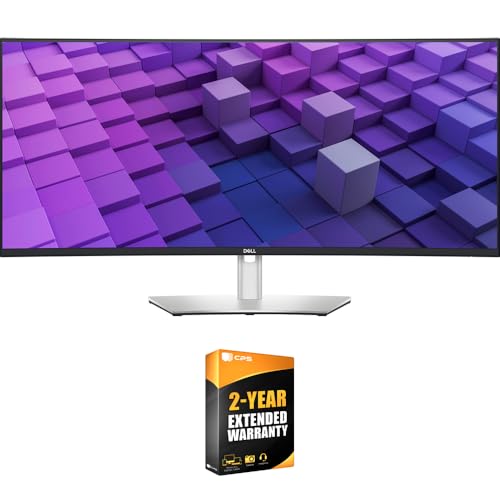
Dell 38-Inch IPS Black Curved Monitor
Best for: professional multitasking and color-critical work
- Screen Size
- 37.5"
- Resolution
- 3840×1600
- Panel Type
- IPS Black
- Aspect Ratio
- 21:9
- Ports
- USB-C, USB-A, HDMI, DisplayPort, RJ45
- Features
- Curved Screen
This 37.5-inch curved monitor features a 21:9 WQHD+ display with a 2000:1 contrast ratio. It offers 100% sRGB and 98% DCI-P3 color coverage. The built-in USB-C hub delivers 90W power delivery. You get dual 9W speakers and 2.5GbE networking. This setup suits professionals who need high color accuracy and multitasking efficiency.
- 2000:1 contrast ratio for deep blacks
- 90W USB-C power delivery
- 100% sRGB and 98% DCI-P3 coverage
- Integrated dual 9W speakers
- Auto KVM for switching two PCs
- Heavy 29.3-pound build
- 2300R curve radius limits immersion compared to steeper curves
- WQHD+ resolution on a 37.5-inch screen offers lower pixel density than 4K
- You need precise color accuracy for creative work
- You want to connect devices with a single USB-C cable
- You manage two computers and need seamless switching
- You prefer a flat screen for gaming
- You require a 4K resolution on this screen size
- You have limited desk space for a large footprint
Verdict: Dell U3824DW 37.5-Inch Curved Monitor provides professional-grade color and connectivity for office workflows. It fits users who prioritize color accuracy and cable management over high refresh rates.
Specifications side by side
| Spec | Dell 38-Inch IPS Black Curved Monitor |
|---|---|
| Screen Size | 37.5" |
| Resolution | 3840×1600 |
| Panel Type | IPS Black |
| Aspect Ratio | 21:9 |
| Ports | USB-C, USB-A, HDMI, DisplayPort, RJ45 |
| Features | Curved Screen |
| Dimensions | 42 × 21 × 9 inches |
| Weight | 29.3 pounds |
| Color | Platinum Silver |
| Model | E99DELU3824DW |
Frequently asked questions
Is the Dell 38-inch monitor good for gaming?
This display is not optimized for high-end gaming. It prioritizes color accuracy and professional workflows over high refresh rates. You get a 3840×1600 resolution for sharp visuals, but the panel is designed for office tasks. Gamers seeking fast response times should look elsewhere.
Does this monitor support USB-C connectivity?
Yes, it includes USB-C connectivity. The port supports up to 90W power delivery. You can connect a laptop with a single cable to receive video, data, and charging. This simplifies your desk setup by reducing the number of cables needed for your primary device.
What is the aspect ratio of this screen?
The screen features a 21:9 aspect ratio. This ultra-wide format provides significantly more vertical space than standard 4K displays. You get sharp text and detailed images without scaling issues. The wider shape allows you to keep multiple windows open side by side for multitasking.
How heavy is the Dell U3824DW?
The monitor weighs 29.3 pounds. It measures 42 inches wide, 21 inches deep, and 9 inches tall. This substantial footprint requires a wide desk. Ensure your workspace can support this weight and size before purchasing. The build is sturdy but takes up significant surface area.
Is the screen curved or flat?
The display is curved. It features a 2300R curvature that wraps around your field of view. This shape helps reduce eye strain during long sessions. The curved design complements the ultra-wide aspect ratio, making it easier to view edges without turning your head.
Who is this monitor best suited for?
It is best for professional multitasking and color-critical work. Users who prioritize color accuracy and cable management will benefit most. It fits office workflows well. If you need high refresh rates for gaming, this model is not the right choice for your needs.
See also