Best BenQ Monitors Under $1000: 2 Spec-Based Picks
As Amazon Associates, we earn from qualifying purchases. This means we may receive a small commission at no extra cost to you if you click through and make a purchase.
As an Amazon Associate we earn from qualifying purchases. Links on this page are affiliate links.
Finding the best BenQ monitors under $1000 requires looking closely at technical details. This guide compares 2 options based strictly on published specifications. Our top pick is the BenQ 24-Inch 360Hz 1440p Monitor for competitive esports gaming. Its 360Hz refresh rate ensures the fastest possible motion clarity for serious players. Each selection prioritizes specific performance metrics like resolution and panel type. We help you decide which display matches your exact needs.
Match refresh rate to your game type

Choose between raw speed and visual fidelity. The top pick offers a 360Hz refresh rate for competitive esports. The second option provides 4K resolution with a 240Hz OLED panel. Select the higher hertz for fast-paced shooters. Pick the 4K OLED if you prioritize color accuracy and sharp imagery over maximum frame rates.
| # | Product | Best for | Price |
|---|---|---|---|
| 1 | BenQ 24-Inch 360Hz 1440p Monitor Best overall | competitive esports gaming | |
| 2 | BenQ 27-Inch 4K 240Hz QD-OLED Gaming Monitor Best 4k uhd | 4K gaming with high color accuracy |
The best fit for you

- You want the fastest refresh rate for esports – BenQ 24-Inch 360Hz 1440p Monitor – It offers 360Hz refresh rate for smooth motion clarity.
- You need high resolution with accurate colors – BenQ 27-Inch 4K 240Hz QD-OLED Gaming Monitor – Its 4K QD-OLED panel delivers sharp visuals and rich color.
- You prefer a compact screen size for desk space – BenQ 24-Inch 360Hz 1440p Monitor – This 24-inch model fits smaller desks better than larger options.

BenQ 24-Inch 360Hz 1440p Monitor
Best for: competitive esports gaming
- Screen Size
- 24.1"
- Resolution
- 1440p
- Refresh Rate
- 360Hz
- Panel Type
- Fast TN
- Use
- Gaming
- Dimensions
- 27 × 20 × 9.5 inches
The BenQ XQ2566X is a 24.1-inch Fast TN gaming monitor with a 1440p QHD resolution and 360Hz refresh rate. It features DyAc 3 technology for enhanced motion clarity and reduced overshoot. The display includes a color filter to improve target separation. This model suits competitive gamers who prioritize speed and sharp visuals over panel type flexibility. It supports G-Sensor and Zowie Sync app integration for tailored settings.
- 360Hz refresh rate for smooth motion
- 1440p QHD resolution for sharp visuals
- DyAc 3 technology reduces motion blur
- Fast TN panel minimizes overshoot
- Color filter enhances enemy visibility
- 24.1-inch screen is smaller than the 27-inch competitor
- 27.9-pound weight is heavier than typical 27-inch monitors
- Fast TN panel offers lower color accuracy than QD-OLED
- You play competitive shooters requiring high refresh rates
- You prefer a smaller 24-inch display for closer viewing
- You value motion clarity over color vibrancy
- You need a 27-inch screen for immersive gaming
- You prioritize color accuracy for content creation
- You want a QD-OLED panel for deeper blacks
Verdict: BenQ XQ2566X 24.1in 360Hz QHD is built for esports players who need the fastest response times and sharpest motion clarity in a compact form factor. It fits those who prioritize competitive performance over larger screen real estate or premium panel technologies.
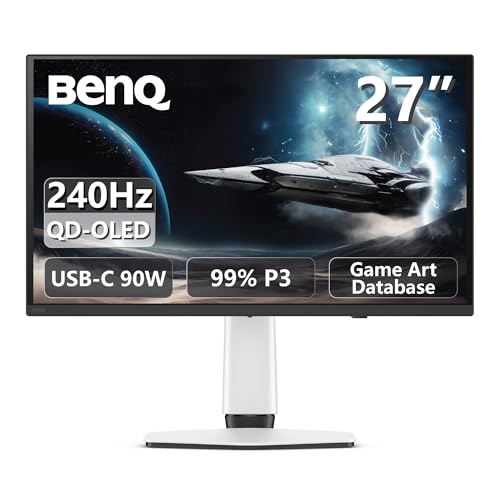
BenQ 27-Inch 4K 240Hz QD-OLED Gaming Monitor
Best for: 4K gaming with high color accuracy
- Screen Size
- 27"
- Resolution
- 4K
- Refresh Rate
- 240Hz
- Panel Type
- QD-OLED
- Response Time
- 0.03ms
- Variable Refresh Rate
- FreeSync Premium Pro
The BenQ EX271UZ is a 27-inch 4K QD-OLED monitor designed for high-end gaming. It features a 240Hz refresh rate and 0.03ms response time for smooth motion. The panel covers 99% of the DCI-P3 color gamut with 10-bit color depth. It includes HDMI 2.1 and USB-C ports with 90W power delivery. This display suits players who want professional-grade color accuracy and high-speed performance in a single package.
- 240Hz refresh rate for fluid gameplay
- 99% DCI-P3 color coverage with 10-bit depth
- HDMI 2.1 and USB-C with 90W charging
- VESA DisplayHDR 400 True Black certification
- 240Hz refresh rate is lower than the 360Hz on the Zowie XQ2566X
- 27-inch screen is smaller than the 32-inch options available in this series
- You want 4K resolution paired with a high refresh rate
- You need USB-C connectivity with 90W power delivery for your laptop
- You prioritize color accuracy with 99% DCI-P3 coverage
- You require a refresh rate higher than 240Hz for competitive play
- You prefer a larger 32-inch or bigger display area
- You are looking for an IPS panel instead of OLED technology
Verdict: BenQ 27-inch 4K QD-OLED Gaming Monitor delivers exceptional color and speed for 4K gamers. It is the best choice for players who value visual fidelity and modern connectivity over maximum refresh rates.
Specifications side by side

| Spec | BenQ 24-Inch 360Hz 1440p Monitor | BenQ 27-Inch 4K 240Hz QD-OLED Gaming Monitor |
|---|---|---|
| Screen Size | 24.1" | 27" |
| Resolution | 1440p | 4K |
| Refresh Rate | 360Hz | 240Hz |
| Panel Type | Fast TN | QD-OLED |
| Response Time | – | 0.03ms |
| Variable Refresh Rate | – | FreeSync Premium Pro |
| Ports | – | HDMI 2.1, USB-C 90W |
| Use | Gaming | Gaming |
| Dimensions | 27 × 20 × 9.5 inches | 24 × 22 × 9.5 inches |
| Weight | 27.9 pounds | – |
| Color | Black | White |
| Model | XQ2566X | EX271UZ |
| Size | – | 27" |
Spec-Based Buying Tips for BenQ Monitors
Match resolution to use
Your primary activity dictates the ideal pixel density. The top pick uses 1440p QHD, balancing sharpness with high frame rates for esports. If you prioritize visual fidelity and color accuracy over raw speed, consider the second option. It features a 4K UHD panel. Higher resolution provides crisper text and detailed imagery. Choose 1440p for competitive performance. Select 4K for media consumption and design work where detail matters most. Check the spec sheet to confirm the resolution matches your needs.
Prioritize refresh rate for speed
Refresh rate measures how many times the screen updates per second. Higher numbers reduce motion blur. The best overall option offers a 360Hz refresh rate. This is ideal for fast-paced shooters where split-second reactions matter. The second monitor provides 240Hz. While still very fast, it is slightly lower. Compare these figures if you play competitive games. A higher hertz value ensures smoother motion. Verify the refresh rate in the specifications to ensure it meets your performance requirements.
Check panel technology type
Panel type affects image quality and response time. The second monitor uses a QD-OLED panel. This technology delivers exceptional color accuracy and deep blacks. It is suitable for gamers who value visual richness. The top pick uses a standard panel optimized for speed. OLED panels often provide superior contrast. However, they may have different longevity characteristics. Review the panel type in the specs. Choose OLED for color-critical tasks. Select other panels if maximum speed is your only goal.
Verify variable refresh rate support
Variable Refresh Rate (VRR) syncs the monitor's refresh rate with your GPU's frame output. This reduces screen tearing and stuttering. The second monitor supports FreeSync. This ensures smoother gameplay when frame rates drop. The top pick focuses on raw speed with a 360Hz fixed rate. Check if VRR is listed in the specs. This feature is valuable for varied gaming scenarios. It improves visual consistency. Ensure your graphics card supports the same VRR standard for full compatibility.
Inspect connectivity ports
Ports determine what devices you can connect. The second monitor includes HDMI and USB-C ports. USB-C allows for video, data, and power delivery through a single cable. This simplifies desk setup. The top pick does not list USB-C in its specs. Check the port list carefully. HDMI is standard for gaming consoles and PCs. USB-C offers convenience for laptops. Verify the available connections match your hardware. This ensures you can connect all your devices without adapters.
Frequently asked questions
Which BenQ monitor is best for competitive esports?
The BenQ XQ2566X is the top choice for competitive gaming. It features a 360Hz refresh rate and 1440p QHD resolution. This combination provides fast response times and sharp motion clarity. The 24.1-inch screen fits well on desks for players who prioritize speed over larger display areas.
What is the best BenQ monitor for 4K gaming?
The BenQ EX271UZ is the best option for 4K gaming. It uses a 27-inch QD-OLED panel with 4K UHD resolution. The 240Hz refresh rate ensures smooth visuals while maintaining high color accuracy. This model suits gamers who value visual fidelity and modern connectivity over maximum frame rates.
How do the refresh rates compare between these picks?
The top pick offers a 360Hz refresh rate for ultra-fast motion. The second option provides a 240Hz refresh rate on its OLED panel. You should choose the higher hertz for fast-paced shooters. Select the lower hertz if you prefer better color reproduction and resolution for your games.
Which monitor has the best color accuracy?
The BenQ EX271UZ delivers exceptional color performance. It uses a QD-OLED panel for rich colors and sharp visuals. This technology is ideal for players who value visual fidelity. The 4K resolution ensures details are crisp, making it a strong choice for those prioritizing image quality over raw speed.
What connectivity ports are available on the 4K model?
The BenQ EX271UZ includes HDMI and USB-C ports. These connections support modern devices and offer versatile connectivity options. The 27-inch size and white color also add to its aesthetic appeal. This setup is suitable for users who want high resolution with reliable input options for their gaming rig.
Is the top pick suitable for small desk spaces?
Yes, the BenQ XQ2566X is designed for compact spaces. It features a 24.1-inch screen size that fits easily on most desks. The 1440p QHD resolution balances sharpness with high frame rates. This makes it a practical choice for players who need competitive performance without requiring a large monitor footprint.
See also