Best Dell IPS Monitors: 15 Spec-Based Picks
As Amazon Associates, we earn from qualifying purchases. This means we may receive a small commission at no extra cost to you if you click through and make a purchase.
As an Amazon Associate we earn from qualifying purchases. Links on this page are affiliate links.
Finding the best dell IPS monitors requires comparing key specifications like resolution, refresh rate, and connectivity. We evaluated 15 options to help you choose based on published data rather than subjective claims. The Dell 27-Inch 4K 120Hz Monitor leads this list because it delivers 4K clarity and 120Hz smoothness without the bulk of a USB-C hub. Each pick is ranked strictly by its technical attributes and intended use case. This guide helps you decide which monitor fits your specific workspace needs.
Match resolution to your desk space

You should pick your screen size based on the resolution you need. The Dell S2725QS offers 4K clarity on a 27-inch panel. If you need more horizontal space, the Dell U3426WER provides an ultrawide QHD display. Check the aspect ratio and physical dimensions to ensure the monitor fits your desk setup comfortably.
| # | Product | Best for | Price |
|---|---|---|---|
| 1 | Dell 27-Inch 4K 120Hz Monitor Best overall | 4K clarity and 120Hz smoothness without USB-C hub | |
| 2 | Dell 27-Inch 4K 120Hz IPS Monitor Best ethernet | professionals needing Ethernet and color accuracy | |
| 3 | Dell UltraSharp 24-Inch 120Hz IPS Monitor Best 1080p fhd | compact 1080p desks needing high refresh rates | |
| 4 | Dell 32-Inch 4K 120Hz Thunderbolt Monitor Best premium | creators needing 4K color accuracy and KVM switching | |
| 5 | Dell 32-Inch 4K Thunderbolt Hub Monitor Best hdr | large 4K workspace with Thunderbolt hub | |
| 6 | Dell 32-Inch 4K 100Hz IPS Monitor Best 100hz | 4K productivity and color-critical work | |
| 7 | Dell P2725H 27" IPS Office Monitor Best budget | standard office work and eye comfort | |
| 8 | Dell U2725QE 27-Inch 4K IPS Black Best 27 inch | Professional color work and Thunderbolt connectivity | |
| 9 | Dell 34-Inch Curved Thunderbolt Hub Monitor Also great | Ultrawide multitasking and color-critical creative work | |
| 10 | Dell 38-Inch IPS Black Curved Monitor Also great | wide multitasking and color-critical work | |
| 11 | Dell P3426WEB 34" Curved UWQHD Webcam Monitor Also great | Remote workers needing an integrated webcam and ultrawide screen | |
| 12 | Dell 34-Inch Curved Thunderbolt 120Hz IPS Monitor Also great | Multitasking and immersive media viewing | |
| 13 | Dell UltraSharp 38-inch WQHD+ Curved Monitor Also great | multitasking and dual-PC workflows | |
| 14 | Dell UltraSharp 49 Curved Ultrawide Best 32:9 | productivity and wide multitasking | |
| 15 | Dell P2426HEV 24-inch 120Hz IPS Monitor Also great | compact office setups with KVM needs |
The best fit for you

- You want 4K clarity and 120Hz smoothness without a hub – Dell 27-Inch 4K 120Hz Monitor – It features a 4K UHD IPS panel with a 120Hz refresh rate and HDMI or DisplayPort inputs.
- You need Ethernet connectivity for professional color work – Dell 27-Inch 4K 120Hz IPS Monitor – This model includes Ethernet ports alongside HDMI, USB-C, and USB-A for wired network access.
- You need a compact 1080p monitor for small desks – Dell UltraSharp 24-Inch 120Hz IPS Monitor – It offers a 1080p FHD resolution with a 120Hz refresh rate in a small footprint.
- You want a large 4K workspace with Thunderbolt hub – Dell 32-Inch 4K Thunderbolt Hub Monitor – It provides a large 4K display with Thunderbolt 4 connectivity and HDR support.
- You need an integrated webcam for remote work – Dell P3426WEB 34" Curved UWQHD Webcam Monitor – This ultrawide curved IPS monitor includes a built-in webcam for video conferencing convenience.

Dell 27-Inch 4K 120Hz Monitor
Best for: 4K clarity and 120Hz smoothness without USB-C hub
- Panel Type
- IPS
- Screen Size
- 27"
- Resolution
- 4K UHD
- Refresh Rate
- 120Hz
- Response Time
- 5ms
- Variable Refresh Rate
- AMD FreeSync Premium
The Dell S2725QS is a 27-inch IPS monitor with 4K UHD resolution and a 120Hz refresh rate. It offers 99% sRGB color coverage and a 1,500:1 contrast ratio for vivid visuals. The stand is height-adjustable, and it includes FreeSync Premium for tear-free motion. This model suits users who want a balance of sharp imagery and smooth performance for work and casual gaming.
- 4K UHD resolution for sharp detail
- 120Hz refresh rate with AMD FreeSync Premium
- 99% sRGB color gamut coverage
- Height-adjustable stand included
- Improved ComfortView Plus reduces blue light to ≤35%
- 1,500:1 contrast ratio is lower than the 4,000:1 typical of VA panels or higher-end IPS Black models
- HDMI and DisplayPort inputs only, lacking USB-C connectivity found in many UltraSharp competitors
- 14.3-pound weight is heavier than smaller 24-inch or non-hub 27-inch alternatives
- You need 4K resolution and 120Hz refresh rate for smooth visuals
- You prefer a height-adjustable stand for ergonomic positioning
- You want a minimalist ash white design with thin bezels
- You require USB-C connectivity for a single-cable dock setup
- You need USB-C power delivery for laptop charging
- You prioritize the highest possible contrast ratio for dark room viewing
Verdict: Dell S2725QS 27-inch 4K IPS Monitor fits users who want 4K clarity and 120Hz smoothness without the bulk of a Thunderbolt hub. It is a practical choice for those who value ergonomic adjustability and color accuracy over high-end connectivity.

Dell 27-Inch 4K 120Hz IPS Monitor
Best for: professionals needing Ethernet and color accuracy
- Panel Type
- IPS
- Screen Size
- 27-Inch
- Resolution
- 3840 x 2160
- Refresh Rate
- 120Hz
- Response Time
- 5ms
- Ports
- HDMI 2.1, USB-C, USB-A, Ethernet
The Dell U2725QE is a 27-inch 4K UHD monitor with a 120Hz refresh rate and IPS Black panel. It covers 99% DCI-P3 color and includes an Ethernet port. Thunderbolt 4 delivers up to 140W of power. It suits professionals needing accurate color and wired connectivity. The ergonomic stand adjusts height, tilt, swivel, and pivot for your comfort.
- 4K UHD resolution with 99% DCI-P3 color coverage
- 120Hz refresh rate and 5ms response time
- Thunderbolt 4 with up to 140W power delivery
- Built-in Ethernet port for wired networking
- Factory calibrated to Delta E less than 1.5
- 27-inch size is smaller than many other options on this list
- 21.4-pound weight is heavier than most 24-inch or 27-inch monitors
- 120Hz refresh rate is lower than some 144Hz or 280Hz alternatives
- You need a wired Ethernet connection for stable networking
- You require high color accuracy for professional design work
- You want Thunderbolt 4 daisy-chaining for multiple displays
- You prefer a larger 32-inch or ultrawide screen
- You need a higher refresh rate for competitive gaming
- You want a lighter monitor for easy desk movement
Verdict: Dell U2725QE 27-inch 4K IPS Black fits professionals who need precise color and wired Ethernet. It suits users who value Thunderbolt 4 connectivity and ergonomic adjustability over larger screen real estate.

Dell UltraSharp 24-Inch 120Hz IPS Monitor
Best for: compact 1080p desks needing high refresh rates
- Panel Type
- IPS
- Screen Size
- 24"
- Resolution
- 1920×1080
- Refresh Rate
- 120Hz
- Response Time
- 5ms
- Ports
- 2X USB-C, 2X DisplayPort, HDMI, 3X USB
The Dell U2424H is a 24-inch IPS monitor with a 1080p FHD resolution and a 120Hz refresh rate. It features a 5ms response time and covers 98% of the DCI-P3 color gamut. The stand allows tilt, swivel, pivot, and height adjustments. An ambient light sensor optimizes brightness and color temperature. You get two USB-C ports, two DisplayPort inputs, and HDMI connectivity.
- 120Hz refresh rate on a 24-inch IPS panel
- 98% DCI-P3 color gamut coverage
- Height-adjustable stand with pivot capability
- Built-in ambient light sensor for brightness optimization
- Two USB-C ports for easy device connection
- 1080p resolution is lower than the 4K UHD panels on this list
- 24-inch screen size is smaller than the 27-inch and larger options available
- Maximum USB-C power delivery is limited to 15W
- You need a compact monitor that fits on a small desk
- You want a high refresh rate for smooth scrolling on a standard budget
- You require accurate color reproduction for photo or video work
- You need 4K UHD resolution for detailed text or graphics
- You want a screen larger than 24 inches for immersive viewing
- You need to power a laptop through a single cable with high wattage
Verdict: The Dell U2424H 24-inch 1080p Monitor suits users who prioritize color accuracy and a 120Hz refresh rate in a compact footprint. It is ideal for those who need a versatile stand and precise ambient light adjustment.

Dell 32-Inch 4K 120Hz Thunderbolt Monitor
Best for: creators needing 4K color accuracy and KVM switching
- Panel Type
- IPS
- Resolution
- 3840 x 2160
- Refresh Rate
- 120 Hz
- Ports
- DisplayPort, USB, Thunderbolt
- Use
- Mac
- Operating System
- macOS
The Dell U3226QER is a 31.5-inch 4K UHD IPS Black monitor with a 120Hz refresh rate. It features a Thunderbolt 4 hub and KVM switching for multi-device setups. The panel offers 99% Display P3 coverage and a 3,000:1 contrast ratio. It is designed for creators and developers who need precise color and high resolution. The silver finish adds a premium look to your workspace.
- 31.5-inch 4K UHD (3840×2160) IPS Black panel
- 120Hz refresh rate for smooth motion
- Thunderbolt 4 hub with KVM switching
- 99% Display P3 color coverage and factory calibration
- 3,000:1 contrast ratio with 47% deeper blacks
- Heavier build at 20.6 pounds compared to lighter 27-inch options
- Smaller 31.5-inch screen compared to the 37.5-inch and 49-inch ultrawide models on the list
- 100% sRGB coverage is lower than the 100% sRGB or wider gamut claims of some competitors
- You need a high-resolution 4K display for detailed creative work
- You want to connect multiple computers using a single keyboard and mouse
- You use macOS devices and benefit from Thunderbolt connectivity
- You prefer a larger 34-inch or 49-inch ultrawide screen for multitasking
- You need a budget-friendly option without a Thunderbolt hub
- You require a monitor with a higher refresh rate than 120Hz for competitive gaming
Verdict: The Dell U3226QER 32-inch 4K Thunderbolt Hub is ideal for professionals who prioritize color accuracy and multi-device management. It suits users who value a premium build and deep blacks in a 4K workspace.

Dell 32-Inch 4K Thunderbolt Hub Monitor
Best for: large 4K workspace with Thunderbolt hub
- Panel Type
- IPS
- Screen Size
- 31.5"
- Resolution
- 3840 x 2160
- Refresh Rate
- 120Hz
- Aspect Ratio
- 16:9
- Ports
- Thunderbolt
The Dell U3225QE is a 32-inch 4K UHD IPS monitor designed for high-resolution work. It features a 120Hz refresh rate and Thunderbolt 4 connectivity. The integrated hub streamlines your desk setup. HDR support enhances visual detail. Its large 16:9 screen offers ample space for multitasking. This monitor suits professionals who need sharp text and efficient connectivity in a single device.
- 32-inch 4K UHD (3840 x 2160) resolution
- 120Hz refresh rate for smooth motion
- Thunderbolt 4 hub for seamless connectivity
- IPS panel with HDR support
- Heavier at 20.6 pounds compared to lighter 27-inch options
- Larger 36.5-inch width requires more desk space
- Standard 16:9 aspect ratio limits horizontal workflow
- You need a large 32-inch screen for detailed work
- You want Thunderbolt 4 connectivity for a streamlined setup
- You prefer 4K resolution with 120Hz refresh rates
- You require a smaller 27-inch footprint
- You need a curved display for immersion
- You prefer a lighter monitor under 15 pounds
Verdict: Dell 32-inch 4K 120Hz IPS Monitor fits professionals who value a large, sharp display and efficient Thunderbolt connectivity. It is ideal for users who prioritize screen real estate and modern hub features over compact size.

Dell 32-Inch 4K 100Hz IPS Monitor
Best for: 4K productivity and color-critical work
- Panel Type
- IPS
- Screen Size
- 31.5-Inch
- Resolution
- 3840 x 2160
- Refresh Rate
- 100Hz
- Response Time
- 5ms
- Aspect Ratio
- 16:9
The Dell P3225QE is a 31.5-inch 4K IPS monitor designed for sharp visuals and smooth motion. It features a 100Hz refresh rate and 5ms response time. The screen covers 99% of the sRGB color gamut for accurate colors. You get USB-C with 90W power delivery, HDMI 2.1, and DisplayPort 1.4. The stand adjusts for height, tilt, swivel, and pivot. This model suits users who want a large, high-resolution display with solid connectivity.
- 31.5-inch 4K Ultra HD resolution
- 100Hz refresh rate with 5ms response time
- 99% sRGB color gamut coverage
- USB-C with 90W power delivery
- Fully adjustable stand with pivot
- 100Hz refresh rate is lower than the 120Hz found on other list models
- 21.1 pounds weight is heavier than the 24-inch and 27-inch competitors
- 31.5-inch size is smaller than the 34-inch, 37.5-inch, and 49-inch ultrawide options
- You need a large 4K screen for detailed work
- You want USB-C connectivity with high power delivery
- You prefer a standard 16:9 aspect ratio
- You require a refresh rate above 100Hz for gaming
- You are looking for an ultrawide or curved display
- You need a monitor under 27 inches
Verdict: Dell P3225QE 31.5-Inch 100Hz IPS Monitor delivers sharp 4K visuals and a versatile stand for office tasks. It fits professionals who prioritize color accuracy and a single-cable USB-C connection over high refresh rates.

Dell P2725H 27" IPS Office Monitor
Best for: standard office work and eye comfort
- Panel Type
- IPS
- Screen Size
- 27"
- Use
- Business & Office, Office
- Dimensions
- 7.5 × 24 × 21 inches
- Weight
- 4.41 pounds
The Dell P2725H is a 27-inch IPS monitor designed for business and office use. It features Eye Comfort Technology with anti-glare and low blue light filters to reduce strain during long work sessions. This model includes a security lock for workplace safety. It is a practical option for users who need a reliable display for standard office tasks without requiring high refresh rates or advanced connectivity.
- 27-inch IPS panel for wide viewing angles
- Eye Comfort Technology with anti-glare coating
- Low Blue Light feature for reduced eye strain
- Includes security lock for office environments
- Lower 120Hz refresh rate compared to 4K models on this list
- Standard FHD resolution instead of 4K UHD
- Heavier build at 4.41 pounds
- You need a reliable monitor for standard office tasks
- You prioritize eye comfort during long work hours
- You require a security lock for workplace safety
- You need 4K UHD resolution for detailed work
- You want a high refresh rate for gaming
- You prefer a lighter, more portable display
Verdict: Dell P2725H 27-inch IPS Monitor suits office workers who value eye comfort and security features over high resolution or speed. It is a solid choice for standard business environments.

Dell U2725QE 27-Inch 4K IPS Black
Best for: Professional color work and Thunderbolt connectivity
- Panel Type
- IPS
- Screen Size
- 27"
- Resolution
- 3840 x 2160
- Refresh Rate
- 120Hz
- Response Time
- 5ms
- Ports
- Thunderbolt 4, HDMI 2.1, USB-C, USB-A
The Dell U2725QE is a 27-inch 4K UHD IPS Black monitor with a 120Hz refresh rate. It offers 99% DCI-P3 color coverage and factory calibration for professional accuracy. Thunderbolt 4 connectivity delivers up to 140W of power over a single cable. An ambient light sensor and ComfortView Plus help reduce eye strain during long work sessions.
- 4K UHD resolution with 99% DCI-P3 color coverage
- 120Hz refresh rate and 5ms response time
- Thunderbolt 4 port with up to 140W power delivery
- Factory calibrated to Delta E less than 1.5
- Heavier build at 15.6 pounds compared to lighter alternatives
- 27-inch size is smaller than the 32-inch and 34-inch options available
- You need Thunderbolt 4 connectivity with daisy-chaining support
- You require high color accuracy for professional creative work
- You prefer a compact 27-inch display for your desk
- You need a larger screen size than 27 inches
- You do not require Thunderbolt 4 connectivity
- You are looking for a curved display option
Verdict: Dell U2725QE 27-Inch 4K IPS Black suits professionals who need precise color reproduction and a single-cable Thunderbolt 4 connection for a tidy workspace.

Dell 34-Inch Curved Thunderbolt Hub Monitor
Best for: Ultrawide multitasking and color-critical creative work
- Panel Type
- IPS
- Resolution
- 3440 x 1440
- Refresh Rate
- 120Hz
- Ports
- Thunderbolt
- Features
- Curved Screen
- Dimensions
- 9.47 × 32 × 15.5 inches
The Dell U3426WER is a 34-inch ultrawide curved IPS Black monitor with a 120Hz refresh rate and Thunderbolt 4 connectivity. It offers Ultrawide QHD resolution and 98% Display P3 color coverage for accurate visuals. This model suits developers and creators who need a large, continuous canvas. The Thunderbolt hub simplifies connections for Mac and Windows users. Its curved screen and refined finish enhance the workspace aesthetic.
- IPS Black panel with 2000:1 contrast ratio
- 120Hz refresh rate for smooth motion
- Thunderbolt 4 port with built-in KVM
- 98% Display P3 color gamut coverage
- Curved screen may not suit all desk setups
- Heavier build at 22.9 pounds
- Ultrawide QHD resolution is lower than 4K options
- You need a large ultrawide canvas for multitasking
- You use Thunderbolt devices for simple connectivity
- You want high color accuracy for creative work
- You prefer a flat screen for precise alignment
- You need 4K UHD resolution for detailed work
- You want a lighter monitor for easy moving
Verdict: Dell U3426WER 34-Inch Curved Thunderbolt Monitor is ideal for developers and creators who value color accuracy and a large ultrawide workspace. Its Thunderbolt hub and curved IPS Black panel make it a strong choice for multi-device setups.
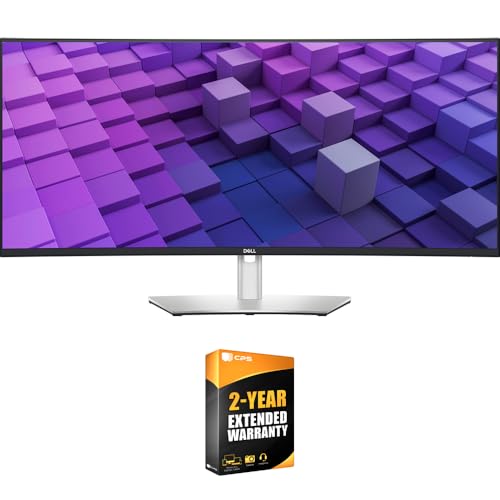
Dell 38-Inch IPS Black Curved Monitor
Best for: wide multitasking and color-critical work
- Panel Type
- IPS
- Screen Size
- 37.5"
- Resolution
- 3840×1600
- Aspect Ratio
- 21:9
- Ports
- USB-C, USB-A, HDMI, DisplayPort, RJ45
- Features
- Curved Screen
The Dell U3824DW is a 38-inch curved IPS Black monitor with a 21:9 aspect ratio and WQHD+ resolution. It offers a 2000:1 contrast ratio and covers 98% of DCI-P3 color space. A USB-C hub provides 90W power delivery and 2.5GbE networking. The stand adjusts for tilt, swivel, and height. This large display suits users who need wide multitasking space and high color accuracy.
- 3840×1600 WQHD+ resolution on a 38-inch curved screen
- 2000:1 contrast ratio for deep blacks
- 98% DCI-P3 and 100% sRGB color coverage
- USB-C hub with 90W power delivery
- Built-in 2.5GbE Ethernet port
- 2300R curve is less aggressive than some competitors
- 29.3 pounds weight makes it heavy to move
- WQHD+ resolution is lower than 4K options on this list
- You need a wide 21:9 screen for multitasking
- You want USB-C connectivity with 90W charging
- You prioritize color accuracy for creative work
- You prefer a flat screen over a curved one
- You need 4K UHD resolution for sharp text
- You have limited desk space for a 38-inch display
Verdict: The Dell U3824DW 38-inch Curved IPS Monitor fits professionals who need a wide workspace and reliable color performance. It is ideal for users who value USB-C convenience and a large immersive display.

Dell P3426WEB 34" Curved UWQHD Webcam Monitor
Best for: Remote workers needing an integrated webcam and ultrawide screen
- Panel Type
- IPS
- Screen Size
- 34.1-inch
- Resolution
- 3440 x 1440
- Response Time
- 5ms
- Ports
- HDMI, DisplayPort, USB-C
- Features
- Curved Screen, Webcam
The Dell P3426WEB is a 34.1-inch curved IPS monitor with Ultrawide QHD resolution. It offers a 5ms response time and includes an integrated webcam. You get HDMI, DisplayPort, and USB-C ports for versatile connectivity. This display provides expanded screen space for multitasking. It suits professionals who need a clean workspace and sharp details for business applications.
- 34.1-inch curved IPS display with Ultrawide QHD resolution
- Integrated webcam for video conferencing
- 5ms response time for smooth visuals
- USB-C, HDMI, and DisplayPort connectivity
- 100Hz refresh rate is lower than the 120Hz found on several other Dell IPS models in this list
- 22-pound weight is heavier than the standard 27-inch and 24-inch options on the list
- Ultrawide QHD resolution is lower in total pixels than the 4K UHD panels available in this guide
- You need a single large screen to replace dual monitors for office work
- You frequently attend video calls and want a built-in camera
- You prefer a curved display for immersive productivity
- You require 4K UHD resolution for detailed graphic design
- You need a high refresh rate above 100Hz for gaming
- You prefer a standard 16:9 aspect ratio monitor
Verdict: Dell P3426WEB 34-inch Curved UWQHD Monitor fits remote workers who want an integrated webcam and a wide screen for multitasking without buying separate peripherals.

Dell 34-Inch Curved Thunderbolt 120Hz IPS Monitor
Best for: Multitasking and immersive media viewing
- Panel Type
- IPS
- Screen Size
- 34.1"
- Resolution
- 3440 x 1440
- Refresh Rate
- 120Hz
- Response Time
- up to 5ms
- Aspect Ratio
- 21:9
This 34-inch curved IPS monitor offers a 21:9 aspect ratio and UWQHD resolution for expanded workspace. It supports a 120Hz refresh rate with a 5ms response time, making it suitable for smooth visuals. The high contrast ratio of 2000:1 enhances image depth. You will appreciate the versatile connectivity options including Thunderbolt 4. It is a solid choice for users needing a wide, immersive display.
- 34-inch curved IPS panel with 21:9 aspect ratio
- UWQHD 3440 x 1440 resolution at 120Hz
- High contrast ratio of 2000:1
- Thunderbolt 4 connectivity
- Heavier build at 33.5 pounds
- 5ms response time is slower than 1ms options
- Curved design limits wall-mounting flexibility
- You need a wide screen for multitasking
- You want a curved display for immersion
- You require Thunderbolt 4 connectivity
- You prefer a flat screen
- You need a 4K UHD resolution
- You want a lightweight portable monitor
Verdict: Dell U3425WE 34" Curved UWQHD Monitor fits professionals who need a wide, immersive display with Thunderbolt 4 connectivity. It is ideal for multitasking and media consumption.

Dell UltraSharp 38-inch WQHD+ Curved Monitor
Best for: multitasking and dual-PC workflows
- Panel Type
- IPS
- Screen Size
- 37.5"
- Resolution
- 3840 x 1600
- Refresh Rate
- 60Hz
- Response Time
- 5ms
- Aspect Ratio
- 21:9
This Dell UltraSharp monitor features a 38-inch curved IPS panel with a 21:9 aspect ratio and WQHD+ resolution. It offers a 60Hz refresh rate and 5ms response time for steady performance. The built-in KVM switch lets you control two PCs with one keyboard and mouse. Its curved design reduces eye fatigue. This display suits users who need a wide workspace for multitasking and productivity tasks.
- 38-inch WQHD+ (3840×1600) curved IPS screen
- Built-in Auto KVM for dual PC control
- 21:9 aspect ratio for wide multitasking
- Includes wireless keyboard and mouse
- 60Hz refresh rate is lower than many competitors
- 300-nit brightness is modest for HDR content
- Curved design limits wall-mount flexibility
- You need a wide screen for multitasking
- You manage two computers frequently
- You prefer a curved display for immersion
- You require high refresh rates for gaming
- You need a flat panel for mounting
- You want a smaller 27-inch footprint
Verdict: Dell UltraSharp 38-inch WQHD+ Curved Monitor delivers a spacious 21:9 workspace with convenient dual-PC switching. It is ideal for professionals who value screen real estate and ergonomic flexibility over high-speed motion.

Dell UltraSharp 49 Curved Ultrawide
Best for: productivity and wide multitasking
- Panel Type
- IPS
- Screen Size
- 49"
- Resolution
- 5120 x 1440
- Refresh Rate
- 60Hz
- Response Time
- 5ms
- Aspect Ratio
- 32:9
This Dell UltraSharp monitor features a 49-inch curved IPS panel with a 32:9 aspect ratio. It delivers a 5120×1440 resolution at 60Hz. The display covers 100% of the sRGB color space. It includes a built-in USB hub with Ethernet. The stand allows height, tilt, and swivel adjustments. This screen suits users who need a wide workspace.
- 49-inch curved IPS panel with 32:9 aspect ratio
- 5120×1440 DQHD resolution for expansive viewing
- 100% sRGB color coverage for accurate visuals
- Built-in USB-C hub with 2.5G Ethernet port
- Adjustable stand with height, tilt, and swivel
- 60Hz refresh rate limits smooth motion for fast games
- 49-inch size requires significant desk depth and width
- 350 nits brightness is lower than many 4K peers
- You need a single screen to replace dual monitors
- You work with wide spreadsheets or video timelines
- You want accurate colors for photo or design work
- You play fast-paced competitive shooters
- You have a small desk with limited depth
- You require high refresh rates for gaming
Verdict: Dell UltraSharp 49 Curved Ultrawide is a wide-format workstation screen for professionals who need extra horizontal space. It fits users who prioritize color accuracy and connectivity over high refresh rates. The large panel replaces two monitors but demands a deep desk.

Dell P2426HEV 24-inch 120Hz IPS Monitor
Best for: compact office setups with KVM needs
- Panel Type
- IPS
- Screen Size
- 24"
- Resolution
- 1920 x 1080
- Refresh Rate
- 120 Hz
- Ports
- USB-C
- Features
- Webcam
The Dell P2426HEV is a 24-inch IPS monitor with a 1920×1080 resolution and 120Hz refresh rate. It includes a built-in webcam, USB-C hub, and integrated KVM switcher. This compact display suits users needing a clear image and efficient connectivity for a single workstation setup.
- 120Hz refresh rate at 1080p resolution
- Built-in webcam for video calls
- Integrated KVM switcher for multi-device control
- USB-C hub connectivity
- 1080p resolution is lower than the 4K and UWQHD panels on this list
- 24-inch screen size is smaller than the 27-inch and larger options available
- You need a compact 24-inch display for a tight desk space
- You require a built-in webcam and KVM switcher for office tasks
- You prefer a 120Hz refresh rate for smoother motion in 1080p
- You need 4K resolution for detailed work
- You want a larger 27-inch or 32-inch screen
- You are looking for a curved display
Verdict: Dell P2426HEV 24-inch 120Hz IPS Monitor is a practical pick for users who value integrated peripherals like a webcam and KVM switcher in a compact 24-inch form factor.
Specifications side by side

| Spec | Dell 27-Inch 4K 120Hz Monitor | Dell 27-Inch 4K 120Hz IPS Monitor | Dell UltraSharp 24-Inch 120Hz IPS Monitor | Dell 32-Inch 4K 120Hz Thunderbolt Monitor | Dell 32-Inch 4K Thunderbolt Hub Monitor | Dell 32-Inch 4K 100Hz IPS Monitor | Dell P2725H 27" IPS Office Monitor | Dell U2725QE 27-Inch 4K IPS Black | Dell 34-Inch Curved Thunderbolt Hub Monitor | Dell 38-Inch IPS Black Curved Monitor | Dell P3426WEB 34" Curved UWQHD Webcam Monitor | Dell 34-Inch Curved Thunderbolt 120Hz IPS Monitor | Dell UltraSharp 38-inch WQHD+ Curved Monitor | Dell UltraSharp 49 Curved Ultrawide | Dell P2426HEV 24-inch 120Hz IPS Monitor |
|---|---|---|---|---|---|---|---|---|---|---|---|---|---|---|---|
| Screen Size | 27" | 27-Inch | 24" | – | 31.5" | 31.5-Inch | 27" | 27" | – | 37.5" | 34.1-inch | 34.1" | 37.5" | 49" | 24" |
| Resolution | 4K UHD | 3840 x 2160 | 1920×1080 | 3840 x 2160 | 3840 x 2160 | 3840 x 2160 | – | 3840 x 2160 | 3440 x 1440 | 3840×1600 | 3440 x 1440 | 3440 x 1440 | 3840 x 1600 | 5120 x 1440 | 1920 x 1080 |
| Refresh Rate | 120Hz | 120Hz | 120Hz | 120 Hz | 120Hz | 100Hz | – | 120Hz | 120Hz | – | – | 120Hz | 60Hz | 60Hz | 120 Hz |
| Panel Type | IPS | IPS Black | IPS | IPS Black | IPS | IPS | IPS | IPS Black | IPS Black | IPS Black | IPS | IPS | IPS Black | IPS | IPS |
| Response Time | 5ms | 5ms | 5ms | – | – | 5ms | – | 5ms | – | – | 5ms | up to 5ms | 5ms | 5ms | – |
| Aspect Ratio | – | – | – | – | 16:9 | 16:9 | – | – | – | 21:9 | – | 21:9 | 21:9 | 32:9 | – |
| Variable Refresh Rate | AMD FreeSync Premium | – | – | – | – | – | – | – | – | – | – | – | – | – | – |
| Ports | HDMI, DisplayPort, USB-C | HDMI 2.1, USB-C, USB-A, Ethernet | 2X USB-C, 2X DisplayPort, HDMI, 3X USB | DisplayPort, USB, Thunderbolt | Thunderbolt | HDMI 2.1, DisplayPort 1.4, USB-C | – | Thunderbolt 4, HDMI 2.1, USB-C, USB-A | Thunderbolt | USB-C, USB-A, HDMI, DisplayPort, RJ45 | HDMI, DisplayPort, USB-C | HDMI, DisplayPort, Thunderbolt 4, USB-C | DP 1.4, HDMI 2.1, USB-C, USB-A, RJ45 | USB-C, USB-A, 2.5G Ethernet | USB-C |
| Features | Height-Adjustable Stand | – | – | – | HDR | – | – | – | Curved Screen | Curved Screen | Curved Screen, Webcam | Curved Screen | Built-in Speakers, Curved Screen | Built-in Speakers, Curved Screen | Webcam |
| Use | – | – | – | Mac | – | – | Business & Office, Office | – | – | – | – | – | – | – | – |
| Size | S2725QS | 27.0 inches | – | U3226QER | – | – | – | 27 Inch | U3426WER | – | – | – | – | – | 24 |
| Operating System | – | – | – | macOS | – | – | – | – | – | – | – | – | – | – | – |
| Dimensions | 7.89 × 24.1 × 15.3 inches | 2.19 × 24.1 × 13.9 inches | 7.16 × 21.2 × 14.3 inches | 8.46 × 28.1 × 18.5 inches | 36.5 × 20 × 9.75 inches | 8.46 × 28.1 × 24.4 inches | 7.5 × 24 × 21 inches | 7.44 × 24.1 × 21.1 inches | 9.47 × 32 × 15.5 inches | 42 × 21 × 9 inches | 32.1 × 9.02 × 22.6 inches | 37.5 × 18 × 9 inches | 35.2 × 17.4 × 22.2 inches | 47.8 × 10.6 × 20.5 inches | – |
| Weight | 14.3 pounds | 21.4 pounds | 7.78 pounds | 20.6 pounds | 20.6 pounds | 21.1 pounds | 4.41 pounds | 15.6 pounds | 22.9 pounds | 29.3 pounds | 22 pounds | 33.9 pounds | – | – | 8.58 pounds |
| Color | Ash White | UHD-120Hz | Silver | Silver | Black, Silver | Black | Black | UHD-120Hz | Silver | Platinum Silver | black | Silver | Silver | Black | Preto |
| Model | S2725QS | U2725QE | U2424H | U3226QER | U3225QE | DELL-P3225QE | P2722H | E990DELU2725QE | U3426WER | E99DELU3824DW | DELL-P3426WEB | U3425WE UltraSharp | U3824DW | U4924DW | P2426HEV |
If you require extra horizontal screen space, compare panel dimensions among the best dell IPS ultrawide monitors.
Choose Dell Monitors by Key Specs

Match Resolution to Desk Space
Select your resolution based on how close you sit to the screen. The Dell S2725QS delivers 4K clarity on a compact 27-inch panel, making it ideal for tight workspaces. If you need more horizontal room, the Dell U3426WER offers an ultrawide QHD display. Higher pixel density sharpens text for coding or writing. Ensure your desk depth supports the chosen size for comfortable viewing angles.
Check Refresh Rate Needs
Refresh rate determines motion smoothness. Most office monitors run at 60Hz, but several Dell models offer 120Hz for fluid scrolling and faster cursor movement. The Dell S2725QS and U2725QE both provide 120Hz alongside 4K resolution. If you primarily read documents, 60Hz is sufficient. However, for video editing or light gaming, the higher refresh rate reduces motion blur and improves overall responsiveness during fast-paced tasks.
Verify Connectivity Ports
Port availability dictates how you connect devices. The Dell U2725QE includes Ethernet, HDMI, USB-C, and USB-A ports, supporting direct wired networking and hub functions. The Dell S2725QS relies on HDMI and DisplayPort, requiring a separate hub for USB devices. Check if your setup needs Thunderbolt 4 for single-cable power and data transfer. The Dell U3226QER and U3225QE feature Thunderbolt 4 for efficient Mac or PC integration.
Consider Aspect Ratio for Multitasking
Aspect ratio affects how many windows fit side-by-side. Standard 16:9 monitors like the Dell P3225QE suit general productivity. Ultrawide 21:9 models, such as the Dell U3426WER, provide extra horizontal space for spreadsheets or code. The massive Dell U4924DW uses a 32:9 ratio to replace dual monitors entirely. Choose a ratio that matches your workflow, ensuring your desk width accommodates the wider form factor.
Evaluate Integrated Features
Built-in features reduce clutter. The Dell P3426WEB includes an integrated webcam, ideal for remote workers who want a clean desk setup. The Dell P2426HEV adds a KVM switcher, allowing control of multiple computers with one keyboard and mouse. Some models feature built-in speakers, while others prioritize color accuracy over audio. Identify which peripherals you need integrated versus external to simplify your workspace configuration effectively.
Frequently asked questions
Which Dell IPS monitor has the highest refresh rate?
Several models in this list support 120Hz refresh rates. The Dell S2725QS and U2725QE both offer 120Hz smoothness for general use. The U3426WER also runs at 120Hz for ultrawide multitasking. If you prefer a slower pace, the U3824DW operates at 60Hz. Check the attributes for each model to confirm the speed.
Does Dell offer an IPS monitor with a built-in webcam?
Yes, the Dell P3426WEB includes an integrated webcam. This 34-inch curved model is designed for remote workers who need video conferencing without extra peripherals. It also features HDMI, DisplayPort, and USB-C ports. Another compact option, the P2426HEV, also includes a built-in webcam for office setups.
Which Dell monitor is best for color-critical professional work?
The Dell U2725QE is ideal for professionals needing precise color accuracy. It features an IPS Black panel and Thunderbolt 4 connectivity. The U3226QER is another strong choice for creators, offering color accuracy and KVM switching. Both models prioritize visual fidelity and multi-device management for professional workflows.
What is the largest Dell IPS monitor available in this list?
The Dell UltraSharp 49 Curved Ultrawide is the largest option. It features a 32:9 aspect ratio that replaces two monitors. This model measures 47.8 inches in length and includes built-in speakers. It is designed for wide multitasking and productivity, though it requires a deep desk to accommodate its size.
Which Dell monitor includes an Ethernet port?
The Dell U2725QE includes an Ethernet port for wired connectivity. This model is designed for professionals who need stable network connections alongside USB-C and HDMI inputs. It supports Thunderbolt 4 and offers 4K clarity at 120Hz. This makes it a practical choice for office environments requiring robust networking.
Does Dell make a curved IPS monitor?
Yes, Dell offers several curved IPS monitors. The U3426WER features a curved screen with Thunderbolt 4 connectivity. The U3824DW is a 38-inch curved model with a 21:9 aspect ratio. The U4924DW is a massive 49-inch curved ultrawide. These models provide immersive displays for multitasking and media consumption.
Which Dell monitor is best for small desks?
The Dell U2424H is a compact 24-inch 1080p monitor. It measures 21.2 inches in width and weighs just 7.78 pounds. It offers 120Hz refresh rates and USB-C connectivity in a small footprint. The P2725H is another smaller option at 27 inches, suitable for standard office work and eye comfort.
Which Dell monitor supports Thunderbolt 4?
Several models support Thunderbolt 4 connectivity. The U2725QE and U3226QER both include Thunderbolt 4 ports for single-cable connections. The U3426WER and U3225QE also feature Thunderbolt 4 hubs. These monitors allow you to connect devices efficiently while delivering power and data over one cable.
See also