15 Best Docking Stations with DisplayPort, Compared
As Amazon Associates, we earn from qualifying purchases. This means we may receive a small commission at no extra cost to you if you click through and make a purchase.
As an Amazon Associate we earn from qualifying purchases. Links on this page are affiliate links.
Finding the best docking stations with DisplayPort requires matching port counts to your workflow. We compared 15 models based strictly on their published specifications. The Plugable 13-in-1 Triple 4K USB-C Dock leads because it supports three 4K displays and 100W charging in one unit. This guide helps you decide which dock fits your screen count and power needs without guesswork.
Check your host port type first

Your laptop or desktop must have the matching host interface to support the dock's display outputs. Thunderbolt 4 and Thunderbolt 5 docks like the iVANKY FusionDock Ultra require specific ports on your computer. Standard USB-C docks work with more devices but may limit resolution or charging speed. Verify your computer's ports before buying.
| # | Product | Best for | Price |
|---|---|---|---|
| 1 | Plugable 13-in-1 Triple 4K USB-C Dock Best overall | three 4K monitors and 100W charging | |
| 2 | Plugable 16-in-1 Thunderbolt 4 Dock Also great | Mac users needing dual 4K displays and 100W charging | |
| 3 | ANYHDD ThinkPad Dual 4K USB-C Dock Best budget | simple dual monitor setups with included cables | |
| 4 | TechTray SD25TB4 Quad Display Dock Also great | complete multi-monitor workstation setups with included cables | |
| 5 | Koncept Thunderbolt 4 Modular Dock 130W Also great | Dual 4K monitor setups with Thunderbolt 4 laptops | |
| 6 | Plugable 12-in-1 Triple 4K USB-C Dock Also great | Three 4K monitors with 100W charging | |
| 7 | iVANKY 26-in-1 FusionDock Ultra Best premium | Mac users needing quad 6K or dual 8K displays | |
| 8 | Koncept ThinkPad USB-C Dual Monitor Dock Also great | Dual 4K monitor setups with included cables | |
| 9 | HP USB-C 100W G6 Dock Also great | Business users needing 2.5G Ethernet and triple 4K displays | |
| 10 | ANYHDD WD22TB4 Thunderbolt 4 Dock Also great | users needing 180W power and dual 4K displays | |
| 11 | Lenovo ThinkPad Hybrid Dual 4K Dock Also great | Dual 4K monitor setups with Windows laptops | |
| 12 | Belkin 15-in-1 Triple DisplayLink Dock Best built-in speakers | Triple 4K setups with built-in audio | |
| 13 | ANYHDD USB-C G6 100W Dock Also great | Dual monitor setups with 100W charging | |
| 14 | WAVLINK Quad 4K@60Hz DisplayLink Dock Best 60hz | users needing four 4K monitors | |
| 15 | FKA HP USB-C G5 Dual Monitor Dock Also great | Dual monitor setups with HDMI and DP |
The best fit for you

- You need three 4K displays and fast charging – Plugable 13-in-1 Triple 4K USB-C Dock – It supports three 4K outputs and includes 100W power delivery for your laptop.
- You want the most compact model on the list – FKA HP USB-C G5 Dual Monitor Dock – Its small footprint measures just 4.8 inches by 4.8 inches by 1.8 inches.
- You require quad 6K or dual 8K resolution – iVANKY 26-in-1 FusionDock Ultra – It features Thunderbolt 5 connectivity to drive up to four 6K displays.
- You need four 4K monitors at 60Hz – WAVLINK Quad 4K@60Hz DisplayLink Dock – It supports quad display output with a 60Hz refresh rate for smooth visuals.

Plugable 13-in-1 Triple 4K USB-C Dock
Best for: three 4K monitors and 100W charging
- Ports
- HDMI, DisplayPort, USB-C, Thunderbolt 4
- Display Support
- Triple
- Max Resolution
- 4K@60Hz
- Host Interface
- USB-C
- Power Delivery
- 100W
- Data Transfer Speed
- 10Gbps
The Plugable UD-ULTC4K is a 13-in-1 docking station that connects up to three 4K 60Hz monitors via HDMI and DisplayPort. It delivers 100W Power Delivery to charge your laptop through a single USB-C cable. The unit supports Windows, macOS, and ChromeOS, though macOS requires DisplayLink drivers. It is built for users who need extensive screen real estate and reliable wired connectivity for productivity tasks.
- Supports up to three 4K 60Hz displays simultaneously
- Provides 100W Power Delivery for laptop charging
- Includes 10Gbps USB-C data transfer port
- Features both HDMI and DisplayPort outputs
- Supports only three monitors compared to quad options
- Requires DisplayLink drivers on macOS systems
- Does not support HDCP for protected content
- You need three separate 4K screens for work
- You want a single cable for charging and data
- You use Windows or ChromeOS primarily
- You require four simultaneous monitor outputs
- You need to play HDCP protected media
- You prefer native macOS display support without drivers
Verdict: Plugable UD-ULTC4K 13-in-1 USB-C Dock suits professionals who need three 4K displays and 100W charging in one compact unit. It is ideal for Windows or ChromeOS users who prioritize screen count over HDCP support.

Plugable 16-in-1 Thunderbolt 4 Dock
Best for: Mac users needing dual 4K displays and 100W charging
- Ports
- HDMI, DisplayPort, Ethernet, Thunderbolt 4
- Display Support
- Dual
- Max Resolution
- 4K@60Hz
- Host Interface
- Thunderbolt 4
- Power Delivery
- 100W
- Data Transfer Speed
- 40Gbps
This Plugable dock supports dual 4K 60Hz displays via HDMI and DisplayPort. It delivers 100W power delivery for your laptop and includes a 2.5Gbps Ethernet port. The unit weighs 1.42 pounds and measures 11.9 by 6 by 4.3 inches. It works with Thunderbolt 4, USB4, and USB-C laptops. You get seven USB ports, SD slots, and audio jacks. It is designed for users who need a reliable dual-monitor setup without driver installation on macOS.
- Supports dual 4K 60Hz monitors
- Provides 100W power delivery
- Includes 2.5Gbps Ethernet port
- Seven USB ports available
- Supports only dual displays, while competitors offer triple or quad monitor setups
- Weighs 1.42 pounds, which is heavier than some lighter dock alternatives
- You need a plug-and-play dual monitor solution for Mac
- You require 100W charging for your laptop
- You want a dock with built-in SD card slots
- You need to connect three or more monitors
- You prefer a lighter, more portable dock
- You do not have a Thunderbolt 4 or USB4 port
Verdict: Plugable 16-in-1 Thunderbolt 4 Dock is a solid choice for Mac users who need two 4K screens and fast charging. It fits professionals who value simplicity and reliable connectivity over maximum display count.

ANYHDD ThinkPad Dual 4K USB-C Dock
Best for: simple dual monitor setups with included cables
- Ports
- HDMI, DisplayPort, USB-C
- Display Support
- Dual
- Max Resolution
- 4K
- Host Interface
- USB-C
- Video Ports
- HDMI, DisplayPort
- Weight
- 1 pounds
The ANYHDD 40AY0090US is a dual monitor docking station designed for users who need reliable video output without extra bulk. It supports 4K UHD resolution through its HDMI and DisplayPort connections. The unit includes a 90W power adapter, which provides sufficient charging for most laptops. Its compact 8 x 3 inch footprint and 1-pound weight make it easy to place on a desk. This dock is a practical solution for extending your display setup efficiently.
- Supports 4K UHD resolution on external displays
- Includes HDMI and DisplayPort cables for immediate setup
- Features a 90W AC adapter for stable power delivery
- Compact size measuring 8 x 3 inches
- 90W power delivery is lower than the 100W or 130W options available on other docks in this list
- Supports only dual monitors, whereas several competing models handle triple or quad displays
- You need a simple dual monitor setup with included cables
- You prefer a lightweight dock that takes up minimal desk space
- You want 4K resolution without needing Thunderbolt 4 speeds
- You require charging speeds above 90W for high-power laptops
- You need to connect three or four monitors simultaneously
- You require Thunderbolt 4 connectivity for maximum data transfer speeds
Verdict: The ANYHDD 40AY0090US Dual Monitor Dock fits users who prioritize a straightforward dual-screen experience and included cables over maximum power or multi-monitor expansion. It is a sensible choice for standard office setups where desk space is limited.
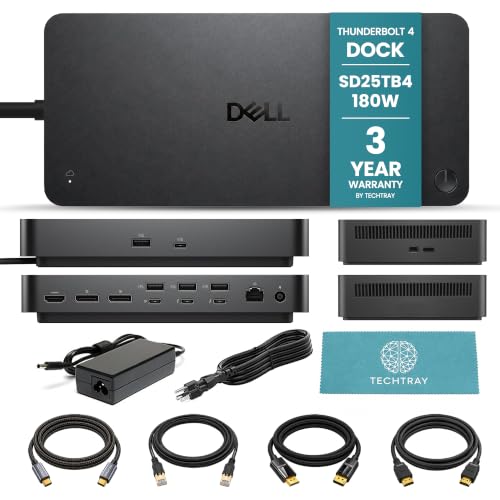
TechTray SD25TB4 Quad Display Dock
Best for: complete multi-monitor workstation setups with included cables
- Ports
- HDMI, DisplayPort, Ethernet, Thunderbolt 4
- Display Support
- Up to 4
- Max Resolution
- 8K@60Hz
- Host Interface
- Thunderbolt 4
- Power Delivery
- Up to 130W (Dell), 96W (non-Dell)
- Video Ports
- DisplayPort 1.4, HDMI 2.1
This bundle pairs the Dell SD25TB4 dock with necessary cables for a complete workstation setup. It supports up to four 4K displays at 60Hz or one 8K display. The dock delivers 130W of power to Dell laptops and 96W to other USB-C systems. You get two DisplayPort 1.4 ports and one HDMI 2.1 port for video output. It includes Thunderbolt 4 and USB-A connectivity for peripherals.
- Supports up to four 4K displays at 60Hz
- Includes DisplayPort 1.4, HDMI 2.1, and Thunderbolt 4 ports
- Delivers 130W power to compatible Dell computers
- Bundle includes 2-meter DisplayPort, HDMI, USB-C, and Ethernet cables
- Power delivery caps at 130W, lower than the 180W adapter included in this specific bundle title
- macOS users are limited to one external display on standard M1 and M2 models
- You need a complete setup with all necessary cables included
- You require support for up to four 4K monitors
- You use a Dell laptop needing 130W power delivery
- You own a standard M1 or M2 Mac and need dual external displays
- You require more than 130W of power delivery for your laptop
- You prefer a dock without bundled cables to choose your own
Verdict: TechTray Dell SD25TB4 Thunderbolt 4 Dock is a solid choice for users who want a ready-to-use multi-monitor setup with included cables. It fits professionals who need high-resolution display support and reliable power delivery for their Dell systems.

Koncept Thunderbolt 4 Modular Dock 130W
Best for: Dual 4K monitor setups with Thunderbolt 4 laptops
- Ports
- HDMI, DisplayPort, USB-C, Thunderbolt 4
- Display Support
- Dual
- Max Resolution
- 4K
- Host Interface
- Thunderbolt 4
- Power Delivery
- 130W
- Data Transfer Speed
- 40Gbps
The Dell SD25TB4 is a Thunderbolt 4 docking station designed for dual 4K displays. It features two DisplayPort 1.4 outputs and one HDMI 2.0 port. The unit delivers up to 120W of charging power via its included 180W adapter. It supports 40Gbps data transfer and includes a Gigabit Ethernet port. This dock suits users needing reliable dual-screen connectivity with high-speed data transfer capabilities.
- Dual 4K display support via DisplayPort and HDMI
- Thunderbolt 4 connectivity with 40Gbps data transfer
- 120W charging power output
- Includes 180W power adapter and cables
- Compatible with Windows, macOS, and Ubuntu
- Supports only dual monitors, unlike some competitors offering triple or quad displays
- Charging power is 120W, lower than the 130W or 100W options found on other docks in this list
- Weighs 1.28 pounds, which is heavier than many slim USB-C docks
- You need to connect two 4K monitors to your laptop
- You require Thunderbolt 4 speeds for fast data transfers
- You want a dock that includes the necessary cables out of the box
- You need to drive three or four monitors simultaneously
- You require more than 120W of charging power for your device
- You prefer a lighter, more portable docking solution
Verdict: Dell SD25TB4 Thunderbolt 4 Dock provides solid dual 4K support and fast data transfer for users who prioritize display count and connectivity speed over maximum charging wattage or multi-monitor setups.

Plugable 12-in-1 Triple 4K USB-C Dock
Best for: Three 4K monitors with 100W charging
- Ports
- HDMI, DisplayPort, USB-C, Ethernet, Thunderbolt 4
- Display Support
- Triple
- Max Resolution
- 4K@60Hz
- Host Interface
- USB-C
- Power Delivery
- 100W
- Video Ports
- 3x HDMI, 3x DisplayPort
This Plugable dock supports three 4K displays via HDMI or DisplayPort on Windows, Mac, and ChromeOS. It delivers 100W of power delivery to keep your laptop charged during use. The unit measures 9.1 by 5.8 by 3.4 inches and weighs 2.4 pounds. You get six USB 3.0 ports, Ethernet, and audio jacks. It works with USB-C, USB4, and Thunderbolt systems. This setup suits professionals needing multiple screens without extra adapters.
- Supports three 4K 60Hz displays simultaneously
- 100W Power Delivery for laptop charging
- Includes six USB 3.0 downstream ports
- Compatible with Windows, macOS, and ChromeOS
- Features Gigabit Ethernet connectivity
- 100W power delivery is lower than the 130W found on some competitors
- Three-display limit is fewer than the four monitors supported by other options
- Requires DisplayLink drivers for macOS compatibility
- You need three external monitors for productivity
- You use a Windows or ChromeOS laptop with USB-C
- You want 100W charging for your device
- You require more than three external displays
- You need Thunderbolt 5 speeds
- You want a dock with 130W or higher power delivery
Verdict: Plugable 12-in-1 USB-C Triple 4K Dock offers solid triple-monitor support and 100W charging for multi-screen setups. It fits users who need three 4K displays and reliable wired connections on Windows or ChromeOS.

iVANKY 26-in-1 FusionDock Ultra
Best for: Mac users needing quad 6K or dual 8K displays
- Ports
- HDMI, DisplayPort, Thunderbolt 4
- Display Support
- Quad
- Max Resolution
- 8K@60Hz
- Host Interface
- Thunderbolt 5
- Power Delivery
- 140W
- Data Transfer Speed
- 120Gbps
This dock targets Mac users with a Thunderbolt 5 host interface and dual-chip architecture for high throughput. It supports up to four 6K or two 8K displays simultaneously. You get 140W power delivery and a 10GbE port. The build includes active cooling to sustain performance. It is designed for professional workflows requiring massive bandwidth and multiple high-resolution screens.
- Thunderbolt 5 host interface for next-gen connectivity
- Supports quad 6K@60Hz or dual 8K@60Hz displays
- 140W power delivery for fast laptop charging
- Includes 10GbE Ethernet port for high-speed networking
- Active cooling system with fan and heat sinks
- Limited to Mac ecosystem compatibility
- Higher complexity with dual chip architecture
- Requires specific macOS setups for multi-display support
- You need Thunderbolt 5 speed for future-proofing
- You run multiple 6K or 8K monitors on Mac
- You require 10GbE networking for professional work
- You use a Windows PC instead of Mac
- You only need a single display connection
- You prefer a simpler plug-and-play setup
Verdict: iVANKY FusionDock Ultra Thunderbolt 5 fits Mac professionals who demand extreme display counts and bandwidth. It suits users with high-end MacBook Pro models needing quad 6K or dual 8K outputs.

Koncept ThinkPad USB-C Dual Monitor Dock
Best for: Dual 4K monitor setups with included cables
- Ports
- HDMI, DisplayPort, USB-C
- Display Support
- Dual
- Max Resolution
- 4K
- Host Interface
- USB-C
- Power Delivery
- 90W
- Video Ports
- HDMI, DisplayPort, USB-C
The Lenovo ThinkPad 40AY0090US is a USB-C docking station designed for dual monitor setups. It supports 4K UHD resolution and includes HDMI and DisplayPort cables for immediate connectivity. The unit provides 90W of power delivery to keep your devices charged. It also comes with a microfiber cleaning cloth to maintain the device's appearance. This bundle offers a straightforward connection solution for users needing reliable display output and power.
- Supports dual monitors with 4K UHD resolution
- Includes HDMI and DisplayPort cables
- Provides 90W power delivery
- Comes with a microfiber cleaning cloth
- 90W power delivery is lower than the 100W or 130W options on this list
- Supports only dual monitors, whereas other listed docks handle three or four displays
- You need a ready-to-use bundle with included DisplayPort and HDMI cables
- You require a docking station for two 4K monitors
- You want a simple setup with 90W charging capability
- You need to connect three or more external monitors
- You require 100W or higher power delivery for your laptop
- You prefer Thunderbolt 4 connectivity over USB-C
Verdict: Lenovo ThinkPad 40AY0090US USB-C Dock provides a complete dual-monitor solution with included cables and 90W charging. It fits users who want a straightforward setup for two 4K displays without needing higher power or more screen outputs.

HP USB-C 100W G6 Dock
Best for: Business users needing 2.5G Ethernet and triple 4K displays
- Ports
- HDMI, DisplayPort, USB-C, Ethernet
- Max Resolution
- 4K@60Hz
- Host Interface
- USB-C
- Power Delivery
- 100W
- Video Ports
- DisplayPort 1.4, HDMI 2.1
- Total Ports
- 9
The HP USB-C 100W G6 Dock supports up to three 4K displays via two DisplayPort 1.4 outputs and one HDMI 2.1 port. It delivers 100W of power delivery to charge your laptop while connected. The unit includes a 2.5 Gigabit Ethernet port for fast networking. It fits well in business environments where multiple monitors and stable connectivity are priorities. You get a single-cable solution for data, video, and power.
- Supports up to 3x 4K@60Hz displays
- 100W Power Delivery for laptop charging
- 2.5 Gigabit Ethernet port included
- Dual DisplayPort 1.4 outputs
- 100W power delivery is lower than the 130W option on this list
- Weighs 1.49 pounds, which is heavier than some compact alternatives
- Only two DisplayPort outputs limit triple monitor setups without HDMI
- You need a docking station with 2.5G Ethernet for fast wired networking
- You want to connect up to three 4K monitors to your laptop
- You require 100W of power delivery to charge your device
- You need more than 100W of charging power for your laptop
- You prefer a Thunderbolt 4 dock for higher bandwidth
- You want a dock with four display outputs for quad monitors
Verdict: HP USB-C 100W G6 Dock fits hybrid workers who need reliable 2.5G networking and triple 4K display support. It is a solid choice for business users who prioritize Ethernet speed and multi-monitor productivity over maximum charging wattage.

ANYHDD WD22TB4 Thunderbolt 4 Dock
Best for: users needing 180W power and dual 4K displays
- Ports
- HDMI, DisplayPort, USB-C, Thunderbolt 4, USB-A
- Display Support
- Dual/Triple
- Max Resolution
- 4K
- Host Interface
- Thunderbolt 4
- Data Transfer Speed
- 40Gbps
- Video Ports
- DisplayPort 1.4, HDMI 2.0, USB-C
The ANYHDD WD22TB4 Thunderbolt 4 dock connects dual 4K displays via two DisplayPort 1.4 outputs and one HDMI 2.0 port. It delivers 40Gbps data transfer speeds and supports 180W power delivery for connected devices. This bundle includes necessary cables and a 180W adapter. It suits users who need a single-cable solution for productivity and require compatible Thunderbolt 4 peripherals.
- Dual DisplayPort 1.4 outputs for multi-monitor setups
- 180W power adapter included for high-power devices
- 40Gbps Thunderbolt 4 data transfer speed
- Includes HDMI and DisplayPort cables in the box
- Supports only two external displays, fewer than the four monitors offered by some competing docks
- Uses USB-C 3.2 Gen 2 for one port, while other docks provide faster Thunderbolt or USB4 connections
- Gigabit Ethernet speed is lower than the 10GbE found in premium models
- You need a Thunderbolt 4 dock with a high-wattage 180W power supply
- You want a bundle that includes the necessary HDMI and DisplayPort cables
- You require dual 4K display support via DisplayPort and HDMI
- You need to drive more than two external monitors simultaneously
- You require 10GbE networking speeds for fast file transfers
- You are using a system that does not support Thunderbolt 4
Verdict: The ANYHDD WD22TB4 Thunderbolt 4 Dock provides a robust 180W charging solution and dual 4K display support for users who prioritize power delivery and included accessories. It is a solid option for those needing reliable Thunderbolt 4 connectivity without the need for quad-monitor expansion.
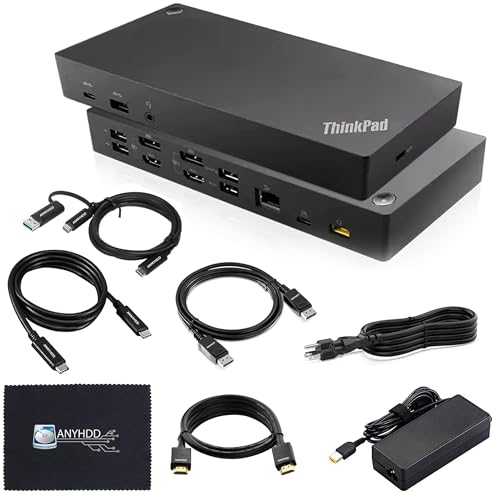
Lenovo ThinkPad Hybrid Dual 4K Dock
Best for: Dual 4K monitor setups with Windows laptops
- Ports
- HDMI, DisplayPort, USB-C, USB-A
- Display Support
- Up to 2
- Max Resolution
- 4K
- Host Interface
- USB-C, USB-A
- Video Ports
- DisplayPort 1.2, HDMI
- Ethernet Speed
- 10/100/1000 Mb/s
This docking station supports up to two 4K displays via its two DisplayPort 1.2 ports and two HDMI ports. It includes a 135W AC adapter for stable power delivery to connected devices. The unit connects through a USB-C cable with a USB-A adapter, making it compatible with most Windows laptops. It weighs 3.51 pounds and comes with the necessary cables for immediate setup.
- Includes 135W AC adapter for efficient power delivery
- Supports up to two 4K displays simultaneously
- Features two DisplayPort 1.2 and two HDMI ports
- Compatible with most Windows laptops via USB-C
- Ethernet port is limited to 10/100/1000 Mb/s speeds
- Weighs 3.51 pounds, which is bulkier than lighter alternatives
- Supports only dual monitors, not triple or quad setups
- You need a reliable dual 4K display setup
- You use Windows laptops with USB-C connectivity
- You want a dock that includes a 135W power adapter
- You require Thunderbolt 4 or 5 connectivity
- You need support for three or four monitors
- You want 10GbE or faster Ethernet speeds
Verdict: ANYHDD 40AF0135US 135W Dual 4K Dock is a practical solution for users who need dual 4K monitors and a strong 135W power supply for their Windows laptops.

Belkin 15-in-1 Triple DisplayLink Dock
Best for: Triple 4K setups with built-in audio
- Ports
- HDMI, DisplayPort, USB-C, USB-A
- Display Support
- Triple
- Max Resolution
- 4K
- Host Interface
- USB-C
- Power Delivery
- 85W
- Video Ports
- 3x HDMI, 2x DisplayPort
This Belkin docking station supports triple 4K displays via DisplayLink technology. It includes three HDMI and two DisplayPort outputs for multi-monitor setups. The unit provides 85W pass-through charging over USB-C. It also features a Gigabit Ethernet port and an SD card reader. You need to install drivers for Windows or macOS to enable the triple display function. It is designed for users who need extensive connectivity and screen real estate.
- Supports triple 4K displays simultaneously
- Includes 85W pass-through charging
- Features built-in speakers
- Provides Gigabit Ethernet connectivity
- Offers SD card reader access
- 85W charging is lower than the 100W or 130W options on this list
- Requires driver download for triple display support
- Limited to Windows operating system in listed specs
- You need three monitors for productivity
- You want built-in audio without extra speakers
- You require an SD card reader
- You need more than 85W of charging power
- You want a plug-and-play setup without driver installation
- You rely on macOS without checking driver compatibility
Verdict: Belkin 15-in-1 Triple Display Dock offers triple 4K support and built-in speakers for users needing multiple screens. It suits those who prioritize display count and audio integration over maximum charging speed. The required driver installation adds a setup step for Windows users.

ANYHDD USB-C G6 100W Dock
Best for: Dual monitor setups with 100W charging
- Ports
- HDMI, DisplayPort, USB-C, Ethernet
- Display Support
- Dual
- Host Interface
- USB-C
- Power Delivery
- 100W
- Video Ports
- HDMI, DisplayPort
- Features
- Power Delivery
The ANYHDD USB-C G6 is a silver docking station designed for laptops with USB-C or Thunderbolt ports. It supports dual 4K displays via HDMI and DisplayPort connections. The unit delivers up to 100W of power delivery to keep your laptop charged. It includes an Ethernet port for wired networking. This compact dock suits users who need a single-cable solution for productivity and display expansion without complex setup.
- Supports dual display output via HDMI and DisplayPort
- Provides 100W power delivery for laptop charging
- Includes Ethernet port for stable wired internet
- Universal compatibility with USB-C and Thunderbolt laptops
- Supports only dual displays, unlike competitors offering triple or quad monitor setups
- Uses USB-C connection instead of Thunderbolt 4 for higher bandwidth
- Limited to two video outputs compared to docks with four ports
- You need a simple dual-monitor setup for work
- You require 100W charging for your laptop
- You want a compact dock with Ethernet access
- You need to connect three or more monitors
- You require Thunderbolt 4 speeds for high-bandwidth peripherals
- You prefer a dock with more than two display outputs
Verdict: The ANYHDD USB-C G6 100W Dock fits users who need reliable dual-monitor support and fast charging in a compact form factor. It is a practical choice for those who do not require the higher bandwidth or multi-monitor capabilities of Thunderbolt docks.

WAVLINK Quad 4K@60Hz DisplayLink Dock
Best for: users needing four 4K monitors
- Ports
- HDMI, DisplayPort, USB-C, Ethernet, Thunderbolt 4
- Display Support
- Quad
- Max Resolution
- 5K@60Hz, 4K@60Hz
- Host Interface
- USB-C
- Power Delivery
- 100W
- Video Ports
- 4x HDMI, 4x DisplayPort
This WAVLINK dock supports four monitors at 4K or 5K resolution with a 60Hz refresh rate. It connects via Thunderbolt 5 and includes a 2.5Gbps Ethernet port and SD 4.0 card reader. You get 100W power delivery for your laptop. The black unit weighs 1.96 pounds. It works with Mac and Windows devices. This setup suits users who need multiple screens for heavy multitasking or media consumption.
- Supports quad displays at 4K@60Hz or 5K@60Hz
- Thunderbolt 5 host interface for high bandwidth
- 100W Power Delivery for fast laptop charging
- Built-in 2.5Gbps Ethernet and SD 4.0 reader
- Requires DisplayLink drivers for extended desktop functionality
- Heavier build at 1.96 pounds compared to lighter docks
- Limited to 60Hz refresh rate for all four screens
- You need four separate monitors for your workflow
- You want 100W charging for your laptop
- You use Thunderbolt 5 or Thunderbolt 4 devices
- You require refresh rates higher than 60Hz
- You prefer a driver-free plug-and-play experience
- You only need one or two monitors
Verdict: WAVLINK Quad 4K@60Hz Thunderbolt 5 Dock delivers a high-screen-count solution for professionals. It fits users who prioritize visual real estate and fast data transfer over ultra-high refresh rates.

FKA HP USB-C G5 Dual Monitor Dock
Best for: Dual monitor setups with HDMI and DP
- Ports
- HDMI, DisplayPort, USB-C
- Display Support
- Up to 3
- Host Interface
- USB-C
- Video Ports
- DisplayPort, HDMI
- Features
- Power Delivery
- Dimensions
- 4.8 × 4.8 × 1.8 inches
The FKA HP USB-C G5 Dock supports dual 4K monitors via HDMI and DisplayPort. It includes a 120W power adapter for device charging. The compact design measures 4.8 by 4.8 by 1.8 inches. It connects to USB-C and Thunderbolt laptops. This bundle suits users needing reliable dual-screen output and sufficient power delivery for their setup.
- Includes 120W AC adapter for charging
- Supports dual 4K displays via HDMI and DisplayPort
- Compact footprint of 4.8 inches square
- Compatible with USB-C and Thunderbolt laptops
- Supports only dual monitors, while competitors offer triple or quad displays
- Uses HDMI and DisplayPort instead of Thunderbolt 4 for video output
- Lower power delivery than 100W or 130W options on the list
- You need a dual monitor setup with HDMI and DisplayPort
- You want a compact dock with a 120W power adapter included
- You use USB-C or Thunderbolt laptops
- You require triple or quad monitor support
- You need Thunderbolt 4 connectivity for video
- You prefer a dock with higher wattage charging
Verdict: The FKA HP USB-C G5 Dual Monitor Dock fits users who need a compact dual-screen solution with a 120W adapter. It is a practical choice for USB-C laptops requiring HDMI and DisplayPort outputs.
Specifications side by side

| Spec | Plugable 13-in-1 Triple 4K USB-C Dock | Plugable 16-in-1 Thunderbolt 4 Dock | ANYHDD ThinkPad Dual 4K USB-C Dock | TechTray SD25TB4 Quad Display Dock | Koncept Thunderbolt 4 Modular Dock 130W | Plugable 12-in-1 Triple 4K USB-C Dock | iVANKY 26-in-1 FusionDock Ultra | Koncept ThinkPad USB-C Dual Monitor Dock | HP USB-C 100W G6 Dock | ANYHDD WD22TB4 Thunderbolt 4 Dock | Lenovo ThinkPad Hybrid Dual 4K Dock | Belkin 15-in-1 Triple DisplayLink Dock | ANYHDD USB-C G6 100W Dock | WAVLINK Quad 4K@60Hz DisplayLink Dock | FKA HP USB-C G5 Dual Monitor Dock |
|---|---|---|---|---|---|---|---|---|---|---|---|---|---|---|---|
| Display Support | Triple | Dual | Dual | Up to 4 | Dual | Triple | Quad | Dual | – | Dual/Triple | Up to 2 | Triple | Dual | Quad | Up to 3 |
| Max Resolution | 4K@60Hz | 4K@60Hz | 4K | 8K@60Hz | 4K | 4K@60Hz | 8K@60Hz | 4K | 4K@60Hz | 4K | 4K | 4K | – | 5K@60Hz, 4K@60Hz | – |
| Host Interface | USB-C | Thunderbolt 4 | USB-C | Thunderbolt 4 | Thunderbolt 4 | USB-C | Thunderbolt 5 | USB-C | USB-C | Thunderbolt 4 | USB-C, USB-A | USB-C | USB-C | USB-C | USB-C |
| Power Delivery | 100W | 100W | – | Up to 130W (Dell), 96W (non-Dell) | 130W | 100W | 140W | 90W | 100W | – | – | 85W | 100W | 100W | – |
| Data Transfer Speed | 10Gbps | 40Gbps | – | – | 40Gbps | – | 120Gbps | – | – | 40Gbps | – | – | – | – | – |
| Video Ports | 3x HDMI, 3x DisplayPort | 2x HDMI, 2x DisplayPort | HDMI, DisplayPort | DisplayPort 1.4, HDMI 2.1 | Thunderbolt 4, DP 1.4, HDMI 2.0 | 3x HDMI, 3x DisplayPort | HDMI, DisplayPort | HDMI, DisplayPort, USB-C | DisplayPort 1.4, HDMI 2.1 | DisplayPort 1.4, HDMI 2.0, USB-C | DisplayPort 1.2, HDMI | 3x HDMI, 2x DisplayPort | HDMI, DisplayPort | 4x HDMI, 4x DisplayPort | DisplayPort, HDMI |
| Total Ports | 13 | 16 | – | – | – | 12 | 26 | – | 9 | – | – | 15 | – | – | – |
| Ethernet Speed | – | 2.5Gbps | – | – | Gigabit | – | 10GbE | – | 2.5GbE | Gigabit | 10/100/1000 Mb/s | Gigabit | – | 2.5Gbps | – |
| Resolution | 4K UHD | 4K UHD | 4K UHD | – | 4K UHD | 4K UHD | 8K UHD | 4K UHD | 4K UHD | 4K UHD | – | 4K UHD | – | 4K UHD | – |
| Refresh Rate | – | – | – | – | – | – | – | – | – | – | – | – | – | 60Hz | – |
| Ports | HDMI, DisplayPort, USB-C, Thunderbolt 4 | HDMI, DisplayPort, Ethernet, Thunderbolt 4 | HDMI, DisplayPort, USB-C | HDMI, DisplayPort, Ethernet, Thunderbolt 4 | HDMI, DisplayPort, USB-C, Thunderbolt 4 | HDMI, DisplayPort, USB-C, Ethernet, Thunderbolt 4 | HDMI, DisplayPort, Thunderbolt 4 | HDMI, DisplayPort, USB-C | HDMI, DisplayPort, USB-C, Ethernet | HDMI, DisplayPort, USB-C, Thunderbolt 4, USB-A | HDMI, DisplayPort, USB-C, USB-A | HDMI, DisplayPort, USB-C, USB-A | HDMI, DisplayPort, USB-C, Ethernet | HDMI, DisplayPort, USB-C, Ethernet, Thunderbolt 4 | HDMI, DisplayPort, USB-C |
| Features | Power Delivery | Power Delivery, SD Card Reader | – | – | – | Power Delivery | Power Delivery, SD Card Reader | – | Power Delivery | – | – | Built-in Speakers, Power Delivery, DisplayLink | Power Delivery | Power Delivery, DisplayLink, SD Card Reader | Power Delivery |
| Use | Mac | Mac | – | – | – | Mac | Mac | – | – | – | – | – | – | Mac | – |
| Operating System | ChromeOS | macOS | – | – | – | Windows | Windows | – | Windows | – | – | Windows | – | macOS | – |
| Dimensions | 4.72 × 2.64 × 6.89 inches | 11.9 × 6 × 4.3 inches | – | – | 8.07 × 3.54 × 1.39 inches | 7.87 × 3.39 × 1.26 inches | – | – | 4.76 × 4.76 × 2 inches | – | – | 10.5 × 6 × 3.5 inches | – | – | 4.8 × 4.8 × 1.8 inches |
| Weight | 1.07 pounds | 1.42 pounds | 1 pounds | – | 1.28 pounds | 2.4 pounds | – | – | 1.49 pounds | – | 3.51 pounds | – | – | 1.96 pounds | – |
| Model | UD-ULTC4K | TBT4-UDZ | DOCK-40AY0090US-New | SD25TB4 | SD25TB4 | UD-6950PDZ | – | 40AY0090US | – | DOCK-WD22TB4 | 40AF0135US | INC007TTBK | – | RC-UG39PD8-UK | – |
| Size | – | 11.6" × 5.8" × 4.1" | 8 x 3 inch | – | – | 9.1" × 5.8" × 3.4" | – | – | 100W | – | – | 85W | – | – | – |
| Color | – | Silver | Black | Black | Black | Black | Black | Black | Black | black | Black | black | Silver | Black | Black |
Key Specs for DisplayPort Docks

Match Display Resolution
Check the maximum resolution the dock supports. Most models here handle 4K UHD, which is standard for modern office work. If you need higher clarity, look for 8K support. The iVANKY FusionDock Ultra handles 8K UHD, making it suitable for Mac professionals with high-end displays. Standard 4K docks like the Plugable 13-in-1 are sufficient for most users. Ensure your monitors match the dock's output capabilities to avoid downscaling issues.
Check Refresh Rate Needs
Refresh rate determines how smooth motion appears on screen. Most docks listed support 60Hz, which is standard for productivity. The WAVLINK Quad 4K@60Hz Dock explicitly lists this rate, ensuring smooth scrolling and video playback. Higher refresh rates are rare in docking stations. If you need 60Hz for all four screens, this model fits. Standard users rarely need more than 60Hz for typical office tasks or web browsing.
Count Your Display Ports
Verify the number of DisplayPort and HDMI outputs available. The Plugable 13-in-1 offers three 4K displays, ideal for heavy multitaskers. The Plugable 16-in-1 supports dual 4K displays, which suits most users. The TechTray SD25TB4 supports quad displays for extensive workspaces. Match the port count to your monitor setup. If you only need two screens, a dual-display dock saves space and cost while providing sufficient connectivity.
Verify Power Delivery
Power Delivery (PD) charges your laptop through the dock. Look for wattage that meets your laptop's needs. The Plugable 13-in-1 provides 100W PD, sufficient for most laptops. The iVANKY FusionDock Ultra offers 140W PD for high-power MacBooks. The ANYHDD WD22TB4 delivers 180W, supporting even larger systems. Ensure the dock's PD output matches your laptop's charging requirements to avoid slow charging or power issues.
Select Host Interface
Your computer must have the correct host interface. Thunderbolt 4 docks like the Plugable 16-in-1 require a Thunderbolt port. Thunderbolt 5 docks like the iVANKY FusionDock Ultra need compatible ports. Standard USB-C docks, such as the ANYHDD ThinkPad Dual 4K, work with regular USB-C ports. Check your laptop's port type before buying. Using a Thunderbolt dock with a standard USB-C port will not work.
Consider Built-in Features
Some docks include extra features like speakers or card readers. The Belkin 15-in-1 has built-in speakers, reducing cable clutter. The Plugable 16-in-1 includes an SD card reader for photographers. The WAVLINK Quad 4K@60Hz also features an SD card reader. These features add convenience but may increase cost. Decide if you need integrated audio or card access, or if you prefer separate peripherals for flexibility.
Frequently asked questions
Can a docking station with DisplayPort support three monitors?
Yes, several models support triple display setups. The Plugable 13-in-1 Triple 4K USB-C Dock handles three 4K displays. The Plugable 12-in-1 model also offers triple 4K support. These docks use multiple video outputs to drive three screens simultaneously. This setup is ideal for users needing extensive screen real estate for productivity.
Do I need Thunderbolt 4 or Thunderbolt 5 for DisplayPort?
Not necessarily, but it depends on your display needs. Standard USB-C docks like the ANYHDD ThinkPad Dual 4K use HDMI and DisplayPort without Thunderbolt. However, high-bandwidth setups often require Thunderbolt 4 or 5. The iVANKY FusionDock Ultra uses Thunderbolt 5 for extreme resolution support. Check your laptop’s host interface compatibility first.
What is the maximum resolution supported by these docks?
Most docks in this list support 4K UHD resolution. Some high-end models go further. The iVANKY FusionDock Ultra supports 8K UHD. It can handle quad 6K or dual 8K displays. Other models, like the TechTray SD25TB4, focus on quad 4K setups. Always verify the maximum resolution in the specifications.
Can these docks charge my laptop while using DisplayPort?
Yes, most include Power Delivery for charging. The Plugable 13-in-1 offers 100W PD. The iVANKY FusionDock Ultra provides 140W PD. The ANYHDD WD22TB4 delivers up to 180W. This allows you to power your laptop through the same cable that carries video signals. Check the wattage to ensure it meets your laptop’s requirements.
Are there docks with built-in speakers for DisplayPort setups?
Yes, the Belkin 15-in-1 Triple DisplayLink Dock includes built-in speakers. This feature integrates audio directly into the dock. It is useful for users who want a clean desk setup. The dock supports triple 4K displays while providing audio output. Note that DisplayLink technology may require driver installation on Windows systems.
Which dock is best for Mac users with DisplayPort?
The Plugable 16-in-1 Thunderbolt 4 Dock is designed for macOS. It supports dual 4K displays and 100W charging. The iVANKY FusionDock Ultra also suits Mac professionals needing high bandwidth. It supports Thunderbolt 5 for extreme display counts. These models ensure reliable connectivity and power delivery for Apple devices.
Do I need to buy extra cables for DisplayPort?
Some docks include cables, while others do not. The ANYHDD ThinkPad Dual 4K Dock comes with included cables. The TechTray SD25TB4 also includes necessary cables for its setup. Other models, like the Plugable 13-in-1, may require you to purchase cables separately. Check the product details to see if cables are bundled with the dock.
What is the refresh rate for 4K displays on these docks?
The WAVLINK Quad 4K@60Hz Dock supports 60Hz refresh rates at 4K resolution. This is standard for smooth visuals in office work. Most other docks in this list support 4K UHD, but specific refresh rates vary. Higher refresh rates are less common in docking stations due to bandwidth limitations. Verify the refresh rate if you need smoother motion.
See also