15 Best Docking Stations Under $300, Compared
As Amazon Associates, we earn from qualifying purchases. This means we may receive a small commission at no extra cost to you if you click through and make a purchase.
As an Amazon Associate we earn from qualifying purchases. Links on this page are affiliate links.
Choosing the best docking stations under $300 requires matching your hardware needs to specific port counts and power delivery limits. We compared 15 models based strictly on published specifications. The Anker Prime 14-in-1 Dual Display Dock leads because it offers 160W charging and 10Gbps data speeds. This high power output supports demanding Windows workstations better than most competitors. We analyzed resolution limits, display support, and physical dimensions for each unit. This guide helps you decide which dock fits your monitor count and laptop requirements.
Match port types to your monitor count

Your laptop’s available ports dictate how many screens you can run. Thunderbolt 4 docks often support dual 4K displays natively. If you need three or four screens, look for DisplayLink technology or specific HDMI and DisplayPort outputs. Always verify the dock’s resolution support matches your monitors to avoid signal issues.
| # | Product | Best for | Price |
|---|---|---|---|
| 1 | Anker Prime 14-in-1 Dual Display Dock Best overall | high-power dual-monitor Windows setups | |
| 2 | Lenovo ThinkPad Thunderbolt 4 Smart Dock Also great | Dual 4K 144Hz setups with remote management needs | |
| 3 | Plugable 13-in-1 Triple 4K USB-C Dock Best budget | three 4K monitor setups | |
| 4 | Plugable 16-in-1 Thunderbolt 4 Dock Best premium | Dual 4K Mac users needing 100W charging | |
| 5 | TechTray SD25TB4 Quad Display Dock Also great | multi-monitor Dell setups with included cables | |
| 6 | Koncept Thunderbolt 4 Modular Dock 130W Also great | dual 4K monitor setups with Thunderbolt 4 | |
| 7 | Tobenone Quad 4K 20-in-1 DisplayLink Dock Also great | Users needing four 4K monitors and many ports | |
| 8 | UGREEN 8-in-1 Thunderbolt 4 Dock Also great | Dual 4K display setups with fast data transfer | |
| 9 | HP Ultra 280W G6 Thunderbolt 4 Dock Best usb-a | Quad display setups with high power needs | |
| 10 | Belkin 16-in-1 Triple 4K DisplayLink Dock Also great | users needing three 4K monitors and 100W charging | |
| 11 | Targus QV4K Quad 4K USB-C Dock Also great | multi-monitor setups with mixed laptop brands | |
| 12 | UGREEN 13-in-1 Thunderbolt 4 Dock Best 8k uhd | 8K display support and silent operation | |
| 13 | WAVLINK Quad 4K@60Hz DisplayLink Dock Also great | users needing four 4K displays | |
| 14 | WAVLINK DL7400 5-Monitor Dock Best 120hz | Five-screen professional workstations | |
| 15 | Belkin Thunderbolt 4 Triple Display Dock Also great | macOS users needing triple 4K displays |
The best fit for you

- You need high-power charging for a Windows workstation – Anker Prime 14-in-1 Dual Display Dock – The Anker Prime offers 160W charging and 10Gbps data speeds for robust power delivery.
- You require support for three 4K monitors – Plugable 13-in-1 Triple 4K USB-C Dock – The Plugable 13-in-1 dock provides triple 4K display support with 100W charging.
- You want a single 8K display output – UGREEN 13-in-1 Thunderbolt 4 Dock – The UGREEN 13-in-1 dock supports 8K UHD resolution for high-detail visuals.
- You need five monitors for heavy multitasking – WAVLINK DL7400 5-Monitor Dock – The WAVLINK DL7400 dock connects five displays with 120Hz refresh rates on primary screens.

Anker Prime 14-in-1 Dual Display Dock
Best for: high-power dual-monitor Windows setups
- Display Support
- Dual
- Max Resolution
- 4K
- Host Interface
- USB-C
- Power Delivery
- 100W
- Data Transfer Speed
- 10Gbps
- Video Ports
- HDMI
The Anker Prime 14-in-1 docking station offers dual 4K HDMI outputs and 160W total charging power. It includes 11 data ports with speeds up to 10Gbps, supporting USB-C, USB4, and Thunderbolt connections. This grey unit weighs 2.82 pounds and measures 5.51 by 3.82 by 1.85 inches. It suits users needing strong power delivery and versatile connectivity for Windows or ChromeOS laptops.
- 160W total output with 100W max per USB-C port
- Dual HDMI ports for 4K UHD display support
- 14-in-1 connectivity with 10Gbps data speeds
- Supports USB-C, USB4, and Thunderbolt connections
- Limited to dual display output while competitors offer triple or quad setups
- Maximum external resolution capped at 4K, excluding ultrawide 5120×1440 support
- Incompatible with Linux operating systems
- You need high-speed data transfer up to 10Gbps
- You require 160W power delivery for multiple devices
- You use Windows 10, 11, or ChromeOS laptops
- You need to drive more than two external monitors
- You require Linux operating system compatibility
- You plan to use ultrawide 5120×1440 displays
Verdict: Anker Prime 14-in-1 Dual 4K Dock provides robust 160W charging and 10Gbps data speeds for users prioritizing power and connectivity over multi-monitor expansion. It is best for professionals using Windows or ChromeOS who need reliable dual-display setups.

Lenovo ThinkPad Thunderbolt 4 Smart Dock
Best for: Dual 4K 144Hz setups with remote management needs
- Max Resolution
- 8K@60Hz
- Host Interface
- Thunderbolt 4
- Power Delivery
- 100W
- Data Transfer Speed
- 40Gbps
- Video Ports
- Thunderbolt 4, HDMI 2.1, DisplayPort 1.4
- Features
- Power Delivery
The Lenovo ThinkPad Thunderbolt 4 Smart Dock Gen 2 provides up to 40 Gbps bandwidth for high-speed data transfer. It supports dual 4K 144Hz monitors or a single 8K 60Hz display. The dock includes 100W Power Delivery 3.1 to charge your laptop. It features HDMI 2.1 and DisplayPort 1.4 for versatile connectivity. This dock suits professionals needing reliable multi-display setups and remote fleet management capabilities.
- Thunderbolt 4 connectivity with 40 Gbps bandwidth
- Supports dual 4K 144Hz or single 8K 60Hz displays
- 100W PD 3.1 power delivery for fast charging
- Cloud-based fleet management via Lenovo Accessories Fleet Manager
- Supports only two 4K 144Hz monitors, fewer than quad options on the list
- Heavier at 1.21 pounds compared to lighter universal docks
- You need a Thunderbolt 4 dock for high-resolution dual monitors
- You manage a fleet of laptops and need remote configuration
- You require 100W power delivery for your workstation
- You need to connect four or more monitors simultaneously
- You prefer a lighter dock under 1 pound
- You do not use Thunderbolt 4 compatible devices
Verdict: Lenovo ThinkPad Thunderbolt 4 Smart Dock Gen 2 delivers robust dual-monitor performance and remote management for IT-heavy environments. It fits users who prioritize Thunderbolt 4 speed and 100W charging over multi-monitor count.

Plugable 13-in-1 Triple 4K USB-C Dock
Best for: three 4K monitor setups
- Display Support
- Triple
- Max Resolution
- 4K@60Hz
- Host Interface
- USB-C
- Power Delivery
- 100W
- Data Transfer Speed
- 10Gbps
- Video Ports
- 3x HDMI, 3x DisplayPort
The Plugable UD-ULTC4K is a 13-in-1 docking station that connects up to three 4K 60Hz monitors. It provides 100W Power Delivery for your laptop and includes 3 HDMI and 3 DisplayPort outputs. This USB-C dock supports Windows, macOS, and ChromeOS. It is designed for users who need significant screen real estate for productivity tasks without relying on wireless connections.
- Supports three 4K 60Hz displays simultaneously
- 100W Power Delivery charging for laptops
- Includes 3 HDMI and 3 DisplayPort ports
- Compatible with Windows, macOS, and ChromeOS
- Supports only three monitors, while competitors offer four or five
- HDCP is not supported for protected streaming content
- Requires DisplayLink drivers and screen recording permission on macOS
- You need three 4K monitors for a workspace
- You use Windows, macOS, or ChromeOS systems
- You require 100W charging for your laptop
- You need to drive four or more monitors
- You want to stream protected content like Netflix
- You prefer a dock that does not require specific driver permissions
Verdict: The Plugable 13-in-1 Triple 4K Dock fits users who need three 4K displays and 100W charging. It is a practical solution for multi-monitor setups on Windows, Mac, or ChromeOS.

Plugable 16-in-1 Thunderbolt 4 Dock
Best for: Dual 4K Mac users needing 100W charging
- Display Support
- Dual
- Max Resolution
- 4K@60Hz
- Host Interface
- Thunderbolt 4
- Power Delivery
- 100W
- Data Transfer Speed
- 40Gbps
- Video Ports
- 2x HDMI, 2x DisplayPort
This Plugable Thunderbolt 4 dock supports dual 4K displays at 60Hz on M4 and M5 Macs without drivers. It delivers 100W of power delivery to keep your laptop charged while you work. The unit includes seven USB ports, 2.5Gbps Ethernet, and SD card slots. It connects via a included 40Gbps cable. This silver dock weighs 1.42 pounds and measures 11.6 by 5.8 by 4.1 inches. It suits users needing a clean, simple dual-monitor setup.
- Dual 4K 60Hz display support for Mac and Windows
- 100W power delivery for laptop charging
- Seven USB ports and 2.5Gbps Ethernet
- Built-in SD and microSD card readers
- Award-winning design for productivity workflows
- Supports only two monitors while other options offer triple or quad displays
- Heavier build at 1.42 pounds compared to lighter alternatives
- Larger footprint measuring 11.6 by 5.8 inches
- You use an M4 or M5 Mac and need dual 4K screens
- You want a single cable solution for charging and displays
- You require SD card access for content creation
- You need to connect three or four monitors simultaneously
- You prefer a smaller, lighter dock for travel
- You use a system that requires DisplayLink drivers for multi-monitor setups
Verdict: Plugable 16-in-1 Thunderbolt 4 Dock is ideal for Mac users who need reliable dual 4K support and 100W charging. It fits professionals who prioritize a clean, driver-free setup over maximum screen count.
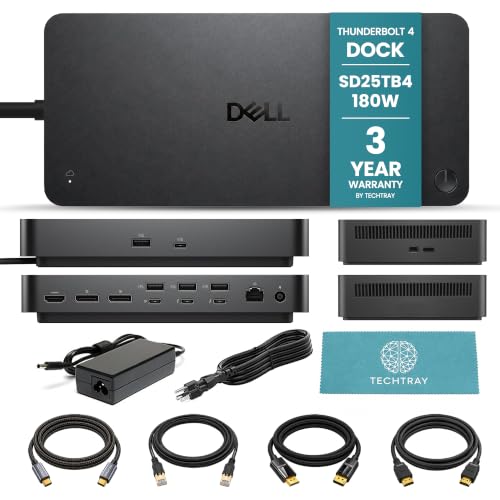
TechTray SD25TB4 Quad Display Dock
Best for: multi-monitor Dell setups with included cables
- Display Support
- Up to 4
- Max Resolution
- 8K@60Hz
- Host Interface
- Thunderbolt 4
- Power Delivery
- Up to 130W (Dell), 96W (non-Dell)
- Video Ports
- DisplayPort 1.4, HDMI 2.1
This bundle pairs the Dell SD25TB4 Thunderbolt 4 dock with essential cables. It delivers up to 130W of power to compatible Dell laptops and 96W to others. You get support for four 4K displays at 60Hz or a single 8K screen. The unit includes two Thunderbolt 4 ports, four USB-A ports, and video outputs. It is a solid option for users needing high-resolution multi-monitor setups with included cabling.
- Supports up to four 4K displays at 60Hz
- Provides up to 130W power to Dell computers
- Includes DisplayPort, HDMI, and USB-C cables in bundle
- Features two Thunderbolt 4 ports and four USB-A ports
- Max power delivery is 130W, lower than some competitors offering 180W or 280W
- MacOS support is limited to dual displays on Pro/Max chips, unlike Windows MST support
- Includes only one HDMI port compared to docks with two or three
- You need a complete setup with cables included for a multi-monitor workstation
- You use a Dell laptop that can utilize the 130W power delivery
- You require four 4K displays for intensive productivity tasks
- You need more than 130W of power for high-end non-Dell laptops
- You want a single dock to support five or more monitors natively
- You prefer a dock with multiple HDMI ports for simpler cable management
Verdict: TechTray Dell SD25TB4 Thunderbolt 4 Dock is a comprehensive bundle for users who need four 4K displays and want cables included. It fits Dell users well, though those needing higher wattage should look elsewhere.

Koncept Thunderbolt 4 Modular Dock 130W
Best for: dual 4K monitor setups with Thunderbolt 4
- Display Support
- Dual
- Max Resolution
- 4K
- Host Interface
- Thunderbolt 4
- Power Delivery
- 130W
- Data Transfer Speed
- 40Gbps
- Video Ports
- Thunderbolt 4, DP 1.4, HDMI 2.0
The Dell SD25TB4 is a Thunderbolt 4 docking station designed for dual 4K displays. It delivers 130W of power to connected laptops and supports data transfer speeds up to 40Gbps. The unit includes a 180W power adapter and essential cables for immediate use. It is compatible with Windows, macOS, and Ubuntu. This dock suits users who need a reliable, single-cable solution for a clean desktop setup with high-resolution monitors.
- Supports dual 4K displays at high resolution
- Provides 130W charging power for laptops
- Includes 180W power adapter and cables in the box
- Features Thunderbolt 4 connectivity for 40Gbps data transfer
- Compatible with Windows, macOS, and Ubuntu
- Supports only dual monitors, while competitors offer triple or quad display options
- Provides 130W charging, which is lower than the 180W or 200W options available elsewhere
- Weighs 1.28 pounds, adding more bulk than lighter 8-in-1 or 13-in-1 alternatives
- You need a Thunderbolt 4 dock for dual 4K monitors
- You want a dock that includes the power adapter and cables
- You use Windows or macOS and need 130W of charging power
- You require support for three or four monitors simultaneously
- You need more than 130W of charging power for your laptop
- You prefer a lighter dock under 1 pound
Verdict: Dell SD25TB4 Thunderbolt 4 Dock is a solid choice for users who need dual 4K displays and a complete cable package. It fits professionals who prioritize Thunderbolt 4 speed and reliable charging over higher monitor counts.

Tobenone Quad 4K 20-in-1 DisplayLink Dock
Best for: Users needing four 4K monitors and many ports
- Display Support
- Quad
- Max Resolution
- 4K@60Hz
- Power Delivery
- 100W
- Video Ports
- HDMI, DisplayPort
- Total Ports
- 20
- Features
- DisplayLink
This TobenONE docking station supports four 4K@60Hz displays via DisplayLink technology. It includes 20 ports, such as four HDMI and four DisplayPort outputs, along with a 150W power supply that delivers 100W to your laptop. The device features a small footprint and weighs 2.27 pounds. You will need to install the DisplayLink driver before use. It works with Windows and macOS systems, making it suitable for users needing extensive monitor expansion.
- Supports four 4K@60Hz monitors simultaneously
- Includes 20 expansion ports for peripherals
- Provides 100W laptop charging via USB-C PD
- Compatible with Windows, macOS, and Chrome OS
- Requires installation of DisplayLink driver software
- Heavier build at 2.27 pounds compared to lighter alternatives
- Does not support HDCP for protected content playback
- You need to connect four external monitors to a single laptop
- You require a wide variety of ports for multiple peripherals
- You use a Windows or Intel-based Mac system
- You use an M1 or M2 MacBook that cannot drive four displays
- You want a plug-and-play setup without installing drivers
- You need to play DRM-protected video content on all screens
Verdict: TobenONE 20-in-1 Quad 4K Dock fits professionals who need to manage four 4K screens and many peripherals. It is a practical solution for users who prioritize screen real estate and port variety over a driver-free experience.

UGREEN 8-in-1 Thunderbolt 4 Dock
Best for: Dual 4K display setups with fast data transfer
- Display Support
- Dual
- Max Resolution
- 8K@30Hz
- Host Interface
- Thunderbolt 4
- Power Delivery
- 85W
- Data Transfer Speed
- 40Gbps
- Video Ports
- Thunderbolt 4
This UGREEN 8-in-1 Thunderbolt 4 dock expands your workspace with dual 4K@60Hz or single 8K display support. It features three Thunderbolt 4 ports for 40Gbps data transfer and provides up to 85W of power delivery for your laptop. The unit weighs 3.09 pounds and measures 9.5 inches in width. It suits users needing robust connectivity and high-resolution output for Mac or Windows systems.
- Supports dual 4K@60Hz or single 8K displays
- Includes three Thunderbolt 4 ports with 40Gbps speeds
- Provides 85W power delivery for connected laptops
- Offers three USB-A 3.2 ports for peripherals
- Lower port count with only eight expansion options compared to other docks on this list
- Heavier build at 3.09 pounds versus lighter alternatives
- Limited to dual display output instead of triple or quad setups
- You need high-speed 40Gbps data transfer via Thunderbolt 4
- You want to drive two 4K monitors at 60Hz
- You require 85W charging for your laptop while docked
- You need to connect three or more monitors simultaneously
- You prefer a lighter dock under 2 pounds
- You require more than eight total expansion ports
Verdict: UGREEN 8-in-1 Thunderbolt 4 Dock delivers strong performance for users who prioritize dual 4K displays and fast data transfer. It is a solid choice for professionals who do not need multi-monitor arrays beyond two screens.

HP Ultra 280W G6 Thunderbolt 4 Dock
Best for: Quad display setups with high power needs
- Display Support
- 4
- Host Interface
- Thunderbolt 4
- Power Delivery
- 330 W
- Ports
- Thunderbolt 4, USB-A
- Features
- Power Delivery
- Dimensions
- 4.76 × 4.76 × 1.95 inches
The HP Ultra 280W G6 is a wired docking station designed for notebook and desktop PCs. It features Thunderbolt 4 connectivity and supports quad displays. The unit includes 330W of charging capability and weighs 1.7 pounds. Its compact dimensions are 1.95 x 4.76 x 4.76 inches. This dock suits users who need high power delivery and multiple monitor support in a small footprint.
- Thunderbolt 4 connectivity
- Quad display support
- 330W charging capability
- Compact 1.7-pound build
- Lower port variety compared to 16-in-1 competitors
- Single Thunderbolt 4 uplink limits daisy-chaining flexibility
- You need high wattage charging for power-hungry laptops
- You require quad monitor setups for productivity
- You prefer a compact and lightweight dock
- You need more than four display outputs
- You require extensive USB-A or legacy port options
- You prefer wireless connectivity solutions
Verdict: HP Ultra 280W G6 Thunderbolt 4 Dock delivers strong power and quad display support for users who prioritize performance over port variety. It is a solid choice for professionals needing reliable connectivity in a small form factor.

Belkin 16-in-1 Triple 4K DisplayLink Dock
Best for: users needing three 4K monitors and 100W charging
- Display Support
- Triple
- Max Resolution
- 4K@60Hz
- Host Interface
- USB-C
- Power Delivery
- 100W
- Data Transfer Speed
- 10Gbps
- Video Ports
- HDMI, DisplayPort
This Belkin docking station supports three 4K monitors at 60Hz using DisplayLink technology. It delivers 100W of power delivery to keep your laptop charged while you work. The unit includes a 2.5Gb Ethernet port for fast wired internet and 10Gbps data transfer speeds. It is VESA mountable and includes a Kensington lock slot for security. This setup suits users who need multiple screens without Thunderbolt requirements.
- Supports triple 4K@60Hz displays via DisplayLink
- Provides 100W power delivery for laptops
- Includes 2.5Gb Ethernet for fast networking
- Features 10Gbps data transfer speeds
- VESA mountable with Kensington lock compatibility
- Supports three monitors while several competitors on this list support four or five displays
- Uses DisplayLink technology rather than native Thunderbolt 4 direct display output
- 100W power delivery is lower than the 130W or 280W options available from other brands
- You need three external monitors for productivity
- You want a dock with 100W charging for your laptop
- You require 2.5Gb Ethernet for faster wired connections
- You need native Thunderbolt 4 display support without drivers
- You require four or more simultaneous displays
- You need more than 100W of power delivery
Verdict: The Belkin 16-in-1 Triple Display Dock is a solid choice for users who specifically need three 4K monitors and 100W charging. It fits those who prioritize wired networking and flexible mounting over higher port counts or native Thunderbolt video paths.

Targus QV4K Quad 4K USB-C Dock
Best for: multi-monitor setups with mixed laptop brands
- Display Support
- Quad
- Max Resolution
- 5K, 4K UHD@60Hz
- Host Interface
- USB-C
- Power Delivery
- 100W
- Data Transfer Speed
- 5 Gbps
- Video Ports
- 4x DisplayPort, 4x HDMI
The Targus QV4K expands your workspace to four 4K displays or one 5K screen. It delivers up to 100W of power delivery to keep your laptop charged. The unit includes four DisplayPort and four HDMI outputs for flexible monitor connections. You get five USB ports for peripherals and a gigabit Ethernet port for stable networking. This dock works with Thunderbolt 3 and other USB-C alt mode hosts, making it a versatile option for mixed laptop setups.
- Supports up to four 4K UHD displays simultaneously
- Provides 100W power delivery for laptop charging
- Includes four DisplayPort and four HDMI ports
- Features five USB ports for peripheral connectivity
- Compatible with Thunderbolt 3 and USB-C alt mode hosts
- Supports 4K at 50Hz on HDMI ports, while other docks offer 60Hz
- Heavier at 1.5 pounds compared to lighter Thunderbolt 4 alternatives
- Limited to 5 Gbps data transfer speeds on USB ports
- You need to connect four monitors to a single laptop
- You use a mix of Thunderbolt 3 and standard USB-C laptops
- You require 100W power delivery for your device
- You need 60Hz refresh rates on all HDMI displays
- You require Thunderbolt 4 connectivity for maximum speed
- You want a lighter dock under 1 pound
Verdict: Targus QV4K Universal Quad 4K Dock suits users who need multi-monitor setups across various laptop brands. It offers solid display expansion and charging power for general office or creative workstations.

UGREEN 13-in-1 Thunderbolt 4 Dock
Best for: 8K display support and silent operation
- Display Support
- Dual
- Max Resolution
- 8K@30Hz
- Host Interface
- Thunderbolt 4
- Power Delivery
- 96W
- Data Transfer Speed
- 40Gbps
- Video Ports
- Thunderbolt 4, DP 1.4
This UGREEN 13-in-1 Thunderbolt 4 docking station offers 180W total power with 96W PD for laptops. It supports dual 4K@60Hz displays or a single 8K@30Hz output via its three Thunderbolt 4 ports. The aluminum design features fanless cooling for silent operation. You get high-speed 40Gbps data transfer, SD/TF card reading, and Gigabit Ethernet. It suits users needing robust connectivity and high-resolution display support.
- 180W total power with 96W PD charging
- Supports dual 4K@60Hz or single 8K@30Hz displays
- Three Thunderbolt 4 ports for 40Gbps bandwidth
- Fanless passive cooling for silent operation
- Includes SD/TF card reader and Gigabit Ethernet
- Lower 96W laptop charging power than many competitors offering 100W or 130W
- Single 8K support limited to 30Hz refresh rate
- Requires active adapters for HDMI connections
- You need a single 8K@30Hz display output
- You require silent operation with fanless cooling
- You want three Thunderbolt 4 ports for daisy-chaining
- You need 100W or higher laptop charging power
- You want native HDMI output without adapters
- You require triple or quad monitor support
Verdict: UGREEN 13-in-1 Thunderbolt 4 Dock delivers high-resolution display options and silent performance for users prioritizing 8K support and quiet operation. It fits professionals who need specific Thunderbolt connectivity and do not require maximum laptop charging power.

WAVLINK Quad 4K@60Hz DisplayLink Dock
Best for: users needing four 4K displays
- Display Support
- Quad
- Max Resolution
- 5K@60Hz, 4K@60Hz
- Host Interface
- USB-C
- Power Delivery
- 100W
- Video Ports
- 4x HDMI, 4x DisplayPort
- Ethernet Speed
- 2.5Gbps
This WAVLINK dock supports four monitors at 4K resolution with a 60Hz refresh rate. It uses DisplayLink technology to drive the extra screens and includes a 100W power delivery port for charging your laptop. The unit features a 2.5Gbps Ethernet port and an SD 4.0 card reader. It weighs 1.96 pounds and connects via Thunderbolt 5 or USB-C. This setup suits users who need multiple displays for complex workflows.
- Supports four displays at 4K@60Hz resolution
- Provides 100W power delivery for host devices
- Includes 2.5Gbps Ethernet for fast networking
- Features an SD 4.0 card reader
- Requires DisplayLink drivers for quad monitor operation
- Heavier build at 1.96 pounds compared to lighter alternatives
- Limited to 18 months warranty coverage
- You need four screens for multitasking
- You require SD card access on your desk
- You use a Mac or Windows device with USB-C
- You prefer a plug-and-play setup without drivers
- You need Thunderbolt 4 native daisy-chaining
- You want a lighter portable dock
Verdict: WAVLINK Quad 4K@60Hz DisplayLink Dock delivers extensive multi-monitor capability for users who prioritize screen real estate over minimal weight or driver-free simplicity. It fits professionals who need four displays and fast data transfer.

WAVLINK DL7400 5-Monitor Dock
Best for: Five-screen professional workstations
- Display Support
- 5
- Max Resolution
- 8K@60Hz
- Host Interface
- USB-C
- Power Delivery
- 100W
- Data Transfer Speed
- 10Gbps
- Video Ports
- DisplayPort 1.4, HDMI
This WAVLINK dock uses the DisplayLink DL7400 chipset to drive five external displays. It supports two DisplayPort outputs at 4K@120Hz and three HDMI ports at 4K@60Hz. You get 100W Power Delivery and 2.5Gb Ethernet. Four screens rely on the dock, while the fifth requires your laptop's USB-C video output. It suits professionals needing extensive screen real estate for Mac or Windows systems.
- Supports up to five external displays
- Two DisplayPort outputs reach 4K@120Hz
- 100W Power Delivery for laptops
- 2.5Gb Ethernet connectivity
- Requires 16GB RAM or more for smooth performance
- Does not support Thunderbolt functionality
- Fifth display requires laptop USB-C video output
- You need five screens for trading or development
- You use a Mac or Windows laptop with USB-C video output
- You require 100W charging for your workstation
- You need Thunderbolt 4 or 5 speeds
- Your laptop has less than 16GB RAM
- You want a plug-and-play setup without drivers
Verdict: WAVLINK DL7400 5-Monitor Dock delivers five displays for heavy multitasking. It fits users who need high refresh rates on primary screens and have compatible laptops.

Belkin Thunderbolt 4 Triple Display Dock
Best for: macOS users needing triple 4K displays
- Display Support
- Triple
- Max Resolution
- 4K@60Hz
- Host Interface
- Thunderbolt 4
- Power Delivery
- 96W
- Data Transfer Speed
- 40Gbps
- Video Ports
- HDMI
The Belkin Thunderbolt 4 Dock offers triple 4K@60Hz monitor support and 96W power delivery for your laptop. It features 14 ports, including 2.5Gb Ethernet and 40Gbps data transfer. This dock suits users who need a clean workstation with multiple screens. It is compatible with macOS and USB-C devices like MacBook Pro. The build includes a Kensington Lock for security and plastic-free packaging.
- Supports up to 3 extended monitors at 4K@60Hz
- Delivers 96W power delivery to charge your laptop
- Includes ultra-fast 2.5Gb Ethernet connection
- Offers 40Gbps data transfer speeds
- Features 14 ports for complete expansion
- 96W power delivery is lower than the 100W or 130W found on other docks in this list
- Weighs 2.55 pounds, which is heavier than many compact USB-C hubs
- Limited to Thunderbolt 4 and USB-C connections, excluding older USB-A only setups
- You need a triple monitor setup for productivity
- You use a macOS device or Thunderbolt 4 laptop
- You require fast 2.5Gb wired networking
- You need more than 96W of power delivery
- You require Thunderbolt 5 speeds
- You prefer a lighter, more portable dock
Verdict: The Belkin Thunderbolt 4 Triple Display Dock fits users who prioritize multiple high-resolution screens and reliable wired networking over maximum charging speed. It is a solid choice for macOS users needing a stable, multi-monitor workstation.
Specifications side by side

| Spec | Anker Prime 14-in-1 Dual Display Dock | Lenovo ThinkPad Thunderbolt 4 Smart Dock | Plugable 13-in-1 Triple 4K USB-C Dock | Plugable 16-in-1 Thunderbolt 4 Dock | TechTray SD25TB4 Quad Display Dock | Koncept Thunderbolt 4 Modular Dock 130W | Tobenone Quad 4K 20-in-1 DisplayLink Dock | UGREEN 8-in-1 Thunderbolt 4 Dock | HP Ultra 280W G6 Thunderbolt 4 Dock | Belkin 16-in-1 Triple 4K DisplayLink Dock | Targus QV4K Quad 4K USB-C Dock | UGREEN 13-in-1 Thunderbolt 4 Dock | WAVLINK Quad 4K@60Hz DisplayLink Dock | WAVLINK DL7400 5-Monitor Dock | Belkin Thunderbolt 4 Triple Display Dock |
|---|---|---|---|---|---|---|---|---|---|---|---|---|---|---|---|
| Display Support | Dual | – | Triple | Dual | Up to 4 | Dual | Quad | Dual | 4 | Triple | Quad | Dual | Quad | 5 | Triple |
| Max Resolution | 4K | 8K@60Hz | 4K@60Hz | 4K@60Hz | 8K@60Hz | 4K | 4K@60Hz | 8K@30Hz | – | 4K@60Hz | 5K, 4K UHD@60Hz | 8K@30Hz | 5K@60Hz, 4K@60Hz | 8K@60Hz | 4K@60Hz |
| Host Interface | USB-C | Thunderbolt 4 | USB-C | Thunderbolt 4 | Thunderbolt 4 | Thunderbolt 4 | – | Thunderbolt 4 | Thunderbolt 4 | USB-C | USB-C | Thunderbolt 4 | USB-C | USB-C | Thunderbolt 4 |
| Power Delivery | 100W | 100W | 100W | 100W | Up to 130W (Dell), 96W (non-Dell) | 130W | 100W | 85W | 330 W | 100W | 100W | 96W | 100W | 100W | 96W |
| Data Transfer Speed | 10Gbps | 40Gbps | 10Gbps | 40Gbps | – | 40Gbps | – | 40Gbps | – | 10Gbps | 5 Gbps | 40Gbps | – | 10Gbps | 40Gbps |
| Video Ports | HDMI | Thunderbolt 4, HDMI 2.1, DisplayPort 1.4 | 3x HDMI, 3x DisplayPort | 2x HDMI, 2x DisplayPort | DisplayPort 1.4, HDMI 2.1 | Thunderbolt 4, DP 1.4, HDMI 2.0 | HDMI, DisplayPort | Thunderbolt 4 | – | HDMI, DisplayPort | 4x DisplayPort, 4x HDMI | Thunderbolt 4, DP 1.4 | 4x HDMI, 4x DisplayPort | DisplayPort 1.4, HDMI | HDMI |
| Total Ports | 14 | – | 13 | 16 | – | – | 20 | 8 | – | 16 | – | 13 | – | – | 14 |
| Ethernet Speed | – | – | – | 2.5Gbps | – | Gigabit | – | Gigabit | – | 2.5GbE | Gigabit | Gigabit | 2.5Gbps | 2.5Gbps | 2.5GbE |
| Resolution | 4K UHD | – | 4K UHD | 4K UHD | – | 4K UHD | 4K UHD | 4K UHD | – | 4K UHD | 4K UHD | 8K UHD | 4K UHD | 4K UHD | – |
| Refresh Rate | – | – | – | – | – | – | 60Hz | 60Hz | – | 60Hz | – | 60Hz | 60Hz | 120Hz | – |
| Ports | HDMI, Ethernet | Thunderbolt 4 | HDMI, DisplayPort, USB-C, Thunderbolt 4 | HDMI, DisplayPort, Ethernet, Thunderbolt 4 | HDMI, DisplayPort, Ethernet, Thunderbolt 4 | HDMI, DisplayPort, USB-C, Thunderbolt 4 | USB-C, Ethernet, Thunderbolt 4 | Ethernet, Thunderbolt 4 | Thunderbolt 4, USB-A | HDMI, USB-C, Ethernet | USB-C | Ethernet, Thunderbolt 4 | HDMI, DisplayPort, USB-C, Ethernet, Thunderbolt 4 | HDMI, DisplayPort, Ethernet | USB-C, Ethernet, Thunderbolt 4 |
| Features | Audio Support | Power Delivery | Power Delivery | Power Delivery, SD Card Reader | – | – | DisplayLink | Power Delivery | Power Delivery | Power Delivery, DisplayLink | Power Delivery | Power Delivery, Audio Support, SD Card Reader | Power Delivery, DisplayLink, SD Card Reader | DisplayLink | – |
| Use | – | – | Mac | Mac | – | – | Mac | Mac | – | – | – | – | Mac | Business & Office, Mac, Office, Home Office | Mac |
| Operating System | – | – | ChromeOS | macOS | – | – | macOS | macOS | – | – | – | – | macOS | macOS | macOS |
| Dimensions | 5.51 × 3.82 × 1.85 inches | 8.66 × 3.15 × 1.18 inches | 4.72 × 2.64 × 6.89 inches | 11.9 × 6 × 4.3 inches | – | 8.07 × 3.54 × 1.39 inches | 11.8 × 3.14 × 0.86 inches | 9.5 × 9.5 × 2.5 inches | 4.76 × 4.76 × 1.95 inches | – | 3.5 × 8.2 × 1.7 inches | 3.7 × 1.96 × 5.78 inches | – | 9.65 × 3.7 × 1.48 inches | – |
| Weight | 2.82 pounds | 1.21 pounds | 1.07 pounds | 1.42 pounds | – | 1.28 pounds | 2.27 pounds | 3.09 pounds | 1.7 pounds | – | 1.5 pounds | – | 1.96 pounds | 1.79 pounds | 2.55 pounds |
| Color | Grey | Eclipse Black | – | Silver | Black | Black | Grey | Dark Gray | silver | Black | Black | – | Black | 75PD13 | Gray |
| Model | A83B6 | 40BE0135US | UD-ULTC4K | TBT4-UDZ | SD25TB4 | SD25TB4 | – | 25053 | G6 | INC026ttBK | DOCK570USZ | U707 | RC-UG39PD8-UK | WL-UG75PD5 | INC030ttSGY |
| Size | – | 1 Count (Pack of 1) | – | 11.6" × 5.8" × 4.1" | – | – | small | 8-in-1 | 1.95" x 4.76" x 4.76" | – | Quad Monitor 4K, 5 Gbps, 100 Watt | 13-in-1 | – | – | – |
How to choose the right docking station
Check port availability
Verify that the dock includes the specific video outputs your monitors require. Some models, like the Plugable 13-in-1, offer HDMI, DisplayPort, and USB-C connections. Others, such as the Lenovo ThinkPad Smart Dock, rely solely on Thunderbolt 4. Ensure the physical ports match your display cables to avoid needing extra adapters or converters. This compatibility check prevents connectivity issues before you purchase.
Assess power delivery needs
Look at the wattage the dock provides to your laptop. The Anker Prime delivers 160W, which suits high-power Windows workstations. Most other options, including the Belkin 16-in-1 and Plugable 13-in-1, provide 100W. If your laptop requires more than 100W for optimal performance under load, choose a higher-wattage model. Insufficient power may cause charging delays or reduced performance.
Determine monitor count
Decide how many screens you need to run simultaneously. Dual 4K setups are common with Thunderbolt 4 docks like the UGREEN 8-in-1. If you need three displays, consider the Belkin 16-in-1 or Plugable 13-in-1. For four or five screens, look at the TechTray SD25TB4 or WAVLINK DL7400. Matching the dock’s display support to your workflow ensures you do not waste money on unused ports.
Review refresh rates
Check the maximum refresh rate if you do gaming or fast-paced video work. The WAVLINK DL7400 supports 120Hz on its primary displays. Most other docks, including the Tobenone Quad and Belkin Triple, are limited to 60Hz. A higher refresh rate provides smoother motion. If you only do office work, 60Hz is sufficient. For creative pros, verify the specific port supports the higher rate.
Consider resolution options
Ensure the dock supports your monitor’s maximum resolution. The UGREEN 13-in-1 offers 8K UHD support, catering to high-end displays. Most other docks, such as the HP Ultra and Anker Prime, support 4K UHD. If you have 8K monitors, standard 4K docks will not display the full resolution. Always match the dock’s resolution capability to your highest-resolution screen to avoid downscaling.
Frequently asked questions
Can a docking station under $300 support four monitors?
Yes, several models support four displays. The TechTray SD25TB4 and HP Ultra 280W G6 both offer quad display support via Thunderbolt 4. The Tobenone 20-in-1 dock also handles four 4K screens using DisplayLink technology. These options allow you to expand your workspace significantly without exceeding the budget.
Which dock is best for Mac users needing triple displays?
The Belkin Thunderbolt 4 Triple Display Dock is designed for macOS users requiring three screens. It uses Thunderbolt 4 to drive triple 4K outputs. The Plugable 13-in-1 dock is another option, offering triple 4K support with 100W charging. Both provide reliable connectivity for Apple hardware.
Do these docks include power delivery for laptops?
Most docks include power delivery to charge your laptop. The Anker Prime offers 160W charging, while many others provide 100W. The Koncept and Belkin 16-in-1 docks also deliver 100W. This feature allows you to connect peripherals and charge your computer through a single cable.
Is Thunderbolt 4 better than USB-C for docking?
Thunderbolt 4 offers higher bandwidth and more reliable video output than standard USB-C. It supports dual 4K displays natively. The Lenovo ThinkPad Smart Dock and UGREEN 8-in-1 dock use Thunderbolt 4 for superior performance. This interface ensures stable connections for high-resolution monitors and fast data transfer.
Can I use a docking station with a Dell laptop?
Yes, many docks work with Dell laptops. The TechTray SD25TB4 is specifically noted as a comprehensive bundle for Dell users. The Koncept dock also fits Dell systems well. These models provide the necessary connectivity for video and data while supporting Dell power requirements through their respective charging capabilities.
What is the highest resolution supported by these docks?
The UGREEN 13-in-1 dock supports 8K UHD resolution. Most other models support 4K UHD at 60Hz. The UGREEN 13-in-1 uses Thunderbolt 4 to achieve this high resolution. This makes it suitable for users with 8K monitors or those needing maximum clarity for professional work.
Do any docks support 120Hz refresh rates?
The WAVLINK DL7400 5-Monitor Dock supports 120Hz refresh rates. It is designed for five-screen setups with high refresh capabilities. This feature benefits users who need smooth motion for gaming or fast-paced professional work. Most other docks in this range support 60Hz for standard 4K displays.
See also