Best Docking Stations with HDMI: 15 Spec-Based Picks
As Amazon Associates, we earn from qualifying purchases. This means we may receive a small commission at no extra cost to you if you click through and make a purchase.
As an Amazon Associate we earn from qualifying purchases. Links on this page are affiliate links.
Finding the best docking stations with HDMI requires checking specific port counts and resolution limits. We compared 15 options using only the specifications published on the listings. The Anker Prime 14-in-1 Dual Display Dock leads because it supports dual 4K outputs via HDMI. This guide helps you decide which dock matches your monitor count and charging needs based on these published specs.
Check resolution and display support first

Most docks in this guide support dual 4K resolution. If you need three screens, look for triple display support. For higher clarity, some options offer 8K outputs. Verify the host interface matches your laptop, such as Thunderbolt 4 or Thunderbolt 5. This ensures the dock can drive your desired number of monitors at the specified resolution.
| # | Product | Best for | Price |
|---|---|---|---|
| 1 | Anker Prime 14-in-1 Dual Display Dock Best overall | Dual 4K display setups on Windows or ChromeOS | |
| 2 | Plugable 13-in-1 Triple 4K USB-C Dock Best chromeos | ChromeOS triple monitor setups | |
| 3 | Plugable 16-in-1 Thunderbolt 4 Dock Also great | Dual 4K monitor setups with 100W charging | |
| 4 | ANYHDD ThinkPad Dual 4K USB-C Dock Best budget | Dual 4K monitor setups with included cables | |
| 5 | TechTray SD25TB4 Quad Display Dock Best quad display | multi-monitor workstation setups | |
| 6 | Koncept Thunderbolt 4 Modular Dock 130W Also great | Dual 4K setups needing Thunderbolt 4 speed | |
| 7 | Plugable 12-in-1 Triple 4K USB-C Dock Also great | triple monitor setups with USB-C laptops | |
| 8 | Plugable Thunderbolt 5 Dual HDMI Dock Best premium | Thunderbolt 5 laptops needing 8K displays | |
| 9 | iVANKY 26-in-1 FusionDock Ultra Also great | Mac users needing quad 6K or dual 8K displays | |
| 10 | Koncept ThinkPad USB-C Dual Monitor Dock Also great | Dual monitor setups with included cables | |
| 11 | HP USB-C 100W G6 Dock Also great | triple 4K display setups with fast Ethernet | |
| 12 | ANYHDD WD22TB4 Thunderbolt 4 Dock Also great | Users needing modular Thunderbolt 4 docks with 180W power | |
| 13 | Lenovo ThinkPad Hybrid Dual 4K Dock Also great | Dual 4K displays with hybrid connectivity | |
| 14 | Belkin 15-in-1 Triple DisplayLink Dock Best built-in speakers | multi-monitor setups with audio needs | |
| 15 | ANYHDD USB-C G6 100W Dock Also great | Dual monitor setups with single-cable simplicity |
The best fit for you

- You want the best overall dock for dual displays – Anker Prime 14-in-1 Dual Display Dock – It supports dual 4K displays and includes Ethernet for stable connectivity.
- You need triple 4K monitors on ChromeOS – Plugable 13-in-1 Triple 4K USB-C Dock – It provides triple 4K output with 100W power delivery for ChromeOS.
- You require a four-monitor workstation setup – TechTray SD25TB4 Quad Display Dock – It supports quad displays via Thunderbolt 4 for high-resolution work.
- You have a Thunderbolt 5 laptop needing 8K – Plugable Thunderbolt 5 Dual HDMI Dock – It delivers 8K resolution at 144Hz with 140W charging.

Anker Prime 14-in-1 Dual Display Dock
Best for: Dual 4K display setups on Windows or ChromeOS
- Ports
- HDMI, Ethernet
- Display Support
- Dual
- Max Resolution
- 4K
- Host Interface
- USB-C
- Power Delivery
- 100W
- Data Transfer Speed
- 10Gbps
The Anker Prime 14-in-1 docking station provides dual HDMI ports for connecting two external displays. It delivers up to 160W of total power output, allowing you to charge multiple devices simultaneously. This dock supports data transfer speeds up to 10Gbps and includes an Ethernet port. It is designed for laptops with USB-C, USB4, or Thunderbolt connections running Windows or ChromeOS.
- Dual HDMI ports support dual 4K displays
- 160W total power output for charging
- 10Gbps data transfer speeds
- Includes Ethernet connectivity
- Lower maximum power output than 100W+ competitors
- Does not support 5120×1440 resolution monitors
- Incompatible with Linux operating systems
- You need dual HDMI connections for two monitors
- You use Windows 10, Windows 11, or ChromeOS
- You want a single cable for data and power
- You require Linux operating system support
- You need to drive ultrawide 5120×1440 displays
- You are using a macOS setup requiring distinct displays
Verdict: Anker Prime 14-in-1 Dual HDMI Dock is a solid option for Windows and ChromeOS users who need dual 4K displays and strong charging speeds. It fits professionals who prioritize data throughput and Ethernet connectivity over higher power delivery or Linux compatibility.

Plugable 13-in-1 Triple 4K USB-C Dock
Best for: ChromeOS triple monitor setups
- Ports
- HDMI, DisplayPort, USB-C, Thunderbolt 4
- Display Support
- Triple
- Max Resolution
- 4K@60Hz
- Host Interface
- USB-C
- Power Delivery
- 100W
- Data Transfer Speed
- 10Gbps
The Plugable UD-ULTC4K is a 13-in-1 docking station designed for ChromeOS, Windows, and macOS systems. It supports up to three 4K 60Hz monitors via its three HDMI and three DisplayPort outputs. You get 100W Power Delivery for your laptop and a front USB-C port for accessories. This dock connects through a single 10Gbps USB-C link, making it a solid choice for users needing triple display setups on compatible hardware.
- Supports triple 4K 60Hz displays
- Includes three HDMI and three DisplayPort outputs
- Provides 100W Power Delivery for laptops
- Compatible with ChromeOS 100.x or later
- Supports only three monitors compared to four on some competitors
- Does not support HDCP for protected streaming content
- Requires DisplayLink drivers on macOS systems
- You need three external monitors for your workflow
- You use a ChromeOS laptop with USB-C or Thunderbolt
- You want 100W charging for your laptop
- You require four monitor outputs
- You need to play HDCP protected content
- You want a plug-and-play setup on macOS without drivers
Verdict: Plugable 13-in-1 USB-C Dock is a practical solution for ChromeOS users who need triple 4K displays and 100W charging. It fits professionals who can manage DisplayLink drivers on Mac or need specific USB-C connectivity.

Plugable 16-in-1 Thunderbolt 4 Dock
Best for: Dual 4K monitor setups with 100W charging
- Ports
- HDMI, DisplayPort, Ethernet, Thunderbolt 4
- Display Support
- Dual
- Max Resolution
- 4K@60Hz
- Host Interface
- Thunderbolt 4
- Power Delivery
- 100W
- Data Transfer Speed
- 40Gbps
This Plugable dock supports dual 4K 60Hz displays via HDMI or DisplayPort. It delivers 100W Power Delivery for your laptop and includes 2.5Gbps Ethernet, SD card slots, and seven USB ports. The silver unit weighs 1.42 pounds and measures 11.6 by 5.8 by 4.1 inches. It works with Thunderbolt 5, Thunderbolt 4, USB4, and USB-C laptops running macOS or Windows.
- Supports dual 4K 60Hz monitors
- 100W Power Delivery charging
- Includes 2.5Gbps Ethernet port
- Features SD and microSD slots
- Seven USB ports total
- Supports only dual monitors, while other options offer triple or quad display support
- Weighs 1.42 pounds, which is heavier than some competitors
- Limited to 2.5Gbps Ethernet instead of 10GbE found in other models
- You need a clean dual-monitor setup for M4 or M5 Macs
- You require 100W charging for your laptop
- You want built-in SD card reading capability
- You need to drive three or more monitors simultaneously
- You require 10GbE network speeds
- You prefer a lighter docking station under 1.42 pounds
Verdict: Plugable TBT4-UDZ Thunderbolt 4 Dock is a solid choice for users who need reliable dual 4K 60Hz output and 100W charging for their Mac or Windows laptop. It fits professionals who value integrated card readers and stable Ethernet connections.

ANYHDD ThinkPad Dual 4K USB-C Dock
Best for: Dual 4K monitor setups with included cables
- Ports
- HDMI, DisplayPort, USB-C
- Display Support
- Dual
- Max Resolution
- 4K
- Host Interface
- USB-C
- Video Ports
- HDMI, DisplayPort
- Weight
- 1 pounds
This docking station connects your laptop to dual 4K monitors via HDMI and DisplayPort. It includes a 90W power adapter for efficient charging. The package provides the necessary cables for immediate setup. It measures 8 x 3 inches and weighs 1 pound. You will find this useful if you need a reliable connection for dual displays without complex configuration.
- Supports dual 4K UHD displays
- Includes HDMI and DisplayPort cables
- Provides 90W power delivery
- Compact 8 x 3 inch footprint
- Lower power delivery at 90W compared to 100W options
- Fewer total ports than 14-in-1 or higher models
- Heavier at 1 pound compared to lighter alternatives
- You need dual 4K monitors for productivity
- You want a dock with included cables
- You prefer a compact desktop footprint
- You require Thunderbolt 4 or 5 speeds
- You need more than two displays
- You need 100W or higher charging
Verdict: ANYHDD 40AY0090US USB-C Dock offers solid dual 4K support for users who prioritize included cables and a simple setup over high-speed Thunderbolt connectivity or maximum charging power.
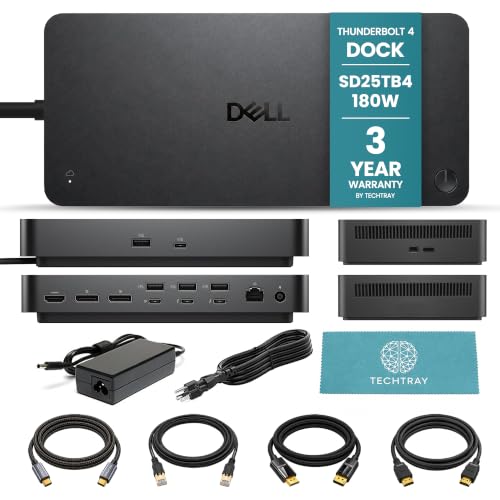
TechTray SD25TB4 Quad Display Dock
Best for: multi-monitor workstation setups
- Ports
- HDMI, DisplayPort, Ethernet, Thunderbolt 4
- Display Support
- Up to 4
- Max Resolution
- 8K@60Hz
- Host Interface
- Thunderbolt 4
- Power Delivery
- Up to 130W (Dell), 96W (non-Dell)
- Video Ports
- DisplayPort 1.4, HDMI 2.1
This TechTray bundle pairs the Dell SD25TB4 dock with necessary cables for a four-monitor setup. It delivers up to 130W of power to compatible Dell laptops and 96W for others. The dock supports four 4K displays at 60Hz or a single 8K display. You get two DisplayPort 1.4 ports and one HDMI 2.1 port for video output. It connects via Thunderbolt 4 for high-speed data and networking.
- Supports up to four 4K displays at 60Hz
- Includes HDMI 2.1 and two DisplayPort 1.4 outputs
- Provides up to 130W power delivery for Dell systems
- Bundle includes 2m DisplayPort, HDMI, and USB-C cables
- Lower power delivery of 96W for non-Dell computers compared to 130W for Dell
- MacOS users are limited to dual displays due to system constraints
- Requires specific Thunderbolt or DisplayPort connections for extended displays on Mac
- You need to drive four 4K monitors from a single laptop
- You use a Dell laptop that supports 130W power delivery
- You want a bundle with the necessary cables included
- You use a standard M1 or M2 Mac requiring only one display
- You need more than 130W of power for your workstation
- You prefer a dock with more than one HDMI port
Verdict: TechTray SD25TB4 Quad Display Dock is a practical solution for users requiring a four-monitor setup. It fits professionals who need high-resolution displays and sufficient power for their Dell laptops.

Koncept Thunderbolt 4 Modular Dock 130W
Best for: Dual 4K setups needing Thunderbolt 4 speed
- Ports
- HDMI, DisplayPort, USB-C, Thunderbolt 4
- Display Support
- Dual
- Max Resolution
- 4K
- Host Interface
- Thunderbolt 4
- Power Delivery
- 130W
- Data Transfer Speed
- 40Gbps
The Dell SD25TB4 is a Thunderbolt 4 docking station designed for dual 4K displays. It features two Thunderbolt-4 ports and one HDMI 2.0 output. The unit includes a 180W power adapter and supports up to 120W of charging. It measures 8.07 inches in length and weighs 1.28 pounds. This dock suits users who need reliable dual-monitor connectivity with robust data transfer speeds.
- Dual 4K display support via HDMI 2.0 and DisplayPort 1.4
- Thunderbolt 4 connectivity with 40Gbps data transfer
- Includes 180W power adapter for stable supply
- Swappable modular design for future upgrades
- Supports only dual monitors, while other options offer triple or quad displays
- HDMI port is version 2.0, limiting bandwidth compared to HDMI 2.1
- Heavier build at 1.28 pounds compared to lighter USB-C docks
- You require dual 4K monitors for your workflow
- You need Thunderbolt 4 speeds for fast data transfer
- You want a dock with a high-wattage power adapter included
- You need to connect three or more monitors simultaneously
- You require HDMI 2.1 for 8K or high-refresh-rate gaming
- You prefer a compact dock with minimal weight
Verdict: Dell SD25TB4 Thunderbolt 4 Dock provides solid dual 4K performance for professionals who prioritize Thunderbolt 4 speed and included power. It fits users who do not need triple displays or the latest HDMI 2.1 standard.

Plugable 12-in-1 Triple 4K USB-C Dock
Best for: triple monitor setups with USB-C laptops
- Ports
- HDMI, DisplayPort, USB-C, Ethernet, Thunderbolt 4
- Display Support
- Triple
- Max Resolution
- 4K@60Hz
- Host Interface
- USB-C
- Power Delivery
- 100W
- Video Ports
- 3x HDMI, 3x DisplayPort
This Plugable 12-in-1 docking station supports three 4K displays via HDMI or DisplayPort. It delivers 100W power delivery to charge most laptops without their original chargers. The unit includes six USB 3.0 ports, Ethernet, and audio jacks. It works with Windows, ChromeOS, and macOS systems using DisplayLink drivers. The compact black chassis measures 9.1 by 5.8 by 3.4 inches.
- Supports three 4K 60Hz displays simultaneously
- Provides 100W power delivery for laptops
- Includes six USB 3.0 downstream ports
- Features built-in Gigabit Ethernet connectivity
- Mac systems require separate DisplayLink driver installation
- Heavier at 2.4 pounds than many single-monitor docks
- 100W charging may be insufficient for high-power gaming laptops
- You need three external monitors for productivity
- You use a Windows or ChromeOS laptop
- You want a single cable for power and data
- You use a Mac without wanting to install drivers
- You have a gaming laptop requiring more than 100W
- You prefer Thunderbolt 5 speeds for maximum bandwidth
Verdict: Plugable 12-in-1 Triple 4K USB-C Dock fits users who need three 4K screens and reliable 100W charging for standard laptops.

Plugable Thunderbolt 5 Dual HDMI Dock
Best for: Thunderbolt 5 laptops needing 8K displays
- Ports
- HDMI, Ethernet, Thunderbolt 4
- Display Support
- Dual
- Max Resolution
- 8K@60Hz
- Host Interface
- Thunderbolt 5
- Power Delivery
- 140W
- Video Ports
- HDMI 2.1
The Plugable TBT-UDH2 is a 16-in-1 docking station designed for high-performance displays. It features dual HDMI 2.1 ports capable of 8K 60Hz or 4K 144Hz output. The dock provides 140W of power delivery for your laptop and includes six USB-C ports. It supports Thunderbolt 5, Thunderbolt 4, and USB4 hosts. This setup suits users needing maximum resolution and fast charging.
- Dual HDMI 2.1 ports support 8K 60Hz output
- 140W power delivery charges laptops quickly
- Six USB-C ports include two front-facing 30W options
- Compatible with Thunderbolt 5, Thunderbolt 4, and USB4 systems
- Requires Thunderbolt 5 or 4 host for full dual 8K performance
- Base M1, M2, and M3 Mac chips only support one external display
- Weighs 8.92 ounces, which is heavier than many standard docks
- You need dual 8K or 4K 144Hz displays
- You use a Thunderbolt 5 or 4 laptop
- You want 140W charging for your device
- You use a base M1, M2, or M3 Mac
- Your laptop only has Thunderbolt 3 or USB-C
- You need DisplayPort MUX gaming laptop support
Verdict: Plugable TBT-UDH2 Thunderbolt 5 Dock delivers top-tier video specs for users with compatible high-end laptops. It fits professionals who demand 8K resolution and fast charging without compromise.

iVANKY 26-in-1 FusionDock Ultra
Best for: Mac users needing quad 6K or dual 8K displays
- Ports
- HDMI, DisplayPort, Thunderbolt 4
- Display Support
- Quad
- Max Resolution
- 8K@60Hz
- Host Interface
- Thunderbolt 5
- Power Delivery
- 140W
- Data Transfer Speed
- 120Gbps
This iVANKY dock targets Mac users with a Thunderbolt 5 host interface and dual-chip architecture. It supports up to two 8K displays or four 6K monitors. You get 140W power delivery and a 10GbE port. The device includes SD and optical audio ports. It is designed for high-end macOS workflows requiring massive throughput.
- Thunderbolt 5 host interface
- Supports dual 8K or quad 6K displays
- 140W power delivery
- 10GbE Ethernet port
- SD 4.0 card reader
- Limited to Mac ecosystem compatibility
- Heavier build with active cooling fan
- Requires specific MacBook Pro models for full features
- You use a MacBook Pro M-Series Max
- You need dual 8K or quad 6K displays
- You require 10GbE connectivity
- You use a Windows PC
- You need standard HDMI-only connectivity
- You prefer a passive cooling design
Verdict: iVANKY FusionDock Ultra Thunderbolt 5 Mac Dock suits Mac power users needing extreme display counts and high-speed data. It fits professionals who need 10GbE and 140W charging in one unit.

Koncept ThinkPad USB-C Dual Monitor Dock
Best for: Dual monitor setups with included cables
- Ports
- HDMI, DisplayPort, USB-C
- Display Support
- Dual
- Max Resolution
- 4K
- Host Interface
- USB-C
- Power Delivery
- 90W
- Video Ports
- HDMI, DisplayPort, USB-C
The 40AY0090US Lenovo ThinkPad Docking Station connects dual monitors via HDMI and DisplayPort. It supports 4K UHD resolution for clear visuals. The unit includes a 90W power adapter and necessary cables. You get a microfiber cloth for maintenance. This dock suits users who need reliable display output and efficient energy delivery for their workspace setup.
- Supports dual monitor setups with HDMI and DisplayPort
- Delivers 4K UHD resolution for sharp visuals
- Includes 90W power adapter for stable energy supply
- Comes with HDMI and DisplayPort cables ready to use
- 90W power delivery is lower than the 100W or 130W options on this list
- Supports only dual monitors, whereas other picks offer triple display capability
- Uses USB-C connectivity which may limit compatibility with older USB-A devices
- You need a simple dual monitor setup with included cables
- You prioritize 4K UHD resolution for your displays
- You want a dock with a 90W power supply for your laptop
- You require triple monitor support for a multi-display workflow
- You need 100W or higher charging power for your devices
- You prefer Thunderbolt 4 or Thunderbolt 5 connectivity for higher speeds
Verdict: The Lenovo ThinkPad 40AY0090US Docking Station fits users who need a straightforward dual monitor setup with included cables and 4K support. It is a solid choice for those who do not require higher power delivery or triple displays.

HP USB-C 100W G6 Dock
Best for: triple 4K display setups with fast Ethernet
- Ports
- HDMI, DisplayPort, USB-C, Ethernet
- Max Resolution
- 4K@60Hz
- Host Interface
- USB-C
- Power Delivery
- 100W
- Video Ports
- DisplayPort 1.4, HDMI 2.1
- Total Ports
- 9
The HP USB-C 100W G6 Dock supports up to three 4K displays at 60Hz through its HDMI 2.1 and dual DisplayPort 1.4 outputs. It delivers 100W of power delivery to your laptop while providing 2.5 Gigabit Ethernet and multiple USB ports. This 9-in-1 station fits well for users needing a single-cable connection for video, data, and power across Windows, macOS, and ChromeOS devices.
- Supports up to 3x 4K@60Hz displays
- HDMI 2.1 and 2x DisplayPort 1.4 outputs
- 100W Power Delivery for laptop charging
- 2.5 Gigabit Ethernet port for fast networking
- Compatible with Windows, macOS, and ChromeOS
- Lower port count with only 9 connections compared to 12-in-1 or higher options on the list
- Heavier build at 1.49 pounds versus lighter competitors
- Smaller physical footprint may limit cable management space compared to bulkier 14-in-1 docks
- You need to drive three 4K monitors from a single USB-C connection
- You require 2.5 Gigabit Ethernet speeds for your network
- You want 100W charging to power your laptop directly
- You need more than three display outputs
- You require Thunderbolt 4 or Thunderbolt 5 connectivity
- You prefer a dock with 12 or more total ports
Verdict: HP USB-C 100W G6 Dock offers solid triple-display support and fast networking for professionals who prioritize video output and 2.5G Ethernet over a massive number of USB ports. It is a practical choice for users who need a reliable, single-cable solution for hybrid work setups.

ANYHDD WD22TB4 Thunderbolt 4 Dock
Best for: Users needing modular Thunderbolt 4 docks with 180W power
- Ports
- HDMI, DisplayPort, USB-C, Thunderbolt 4, USB-A
- Display Support
- Dual/Triple
- Max Resolution
- 4K
- Host Interface
- Thunderbolt 4
- Data Transfer Speed
- 40Gbps
- Video Ports
- DisplayPort 1.4, HDMI 2.0, USB-C
This Thunderbolt 4 dock supports dual 4K displays via HDMI and DisplayPort. It features two Thunderbolt 4 ports and a 40Gbps data transfer rate. The included 180W adapter provides ample power for connected devices. You get a modular design that allows for easy upgrades. It works with Windows, macOS, and Ubuntu operating systems for broad compatibility.
- Dual 4K display support via HDMI 2.0 and DisplayPort 1.4
- Thunderbolt 4 connectivity with 40Gbps data transfer speed
- Includes 180W power adapter for high-power device charging
- Modular design allows for swappable module upgrades
- HDMI 2.0 limit caps resolution at 4K 60Hz unlike HDMI 2.1 options
- Only one HDMI port compared to triple display competitors
- Single Gigabit Ethernet port limits network upgrade paths
- You need a Thunderbolt 4 dock with a 180W power adapter
- You want modular upgrade capability for your docking station
- You require dual 4K display support for productivity
- You need HDMI 2.1 for 8K or high refresh rate gaming
- You require triple monitor support without additional adapters
- You want a dock with Wi-Fi 6E or faster networking
Verdict: ANYHDD WD22TB4 Thunderbolt 4 Dock delivers reliable dual 4K output and high-speed data transfer for users who value modular design. It suits professionals needing a 180W power solution over those requiring advanced display refresh rates.
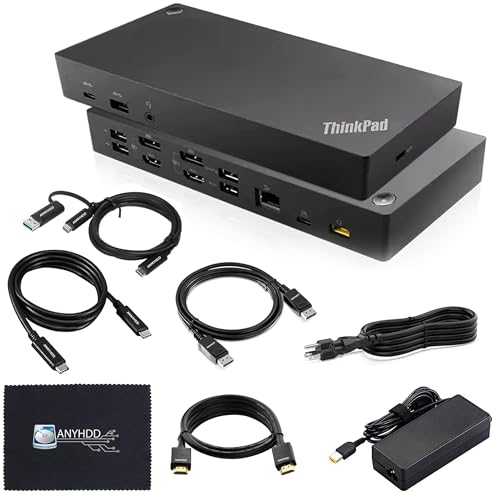
Lenovo ThinkPad Hybrid Dual 4K Dock
Best for: Dual 4K displays with hybrid connectivity
- Ports
- HDMI, DisplayPort, USB-C, USB-A
- Display Support
- Up to 2
- Max Resolution
- 4K
- Host Interface
- USB-C, USB-A
- Video Ports
- DisplayPort 1.2, HDMI
- Ethernet Speed
- 10/100/1000 Mb/s
This ANYHDD docking station offers dual 4K display support via two HDMI and two DisplayPort 1.2 outputs. It includes a 135W AC adapter for stable power delivery and connects through a hybrid USB-C or USB-A cable. The unit weighs 3.51 pounds and features a black finish. It suits users needing reliable dual-monitor connectivity with flexible port options for various laptop connections.
- Supports up to two 4K displays
- Includes 135W AC power adapter
- Features two HDMI and two DisplayPort 1.2 outputs
- Connects via USB-C or USB-A adapter
- Ethernet port limited to 10/100/1000 Mb/s speeds
- Heavier build at 3.51 pounds compared to lighter alternatives
- You need dual 4K monitor support
- You require a 135W power adapter
- You prefer hybrid USB-C or USB-A connectivity
- You need Thunderbolt 4 or 5 speeds
- You require 2.5GbE or faster Ethernet
- You want a triple monitor setup
Verdict: ANYHDD 135W Hybrid USB-C Dock provides solid dual 4K output and flexible connectivity for users who do not need Thunderbolt speeds. It is a practical choice for those who value included power adapters and hybrid cabling options.

Belkin 15-in-1 Triple DisplayLink Dock
Best for: multi-monitor setups with audio needs
- Ports
- HDMI, DisplayPort, USB-C, USB-A
- Display Support
- Triple
- Max Resolution
- 4K
- Host Interface
- USB-C
- Power Delivery
- 85W
- Video Ports
- 3x HDMI, 2x DisplayPort
This Belkin docking station supports three 4K displays via HDMI and DisplayPort. It includes 85W pass-through charging and a Gigabit Ethernet port. The unit features built-in speakers and multiple USB ports. You need to install DisplayLink drivers for triple display support on Windows and Mac. It suits users who need multiple screens and audio output from one dock.
- Supports triple 4K displays
- Built-in speakers for audio
- 85W pass-through charging
- Gigabit Ethernet connectivity
- 85W charging is lower than the 100W or 130W found on other docks
- Requires driver download for triple display functionality
- Larger footprint at 10.5 inches long
- You need three monitors for productivity
- You want built-in speakers without extra cables
- You use Windows or Mac laptops
- You require 100W or higher charging speed
- You want plug-and-play triple displays without drivers
- You prefer a compact single-monitor setup
Verdict: Belkin 15-in-1 Triple Display Dock is a solid choice for users who need three 4K screens and built-in audio. It fits those willing to install drivers for a multi-monitor workflow.

ANYHDD USB-C G6 100W Dock
Best for: Dual monitor setups with single-cable simplicity
- Ports
- HDMI, DisplayPort, USB-C, Ethernet
- Display Support
- Dual
- Host Interface
- USB-C
- Power Delivery
- 100W
- Video Ports
- HDMI, DisplayPort
- Features
- Power Delivery
The ANYHDD USB-C G6 is a silver docking station designed for dual displays. It connects laptops via a single USB-C cable and supports up to 100W power delivery. You get HDMI and DisplayPort outputs alongside Ethernet and USB ports. The compact design includes integrated cable management. It suits users who need a straightforward dual-monitor setup with reliable charging for their USB-C or Thunderbolt devices.
- Supports dual display output via HDMI and DisplayPort
- Provides 100W Power Delivery for laptop charging
- Includes Ethernet and USB ports for peripherals
- Uses single-cable USB-C connectivity
- Compact form factor with integrated cable management
- Supports only dual displays, while other options offer triple or quad monitor support
- Uses USB-C connection instead of Thunderbolt for higher bandwidth
- Fewer total ports compared to 13-in-1 or higher count docks
- You need a simple dual-monitor setup
- You want a compact dock with cable management
- You require 100W charging for your laptop
- You need to drive three or more monitors
- You require Thunderbolt 4 or 5 speeds
- You want a wide variety of port options
Verdict: The ANYHDD USB-C G6 100W Dock fits users who prioritize a clean, compact setup for two screens and fast charging. It delivers essential connectivity without the complexity of multi-monitor or Thunderbolt systems.
Specifications side by side

| Spec | Anker Prime 14-in-1 Dual Display Dock | Plugable 13-in-1 Triple 4K USB-C Dock | Plugable 16-in-1 Thunderbolt 4 Dock | ANYHDD ThinkPad Dual 4K USB-C Dock | TechTray SD25TB4 Quad Display Dock | Koncept Thunderbolt 4 Modular Dock 130W | Plugable 12-in-1 Triple 4K USB-C Dock | Plugable Thunderbolt 5 Dual HDMI Dock | iVANKY 26-in-1 FusionDock Ultra | Koncept ThinkPad USB-C Dual Monitor Dock | HP USB-C 100W G6 Dock | ANYHDD WD22TB4 Thunderbolt 4 Dock | Lenovo ThinkPad Hybrid Dual 4K Dock | Belkin 15-in-1 Triple DisplayLink Dock | ANYHDD USB-C G6 100W Dock |
|---|---|---|---|---|---|---|---|---|---|---|---|---|---|---|---|
| Display Support | Dual | Triple | Dual | Dual | Up to 4 | Dual | Triple | Dual | Quad | Dual | – | Dual/Triple | Up to 2 | Triple | Dual |
| Max Resolution | 4K | 4K@60Hz | 4K@60Hz | 4K | 8K@60Hz | 4K | 4K@60Hz | 8K@60Hz | 8K@60Hz | 4K | 4K@60Hz | 4K | 4K | 4K | – |
| Host Interface | USB-C | USB-C | Thunderbolt 4 | USB-C | Thunderbolt 4 | Thunderbolt 4 | USB-C | Thunderbolt 5 | Thunderbolt 5 | USB-C | USB-C | Thunderbolt 4 | USB-C, USB-A | USB-C | USB-C |
| Power Delivery | 100W | 100W | 100W | – | Up to 130W (Dell), 96W (non-Dell) | 130W | 100W | 140W | 140W | 90W | 100W | – | – | 85W | 100W |
| Data Transfer Speed | 10Gbps | 10Gbps | 40Gbps | – | – | 40Gbps | – | – | 120Gbps | – | – | 40Gbps | – | – | – |
| Video Ports | HDMI | 3x HDMI, 3x DisplayPort | 2x HDMI, 2x DisplayPort | HDMI, DisplayPort | DisplayPort 1.4, HDMI 2.1 | Thunderbolt 4, DP 1.4, HDMI 2.0 | 3x HDMI, 3x DisplayPort | HDMI 2.1 | HDMI, DisplayPort | HDMI, DisplayPort, USB-C | DisplayPort 1.4, HDMI 2.1 | DisplayPort 1.4, HDMI 2.0, USB-C | DisplayPort 1.2, HDMI | 3x HDMI, 2x DisplayPort | HDMI, DisplayPort |
| Total Ports | 14 | 13 | 16 | – | – | – | 12 | 16 | 26 | – | 9 | – | – | 15 | – |
| Ethernet Speed | – | – | 2.5Gbps | – | – | Gigabit | – | 2.5GbE | 10GbE | – | 2.5GbE | Gigabit | 10/100/1000 Mb/s | Gigabit | – |
| Resolution | 4K UHD | 4K UHD | 4K UHD | 4K UHD | – | 4K UHD | 4K UHD | 8K UHD | 8K UHD | 4K UHD | 4K UHD | 4K UHD | – | 4K UHD | – |
| Refresh Rate | – | – | – | – | – | – | – | 144Hz | – | – | – | – | – | – | – |
| Ports | HDMI, Ethernet | HDMI, DisplayPort, USB-C, Thunderbolt 4 | HDMI, DisplayPort, Ethernet, Thunderbolt 4 | HDMI, DisplayPort, USB-C | HDMI, DisplayPort, Ethernet, Thunderbolt 4 | HDMI, DisplayPort, USB-C, Thunderbolt 4 | HDMI, DisplayPort, USB-C, Ethernet, Thunderbolt 4 | HDMI, Ethernet, Thunderbolt 4 | HDMI, DisplayPort, Thunderbolt 4 | HDMI, DisplayPort, USB-C | HDMI, DisplayPort, USB-C, Ethernet | HDMI, DisplayPort, USB-C, Thunderbolt 4, USB-A | HDMI, DisplayPort, USB-C, USB-A | HDMI, DisplayPort, USB-C, USB-A | HDMI, DisplayPort, USB-C, Ethernet |
| Features | Audio Support | Power Delivery | Power Delivery, SD Card Reader | – | – | – | Power Delivery | Power Delivery | Power Delivery, SD Card Reader | – | Power Delivery | – | – | Built-in Speakers, Power Delivery, DisplayLink | Power Delivery |
| Use | – | Mac | Mac | – | – | – | Mac | – | Mac | – | – | – | – | – | – |
| Operating System | – | ChromeOS | macOS | – | – | – | Windows | macOS | Windows | – | Windows | – | – | Windows | – |
| Dimensions | 5.51 × 3.82 × 1.85 inches | 4.72 × 2.64 × 6.89 inches | 11.9 × 6 × 4.3 inches | – | – | 8.07 × 3.54 × 1.39 inches | 7.87 × 3.39 × 1.26 inches | 1.97 × 2.95 × 5.91 inches | – | – | 4.76 × 4.76 × 2 inches | – | – | 10.5 × 6 × 3.5 inches | – |
| Weight | 2.82 pounds | 1.07 pounds | 1.42 pounds | 1 pounds | – | 1.28 pounds | 2.4 pounds | 8.92 ounces | – | – | 1.49 pounds | – | 3.51 pounds | – | – |
| Color | Grey | – | Silver | Black | Black | Black | Black | Space Gray | Black | Black | Black | black | Black | black | Silver |
| Model | A83B6 | UD-ULTC4K | TBT4-UDZ | DOCK-40AY0090US-New | SD25TB4 | SD25TB4 | UD-6950PDZ | TBT-UDH2 | – | 40AY0090US | – | DOCK-WD22TB4 | 40AF0135US | INC007TTBK | – |
| Size | – | – | 11.6" × 5.8" × 4.1" | 8 x 3 inch | – | – | 9.1" × 5.8" × 3.4" | – | – | – | 100W | – | – | 85W | – |
How to choose the right docking station
Check display count needs
Most docks support dual 4K displays, but some users require triple or quad setups. If you need three screens, look for triple display support like the Plugable 13-in-1 Triple 4K USB-C Dock. For even more screens, the TechTray SD25TB4 offers quad display support. Verify the dock explicitly states its display support capabilities before buying. Higher display counts often require specific host interfaces like Thunderbolt 4 or DisplayLink technology to function correctly. Ensure your laptop can handle the additional video outputs without performance issues.
Verify host interface type
The connection type between your laptop and the dock matters significantly. Thunderbolt 4 docks like the Plugable Thunderbolt 5 Dual HDMI Dock offer high bandwidth for 8K resolutions. Standard USB-C docks may limit resolution or refresh rates. Check if your laptop supports Thunderbolt 4 or Thunderbolt 5. If you have an older laptop, a standard USB-C dock might be your only option. The interface determines maximum data speed and video output quality. Match the dock interface to your laptop port to ensure full functionality and avoid compatibility issues.
Assess power delivery needs
Power delivery charges your laptop through the dock. Many docks offer 100W or 140W charging. The Koncept Thunderbolt 4 Modular Dock provides 130W power for high-performance laptops. If your laptop requires more power, ensure the dock meets that threshold. Lower power delivery might charge slowly or not at all under heavy load. Check your laptop's charging requirements. A dock with insufficient power delivery will not keep up with your device's energy consumption during intensive tasks. Choose a dock that matches or exceeds your laptop's power needs.
Check resolution and refresh rate
Resolution determines image clarity. Most docks support 4K UHD. Some premium options like the Plugable Thunderbolt 5 Dual HDMI Dock support 8K UHD at 144Hz. If you need high refresh rates for smooth motion, verify the dock supports your monitor's specs. Standard 4K docks often cap at 60Hz. Higher refresh rates require more bandwidth. Check the specifications for both resolution and refresh rate. Ensure the dock can output the resolution and refresh rate your monitors require for your specific workflow.
Consider operating system compatibility
Some docks work better with specific operating systems. The Plugable 13-in-1 Triple 4K USB-C Dock is noted for ChromeOS compatibility. Others may require specific drivers for Mac or Windows. Check if the dock supports your operating system natively. Some docks use DisplayLink technology, which requires driver installation on Windows or Mac. Ensure your OS is supported to avoid connectivity issues. Verify compatibility before purchasing to ensure a seamless setup experience without unnecessary software configuration or hardware limitations.
Frequently asked questions
Can a docking station support dual 4K monitors via HDMI?
Yes, many models support dual 4K outputs. The Anker Prime 14-in-1 Dual Display Dock provides dual 4K UHD support for Windows and ChromeOS. The Plugable 16-in-1 Thunderbolt 4 Dock also offers dual 4K 60Hz output. These docks allow you to connect two high-resolution displays simultaneously through HDMI ports.
Which docking station is best for triple monitor setups?
Several options support triple displays. The Plugable 13-in-1 Triple 4K USB-C Dock is designed for ChromeOS users needing three 4K screens. The Plugable 12-in-1 Triple 4K USB-C Dock works with Windows and Mac. The Belkin 15-in-1 Triple DisplayLink Dock also provides three 4K outputs with built-in speakers.
Do these docks support 8K resolution displays?
Some high-end docks support 8K resolution. The Plugable Thunderbolt 5 Dual HDMI Dock delivers 8K UHD at 144Hz. The iVANKY 26-in-1 FusionDock Ultra supports dual 8K displays for Mac users. These models are suitable if you require the highest possible clarity for professional video work or detailed graphics.
Is Thunderbolt 4 or USB-C better for HDMI docks?
Thunderbolt 4 offers higher bandwidth and reliability. The Plugable 16-in-1 Thunderbolt 4 Dock and ANYHDD WD22TB4 Thunderbolt 4 Dock use this interface for stable dual 4K output. Standard USB-C docks like the ANYHDD ThinkPad Dual 4K Dock are also viable. Choose Thunderbolt 4 if you need maximum data throughput and charging speed.
Can I charge my laptop through an HDMI docking station?
Yes, most docks include Power Delivery. The Plugable 13-in-1 USB-C Dock provides 100W PD. The Plugable Thunderbolt 5 Dual HDMI Dock offers 140W PD. The HP USB-C 100W G6 Dock also delivers 100W. This allows you to power your laptop while connected to multiple monitors and peripherals.
Are there docking stations with built-in speakers?
Yes, the Belkin 15-in-1 Triple DisplayLink Dock includes built-in speakers. This feature is useful for users who want audio output without connecting external speakers. It supports triple 4K displays and works with Windows. This dock simplifies your setup by integrating audio directly into the docking station hardware.
Which dock is best for a four-monitor setup?
The TechTray SD25TB4 Quad Display Dock is designed for this purpose. It supports four monitors via HDMI and DisplayPort connections. It uses a Thunderbolt 4 interface for high-speed data transfer. This dock is ideal for professionals who need extensive screen real estate for complex workflows or data monitoring.
See also