Amazon Basics 27-Inch Monitor Comparison: 100Hz, 120Hz, or 165Hz?
As Amazon Associates, we earn from qualifying purchases. This means we may receive a small commission at no extra cost to you if you click through and make a purchase.
Choosing the right amazon basics 27 inch monitor requires balancing refresh rate, color reproduction, and desk connectivity. A 1080p display at 27 inches provides an expansive workspace for multitasking, document management, and multimedia without taking over your desk. Deciding which amazon basics monitor to buy depends on whether your daily routine centers on general office tasks, color-sensitive design, or fast-paced gaming.
This amazon basics monitor comparison covers three distinct models: the 100Hz everyday display, the 120Hz productivity screen with wide color coverage, and the 165Hz gaming panel. While all three feature a 27-inch screen size, 16:9 aspect ratio, matte anti-glare finish, and Full HD 1080p resolution, they differ across refresh rates, contrast ratios, response times, and bezel designs. Evaluating these specifications ensures you select the display tailored to your workstation.
Which Amazon Basics 27-Inch Monitors Should You Buy
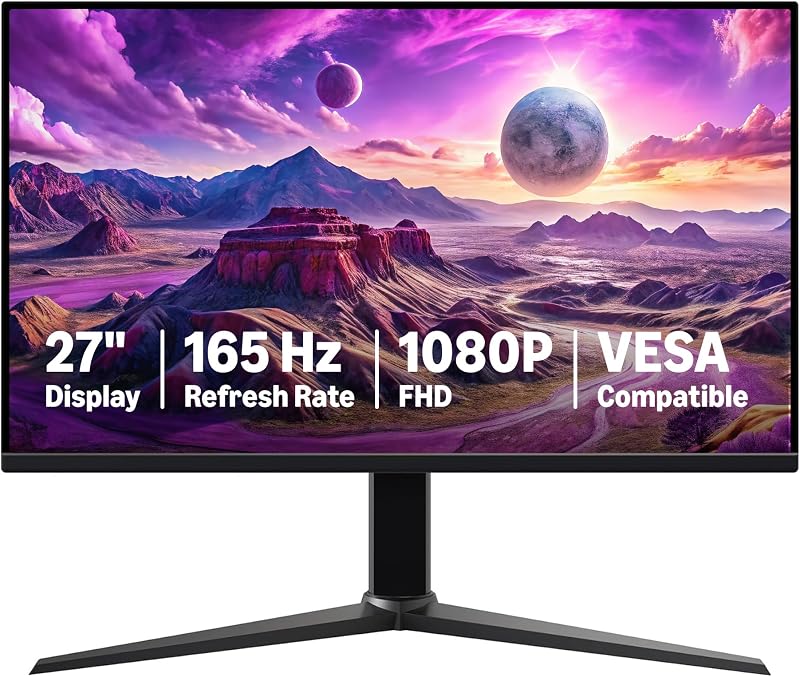
Best for: Fast-paced gaming on a budget
Pros
- 165Hz refresh rate
- 1ms rapid response time
- Adaptive sync technology
- Matte anti-glare screen
Cons
- Standard 1000:1 contrast ratio
- Listing omits built-in speakers

Best for: Multi-monitor workspaces and color-critical tasks
Pros
- 99% sRGB color coverage
- Four-sided narrow bezel design
- DisplayPort and HDMI connectivity
- Adaptive Sync with 120Hz
Cons
- 14ms response time

Best for: Everyday office productivity and desk audio
Pros
- 100Hz smooth refresh rate
- Built-in speakers and USB ports
- 1500:1 static contrast ratio
Cons
- 170-degree viewing angle
- Listing omits response time
- Choose the 100Hz model if you want an everyday workspace display with integrated USB ports, built-in speakers, and high static contrast for administrative duties.
- Select the 120Hz model if you need enhanced color accuracy with 99% sRGB coverage, a four-sided narrow bezel for multi-monitor setups, wide 178-degree viewing angles, and DisplayPort connectivity.
- Pick the 165Hz gaming model if your priority is smooth gameplay powered by a 1ms response time, high refresh rates, and adaptive synchronization.
Amazon Basics 27 Inch Monitor
Amazon Basics
4.4 average from Amazon buyers
- Color
- Black
- Size
- 27"
- Dimensions
- 24.21 x 8.86 x 17.99 Inches
- Weight
- 8.38 pounds
Listed by the seller on the product page.
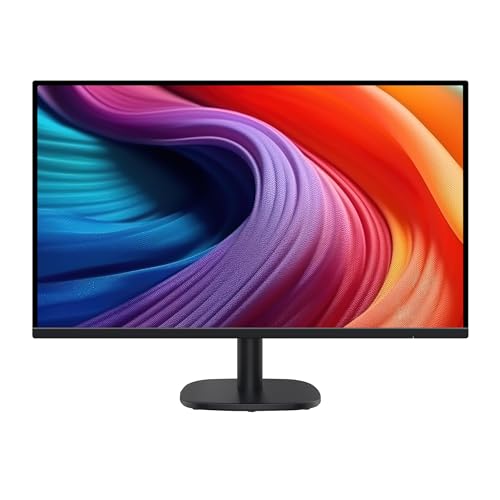
The Amazon Basics 27 Inch Monitor functions as a dependable display designed for standard office workflows, administrative computing, and daily entertainment. Built around an LCD panel utilizing IPS technology, this amazon basics 1080p 27 inch screen delivers a native resolution of 1920×1080 on a 16:9 widescreen layout. A standout feature is its 1500:1 contrast ratio, producing deep black levels and crisp text rendering. Operating at a 100Hz refresh rate, it provides smoother cursor tracking and window movement than conventional 60Hz screens, reducing visual fatigue during long sessions. Before arranging your desk, noting measurements in an amazon basics notebook helps ensure a proper fit for this display, which measures 24.07 inches wide, 17.96 inches high, and 9.05 inches deep with its stand.
This amazon basics 100hz monitor includes integrated speakers that deliver clear digital sound for calls and media playback without desktop clutter. It also provides built-in USB ports for connecting peripherals directly to the screen housing. The display surface features a matte screen finish to diffuse overhead glare, paired with a 170-degree viewing angle and a 0.23 pixel pitch for clean graphic relays. The listing explicitly notes that users must remove the protective shipping film with the date code from the panel surface before initial operation. Weighing 8.4 pounds and offering standard VESA compatibility, the monitor easily adapts to articulating monitor arms.
This model serves as the best amazon basics monitor for office users who require reliable performance, integrated audio, and USB hub convenience. However, it gives way to the 120Hz model when your work involves color-sensitive editing, multi-monitor alignment with ultra-thin borders, or DisplayPort connections. Furthermore, users seeking fast-paced gaming performance should look toward the dedicated 165Hz version, as this unit is engineered primarily for office productivity and casual viewing rather than low response times.
- Full HD 1080p resolution with a smooth 100Hz refresh rate and 1500:1 contrast ratio
- Built-in speakers and integrated USB ports for convenient desktop peripheral access
- Matte screen finish with a 170-degree viewing angle and 0.23 pixel pitch
- VESA mount compatibility and an 8.4-pound total weight for flexible mounting
Amazon Basics 27-inch Computer Monitor
Amazon Basics
4.5 average from Amazon buyers
- Color
- Black
- Size
- 27 Inches
- Dimensions
- 7.9 x 24.2 x 17.68 Inches
Listed by the seller on the product page.
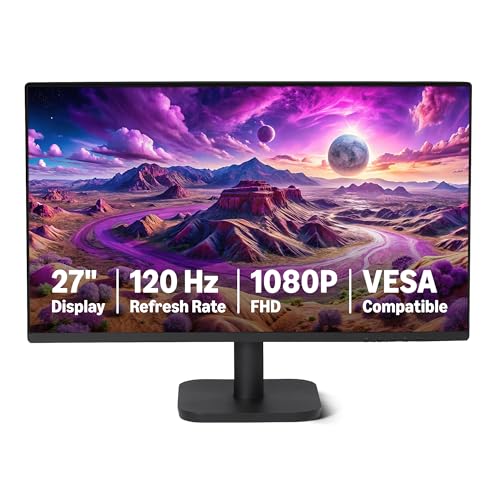
The Amazon Basics 27-inch Computer Monitor delivers a refined visual experience for professionals who demand superior color performance and smooth screen transitions. This amazon basics 120hz ips monitor features a 27-inch IPS panel with Full HD 1920×1080 resolution, 16.7 million displayable colors, and 99% sRGB color space coverage. Combined with a 1500:1 contrast ratio and a matte screen finish, it renders rich, vibrant images and crisp text. It also provides wide 178-degree viewing angles, maintaining consistent color and contrast even when viewing the screen from off-axis angles.
Connectivity includes HDMI 1.4, DisplayPort 1.2, and a 3.5mm audio-out port, alongside built-in dual 2W speakers that provide convenient audio for meetings. If you require higher acoustic fidelity, you can route sound through external amazon basic speakers via the audio-out jack. A major hardware advantage is the four-sided narrow bezel design, which creates a near-borderless viewing area ideal for multi-monitor workstations. For eye comfort, the screen incorporates LowBlue Light and Flicker-Free technologies. Achieving the maximum 120Hz refresh rate with Adaptive Sync requires connecting through a certified 120Hz HDMI or DisplayPort cable paired with a compatible graphics card.
This display is well-suited for content creators and spreadsheet analysts seeking accurate colors and minimal frame bezels. However, with its 14ms response time, it gives way to the 165Hz gaming monitor for fast-paced competitive games where instantaneous pixel response is critical. Additionally, users who rely heavily on direct USB peripheral connectivity at their display may prefer the 100Hz model, as this 120Hz unit concentrates its connectivity on video inputs and audio output.
- 120Hz refresh rate with Adaptive Sync technology and a 14ms response time
- 99% sRGB color gamut coverage with 16.7 million colors and 1500:1 contrast ratio
- Four-sided narrow bezel enclosure with wide 178-degree viewing angles
- HDMI 1.4, DisplayPort 1.2, 3.5mm audio jack, and dual 2W speakers
Amazon Basics 27 inch Gaming Monitor

Amazon Basics
4.4 average from Amazon buyers
- Color
- Black
- Size
- 27"
- Dimensions
- 24 x 10.37 x 20.44 Inches
- Weight
- 9.92 pounds
Listed by the seller on the product page.
The Amazon Basics 27 inch Gaming Monitor is engineered for fast-moving visual entertainment and gaming setups. This amazon basics 165hz gaming monitor combines a 27-inch LCD panel with an ultra-fast 165Hz refresh rate and a rapid 1ms response time, delivering near-zero lag and minimizing motion blur during fast gameplay sequences. Operating at Full HD 1080p resolution on a 16:9 aspect ratio, it ensures sharp graphics relay while allowing graphics cards to sustain high frame rates. Like the 100Hz model, the listing notes an important step: you must remove the protective film with the printed date code from the panel surface before initial operation.
To prevent screen tearing and stuttering, this monitor features adaptive sync technology that coordinates panel refresh cycles with GPU frame delivery. Unlocking the full 165Hz refresh rate requires using a DisplayPort 1.4 or HDMI 2.0 compatible cable connected to a graphics card capable of driving 1080p at 165Hz. The panel incorporates a matte screen finish to eliminate glare, a 170-degree viewing angle, a 0.36 pixel pitch, and a standard 1000:1 contrast ratio. Weighing 9.9 pounds, the display includes standard VESA mounting holes, allowing users to swap the factory base for an articulating arm.
This unit is the definitive choice for gamers who prioritize fluid motion, 1ms pixel transitions, and adaptive synchronization. Where it gives way to the 120Hz model is in color-critical work, as the 120Hz version provides a higher 1500:1 contrast ratio, 99% sRGB color coverage, and four-sided narrow bezels for multi-screen productivity. Furthermore, because the listing does not specify built-in speakers or USB ports on this 165Hz screen, users looking for an all-in-one workstation hub may find the 100Hz or 120Hz models more convenient.
- High-speed 165Hz refresh rate with a rapid 1ms response time for smooth gaming
- Adaptive sync technology to prevent visual stutter and screen tearing
- Full HD 1080p resolution with a matte finish and 1000:1 contrast ratio
- VESA mount compatible 9.9-pound build requiring DP 1.4 or HDMI 2.0 for max speed
What Sets These Models Apart
| Model | Refresh Rate & Response Time | Contrast & Color | Viewing Angle & Bezels | Audio & Ports |
|---|---|---|---|---|
| Amazon Basics 27 Inch Monitor | 100Hz (response time not specified) | 1500:1 contrast ratio (color coverage not specified) | 170 degrees (standard bezels) | Built-in speakers, USB ports |
| Amazon Basics 27-inch Computer Monitor | 120Hz with Adaptive Sync, 14ms | 1500:1 contrast ratio, 99% sRGB, 16.7M colors | 178 degrees, 4-sided narrow bezel | Dual 2W speakers, HDMI 1.4, DP 1.2, 3.5mm audio |
| Amazon Basics 27 inch Gaming Monitor | 165Hz with Adaptive Sync, 1ms | 1000:1 contrast ratio (color coverage not specified) | 170 degrees (standard bezels) | Audio not specified, DP 1.4 / HDMI 2.0 required |
The primary distinctions among these three monitors center on refresh rate, response speed, panel aesthetics, and port selections. The progression from 100Hz to 120Hz and 165Hz directly addresses different performance needs. While a 100Hz refresh rate delivers noticeably smoother window dragging than legacy 60Hz screens, the 120Hz and 165Hz options add adaptive synchronization to eliminate tearing during video playback and gaming. Response times also show sharp differentiation: the 120Hz model uses a 14ms response time tailored for general office comfort, whereas the 165Hz gaming panel achieves a 1ms response time to eliminate motion ghosting.
Color capabilities and chassis designs create further separation. The 100Hz and 120Hz models both deliver a 1500:1 contrast ratio, outperforming the 1000:1 ratio on the 165Hz gaming screen for contrast-rich documents. However, the 120Hz monitor stands out as the most visually refined with its 99% sRGB coverage, four-sided narrow bezels, and 178-degree viewing angles. Connectivity choices also reflect these target roles: the 100Hz model provides USB ports, the 120Hz monitor incorporates DisplayPort 1.2, HDMI 1.4, and an audio-out jack, and the 165Hz display requires DisplayPort 1.4 or HDMI 2.0 to sustain maximum throughput.
Buying Tips for Amazon Basics 27-Inch Monitors
When setting up any amazon basics 27 inch monitor, verifying cable capabilities and operating system settings is essential for achieving advertised refresh rates. Connecting your display does not guarantee maximum performance if the system defaults to lower settings. For both the 120Hz computer monitor and the 165Hz gaming screen, you must utilize high-bandwidth connections such as DisplayPort 1.2, DisplayPort 1.4, or certified HDMI 2.0 cables. Once connected, open operating system display properties and confirm the refresh rate is set to 100Hz, 120Hz, or 165Hz rather than the standard 60Hz baseline.
Ergonomics and physical placement should also guide workspace design. Each monitor features VESA mounting compatibility, allowing you to attach them to third-party desk arms or wall brackets to free up desktop space. Adjusting your screen height so the top third of the display sits at eye level helps prevent neck strain, especially when paired with an ergonomic setup like an amazon basics chair that supports healthy posture during long hours at your desk. If your workflow requires two screens side by side, the four-sided narrow bezel on the 120Hz model provides the cleanest visual alignment.
Finally, pay close attention to initial unboxing procedures and viewing distances. Both the 100Hz and 165Hz models come with a protective transit film printed with a date code that must be peeled off before you begin using the screen. Leaving this film in place degrades brightness and causes glare. In addition, because 27 inches is a substantial screen size for a 1080p resolution, sitting roughly two to three feet away from the display ensures that text remains sharp and comfortable to read without noticeable pixelation.
FAQ
Do these Amazon Basics 27-inch monitors come with built-in speakers?
The 100Hz Amazon Basics 27 Inch Monitor and the 120Hz Amazon Basics 27-inch Computer Monitor both feature integrated audio, with the 120Hz model specifically offering dual 2W speakers alongside a 3.5mm audio-out port. For the 165Hz gaming monitor, the listing does not specify built-in speakers, meaning users should connect external speakers or headphones.
How do I achieve the maximum 165Hz refresh rate on the gaming monitor?
To run the Amazon Basics 27 inch Gaming Monitor at 165Hz, your computer graphics card must support 1080p output at 165Hz. You must connect the monitor using a DisplayPort 1.4 or HDMI 2.0 compatible cable, and then select the 165Hz option inside your operating system display settings or GPU control panel.
Why is there a protective film with a date code on the screen?
The manufacturer places a protective film with a printed date code on the display surface to prevent scratches and abrasions during factory packaging and shipping. As noted on the listings for the 100Hz and 165Hz models, you must remove this film before using the monitor to avoid visual distortion and glare.
Can I mount these Amazon Basics 27-inch monitors on a monitor arm?
Yes, all three models feature VESA compatibility, allowing you to attach them to standard VESA-compliant monitor arms or wall mounts. Their weights range from 8.4 pounds for the 100Hz display to 9.9 pounds for the 165Hz gaming model, which is well within the weight capacity of most standard desk mounts.
Which Amazon Basics 27-inch monitor is best for a dual-monitor setup?
The 120Hz Amazon Basics 27-inch Computer Monitor is the best choice for dual-monitor arrangements. Its four-sided narrow bezel design creates minimal visual gap between adjacent screens, while its 178-degree viewing angles and 99% sRGB color coverage provide consistent color and brightness across your entire visual field.