BenQ 4K 32-Inch Monitor Lineup: Which Model Fits Your Work?
As Amazon Associates, we earn from qualifying purchases. This means we may receive a small commission at no extra cost to you if you click through and make a purchase.
Choosing the right benq 4k 32 monitor requires matching panel hardware, screen coatings, and ports to your daily workflow. BenQ does not rely on a generic approach for its 32-inch 4K lineup. Instead, the company designs specialized series: the MA series for seamless Apple Mac integration, the PD series for color-critical design work, and the RD series for long coding sessions. Understanding these distinct priorities ensures you select a display that complements your workstation.
This benq 32 inch 4k monitor comparison analyzes six dedicated displays to help you identify the best benq 32 inch 4k monitor for your needs. While all six share a 3840×2160 resolution across a 32-inch class form factor, they vary in panel finishes, refresh rates, contrast ratios, and port bandwidth. Across the lineup, finishes range from traditional matte and glossy to nano gloss and nano matte, while contrast options reach 2000:1 and refresh rates span 60Hz to 120Hz. Reviewing these specifications makes it clear which benq 4k 32 monitor to buy.
Which BenQ 32-Inch 4K Monitor Should You Buy
- BenQ MA320U: Best for Mac laptop users wanting glare-free matte viewing with direct keyboard brightness and volume controls.
- BenQ PD3205U: Best for web designers and digital artists who need factory-calibrated sRGB and Rec.709 accuracy with a Hotkey Puck.
- BenQ MA320UP: Best for creative Mac professionals desiring vibrant Apple-style glossy clarity with a 2000:1 contrast ratio.
- BenQ MA320UG: Best for high-productivity Mac users demanding fluid 120Hz motion, dual Thunderbolt 4 bandwidth, and Smart KVM switching.
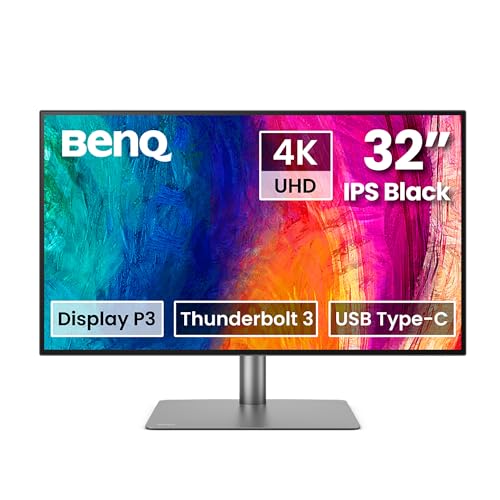
- BenQ PD3225U: Best for colorists and print specialists requiring 2000:1 IPS Black depth, Thunderbolt 3 daisy-chaining, and wide P3 precision.
- BenQ RD320U: Best for software developers who need dedicated dark and light coding modes, MoonHalo bias lighting, and Night Hours protection.
BenQ MA320U 32” 4K 3840×2160 Monitor

BenQ
4.8 average from Amazon buyers
- Color
- Sliver
- Size
- 2.00
- Dimensions
- 28 x 24 x 8 inches
Listed by the seller on the product page.
Best for: MacBook users wanting matte desktop display
Pros
- Native Mac keyboard brightness and volume controls
- Dual USB-C with 90W and 15W charging
- P3 wide color gamut tuning
Cons
- Standard 60Hz refresh rate
- Lacks integrated KVM switch
The BenQ MA320U 32” 4K 3840×2160 Monitor is engineered specifically for MacBook Pro and MacBook Air users seeking an external screen that mirrors Apple display behavior. Featuring BenQ exclusive Mac color tuning, the panel covers the wide P3 color gamut to maintain visual consistency when moving windows between laptop and desktop. A defining feature is integrated control sync, which allows users to adjust display brightness and speaker volume directly from their MacBook keyboard without touching physical monitor buttons.
The port hub provides two HDMI connections and two USB-C ports. The primary USB-C port supplies 90W power delivery to charge laptops over a single cable, while the secondary USB-C port delivers 15W to power an iPad or iPhone. Its matte finish diffuses ambient reflections in bright offices, and the stand provides full height, tilt, swivel, and pivot adjustments. The screen runs at 60Hz with 400 nits brightness. This display suits Mac office workers and general creative professionals who prioritize native system controls over high refresh rates or dedicated calibration pucks.
- Direct brightness and volume adjustment from MacBook keyboards
- Dual USB-C connectivity with 90W laptop charging and 15W device charging
- Tuned P3 wide color gamut calibrated for Apple laptop screens
- Fully adjustable stand with height, tilt, swivel, and pivot articulation
BenQ PD3205U Mac-Ready Monitor 32" 4K

BenQ
4.2 average from Amazon buyers
- Color
- Metallic Grey
- Size
- 32 Inch
Listed by the seller on the product page.
Best for: Designers focused on sRGB and Rec.709 accuracy
Pros
- Calman Verified and Pantone Validated accuracy
- Hotkey Puck G2 for rapid setting changes
- Integrated KVM Switch and DualView mode
Cons
- Moderate 350 cd brightness
- Standard 1000:1 contrast ratio
The BenQ PD3205U Mac-Ready Monitor 32″ 4K serves creative professionals who require verified standard color space precision. Featuring a 31.5-inch IPS display with a 1000:1 contrast ratio, it delivers 99% sRGB and 99% Rec.709 coverage with a factory calibration report guaranteeing Delta E under or equal to 3. Calman Verified and Pantone Validated certifications confirm that colors render faithfully for digital publishing, web design, and standard video pipelines.
For multitasking, the display includes an integrated KVM switch and DualView mode, allowing users to view two distinct color modes side by side or control two computers with one mouse and keyboard. The included Hotkey Puck G2 provides dedicated physical dials for changing input sources and settings rapidly. It provides a 90W USB-C connection alongside HDMI 2.0 and DisplayPort 1.4 ports, with an anti-glare screen coating that minimizes reflections. This monitor suits digital designers working strictly in sRGB, giving way to the PD3225U for those requiring the wider P3 spectrum and IPS Black contrast.
- Calman Verified and Pantone Validated color accuracy with 99% sRGB coverage
- Hotkey Puck G2 for tactile control over inputs and color modes
- Built-in KVM switch and DualView mode for split-screen efficiency
- Single-cable 90W USB-C connectivity with DisplayPort Alt Mode
BenQ MA320UP 32” 4K 3840×2160 Monitor

BenQ
4.0 average from Amazon buyers
- Color
- Sliver
- Dimensions
- 8.6 x 28 x 24 inches
Listed by the seller on the product page.
Best for: Mac creatives preferring glossy high-contrast visuals
Pros
- Glossy screen finish for vibrant clarity
- Deep 2000:1 contrast ratio
- Mac-tuned P3 color gamut
Cons
- Glossy finish prone to glare
- Caps at standard 60Hz
The BenQ MA320UP 32” 4K 3840×2160 Monitor builds on the Apple integration of the MA series by introducing a glossy panel finish and an elevated 2000:1 contrast ratio. While most desktop monitors utilize diffuse anti-glare coatings, this glossy 31.99-inch IPS panel produces deeper black levels and visual sharpness reminiscent of native Apple Retina glass displays. BenQ exclusive Mac color tuning ensures that the P3 color gamut accurately matches connected MacBook Pro and Air screens.
The display features the same keyboard-linked brightness and volume management found across the MA family, eliminating manual on-screen menu navigation. Connectivity includes two HDMI ports and two USB-C ports, supplying 90W charging to the laptop and 15W to mobile devices. With 400 nits of brightness and an ergonomic stand with tilt, swivel, pivot, and height adjustments, it suits visual artists working in lighting-controlled studios who want punchy contrast. Users in bright rooms with uncontrolled lighting may find reflections intrusive.
- Glossy panel finish delivering saturated visuals and vivid clarity
- Enhanced 2000:1 contrast ratio for deeper shadow detail
- Seamless Mac keyboard integration for brightness and audio adjustments
- Dual USB-C ports delivering 90W primary and 15W auxiliary power
BenQ MA320UG 32” 4K 120Hz Nano

BenQ
4.9 average from Amazon buyers
- Color
- White
- Dimensions
- 28 x 24 x 8 inches
Listed by the seller on the product page.
Best for: Power users wanting 120Hz fluid Mac workflows
Pros
- Fluid 120Hz refresh rate at 4K resolution
- Dual Thunderbolt 4 with daisy chaining
- Integrated Smart KVM switch
Cons
- Chassis weight of 8500 grams
- Listing does not specify contrast ratio
The BenQ MA320UG 32” 4K 120Hz Nano elevates Mac desktop productivity by pairing 4K resolution with a smooth 120Hz refresh rate. Traditional 60Hz professional monitors can feel restrictive for users accustomed to high-refresh laptop screens; this model delivers fluid pointer tracking, smooth window scrolling, and responsive video playback. The screen utilizes a Nano Gloss finish designed to maintain vibrant contrast and deep blacks while controlling harsh surface reflections.
Connectivity centers on two high-bandwidth Thunderbolt 4 ports supporting daisy chaining, 4K 120Hz signal transfer, 96W host charging, and 15W mobile power. A built-in Smart KVM switch enables instant peripheral sharing between two systems. Like its sibling models, it offers native Mac keyboard brightness and volume synchronization and a fully adjustable stand. This display suits Mac power users and motion editors who demand high refresh rates and Thunderbolt data speeds, though the listing does not specify a numeric contrast ratio.
- Fluid 120Hz refresh rate at native 3840×2160 resolution
- Dual Thunderbolt 4 ports with 96W host delivery and daisy chaining
- Smart KVM switch for immediate toggling between two computers
- Nano Gloss panel treatment balancing visual contrast and reflection control
BenQ PD3225U 32 Inch 4K IPS
BenQ
4.7 average from Amazon buyers
- Color
- Black
- Size
- 32 Inch
- Dimensions
- 7.36 x 32.28 x 26.6 inches
Listed by the seller on the product page.
Best for: Colorists requiring IPS Black precision and Thunderbolt
Pros
- 2000:1 IPS Black high-contrast panel
- 40Gbps Thunderbolt 3 with daisy chaining
- Factory calibrated Delta E under 2
Cons
- 250 nits peak brightness
- USB-C power delivery limited to 85W
The BenQ PD3225U 32 Inch 4K IPS is a reference-grade display developed for colorists, prepress designers, and video editors using Mac workstations. It incorporates IPS Black panel technology to achieve a 2000:1 contrast ratio, significantly reducing IPS glow and yielding deep, uniform dark tones. Color accuracy is verified with Calman and Pantone certifications, delivering 98% P3 and 100% sRGB and Rec.709 coverage with a factory-calibrated Delta E under or equal to 2.
Workflow integration is supported by 40Gb/s Thunderbolt 3 connectivity with 85W power delivery and daisy-chaining capability. Creative professionals can control display functions through the external Hotkey Puck or BenQ Display Pilot 2 software, which includes M-Book mode for Mac color matching. An anti-glare panel coating, BenQ Uniformity technology, and an anodized metal ergonomic stand complete the chassis. At 250 nits brightness, it is calibrated for controlled studio environments rather than sunlit spaces.
- IPS Black panel technology providing an authentic 2000:1 contrast ratio
- Factory-calibrated accuracy with Delta E ≤ 2 and 98% P3 gamut coverage
- Thunderbolt 3 architecture offering 85W charging and multi-monitor daisy chaining
- Hotkey Puck and Display Pilot 2 software for rapid hardware management
BenQ RD320U 32” 4K 3840×2160 Programming

BenQ
4.2 average from Amazon buyers
- Color
- Metal Grey
- Size
- 32.0
- Dimensions
- 28 x 23 x 10.2 inches
- Weight
- 34.17 pounds
Listed by the seller on the product page.
Best for: Software developers and late-night programmers
Pros
- Dedicated dark and light coding picture modes
- Integrated MoonHalo customizable rear bias lighting
- Low-reflection Nano Matte 2000:1 panel
Cons
- Narrower 160-degree viewing angle
- Substantial 34.2-pound overall weight
The BenQ RD320U 32” 4K 3840×2160 Programming is purposefully designed for software engineers, developers, and data analysts who spend long sessions reading code. It features a Nano Matte panel with low-reflection properties and a 2000:1 contrast ratio to ensure sharp code rendering. Specialized coding modes provide distinct dark theme and light theme profiles that optimize font contrast and syntax color separation, helping minimize ocular fatigue.
Ergonomics extend beyond the physical stand through BenQ MoonHalo backlight system, an integrated rear bias light with adjustable brightness and color temperature that balances ambient contrast in dark rooms. The monitor also features Night Hours Protection with minimum brightness technology for comfortable late-night work. It includes a 90W USB-C port for single-cable laptop power and data. The 160-degree viewing angle is narrower than standard 178-degree IPS screens, making it ideal for dedicated single-user development workstations rather than group viewing.
- Dedicated coding modes tailored for dark and light programming themes
- Integrated MoonHalo rear bias lighting with adjustable color temperature
- Low-reflection Nano Matte coating paired with a 2000:1 contrast ratio
- Night Hours Protection and single-cable 90W USB-C power delivery
What Sets These Models Apart
| Model | Screen Finish | Contrast Ratio | Refresh Rate | Primary Connectivity |
|---|---|---|---|---|
| BenQ MA320U | Matte | [High-End] | 60Hz | Dual USB-C (90W / 15W), HDMI |
| BenQ PD3205U | Anti-glare | 1000:1 | 60Hz | USB-C (90W), HDMI 2.0, DisplayPort 1.4 |
| BenQ MA320UP | Glossy | 2000:1 | 60Hz | Dual USB-C (90W / 15W), HDMI |
| BenQ MA320UG | Nano Gloss | the listing does not specify | 120Hz | Dual Thunderbolt 4 (96W / 15W), HDMI, USB-C |
| BenQ PD3225U | Anti-glare | 2000:1 | 60Hz | Thunderbolt 3 (85W), Daisy Chain |
| BenQ RD320U | Nano Matte | 2000:1 | 60Hz | USB-C (90W) |
Buying Tips for BenQ 32-Inch 4K Monitors
When selecting a 32-inch 4K monitor from BenQ, your room lighting environment should guide your choice of panel finish. Glossy panels like the MA320UP deliver rich color saturation and pure black depth, but they reflect nearby windows and lamps. In contrast, matte and anti-glare coatings diffuse reflections, making displays like the MA320U and PD3205U easier to view in brightly lit offices. The specialized Nano treatments found on the MA320UG and RD320U offer advanced solutions: Nano Gloss curbs harsh reflections while preserving depth, whereas Nano Matte virtually eliminates glare for fatigue-free text inspection. Setting up your workstation comfortably with a dedicated benq mouse pad and proper positioning ensures sustained productivity across any panel type.
Port bandwidth and power architecture represent the second critical consideration. Standard USB-C connections with 90W power delivery on models like the PD3205U or RD320U easily handle 4K 60Hz video and laptop charging over a single cable. However, if your workflow demands multi-display daisy-chaining, dual-host switching, or high-bandwidth 120Hz signals, Thunderbolt 3 or Thunderbolt 4 connectivity becomes essential. The MA320UG and PD3225U utilize these protocols to move high-resolution streams without bottlenecks. Unlike general viewing environments where a 43 inch roku television displays media across a living room, a 32-inch desktop screen sits close to your eyes, making clean cabling and full interface bandwidth crucial for daily efficiency.
Finally, match the onboard workflow tools to your daily software habits. Creative professionals working across sRGB or P3 color spaces benefit immensely from the physical Hotkey Puck and ICC Sync on the PD series. Mac-centric professionals who frequently adjust audio levels and panel brightness will appreciate the direct keyboard integration on the MA lineup. Meanwhile, developers working extended programming sessions will find the MoonHalo bias lighting and dedicated dark-theme modes on the RD320U irreplaceable for preventing eye fatigue.
FAQ
How does the BenQ MA series synchronize with Apple MacBooks?
The BenQ MA series monitors feature integrated firmware that communicates directly with macOS. This integration allows users to alter monitor brightness and built-in speaker volume using standard MacBook keyboard function keys, bypassing the need for physical monitor buttons or third-party menu software.
What makes IPS Black technology on the PD3225U different from standard IPS panels?
Standard IPS panels typically provide a 1000:1 contrast ratio and can suffer from pale black levels or IPS glow when viewed off-angle. The IPS Black panel on the PD3225U achieves a 2000:1 contrast ratio, doubling contrast depth and maintaining deep, uniform shadow detail essential for precision color grading and photo editing.
Why should creative professionals consider a 120Hz monitor like the MA320UG?
While 60Hz remains the standard for static image editing, a 120Hz refresh rate delivers twice the visual frame data per second. On the MA320UG, this results in seamless cursor tracking, ultra-smooth timeline scrubbing in video editing software, and fluid window management that matches modern ProMotion displays.
How does the MoonHalo backlight on the RD320U protect eye comfort?
The RD320U MoonHalo system is a built-in rear bias light that projects balanced illumination onto the wall behind the monitor. By illuminating the surrounding space with customizable color temperature and brightness, it softens the harsh contrast between a bright screen and a dark room, significantly reducing eye strain during night hours.
Which BenQ 4K 32 monitor to buy for dual-computer workstations?
If you regularly switch between two computers, choose a model with an integrated KVM switch. The BenQ PD3205U and PD3225U feature built-in KVM switches with Hotkey Puck access, while the BenQ MA320UG includes Smart KVM functionality. These allow you to control two connected systems using a single keyboard and mouse set.