ASUS 32-Inch 4K OLED Monitor Comparison: The Executive Shortlist
As Amazon Associates, we earn from qualifying purchases. This means we may receive a small commission at no extra cost to you if you click through and make a purchase.
Selecting an asus 32 inch 4k oled display represents a major upgrade for high-end gaming, creative production, and daily desktop clarity. Modern OLED panels provide per-pixel illumination with infinite contrast, sub-millisecond response times, and expansive color gamut coverage that standard backlights cannot match. When deciding which display fits your workspace, the primary variables come down to panel finishes, thermal mitigation, interface bandwidth, and integrated workflow features such as high-wattage power delivery or hardware calibration.
This executive guide evaluates exactly six 32-inch ASUS displays to determine how each model fulfills specific professional and enthusiast requirements. Five of these units feature self-emissive organic panels spanning third-generation QD-OLED, tandem architectures, and glossy WOLED designs, while one hybrid entry utilizes high-speed Fast IPS technology for maximum static endurance. Across this asus 32 inch 4k oled comparison, you will discover how these displays differ in video bandwidth standards, peak luminance capabilities, panel coatings, and automated burn-in protection.
Which ASUS 32-Inch 4K OLED Monitors Should You Buy
- Everyday gaming and clean single-cable laptop docking: Choose the ASUS ROG PG32UCDM 32 Inch 4K for its 90W USB-C connectivity, balanced matte coating, and graphene thermal architecture.
- Deep room lighting and maximum perceived sharpness: Select the ASUS ROG XG32UCWMG 32 Inch 4K to capitalize on its TrueBlack glossy zero-haze coating and dual-mode FHD 480Hz flexibility.
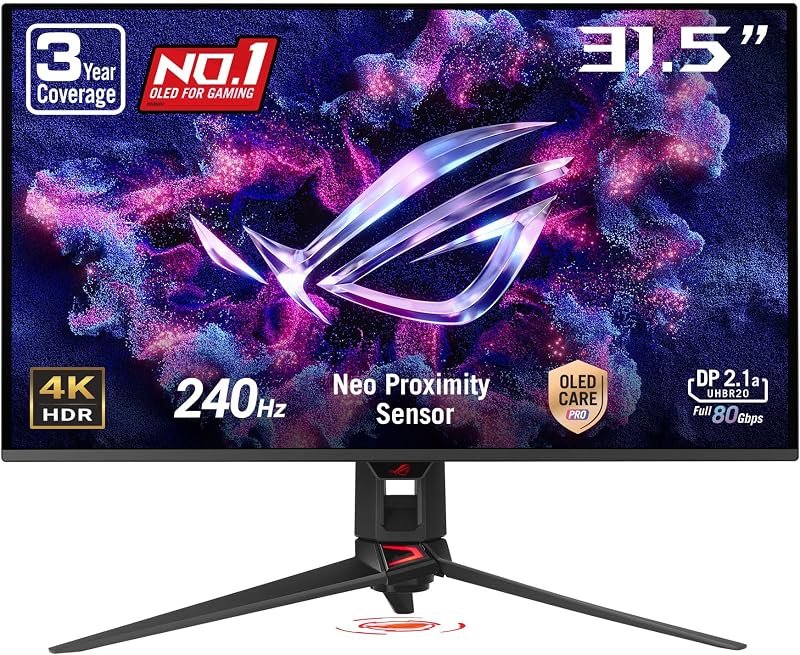
- Future-proof graphics setups demanding maximum DP bandwidth: Pick the ASUS ROG PG32UCDM3 32 Inch 4K to leverage 80Gbps DisplayPort 2.1 UHBR20 transmission and DisplayHDR 500 Tandem OLED brightness.
- Complete turnkey DisplayPort 2.1 accessory bundling: Opt for the ASUS ROG PG32UCDMR 32 Inch 4K to receive certified DP80 cabling, proactive proximity sensing, and Adobe software access.
- Color-critical mastering and Mac studio integration: Invest in the ASUS ProArt PA32UCDM 32 Inch 4K for its factory Delta E under 1 calibration, hardware profile write-back, and Thunderbolt 4 support.
- Competitive high-frame esports with zero image retention risk: Settle on the ASUS ROG XG32UCG 32 Inch 4K for high-speed Fast IPS performance and 320Hz dual-mode scaling.
ASUS ROG PG32UCDM 32 Inch 4K

ASUS
4.0 average from Amazon buyers
- Color
- BLACK
- Size
- 9.40
- Dimensions
- 21 x 38 x 49 inches
- Weight
- 19.4 pounds
Listed by the seller on the product page.
Best for: Everyday gaming with single-cable laptop docking
Pros
- 240Hz 4K QD-OLED panel
- 90W USB-C power delivery
- Custom heatsink with graphene film
Cons
- Matte coating diffuses ambient light
The ASUS ROG PG32UCDM 32 Inch 4K serves as the foundational flagship in the Republic of Gamers display lineup. Built around a 32-inch third-generation QD-OLED panel operating at 3840 x 2160 resolution, this monitor delivers fluid motion rendering through its 240Hz refresh rate and near-instantaneous 0.03ms gray-to-gray response time. The display achieves a peak brightness rating of 1000 candela per square meter, supported by VESA DisplayHDR 400 True Black compliance, Dolby Vision decoding, and a 1,500,000:1 contrast ratio that ensures deep black rendering alongside vibrant specular highlights across gaming environments.
Thermal stability is critical for organic panels, and ASUS equips this chassis with an advanced heat management framework that combines a custom heatsink, targeted airflow channeling, and a graphene rear film. These physical cooling solutions work silently to disperse heat from the panel surface, actively mitigating permanent image retention without requiring noisy internal fans. For desktop users who manage productivity tasks alongside gaming, the integrated USB-C port provides 90W Power Delivery to charge connected laptops, while the DisplayWidget Center allows quick configuration of OLED Care features and uniform luminance settings directly within desktop software.
Gamers researching an asus rog 32 4k oled setup will find this model ideal for multi-device workstations requiring dependable anti-reflective performance under ambient office lighting. Its matte surface finish disperses incoming glare across the glass, maintaining legible text and consistent dark levels in well-lit rooms. However, users who demand uncompressed next-generation video transmission without Display Stream Compression may prefer models that feature updated DisplayPort 2.1 ports rather than standard DisplayPort 1.4 hardware.
- Third-generation 4K QD-OLED panel running at 240Hz with 0.03ms response time
- Custom heatsink system utilizing graphene film and optimized airflow channels
- VESA DisplayHDR 400 True Black and 99% DCI-P3 color gamut coverage
- 90W USB-C Power Delivery alongside DisplayWidget Center controls
ASUS ROG XG32UCWMG 32 Inch 4K

ASUS
4.7 average from Amazon buyers
- Color
- BLACK
- Size
- 16.9" x 28.1" x 2.8"
- Dimensions
- 10.8 x 28.1 x 22.8 inches
- Weight
- 16.1 Pounds
Listed by the seller on the product page.
Best for: Glossy screen enthusiasts and competitive esports players
Pros
- Zero-haze TrueBlack glossy glass
- Dual-mode 4K 240Hz or FHD 480Hz
- Neo proximity sensor burn-in defense
Cons
- USB-C power capped at 15W
The ASUS ROG XG32UCWMG 32 Inch 4K shifts focus toward visual purity and competitive adaptability by pairing a TrueBlack Glossy WOLED panel with versatile frame-rate switching. Unlike conventional matte displays that use anti-glare coatings to scatter ambient illumination, the zero-haze glass surface on this model preserves optical clarity, yielding deeper perceived black depth and punchier contrast when used in light-controlled environments. It delivers standard UHD immersion at 240Hz while offering a hardware dual-mode toggle that shifts the panel into Full HD resolution at a blisteringly fast 480Hz refresh rate.
Motion performance remains benchmark-grade with a 0.03ms response time, supported by both NVIDIA G-SYNC Compatible and AMD FreeSync Premium Pro synchronization protocols to prevent screen tearing during intense frame drops. To protect the glossy WOLED matrix during idle periods, ASUS integrates an intelligent Neo Proximity Sensor within its OLED Care Pro suite. This sensor actively scans the workspace in front of the display, immediately identifying when you step away from the desk and triggering a protective black screen to eliminate unnecessary panel wear.
This display suits competitive esports enthusiasts and visual purists who maintain dedicated gaming spaces with controlled ambient light. The dual-mode feature makes it a superb single-screen solution for players who switch between cinematic story-driven titles at 4K and fast-paced first-person shooters requiring maximum frame frequency. Shooters needing comprehensive laptop power will note that the onboard USB-C interface supplies 15W Power Delivery, making it better suited for phone charging and display signals rather than full workstation notebook docking.
- TrueBlack Glossy WOLED screen with zero-haze glass for maximum clarity
- Dual-mode operation supporting native 4K at 240Hz or Full HD at 480Hz
- ASUS OLED Care Pro featuring an integrated Neo Proximity Sensor
- VESA DisplayHDR 400 True Black with 99% DCI-P3 color coverage
ASUS ROG PG32UCDM3 32 Inch 4K

ASUS
4.9 average from Amazon buyers
- Color
- BLACK
- Size
- 16.3" x 28.3" x 2.6"
- Dimensions
- 10.9 x 28.3 x 20.9 inches
- Weight
- 19.18 pounds
Listed by the seller on the product page.
Best for: Enthusiasts demanding maximum DisplayPort 2.1 bandwidth
Pros
- Full 80Gbps DP 2.1 UHBR20
- Tandem OLED DisplayHDR 500
- Scratch-resistant BlackShield film
Cons
- Requires compatible UHBR20 graphics hardware
Engineered for cutting-edge computing rigs, the ASUS ROG PG32UCDM3 32 Inch 4K introduces third-generation Tandem QD-OLED architecture paired with maximum-tier connection throughput. The Tandem OLED stack elevates dynamic range reproduction, securing VESA DisplayHDR 500 True Black certification with a peak luminance rating of 1000 nits and an expanded 99.5% DCI-P3 color gamut. By layering organic emissive components, this architecture enhances sustained highlight intensity across demanding HDR mastered scenes while maintaining 240Hz refresh fluidities and rapid 0.03ms pixel transitions.
Durability and physical panel resilience receive a major upgrade via integrated BlackShield Film technology. This specialized optical layer increases surface scratch resistance by 2.5 times compared to earlier iterations, while boosting perceived black depth by up to 40% under ambient lighting by filtering stray internal reflections. On the connectivity front, the display features future-proof DisplayPort 2.1 UHBR20 ports supporting full 80Gbps transmission bandwidth. This allows modern graphics processors to drive 4K resolution at 240Hz without relying on Display Stream Compression visual compromises.
Discerning builders deciding asus rog swift 27 upgrades or stepping into true flagship 32-inch territory will appreciate this model’s uncompromised hardware specification. Between its 90W USB-C power delivery, automated firmware deployment through DisplayWidget Center, and the Neo Proximity Sensor, it represents the technical peak of the ROG gaming monitor series. Users whose graphics cards lack UHBR20 output support will find that older display hardware cannot exploit the monitor’s full input interface bandwidth.
- Tandem QD-OLED panel with DisplayHDR 500 True Black and 99.5% DCI-P3 gamut
- DisplayPort 2.1 UHBR20 input supplying full 80Gbps transmission bandwidth
- BlackShield Film technology providing 2.5X scratch resistance and deeper black levels
- Automated Neo Proximity Sensor and 90W USB-C laptop power delivery
ASUS ROG PG32UCDMR 32 Inch 4K
ASUS
4.0 average from Amazon buyers
- Color
- BLACK
- Dimensions
- 10.9 x 28.3 x 20.9 inches
- Weight
- 19.2 Pounds
Listed by the seller on the product page.
Best for: Turnkey setups needing included DP80 cables
Pros
- Full DisplayPort 2.1 connectivity
- Included DP80 cable and accessories
- Neo proximity presence detection
Cons
- DisplayHDR 400 True Black tier
The ASUS ROG PG32UCDMR 32 Inch 4K is an all-inclusive gaming and productivity monitor optimized for rapid desktop integration. Centered on a 31.5-inch 4K QD-OLED panel, the display provides 240Hz refresh rates, instant 0.03ms pixel responsiveness, and a 1,500,000:1 contrast ratio. Like its sibling flagships, it incorporates VESA DisplayHDR 400 True Black compliance alongside 99% DCI-P3 color gamut coverage, producing accurate color reproduction with a Delta E under 2 variance directly out of the packaging.
ASUS differentiates this package by including an exhaustive set of certified accessories and software perks inside the retail carton. Buyers receive a certified DisplayPort 2.1 DP80 transmission cable, an HDMI Ultra High Speed cable, dedicated USB 3.2 and USB-C data cords, a bespoke ROG accessory pouch, and a VESA wall mounting bracket. In addition to high-speed hardware connectivity spanning DP 2.1, HDMI 2.1, and 90W USB-C, ASUS bundles a complimentary three-month Adobe Creative Cloud membership, bridging the gap between enthusiast gaming sessions and professional visual production tasks.
This monitor is tailored specifically for users seeking an asus qd-oled 32 inch display that includes every necessary cable to unlock high-bandwidth 4K operation immediately. The Neo Proximity Sensor and optional uniform luminance mode maintain reliable daily operation while eliminating aggressive auto-dimming swings during web browsing and office productivity. It gives way to the ProArt PA32UCDM for creators who require hardware calibration profile write-back directly into the internal display lookup tables.
- 4K 240Hz QD-OLED display with DisplayPort 2.1 and 90W USB-C connectivity
- Complete cable bundle including certified DP80 and Ultra High Speed HDMI cables
- Integrated Neo Proximity Sensor with DisplayWidget Center software control
- Three-month Adobe Creative Cloud subscription and VESA mounting bracket included
ASUS ProArt PA32UCDM 32 Inch 4K

ASUS
4.2 average from Amazon buyers
- Color
- BLACK
- Size
- 32 Inch
- Dimensions
- 10 x 30 x 18 inches
- Weight
- 19.8 pounds
Listed by the seller on the product page.
Best for: Color-critical video editors and Mac workstations
Pros
- Delta E under 1 accuracy
- Hardware calibration profile write-back
- Dual Thunderbolt 4 connectivity
Cons
- Slightly slower 0.1ms response time
Tailored exclusively for studio directors, video colorists, and digital imaging technicians, the ASUS ProArt PA32UCDM 32 Inch 4K adapts premium organic display hardware into an uncompromising mastering platform. It houses a 31.5-inch 4K QD-OLED panel reaching 1000 nits peak brightness, boasting complete 100% sRGB, 99% DCI-P3, and expansive BT. 2020 color gamut coverage. Color fidelity achieves an industry-leading Delta E under 1 accuracy rating, ensuring that visual assets remain perfectly calibrated across global production pipelines.
While enthusiast gaming screens rely primarily on graphics card profile adjustments, the PA32UCDM features ProArt Hardware Calibration Technology. This system enables internal color profile write-back, storing customized look-up tables directly onto the internal monitor scaler rather than relying on computer operating system settings. The unit is Calman Ready certified and delivers multi-standard HDR mastering support covering Dolby Vision, Hybrid Log-Gamma (HLG), and HDR10. High-speed studio workflows are accommodated through dual Thunderbolt 4 connections that support high-speed peripheral daisy chains and clean video routing.
Creative directors transitioning from options like the asus tuf monitor 27 inch family will find this workstation display uniquely suited for Mac and PC hybrid environments. The monitor includes a three-month Adobe Creative Cloud subscription and provides extended five-year warranty coverage upon simple online registration. Although the 240Hz refresh rate permits video editors to preview fast-rendering frames and game assets smoothly, its 0.1ms GTG response time is fractionally slower than the 0.03ms tuning found on dedicated ROG gaming variants.
- Factory calibrated QD-OLED display delivering Delta E under 1 color precision
- Hardware calibration technology with internal monitor profile write-back
- Comprehensive HDR support covering Dolby Vision, HLG, and HDR10 formats
- Dual Thunderbolt 4 connectivity with an extended five-year total warranty
ASUS ROG XG32UCG 32 Inch 4K

ASUS
4.9 average from Amazon buyers
- Color
- BLACK
- Dimensions
- 9.7 x 28.2 x 22.6 inches
- Weight
- 21.8 pounds
Listed by the seller on the product page.
Best for: Competitive play needing static LCD endurance
Pros
- Dual-mode 4K 160Hz and FHD 320Hz
- Fast IPS panel eliminates burn-in
- ELMB Sync motion blur reduction
Cons
- Lacks true self-emissive OLED contrast
The ASUS ROG XG32UCG 32 Inch 4K presents an alternative display path for users who demand ultra-high-definition desktop space without utilizing self-emissive organic materials. Utilizing a 31.98-inch Fast IPS LCD panel, this monitor eliminates any concern regarding static element burn-in or desktop taskbar image retention. The panel delivers a native 4K resolution at a 160Hz refresh rate, while featuring a dedicated hardware dual-mode switch that transforms the display output into 1080p Full HD running at an ultra-fast 320Hz refresh rate.
Motion clarity on this Fast IPS panel is reinforced by ASUS Extreme Low Motion Blur Sync (ELMB SYNC) technology, which allows backlight strobing to operate simultaneously with variable refresh rate synchronization. This configuration eliminates ghosting, smearing, and screen tearing during rapid cursor or target movements, yielding a minimum response time of 0.3ms. The panel maintains broad color rendering with 95% DCI-P3 gamut coverage and utilizes ASUS advanced gray-scale tracking to preserve smooth color gradations across office spreadsheets and gaming environments alike.
Users balancing long hours of static document work, code development, or stock tracking alongside competitive gaming will appreciate the durability of this traditional LCD architecture. The chassis includes a versatile USB Type-C connection with DisplayPort Alternate Mode, alongside ROG Gaming A.I. assist features for real-time target enhancement. While it provides outstanding motion clarity and static image peace of mind, its dynamic contrast ratio of 100,000,000:1 relies on standard LCD backlighting, meaning it cannot produce the true inky black depths achievable on true OLED hardware.
- Dual-mode Fast IPS panel offering 4K at 160Hz or Full HD at 320Hz
- ASUS Extreme Low Motion Blur Sync eliminating motion artifacts
- Immunity to organic image retention across intensive static desktop workflows
- USB Type-C connectivity supporting DisplayPort Alternate Mode video
What Sets These Models Apart
Choosing the right asus 4k 240hz oled monitor requires understanding how each model balances panel coatings, video transmission bandwidth, and power delivery. The following table provides an executive comparison of these six models across core technical attributes.
| Model | Panel Technology & Surface | Refresh Rate & Modes | Video Interfaces | Power Delivery |
|---|---|---|---|---|
| ASUS ROG PG32UCDM 32 Inch 4K | QD-OLED, Anti-Glare Matte | 240Hz Native (0.03ms GTG) | DisplayPort 1.4, HDMI 2.1 | 90W USB-C |
| ASUS ROG XG32UCWMG 32 Inch 4K | WOLED, TrueBlack Glossy | 240Hz 4K / 480Hz FHD Dual-Mode | DisplayPort 1.4, HDMI 2.1 | 15W USB-C |
| ASUS ROG PG32UCDM3 32 Inch 4K | Tandem QD-OLED, Matte BlackShield | 240Hz Native (0.03ms GTG) | DisplayPort 2.1 UHBR20, HDMI 2.1 | 90W USB-C |
| ASUS ROG PG32UCDMR 32 Inch 4K | QD-OLED, Anti-Glare Matte | 240Hz Native (0.03ms GTG) | DisplayPort 2.1, HDMI 2.1 | 90W USB-C |
| ASUS ProArt PA32UCDM 32 Inch 4K | QD-OLED, Anti-Glare Matte | 240Hz Native (0.1ms GTG) | Thunderbolt 4, HDMI 2.1 | Thunderbolt 4 |
| ASUS ROG XG32UCG 32 Inch 4K | Fast IPS LCD, Anti-Glare Matte | 160Hz 4K / 320Hz FHD Dual-Mode | DisplayPort, HDMI, USB-C | USB-C DP Alt Mode |
Buying Tips for ASUS 32-Inch 4K OLED Monitors
When selecting your monitor, evaluate your room’s ambient lighting before deciding between glossy and matte finishes. A glossy display like the XG32UCWMG maximizes perceived color saturation and contrast depth because there is no diffusive surface layer over the pixels. However, glossy screens reflect point light sources such as ceiling lamps and windows directly into your eyes. If your workstation sits in a brightly lit room or opposite large windows, a matte finish with advanced anti-reflective properties—such as the BlackShield film on the PG32UCDM3—will keep reflections manageable and maintain comfortable viewing during long sessions.
Interface bandwidth should align directly with your computer’s graphics hardware. Driving a 4K resolution at 240Hz requires immense transmission throughput. DisplayPort 1.4 ports achieve this by utilizing Display Stream Compression (DSC), which is visually lossless but can occasionally limit multi-monitor configuration flexibility or custom resolution scaling on older operating systems. If you have a modern graphics card capable of ultra-high-bit-rate outputs, investing in a display equipped with DisplayPort 2.1 UHBR20 unlocks pure, uncompressed visual pipelines capable of transferring up to 80Gbps of raw video data.
Long-term organic panel reliability depends heavily on thermal design and intelligent automated mitigation. Look closely at the OLED Care features built into the monitor’s firmware. Models equipped with passive hardware components—such as graphene dissipation layers and heavy internal heatsinks—keep operating temperatures low without relying on audible cooling fans. Furthermore, models incorporating automated Neo Proximity Sensors provide hands-free burn-in mitigation by automatically blanking the display whenever you leave your chair, protecting your investment without requiring manual standby toggles.
FAQ
How do QD-OLED panels differ from TrueBlack glossy WOLED panels?
QD-OLED panels utilize blue organic light-emitting diodes coupled with a quantum dot layer to produce pure red and green primary colors. This results in wider color gamuts, such as 99.5% DCI-P3 coverage, and exceptionally bright specular highlights. In contrast, TrueBlack WOLED panels use white organic emitters filtered into RGB subpixels with an added white subpixel. The TrueBlack Glossy finish featured on the XG32UCWMG completely removes the matte anti-glare layer, providing zero optical haze and superior perceived contrast in dim rooms, whereas QD-OLED panels excel in overall color saturation across varied light environments.
Why does DisplayPort 2.1 UHBR20 matter on a 4K 240Hz display?
Standard DisplayPort 1.4 interfaces lack sufficient native data bandwidth to transmit 3840 x 2160 pixels at 240Hz in true 10-bit color. To bridge this gap, monitors must use Display Stream Compression. DisplayPort 2.1 UHBR20 delivers up to 80Gbps of transmission bandwidth, which is more than double that of legacy display ports. This massive bandwidth allows compatible graphics cards to send uncompressed, native 4K 240Hz video signals directly to the panel without relying on compression algorithms, reducing display pipeline latency and ensuring flawless pixel rendering.
How does the Neo Proximity Sensor protect against panel burn-in?
The Neo Proximity Sensor is a dedicated hardware module built into the lower bezel of select ASUS displays. It emits a safe, low-power detection field to monitor the space directly in front of the screen. When you stand up and step away from your workstation, the sensor notes your absence and commands the monitor to instantly transition to a pitch-black screen. Because OLED pixels turn off completely when displaying black, this completely halts panel degradation caused by static desktop items during unattended intervals.
Can creative professionals rely on gaming-oriented ROG OLED displays for color work?
Yes. Many ROG gaming monitors in this class feature factory calibration with a Delta E under 2 variance, true 10-bit color processing, and comprehensive DCI-P3 color gamut coverage. They also feature uniform brightness modes that disable automatic backlight dimming algorithms, keeping luminance stable across full-screen photo editing software. However, for specialized film mastering, broadcast workflows, and Mac environments, the ProArt PA32UCDM remains superior due to its dedicated hardware calibration write-back, Delta E under 1 tolerance, and native Dolby Vision profile mastering support.
What is the difference between ProArt hardware calibration and software calibration?
Standard software calibration adjusts color reproduction by modifying the look-up tables inside your computer’s operating system or graphics driver. This can occasionally reduce color gradation depth or introduce subtle banding artifacts. ProArt Hardware Calibration communicates directly with the internal image processor of the PA32UCDM monitor, writing the calibrated color profiles directly to the monitor’s onboard scaler hardware. This guarantees that your color adjustments remain consistent regardless of which computer or operating system is connected to the screen.