Alienware Curved Monitor Guide: Fast Recommendations by Panel and Refresh Rate
As Amazon Associates, we earn from qualifying purchases. This means we may receive a small commission at no extra cost to you if you click through and make a purchase.
Selecting an alien ware curved monitor requires balancing display panel technology, refresh rate, and desk ergonomics. Modern curved ultrawide screens expand peripheral vision, eliminate multi-monitor bezel interruptions, and reduce neck rotation across expansive digital canvases. For demanding desktop tasks and fast-paced gaming, choosing between vibrant Quantum Dot OLED panels and resilient LED-backlit displays dictates everyday image contrast, color accuracy, and motion clarity.
This comprehensive guide covers six monitors from the Alienware display portfolio to help you determine which alienware curved monitor to buy. Across these options, Alienware deploys distinct display architectures ranging from QD-OLED panels with near-instantaneous response times to high-contrast VA panels and Fast IPS displays. The monitors differ across refresh rates from 165Hz up to 280Hz, curvature profiles including 1500R and 1800R, and dedicated feature sets built for both creative workstations and competitive play.
Which Alienware Curved Monitors Should You Buy
- Best for balanced ultrawide productivity and casual gaming: Alienware 34 Curved Gaming Monitor (AW3425DWM) delivers a steep 1500R curve, 180Hz refresh rate, and reliable LED reliability.
- Best for ultra-responsive HDR visuals: Alienware 34 240Hz QD-OLED Curved Gaming (AW3425DW) combines an infinite contrast ratio with 240Hz motion and cinema-grade color accuracy.
- Best for pure competitive speed on an ultrawide canvas: Alienware 34 Gaming Monitor AW3426DW achieves a category-leading 280Hz refresh rate on a QD-OLED panel.
- Best for high-framerate gaming in bright ambient rooms: Alienware 34 Gaming Monitor AW3426DWM pairs a 240Hz VA display with 400 nits brightness and zero burn-in risk.
- Best for creative workflows and color-critical grading: Alienware AW3423DWF Curved QD-OLED Gaming Monitor provides a specialized Creator Mode alongside factory-calibrated DCI-P3 and sRGB profiles.
- Best for compact setups requiring standard proportions: Alienware 27 Gaming Monitor AW2725DM provides 180Hz Fast IPS performance for desks unable to support ultrawide dimensions.
Alienware 34 Curved Gaming Monitor

Alienware
4.1 average from Amazon buyers
- Color
- Black
- Dimensions
- 31.71 x 9.13 x 21.84 inches
- Weight
- 20.97 Pounds
Listed by the seller on the product page.
Best for: Everyday ultrawide gaming and productivity
Pros
- Fluid 180Hz refresh rate
- Deep 1500R curvature
- Hardware low blue light
Cons
- Standard LED contrast
- 1ms response time
The Alienware 34 Curved Gaming Monitor, carrying the model number AW3425DWM, is built for users who prioritize expansive desktop real estate alongside dependable LED backlighting. This display features a 34-inch ultrawide panel with WQHD resolution across a 21:9 aspect ratio. The screen employs an aggressive 1500R curvature that bends inward to draw peripheral details into view. A matte finish diffuses ambient reflections, while the LED display technology delivers a 3,000:1 contrast ratio that ensures deep dark tones during productivity sessions and cinematic gaming.
Performance capabilities make the alienware aw3425dwm an adaptable solution for work and play. The display runs at a fluid 180Hz refresh rate paired with a 1ms gray-to-gray response time, supported by AMD FreeSync Premium and VESA AdaptiveSync to eliminate tearing. Visual output is reinforced with VESA DisplayHDR 400 certification and 95% DCI-P3 color gamut coverage, producing vibrant highlights at 400 nits brightness. For extended work sessions, a hardware-based low blue light solution reduces eye strain while preserving color accuracy, and a dedicated console mode accommodates external hardware seamlessly.
This alienware 34 curved gaming monitor serves as a balanced baseline for professionals wanting a multi-window workspace without worrying about organic pixel degradation. It provides crisp text rendering and durable backlighting for static interface elements. However, users seeking true black levels and near-zero response times for competitive motion clarity will want to step up to the Alienware 34 240Hz QD-OLED Curved Gaming.
- 34-inch WQHD ultrawide panel with immersive 1500R curvature and matte finish
- Smooth 180Hz refresh rate with 1ms gray-to-gray response time
- VESA DisplayHDR 400 with 400 nits brightness and 95% DCI-P3 color coverage
- AMD FreeSync Premium, VESA AdaptiveSync, and hardware low blue light filtering
Alienware 34 240Hz QD-OLED Curved Gaming

Alienware
4.4 average from Amazon buyers
- Color
- Black
- Size
- 34.2" QD-OLED
- Dimensions
- 31.71 x 9.13 x 21.84 inches
- Weight
- 20.04 pounds
Listed by the seller on the product page.
Best for: Enthusiast gamers seeking elite QD-OLED motion
Pros
- Fast 240Hz refresh rate
- Near-instant 0.03ms response
- Infinite contrast ratio
Cons
- 250 nits typical brightness
- Requires burn-in precautions
The Alienware 34 240Hz QD-OLED Curved Gaming monitor represents a significant leap forward in visual dynamics by utilizing self-illuminating Quantum Dot OLED panel engineering. Carrying the model designation alienware aw3425dw, this 34.2-inch display delivers WQHD resolution at 3440 x 1440 across an 1800R curve. The gentler 1800R arc provides an expansive viewing field with 178-degree viewing angles and minimal edge distortion. Because each pixel emits its own light, the monitor achieves an infinite contrast ratio with a listed 1,500,000:1 spec, rendering true pitch blacks next to brilliant spectral highlights.
Motion performance on this screen sets an elite standard for fast-moving content. Operating at 240Hz with an instantaneous 0.03ms response time, motion blur and ghosting are virtually eradicated. Multi-platform sync technologies including NVIDIA G-SYNC Compatible, AMD FreeSync Premium Pro, and VESA AdaptiveSync guarantee artifact-free frame delivery. If you are researching high-refresh alternatives across the market, our guide to the alien ware monitor 240hz segment showcases how this panel compares across dedicated gaming setups. The AW3425DW also achieves VESA DisplayHDR TrueBlack 400 certification with 1000 nits peak HDR brightness and 250 nits typical luminance.
Color precision is a hallmark of this panel, sporting 99.3% DCI-P3 color gamut coverage and factory-calibrated Delta E<2 accuracy. It excels in dark-room gaming, multimedia consumption, and creative editing where pixel-level luminance control matters most. However, if your daily tasks consist primarily of static spreadsheets and text editing under bright office fixtures, the VA-based Alienware 34 Gaming Monitor AW3426DWM avoids OLED luminance throttling.
- 34.2-inch QD-OLED display with WQHD resolution and an 1800R curve
- Ultra-fast 240Hz refresh rate and near-instant 0.03ms pixel response time
- VESA DisplayHDR TrueBlack 400 with 1000 nits peak brightness and infinite contrast
- Broad 99.3% DCI-P3 color space coverage with factory Delta E<2 calibration
Alienware 34 Gaming Monitor AW3426DW

Alienware
4.1 average from Amazon buyers
- Color
- Interstellar Indigo
- Dimensions
- 9.13 x 32.06 x 21.85 Inches
- Weight
- 16.58 pounds
Listed by the seller on the product page.
Best for: Bright workspaces and daytime office workflows
Pros
- High 400 nits brightness
- Smooth 240Hz refresh rate
- Zero burn-in risk
Cons
- 1ms response time
- Listing omits curvature radius
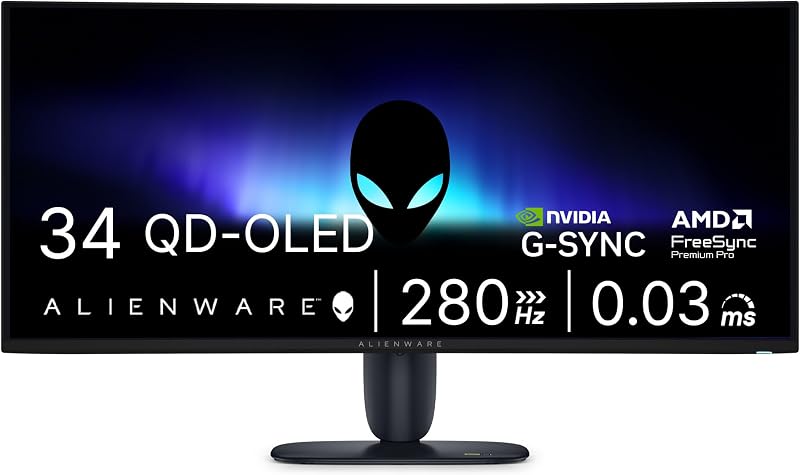
Best for: Competitive esports players needing 280Hz ultrawide
Pros
- Category-leading 280Hz refresh rate
- 03ms pixel response
- Vibrant 99% color gamut
Cons
- Listing omits curvature radius
- Moderate 300 nits brightness
The Alienware 34 Gaming Monitor AW3426DW pushes refresh rate boundaries even higher within the ultrawide QD-OLED category. Engineered with Quantum Dot-Organic Light-Emitting Diode technology, this 34-inch screen delivers an ultra-wide QHD resolution on a 21:9 aspect ratio. The panel operates at a blistering 280Hz refresh rate, making the alienware aw3426dw one of the fastest ultrawide displays in the Alienware catalog. The rapid 0.03ms response time works alongside G-SYNC compatibility to render hyper-fluid frames without tearing or smearing during high-velocity action.
Visual specifications from the listing confirm a 300 nits brightness rating, an anti-glare matte screen finish, and 99% color gamut coverage. Measuring 9.13 inches deep, 32.06 inches wide, and 21.85 inches tall with its stand, the chassis provides solid desk presence. The listing does not specify the exact curvature radius for this specific model, though its wide 178-degree viewing angles preserve image uniformity across the entire panel. With a pixel pitch of 110, text clarity and in-game textures retain sharp definition whether executing precision work or tracking fast moving targets.
This monitor suits competitive enthusiasts and simulation drivers who want the pixel responsiveness of QD-OLED matched with a towering 280Hz frame ceiling. It stands as a pinnacle for high-speed ultrawide visuals. Nevertheless, for users who need traditional high-brightness LED backlighting to combat heavy ambient glare, the Alienware 34 Gaming Monitor AW3426DWM represents a more practical daily alternative.
- 34-inch UWQHD QD-OLED display engineered for high-velocity visuals
- Blazing 280Hz refresh rate paired with instantaneous 0.03ms response time
- G-SYNC synchronization with 99% color gamut coverage and 300 nits brightness
- Sturdy dimensions measuring 9.13 by 32.06 by 21.85 inches with matte coating
Alienware 34 Gaming Monitor AW3426DWM

Alienware
4.6 average from Amazon buyers
- Color
- Interstellar Indigo
- Dimensions
- 9.13 x 31.71 x 21.84 Inches
- Weight
- 20.59 pounds
Listed by the seller on the product page.
The Alienware 34 Gaming Monitor AW3426DWM provides a high-refresh, high-brightness alternative to OLED panels by leveraging a durable VA LED matrix. The alienware aw3426dwm spans 34 inches across a 21:9 ultrawide canvas with sharp WQHD resolution. For users comparing form factors against wider budget solutions like the sceptre 34 inch curved ultrawide monitor, Alienware integrates high-end esports engineering directly into this panel. A 240Hz refresh rate and 1ms response time ensure smooth tracking in twitch shooters and racing titles alike.
Unlike self-emissive organic displays that can dim across broad white windows, this VA-based monitor produces a constant 400 nits brightness. This luminance makes it exceptionally well suited for sunlit home offices or brightly lit studio spaces. The screen is finished with a glare-resistant matte treatment, supports 95% color gamut coverage, and features a 110 pixel pitch. The unit weighs 20.6 pounds and measures 9.13 inches deep by 31.71 inches wide by 21.84 inches high. While the listing does not specify the exact curvature radius, its panoramic width provides ample room for side-by-side productivity windows.
Professionals handling long hours of financial data, programming, or static user interfaces will appreciate the peace of mind offered by the AW3426DWM, as LED backlights carry no potential for burn-in. It strikes an effective balance between rapid 240Hz motion and daytime brightness. However, if your work demands true pitch blacks and factory-certified color critical calibration, the Alienware AW3423DWF Curved QD-OLED Gaming Monitor remains the superior tool.
- 34-inch WQHD VA panel delivering continuous 400 nits brightness
- Rapid 240Hz refresh rate and responsive 1ms panel performance
- Vibrant 95% color gamut coverage on an anti-glare matte screen
- Substantial build quality weighing 20.6 pounds with 178-degree viewing angles
Alienware AW3423DWF Curved QD-OLED Gaming Monitor

Alienware
4.2 average from Amazon buyers
- Color
- Black
- Size
- 34.0" OLED
- Dimensions
- 32.1 x 12 x 20.7 inches
- Weight
- 20.5 Pounds
Listed by the seller on the product page.
Best for: Color-critical creators and cinematic HDR gaming
Pros
- Dedicated Creator Mode
- 3-year burn-in warranty
- 3% DCI-P3 color gamut
Cons
- 165Hz refresh rate ceiling
- 250 nits typical brightness
The Alienware AW3423DWF Curved QD-OLED Gaming Monitor is one of the most celebrated ultrawide displays in the Alienware catalog. Featuring a 34-inch Quantum Dot OLED panel with an 1800R curve and a 21:9 aspect ratio, the alienware aw3423dwf curved qd-oled achieves breathtaking dynamic range. The panel combines a 1,000,000:1 contrast ratio with VESA DisplayHDR TrueBlack 400 certification and 1000 nits peak HDR brightness. In discussions surrounding the broader lg computer monitor curved category, Alienware differentiates this display by pairing quantum dot color saturation with deep self-emissive blacks.
Creative professionals will appreciate the built-in Creator Mode, which allows seamless toggling between native DCI-P3 (99.3% coverage) and standard sRGB color spaces alongside factory-calibrated Delta E<2 accuracy. For gaming, the screen runs at a smooth 165Hz refresh rate with an ultra-low 0.1ms response time, certified for AMD FreeSync Premium Pro and VESA AdaptiveSync. The chassis incorporates Alienware Legend 2.0 industrial design, customizable RGB AlienFX lighting, 360-degree ventilation for heat dissipation, a centralized 5-axis OSD joystick, and TUV-certified ComfortView Plus hardware blue light reduction.
Alienware backs this monitor with a 3-year premium warranty that explicitly includes OLED burn-in coverage, offering long-term assurance for content creators and hybrid workers. It delivers peerless contrast and color accuracy for dark-room editing and cinematic adventures. Nevertheless, for users working at shallower desks where a 34-inch ultrawide footprint is simply too wide, the Alienware 27 Gaming Monitor AW2725DM offers a more focused, standard-aspect alternative.
- 34-inch QD-OLED curved 1800R panel with 1,000,000:1 contrast ratio
- Creator Mode supporting sRGB and DCI-P3 spaces with factory Delta E<2 accuracy
- 165Hz refresh rate, 0.1ms response time, and AMD FreeSync Premium Pro
- 3-year premium manufacturer warranty including explicit OLED burn-in protection
Alienware 27 Gaming Monitor AW2725DM

Alienware
4.6 average from Amazon buyers
- Aspect Ratio
- 16:9
- Screen Finish
- Matte
- Contrast Ratio
- 1,000:1
- Refresh Rate
- 180 hertz
- Display Type
- QHD
Listed by the seller on the product page.
Best for: Esports players with limited desk space
Pros
- Responsive Fast IPS panel
- 180Hz refresh rate
- Console mode compatibility
Cons
- Flat 16:9 aspect ratio
- 1,000:1 contrast ratio
The Alienware 27 Gaming Monitor AW2725DM departs from the wide 21:9 format to deliver a focused 16:9 solution for space-constrained desks and competitive players. Equipped with a 27-inch Fast IPS panel, this display outputs crisp QHD resolution across a matte surface. The listing does not specify a curved profile, indicating a standard flat form factor that slots effortlessly onto smaller desks or dual-arm setups. The Fast IPS architecture ensures uniform color consistency across wide 178-degree viewing angles with a 1,000:1 contrast ratio.
Performance metrics are tailored for responsive competition, boasting a 180Hz refresh rate and a 1ms gray-to-gray response time. Synchronized frame output is maintained through G-SYNC compatibility and VESA AdaptiveSync certification. Visuals are rendered with 95% DCI-P3 color coverage and VESA DisplayHDR 400 compliance at a steady 400 nits brightness. Like its larger siblings, the AW2725DM includes a dedicated console mode and a hardware-based low blue light filter that preserves accurate color reproduction during grueling work or gaming marathons.
This 27-inch model is best suited for esports competitors and professionals who require standard 16:9 aspect ratio compatibility without window management scaling quirks. It excels at fast-twitch gaming where peripheral scanning must remain tightly focused. However, users who require immersive multi-window multitasking or cinematic ultrawide aspect ratios will be better served by returning to the Alienware 34 Curved Gaming Monitor.
- 27-inch QHD Fast IPS panel delivering sharp 109 pixel pitch visuals
- Responsive 180Hz refresh rate with 1ms gray-to-gray response time
- VESA DisplayHDR 400 certification with 400 nits brightness and 95% DCI-P3 color
- G-SYNC compatibility, VESA AdaptiveSync, and console mode support
What Sets These Models Apart
To help simplify your alienware curved monitor comparison, the table below highlights primary hardware differences across panel technology, refresh rate, screen dimensions, and luminance. Reviewing these key specifications side-by-side clarifies how each display behaves in daily office, creative, and gaming environments.
| Model | Panel Type | Refresh Rate | Screen Size & Curvature | Brightness & Contrast |
|---|---|---|---|---|
| Alienware 34 Curved Gaming Monitor (AW3425DWM) | LED | 180Hz | 34-inch / 1500R | 400 nits / 3,000:1 |
| Alienware 34 240Hz QD-OLED Curved Gaming (AW3425DW) | QD-OLED | 240Hz | 34.2-inch / 1800R | 250 nits (1000 nits peak) / 1,500,000:1 |
| Alienware 34 Gaming Monitor AW3426DW | QD-OLED | 280Hz | 34-inch / Not specified | 300 nits / Infinite contrast |
| Alienware 34 Gaming Monitor AW3426DWM | VA (LED) | 240Hz | 34-inch / Not specified | 400 nits / Standard high contrast |
| Alienware AW3423DWF Curved QD-OLED Gaming Monitor | QD-OLED | 165Hz | 34-inch / 1800R | 250 nits (1000 nits peak) / 1,000,000:1 |
| Alienware 27 Gaming Monitor AW2725DM | Fast IPS | 180Hz | 27-inch / Flat profile | 400 nits / 1,000:1 |
Buying Tips for Alienware Curved Monitors
When searching for the best alienware curved gaming monitor, panel technology should be your primary consideration. Quantum Dot OLED displays, such as the AW3425DW, AW3426DW, and AW3423DWF, deliver unrivaled picture quality with true blacks, infinite contrast, and sub-millisecond response times. However, QD-OLED panels typically sustain moderate full-screen brightness around 250 to 300 nits, making them best suited for light-controlled rooms. In contrast, VA and LED options like the AW3425DWM and AW3426DWM output a constant 400 nits, offering superior resilience against ambient office glare and complete immunity to image retention during repetitive static tasks.
Curvature and viewing ergonomics also dictate everyday comfort across an ultrawide canvas. An 1800R curve provides a gentle, subtle arc that maintains straight horizontal lines for timeline editing and graphic design while still reducing peripheral eye strain. A tighter 1500R curve, found on the AW3425DWM, creates a more pronounced wraparound effect that enhances visual immersion in flight simulators and open-world games. Be sure to measure your desk depth before purchasing, as ultrawide panels with deep stands require at least 24 to 30 inches of viewing distance to maintain comfortable focal ergonomics.
Finally, align your refresh rate target with your graphics hardware and workflow priorities. While 165Hz and 180Hz displays provide ample fluidity for productivity and standard gaming, esports titles benefit significantly from the 240Hz and 280Hz ceilings found on the newer AW3425DW and AW3426DW models. Ensure your PC hardware can reliably drive 3440 x 1440 pixels at these demanding frame rates over modern DisplayPort connections to make full use of Alienware display capabilities.
FAQ
Which Alienware curved monitor is best for mixed office work and gaming?
The Alienware 34 Curved Gaming Monitor (AW3425DWM) and the Alienware 34 Gaming Monitor AW3426DWM are the most balanced choices for mixed use. Their LED and VA panels provide a high continuous brightness of 400 nits and carry zero risk of burn-in when displaying static application windows, spreadsheets, or browser tabs for eight hours a day. They also offer high refresh rates of 180Hz and 240Hz for fluid after-hours gaming.
What is the difference between QD-OLED and VA panels in Alienware monitors?
QD-OLED panels use self-emissive organic pixels combined with quantum dots, allowing individual pixels to turn completely off for an infinite contrast ratio, true blacks, and near-instantaneous 0.03ms response times. VA panels rely on traditional LED backlights passing through liquid crystals; they produce higher sustained full-screen brightness at 400 nits and solid static contrast without any risk of permanent pixel retention.
Does Alienware provide burn-in warranty protection on QD-OLED displays?
The listing for the Alienware AW3423DWF Curved QD-OLED Gaming Monitor explicitly confirms a 3-year premium manufacturer warranty that includes coverage for OLED burn-in. For the newer AW3425DW and AW3426DW models, the listing does not specify whether burn-in coverage is identical, so buyers should review official manufacturer documentation prior to deployment.
What does an 1800R or 1500R curvature mean for daily productivity?
The number preceding the ‘R’ refers to the radius of the circle the display would form in millimeters. A 1500R curve has a 1,500mm radius, creating a tighter bend that brings the outer edges of the screen closer to your peripheral vision. An 1800R curve is gentler, making it slightly easier to perceive straight horizontal lines during digital design and video timeline editing while still reducing neck strain.
Are Alienware curved monitors compatible with gaming consoles?
Yes, models such as the Alienware 34 Curved Gaming Monitor (AW3425DWM) and the Alienware 27 Gaming Monitor AW2725DM feature a dedicated console mode. This firmware setting adapts and scales video signals from gaming consoles cleanly, ensuring reliable refresh rates and low-latency gameplay even when connected to fixed-resolution sources.