Acer Nitro 240Hz Monitor Lineup: The Fast Decision Guide
As Amazon Associates, we earn from qualifying purchases. This means we may receive a small commission at no extra cost to you if you click through and make a purchase.
Selecting an acer nitro 240hz monitor comes down to balancing panel dimensions, resolution, and desk ergonomics with your gaming habits. Displays running at a 240Hz refresh rate update every 4.16 milliseconds, providing immediate frame pacing and smooth motion tracking. Choosing the right display depends on whether you play twitch-reaction esports, build a panoramic racing setup, or require an efficient hybrid workspace that balances office work with competitive gaming.
This guide analyzes four distinct acer gaming monitors in the Nitro lineup to clarify how their technical specifications match different operational demands. Across these four selections, hardware specifications vary widely across screen sizes, native pixel formats, desktop ergonomics, and screen curvature. Scaling from a fast 23.8-inch flat 1080p display up to an immense 49-inch dual-QHD curved workstation, this overview will help you pinpoint the best acer nitro monitor for your desk layout and hardware capabilities.
Which Acer Gaming Monitors Should You Buy
- Choose the Acer Nitro 23.8in FHD 1920×1080 IPS for fast competitive esports where quick eye tracking and a compact desk footprint are critical.
- Choose the MONITOR Acer Nitro 27in QHD 2560×1440 for balanced 1440p visual clarity, fluid 240Hz motion, and full ergonomic stand adjustments.
- Choose the Acer Nitro 31.5in FHD 1920×1080 Curved for big-screen visual immersion and a gentle 1500R curvature that keeps graphics demands manageable.
- Choose the Acer Nitro 49in DQHD 5120×1440 Curved for panoramic racing and flight simulations or replacing dual displays with a seamless 32:9 workspace.
Acer Nitro 23.8in FHD 1920×1080 IPS
Acer
4.6 average from Amazon buyers
- Color
- Black
- Size
- 23.8-inch
- Dimensions
- 8.28 x 24.08 x 18.12 inches
Listed by the seller on the product page.
Best for: Esports players with compact desks
Pros
- 240Hz refresh rate
- Up to 0.5ms GTG response
- 99% sRGB color accuracy
Cons
- Compact 23.8-inch display
- Listing omits height adjustment
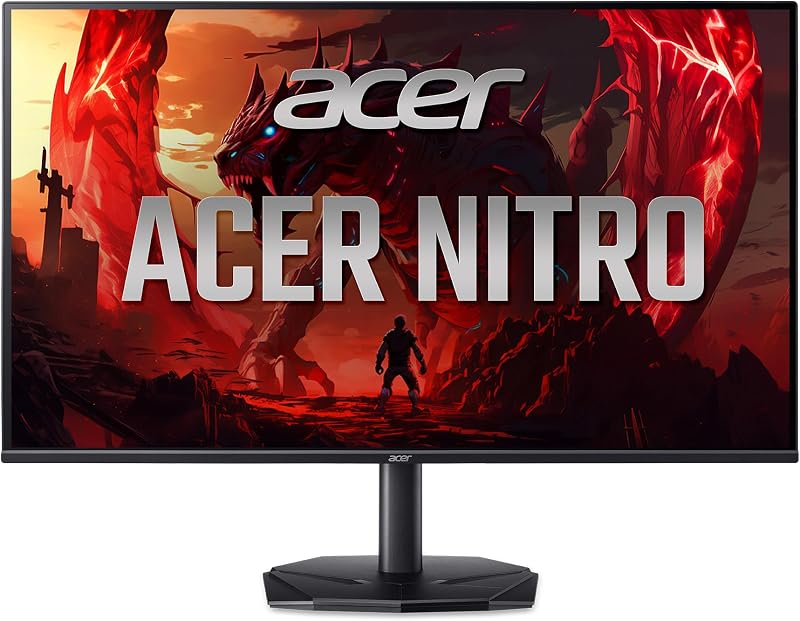
The Acer Nitro 23.8in FHD 1920×1080 IPS, known by model code Acer Nitro KG240Y W3biip, emphasizes rapid frame delivery and workspace economy. Featuring a 23.8-inch Full HD 1920 x 1080 resolution on a matte screen, it uses an In-Plane Switching panel to deliver stable colors across wide view angles. The zero-frame housing trims exterior borders to preserve valuable desktop space. For users seeking an acer 24 inch monitor, this unit packs rapid 240Hz refresh speeds into an efficient footprint.
Motion rendering stands as this monitor’s core strength. Operating at up to 240Hz with an agile response time reaching up to 0.5ms Gray-to-Gray, it minimizes smearing and ghosting during rapid transitions. Integrated AMD FreeSync Premium matches refresh cycles with your GPU to prevent screen tearing. Additionally, the panel covers 99 percent of the sRGB color spectrum, making it reliable for photo editing and creative digital projects. The listing does not specify integrated speakers or height adjustments.
This display suits competitive esports enthusiasts who keep their entire visual field in direct focus. It functions seamlessly on compact student desks or tight multi-screen gaming stations. However, it yields to the 27-inch Nitro model when your workflow demands sharper 1440p resolution, taller desktop real estate, or comprehensive stand mobility.
- 23.8-inch Full HD 1920 x 1080 IPS matte panel with zero-frame enclosure
- Up to 240Hz refresh rate and response time reaching up to 0.5ms GTG
- AMD FreeSync Premium synchronization to eliminate tearing and stutter
- Accurate 99 percent sRGB color gamut coverage for creative work
MONITOR Acer Nitro 27in QHD 2560×1440

Acer
4.2 average from Amazon buyers
- Color
- Black
- Size
- 27-inch
- Dimensions
- 9.2 x 24.2 x 18 Inches
Listed by the seller on the product page.
Best for: Balanced 1440p gaming and office productivity
Pros
- Crisp 2560×1440 QHD resolution
- Full Ergostand with pivot and swivel
- Built-in dual 2W speakers
Cons
- HDMI ports capped at 144Hz
The MONITOR Acer Nitro 27in QHD 2560×1440, cataloged under model code Acer Nitro XV272U W2bmiiprx, is the most well-rounded unit in this lineup. Its 27-inch widescreen IPS display delivers Quad HD resolution at 2560 x 1440 with a fine 0.233mm pixel pitch and a matte surface. The display achieves a 240Hz refresh rate through DisplayPort 1.4 and supports 144Hz across its two HDMI 2.0 ports. Gamers considering an acer nitro monitor 27 will appreciate the sharp text clarity and fluid motion reproduction.
Physical flexibility is handled by Acer’s Ergostand, providing 4.7 inches of height adjustment, tilt from -5 to 15 degrees, 360-degree swivel, and a full 90-degree pivot for portrait use. It is also 100 x 100mm VESA compliant and houses dual 2-watt speakers for built-in audio. Its response time ranges from 1ms GTG down to 0.5ms GTG, supported by AMD FreeSync Premium. Video ports include one DisplayPort 1.4, two HDMI 2.0 ports, and an audio out jack, with both DisplayPort and HDMI cables supplied.
This monitor is built for professionals who want sharp text for productivity alongside high-speed 240Hz responsiveness for competitive gaming. The versatile stand easily adapts to ergonomic work desks. It gives way to Acer’s 31.5-inch or 49-inch curved panels for users seeking wraparound immersion or extreme panoramic fields of view.
- 27-inch WQHD 2560 x 1440 widescreen IPS panel with 0.233mm pixel pitch
- 240Hz refresh rate via DisplayPort 1.4 and 144Hz via dual HDMI 2.0 ports
- Ergostand with 4.7 inches of height travel, tilt, 360-degree swivel, and pivot
- Integrated dual 2-watt speakers and VESA 100 x 100mm mounting support
Acer Nitro 31.5in FHD 1920×1080 Curved

Acer
4.0 average from Amazon buyers
- Color
- Black
- Dimensions
- 7.8 x 27.91 x 20.27 Inches
Listed by the seller on the product page.
Best for: Immersive curved gaming on a budget
Pros
- Expansive 31.5-inch screen
- Immersive 1500R curvature
- Fluid 240Hz refresh rate
Cons
- 1080p resolution across large display
- Tilt-only stand adjustment
The Acer Nitro 31.5in FHD 1920×1080 Curved, also designated as the Acer Nitro ED320Q W0biip, brings large-scale curved immersion to high-refresh gaming. Featuring an expansive 31.5-inch matte display with 1920 x 1080 Full HD resolution, it utilizes a 1500R curvature to wrap scenes across your natural sightlines. Buyers exploring an acer nitro 32 inch curved monitor will find that this model prioritizes expansive viewing angles and zero-frame aesthetics over ultra-dense pixel layouts.
Motion clarity remains sharp thanks to its 240Hz refresh rate and a fast 1ms response time that reduces ghosting and smearing during fast gameplay. AMD FreeSync Premium dynamically aligns frame presentation with your graphics card to ensure seamless visual pacing. The included stand offers tilt adjustments ranging from -5 to 20 degrees. The product listing does not specify height travel, swivel mechanics, or internal speakers for this model.
This monitor suits sim racers and casual gamers who sit back from their desk and want expansive visual impact without overtaxing their computer hardware. Because it pairs 1080p resolution with a 31.5-inch screen, graphics cards can easily sustain high frame rates. It steps aside for the 49-inch curved Nitro when you demand extreme horizontal resolution and seamless multi-app tiling.
- 31.5-inch curved 1500R display featuring 1920 x 1080 Full HD resolution
- 240Hz refresh rate paired with a rapid 1ms response time
- AMD FreeSync Premium support for smooth, tear-free frame rendering
- Zero-frame design with ergonomic tilt adjustment from -5 to 20 degrees
Acer Nitro 49in DQHD 5120×1440 Curved

Acer
4.0 average from Amazon buyers
- Color
- Black
- Dimensions
- 22.5 x 45.3 x 15.6 inches
- Weight
- 36 Pounds
Listed by the seller on the product page.
Best for: Panoramic simulation and super-ultrawide multitasking
Pros
- Massive 49-inch 32:9 DQHD canvas
- Deep 1000R curvature
- High 100,000,000:1 contrast ratio
Cons
- Requires 22.5 inches of desk depth
- Heavier 36-pound build
The Acer Nitro 49in DQHD 5120×1440 Curved, known as the Acer Nitro EI491CUR W3 (part number UM.SE1AA.301), is a super-ultrawide flagship display. It features a massive 49-inch VA LCD panel in a 32:9 aspect ratio with a 5120 x 1440 Dual Quad HD resolution. This layout matches two standard 27-inch 1440p screens side by side without a separating center bezel. In any serious acer gaming monitor comparison, this model provides an unmatched visual expanse for gaming and multitasking.
An aggressive 1000R curve brings the outer edges of this wide display directly into your peripheral vision. Key performance metrics include a 240Hz refresh rate, a 3ms response time, AMD FreeSync support, and a high contrast ratio of 100,000,000:1 alongside a 1027.8 brightness rating. The stand permits tilt adjustments from -5 to 20 degrees and 5.11 inches of height travel. Dimensions measure 45.3 inches wide by 22.5 inches deep by 15.6 inches high, with a total weight of 36 pounds.
This model is tailored for sim racers, flight simulator pilots, and creative professionals who need extensive horizontal space for timeline editing or data analysis. However, its substantial 36-pound weight and deep desk requirement make it impractical for compact workspaces. Gamers with standard desks or those focused strictly on esports will be better served by the smaller 23.8-inch or 27-inch Nitro screens.
- 49-inch 32:9 VA panel with 5120 x 1440 Dual Quad HD resolution
- Deep 1000R curvature matching natural peripheral sightlines
- 240Hz refresh rate, 3ms response time, and AMD FreeSync technology
- Adjustable stand with 5.11 inches of height travel and tilt mechanics
What Sets These Models Apart
| Model Name | Screen Size & Aspect Ratio | Resolution & Panel Type | Stand Adjustability |
|---|---|---|---|
| Acer Nitro 23.8in FHD 1920×1080 IPS | 23.8 inches, 16:9 aspect ratio | 1920 x 1080 Full HD, IPS panel | Listing does not specify stand adjustments |
| MONITOR Acer Nitro 27in QHD 2560×1440 | 27 inches, 16:9 aspect ratio | 2560 x 1440 Quad HD, IPS panel | Height 4.7 inches, tilt -5° to 15°, swivel 360°, pivot 90° |
| Acer Nitro 31.5in FHD 1920×1080 Curved | 31.5 inches, 16:9 aspect ratio | 1920 x 1080 Full HD, 1500R curved display | Tilt -5 to 20 degrees (height not specified) |
| Acer Nitro 49in DQHD 5120×1440 Curved | 49 inches, 32:9 aspect ratio | 5120 x 1440 Dual Quad HD, 1000R curved VA panel | Height 5.11 inches, tilt -5 to 20 degrees |
Buying Tips for Acer Gaming Monitors
Before determining which acer gaming monitor to buy, measure your desk space and consider your mounting configuration. A compact display like the 23.8-inch model fits easily on standard office desks, while the 49-inch curved monitor measures 45.3 inches wide and 22.5 inches deep, requiring a robust desk surface capable of supporting its 36-pound frame. If physical flexibility matters to your posture, verify whether a model offers full ergonomics. The 27-inch Nitro features comprehensive height, tilt, swivel, and pivot adjustments, whereas curved alternatives focus mainly on tilt mechanics.
Match your screen resolution with your graphics hardware capabilities to ensure your system can sustain a steady 240Hz output. Driving an acer 240hz gaming monitor at 1080p is accessible for mid-tier graphics cards, making it ideal for maintaining maximum frame rates in competitive shooters. In contrast, driving 2560 x 1440 on the 27-inch model or 5120 x 1440 on the 49-inch ultrawide demands substantial graphical performance. Pay attention to display inputs as well, since the 27-inch monitor achieves 240Hz via DisplayPort 1.4 while its HDMI ports operate at 144Hz.
Finally, consider how flat versus curved panels affect your specific gaming and professional use cases. Flat IPS panels deliver consistent geometry and color accuracy across wide angles, as demonstrated by the 99 percent sRGB coverage on the 23.8-inch display, making them excellent for color-critical work alongside esports. Conversely, 1500R and 1000R curved panels wrap visuals around your peripheral vision, reducing eye strain and increasing immersion in driving games and flight simulators.
FAQ
Can all Acer Nitro 240Hz monitors output 240Hz over HDMI?
No, refresh rates often depend on the specific port connected. On the MONITOR Acer Nitro 27in QHD 2560×1440, the 240Hz refresh rate requires a DisplayPort 1.4 connection, while its two HDMI 2.0 ports cap at 144Hz. Always consult the product specifications to confirm which video port supports the maximum 240Hz refresh rate.
Which Acer Nitro 240Hz monitor is best for competitive esports?
The Acer Nitro 23.8in FHD 1920×1080 IPS is the premier choice for competitive esports play. Its 23.8-inch size allows players to observe the entire battlefield without shifting their gaze, and its 240Hz refresh rate combined with up to 0.5ms GTG response time minimizes input lag and motion blur during fast twitch action.
What is the difference between 1500R and 1000R screen curves?
The number indicates the curvature radius in millimeters, meaning a 1000R curve is tighter and more pronounced than a 1500R curve. The 49-inch Acer Nitro uses a 1000R curve to match the natural peripheral arc of human vision across its wide 32:9 panel, whereas the 31.5-inch model uses a gentler 1500R curve suited to a 16:9 aspect ratio.
Do these Acer Nitro monitors include built-in speakers?
Audio hardware varies across the lineup. The MONITOR Acer Nitro 27in QHD 2560×1440 comes equipped with two built-in speakers delivering 2 watts per speaker alongside an audio output jack. The listings for the 23.8-inch, 31.5-inch, and 49-inch models do not specify integrated internal speakers, making dedicated desktop speakers or headphones necessary.
How does AMD FreeSync technology improve gaming on these monitors?
AMD FreeSync and AMD FreeSync Premium synchronize the refresh rate of the monitor directly with the frame output of compatible graphics cards. This synchronization eliminates visual screen tearing and reduces micro-stuttering, ensuring smooth frame delivery during high-speed action scenes.