6 Best Alternatives to the ViewSonic VP2468a ColorPro 24 inch 1080p IPS Monitor (2026)
As Amazon Associates, we earn from qualifying purchases. This means we may receive a small commission at no extra cost to you if you click through and make a purchase.
As an Amazon Associate we earn from qualifying purchases. Links on this page are affiliate links.
The ViewSonic VP2468a ColorPro delivers precise color accuracy for creative work, featuring a 24-inch 1080p IPS panel and USB-C docking with 65W charging. If you are searching for viewsonic vp2468a colorpro 24 inch 1080p ips monitor alternatives, you might need a different screen size, resolution, or connectivity setup. Some users prefer larger displays for more workspace, while others prioritize higher refresh rates or integrated webcams for video calls. Others may want a more budget-friendly option or a portable design for travel.
We selected these alternatives because their specifications overlap with the original model’s core strengths. Each option shares key features like IPS panels, USB-C connectivity, or professional color calibration. This list covers a range of sizes from 21.5 to 32 inches, including 4K and 1080p resolutions. You will find options with built-in speakers, Ethernet ports, and ergonomic stands. Whether you need a docking station for your office or a high-refresh screen for gaming, these picks match the practical needs of users who value the VP2468a’s reliability but require different specs.
How each alternative compares
ASUS 24-Inch 1080p Video Conferencing Monitor
The ASUS BE24ECSNK adds a built-in webcam to the standard docking setup, which the ViewSonic lacks. Both monitors offer 24-inch 1080p IPS panels and USB-C connectivity with Ethernet ports. The ASUS model provides height-adjustable stands and a USB hub, similar to the ViewSonic. However, the ViewSonic focuses on color accuracy with Pantone validation, while the ASUS prioritizes video conferencing hardware. You should choose the ASUS if you need integrated camera hardware for calls. The ViewSonic remains better for color-critical photo and video editing tasks where precise color reproduction is essential over communication features.
ASUS 27-Inch 1080p USB-C Docking Monitor
The ASUS VA27ECPSN increases the screen size to 27 inches while keeping the 1080p resolution and IPS panel. Like the ViewSonic, it includes USB-C and Ethernet ports for docking and networking. It adds Adaptive-Sync technology and built-in speakers, which the ViewSonic does not specify. The ViewSonic offers 24 inches of screen real estate and is designed specifically for color-accurate creative work. The ASUS model provides more desk space and smoother motion for general office tasks. You should pick the ASUS if you value larger screen real estate and integrated audio. The ViewSonic is the superior choice for professionals who require precise color fidelity for design work.
INNOCN 32-Inch 120Hz 90W USB-C Monitor
The INNOCN CB32U1 steps up significantly in resolution and size, offering a 32-inch 4K display with a 120Hz refresh rate. It provides 90W USB-C charging, which exceeds the ViewSonic’s 65W output. Both monitors use IPS panels and target creative professionals. The ViewSonic is smaller at 24 inches and focuses on 1080p color accuracy. The INNOCN model delivers much higher pixel density and screen space for detailed work. You should choose the INNOCN if you need a larger, sharper display and faster charging. The ViewSonic remains a compact option for those who prefer a smaller footprint and do not require 4K resolution.
ViewSonic VG2458 24-Inch 1080p Docking Monitor
The ViewSonic VG2458 is a direct alternative within the same brand, featuring a 24-inch 1080p IPS panel. It matches the ViewSonic VP2468a in offering USB-C docking and Ethernet connectivity. The VG2458 includes a height-adjustable stand and a USB hub, similar to the VP2468a. However, the VG2458 has a 100Hz refresh rate, while the VP2468a emphasizes color accuracy with Pantone validation. The VG2458 is positioned for home office use with macOS compatibility. You should pick the VG2458 if you want a standard office docking monitor. The VP2468a is better for creative professionals who need certified color precision for editing tasks.
BenQ 27-Inch 1080p USB-C IPS Monitor
The BenQ GW2786TC offers a larger 27-inch 1080p IPS panel compared to the ViewSonic’s 24-inch screen. It includes USB-C connectivity and a height-adjustable stand with a USB hub. The BenQ model adds a built-in microphone, which the ViewSonic does not list. Both monitors target office users and provide ergonomic adjustments. The ViewSonic focuses on color accuracy for creative work, while the BenQ emphasizes audio integration for calls. You should choose the BenQ if you need a larger screen and integrated audio hardware. The ViewSonic remains the better option for tasks requiring precise color reproduction and professional display calibration.
Upperizon 21.5-Inch 120Hz Portable Monitor
The Upperizon M215FH is a portable 21.5-inch monitor with a 120Hz refresh rate, unlike the stationary ViewSonic VP2468a. It uses an IPS panel and offers USB-C and HDMI inputs. The ViewSonic is a desktop monitor with Ethernet and docking features, which the Upperizon lacks. The Upperizon model is designed for travel and secondary display use, weighing only 3.79 pounds. It includes built-in speakers and HDR support. You should pick the Upperizon if you need a lightweight, high-refresh-rate screen for travel. The ViewSonic is superior for a primary desktop setup requiring stable networking and color accuracy for professional work.
| # | Product | Best for | Price |
|---|---|---|---|
| 1 | ViewSonic VP2468a 24-Inch 1080p ColorPro Best overall | color-accurate photo and video editing | |
| 2 | ASUS 24-Inch 1080p Video Conferencing Monitor Best webcam | integrated video conferencing and docking | |
| 3 | ASUS 27-Inch 1080p USB-C Docking Monitor Best budget | office setups needing Ethernet and USB-C docking | |
| 4 | INNOCN 32-Inch 120Hz 90W USB-C Monitor Best premium | Creative professionals needing large 4K screen real estate | |
| 5 | ViewSonic VG2458 24-Inch 1080p Docking Monitor Best home office | Office setups needing USB-C docking and Ethernet | |
| 6 | BenQ 27-Inch 1080p USB-C IPS Monitor Also great | Office workers needing a large screen and microphone | |
| 7 | Upperizon 21.5-Inch 120Hz Portable Monitor Best 120hz | portable 120Hz secondary display |
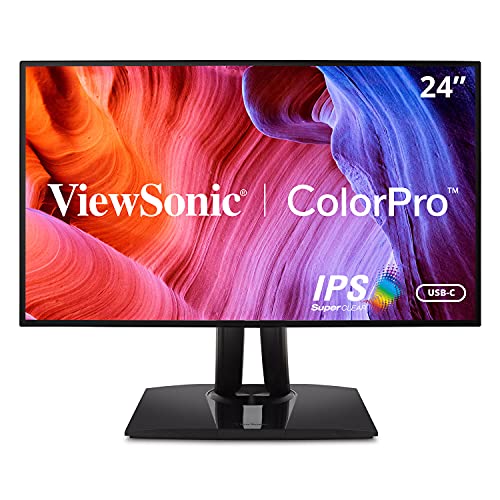
ViewSonic VP2468a 24-Inch 1080p ColorPro
Best for: color-accurate photo and video editing
- Screen Size
- 24 inch
- Resolution
- 1920 x 1080
- Panel Type
- IPS
- Ports
- USB-C, RJ45, HDMI, DisplayPort
- Use
- Photo & Video Editing
- Dimensions
- 8 × 16.6 × 21 inches
This 24-inch IPS monitor delivers Full HD resolution with 100% sRGB and Rec. 709 coverage. It features factory calibration with Delta E<2 accuracy and Pantone validation for precise color work. The integrated USB-C port provides 65W charging and Ethernet connectivity. You get a fully adjustable stand for ergonomic comfort. This setup suits photo and video editors who need reliable color fidelity and a clean desk.
- 100% sRGB and Rec. 709 color coverage
- Delta E<2 factory calibration accuracy
- 65W USB-C charging capability
- Integrated RJ45 Ethernet port
- Pantone Validated color precision
- 1080p resolution is lower than the 4K option on this list
- 24-inch screen is smaller than the 27-inch and 32-inch alternatives
- 12.5-pound weight is heavier than the portable 21.5-inch model
- You need precise color accuracy for professional design work
- You want to reduce cable clutter with a single USB-C connection
- You require Ethernet connectivity directly through the monitor
- You need 4K resolution for detailed visual tasks
- You prefer a larger 27-inch or 32-inch display
- You want a lightweight portable monitor for travel
Verdict: ViewSonic VP2468a ColorPro 24-Inch 1080p is ideal for creative professionals who prioritize color accuracy and docking station convenience over screen size or resolution.

ASUS 24-Inch 1080p Video Conferencing Monitor
Best for: integrated video conferencing and docking
- Screen Size
- 24 Inch
- Resolution
- 1920 x 1080
- Panel Type
- IPS
- Ports
- HDMI, USB-C, DisplayPort, RJ45
- Features
- Height-Adjustable Stand, USB Hub, Webcam
- Dimensions
- 21.3 × 8.32 × 15.8 inches
This 24-inch IPS monitor delivers Full HD resolution with a built-in 2MP webcam, microphone array, and stereo speakers. It supports USB-C docking for single-cable laptop connectivity and includes an RJ45 Ethernet port. The panel features a frameless design and height-adjustable stand. It is suitable for users who need integrated video conferencing tools and stable wired networking without extra peripherals.
- Integrated 2MP Full HD webcam with face auto exposure
- USB-C docking with 100W charging capability
- Built-in mic array and stereo speakers
- RJ45 Ethernet port for wired LAN
- 24-inch screen size is smaller than the 27-inch and 32-inch alternatives
- 1080p resolution is lower than the 4K option on the list
- 75Hz refresh rate is lower than the 120Hz and 240Hz options
- You need a built-in webcam and microphone for video calls
- You want a single-cable USB-C solution for laptop docking
- You require an Ethernet port for stable internet connectivity
- You need a 4K display for detailed work
- You prefer a larger 27-inch or 32-inch screen
- You require a high refresh rate for gaming
Verdict: ASUS BE24ECSNK 24-Inch Webcam Monitor fits remote workers who prioritize integrated video conferencing hardware and wired networking over screen size or resolution. It serves as a complete communication hub for your desk.

ASUS 27-Inch 1080p USB-C Docking Monitor
Best for: office setups needing Ethernet and USB-C docking
- Screen Size
- 27-inch
- Resolution
- 1920 x 1080
- Refresh Rate
- 75Hz
- Panel Type
- IPS
- Variable Refresh Rate
- Adaptive-Sync, FreeSync
- Ports
- HDMI, USB-C, DisplayPort, RJ45
The ASUS VA27ECPSN is a 27-inch 1080p IPS monitor designed for office productivity. It features a 75Hz refresh rate and Adaptive-Sync for smooth visuals. A key benefit is the USB-C port, which provides 65W power delivery and video input through a single cable. It also includes built-in speakers and an RJ45 Ethernet port. This setup suits users who want a clean desk with minimal cable clutter.
- 27-inch IPS panel with 178-degree viewing angles
- USB-C port delivers 65W power to laptops
- Built-in RJ45 Ethernet port for wired networking
- Ergonomic stand with height, tilt, swivel, and pivot adjustments
- TÜV Rheinland-certified Flicker-free and Low Blue Light technologies
- 1080p resolution on a 27-inch screen offers lower pixel density than 1440p or 4K alternatives
- 14.3-pound weight is heavier than smaller 24-inch options
- 75Hz refresh rate is slower than the 120Hz or 240Hz panels found in some competitors
- You need a single-cable connection for your laptop with charging capability
- You prefer a larger 27-inch screen for multitasking and document work
- You require built-in wired Ethernet connectivity without a separate adapter
- You require 4K resolution for detailed graphic design or video editing
- You prioritize high refresh rates for fast-paced gaming
- You want a compact 24-inch display for limited desk space
Verdict: ASUS VA27ECPSN 27-inch 1080p Docking Monitor fits professionals who value a tidy workspace and need reliable wired networking alongside their display. It is ideal for office tasks where screen real estate and cable management matter more than high refresh rates.

INNOCN 32-Inch 120Hz 90W USB-C Monitor
Best for: Creative professionals needing large 4K screen real estate
- Screen Size
- 32"
- Resolution
- 4K, FHD
- Refresh Rate
- 120Hz, 240Hz
- Panel Type
- IPS
- Ports
- USB-C, DP 1.4, HDMI 2.1
- Features
- HDR
This 32-inch IPS monitor delivers 4K resolution at 120Hz, offering significantly higher pixel density than the 1080p alternatives on this list. It includes 90W USB-C power delivery, allowing you to charge a MacBook with a single cable. The panel covers 98% DCI-P3 and 100% sRGB with factory calibration. This setup suits creative professionals who need color accuracy and screen real estate for detailed editing tasks.
- 32-inch 4K IPS panel with 120Hz refresh rate
- 90W USB-C connectivity for single-cable MacBook charging
- Factory-calibrated Delta E < 1 color accuracy
- Covers 98% DCI-P3 and 100% sRGB gamuts
- Larger 32-inch size requires more desk space than the 24-inch competitors
- Heavier build due to the larger 32-inch panel and metal base
- Higher resolution may demand more GPU power than 1080p displays
- You need a larger 32-inch screen for detailed photo or video editing
- You want 4K resolution with high color accuracy for creative work
- You use a MacBook and want 90W USB-C charging to reduce cable clutter
- You prefer a compact 24-inch display for a smaller desk
- You are limited to 1080p resolution and do not need 4K
- You need a monitor that fits in a portable bag
Verdict: INNOCN 32" 4K 120Hz IPS Monitor is ideal for creative professionals who need a large, color-accurate display with USB-C convenience. It suits users who prioritize screen real estate and resolution over the smaller footprint of the other options.

ViewSonic VG2458 24-Inch 1080p Docking Monitor
Best for: Office setups needing USB-C docking and Ethernet
- Screen Size
- 24"
- Resolution
- 1920 x 1080
- Refresh Rate
- 100Hz
- Panel Type
- IPS
- Ports
- USB-C, HDMI, DisplayPort, RJ45
- Features
- Height-Adjustable Stand, USB Hub
This 24-inch 1080p IPS monitor offers a 100Hz refresh rate for smooth visuals. It features a 100W USB-C port that handles video, data, and charging through a single cable. The stand adjusts for height, tilt, swivel, and rotation. Integrated flicker-free technology and a blue light filter help reduce eye strain during long work sessions.
- 100W USB-C port supports daisy-chaining and device charging
- IPS panel with 100Hz refresh rate
- Height-adjustable stand with swivel and rotation
- Built-in RJ45 Ethernet port
- 1080p resolution is lower than the 4K option on this list
- 13.6-pound weight is heavier than the portable monitor alternative
- 24-inch screen is smaller than the 27-inch and 32-inch models listed
- You need a single-cable USB-C connection for your laptop
- You want a monitor with built-in Ethernet connectivity
- You prefer a 24-inch screen size for your desk
- You require 4K resolution for detailed work
- You need a portable monitor for travel
- You prefer a larger 27-inch or 32-inch display
Verdict: ViewSonic VG2458 24-Inch Docking Monitor fits professionals who want a tidy desk with a single USB-C cable and built-in Ethernet. It is a solid choice for office setups that prioritize connectivity and ergonomic adjustments over high resolution.

BenQ 27-Inch 1080p USB-C IPS Monitor
Best for: Office workers needing a large screen and microphone
- Screen Size
- 27 Inch
- Resolution
- 1080p
- Refresh Rate
- 100Hz
- Panel Type
- IPS
- Ports
- USB-C
- Features
- Height-Adjustable Stand, USB Hub
The BenQ GW2786TC is a 27-inch 1080p IPS monitor designed for office environments. It features a 100Hz refresh rate and a height-adjustable stand for ergonomic flexibility. The display includes a built-in noise-cancellation microphone and USB-C connectivity with 65W charging. Adaptive brightness technology adjusts to ambient light. This model suits users who prioritize screen real estate and integrated audio for video calls.
- 27-inch IPS panel with 1080p resolution
- 100Hz refresh rate for smoother motion
- Height-adjustable stand with tilt, pivot, and swivel
- USB-C port with 65W charging and hub
- Built-in noise-cancellation microphone
- 1080p resolution on a 27-inch screen results in lower pixel density
- 65W USB-C charging is less than the 100W offered by some competitors
- 9.1-pound weight is heavier than smaller 24-inch alternatives
- You need a larger 27-inch display for multitasking
- You require a built-in microphone for conference calls
- You prefer an ergonomic stand with height adjustment
- You require 4K resolution for sharp text
- You need high-power USB-C charging above 65W
- You prefer a compact 24-inch form factor
Verdict: BenQ GW2786TC 27-inch 1080p USB-C Monitor fits office workers who value a large screen and integrated audio. It is ideal for users who spend long hours at a desk and need ergonomic adjustments.

Upperizon 21.5-Inch 120Hz Portable Monitor
Best for: portable 120Hz secondary display
- Screen Size
- 21.5 inch
- Resolution
- 1920×1080
- Refresh Rate
- 120Hz
- Panel Type
- IPS
- Ports
- USB-C, HDMI
- Features
- HDR, Built-in Speakers
This Upperizon portable monitor offers a 21.5-inch 1080p IPS display with a 120Hz refresh rate. It covers 110% of the sRGB color gamut and reaches 300 nits of brightness. The unit weighs 3.79 pounds and includes a built-in kickstand. You can connect it via USB-C or HDMI. It suits users needing a lightweight second screen for travel or casual gaming.
- 120Hz refresh rate for smoother motion
- 110% sRGB color gamut coverage
- Lightweight 3.79 pounds design
- Built-in adjustable kickstand
- 21.5-inch screen is smaller than the 24-inch or 27-inch options on this list
- 300 nits brightness is lower than typical desktop monitors
- 3.79-pound weight is heavier than some ultrathin portable alternatives
- You need a high refresh rate for casual gaming on the go
- You want accurate colors with 110% sRGB coverage
- You prefer a lightweight screen for travel
- You require a larger 24-inch or 27-inch display
- You need high brightness for bright environments
- You want a monitor with built-in webcam or docking station
Verdict: Upperizon 21.5 inch 120Hz Portable Monitor delivers a compact, high-refresh-rate screen for travelers. It fits users who prioritize portability and smooth motion over large desktop real estate.
Specifications side by side

| Spec | ViewSonic VP2468a 24-Inch 1080p ColorPro | ASUS 24-Inch 1080p Video Conferencing Monitor | ASUS 27-Inch 1080p USB-C Docking Monitor | INNOCN 32-Inch 120Hz 90W USB-C Monitor | ViewSonic VG2458 24-Inch 1080p Docking Monitor | BenQ 27-Inch 1080p USB-C IPS Monitor | Upperizon 21.5-Inch 120Hz Portable Monitor |
|---|---|---|---|---|---|---|---|
| Screen Size | 24 inch | 24 Inch | 27-inch | 32" | 24" | 27 Inch | 21.5 inch |
| Resolution | 1920 x 1080 | 1920 x 1080 | 1920 x 1080 | 4K, FHD | 1920 x 1080 | 1080p | 1920×1080 |
| Refresh Rate | – | – | 75Hz | 120Hz, 240Hz | 100Hz | 100Hz | 120Hz |
| Panel Type | IPS | IPS | IPS | IPS | IPS | IPS | IPS |
| Variable Refresh Rate | – | – | Adaptive-Sync, FreeSync | – | – | – | – |
| Ports | USB-C, RJ45, HDMI, DisplayPort | HDMI, USB-C, DisplayPort, RJ45 | HDMI, USB-C, DisplayPort, RJ45 | USB-C, DP 1.4, HDMI 2.1 | USB-C, HDMI, DisplayPort, RJ45 | USB-C | USB-C, HDMI |
| Features | – | Height-Adjustable Stand, USB Hub, Webcam | Built-in Speakers, Height-Adjustable Stand | HDR | Height-Adjustable Stand, USB Hub | Height-Adjustable Stand, USB Hub | HDR, Built-in Speakers |
| Use | Photo & Video Editing | – | – | Mac, Photo & Video Editing | Business & Office, Mac, Office, Home Office | Business & Office, Office | Mac, Travel |
| Size | – | 24 Inch | 27 Inch | 32 Inch | 12.5" x 21.2" x 1.8" | 27 Inch | 21.5 inch |
| Operating System | – | – | – | macOS | macOS | – | macOS |
| Dimensions | 8 × 16.6 × 21 inches | 21.3 × 8.32 × 15.8 inches | 24.1 × 8.9 × 14.7 inches | 10 × 2 × 50 inches | 8.08 × 21.2 × 19.9 inches | 9 × 24 × 18 inches | 0.59 × 19.4 × 11.3 inches |
| Weight | 12.5 pounds | 11.4 pounds | 14.3 pounds | – | 13.6 pounds | 9.1 pounds | 3.79 pounds |
| Color | Black | BLACK | BLACK | White | Black | White | Black |
| Model | VP2468A-CR | BE24ECSNK | VA27ECPSN | CB32U1 | VG2458 | GW2786TC | M215FH |
Frequently asked questions
Which alternative offers the largest screen size?
The INNOCN CB32U1 provides the largest display in this list at 32 inches. It also features a 4K resolution, which is significantly higher than the 1080p panels found on the ViewSonic VP2468a and most other alternatives here. This makes it ideal if you need more screen real estate for detailed creative work.
Can I find a monitor with a built-in webcam?
Yes, the ASUS BE24ECSNK includes a built-in webcam. This feature is unique among the listed options and is particularly useful for remote workers who need a complete communication hub without adding external hardware. It retains the standard 24-inch 1080p IPS panel and USB-C docking capabilities found on similar models.
Do any alternatives have a higher refresh rate than the ViewSonic?
Several options offer higher refresh rates than the standard 60Hz found on many office monitors. The Upperizon M215FH provides a 120Hz refresh rate for smoother motion. The INNOCN CB32U1 lists a 240Hz refresh rate, and the ViewSonic VG2458 offers 100Hz. These are beneficial for gaming or fast-paced tasks.
Is there a 27-inch option available?
Yes, there are two 27-inch models: the ASUS VA27ECPSN and the BenQ GW2786TC. Both provide a larger viewing area than the 24-inch ViewSonic VP2468a. The ASUS model includes Ethernet and a height-adjustable stand, while the BenQ unit offers a height-adjustable stand and integrated microphone for office use.
Which monitor is best for portable use?
The Upperizon M215FH is designed as a portable monitor. It weighs only 3.79 pounds and has a thin profile, making it easy to transport. It connects via HDMI and USB-C, allowing you to use it as a secondary display for travel or when you need a compact, high-refresh-rate screen away from your desk.
Do these alternatives support USB-C docking like the ViewSonic?
Most listed monitors support USB-C docking. The ViewSonic VG2458, ASUS VA27ECPSN, ASUS BE24ECSNK, and BenQ GW2786TC all include USB-C ports. This allows you to connect your computer with a single cable for data, video, and power. The INNOCN CB32U1 also features USB-C, ensuring convenient connectivity for modern devices.
Which monitor is best for a tidy office setup?
The ViewSonic VG2458 and ASUS VA27ECPSN are ideal for tidy setups. Both include built-in Ethernet ports and USB-C docking, reducing cable clutter. The VG2458 also features a height-adjustable stand and USB hub, while the VA27ECPSN offers Adaptive-Sync technology. These features help maintain a clean and organized workspace.
See also