Msi 34-Inch 120Hz UWQHD Ultrawide Monitor Alternatives: 6 Similar Picks Compared
As Amazon Associates, we earn from qualifying purchases. This means we may receive a small commission at no extra cost to you if you click through and make a purchase.
As an Amazon Associate we earn from qualifying purchases. Links on this page are affiliate links.
You might be searching for msi 34 inch 120hz uwqhd ultrawide monitor alternatives if the original does not match your exact needs. The MSI PRO MP341CQ E12 offers a 3440×1440 resolution with a 120Hz refresh rate and Adaptive-Sync. It includes built-in speakers and a tilt-adjustable stand. However, you may prefer a different panel type, a height-adjustable stand, or USB-C connectivity. Some users might also want a curved screen or a smaller size. This list compares 6 similar picks that share key specifications with the original model. We selected these alternatives because their specs overlap with the MSI monitor. You can find options with higher refresh rates, different resolutions, or additional ports. Each choice balances screen real estate with specific features like color accuracy or ergonomic flexibility. This guide helps you compare the published specifications to find the best fit for your desk setup. You will see how each monitor handles multitasking, gaming, or productivity tasks based on its technical data. The goal is to provide a clear view of what each spec means in practice. You can then decide which combination of features suits your workflow best without guessing.
How each alternative compares
MSI 34-Inch White Ultrawide Monitor
This MSI model shares the same 34-inch UWQHD VA panel and 120Hz refresh rate as the original. The primary difference is the white finish, which changes the aesthetic for your desk setup. It retains Adaptive-Sync and built-in speakers, ensuring similar performance for multitasking and casual gaming. You get the same eye comfort features, including flicker-free technology. Choose this version if you prefer a lighter color scheme but want identical technical specifications and viewing angles for productivity tasks.
Msi PRO MP341CQPHG E12 34-inch UWQHD Monitor
This variant upgrades the stand to a height-adjustable design, offering ergonomic flexibility that the original tilt-only stand lacks. It adds USB-C connectivity, allowing for simpler cable management and potential power delivery to laptops. The 120Hz UWQHD VA panel and Adaptive-Sync remain consistent with the original. If you spend long hours at your desk and need to raise or lower the screen without an external arm, this model provides superior ergonomics while maintaining the same core display performance and audio features.
Philips 346E2CUAE 34" Curved USB-C Monitor
The Philips monitor introduces a curved screen, which can enhance immersion for media consumption compared to the flat panel of the original. It includes USB-C connectivity with power delivery, a feature absent in the MSI model. However, the refresh rate is lower at 100Hz instead of 120Hz. It retains the VA panel and Adaptive-Sync for smooth motion. Select this alternative if you prioritize a curved viewing experience and convenient single-cable connectivity for workstations over the slightly higher refresh rate of the original.
Amzfast 32-Inch Curved 4K 120Hz Monitor
This Amzfast monitor shifts from ultrawide to a standard 32-inch 4K UHD resolution. You gain significantly higher pixel density for sharp text and detailed images, but lose the horizontal screen real estate of the 3440×1440 format. It maintains a 120Hz refresh rate and includes HDR support for better contrast and color range. The curved design adds immersion. Pick this option if you prioritize image clarity and color accuracy for gaming or creative work over the wide aspect ratio needed for multitasking.
ASUS 27" FHD 240Hz VA Monitor
The ASUS monitor targets competitive gamers with a 27-inch 1080p FHD resolution and a much higher 240Hz refresh rate. It sacrifices the high resolution and ultrawide width of the original for faster motion clarity. The VA panel and FreeSync support help reduce tearing. It includes built-in speakers and a curved screen. Choose this alternative if you play fast-paced competitive titles and prioritize frame rate and response time over the detailed visuals and screen space provided by the original 34-inch UWQHD display.
Dell 32-Inch 4K 120Hz Monitor
This Dell monitor offers a 32-inch 4K UHD resolution with a 120Hz refresh rate, focusing on image sharpness rather than ultrawide width. It uses a VA panel with FreeSync for smooth motion. The original has built-in speakers, but this Dell model does not list them. It lacks USB-C connectivity. Select this option if you want a standard aspect ratio with high pixel density for media and color-accurate work, and you do not require the extra horizontal space or audio features of the original MSI monitor.
| # | Product | Best for | Price |
|---|---|---|---|
| 1 | MSI 34-Inch 120Hz UWQHD Ultrawide Monitor Best overall | Multitasking and casual gaming | |
| 2 | MSI 34-Inch White Ultrawide Monitor Best budget | Ultrawide productivity and smooth 120Hz gaming | |
| 3 | Msi PRO MP341CQPHG E12 34-inch UWQHD Monitor Best height-adjustable stand | height-adjustable stand needs | |
| 4 | Philips 346E2CUAE 34" Curved USB-C Monitor Best premium | Ultrawide productivity and media consumption | |
| 5 | Amzfast 32-Inch Curved 4K 120Hz Monitor Best hdr | 4K gaming and color-critical work | |
| 6 | ASUS 27" FHD 240Hz VA Monitor Best 1080p fhd | Competitive gaming at 1080p | |
| 7 | Dell 32-Inch 4K 120Hz Monitor Also great | 4K media and color-accurate work |

MSI 34-Inch 120Hz UWQHD Ultrawide Monitor
Best for: Multitasking and casual gaming
- Screen Size
- 34-inch
- Resolution
- 3440 x 1440
- Refresh Rate
- 120Hz
- Response Time
- 1ms
- Aspect Ratio
- 21:9
- Variable Refresh Rate
- Adaptive-Sync (FreeSync compatible)
The MSI PRO MP341CQ E12 is a 34-inch ultrawide monitor featuring a VA panel and 3440 x 1440 resolution. It offers a 120Hz refresh rate with Adaptive Sync for smooth motion. The display includes built-in speakers and a tilt-adjustable stand. This setup suits professionals and gamers who need a wide workspace and fluid visuals without excessive bulk.
- 3440 x 1440 UWQHD resolution provides expansive multitasking space
- 120Hz refresh rate reduces screen tearing and stuttering
- Adaptive Sync matches the monitor's refresh rate to your GPU
- Built-in speakers save desk space for external audio gear
- Tilt-adjustable stand allows flexible viewing angles
- VA panel type may have slower response times than IPS panels
- 24.5-pound weight makes the monitor heavier than many alternatives
- HDMI 2.0b port limits bandwidth compared to newer standards
- You need a wide screen for multitasking across multiple windows
- You want a 120Hz refresh rate for smoother gaming
- You prefer a monitor with built-in speakers for simplicity
- You require a 4K resolution for detailed image clarity
- You need a high refresh rate above 120Hz for competitive gaming
- You want an IPS panel for faster response times
Verdict: MSI 34-inch 120Hz UWQHD Ultrawide Monitor delivers a solid balance of resolution and refresh rate for users who value screen real estate. It fits those who want smooth visuals and built-in audio without needing the fastest panel technology.

MSI 34-Inch White Ultrawide Monitor
Best for: Ultrawide productivity and smooth 120Hz gaming
- Screen Size
- 34-inch
- Resolution
- 3440 x 1440
- Refresh Rate
- 120Hz
- Response Time
- 1ms
- Variable Refresh Rate
- Adaptive-Sync (FreeSync compatible)
- Ports
- HDMI 2.0b, DisplayPort 1.4a
The MSI PRO MP341CQW E12 is a 34-inch ultrawide monitor featuring a VA panel and 3440 x 1440 resolution. It offers a 120Hz refresh rate with Adaptive Sync for smooth motion. The display includes TÜV Rheinland certification for flicker-free viewing and low blue light. You get HDMI 2.0b and DisplayPort 1.4a connectivity. This model suits users seeking a comfortable, high-refresh ultrawide screen for work or gaming.
- 120Hz refresh rate for smoother motion
- UWQHD 3440 x 1440 resolution
- TÜV Rheinland Flicker Free and Low Blue Light certification
- Adaptive Sync reduces screen tearing
- VESA 100x100mm wall mount compatible
- VA panel may have slower response times than IPS alternatives
- HDMI 2.0b limits bandwidth compared to HDMI 2.1
- Standard tilt stand limits height adjustment range
- You need a large ultrawide screen for multitasking
- You want a 120Hz refresh rate for smoother visuals
- You value eye comfort certifications for long sessions
- You require a 4K resolution display
- You need HDMI 2.1 for next-gen console features
- You prefer an IPS panel for better viewing angles
Verdict: MSI PRO MP341CQW E12 34-Inch UWQHD Monitor delivers a solid 120Hz ultrawide experience for productivity and casual gaming. It fits users who prioritize screen real estate and eye comfort over absolute peak performance.

Msi PRO MP341CQPHG E12 34-inch UWQHD Monitor
Best for: height-adjustable stand needs
- Screen Size
- 34"
- Resolution
- 3440×1440
- Refresh Rate
- 120Hz
- Response Time
- 1ms
- Aspect Ratio
- 21:9
- Variable Refresh Rate
- Adaptive-Sync
The MSI PRO MP341CQPHG E12 is a 34-inch ultrawide monitor featuring a VA panel and 3440×1440 resolution. It offers a 120Hz refresh rate with Adaptive-Sync for smooth visuals. The stand provides height adjustment, and the USB-C port delivers 98W power delivery. This model suits users who need a height-adjustable base and efficient connectivity for their workstation setup.
- Height-adjustable stand for ergonomic positioning
- USB-C port with 98W power delivery
- 120Hz refresh rate with Adaptive-Sync
- 3440×1440 UWQHD resolution
- 100Hz refresh rate is lower than the 120Hz standard in this guide
- VA panel may have slower response times than IPS alternatives
- You need a height-adjustable stand for ergonomic comfort
- You require USB-C connectivity with power delivery
- You work with ultrawide displays for multitasking
- You need a 144Hz or higher refresh rate
- You prefer IPS panel technology for faster response
- You want a standard 16:9 aspect ratio
Verdict: MSI 34-Inch 120Hz UWQHD Monitor provides a practical ultrawide experience with a height-adjustable stand and robust USB-C connectivity. It fits professionals who prioritize ergonomic flexibility and efficient desk setups over maximum gaming speeds.
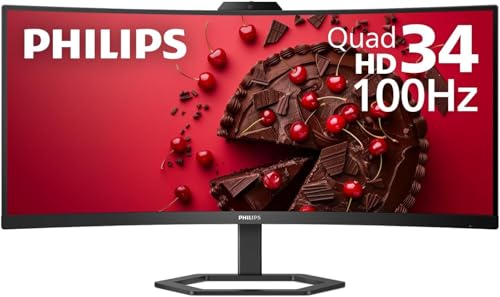
Philips 346E2CUAE 34" Curved USB-C Monitor
Best for: Ultrawide productivity and media consumption
- Screen Size
- 34"
- Resolution
- 3440 x 1440
- Refresh Rate
- 100Hz
- Response Time
- 1ms (MPRT)
- Variable Refresh Rate
- Adaptive-Sync
- Ports
- USB-C, HDMI, DP, USB 3.2
This Philips monitor offers a 34-inch curved VA panel with 3440×1440 resolution. It runs at 100Hz with 1ms MPRT response time. A key feature is the USB-C port supporting Power Delivery. The display covers 121.3% sRGB for accurate colors. It suits users wanting an ultrawide screen with convenient laptop connectivity.
- 3440×1440 UWQHD resolution on a 34-inch screen
- USB-C port with Power Delivery support
- 121.3% sRGB color gamut coverage
- 100Hz refresh rate with Adaptive-Sync
- 100Hz refresh rate is lower than the 120Hz standard of other list items
- 27.8 pounds weight is heavier than many competitors
- Curved VA panel may show less contrast than IPS alternatives
- You need USB-C Power Delivery for a single-cable laptop setup
- You want an ultrawide screen for expanded multitasking
- You prioritize wide color gamut accuracy for creative work
- You require a 120Hz or higher refresh rate for competitive gaming
- You prefer a flat screen over a curved display
- You need a lighter monitor for easy desk movement
Verdict: Philips 34-inch Curved UWQHD Monitor delivers a spacious ultrawide experience with useful USB-C connectivity. It is ideal for professionals and casual gamers who value color accuracy and cable management over maximum refresh rates.

Amzfast 32-Inch Curved 4K 120Hz Monitor
Best for: 4K gaming and color-critical work
- Screen Size
- 32"
- Resolution
- 3840×2160
- Refresh Rate
- 120Hz
- Variable Refresh Rate
- Adaptive Sync, VRR
- Ports
- HDMI 2.1, DP 1.4, audio jack
- Features
- HDR, Built-in Speakers, Curved Screen
This 32-inch curved monitor delivers 4K UHD resolution at 120Hz, offering sharp visuals and smooth motion for gaming. It covers 131% of the sRGB color gamut and includes built-in 3W speakers. The screen supports Adaptive Sync to reduce lag. You get PIP/PBP split-screen capabilities for multitasking. This model suits console gamers and designers who need high color accuracy and a curved display field.
- 3840×2160 4K UHD resolution for sharp detail
- 120Hz refresh rate with Adaptive Sync support
- 131% sRGB color coverage for accurate visuals
- Built-in 3W speakers for basic audio
- PIP/PBP split-screen for multitasking
- 3000:1 contrast ratio is lower than the 4000:1 typical of VA panels in this category
- 300 nits peak brightness limits HDR impact compared to higher-end displays
- 32-inch size is smaller than the 34-inch ultrawide alternatives listed
- You want 4K resolution on a curved screen
- You need built-in speakers for casual use
- You play games at 120Hz on consoles or PC
- You require a 34-inch ultrawide aspect ratio
- You need high brightness for bright rooms
- You prefer a flat panel design
Verdict: Amzfast 32-inch 4K 120Hz Curved Monitor fits users who prioritize 4K sharpness and color accuracy over ultrawide width. It is a solid choice for console gamers and mixed-use tasks. The curved design enhances immersion. You get good value for the resolution and refresh rate.
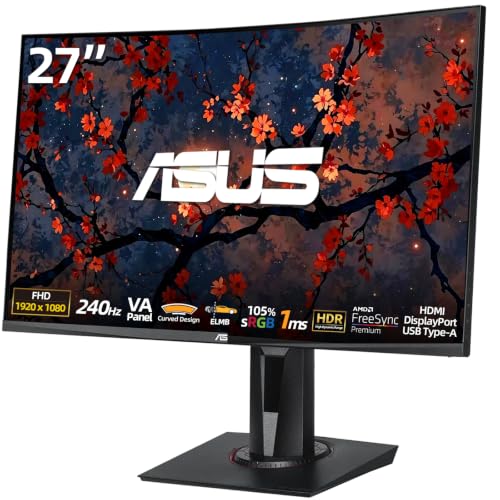
ASUS 27" FHD 240Hz VA Monitor
Best for: Competitive gaming at 1080p
- Screen Size
- 27"
- Resolution
- 1920 x 1080
- Refresh Rate
- 240Hz
- Response Time
- 1ms
- Variable Refresh Rate
- AMD FreeSync Premium
- Ports
- HDMI 2.0, DisplayPort 1.2, USB 3.2 Gen 1
This ASUS monitor offers a 27-inch curved VA panel with 1920 x 1080 resolution. It features a 240Hz refresh rate and 1ms response time for fast-paced gaming. ELMB SYNC technology reduces motion blur, while AMD FreeSync Premium ensures tear-free visuals. Built-in 2W speakers and multiple connectivity ports complete the setup. It is a solid option for players prioritizing speed over screen real estate.
- 240Hz refresh rate for ultra-smooth motion
- 1ms response time reduces input lag
- ELMB SYNC technology sharpens fast-moving objects
- Built-in 2W x 2 speakers
- 3000:1 contrast ratio for deeper blacks
- 1920 x 1080 resolution is lower than the 3440 x 1440 UWQHD of other list picks
- 27-inch screen size is smaller than the 34-inch or 32-inch alternatives
- 2W built-in speakers are less powerful than dedicated audio setups
- You want high refresh rates for competitive FPS gaming
- You prefer a curved display for immersion
- You need a monitor with built-in speakers
- You require UWQHD or 4K resolution
- You want a 34-inch ultrawide screen
- You need USB-C connectivity with power delivery
Verdict: ASUS 27-inch 240Hz FHD Curved Gaming Monitor delivers high-speed performance for competitive gamers who prioritize refresh rate over pixel density. It suits players who want a compact, curved screen with integrated audio for a streamlined setup.

Dell 32-Inch 4K 120Hz Monitor
Best for: 4K media and color-accurate work
- Screen Size
- 31.5in
- Resolution
- 3840×2160
- Refresh Rate
- 120Hz
- Response Time
- 4ms
- Variable Refresh Rate
- AMD FreeSync Premium
- Ports
- HDMI, DisplayPort
This Dell S3225QS offers a 31.5-inch 4K UHD VA panel with a 120Hz refresh rate. It covers 99% sRGB and 95% DCI-P3 for accurate colors. The 1500:1 contrast ratio and AMD FreeSync Premium support smooth visuals. You get improved comfort with blue light reduction and re-engineered sound. It features an ash white finish with ultra-thin bezels for a modern look.
- 4K UHD resolution with 99% sRGB coverage
- 120Hz refresh rate with AMD FreeSync Premium
- 1500:1 contrast ratio for deep blacks
- Ash white finish with ultra-thin bezels
- 1500:1 contrast ratio is lower than the 3000:1 ratio found on the MSI PRO MP341CQPHG E12
- 19.3-pound weight is heavier than the Philips 346E2
- Standard HDMI and DisplayPort ports lack USB-C connectivity
- You want 4K clarity with a 120Hz refresh rate
- You prefer a 32-inch VA panel for media consumption
- You value color accuracy with 95% DCI-P3 coverage
- You need a 34-inch ultrawide display
- You require USB-C connectivity for docking
- You want a higher contrast ratio than 1500:1
Verdict: Dell 32in 4K 120Hz VA Monitor delivers solid 4K performance and color accuracy for users who prioritize image quality over ultrawide formats. It suits those who want a modern aesthetic and smooth motion without needing USB-C.
Specifications side by side

| Spec | MSI 34-Inch 120Hz UWQHD Ultrawide Monitor | MSI 34-Inch White Ultrawide Monitor | Msi PRO MP341CQPHG E12 34-inch UWQHD Monitor | Philips 346E2CUAE 34" Curved USB-C Monitor | Amzfast 32-Inch Curved 4K 120Hz Monitor | ASUS 27" FHD 240Hz VA Monitor | Dell 32-Inch 4K 120Hz Monitor |
|---|---|---|---|---|---|---|---|
| Screen Size | 34-inch | 34-inch | 34" | 34" | 32" | 27" | 31.5in |
| Resolution | 3440 x 1440 | 3440 x 1440 | 3440×1440 | 3440 x 1440 | 3840×2160 | 1920 x 1080 | 3840×2160 |
| Refresh Rate | 120Hz | 120Hz | 120Hz | 100Hz | 120Hz | 240Hz | 120Hz |
| Response Time | 1ms | 1ms | 1ms | 1ms (MPRT) | – | 1ms | 4ms |
| Aspect Ratio | 21:9 | – | 21:9 | – | – | – | – |
| Variable Refresh Rate | Adaptive-Sync (FreeSync compatible) | Adaptive-Sync (FreeSync compatible) | Adaptive-Sync | Adaptive-Sync | Adaptive Sync, VRR | AMD FreeSync Premium | AMD FreeSync Premium |
| Ports | HDMI 2.0b, DisplayPort 1.4a | HDMI 2.0b, DisplayPort 1.4a | HDMI, DisplayPort, Type C | USB-C, HDMI, DP, USB 3.2 | HDMI 2.1, DP 1.4, audio jack | HDMI 2.0, DisplayPort 1.2, USB 3.2 Gen 1 | HDMI, DisplayPort |
| Panel Type | VA | VA | VA | VA | – | VA | VA |
| Features | Built-in Speakers | Built-in Speakers | Built-in Speakers, Height-Adjustable Stand | Built-in Speakers, Curved Screen, Power Delivery | HDR, Built-in Speakers, Curved Screen | Built-in Speakers, Curved Screen | – |
| Use | – | – | – | – | Gaming | Gaming | – |
| Size | – | – | – | 34" | 32 Inch | 27"-FHD-240Hz-1ms | S3225QS |
| Dimensions | 18.5 × 31.9 × 9.33 inches | 18.5 × 31.9 × 9.33 inches | 21.6 × 31.9 × 9.25 inches | 14.4 × 31.8 × 4.3 inches | 7.48 × 28.2 × 20.1 inches | 8.31 × 24 × 15.2 inches | 8.73 × 28.1 × 17.6 inches |
| Weight | 24.5 pounds | – | 27.4 pounds | 27.8 pounds | – | – | 19.3 pounds |
| Color | Black | White | Black | Black | Black | Black | Ash White |
| Model | PRO MP341CQ E12 | PRO MP341CQW E12 | PRO MP341CQPHG E12 | 346E2CUAE | AMZG32C3U | 27-240 | S3225QS |
Frequently asked questions
Is there a white version of the MSI 34-inch ultrawide monitor?
Yes, the MSI PRO MP341CQW E12 is available in white. It keeps the same 34-inch UWQHD VA panel and 120Hz refresh rate as the black model. You get Adaptive-Sync and built-in speakers. The main difference is the white finish, which changes the aesthetic for your desk setup.
Which MSI ultrawide monitor has a height-adjustable stand?
The MSI PRO MP341CQPHG E12 features a height-adjustable stand. It includes a 34-inch UWQHD VA panel with a 120Hz refresh rate. You also get USB-C connectivity alongside HDMI and DisplayPort. This model suits professionals who prioritize ergonomic flexibility and efficient desk setups over maximum gaming speeds.
Does the Philips 34-inch monitor support USB-C power delivery?
Yes, the Philips 346E2CUAE supports USB-C power delivery. It offers a 34-inch curved UWQHD VA panel with a 100Hz refresh rate. You get Adaptive-Sync and built-in speakers. This model is ideal for professionals and casual gamers who value color accuracy and cable management over maximum refresh rates.
Are there 4K ultrawide alternatives to the MSI 34-inch model?
The Amzfast 32-inch and Dell 32-inch monitors offer 4K UHD resolution. The Amzfast model features a 120Hz refresh rate, HDR, and a curved screen. The Dell S3225QS provides 120Hz performance with FreeSync. Both models prioritize image quality and sharpness over the ultrawide format of the MSI 34-inch monitor.
What is the fastest refresh rate available in this list?
The ASUS 27-inch FHD monitor offers a 240Hz refresh rate. It uses a 1080p VA panel with FreeSync and Adaptive-Sync. You get a curved screen and built-in speakers. This model delivers high-speed performance for competitive gamers who prioritize refresh rate over pixel density.
Do these monitors include built-in speakers?
Most monitors in this list include built-in speakers. The MSI models, Philips 34-inch, Amzfast 32-inch, and ASUS 27-inch all feature integrated audio. The Dell S3225QS does not list built-in speakers in its attributes. You can check the specific attributes for each model to confirm audio capabilities.
Which monitor is best for color-accurate work?
The Dell S3225QS and Amzfast 32-inch monitors are best for color-accurate work. Both offer 4K UHD resolution and 120Hz refresh rates. The Dell model provides a modern ash white aesthetic. The Amzfast model includes HDR and a curved screen. Both prioritize image quality over ultrawide formats.
See also