Best AOC Monitors with Height-Adjustable Stand: 3 Spec-Based Picks
As Amazon Associates, we earn from qualifying purchases. This means we may receive a small commission at no extra cost to you if you click through and make a purchase.
As an Amazon Associate we earn from qualifying purchases. Links on this page are affiliate links.
You need the best AOC monitors with height adjustable stand for flexible viewing angles. We compared 3 options using only published specifications. The top pick is the AOC 27-Inch Mini-LED 1440p Gaming Monitor. It leads because its 180Hz refresh rate and Mini-LED panel deliver strong contrast for gamers. These picks are based strictly on the data listed on each product page. This guide helps you decide which monitor fits your desk space and performance needs.
Choose panel type for your needs

Your choice depends on whether you prioritize contrast or speed. The top Mini-LED model offers strong HDR performance at 180Hz. The budget OLED option delivers faster 240Hz refresh rates for competitive gaming. Both include height-adjustable stands. Select the Mini-LED for image quality. Pick the OLED for motion clarity.
| # | Product | Best for | Price |
|---|---|---|---|
| 1 | AOC 27-Inch Mini-LED 1440p Gaming Monitor Best overall | gamers wanting high contrast and adjustable ergonomics | |
| 2 | AOC 27" QD-OLED 240Hz Gaming Monitor Best budget | competitive gaming with ergonomic adjustments | |
| 3 | AOC 27-Inch QD-OLED Gaming Monitor Best built-in speakers | Gaming with color accuracy and audio |
The best fit for you

- You want the best overall image quality and ergonomics – AOC 27-Inch Mini-LED 1440p Gaming Monitor – The Mini-LED panel delivers strong contrast for better HDR performance.
- You need the fastest refresh rate for competitive gaming – AOC 27" QD-OLED 240Hz Gaming Monitor – This model features a 240Hz refresh rate for smooth motion clarity.
- You prefer built-in audio without external speakers – AOC 27-Inch QD-OLED Gaming Monitor – It includes built-in speakers, saving desk space and setup time.
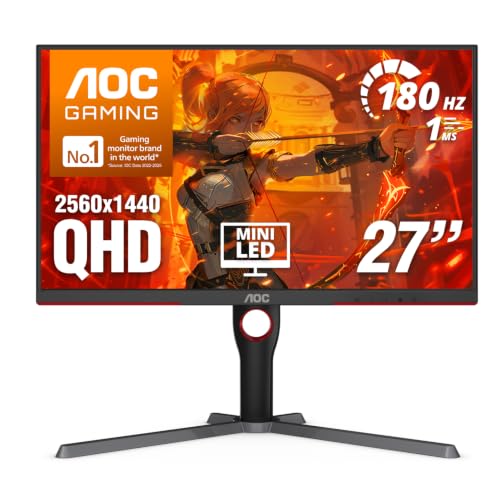
AOC 27-Inch Mini-LED 1440p Gaming Monitor
Best for: gamers wanting high contrast and adjustable ergonomics
- Features
- HDR, Height-Adjustable Stand, Audio Support
- Screen Size
- 27 Inch
- Resolution
- 2560×1440
- Refresh Rate
- 180Hz
- Response Time
- 1ms GtG
- Variable Refresh Rate
- Adaptive-Sync
This AOC 27-inch QHD monitor features a Mini-LED backlight with 336 dimming zones for high contrast. It offers a 180Hz refresh rate and 1ms response time for smooth gaming. The height-adjustable stand allows you to customize your viewing position. You get VESA DisplayHDR 1000 support and a 134% sRGB color gamut. It is a solid choice for gamers who want sharp images and flexible ergonomics.
- Mini-LED backlight with 336 individual dimming zones
- Height-adjustable stand for ergonomic positioning
- 180Hz refresh rate and 1ms GtG response time
- VESA DisplayHDR 1000 certification
- 134% sRGB color gamut coverage
- 15.6 pounds weight is heavier than some lighter 27-inch alternatives
- 180Hz refresh rate is lower than the 240Hz options on this list
- VA panel type may have slower pixel transitions than IPS panels
- You want a height-adjustable stand for better ergonomics
- You prioritize high contrast and HDR performance in gaming
- You prefer a 1440p resolution with sharp details
- You need the highest possible refresh rate like 240Hz or 300Hz
- You require an IPS panel for faster pixel response times
- You prefer a lighter monitor that is easier to move
Verdict: AOC 27" 180Hz Mini-LED Monitor delivers strong contrast and flexible ergonomics for gamers who value image quality over maximum speed. It fits buyers who want a height-adjustable stand and high HDR performance.

AOC 27" QD-OLED 240Hz Gaming Monitor
Best for: competitive gaming with ergonomic adjustments
- Features
- HDR, Height-Adjustable Stand
- Screen Size
- 27"
- Resolution
- 2560×1440
- Refresh Rate
- 240Hz
- Panel Type
- QD-OLED
- Response Time
- 0.03ms
This AOC monitor uses a 27-inch QD-OLED panel with a 240Hz refresh rate and 0.03ms response time. It offers height, tilt, swivel, and pivot adjustments for ergonomic comfort. The G-SYNC Compatible feature ensures smooth gameplay. You get crisp 1440p resolution and a built-in USB 3.2 hub. It is a strong option for gamers who want high refresh rates and flexible positioning.
- 240Hz refresh rate for ultra-smooth motion
- QD-OLED panel with infinite contrast
- Height, tilt, swivel, and pivot adjustments
- 0.03ms response time reduces ghosting
- G-SYNC Compatible for tear-free gaming
- 1440p resolution is lower than the 3440p on the top pick
- 240Hz refresh rate is slower than the 240Hz OLED on the AG276QZD2
- 27-inch size is smaller than the 34-inch ultrawide option
- You want a high refresh rate for competitive gaming
- You need a height-adjustable stand for ergonomic setup
- You prefer the color accuracy of QD-OLED technology
- You require a 4K resolution for sharp text
- You need an ultrawide 34-inch display for multitasking
- You want the fastest possible 360Hz refresh rate
Verdict: AOC 27" QD-OLED 240Hz Monitor delivers excellent motion clarity and ergonomic flexibility for gamers who prioritize refresh rates and panel quality over ultrawide formats.
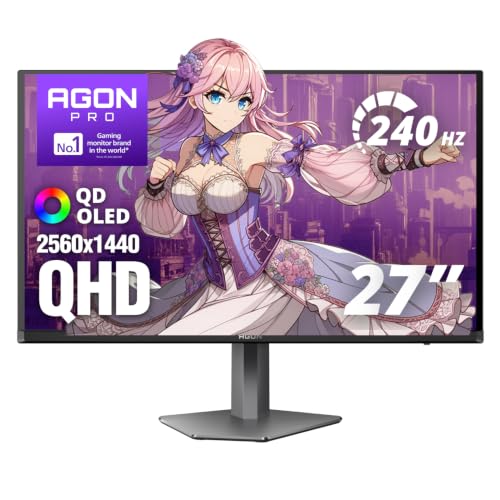
AOC 27-Inch QD-OLED Gaming Monitor
Best for: Gaming with color accuracy and audio
- Features
- HDR, Built-in Speakers, Height-Adjustable Stand
- Screen Size
- 27 Inch
- Resolution
- 2560×1440
- Refresh Rate
- Up to 280Hz
- Panel Type
- QD OLED
- Response Time
- 0.03ms GTG
This AOC monitor features a 27-inch QD-OLED panel with a 240Hz refresh rate and height-adjustable stand. It includes built-in speakers and supports HDR10 with a 101 percent DCI-P3 color gamut. The display offers 1440p resolution and 0.03ms response time. You get a versatile setup for gaming and media. The stand allows for ergonomic adjustments to suit your desk space and viewing preferences.
- 27-inch QD-OLED panel with 240Hz refresh rate
- Built-in speakers for audio output
- Height-adjustable stand for ergonomic positioning
- 101 percent DCI-P3 color gamut coverage
- 1440p resolution is lower than the 3440p on the top pick
- 240Hz refresh rate is lower than the 240Hz QD OLED on the second pick
- 27-inch size is smaller than the 34-inch options available
- You want a height-adjustable stand with built-in speakers
- You prefer the color accuracy of a QD-OLED panel
- You need a 27-inch display for your desk
- You require a 3440p or higher resolution display
- You need a refresh rate higher than 240Hz
- You prefer a larger 34-inch screen real estate
Verdict: AOC AG276QZD2 27-inch QD-OLED suits players who value color fidelity and ergonomic adjustments in a compact 27-inch form factor. It is ideal for those who want built-in audio without external hardware.
Specifications side by side

| Spec | AOC 27-Inch Mini-LED 1440p Gaming Monitor | AOC 27" QD-OLED 240Hz Gaming Monitor | AOC 27-Inch QD-OLED Gaming Monitor |
|---|---|---|---|
| Screen Size | 27 Inch | 27" | 27 Inch |
| Resolution | 2560×1440 | 2560×1440 | 2560×1440 |
| Refresh Rate | 180Hz | 240Hz | Up to 280Hz |
| Panel Type | – | QD-OLED | QD OLED |
| Response Time | 1ms GtG | 0.03ms | 0.03ms GTG |
| Variable Refresh Rate | Adaptive-Sync | G-SYNC Compatible | G-Sync |
| Ports | USB 3.2, DP 1.4, HDMI 2.1 | HDMI 2.1, DisplayPort 1.4, USB 3.2 | – |
| Features | HDR, Height-Adjustable Stand, Audio Support | HDR, Height-Adjustable Stand | HDR, Built-in Speakers, Height-Adjustable Stand |
| Use | Gaming | Gaming | Gaming |
| Dimensions | 10.2 × 23.8 × 20.9 inches | 9.45 × 24 × 21.2 inches | 9.01 × 24 × 20.7 inches |
| Weight | 15.6 pounds | – | 14.7 pounds |
| Size | 27" 180Hz Mini-LED | 27" 240Hz Height Adjustable | 27" 240Hz QD-OLED |
| Color | Black | Black | Black |
| Model | Q27G3XMN | Q27GAZDV | AG276QZD2 |
How to Choose the Right AOC Monitor
Check the resolution first
You need to decide if 1440p QHD fits your workflow. All three AOC models in this guide share this resolution. It offers a good balance between sharpness and performance. Higher resolution means more screen real estate for multitasking. It also ensures text looks crisp during work. If you play games, 1440p provides detailed visuals without straining your GPU as much as 4K. Consider your desk space and viewing distance when making this choice for the best experience.
Match refresh rate to use
Your gaming style dictates the necessary refresh rate. The Mini-LED top pick runs at 180Hz. This speed is smooth for most gamers. The QD-OLED models reach 240Hz. This higher rate helps competitive players see motion clearly. If you play fast-paced shooters, 240Hz offers an edge. Casual gamers may find 180Hz sufficient. Check the spec sheet for this number. Higher hertz reduces blur during fast movements. Select the rate that matches your typical games and hardware capabilities for optimal clarity.
Pick the right panel type
Panel technology affects contrast and color. Mini-LED panels, like the top pick, provide strong HDR performance. They offer deep blacks and bright highlights. QD-OLED panels, found in the other two models, deliver excellent color fidelity. They are ideal for players who value image accuracy. OLEDs also have faster response times. Choose Mini-LED for general HDR content. Select QD-OLED for competitive gaming or color-critical tasks. The panel type defines the visual character of your display.
Verify variable refresh rate support
Variable Refresh Rate prevents screen tearing. The QD-OLED budget model supports G-SYNC. This feature syncs the monitor’s refresh rate with your GPU. It ensures smooth gameplay without stuttering. Not all models list this compatibility. Check the attributes for G-SYNC or FreeSync support. If you use an NVIDIA card, G-SYNC is beneficial. It enhances the gaming experience significantly. Verify this spec before buying. It ensures your hardware and monitor work together seamlessly for tear-free visuals.
Review port availability
Ports determine how you connect devices. The Mini-LED model includes HDMI and DisplayPort. This variety allows flexible connections. The QD-OLED budget model lists only HDMI. Ensure your PC has the right output. DisplayPort often supports higher refresh rates. HDMI is common for consoles. Check your current cables and GPU outputs. Mismatched ports can limit performance. Plan your setup carefully. Having multiple port types gives you more options for peripherals and future upgrades without extra adapters.
Frequently asked questions
Which AOC monitor has the highest refresh rate?
The AOC 27" QD-OLED 240Hz Gaming Monitor offers the highest refresh rate in this list. It runs at 240Hz, which helps with motion clarity in fast-paced games. This model is ideal for competitive gamers who need smooth visuals. It also includes G-SYNC support for variable refresh rates.
Do these monitors include built-in speakers?
Yes, the AOC 27-Inch QD-OLED Gaming Monitor includes built-in speakers. This feature allows you to hear audio without connecting external hardware. The other two models in this guide do not list built-in audio support in their published specifications. You will need external speakers or headphones for those units.
What is the difference between Mini-LED and OLED panels?
Mini-LED panels, like the top pick, generally offer strong contrast and high HDR performance. OLED panels, found in the other two models, provide excellent color fidelity and faster response times. The Mini-LED option runs at 180Hz, while the OLED options run at 240Hz. Choose based on your preference for contrast versus speed.
How heavy are these AOC monitors?
The AOC 27-Inch Mini-LED monitor weighs 15.6 pounds. The AOC 27-Inch QD-OLED Gaming Monitor weighs 14.7 pounds. The AOC 27" QD-OLED 240Hz model does not list a weight in the provided data. All three models feature height-adjustable stands for ergonomic positioning.
Are these monitors suitable for gaming?
Yes, all three monitors are designed for gaming. They feature high refresh rates of 180Hz or 240Hz. They also support HDR for better image quality. The Mini-LED model is best for high contrast, while the OLED models excel in motion clarity and color accuracy. All include height-adjustable stands for comfort.
What resolution do these AOC monitors use?
All three monitors in this list use 1440p QHD resolution. This resolution provides a good balance between sharpness and performance. It fits well on 27-inch screens for both gaming and productivity. Higher resolution ensures clear text and detailed images without requiring excessive GPU power.
Which model is best for competitive gaming?
The AOC 27" QD-OLED 240Hz Gaming Monitor is best for competitive gaming. It features a 240Hz refresh rate for smooth motion. It also includes G-SYNC support to reduce screen tearing. The QD-OLED panel delivers excellent color and contrast. These specs help you react faster in fast-paced games.
What ports are available on these monitors?
The AOC 27-Inch Mini-LED monitor includes HDMI and DisplayPort connections. The AOC 27" QD-OLED 240Hz model lists HDMI ports. The AOC 27-Inch QD-OLED Gaming Monitor does not specify port types in the data. Check the specific model details for your connectivity needs.
See also