LG 34-Inch Curved UltraWide Monitors: Professional Buyer’s Guide
As Amazon Associates, we earn from qualifying purchases. This means we may receive a small commission at no extra cost to you if you click through and make a purchase.
Finding the right lg 34 ultrawide curved monitor requires balancing your daily workflow, connectivity needs, and visual performance demands. A 34-inch 21:9 ultrawide curved monitor replaces dual-monitor setups by delivering a seamless 3440 x 1440 WQHD workspace without obstructive display bezels down the middle. This wide aspect ratio offers 34 percent more horizontal screen real estate than standard widescreen displays, enabling busy professionals to arrange complex spreadsheets, terminal windows, or creative timelines side by side with minimal clutter.
This lg 34 ultrawide curved monitor comparison examines exactly six distinct 34-inch curved monitors manufactured by LG. While they share the same expansive 34-inch curved form factor and 1440p resolution, they serve different desk requirements. Variations across these models include single-cable USB-C laptop docking, native webOS smart hubs for PC-free computing, high-velocity refresh rates spanning from 100Hz to 160Hz, and dedicated ergonomic stands. Reviewing these specific hardware distinctions clarifies which lg 34 ultrawide curved monitor to buy for your office or studio.
Which LG Curved Ultrawide Monitors Should You Buy
- Single-cable laptop docking and dual-PC workflows: LG 34WR55QK-B 34-inch UltraWide WQHD delivers 65W USB Type-C charging and Picture-by-Picture viewing.
- Standalone streaming and voice-navigated entertainment: LG 34″ Curved UltraWide WQHD(3440×1440) Smart includes an LG Magic Remote and webOS23 app support.
- High-refresh desktop multitasking with space-saving ergonomics: LG 34U60ZB-B 34-inch UltraWide WQHD 120Hz pairs 120Hz fluidity with LG Switch window management and a square base.
- Multi-angle positioning on an inspected platform: LG UltraWide 34 Inch WQHD HDR provides height, tilt, and swivel articulation in an Amazon Renewed package.
- PC-free cloud applications and clean styling: LG 34SR60QC-W 34-inch QHD runs cloud-based productivity software natively in a distinct white chassis with built-in speakers.
- High-velocity frame rates and gaming audio: LG Ultragear 34 inch Ultrawide Curved combines a 160Hz refresh rate with dual 7W Maxx Audio speakers.
LG 34WR55QK-B 34-inch UltraWide WQHD

LG
8.0/10 Our score
- Color
- Black
- Dimensions
- 10.2 x 31.9 x 22.4 inches
- Weight
- 15.2 Pounds
Listed by the seller on the product page.
Best for: Laptop docking and multi-source productivity
Pros
- 65W USB Type-C power delivery
- Picture-by-Picture dual-input support
- Height and tilt adjustable stand
- 99% sRGB color gamut coverage
Cons
- 100Hz refresh rate ceiling
- No built-in smart TV streaming
The LG 34WR55QK-B 34-inch UltraWide WQHD serves as a comprehensive docking solution for modern laptop users. Its standout interface is a USB Type-C port delivering video, fast data transfer, and up to 65W of power delivery over a single cord, charging your notebook while driving the 3440 x 1440 display. The back panel expands your workstation with two HDMI inputs, DisplayPort, two USB ports, and a dedicated headphone jack.
For power multitaskers, this lg ultrawide monitor curved 34 incorporates OnScreen Control with Picture-by-Picture (PbP) functionality. This feature splits the 21:9 panel across two separate input devices simultaneously, allowing you to monitor two operating systems side by side. Visual quality is supported by a VA panel with a 3000:1 contrast ratio, 300 cd/m² brightness, 99% sRGB color gamut coverage, and HDR10 support. Reader Mode reduces blue light emissions during long reading sessions, while the 100Hz refresh rate ensures fluid cursor response.
A height and tilt-adjustable stand allows customized viewing angles, complemented by a 3-side borderless frame. For broader context on this brand’s widescreen display options, examine our dedicated lg 34 ultrawide resource. This unit gives way to the 34SR60QC-W if you require untethered smart TV capabilities, but represents the best lg 34 ultrawide curved monitor for dedicated single-cable laptop productivity.
- USB Type-C port delivers video connectivity and up to 65W power delivery for laptops
- Picture-by-Picture support enables side-by-side display of two independent input computers
- Ergonomic stand provides height and tilt adjustments with a 3-side borderless bezel design
- Matte VA panel offers 3000:1 contrast ratio, 100Hz refresh rate, and 99% sRGB color expression
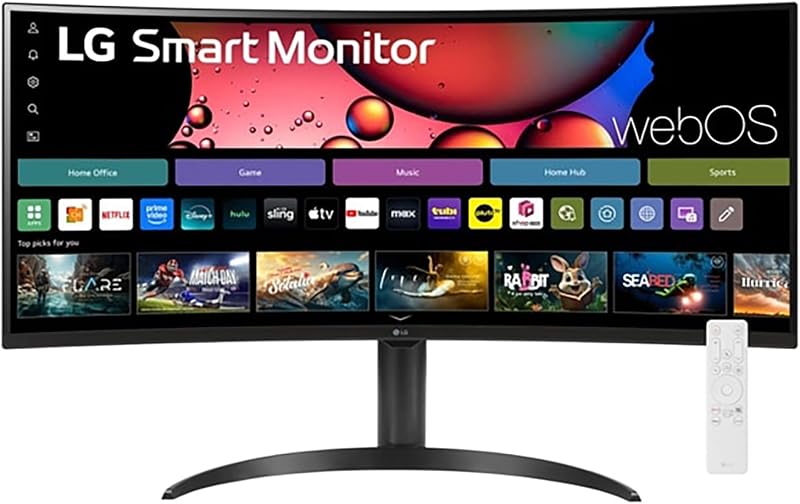
LG 34" Curved UltraWide WQHD(3440×1440) Smart
LG
9.0/10 Our score
- Color
- Black
- Size
- 34 inch-100
- Dimensions
- 14.5 x 31.9 x 22.4 Inches
- Weight
- 15.4 pounds
Listed by the seller on the product page.
Best for: Streaming entertainment and voice-controlled media
Pros
- Built-in webOS23 streaming apps
- Included LG Magic Remote with voice
- Apple AirPlay 2 wireless casting
- Panoramic 1800R curved view
Cons
- No USB-C power delivery listed
- Listing omits detailed port counts
Operating as both a computing screen and an independent entertainment center, the LG 34″ Curved UltraWide WQHD(3440×1440) Smart merges standard desktop utility with native streaming software. Powered by built-in webOS23, the monitor functions independently of a PC, streaming video services including Netflix, Prime Video, Disney+, HBO Max, and over 300 free streaming channels via LG Channels.
Navigating menus is made effortless with the included LG Magic Remote, which supports point-and-click selection and direct voice commands. Apple users benefit from native Apple AirPlay 2 integration, making wireless casting from MacBooks, iPads, and iPhones instantaneous. The 34-inch anti-glare screen features an immersive 1800R curvature that matches your natural peripheral vision, complemented by 3440 x 1440 resolution, 99% sRGB color gamut expression, and HDR10 processing for vibrant visuals.
The included stand allows for custom height and tilt adjustments to maintain ergonomic comfort. The listing does not specify USB Type-C power delivery or precise port allotments, so users who need integrated laptop power delivery should consider the 34WR55QK-B. However, for combined work and media consumption in bedrooms or compact offices, this model stands out.
- Standalone webOS23 platform provides native access to streaming applications and 300+ free channels
- Supplied LG Magic Remote delivers voice command control and air-pointer navigation
- Integrated Apple AirPlay 2 enables effortless wireless casting from Apple laptops and mobile devices
- Panoramic 1800R curved 21:9 WQHD panel with anti-glare finish and 100Hz refresh rate
LG 34U60ZB-B 34-inch UltraWide WQHD 120Hz

LG
9.4/10 Our score
- Color
- Black
- Dimensions
- 9.4 x 31.8 x 18 inches
- Weight
- 13.7 pounds
Listed by the seller on the product page.
Best for: Office multitasking and compact desk setups
Pros
- Smooth 120Hz refresh rate
- LG Switch 11-layout window tool
- Space-saving square stand base
- Deep 3000:1 contrast ratio
Cons
- No USB-C or hub ports
- 250 cd brightness rating
The LG 34U60ZB-B 34-inch UltraWide WQHD 120Hz is tailored for professionals who value high motion smoothness and clean desk geometry. Stepping up to a native 120Hz refresh rate and a 5ms response time, it reduces interface jitter during fast window panning and timeline navigation compared to conventional 100Hz office displays. Visual fidelity is driven by a 3440 x 1440 VA panel providing a 3000:1 contrast ratio, 250 cd/m² brightness, and 99% sRGB color gamut coverage.
Desktop multitasking is enhanced by proprietary LG Switch software. This utility allows users to divide their desktop into up to 11 custom screen splits, modify display settings with hotkey shortcuts, and launch video conferencing calls with a single click. For physical hookups, the monitor includes HDMI, DisplayPort, and an audio headphone jack. A gaming-oriented Black Stabilizer feature brightens dark tones, while Reader Mode softens blue light output.
A defining physical trait is its space-saving slim stand with a flat square base, freeing up practical desk depth on narrow work surfaces while retaining tilt and height adjustability. Because it omits USB Type-C docking, this display yields to the 34WR55QK-B for single-cable laptop users, but excels for dedicated desktop workstations.
- Fast 120Hz refresh rate and 5ms response time keep desktop motions crisp and clear
- LG Switch software provides hotkey controls, one-click call launching, and up to 11 window splits
- Space-saving stand with a square base preserves desktop area while offering height and tilt mechanics
- Subtle 1800R curved matte VA panel features 3000:1 contrast ratio and Black Stabilizer technology
LG UltraWide 34 Inch WQHD HDR

LG
8.6/10 Our score
- Color
- Black
- Dimensions
- 9.1 x 31.9 x 21 inches
Listed by the seller on the product page.
Best for: Ergonomic adjustments with screen swivel versatility
Pros
- Height tilt and swivel stand
- Fluid 120Hz refresh rate
- HDR 10 dynamic contrast
- Anti-glare matte coating
Cons
- Amazon Renewed condition
- Narrower 170-degree viewing angle
Offered under the 34U62TB-B model designation, the LG UltraWide 34 Inch WQHD HDR delivers fluid performance and enhanced physical mobility in an Amazon Renewed package. Inspected and tested to verify full operational performance, this renewed unit delivers 3440 x 1440 WQHD clarity across an expansive 21:9 curved matte display, operating at an elevated 120Hz refresh rate with a 5ms response time for blur-free motion.
A key structural benefit of this model is its comprehensive ergonomic stand. While many curved panels limit movement to vertical sliding and tilting, this assembly provides height, tilt, and swivel adjustments. The swivel range makes it easy to collaborate with colleagues across a desk or angle the screen around ambient window reflections. The display supports HDR 10 for enhanced contrast and wider color dynamics, complemented by Reader Mode for eye comfort.
Connectivity is versatile, housing multiple HDMI and DisplayPort inputs to connect desktop towers and consoles simultaneously. The listing notes a 170-degree viewing angle, which is slightly narrower than the 178-degree rating of the 34WR55QK-B. However, for professionals seeking full stand adjustability including swivel motion, this display remains a practical option.
- Versatile ergonomic stand provides tilt, height, and swivel mechanics for optimal viewing angles
- Fluid 120Hz refresh rate combined with 5ms response time minimizes motion blur
- Curved 3440 x 1440 WQHD matte display with HDR 10 high-contrast optimization
- Tested and inspected under the Amazon Renewed program with HDMI and DisplayPort connectivity
LG 34SR60QC-W 34-inch QHD

LG
9.6/10 Our score
- Color
- White
- Dimensions
- 8.79 x 31.85 x 19.03 inches
- Weight
- 13.45 Pounds
Listed by the seller on the product page.
Best for: Cloud computing and minimalist white aesthetics
Pros
- Cloud PC Microsoft 365 access
- Integrated stereo speakers
- Apple AirPlay 2 and HomeKit
- Three USB accessory ports
Cons
- No height adjustment listed
- 100Hz refresh rate limit
Crafted with an all-white enclosure, the LG 34SR60QC-W 34-inch QHD is an advanced lg 34 curved smart monitor built around flexible work-from-home demands. Its defining strength is the integrated webOS23 platform, which features dedicated cloud PC support. Users can access Microsoft 365 services and Google online applications directly on the screen without attaching a physical computer, creating an autonomous workspace simply by pairing Bluetooth input devices.
Wireless connectivity is comprehensive, incorporating Apple AirPlay 2, Apple HomeKit compatibility, Bluetooth audio pairing, and Screen Share protocols for wireless mirroring. When the workday ends, webOS provides instant streaming access to Netflix, Prime Video, Disney+, HBO Max, and 300+ free LG Channels, accompanied by sound from built-in stereo speakers. Physical interfaces include two HDMI ports and three USB ports to connect wired desktop accessories.
Display performance is anchored by a 100Hz refresh rate, 3000:1 contrast ratio, 300 cd/m² brightness, and 99% sRGB color gamut coverage across an 1800R curvature. The listing does not specify height adjustability for the included stand, which represents a trade-off compared to the 34WR55QK-B. Nevertheless, it is a standout choice as an lg 34 inch curved monitor for work without a computer tower.
- Built-in webOS23 platform supports cloud PC services including Microsoft 365 and Google apps without a PC
- Apple AirPlay 2 and HomeKit integration enable effortless wireless casting and smart device pairing
- Integrated stereo speakers, Bluetooth support, and ThinQ app compatibility clear desktop audio gear
- Sleek white chassis features a curved 3440 x 1440 VA panel, two HDMI ports, and three USB ports
LG Ultragear 34 inch Ultrawide Curved

LG
9.4/10 Our score
- Color
- Black
- Size
- 34 inch
- Dimensions
- 31.2 x 22.6 x 12.3 Inches
Listed by the seller on the product page.
Best for: High-frame-rate gaming and multimedia work
Pros
- Fast 160Hz refresh rate
- 1ms Motion Blur Reduction
- Dual 7W Maxx Audio speakers
- AMD FreeSync Premium support
Cons
- No USB-C laptop charging
- No webOS smart TV interface
Designed for professionals who alternate between intensive daily productivity and competitive gaming, the LG Ultragear 34 inch Ultrawide Curved delivers top-tier speed. Featuring a blazing 160Hz refresh rate with 1ms Motion Blur Reduction (MBR), this LG Ultragear 34 curved monitor produces exceptionally crisp frame transitions, eliminating motion trailing when scrubbing high-framerate timelines or playing fast titles.
Display synchronization is backed by AMD FreeSync Premium, eliminating tearing and frame stuttering. Tactical display tools include Black Stabilizer to brighten shadowed areas, Dynamic Action Sync to minimize signal input lag, and a customizable on-screen Crosshair reticle. Built-in dual 7W stereo speakers powered by Maxx Audio deliver rich audio output directly from the chassis, eliminating the need for separate desktop speakers.
The 34-inch VA panel features an 1800R curvature, 3440 x 1440 resolution, 3000:1 contrast ratio, 300 cd/m² brightness, and 99% sRGB coverage. Its ergonomic stand supports height and tilt adjustment, while the rear panel provides two HDMI inputs, DisplayPort, and a headphone jack. The listing does not specify USB Type-C connectivity, so laptop power delivery is absent, but for raw refresh velocity and audio integration, this monitor leads the lineup.
- High-speed 160Hz refresh rate and 1ms Motion Blur Reduction eliminate ghosting and tearing
- AMD FreeSync Premium dynamically locks frame rates for smooth, artifact-free visual motion
- Dual 7W speakers enhanced by Maxx Audio deliver powerful desktop audio without external hardware
- Gaming utilities include Black Stabilizer, Dynamic Action Sync, and crosshair reticle overlay
What Sets These Models Apart
Evaluating an lg 34 ultrawide curved monitor comparison requires looking past the shared 3440 x 1440 WQHD resolution to examine key operational differences. Refresh rates range from 100Hz on baseline productivity and smart displays up to 160Hz on the Ultragear gaming edition. Connectivity features also diverge significantly, with dedicated USB-C laptop power delivery available on work-centric models, while smart editions leverage independent operating systems and wireless streaming protocols.
| Model | Refresh Rate | Stand Adjustments | Connectivity Highlights | Primary Focus |
|---|---|---|---|---|
| LG 34WR55QK-B | 100Hz | Height, Tilt | USB-C (65W PD), 2x HDMI, DP, 2x USB | Single-cable laptop docking and PbP |
| LG 34″ Curved Smart | 100Hz | Adjustable (Height, Tilt) | AirPlay 2, Magic Remote, webOS23 | Streaming entertainment with voice remote |
| LG 34U60ZB-B | 120Hz | Height, Tilt (Square Base) | HDMI, DisplayPort, LG Switch | Fluid desktop workflow and window splitting |
| LG UltraWide 34 Inch Renewed | 120Hz | Height, Tilt, Swivel | HDMI, DisplayPort | Inspected value with swivel mobility |
| LG 34SR60QC-W | 100Hz | Tilt (Stand included) | AirPlay 2, 2x HDMI, 3x USB, webOS23 | Cloud computing without PC in white chassis |
| LG Ultragear 34 inch | 160Hz | Height, Tilt | 2x HDMI, DP, 7W Maxx Audio Speakers | High-refresh gaming and built-in audio |
Buying Tips for LG Curved Ultrawide Monitors
When selecting an ultrawide display, assess the practical benefits of curvature geometry. An 1800R curved display provides an optimal curvature radius for 34-inch screens, placing the outer display edges equidistant to your eyes and preventing neck strain during long working sessions. While some shoppers inspect specialized formats like a samsung super ultrawide with a wider 49-inch footprint, a 34-inch 21:9 format remains the ideal balance of desk footprint and expansive screen area for most standard workstations.
Connectivity should dictate your hardware choice. If your daily workflow relies on an ultrabook or modern business laptop, choosing a model equipped with USB Type-C power delivery simplifies your desk layout by charging your computer and driving your display over a single wire. If your setup revolves around a dedicated desktop PC, prioritize models with DisplayPort inputs and higher refresh rates, such as 120Hz or 160Hz, which produce noticeably smoother motion when scrolling through large documents and spreadsheets.
Finally, determine whether you require a self-contained smart hub or a traditional monitor. An lg 34 curved smart monitor powered by webOS23 enables independent media streaming and direct cloud PC file editing without booting a laptop. Those weighing standard desktop ultrawide hardware across different brands can also review our acer ultrawide monitor analysis to contextualize build features against alternative options.
FAQ
Why choose a 21:9 curved ultrawide monitor over a dual-monitor setup?
A 21:9 curved ultrawide monitor provides a continuous 3440 x 1440 desktop without a center bezel splitting your viewing area. The 1800R curvature maintains an even focal distance to the screen edges, reducing eye strain and head movement compared to two angled flat monitors.
Can an LG curved smart monitor function without an attached computer?
Yes, models running webOS23, such as the LG 34SR60QC-W, operate as standalone smart systems. They include direct access to streaming applications, free live channels, and cloud computing environments like Microsoft 365, enabling users to work through cloud documents by connecting a Bluetooth keyboard and mouse directly to the screen.
What are the benefits of USB Type-C on the LG 34WR55QK-B?
The USB Type-C interface delivers display video signals, high-speed data transmission, and up to 65W of power delivery over one cable. This charges compatible laptops while connecting them to the monitor and its onboard USB accessory ports, eliminating redundant power bricks and desk cabling.
Does a 120Hz or 160Hz refresh rate benefit non-gaming office work?
While high refresh rates are commonly associated with gaming, a 120Hz or 160Hz display provides noticeable day-to-day benefits for office work. Text remains sharper while scrolling rapidly through documents, mouse cursor tracking is more responsive, and window transitions feel smoother, reducing optical fatigue during long workdays.
How does LG Switch compare to OnScreen Control?
OnScreen Control focuses on basic monitor hardware settings and split-screen layouts, including Picture-by-Picture viewing across two physical video sources. LG Switch is an advanced desktop management tool available on select models like the 34U60ZB-B, offering up to 11 custom window snap arrangements, quick hotkeys for brightness changes, and dedicated one-click video meeting launches.