Acer Ultrawide Monitor Guide: Comparing Top Desk Upgrades
As Amazon Associates, we earn from qualifying purchases. This means we may receive a small commission at no extra cost to you if you click through and make a purchase.
An acer ultrawide monitor expands horizontal desktop real estate to streamline complex workflows, eliminate multi-display bezel interruptions, and deliver immersive visual fields. Selecting the best acer ultrawide monitor comes down to matching panel technology, aspect ratio, curvature radius, and refresh performance to your specific daily tasks. Whether you manage massive data sheets, edit media timelines, or balance professional demands with fast-paced gaming, Acer provides distinct ultrawide configurations tailored to different desk depths and visual priorities.
This direct acer ultrawide monitor comparison examines four distinct displays from the manufacturer: a massive 49-inch dual-QHD productivity flagship, a compact 29.5-inch high-speed panel, a balanced 34-inch curved workhorse, and a premium 34-inch OLED powerhouse. These four models diverge substantially in their panel curvature, native resolutions ranging from 2560×1080 up to 5120×1440, refresh rates scaling from 120Hz to 240Hz, and port connectivity like USB-C power delivery. Understanding these core hardware distinctions ensures you choose the exact screen that complements your physical workspace and processing hardware.
Which Acer Ultrawide Monitor Should You Buy
- Maximum Spreadsheet Real Estate and Multitasking: Choose the Acer Nitro 49in DQHD 5120×1440 Curved for its massive 32:9 dual-QHD canvas and deep 1000R curvature that replaces two separate monitors seamlessly.
- Compact Desks and Fast-Paced Competitive Play: Select the Acer Nitro 29.5in 2560×1080 2560×1080 Curved for its agile 200Hz refresh rate, 1ms response time, and space-saving 21:9 footprint.
- Balanced Workstation Productivity and Smooth 1440p Gaming: Opt for the Acer Nitro 34in WQHD 3440×1440 Curved to balance sharp pixel density, a 1500R wrap, and a rapid 200Hz refresh rate with 0.5ms GTG response.
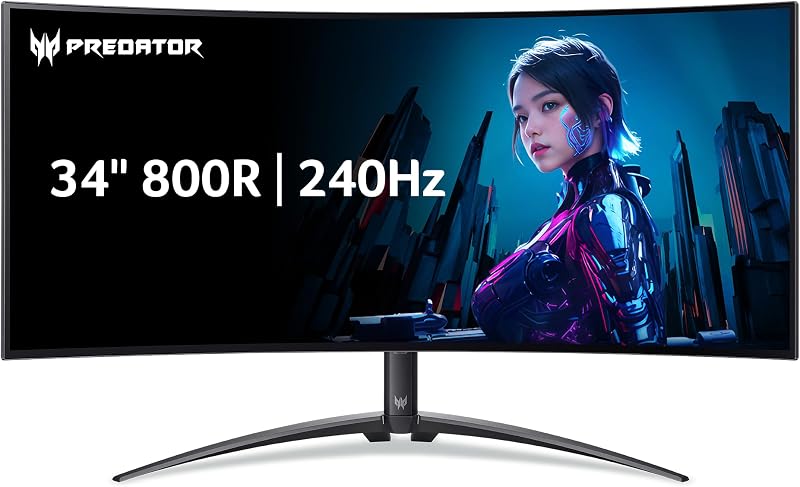
- Color-Critical Creative Production and High-End Gaming: Invest in the Acer Predator 34in WQHD 3440×1440 OLED for per-pixel illumination, infinite contrast, 90W USB-C docking, built-in KVM switching, and 240Hz speed.
Acer Nitro 49in DQHD 5120×1440 Curved

Acer
9.4/10 Our score
- Color
- Black
- Dimensions
- 22.5 x 45.3 x 15.6 inches
- Weight
- 20.5 Pounds
Listed by the seller on the product page.
Best for: Multi-window multitasking and spreadsheet productivity
Pros
- 5120 x 1440 DQHD resolution
- Spacious 49-inch 32:9 aspect ratio
- Ergonomic 1000R curved display
- Height and tilt adjustable stand
Cons
- Substantial desk depth requirement
- 120Hz refresh rate ceiling
The Acer Nitro 49in DQHD 5120×1440 Curved serves as an expansive visual workstation designed to replace cumbersome dual-monitor setups with a continuous 32:9 super ultrawide panel. Built with a 49-inch VA display delivering a 5120 x 1440 DQHD resolution, this screen provides the identical pixel space of two 27-inch 1440p monitors side by side without a central bezel gap. Professionals managing vast financial models, extensive timeline editors, or multiple side-by-side terminal windows gain immediate productivity advantages from the vast horizontal workspace. The listing specifies a 1000R curvature rating that brings the outer edges of the screen within natural peripheral vision, mitigating neck strain during marathon work sessions.
When assessing workstation integration against a samsung super ultrawide layout, the Acer Nitro EI491CUR provides targeted ergonomic flexibility with a stand supporting tilt from -5 to 20 degrees and 5.11 inches of height adjustment. Visual rendering remains fluid across demanding software thanks to a 120Hz refresh rate, 3ms response time, and AMD FreeSync technology that syncs frames directly with graphics hardware to prevent tearing. While its 120Hz refresh speed trails the 200Hz and 240Hz figures of Acer smaller ultrawide options, it delivers more than enough fluidity for smooth document scrolling, office navigation, and immersive casual gaming.
With physical dimensions measuring 22.5 inches deep by 45.3 inches wide and an item weight of 20.5 pounds, this monitor demands a sturdy, dedicated desk surface. The matte finish and high contrast ratio of 100,000,000:1 help maintain clear readability under ambient office lighting, while the listing reports a brightness metric of 1027.8. This model suits spreadsheet architects, data engineers, and flight simulator enthusiasts who prioritize maximum uninterrupted horizontal screen real estate over the ultra-high refresh speeds found on smaller 21:9 gaming displays.
- Massive 49-inch 32:9 VA panel with 5120 x 1440 DQHD resolution.
- Aggressive 1000R curved screen design tailored for uniform peripheral view.
- Smooth 120Hz refresh rate paired with AMD FreeSync and 3ms response time.
- Ergonomic stand providing 5.11 inches of height adjustability and -5 to 20 degree tilt.
Acer Nitro 29.5in 2560×1080 2560×1080 Curved

Acer
9.2/10 Our score
- Color
- Black
- Dimensions
- 8.63 x 27.84 x 16.83 Inches
Listed by the seller on the product page.
Best for: Compact desk setups and competitive gaming
Pros
- 200Hz rapid refresh rate
- Fast 1ms response time
- AMD FreeSync Premium support
- Gentle 1800R screen curve
Cons
- Lower 2560 x 1080 resolution
- Tilt-only stand adjustment
The Acer Nitro 29.5in 2560×1080 2560×1080 Curved presents a high-speed, space-conscious entrance into curved widescreen computing. Known through its listing identifier as the Acer Nitro ED300C, this 29.5-inch display features an Ultra-Wide Full HD resolution of 2560 x 1080 arranged in a standard 21:9 aspect ratio. The 1800R curvature wraps gently around your field of view, keeping screen corners equidistant from your eyes to reduce focal fatigue without presenting the severe visual bend seen on tighter panels. It provides a distinct step up in peripheral visibility compared to standard 16:9 displays while occupying a modest footprint of 27.84 inches wide by 8.63 inches deep.
Speed defines the engineering focus of this model. Acer pairs a rapid 200Hz refresh rate with a 1ms response time and AMD FreeSync Premium technology to eliminate screen tearing, lower input lag, and prevent motion smearing during rapid screen transitions. For users operating on mid-tier hardware, the 2560 x 1080 resolution is far easier to drive at high frame rates than denser 1440p displays, making it possible to maximize the 200Hz refresh ceiling without demanding top-of-the-line graphical processing power. The panel also features a matte anti-glare finish, wide viewing angle technology, a 100,000,000:1 dynamic contrast ratio, and 100 color gamut coverage.
Ergonomics on this model remain simpler than its larger siblings, featuring a stand that tilts from -5 to 15 degrees without built-in height adjustment. It gives way to the 34-inch and 49-inch models if your daily tasks involve detailed desktop publishing, dense coding, or fine image editing where higher pixel density is essential. However, for professionals seeking an energetic secondary display or budget-minded individuals who want a fast acer curved ultrawide monitor for gaming and standard office tasks, this 29.5-inch option delivers exceptional responsiveness.
- Compact 29.5-inch curved display with 2560 x 1080 UWFHD resolution.
- Fluid 200Hz refresh rate with rapid 1ms response time.
- AMD FreeSync Premium variable refresh synchronization for tear-free output.
- Gentle 1800R screen curve and tilt adjustability from -5 to 15 degrees.
Acer Nitro 34in WQHD 3440×1440 Curved

Acer
8.8/10 Our score
- Color
- Black
- Dimensions
- 8.07 x 31.8 x 18 inches
Listed by the seller on the product page.
Best for: Balanced everyday work and smooth gaming
Pros
- Sharp 3440 x 1440 WQHD resolution
- Blazing 200Hz refresh rate
- Up to 0.5ms GTG response time
- Zero-frame bezel design
Cons
- No height adjustability on stand
- Narrower color gamut than OLED
The Acer Nitro 34in WQHD 3440×1440 Curved represents the classic sweet spot for ultrawide desktop monitors, offering a versatile 34-inch canvas that balances visual precision, desk space, and high-frequency motion. Operating under the model designation Acer Nitro EDA340CUR, this display features a sharp Ultra-Wide QHD resolution of 3440 x 1440 across a 21:9 aspect ratio. The screen employs a 1500R curvature that cradles the user’s field of vision comfortably, ensuring consistent viewing distances across the entire panel while avoiding optical distortion when viewing tabular data, documents, or engineering schematics.
When compared against competing form factors like an lg 34 ultrawide curved monitor setup, this panel distinguishes itself through aggressive performance specifications. It boasts an ultra-fluid 200Hz refresh rate along with a blazing gray-to-gray response time of up to 0.5ms. Supported by AMD FreeSync Premium and HDR 10 decoding, visual output remains crisp, stable, and completely tear-free even during turbulent in-game action or high-speed video scrubbing. The VA panel technology maintains a 99 color gamut rating and features wide viewing angle capabilities to keep colors true across off-axis angles.
A sleek zero-frame bezel surrounds the panel, maximizing usable glass area while minimizing frame distractions across multi-monitor or minimalist desk arrangements. Mechanical adjustments are limited to a tilt range of -5 to 20 degrees, meaning users who require vertical height tuning will want to pair its standard form factor with a monitor arm. Measuring 31.8 inches wide and 8.07 inches deep, this acer 34 inch ultrawide monitor strikes an exceptional balance between productivity density and gaming capability, making it the ideal choice for professionals who refuse to sacrifice refresh speed for resolution.
- 34-inch Ultra-Wide QHD panel with native 3440 x 1440 resolution.
- High-velocity 200Hz refresh rate and 0.5ms GTG response time.
- Enclosing 1500R curvature paired with AMD FreeSync Premium and HDR 10.
- Clean zero-frame aesthetic with tilt adjustments between -5 and 20 degrees.
Acer Predator 34in WQHD 3440×1440 OLED
Acer
8.4/10 Our score
- Color
- Black
- Size
- 34-inch
- Dimensions
- 12.02 x 30.94 x 19.5 inches
Listed by the seller on the product page.
Best for: Color-critical creative production and HDR gaming
Pros
- Self-emissive OLED panel
- Instantaneous 0.01ms response time
- USB Type-C 90W PD port
- Integrated KVM switch
Cons
- Aggressive 800R curve takes acclimation
- Lower standard brightness than LCD
The Acer Predator 34in WQHD 3440×1440 OLED stands as the brand’s flagship premium ultrawide, combining self-emissive display technology with workstation-class connectivity. Known officially as the Acer Predator X34 OLED, this display utilizes a 34-inch OLED panel featuring Quantum Dot technology and an Ultra-Wide QHD resolution of 3440 x 1440. Because OLED pixels produce their own light and can shut off entirely, the monitor delivers true absolute black levels, certified by VESA DisplayHDR True Black 400 with minimum black thresholds of 0.0005 nits. With an expanded 1,000,000:1 contrast ratio and 99% DCI-P3 color gamut coverage, visuals show unmatched depth and color purity.
Performance metrics push gaming boundaries. The monitor operates at a blistering 240Hz refresh rate paired with an instantaneous 0.01ms pixel response time, effectively eliminating blur and ghosting beyond what any LCD or VA panel can achieve. AMD FreeSync Premium Pro validation guarantees tear-free, low-latency rendering across both variable frame rates and HDR content. The display features an aggressive 800R curve, wrapping tightly around the viewer’s field of vision for total visual immersion. To ensure long-term panel stability, Acer integrates an image retention refresh feature that actively mitigates image sticking during extended usage.
Shoppers browsing the premium acer predator gaming monitor lineup will appreciate this monitor’s comprehensive connectivity suite. It includes modern HDMI 2.1 support for consoles, dual 5W speakers, and a universal USB Type-C port that delivers 90W Power Delivery alongside display and data transmission over a single cable. An integrated KVM switch allows users to toggle keyboard and mouse controls between two connected computers seamlessly. With typical brightness of 275 nits, peak bursts reaching 1300 nits at HDR 1.5%, and VESA 100 x 100mm mounting support, this model represents the definitive upgrade for creative executives, hybrid remote workers, and enthusiast gamers seeking uncompromised visual fidelity.
- 34-inch OLED display with 3440 x 1440 UWQHD resolution and Quantum Dot enhancement.
- Blistering 240Hz refresh rate with an instantaneous 0.01ms pixel response time.
- VESA DisplayHDR True Black 400 and 99% DCI-P3 cinematic color spectrum.
- Versatile USB Type-C 90W PD port, integrated KVM switch, and HDMI 2.1 connectivity.
What Sets These Models Apart
When conducting an acer ultrawide monitor comparison, hardware specifications clearly divide these four displays into dedicated operational tiers. The most prominent differences lie in screen dimensions, aspect ratios, native display resolutions, panel types, and refresh rate capabilities. While the 49-inch Nitro model focuses on horizontal scale for dual-window management, the 34-inch Nitro and Predator displays target sharper visual densities. The Predator distinguishes itself further by adopting an OLED panel with near-instantaneous pixel responses and integrated docking convenience, whereas the Nitro series focuses on high-speed VA and LCD platforms.
| Model Name | Screen Size and Resolution | Panel Type and Curve | Refresh Rate and Response | Stand Adjustability |
|---|---|---|---|---|
| Acer Nitro 49in DQHD 5120×1440 Curved | 49 Inches, 5120 x 1440 DQHD | VA (LCD), 1000R Curve | 120Hz, 3ms Response Time | Height 5.11 Inches, Tilt -5 to 20 Degrees |
| Acer Nitro 29.5in 2560×1080 2560×1080 Curved | 29.5 Inches, 2560 x 1080 UWFHD | LCD, 1800R Curve | 200Hz, 1ms Response Time | Tilt -5 to 15 Degrees |
| Acer Nitro 34in WQHD 3440×1440 Curved | 34 Inches, 3440 x 1440 WQHD | VA, 1500R Curve | 200Hz, 0.5ms GTG | Tilt -5 to 20 Degrees |
| Acer Predator 34in WQHD 3440×1440 OLED | 34 Inches, 3440 x 1440 UWQHD | OLED, 800R Curve | 240Hz, 0.01ms Response Time | VESA 100×100 Compliant |
These structural variations directly influence GPU demands. Driving 5120×1440 on the 49-inch screen requires nearly the same graphical rendering capacity as 4K resolution, making it ideal for productivity systems equipped with modern enterprise GPUs. Conversely, the 2560×1080 resolution on the 29.5-inch Nitro allows mainstream systems to reach its maximum 200Hz potential effortlessly. Meanwhile, the 34-inch displays offer the industry-standard 110 pixels per inch density that provides sharp typography for daily text editing alongside crisp graphics in creative software suites.
Buying Tips for Acer Ultrawide Monitors
Evaluating which acer ultrawide monitor to buy requires measuring your physical workspace before ordering. Ultrawide panels require significantly more desk depth than standard flat monitors due to their curved stand structures. The 49-inch Acer Nitro measures 22.5 inches deep, which will consume more than half of a standard 30-inch office desk. For compact work environments, the 29.5-inch or 34-inch Nitro models feature slimmer depths around 8 inches, leaving sufficient clearance for keyboards, wrist rests, and desktop documents. Check that your desk frame can accommodate both the width and physical weight of the chosen display.
Consider the curvature radius carefully based on your typical viewing distance. The curvature rating indicates the radius of the circle in millimeters if the curve were extended fully; a lower number signifies a tighter bend. The 800R curve on the Predator X34 and the 1000R curve on the 49-inch Nitro wrap aggressively around your peripheral vision, pulling edge content closer to reduce eye fatigue. However, if your work involves CAD drawing or architectural drafting where geometric straight lines are critical, a gentler curve such as the 1500R on the 34-inch Nitro or 1800R on the 29.5-inch model may feel more natural during visual alignment tasks.
Match your device connectivity needs with monitor input specifications. If you utilize a modern business laptop, the Predator X34 OLED provides substantial utility through its USB Type-C port with 90W Power Delivery, transmitting video, high-speed data, and laptop charging over one cord while eliminating separate docking hubs. The built-in KVM switch also allows you to share one keyboard and mouse across a corporate laptop and personal desktop workstation. For setups utilizing traditional HDMI or DisplayPort cables, the standard Nitro lineup provides clean plug-and-play capability backed by AMD FreeSync technology to ensure smooth, artifact-free frame rendering.
FAQ
What is the difference between DQHD and WQHD resolutions on Acer ultrawide monitors
DQHD stands for Dual Quad High Definition, measuring 5120 x 1440 pixels across a super ultrawide 32:9 aspect ratio, exactly doubling the horizontal space of a standard 2560 x 1440 display. WQHD, or Wide Quad High Definition, measures 3440 x 1440 pixels across a 21:9 aspect ratio, adding approximately thirty-four percent more horizontal room than standard 16:9 displays. DQHD is optimal for complex multi-window workflows requiring three or four open documents side by side, whereas WQHD balances productivity canvas with standard desk space.
How does screen curvature affect daily office productivity
A curved screen keeps the edges of a wide display equidistant from your eyes, maintaining a uniform focal length across the entire panel. This reduces the eye refocusing and neck turning required when scanning between windows on a wide flat screen. Aggressive curves like 1000R or 800R enhance immersion and peripheral coverage on larger screens, while moderate curves like 1500R or 1800R offer a comfortable middle ground that keeps horizontal spreadsheets easy to read without distorting perspective.
Does an OLED ultrawide monitor require special care during office use
OLED displays utilize organic light-emitting diodes that provide infinite contrast and vivid colors, but displaying static elements like taskbars or window borders for days on end requires maintenance. The Acer Predator X34 OLED features an innovative image retention refresh function that actively works to prevent image sticking and burn-in. Users who primarily run static desktop software can rely on built-in refresh cycles, screen savers, and automatic sleep timers to ensure lasting panel performance.
Can an Acer ultrawide monitor eliminate the need for dual monitors
Yes, particularly with the 49-inch Acer Nitro EI491CUR. Because it delivers 5120 x 1440 pixels across a 32:9 aspect ratio, it matches the screen area and resolution of two separate 27-inch 1440p displays side by side without a thick central bezel seam. The 34-inch models also replace dual 1080p screens effectively, allowing users to dock two full-sized browser windows or applications side by side comfortably on one continuous surface.
What graphics hardware is required to run a 200Hz or 240Hz Acer ultrawide monitor
Reaching 200Hz or 240Hz at 3440 x 1440 or 5120 x 1440 requires a modern graphics card equipped with DisplayPort 1.4 or HDMI 2.1. While standard desktop office software will run smoothly on modern integrated graphics or mid-tier dedicated cards, achieving high refresh frame rates in modern games or graphics-intensive software at ultrawide 1440p requires dedicated graphics hardware capable of handling high bandwidth throughput.