Looking Beyond the LG 34-Inch UltraGear Curved OLED Gaming Monitor? 6 Alternatives Worth a Look
As Amazon Associates, we earn from qualifying purchases. This means we may receive a small commission at no extra cost to you if you click through and make a purchase.
As an Amazon Associate we earn from qualifying purchases. Links on this page are affiliate links.
The LG 34GS95QE delivers a 34-inch curved OLED experience with a 240Hz refresh rate and 0.03ms response time. If you are searching for lg 34 inch ultragear curved OLED gaming monitor alternatives, you likely want to compare how other displays handle these same core metrics. This monitor excels in immersion thanks to its 21:9 aspect ratio and 800R curvature. It also offers DisplayHDR True Black 400 for deep contrast and supports both FreeSync Premium Pro and G-SYNC Compatible modes.
You might prefer a different size, a standard 16:9 aspect ratio, or a different panel technology like IPS or QD-OLED. Some buyers may want a height-adjustable stand or additional ports like USB-C, which this model does not list. The alternatives in this list were chosen because their specifications overlap with the original. They share key features such as high refresh rates, OLED panels, and similar resolution targets. This selection helps you find a monitor that matches your specific needs for speed, image quality, and physical dimensions.
How each alternative compares
LG 34-Inch UltraGear OLED Curved Monitor
This LG model shares the same 34-inch curved OLED panel, 240Hz refresh rate, and 1440p resolution as the original. The primary difference is the color variant. While the original features a white finish, this version offers a black or red aesthetic. The physical dimensions and weight remain identical at 30.9 inches wide and 20.5 pounds. You get the same 800R curvature and HDMI 2.1 connectivity. Choose this if you prefer a darker chassis that blends better with a dark desk setup, otherwise the performance is indistinguishable from the white version.
GIGABYTE 27-Inch 240Hz W-OLED Monitor
The GIGABYTE model shifts to a standard 27-inch footprint instead of the 34-inch ultrawide format. It retains the 240Hz OLED panel and 1440p resolution, ensuring similar speed and contrast. However, you lose the immersive 21:9 aspect ratio. This monitor includes a USB-C port, which the original LG does not list. It is also lighter at 16.5 pounds and more compact. Pick this alternative if you want faster response times in a smaller space or need USB-C connectivity for laptops, rather than the wide field of view of the ultrawide LG.
Gawfolk 34" 240Hz UWQHD Curved Monitor
This Gawfolk monitor matches the 34-inch size and 240Hz refresh rate but uses a different panel technology than the LG OLED. It offers a curved screen and supports both FreeSync and G-SYNC. The build is significantly lighter at 12.6 pounds and narrower at 31.9 inches wide. It includes built-in speakers, a feature absent in the original LG spec sheet. You trade the OLED contrast and color accuracy for a budget-friendly option. This is a practical choice for single-player immersion or media consumption where peak brightness and perfect blacks are less critical.
ViewSonic VX2738-2K 27-Inch OLED Gaming Monitor
The ViewSonic model returns to a 27-inch form factor while keeping the 240Hz OLED panel and 1440p resolution. It distinguishes itself with a height-adjustable stand, whereas the original LG has a fixed base. The dimensions are more compact, measuring 24.1 inches wide and weighing just 11.9 pounds. It supports both FreeSync and G-SYNC for smooth gameplay. Choose this if you need ergonomic flexibility to adjust the screen height and tilt. It offers the same OLED visual quality in a smaller, more adjustable package for users with limited desk depth.
AOC 27-inch 240Hz QD-OLED Gaming Monitor
This AOC monitor features a 27-inch QD-OLED panel with a 240Hz refresh rate, differing from the LG's standard OLED and larger size. It maintains the 1440p resolution and supports G-SYNC. The design is compact, measuring 24 inches wide and weighing 17.7 pounds. It includes HDR support for enhanced visual detail. You sacrifice the ultrawide 21:9 aspect ratio for a traditional 16:9 screen. This is ideal for players who prefer standard aspect ratios but still want the high speed and color precision of QD-OLED technology in a smaller footprint.
LG 27-Inch 240Hz QHD Gaming Monitor
The LG 27GR83Q-B uses an IPS panel instead of OLED, marking a significant technology shift. It keeps the 240Hz refresh rate and 1440p resolution for fast gaming. The screen is smaller at 27 inches and flat, lacking the curvature of the original. It supports both FreeSync and G-SYNC and includes HDR features. The weight is 13.7 pounds. This monitor suits competitive gamers who prioritize longevity and avoid OLED burn-in risks. You trade the infinite contrast and perfect blacks of OLED for the reliability and lower cost of high-end IPS technology.
| # | Product | Best for | Price |
|---|---|---|---|
| 1 | LG 34-Inch UltraGear Curved OLED Gaming Monitor Best overall | immersive ultrawide gaming | |
| 2 | LG 34-Inch UltraGear OLED Curved Monitor Also great | immersive ultrawide gaming | |
| 3 | GIGABYTE 27-Inch 240Hz W-OLED Monitor Best premium | fast-paced gaming on a 27-inch OLED | |
| 4 | Gawfolk 34" 240Hz UWQHD Curved Monitor Best budget | Budget ultrawide gaming and media consumption | |
| 5 | ViewSonic VX2738-2K 27-Inch OLED Gaming Monitor Best height-adjustable stand | Height-adjustable stand and 240Hz OLED performance | |
| 6 | AOC 27-inch 240Hz QD-OLED Gaming Monitor Also great | 27-inch OLED gamers wanting high speed | |
| 7 | LG 27-Inch 240Hz QHD Gaming Monitor Best ips | High-refresh-rate gaming on a 27-inch IPS panel |
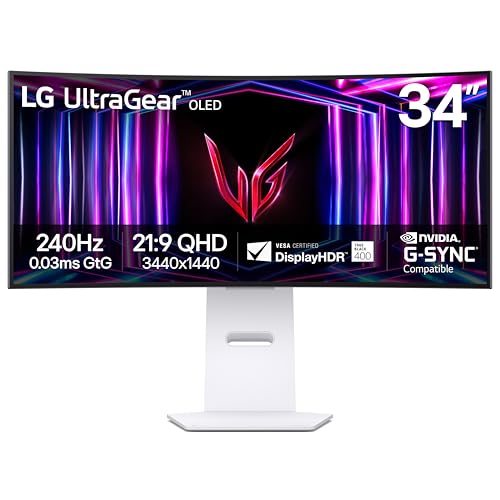
LG 34-Inch UltraGear Curved OLED Gaming Monitor
Best for: immersive ultrawide gaming
- Screen Size
- 34-inch
- Resolution
- WQHD 1440p
- Refresh Rate
- 240Hz
- Panel Type
- OLED
- Response Time
- 0.03ms
- Aspect Ratio
- 21:9
This 34-inch curved OLED monitor delivers a 21:9 aspect ratio and WQHD 1440p resolution for immersive gaming. It features a 240Hz refresh rate and a 0.03ms response time, ensuring smooth visuals. The 800R curve and DisplayHDR True Black 400 enhance contrast. It supports both NVIDIA G-SYNC and AMD FreeSync Premium Pro. This wide display suits players who prefer a broad field of view.
- 240Hz refresh rate for smooth gameplay
- 0.03ms response time reduces ghosting
- 21:9 aspect ratio with 800R curve
- DisplayHDR True Black 400 with 1.5M:1 contrast
- Compatible with NVIDIA G-SYNC and AMD FreeSync Premium Pro
- Heavier build at 20.5 pounds compared to 27-inch competitors
- Lower resolution than 4K alternatives on the list
- Wider footprint requires more desk space
- You want an ultra-wide 21:9 display for immersive gaming
- You prioritize high refresh rates and fast response times
- You use both NVIDIA and AMD graphics cards
- You prefer a compact 27-inch screen for limited desk space
- You need 4K resolution for detailed work
- You want a flat screen instead of a curved one
Verdict: LG 34-inch Ultragear OLED Gaming Monitor offers a wide 21:9 view with fast 240Hz performance. It fits players who value immersion and speed over a standard 16:9 aspect ratio.

LG 34-Inch UltraGear OLED Curved Monitor
Best for: immersive ultrawide gaming
- Screen Size
- 34"
- Resolution
- WQHD 1440p
- Refresh Rate
- 240Hz
- Panel Type
- OLED
- Response Time
- 0.03ms (GtG)
- Aspect Ratio
- 21:9
This LG monitor features a 34-inch curved OLED panel with a 21:9 aspect ratio. It delivers a 240Hz refresh rate and a 0.03ms response time for fast gaming. The 800R curve and DisplayHDR True Black 400 enhance immersion. You get NVIDIA G-SYNC and AMD FreeSync Premium Pro support. It is ideal for gamers who want a wide, ultra-fast display.
- 240Hz refresh rate for smooth gameplay
- 0.03ms response time reduces ghosting
- 800R curved OLED screen for immersion
- 1.5M:1 contrast ratio for deep blacks
- HDMI 2.1 and DisplayPort 1.4 connections
- 20.5 pounds weight makes it heavier than 27-inch alternatives
- 34-inch size requires more desk space than 27-inch models
- 21:9 aspect ratio differs from standard 16:9 screens
- You want a wide 21:9 ultrawide display for gaming
- You need a 240Hz refresh rate for competitive play
- You prefer a curved screen for immersion
- You need a standard 16:9 aspect ratio
- You have limited desk space for a 34-inch monitor
- You prefer a lighter, more portable setup
Verdict: LG 34GS95QE 34-Inch Curved OLED is a high-speed ultrawide choice for gamers who value immersion and speed. It suits those with ample desk space who want a 21:9 screen with a 240Hz refresh rate.
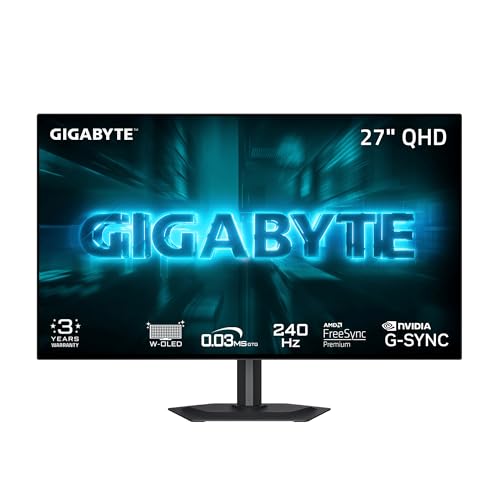
GIGABYTE 27-Inch 240Hz W-OLED Monitor
Best for: fast-paced gaming on a 27-inch OLED
- Screen Size
- 27"
- Resolution
- 2560×1440
- Refresh Rate
- 240Hz
- Panel Type
- WOLED
- Response Time
- 0.03ms GtG
- Variable Refresh Rate
- FreeSync Premium, G-SYNC Compatible
The GIGABYTE GO27Q24G is a 27-inch QHD gaming monitor featuring a W-OLED panel with MLA+ technology. It delivers a 240Hz refresh rate and a 0.03ms response time for smooth motion. The display offers up to 1300 nits peak brightness and includes an AI-based OLED care system to reduce burn-in risks. This monitor suits gamers who want high refresh rates and vivid contrast in a compact 27-inch form factor.
- 27-inch W-OLED panel with MLA+ technology
- 240Hz refresh rate and 0.03ms GTG response time
- Up to 1300 nits peak brightness
- AI-based OLED care algorithm to minimize burn-in
- Zero-bezel design on all four edges
- 27-inch size is smaller than the 34-inch options on this list
- 16.5-pound weight is heavier than many standard 27-inch monitors
- QHD resolution is lower than 4K displays
- You want a high-refresh-rate OLED monitor for competitive gaming
- You prefer a compact 27-inch screen for your desk
- You value high peak brightness for bright room environments
- You need a larger 34-inch ultrawide display
- You require a 4K resolution for detailed productivity work
- You are looking for a budget-friendly IPS panel
Verdict: GIGABYTE GO27Q24G 27-inch W-OLED delivers elite speed and brightness for fast-paced gaming. It fits players who prioritize response time and contrast in a standard 27-inch footprint.
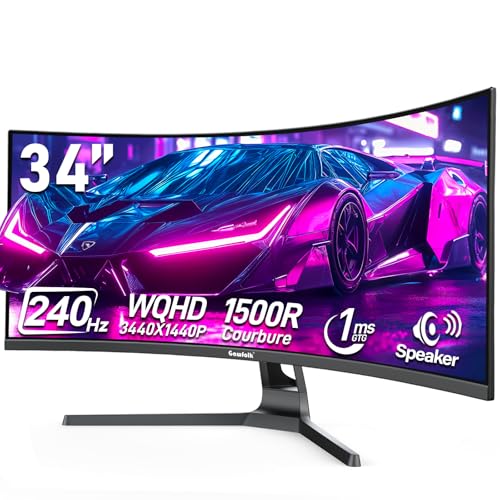
Gawfolk 34" 240Hz UWQHD Curved Monitor
Best for: Budget ultrawide gaming and media consumption
- Screen Size
- 34"
- Resolution
- 3440×1440
- Refresh Rate
- 240Hz
- Aspect Ratio
- 21:9
- Variable Refresh Rate
- FreeSync, G-Sync compatible
- Ports
- HDMI 2.0, DP 1.4
The Gawfolk 34-inch curved monitor delivers UWQHD resolution on a 1500R VA panel. It supports a 240Hz refresh rate via DisplayPort and includes AdaptiveSync for smoother gameplay. The 3500:1 contrast ratio offers deeper blacks than standard IPS panels. Built-in speakers add convenience for casual use. This ultrawide screen suits players who want immersion and high speed without the OLED price tag.
- 240Hz refresh rate via DisplayPort
- UWQHD 3440×1440 resolution
- 1500R curved VA panel
- Built-in speakers included
- G-Sync and FreeSync compatible
- 310 cd/m² peak brightness is lower than OLED competitors
- 12.6-pound weight is heavier than 27-inch alternatives
- VA panel viewing angles are narrower than IPS models
- You want a large ultrawide screen for immersive gaming
- You need high refresh rates for fast-paced titles
- You prefer VA panel contrast for dark scenes
- You require HDR brightness levels above 310 nits
- You need narrow bezels for a multi-monitor setup
- You prefer IPS panels for wider viewing angles
Verdict: Gawfolk 34-Inch Curved UWQHD Gaming Monitor fits budget gamers who prioritize screen size and speed over peak brightness. It offers a solid ultrawide experience for single-player immersion.

ViewSonic VX2738-2K 27-Inch OLED Gaming Monitor
Best for: Height-adjustable stand and 240Hz OLED performance
- Screen Size
- 27"
- Resolution
- 2560 x 1440
- Refresh Rate
- 240Hz
- Panel Type
- QD-OLED
- Response Time
- 0.03ms
- Variable Refresh Rate
- FreeSync Premium, G-SYNC Compatible
The ViewSonic VX2738-2K-OLED is a 27-inch QHD OLED gaming monitor with a 240Hz refresh rate and 0.03ms response time. It features True 10-bit color depth and HDR10 support for vibrant visuals. The monitor includes an ergonomic stand with height adjustment, making it a strong alternative to the LG 34GS95QE for users who prefer a smaller screen size with premium OLED performance.
- 240Hz refresh rate for fluid motion
- Height-adjustable ergonomic stand
- 0.03ms GtG response time
- True 10-bit color depth
- NVIDIA G-SYNC compatibility
- 27-inch screen is smaller than the 34-inch LG 34GS95QE
- 2W speakers are lower power than typical dedicated audio setups
- 11.9-pound weight is comparable to other 27-inch monitors
- You want a height-adjustable stand for better ergonomics
- You prefer a 27-inch screen over a 34-inch ultrawide
- You need a 240Hz OLED display for competitive gaming
- You require a 34-inch ultrawide aspect ratio
- You need a built-in webcam for streaming
- You prefer IPS panels over OLED technology
Verdict: ViewSonic VX2738-2K-OLED 27-inch QHD Monitor is a solid choice for gamers who prioritize a height-adjustable stand and fast OLED performance in a compact 27-inch form factor.

AOC 27-inch 240Hz QD-OLED Gaming Monitor
Best for: 27-inch OLED gamers wanting high speed
- Screen Size
- 27"
- Resolution
- 2560 x 1440
- Refresh Rate
- 240Hz
- Panel Type
- QD OLED
- Response Time
- 0.03ms (GtG)
- Variable Refresh Rate
- G-SYNC Compatible, Adaptive-Sync
The AOC Q27GAZD is a 27-inch QHD gaming monitor featuring a QD OLED panel. It delivers a 240Hz refresh rate and a 0.03ms response time for smooth visuals. The display covers 147.6% sRGB and 110.2% DCI-P3 for accurate colors. It supports NVIDIA G-SYNC Compatible technology to reduce screen tearing. This monitor suits gamers who want high speed and vibrant imagery in a compact 27-inch form factor.
- 240Hz refresh rate for smooth motion
- 0.03ms response time reduces blur
- QD OLED panel with 147.6% sRGB coverage
- NVIDIA G-SYNC Compatible for tear-free play
- 27-inch screen is smaller than the 34-inch options on this list
- 17.7 pounds weight is heavier than typical 27-inch monitors
- You want a smaller 27-inch OLED panel instead of a 34-inch ultrawide
- You need a high 240Hz refresh rate for competitive gaming
- You prioritize color accuracy with over 110% DCI-P3 coverage
- You require a 34-inch ultrawide aspect ratio for immersive viewing
- You prefer a lighter monitor that weighs less than 15 pounds
- You need native DisplayPort connectivity alongside HDMI
Verdict: AOC Q27GAZD 27-inch 240Hz QD OLED offers a fast, colorful experience for players who prefer a standard 27-inch screen over an ultrawide format. It fits users who value high refresh rates and precise color reproduction in a compact size.

LG 27-Inch 240Hz QHD Gaming Monitor
Best for: High-refresh-rate gaming on a 27-inch IPS panel
- Screen Size
- 27"
- Resolution
- 2560 x 1440
- Refresh Rate
- 240Hz
- Panel Type
- IPS
- Response Time
- 1ms (GtG)
- Variable Refresh Rate
- G-SYNC Compatible, AMD FreeSync Premium
The LG 27GR83Q-B is a 27-inch QHD IPS monitor designed for fast-paced gaming. It offers a 240Hz refresh rate and 1ms response time for smooth visuals. The panel covers 95% of the DCI-P3 color gamut and supports VESA DisplayHDR 400. You get G-SYNC and FreeSync compatibility for tear-free play. This monitor suits players who prioritize color accuracy and high refresh rates on a standard IPS panel.
- 240Hz refresh rate via HDMI 2.1 or DisplayPort 1.4
- 95% DCI-P3 color gamut coverage for vivid imagery
- 1ms (GtG) response time for fast motion clarity
- NVIDIA G-SYNC Compatible and AMD FreeSync Premium support
- VESA DisplayHDR 400 rating offers lower peak brightness than OLED competitors
- 27-inch size is smaller than the 34-inch curved OLED options on this list
- You want a high-refresh-rate IPS panel with wide color coverage
- You prefer a standard 27-inch form factor over ultrawide curved displays
- You need G-SYNC and FreeSync compatibility for smooth gameplay
- You require OLED technology for perfect blacks and infinite contrast
- You need an ultrawide 34-inch curved display for immersive gaming
- You prioritize higher peak brightness levels than HDR400 provides
Verdict: LG 27GR83Q-B 27-inch IPS Gaming Monitor delivers strong color accuracy and speed for competitive players who prefer traditional aspect ratios. It fits users who want high refresh rates without the premium cost or curvature of OLED ultrawides.
Specifications side by side

| Spec | LG 34-Inch UltraGear Curved OLED Gaming Monitor | LG 34-Inch UltraGear OLED Curved Monitor | GIGABYTE 27-Inch 240Hz W-OLED Monitor | Gawfolk 34" 240Hz UWQHD Curved Monitor | ViewSonic VX2738-2K 27-Inch OLED Gaming Monitor | AOC 27-inch 240Hz QD-OLED Gaming Monitor | LG 27-Inch 240Hz QHD Gaming Monitor |
|---|---|---|---|---|---|---|---|
| Screen Size | 34-inch | 34" | 27" | 34" | 27" | 27" | 27" |
| Resolution | WQHD 1440p | WQHD 1440p | 2560×1440 | 3440×1440 | 2560 x 1440 | 2560 x 1440 | 2560 x 1440 |
| Refresh Rate | 240Hz | 240Hz | 240Hz | 240Hz | 240Hz | 240Hz | 240Hz |
| Panel Type | OLED | OLED | WOLED | – | QD-OLED | QD OLED | IPS |
| Response Time | 0.03ms | 0.03ms (GtG) | 0.03ms GtG | – | 0.03ms | 0.03ms (GtG) | 1ms (GtG) |
| Aspect Ratio | 21:9 | 21:9 | – | 21:9 | – | – | – |
| Variable Refresh Rate | NVIDIA G-Sync, FreeSync Premium Pro | G-SYNC Compatible, FreeSync Premium Pro | FreeSync Premium, G-SYNC Compatible | FreeSync, G-Sync compatible | FreeSync Premium, G-SYNC Compatible | G-SYNC Compatible, Adaptive-Sync | G-SYNC Compatible, AMD FreeSync Premium |
| Ports | HDMI 2.1, DisplayPort 1.4 | HDMI 2.1, DisplayPort 1.4 | HDMI, DP, Type-C | HDMI 2.0, DP 1.4 | HDMI 2.1, DisplayPort | DP 1.4, HDMI 2.0, Earphone Out | HDMI 2.1, DisplayPort 1.4 |
| Features | Curved Screen | Curved Screen | – | Built-in Speakers, Curved Screen | HDR, Height-Adjustable Stand | HDR | HDR |
| Use | Gaming | Gaming | Gaming | Gaming | Gaming | Gaming | Gaming |
| Size | 34 Inch | 34 Inch | 27" QHD | 34 Inch | – | 27" 240Hz AOC Gaming | 240Hz-HDMI/DP |
| Dimensions | 11 × 30.9 × 23.1 inches | 11 × 30.9 × 23.1 inches | 7.38 × 23.8 × 20.7 inches | 10.6 × 31.9 × 18.6 inches | 9.84 × 24.1 × 15.8 inches | 7.5 × 24 × 17.9 inches | 10 × 24.2 × 22.7 inches |
| Weight | 20.5 pounds | 20.5 pounds | 16.5 pounds | 12.6 pounds | 11.9 pounds | 17.7 pounds | 13.7 pounds |
| Color | White | Green/Red | Black | black | Black | Black | Black |
| Model | 34GS95QE-W.AUS | 34GS95QE-B.AUS | GO27Q24G | GFTY985 | VX2738-2K-OLED | Q27GAZD | 27GR83Q-B.AUS |
Frequently asked questions
Are there cheaper 34-inch ultrawide OLED alternatives to the LG 34GS95QE?
Yes, the Gawfolk 34-inch curved monitor is a budget-friendly option. It offers a 240Hz refresh rate and ultrawide QHD resolution for immersive gaming. While it lacks the OLED panel of the LG, it provides solid speed and size for users prioritizing screen real estate over peak brightness. It also includes built-in speakers.
Is there a 27-inch OLED alternative if I do not want an ultrawide screen?
Several 27-inch OLED monitors serve as strong alternatives. The GIGABYTE GO27Q24G and ViewSonic VX2738-2K both deliver 1440p QHD resolution with 240Hz refresh rates. These models fit players who prefer a standard aspect ratio while still enjoying the high contrast and fast response times inherent to OLED technology.
Which alternative offers the best height-adjustable stand?
The ViewSonic VX2738-2K-OLED is the top choice for ergonomic adjustability. This 27-inch QHD monitor features a height-adjustable stand, allowing you to customize your viewing position. It combines this physical flexibility with 240Hz OLED performance, making it ideal for users who need precise screen positioning during long gaming sessions.
Can I find a 34-inch alternative without using OLED technology?
The LG 27GR83Q-B uses an IPS panel instead of OLED, though it is a 27-inch model. For a 34-inch non-OLED option, the Gawfolk monitor provides a curved ultrawide experience. It uses a different panel technology to achieve 240Hz speed, offering a viable path for those avoiding OLED-specific characteristics.
Do these alternatives support both FreeSync and G-SYNC?
Most listed alternatives support both variable refresh rate technologies. The LG 34GS95QE, GIGABYTE GO27Q24G, ViewSonic VX2738-2K, and Gawfolk 34-inch models all list FreeSync and G-SYNC compatibility. This ensures broad support for both AMD and NVIDIA graphics cards, reducing screen tearing across different PC configurations.
Which alternative is the most compact for smaller desks?
The ViewSonic VX2738-2K-OLED is the most compact option at 24.1 inches wide. Its 27-inch footprint takes up less desk space than the 34-inch ultrawides. Despite its smaller size, it maintains high performance with a 240Hz refresh rate and 1440p QHD resolution, fitting well in tighter gaming setups.
Is there an alternative with USB-C connectivity?
The GIGABYTE GO27Q24G includes USB-C ports alongside HDMI and DisplayPort connections. This allows for video transmission and data transfer through a single cable. Other models like the LG 34GS95QE and ViewSonic VX2738-2K rely on HDMI and DisplayPort for connectivity, making the GIGABYTE a better choice for USB-C needs.
Which monitor offers the best color accuracy for competitive gaming?
The LG 27GR83Q-B uses an IPS panel known for strong color accuracy. While OLED models offer superior contrast, the IPS technology provides consistent color reproduction ideal for competitive play. It delivers 240Hz speed on a 27-inch QHD screen, balancing visual fidelity with the high refresh rates required for fast-paced gaming.
See also