Looking Beyond the LG 27UP850-W Monitor? 6 Alternatives Worth a Look
As Amazon Associates, we earn from qualifying purchases. This means we may receive a small commission at no extra cost to you if you click through and make a purchase.
As an Amazon Associate we earn from qualifying purchases. Links on this page are affiliate links.
If you are exploring lg 27up850 w monitor alternatives, you likely value its strong color accuracy and convenient USB-C connectivity. The original model offers a 27-inch 4K IPS display with a 95% DCI-P3 color gamut and 96W power delivery. It also includes a height-adjustable stand and VESA DisplayHDR 400 support. These specs make it ideal for creative professionals who need reliable color reproduction and a clean desk setup.
However, you might want a different size, a higher refresh rate, or a different brand. Some users prefer a larger 32-inch screen for more workspace, while others seek better value or specialized business features. The 6 alternatives listed here were chosen because their specifications overlap with the original. They share core traits like 4K resolution, IPS panels, and USB-C ports. This guide helps you compare those specs to find the monitor that best fits your specific workflow and budget.
How these alternatives differ from the LG 27UP850-W
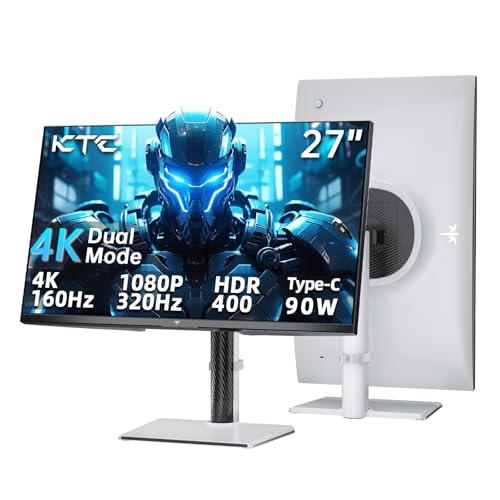
KTC 27-Inch 4K Dual-Mode Gaming Monitor
The KTC H27P6 keeps the 27-inch 4K IPS panel and height-adjustable stand found on the LG, but adds Adaptive-Sync for smoother gaming. It includes HDMI, DisplayPort, and USB-C with power delivery, offering versatile connectivity for single-cable laptop setups. This monitor suits gamers who need high refresh rates alongside strong color coverage. You gain gaming flexibility without sacrificing the ergonomic adjustments or color accuracy that define the LG 27UP850-W, making it a balanced choice for mixed work and play.
ASUS ProArt 27-Inch 4K USB-C Monitor
The ASUS ProArt PA279CRV matches the 27-inch 4K IPS form factor and includes a height-adjustable stand with 96W power delivery via USB-C. It targets professionals who prioritize color precision and ergonomic flexibility over screen size. This model supports daisy-chain connectivity, which streamlines desk setups for creative workflows. While it shares the core display specs of the LG 27UP850-W, it emphasizes professional calibration and macOS compatibility. You should choose this if you need reliable charging and precise color management for detailed editing tasks.
LG 32-Inch 4K IPS Monitor with USB-C
The LG 32UP83AK-W increases the screen size to 32 inches while maintaining 4K resolution and an IPS panel. It retains the height-adjustable stand and USB-C power delivery, providing more screen real estate for users who prioritize desk flexibility over high-speed gaming. This model includes built-in speakers and HDR support, expanding its utility for media viewing and office work. You gain a larger display area without losing the ergonomic benefits of the original, making it ideal for those who need extra space for multitasking or detailed design work.
ASUS ProArt 27-Inch 4K USB-C Monitor
The ASUS ProArt PA279CV offers a 27-inch 4K IPS display with a height-adjustable stand and USB-C connectivity. It includes a USB hub feature, which helps maintain a clean desk setup by consolidating connections. This monitor fits creators who value factory calibration and ergonomic adjustments over maximum power output or larger screen sizes. While it shares the core 4K IPS attributes of the LG 27UP850-W, it emphasizes color fidelity and connectivity convenience. You should pick this if you need reliable color reproduction and a tidy workspace for professional creative tasks.
LG 27-Inch 4K UHD USB-C Monitor
The LG 27UP850K-W mirrors the 27-inch 4K IPS design and includes USB-C power delivery, similar to the original. It adds built-in speakers and audio support, which the base 27UP850-W lacks. This model is suited for professionals and media viewers who need reliable color reproduction and integrated audio for a cleaner setup. You gain audio capabilities without sacrificing the ergonomic stand or color accuracy of the original. It is a solid choice if you want a tidy desk with single-cable connectivity and do not require high refresh rates for gaming.
ViewSonic 27-Inch 4K USB-C Monitor
The ViewSonic VS19281 provides a 27-inch 4K IPS panel with USB-C power delivery and a height-adjustable stand. It includes built-in speakers and supports macOS, making it suitable for home office setups with USB-C laptops. This monitor offers 65W charging, which is lower than the LG 27UP850-W, but still supports single-cable connectivity for a tidy desk. You gain integrated audio and business-focused features. It is a practical choice for users who value a clean setup and reliable color reproduction for office work and media consumption.
| # | Product | Best for | Price |
|---|---|---|---|
| 1 | LG 27UP850-W 27-inch 4K Monitor Best overall | Color-accurate 4K workstations with USB-C needs | |
| 2 | KTC 27-Inch 4K Dual-Mode Gaming Monitor Best budget | gaming and single-cable laptop setups | |
| 3 | ASUS ProArt 27-Inch 4K USB-C Monitor Best premium | professional color-accurate workflows | |
| 4 | LG 32-Inch 4K IPS Monitor with USB-C Best 32 inch | users needing a large 4K display with USB-C | |
| 5 | ASUS ProArt 27-Inch 4K USB-C Monitor Best usb hub | Color-accurate professional work with USB-C | |
| 6 | LG 27-Inch 4K UHD USB-C Monitor Best audio support | Users needing built-in audio and USB-C power | |
| 7 | ViewSonic 27-Inch 4K USB-C Monitor Best business & office | home office setups with USB-C laptops |

LG 27UP850-W 27-inch 4K Monitor
Best for: Color-accurate 4K workstations with USB-C needs
- Screen Size
- 27”
- Resolution
- 3840 x 2160
- Panel Type
- IPS
- Aspect Ratio
- 16:9
- Variable Refresh Rate
- AMD FreeSync
- Ports
- USB-C
This 27-inch 4K UHD IPS monitor delivers sharp visuals with a DCI-P3 95% color gamut and VESA DisplayHDR 400 certification. It features a 96W USB-C port for charging and connectivity, alongside a stand that adjusts for height, pivot, and tilt. The 178-degree viewing angles ensure consistent color from most positions. It suits users who need accurate colors and a single-cable setup for their workstation.
- 95% DCI-P3 color gamut for accurate colors
- 96W USB-C power delivery for single-cable use
- Height, pivot, and tilt adjustable stand
- 178-degree horizontal and vertical viewing angles
- Lower brightness at 400 cd/m² compared to 450 cd/m² options
- Heavier build at 13 pounds versus lighter alternatives
- You need a single cable for video and power
- You require high color accuracy for creative work
- You want a stand that adjusts for height
- You need higher than 400 nits of brightness
- You prefer a lighter monitor for easy moving
- You want a larger 32-inch screen size
Verdict: LG 27UP850-W 27-inch 4K Monitor offers reliable color and convenient USB-C charging for office or creative tasks. It fits professionals who value color accuracy and ergonomic adjustments over peak brightness.
KTC 27-Inch 4K Dual-Mode Gaming Monitor
Best for: gaming and single-cable laptop setups
- Screen Size
- 27 Inch
- Resolution
- 4K, 1080P
- Refresh Rate
- 160Hz, 320Hz
- Panel Type
- Fast IPS
- Response Time
- 1ms
- Variable Refresh Rate
- Adaptive Sync
This KTC 27-inch monitor offers a Fast IPS panel with 4K UHD resolution. It supports dual modes, switching between 4K at 160Hz and FHD at 320Hz. The display covers 125% of the sRGB gamut and includes HDR 400. A USB-C port provides 90W power delivery. It features an ergonomic stand with height, tilt, swivel, and pivot adjustments for flexible positioning.
- Fast IPS panel with 4K UHD resolution
- Dual mode: 4K @160Hz or FHD @320Hz
- USB-C port with 90W Power Delivery
- 125% sRGB color gamut coverage
- Fully adjustable ergonomic stand
- 13.9 pounds weight is heavier than the 27-inch LG 27UP850-W
- 1000:1 contrast ratio is lower than typical professional displays
- 3-year warranty is shorter than the 3-year warranty on the ASUS ProArt PA279CV
- You need high refresh rates for gaming at 4K
- You want to connect a laptop via a single USB-C cable
- You require an adjustable stand for ergonomic comfort
- You need a monitor lighter than 13 pounds
- You require a contrast ratio higher than 1000:1
- You prefer a warranty longer than three years
Verdict: KTC 27 Inch 4K Gaming Monitor suits gamers who want high refresh rates and versatile connectivity. It fits users who value an adjustable stand and strong color coverage for both work and play.

ASUS ProArt 27-Inch 4K USB-C Monitor
Best for: professional color-accurate workflows
- Screen Size
- 27-inch
- Resolution
- 3840 x 2160
- Panel Type
- IPS
- Ports
- DisplayPort, USB-C, HDMI, USB
- Features
- HDR, Height-Adjustable Stand, Power Delivery
- Use
- Mac
The ASUS ProArt PA279CRV is a 27-inch 4K UHD IPS monitor designed for professional color work. It covers 99% of both DCI-P3 and Adobe RGB color spaces with factory calibration ensuring Delta E is under 2. The display supports HDR and includes a USB-C port delivering 96 watts of power. You get an ergonomic stand with height, tilt, swivel, and pivot adjustments. It also features DisplayPort daisy-chain capability for multi-monitor setups.
- 99% DCI-P3 and 99% Adobe RGB color coverage
- Factory calibrated to Delta E < 2 accuracy
- USB-C port with 96-watt power delivery
- Ergonomic stand with height, tilt, swivel, and pivot
- 27-inch panel is smaller than the 32-inch LG 32UP83AK-W
- 18.3-pound weight is heavier than the 16.1-pound LG 27UP850-W
- 96-watt power delivery is lower than the 120-watt KTC 27 Inch
- You need precise color accuracy for professional design work
- You want a single cable for video and 96-watt charging
- You plan to daisy-chain multiple monitors via DisplayPort
- You prefer a larger 32-inch screen for more workspace
- You need higher refresh rates for fast-paced gaming
- You require more than 96 watts of power delivery
Verdict: ASUS ProArt PA279CRV 27-inch 4K USB-C suits professionals who prioritize color precision and ergonomic flexibility over screen size. It fits users who need reliable 96-watt charging and daisy-chain connectivity for their workflow.

LG 32-Inch 4K IPS Monitor with USB-C
Best for: users needing a large 4K display with USB-C
- Screen Size
- 32-inch
- Resolution
- 3840 x 2160
- Refresh Rate
- 60Hz
- Panel Type
- IPS
- Ports
- HDMI, DisplayPort, USB Type-C
- Features
- HDR, Built-in Speakers, Height-Adjustable Stand, Power Delivery
This LG monitor offers a 32-inch IPS panel with 4K UHD resolution. It supports HDR10 for better color and brightness in supported content. The display runs at 60Hz. You get USB-C connectivity with 60W power delivery. The stand allows height, tilt, and pivot adjustments. It includes built-in speakers for basic audio needs.
- 32-inch IPS panel with 4K UHD resolution
- USB-C port with 60W power delivery
- Height, tilt, and pivot adjustable stand
- Built-in speakers for audio output
- 60Hz refresh rate limits smooth motion
- 18.3-pound weight adds bulk to your desk
- No mention of high refresh rate gaming features
- You want a larger 32-inch 4K display
- You need USB-C connectivity for charging
- You prefer an adjustable ergonomic stand
- You require high refresh rates for gaming
- You need a compact 27-inch footprint
- You want advanced HDR color grading tools
Verdict: LG 32-inch 4K IPS Monitor provides a spacious display with versatile connectivity. It fits users who prioritize screen real estate and desk flexibility over high-speed gaming performance.

ASUS ProArt 27-Inch 4K USB-C Monitor
Best for: Color-accurate professional work with USB-C
- Screen Size
- 27 inches
- Panel Type
- IPS
- Response Time
- 5.0 milliseconds
- Ports
- USB-C, DisplayPort, HDMI, USB 3.1
- Resolution
- 4K UHD
- Features
- Height-Adjustable Stand, USB Hub, Power Delivery
The ASUS ProArt PA279CV is a 27-inch 4K UHD IPS monitor designed for professional color work. It offers 100% sRGB and Rec. 709 coverage with factory calibration ensuring Delta E < 2 accuracy. The USB-C port delivers 65W of power delivery while connecting your display. It includes a height-adjustable stand and a built-in USB hub for convenient peripheral access.
- 100% sRGB and Rec. 709 color gamut coverage
- Factory calibrated with Delta E < 2 accuracy
- USB-C port provides 65W power delivery
- Height-adjustable stand for ergonomic positioning
- Built-in USB hub for device connectivity
- 65W power delivery is lower than the 90W option on the KTC model
- 27-inch screen is smaller than the 32-inch LG 32UP83AK-W
- 19-pound weight is heavier than the 65W ViewSonic alternative
- You need precise color accuracy for professional design work
- You want a single cable for display and power delivery
- You require a height-adjustable stand for better ergonomics
- You need more than 65W of power delivery for your laptop
- You prefer a larger 32-inch display for more screen real estate
- You are looking for a lighter monitor for easy desk movement
Verdict: ASUS ProArt PA279CV 27-inch 4K USB-C suits creators who prioritize color fidelity and a clean desk setup. It fits users who value factory calibration and ergonomic adjustments over maximum power output or screen size.

LG 27-Inch 4K UHD USB-C Monitor
Best for: Users needing built-in audio and USB-C power
- Screen Size
- 27-inch
- Resolution
- 3840 x 2160
- Refresh Rate
- 60Hz
- Panel Type
- IPS
- Ports
- HDMI, DisplayPort, USB-C
- Features
- HDR, Built-in Speakers, Power Delivery, Audio Support
This 27-inch LG monitor delivers 4K UHD resolution on an IPS panel with VESA DisplayHDR 400 support. It includes built-in stereo speakers with Waves MaxxAudio, setting it apart from competitors that often omit audio hardware. The display offers 95% DCI-P3 color gamut coverage and a 60Hz refresh rate. USB-C connectivity provides up to 90W power delivery. It suits users who value integrated sound and color accuracy for general computing and media consumption.
- Built-in stereo speakers with Waves MaxxAudio technology
- 95% DCI-P3 color gamut expression for vibrant visuals
- USB-C port with 90W power delivery
- VESA DisplayHDR 400 compatibility
- 60Hz refresh rate limits high-speed gaming performance
- 13-pound weight makes it bulkier than lighter alternatives
- 27-inch size offers less screen real estate than 32-inch options
- You want built-in speakers without needing external audio equipment
- You need USB-C connectivity for single-cable docking
- You prioritize color accuracy for creative work
- You require a high refresh rate for competitive gaming
- You prefer a larger 32-inch display for multitasking
- You want to minimize desk footprint with a lighter monitor
Verdict: LG 27UP850K-W 27-inch 4K Monitor is a solid choice for professionals and media viewers who need reliable color reproduction and integrated audio. It fits users who want a clean setup with USB-C power delivery and do not need high refresh rates for gaming.

ViewSonic 27-Inch 4K USB-C Monitor
Best for: home office setups with USB-C laptops
- Screen Size
- 27 Inch
- Resolution
- 3840 x 2160
- Panel Type
- IPS
- Ports
- USB-C, HDMI, DisplayPort
- Features
- HDR, Built-in Speakers, Power Delivery
- Use
- Business & Office, Mac, Office, Home Office
The ViewSonic VX2776-4K-MHDU is a 27-inch IPS monitor with 4K UHD resolution. It features a single-cable USB-C connection that supports 65W power delivery. HDR10 support enhances visual detail for media. Integrated eye care technologies reduce fatigue during long work sessions. This monitor suits business and office environments where clean setups and clear text are priorities.
- 27-inch 4K UHD (3840 x 2160) IPS display
- USB-C port with 65W power delivery
- HDR10 support for improved contrast
- Built-in Flicker-Free and Blue Light Filter
- 65W power delivery is lower than the 90W PD on the KTC model
- 27-inch screen is smaller than the 32-inch LG 32UP83AK-W
- 8.6-pound weight is heavier than the 27-inch LG 27UP850-W
- You need a single-cable USB-C connection for your laptop
- You prefer a 27-inch screen size for your desk
- You require HDR10 support for media consumption
- You need more than 65W of power delivery for your device
- You prefer a larger 32-inch display for more screen real estate
- You want a lighter monitor for frequent moving
Verdict: The ViewSonic 27-Inch 4K USB-C Monitor fits home office users who value a tidy desk with single-cable USB-C connectivity and 65W charging for their laptops.
Specifications side by side

| Spec | LG 27UP850-W 27-inch 4K Monitor | KTC 27-Inch 4K Dual-Mode Gaming Monitor | ASUS ProArt 27-Inch 4K USB-C Monitor | LG 32-Inch 4K IPS Monitor with USB-C | ASUS ProArt 27-Inch 4K USB-C Monitor | LG 27-Inch 4K UHD USB-C Monitor | ViewSonic 27-Inch 4K USB-C Monitor |
|---|---|---|---|---|---|---|---|
| Screen Size | 27” | 27 Inch | 27-inch | 32-inch | 27 inches | 27-inch | 27 Inch |
| Resolution | 3840 x 2160 | 4K, 1080P | 3840 x 2160 | 3840 x 2160 | – | 3840 x 2160 | 3840 x 2160 |
| Refresh Rate | – | 160Hz, 320Hz | – | 60Hz | – | 60Hz | – |
| Panel Type | IPS | Fast IPS | IPS | IPS | IPS | IPS | IPS |
| Response Time | – | 1ms | – | – | 5.0 milliseconds | – | – |
| Aspect Ratio | 16:9 | – | – | – | – | – | – |
| Variable Refresh Rate | AMD FreeSync | Adaptive Sync | – | – | – | – | – |
| Ports | USB-C | USB-C, HDMI 2.1, DisplayPort 1.4 | DisplayPort, USB-C, HDMI, USB | HDMI, DisplayPort, USB Type-C | USB-C, DisplayPort, HDMI, USB 3.1 | – | USB-C, HDMI, DisplayPort |
| Features | HDR, Height-Adjustable Stand, Power Delivery | HDR, Height-Adjustable Stand, Power Delivery | HDR, Height-Adjustable Stand, Power Delivery | HDR, Built-in Speakers, Height-Adjustable Stand, Power Delivery | Height-Adjustable Stand, USB Hub, Power Delivery | HDR, Built-in Speakers, Power Delivery, Audio Support | HDR, Built-in Speakers, Power Delivery |
| Use | – | Gaming | Mac | – | – | – | Business & Office, Mac, Office, Home Office |
| Size | – | 27-In | 27 Inch | 32 Inch | 27 Inch | 27-inch and USB-C | 27 Inch |
| Operating System | – | – | macOS | – | – | – | macOS |
| Dimensions | 22.4 × 24.2 × 11.5 inches | 8.38 × 24.3 × 21.1 inches | 24.1 × 8.46 × 16.1 inches | 9.4 × 28.1 × 23.5 inches | 20.6 × 24.2 × 8.97 inches | 9.4 × 24.2 × 22.4 inches | 8.2 × 24.2 × 17.2 inches |
| Weight | 13 pounds | 13.9 pounds | 18.3 pounds | 18.3 pounds | 19 pounds | 13 pounds | 8.6 pounds |
| Color | Silver | White | BLACK | White | BLACK | White | Black |
| Model | 27UP850-W | H27P6 | PA279CRV | 32UP83AK-W.AUS | PA279CV | 27UP850K-W | VS19281 |
Frequently asked questions
Which monitor offers the best gaming performance among these alternatives?
The KTC H27P6 is the top choice for gaming. It features Adaptive-Sync variable refresh rate technology for smoother visuals. This model also includes HDMI, DisplayPort, and USB-C ports. It suits users who want high refresh rates and versatile connectivity for both work and play.
Is there a larger screen option available in this list?
Yes, the LG 32UP83AK-W provides a 32-inch display. It retains the 4K UHD resolution and IPS panel type of smaller models. This monitor includes built-in speakers and a height-adjustable stand. It fits users who prioritize screen real estate and desk flexibility over high-speed gaming performance.
Which monitor is best for professional color-accurate workflows?
The ASUS ProArt PA279CRV is rated as the best premium option. It offers 4K UHD resolution with an IPS panel for precise color reproduction. This model supports 96-watt power delivery and daisy-chain connectivity. It suits professionals who prioritize color precision and ergonomic flexibility over screen size.
Does any model include built-in speakers?
Several monitors in this list feature integrated audio. The LG 32UP83AK-W and the LG 27UP850K-W both include built-in speakers. The ViewSonic VS19281 also offers audio support. These models help users maintain a clean desk setup without needing external audio equipment.
Which monitor is ideal for a tidy home office setup?
The ViewSonic VS19281 is designed for home office environments. It provides single-cable USB-C connectivity and 65W charging for laptops. This model includes an IPS panel and 4K UHD resolution. It fits users who value a tidy desk with minimal cable clutter.
What is the lightest monitor on this list?
The ViewSonic VS19281 is the lightest option at 8.6 pounds. It measures 24.2 inches wide and 8.2 inches deep. This compact design makes it easy to position on your desk. It offers 4K UHD resolution and USB-C connectivity for efficient workspace management.
Which monitor serves as the best budget-friendly alternative?
The KTC H27P6 is identified as the best budget pick. It delivers a 27-inch 4K IPS display with Adaptive-Sync. The unit includes a height-adjustable stand and multiple ports. It suits gamers and users who value versatile connectivity without a premium price tag.
See also