6 Best Alternatives to the KTC 27 Inch QHD White Gaming Monitor (2026)
As Amazon Associates, we earn from qualifying purchases. This means we may receive a small commission at no extra cost to you if you click through and make a purchase.
As an Amazon Associate we earn from qualifying purchases. Links on this page are affiliate links.
The KTC 27 Inch QHD White Gaming Monitor delivers high refresh rates and a distinct white aesthetic for competitive players. If you are looking for ktc 27 inch qhd white gaming monitor alternatives, you might want a different size, panel type, or brand. Some buyers prefer larger screens or higher color accuracy over raw speed. Others may need specific connectivity options or a black finish to match their setup.
We selected these 6 monitors because their published specifications overlap with the original model. You will find options with similar QHD resolution and IPS panels, though refresh rates vary from 120Hz to 320Hz. Some entries offer OLED clarity or 4K sharpness instead of the standard 1440p speed. This list helps you compare key specs like panel type, variable refresh rate support, and physical dimensions. You can choose based on whether you prioritize color fidelity, screen size, or pure gaming performance without compromising on the core features you need.
How alternatives compare to KTC H27E6
LG 27-Inch 240Hz QHD Gaming Monitor
The LG 27GR83Q-B offers a 240Hz refresh rate, which is slightly lower than the KTC H27E6’s 320Hz overclocked speed. It uses a standard black finish rather than the white aesthetic you might prefer. This model supports both FreeSync and G-SYNC, providing broader compatibility with NVIDIA and AMD graphics cards. The panel is IPS, matching the KTC in color consistency, but the LG lacks the height-adjustable stand found on the KTC. You get a sturdy, fixed stand instead. This monitor suits competitive gamers who prioritize certified variable refresh rate support over maximum theoretical frame rates and a specific desk color scheme.
LG UltraGear 32-Inch QHD 200Hz IPS Monitor
The LG 32G620B-B provides a larger 32-inch screen while keeping the QHD resolution. This increases pixel density slightly less than the 27-inch KTC, potentially affecting sharpness. It runs at 200Hz, which is slower than the KTC’s 320Hz. Like the KTC, it uses an IPS panel and supports both FreeSync and G-SYNC. The design is black, lacking the white finish of the original. This alternative is best for players who want more screen real estate to track movement in fast-paced games. You trade some speed and color coordination for a bigger viewing area that fills more of your peripheral vision during gameplay.
ASUS TUF 27" QHD 165Hz Fast IPS
The ASUS TUF 27" QHD 165Hz monitor drops the refresh rate significantly to 165Hz compared to the KTC’s 320Hz. It uses a Fast IPS panel, similar to the KTC, but focuses on color accuracy and motion clarity rather than extreme speed. The design is black, not white. It includes built-in audio and VESA mounting, which the KTC also supports via VESA 100x100mm. This model is for gamers who prioritize balanced performance and reliable mounting options over high frame rates. You give up the ultra-smooth 320Hz experience for a more standard, versatile gaming setup with integrated speakers.
KTC 27-Inch 4K 160Hz Fast IPS Monitor
The KTC U27T6 maintains the white aesthetic but upgrades the resolution to 4K UHD. This offers much sharper images than the 1440p KTC H27E6. The refresh rate is 160Hz, which is slower than the H27E6’s 320Hz. It uses a Fast IPS panel and supports Adaptive-Sync. The stand is adjustable, similar to the KTC’s ergonomic features. This monitor is for users who prioritize image sharpness and a matching white desk setup over competitive frame rates. You gain significant detail in visuals but lose the high-speed responsiveness that defines the original H27E6 model for fast-paced gaming.
LG 27-Inch 240Hz OLED Gaming Monitor
The LG 27GX704A-B uses an OLED panel, which provides superior contrast and black levels compared to the KTC’s IPS panel. It runs at 240Hz, slightly slower than the KTC’s 320Hz. The design is black, lacking the white finish. It supports both FreeSync and G-SYNC. This monitor is for competitive gamers who value OLED clarity and deep blacks over a specific color scheme. You gain visual fidelity and response time benefits from the OLED technology but lose the white aesthetic and the absolute highest refresh rate available in the KTC lineup.
ASUS ProArt PA278QGV 27-Inch QHD Monitor
The ASUS ProArt PA278QGV is designed for professional color work rather than high-speed gaming. It runs at 120Hz, significantly slower than the KTC’s 320Hz. The panel is IPS, offering good color accuracy, but it lacks the high refresh rate needed for competitive gaming. The design is black, not white. It includes a USB hub and ergonomic adjustments. This monitor is for creators who need precise color reproduction and adjustable viewing angles. You give up gaming speed and the white aesthetic for professional-grade color accuracy and connectivity features suited for creative workflows.
| # | Product | Best for | Price |
|---|---|---|---|
| 1 | KTC H27E6 27-inch QHD White Monitor Best overall | Fast-paced gaming with a white aesthetic | |
| 2 | LG 27-Inch 240Hz QHD Gaming Monitor Also great | Competitive gamers wanting high refresh rates | |
| 3 | LG UltraGear 32-Inch QHD 200Hz IPS Monitor Best budget | players wanting larger 32-inch QHD screens | |
| 4 | ASUS TUF 27" QHD 165Hz Fast IPS Best premium | gamers wanting color accuracy and VESA mounting | |
| 5 | KTC 27-Inch 4K 160Hz Fast IPS Monitor Best 4k uhd | 4K gaming on a 27-inch white display | |
| 6 | LG 27-Inch 240Hz OLED Gaming Monitor Best oled | competitive gaming with OLED clarity | |
| 7 | ASUS ProArt PA278QGV 27-Inch QHD Monitor Best 120hz | Professional color work and ergonomic comfort |

KTC H27E6 27-inch QHD White Monitor
Best for: Fast-paced gaming with a white aesthetic
- Screen Size
- 27 Inch
- Resolution
- 2K 1440P
- Refresh Rate
- 300Hz (up to 320Hz)
- Panel Type
- Fast IPS
- Response Time
- 1ms MPRT
- Variable Refresh Rate
- Adaptive FreeSync
This 27-inch white KTC H27E6 monitor delivers a 1440p QHD resolution on a Fast IPS panel. It supports a 320Hz refresh rate with 1ms MPRT response time. The display includes HDR400 and 144% sRGB color accuracy. You get a height-adjustable stand with pivot capability. It suits gamers seeking high speed and a clean aesthetic.
- 320Hz overclocked refresh rate for smooth motion
- Fast IPS panel with 144% sRGB coverage
- Height adjustable stand with 90-degree pivot
- Dual HDMI 2.1 and DisplayPort 1.4 inputs
- 1000:1 contrast ratio is lower than OLED alternatives
- HDR400 certification offers limited dynamic range
- 27-inch size is smaller than 32-inch options
- You want a white monitor for a light desk setup
- You prioritize high refresh rates for competitive gaming
- You need vertical screen orientation for productivity
- You require deep black levels for dark room viewing
- You prefer a larger 32-inch display area
- You need professional color grading accuracy beyond sRGB
Verdict: The KTC H27E6 27-inch White QHD 320Hz Monitor fits competitive players who value speed and a specific desk aesthetic. It delivers high frame rates and flexible mounting for focused gaming sessions.

LG 27-Inch 240Hz QHD Gaming Monitor
Best for: Competitive gamers wanting high refresh rates
- Screen Size
- 27"
- Resolution
- 2560 x 1440
- Refresh Rate
- 240Hz
- Panel Type
- IPS
- Response Time
- 1ms (GtG)
- Variable Refresh Rate
- G-SYNC Compatible, AMD FreeSync Premium
This 27-inch QHD monitor uses a Fast IPS panel for 240Hz refresh rates and 1ms response times. It supports both NVIDIA G-SYNC and AMD FreeSync Premium for tear-free gameplay. The display covers 95% of the DCI-P3 color gamut and includes DisplayHDR 400 certification. You get a versatile gaming screen with high color fidelity and smooth motion handling for competitive titles.
- 240Hz refresh rate via DisplayPort or HDMI
- 1ms (GtG) response time on IPS panel
- 95% DCI-P3 color gamut coverage
- NVIDIA G-SYNC Compatible and AMD FreeSync Premium
- 13.7-pound weight is heavier than lighter alternatives
- DisplayHDR 400 is less powerful than OLED HDR
- You want high refresh rates on an IPS panel
- You need G-SYNC compatibility for NVIDIA GPUs
- You prefer wide color gamut for vivid visuals
- You require OLED display technology
- You need a white monitor finish
- You prefer a lighter portable screen
Verdict: LG 27-inch QHD 240Hz Gaming Monitor delivers smooth 240Hz performance and accurate colors for competitive gamers who value IPS quality. It fits players using NVIDIA or AMD cards who want reliable G-SYNC and FreeSync support without OLED pricing.

LG UltraGear 32-Inch QHD 200Hz IPS Monitor
Best for: players wanting larger 32-inch QHD screens
- Screen Size
- 32-inch
- Resolution
- 2560 x 1440
- Refresh Rate
- 200Hz
- Panel Type
- IPS
- Response Time
- 1ms GtG
- Variable Refresh Rate
- NVIDIA G-SYNC, AMD FreeSync Premium
This 32-inch IPS monitor offers a QHD 2560×1440 resolution with a 200Hz refresh rate. It supports HDR10 and covers 99% of the sRGB color gamut. The display features a 1ms response time and includes NVIDIA G-SYNC Compatible and AMD FreeSync Premium technologies. It is designed for gaming, providing smooth visuals and reduced motion blur for fast-paced action.
- 200Hz refresh rate for smooth gameplay
- 32-inch QHD display for expanded screen space
- 99% sRGB color coverage
- 1ms GtG response time
- NVIDIA G-SYNC Compatible support
- 200Hz refresh rate is lower than the 300Hz/320Hz option
- 15.9-pound weight is heavier than the 27-inch alternatives
- Black color does not match the white theme of the list
- You want a larger 32-inch screen for more visibility
- You prefer a high refresh rate for competitive gaming
- You need accurate color reproduction for varied content
- You require a white monitor to match your setup
- You prefer a lighter display for easier desk placement
- You need a higher refresh rate than 200Hz
Verdict: LG 32-inch QHD Gaming Monitor suits players who prioritize screen real estate and smooth motion over the highest possible refresh rates. It fits those who want a larger display for tracking movement without needing the absolute fastest specs available.

ASUS TUF 27" QHD 165Hz Fast IPS
Best for: gamers wanting color accuracy and VESA mounting
- Screen Size
- 27"
- Resolution
- 2560 x 1440
- Refresh Rate
- 165Hz
- Panel Type
- Fast IPS
- Response Time
- 0.3ms (GTG)
- Variable Refresh Rate
- AMD FreeSync Premium, VESA AdaptiveSync
This 27-inch QHD monitor uses a Fast IPS panel for sharp 1440p visuals and wide viewing angles. It offers a 165Hz refresh rate and a 0.3ms response time for smooth gameplay. AMD FreeSync Premium and ELMB technology help reduce tearing and blur. It includes HDR10 support and built-in dual 2W speakers. This model is suitable for gamers who want reliable performance and eye-care features like Flicker-Free technology.
- Fast IPS panel with 120% sRGB color coverage
- 165Hz refresh rate and 0.3ms GTG response time
- AMD FreeSync Premium and ELMB technology for fluid motion
- Built-in dual 2W speakers and VESA 100 x 100mm mounting
- 165Hz refresh rate is lower than the 200Hz to 320Hz options on this list
- Black color finish does not match the white aesthetic of the KTC guide
- Built-in speakers are limited to 2W per side
- You want a Fast IPS panel with wide color coverage
- You need a 27-inch QHD display with VESA mounting
- You prefer a black monitor for a standard setup
- You require a white color scheme to match other peripherals
- You need a refresh rate higher than 165Hz
- You are looking for an OLED display for deeper blacks
Verdict: ASUS TUF 27" QHD Gaming Monitor is a solid choice for gamers who prioritize color accuracy and motion clarity over extreme speed. It fits buyers who want a standard black monitor with reliable VESA mounting and built-in audio.

KTC 27-Inch 4K 160Hz Fast IPS Monitor
Best for: 4K gaming on a 27-inch white display
- Screen Size
- 27 Inch
- Resolution
- 3840 x 2160
- Refresh Rate
- 160Hz
- Panel Type
- Fast IPS
- Response Time
- 1ms MPRT
- Variable Refresh Rate
- Adaptive Sync
The KTC U27T6 is a 27-inch white gaming monitor with 4K UHD resolution. It uses a Fast IPS panel with a 160Hz refresh rate and 1ms MPRT response time. The display covers 140% sRGB and supports HDR400. You get HDMI 2.1 and DisplayPort 1.4 connectivity. It includes height, tilt, pivot, and swivel adjustments for ergonomic use.
- 4K UHD resolution for detailed visuals
- 160Hz refresh rate with Adaptive-Sync
- Fast IPS panel with 140% sRGB coverage
- Ergonomic stand with height and pivot adjustment
- HDMI 2.1 and DisplayPort 1.4 ports
- 1000:1 contrast ratio is lower than OLED alternatives
- 27-inch size offers less screen area than 32-inch options
- 13.8-pound weight is heavier than some competitors
- You want 4K resolution on a 27-inch screen
- You need a white monitor for a matching setup
- You play games at 160Hz with Adaptive-Sync
- You prefer OLED panels for deeper blacks
- You need a 32-inch display for more space
- You require a lighter monitor under 12 pounds
Verdict: KTC 27 Inch 4K Gaming Monitor suits you if you prioritize 4K sharpness and a white design. It delivers solid gaming specs with a sturdy, adjustable stand.

LG 27-Inch 240Hz OLED Gaming Monitor
Best for: competitive gaming with OLED clarity
- Screen Size
- 27"
- Resolution
- 2650 x 1440
- Refresh Rate
- 240Hz
- Panel Type
- OLED
- Response Time
- 0.03ms
- Variable Refresh Rate
- G-Sync Compatible, FreeSync Premium Pro
The LG 27GX704A-B is a 27-inch QHD OLED monitor designed for high-speed gaming. It offers a 240Hz refresh rate and a 0.03ms response time to minimize ghosting. The panel peaks at 1300 nits with a 1.5M:1 contrast ratio for deep blacks. It supports VESA DisplayHDR True Black 400 and includes dual HDMI 2.1 ports for next-gen consoles. This glossy display is UL-certified for eye comfort.
- 240Hz refresh rate for ultra-smooth gameplay
- 0.03ms response time to reduce motion blur
- OLED panel with 1.5M:1 contrast ratio
- Dual HDMI 2.1 ports for console connectivity
- Peaks at 1300 nits for vivid highlights
- Glossy finish may cause reflections in bright rooms
- Standard brightness is 275 nits, lower than some IPS competitors
- Weighs 15.9 pounds, which is heavier than many 27-inch IPS models
- You want OLED contrast for dark room gaming
- You need HDMI 2.1 for PS5 or Xbox Series X
- You prioritize high refresh rates and fast response times
- You prefer a matte screen to avoid glare
- You need a white monitor to match your setup
- You want a lighter monitor for easy desk mounting
Verdict: LG 27-inch OLED Gaming Monitor delivers top-tier speed and contrast for competitive gamers. It fits players who value OLED clarity and console connectivity over a matte finish.
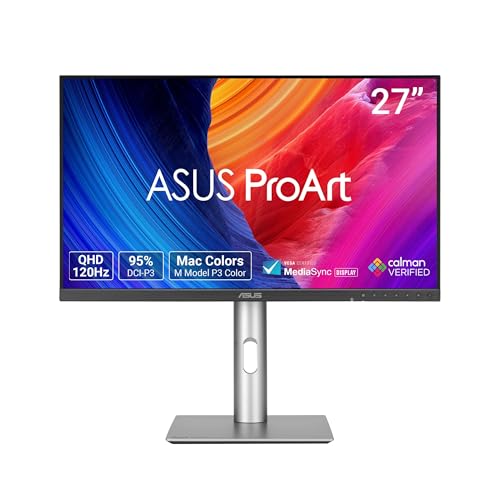
ASUS ProArt PA278QGV 27-Inch QHD Monitor
Best for: Professional color work and ergonomic comfort
- Screen Size
- 27 Inch
- Resolution
- 2560 x 1440
- Refresh Rate
- 120Hz
- Panel Type
- IPS
- Variable Refresh Rate
- VRR
- Ports
- DisplayPort, HDMI
This ASUS ProArt PA278QGV is a 27-inch QHD monitor with a 120Hz refresh rate. It features an IPS panel with 95% DCI-P3 and 100% sRGB color coverage. Factory calibration ensures Delta E < 2 accuracy. It includes ergonomic adjustments and an ambient light sensor. It suits creators who need precise color and smooth motion.
- 120Hz refresh rate for smooth visuals
- 95% DCI-P3 and 100% sRGB color gamut
- Calman Verified with Delta E < 2 accuracy
- Ergonomic stand with height, tilt, swivel, and pivot
- Ambient light sensor for color adjustment
- 120Hz refresh rate is lower than the 165Hz to 320Hz options on this list
- 14.1 pounds weight is heavier than many competitors in this category
- Black color finish does not match the white aesthetic of the guide topic
- You need professional color accuracy for creative work
- You want ergonomic flexibility for long viewing sessions
- You prefer a stable 120Hz refresh rate over higher speeds
- You require a white monitor to match your setup
- You need a refresh rate above 120Hz for competitive gaming
- You want a lighter monitor for easy desk movement
Verdict: ASUS ProArt 27 Inch QHD Monitor delivers professional color accuracy and ergonomic flexibility for creators. It fits users who prioritize precise color reproduction and adjustable viewing angles over high refresh rates or white aesthetics.
Specifications side by side

| Spec | KTC H27E6 27-inch QHD White Monitor | LG 27-Inch 240Hz QHD Gaming Monitor | LG UltraGear 32-Inch QHD 200Hz IPS Monitor | ASUS TUF 27" QHD 165Hz Fast IPS | KTC 27-Inch 4K 160Hz Fast IPS Monitor | LG 27-Inch 240Hz OLED Gaming Monitor | ASUS ProArt PA278QGV 27-Inch QHD Monitor |
|---|---|---|---|---|---|---|---|
| Screen Size | 27 Inch | 27" | 32-inch | 27" | 27 Inch | 27" | 27 Inch |
| Resolution | 2K 1440P | 2560 x 1440 | 2560 x 1440 | 2560 x 1440 | 3840 x 2160 | 2650 x 1440 | 2560 x 1440 |
| Refresh Rate | 300Hz (up to 320Hz) | 240Hz | 200Hz | 165Hz | 160Hz | 240Hz | 120Hz |
| Panel Type | Fast IPS | IPS | IPS | Fast IPS | Fast IPS | OLED | IPS |
| Response Time | 1ms MPRT | 1ms (GtG) | 1ms GtG | 0.3ms (GTG) | 1ms MPRT | 0.03ms | – |
| Variable Refresh Rate | Adaptive FreeSync | G-SYNC Compatible, AMD FreeSync Premium | NVIDIA G-SYNC, AMD FreeSync Premium | AMD FreeSync Premium, VESA AdaptiveSync | Adaptive Sync | G-Sync Compatible, FreeSync Premium Pro | VRR |
| Ports | DP 1.4 x 2, HDMI 2.1 x 2 | HDMI 2.1, DisplayPort 1.4 | HDMI, DisplayPort | DisplayPort 1.4, HDMI 2.0, 3.5mm audio | HDMI 2.1 x 2, DisplayPort 1.4 x 2 | HDMI 2.1, DP 1.4, USB 3.2 | DisplayPort, HDMI |
| Features | HDR | HDR | HDR | HDR | HDR | HDR | HDR, USB Hub |
| Use | Gaming | Gaming | Gaming | Gaming | Gaming | Gaming | – |
| Size | 27 Inch | 240Hz-HDMI/DP | – | 27"-QHD-165Hz-0.3ms | 27 Inch | 27 Inch | 27 Inch |
| Dimensions | 6 × 18 × 30 inches | 10 × 24.2 × 22.7 inches | 8.7 × 28.1 × 24 inches | 24.2 × 7.6 × 17.8 inches | 8.38 × 24.3 × 21.1 inches | 8.7 × 23.8 × 21 inches | 7.5 × 24.1 × 21.1 inches |
| Weight | – | 13.7 pounds | 15.9 pounds | – | 13.8 pounds | 15.9 pounds | 14.1 pounds |
| Color | White | Black | Black | Black | White | Black | BLACK |
| Model | H27E6 | 27GR83Q-B.AUS | 32G620B-B.AUSQ | 27-165 | U27T6 | 27GX704A-B.AUS | PA278QGV |
Frequently asked questions
Is there a white 4K monitor alternative to the KTC 27-inch QHD?
Yes, the KTC U27T6 offers 4K UHD resolution in a white design. It features a 160Hz refresh rate and Fast IPS panel. This model suits you if you prioritize screen sharpness and a matching white aesthetic over the highest possible frame rates for gaming.
Which alternative supports both G-SYNC and FreeSync?
The LG 27GR83Q-B and the LG 32G620B both support FreeSync and G-SYNC. These monitors ensure compatibility with both NVIDIA and AMD graphics cards. This dual support helps maintain smooth gameplay without screen tearing across different hardware setups.
Can I find a larger 32-inch QHD alternative?
The LG 32G620B provides a 32-inch QHD display. It offers a 200Hz refresh rate and IPS panel. This larger screen real estate helps you track movement more easily, making it a strong option if you want more space than the 27-inch standard.
Does any alternative use OLED technology?
The LG 27GX704A-B utilizes an OLED panel. It delivers 240Hz refresh rates and exceptional contrast. This technology provides deep blacks and vibrant colors, which is ideal for competitive gaming where visual clarity and speed are critical for your performance.
Which monitor is best for professional color work?
The ASUS ProArt PA278QGV is designed for professional color accuracy. It features a 120Hz refresh rate and includes a USB hub. This model prioritizes precise color reproduction and ergonomic flexibility, making it suitable for creators who need reliable color management over high gaming speeds.
Are there black alternatives with VESA mounting support?
The ASUS TUF 27" QHD 165Hz and the LG 27GR83Q-B both feature standard black finishes. These models typically include VESA mounting compatibility. This allows you to attach them to wall arms or monitor stands for better desk organization and ergonomic positioning.
See also