Looking Beyond the HP 524pu 24″ Class Full HD LCD Monitor? 6 Alternatives Worth a Look
As Amazon Associates, we earn from qualifying purchases. This means we may receive a small commission at no extra cost to you if you click through and make a purchase.
As an Amazon Associate we earn from qualifying purchases. Links on this page are affiliate links.
The hp 524pu 24 class full HD LCD monitor offers a solid 100Hz IPS panel and USB-C connectivity for standard office tasks. Its 23.8-inch viewable area and matte screen provide a practical workspace for daily business duties. You might consider alternatives if you need a larger display, higher resolution, or specialized features like a built-in webcam or touchscreen. Some users may also prefer a different aspect ratio for media consumption or multitasking.
We selected these options because their specifications overlap with the HP 524pu’s core strengths. Each alternative shares key traits like a 100Hz refresh rate or IPS panel type, ensuring similar image quality and smooth motion. You can compare sizes ranging from 15.6 inches for travel to 34 inches for ultrawide viewing. This guide helps you find a monitor that matches your specific needs for ports, ergonomics, and screen real estate without compromising on essential performance metrics.
How these monitors differ from HP

ViewSonic VG2458 24-Inch 1080p Docking Monitor
The ViewSonic VG2458 matches the HP 524pu’s 24-inch 1080p IPS panel and 100Hz refresh rate. It adds an Ethernet port and a height-adjustable stand, which the HP lacks. This makes it better for office setups needing stable network connectivity and ergonomic adjustments. You lose the sleek silver finish for a standard black design. The dock functionality via USB-C remains similar, but the added physical adjustability and wired network option give it an edge for stationary business desks.
BenQ 27-Inch 1080p USB-C IPS Monitor
The BenQ GW2786TC offers a larger 27-inch screen compared to the HP’s 23.8-inch viewable area. Both share the 1080p resolution and 100Hz IPS panel. The BenQ provides a height-adjustable stand and USB hub, enhancing ergonomics for long office sessions. You gain more screen real estate for multitasking but accept lower pixel density on the larger surface. The white color option differs from the HP’s black and silver. This monitor suits those prioritizing screen size and adjustability over compact footprint.
LG 34-Inch UltraWide 1080p IPS Monitor
The LG 34U530A-W shifts to a 34-inch UltraWide format, significantly widening your workspace compared to the HP’s standard 16:9 aspect ratio. It retains the 100Hz IPS panel and USB-C connectivity. You gain immersive multitasking and media viewing capabilities with HDR support, which the HP does not list. The resolution remains 1080p, so pixel density is lower. This monitor is ideal for users who prioritize screen width and visual immersion over the compact, standard proportions of the HP 524pu.
Upperizon 15.6-Inch Foldable Dual Monitor
The Upperizon UM156FHRL is a portable dual monitor solution, unlike the single fixed HP 524pu. It features two 15.6-inch screens with 1080p resolution but drops to a 60Hz refresh rate. It uses DisplayLink technology for connectivity via USB-C, offering flexibility for travel. You gain expanded workspace on the go but sacrifice the higher refresh rate and stationary stability of the HP. The lightweight design prioritizes portability, making it a practical choice for remote workers who need extra screens while traveling.
ASUS 24-Inch 1080p Video Conferencing Monitor
The ASUS BE24ECSNK matches the HP 524pu’s 24-inch 1080p IPS panel and 100Hz refresh rate. It includes a built-in webcam and height-adjustable stand, features the HP omits. This makes it better for video conferencing and ergonomic comfort. It also offers an Ethernet port for stable connections. You get similar USB-C docking benefits but with added hardware for remote work. The black design is standard. This monitor suits users who need integrated conferencing tools and adjustability in a familiar 24-inch form factor.
Pisichen 27" 2K 100Hz Touchscreen Monitor
The Pisichen 27IN2K100HZ-QHD offers a 27-inch 1440p QHD resolution, providing sharper visuals than the HP’s 1080p 23.8-inch screen. It shares the 100Hz IPS panel and USB-C connectivity. The addition of a touchscreen and built-in speakers adds interactivity and audio without external devices. You gain higher pixel density and touch control but move to a larger 27-inch footprint. This monitor fits users who value screen clarity and direct interaction over the standard non-touch, non-audio setup of the HP 524pu.
| # | Product | Best for | Price |
|---|---|---|---|
| 1 | HP 524pu 24" USB-C Monitor Best overall | Standard 16:9 office tasks | |
| 2 | ViewSonic VG2458 24-Inch 1080p Docking Monitor Best premium | office setups needing USB-C docking | |
| 3 | BenQ 27-Inch 1080p USB-C IPS Monitor Best budget | Office workers needing a large, adjustable screen | |
| 4 | LG 34-Inch UltraWide 1080p IPS Monitor Best hdr | Wide-screen multitasking and media consumption | |
| 5 | Upperizon 15.6-Inch Foldable Dual Monitor Best 60hz | traveling professionals needing extra screens | |
| 6 | ASUS 24-Inch 1080p Video Conferencing Monitor Best webcam | Video conferencing and USB-C docking | |
| 7 | Pisichen 27" 2K 100Hz Touchscreen Monitor Best 1440p qhd | users needing touch control and QHD clarity |

HP 524pu 24" USB-C Monitor
Best for: Standard 16:9 office tasks
- Screen Size
- 23.8"
- Resolution
- 1920 x 1080
- Refresh Rate
- 100 Hz
- Panel Type
- IPS
- Response Time
- 5 ms
- Aspect Ratio
- 16:9
The HP 524pu is a 23.8-inch Full HD monitor with an IPS panel. It offers a 100Hz refresh rate and includes a USB-C port. The matte screen reduces glare. This monitor suits users who need reliable daily performance. The 16:9 aspect ratio fits standard desktop setups. It is a straightforward option for office work or general computing tasks.
- IPS panel for consistent viewing angles
- 100Hz refresh rate for smoother motion
- USB-C port for connectivity
- Matte screen finish reduces glare
- 1080p resolution is lower than the 2K or UltraWide options on this list
- 24-inch screen is smaller than the 27-inch or 34-inch alternatives
- 17.8-pound weight is heavier than portable or smaller desktop monitors
- You need a standard 16:9 display for office work
- You want a 100Hz refresh rate for smoother video
- You prefer a matte screen to reduce glare
- You require higher resolution than 1080p
- You need a screen larger than 24 inches
- You want a lightweight portable monitor
Verdict: HP 524pu 24" IPS Monitor is a solid choice for users who value a 100Hz refresh rate and USB-C connectivity in a standard 24-inch form factor. It fits best for those who do not need higher resolution or larger screen real estate.

ViewSonic VG2458 24-Inch 1080p Docking Monitor
Best for: office setups needing USB-C docking
- Screen Size
- 24"
- Resolution
- 1920 x 1080
- Refresh Rate
- 100Hz
- Panel Type
- IPS
- Ports
- USB-C, HDMI, DisplayPort, RJ45
- Features
- Height-Adjustable Stand, USB Hub
The ViewSonic VG2458 is a 24-inch Full HD IPS monitor designed for professional office environments. It features a 100Hz refresh rate and supports 100W USB-C charging through a single cable. The display includes Flicker-Free technology and a Blue Light Filter to reduce eye strain. It offers versatile connectivity with HDMI, DisplayPort, and RJ45 Ethernet ports. The ergonomic stand allows for height, tilt, swivel, and rotation adjustments to suit your workspace needs.
- 100Hz refresh rate for smoother motion
- 100W USB-C power delivery for laptops
- Built-in RJ45 Ethernet port
- Full ergonomic stand with height adjustment
- USB-C daisy chain capability
- 1080p resolution is lower than the 2K options on this list
- 24-inch screen is smaller than the 27-inch and 34-inch alternatives
- You need a single-cable USB-C solution for your laptop
- You require built-in Ethernet connectivity without a dock
- You want a monitor with a high 100Hz refresh rate
- You need a 4K or 2K resolution for detailed work
- You prefer a larger 27-inch or ultrawide display
- You do not need USB-C power delivery for your device
Verdict: The ViewSonic VG2458 24" 100Hz Docking Monitor fits users who prioritize connectivity and ergonomics over high resolution. It is ideal for office setups where a single cable manages power, data, and video.

BenQ 27-Inch 1080p USB-C IPS Monitor
Best for: Office workers needing a large, adjustable screen
- Screen Size
- 27 Inch
- Resolution
- 1080p
- Refresh Rate
- 100Hz
- Panel Type
- IPS
- Ports
- USB-C
- Features
- Height-Adjustable Stand, USB Hub
This 27-inch IPS monitor delivers Full HD resolution with a 100Hz refresh rate for smoother visuals. It features USB-C connectivity with 65W charging and a height-adjustable stand. The built-in noise-cancellation microphone supports video calls. Adaptive brightness adjusts to ambient light. It suits office users who need ergonomic flexibility and reliable daily performance.
- 27-inch IPS panel with 100Hz refresh rate
- USB-C port with 65W quick charging
- Height-adjustable stand with tilt, pivot, and swivel
- Built-in noise-cancellation microphone
- Adaptive brightness technology
- 1080p resolution is lower than the 2K and UltraWide options on this list
- 9.1-pound weight is heavier than the 24-inch alternatives
- 65W USB-C power is less than the 100W docking monitor
- You need a larger 27-inch screen for office work
- You want a height-adjustable stand for ergonomic comfort
- You require USB-C connectivity with device charging
- You need 4K or QHD resolution for detailed work
- You prefer a lighter, more portable display
- You want higher USB-C power delivery for laptops
Verdict: BenQ GW2786TC 27-Inch 100Hz Monitor fits office workers who prioritize screen size and ergonomic adjustability over high resolution. It provides a solid balance of features for daily business tasks.
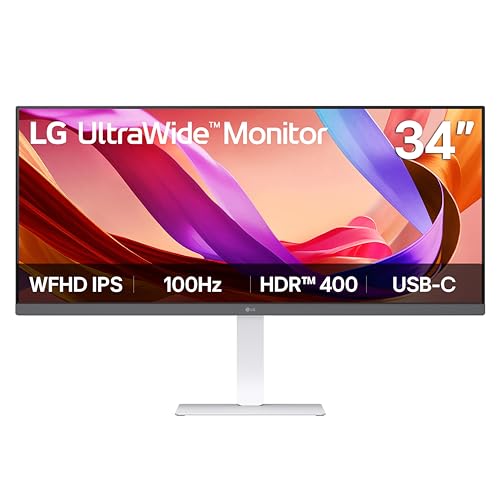
LG 34-Inch UltraWide 1080p IPS Monitor
Best for: Wide-screen multitasking and media consumption
- Screen Size
- 34"
- Resolution
- 2560 x 1080
- Refresh Rate
- 100Hz
- Panel Type
- IPS
- Aspect Ratio
- 21:9
- Ports
- USB Type-C, DisplayPort, HDMI
This LG monitor offers a 34-inch 21:9 UltraWide display with 2560 x 1080 resolution. It features an IPS panel with VESA DisplayHDR 400 and 100Hz refresh rate. USB-C connectivity simplifies desk setup. The built-in MaxxAudio speakers add convenience. You get a large, immersive screen for multitasking. This setup suits users who want wide horizontal space for productivity or media.
- 34-inch 21:9 UltraWide 2560 x 1080 resolution
- VESA DisplayHDR 400 with sRGB 99% coverage
- 100Hz refresh rate for smooth visuals
- USB-C port for single-cable connectivity
- 1080p resolution on a 34-inch screen lowers pixel density
- 19.4-pound weight makes it less portable than smaller monitors
- 21:9 aspect ratio differs from standard 16:9 displays
- You need extra horizontal screen real estate for multitasking
- You want HDR support and a 100Hz refresh rate
- You prefer a wide, immersive viewing experience
- You require a standard 16:9 aspect ratio
- You need 4K resolution for sharp text
- You want a lightweight, portable monitor
Verdict: LG 34U530A-W 34-inch UltraWide Monitor delivers a wide, immersive workspace for multitaskers. It fits users who prioritize screen width and HDR brightness over high pixel density.

Upperizon 15.6-Inch Foldable Dual Monitor
Best for: traveling professionals needing extra screens
- Screen Size
- 15.6"
- Resolution
- 1920 x 1080
- Refresh Rate
- 60Hz
- Panel Type
- IPS
- Ports
- USB-C, USB-A
- Features
- DisplayLink
This Upperizon dual monitor gives you two 15.6-inch FHD IPS screens for a triple-display setup. It uses DisplayLink technology to connect via USB-C or USB-A. The panels offer 60Hz refresh rates and 90% sRGB coverage. Weighing 4.51 lbs, it is designed for travel. You get a complete kit with cables and a sleeve. It suits mobile professionals needing extra screen real estate on the go.
- Dual 15.6-inch FHD IPS displays
- 90% sRGB color coverage
- Lightweight 4.51 lbs build
- Includes USB-C and USB-A cables
- Compatible with Windows and Mac
- 60Hz refresh rate limits motion smoothness
- 15.6-inch size is smaller than standard desktop monitors
- Requires DisplayLink driver installation for operation
- You need a triple-screen setup while traveling
- You work with multiple windows on a laptop
- You want portable monitors with sRGB color accuracy
- You require a single large desktop monitor
- You need built-in speakers for media
- You want a plug-and-play setup without drivers
Verdict: Upperizon 15.6-inch Dual Portable Monitor is a practical choice for travelers who need to expand their laptop workspace. It fits users who prioritize portability and multi-tasking over large screen real estate.

ASUS 24-Inch 1080p Video Conferencing Monitor
Best for: Video conferencing and USB-C docking
- Screen Size
- 24 Inch
- Resolution
- 1920 x 1080
- Panel Type
- IPS
- Ports
- HDMI, USB-C, DisplayPort, RJ45
- Features
- Height-Adjustable Stand, USB Hub, Webcam
- Dimensions
- 21.3 × 8.32 × 15.8 inches
The ASUS BE24ECSNK is a 24-inch Full HD IPS monitor designed for video conferencing. It includes a built-in 2MP webcam, mic array, and stereo speakers. You get USB-C docking with 100W charging, HDMI, DisplayPort, and an RJ45 LAN port. The stand offers height adjustment. This setup suits users who want an all-in-one solution for remote work and online learning without extra peripherals.
- Built-in 2MP Full HD webcam with AI noise-canceling microphone
- USB-C docking with charging capability for laptops
- 24-inch 1920×1080 IPS panel with wide viewing angles
- Integrated stereo speakers and RJ45 Ethernet port
- 24-inch screen size is smaller than the 27-inch and 34-inch options on this list
- 1080p resolution is lower than the 2K and UltraWide displays in the group
- 11.4-pound weight is heavier than many standard 24-inch monitors
- You need a single monitor with a built-in webcam for video calls
- You want USB-C docking to connect your laptop with one cable
- You prefer a 24-inch display for standard office tasks
- You require a 2K or higher resolution for detailed work
- You prefer a larger 27-inch or ultrawide screen
- You do not need built-in audio or video conferencing features
Verdict: ASUS BE24ECSNK 24-inch Webcam Monitor fits remote workers who prioritize video conferencing hardware and USB-C convenience over screen size or resolution.

Pisichen 27" 2K 100Hz Touchscreen Monitor
Best for: users needing touch control and QHD clarity
- Screen Size
- 27"
- Resolution
- 2560×1440
- Refresh Rate
- 100Hz
- Panel Type
- IPS
- Ports
- HDMI, DisplayPort, USB C
- Features
- Built-in Speakers, Touchscreen
This Pisichen monitor offers a 27-inch IPS panel with 1440p QHD resolution and a 100Hz refresh rate. You get a 10-point touchscreen for direct interaction, which is rare in this segment. Connectivity includes HDMI, DisplayPort, and USB-C. It suits users who need sharp visuals and touch control for creative or gaming tasks without needing a laptop dock.
- 27-inch 1440p QHD IPS display
- 10-point touchscreen capability
- 100Hz refresh rate for smooth motion
- USB-C port for video and data
- 100Hz refresh rate is lower than typical 144Hz gaming monitors
- 27-inch size is bulkier than 24-inch alternatives
- 1440p resolution is lower than 4K options
- You want direct touch interaction on your screen
- You need a 27-inch 1440p display for work
- You prefer HDMI and DisplayPort inputs
- You require a 4K UHD resolution
- You need a 240Hz refresh rate for esports
- You want a built-in webcam
Verdict: Pisichen 27" 1440p Touchscreen Monitor delivers sharp QHD visuals and touch control. It fits users who value direct screen interaction over high refresh rates.
Specifications side by side

| Spec | HP 524pu 24" USB-C Monitor | ViewSonic VG2458 24-Inch 1080p Docking Monitor | BenQ 27-Inch 1080p USB-C IPS Monitor | LG 34-Inch UltraWide 1080p IPS Monitor | Upperizon 15.6-Inch Foldable Dual Monitor | ASUS 24-Inch 1080p Video Conferencing Monitor | Pisichen 27" 2K 100Hz Touchscreen Monitor |
|---|---|---|---|---|---|---|---|
| Screen Size | 23.8" | 24" | 27 Inch | 34" | 15.6" | 24 Inch | 27" |
| Resolution | 1920 x 1080 | 1920 x 1080 | 1080p | 2560 x 1080 | 1920 x 1080 | 1920 x 1080 | 2560×1440 |
| Refresh Rate | 100 Hz | 100Hz | 100Hz | 100Hz | 60Hz | – | 100Hz |
| Panel Type | IPS | IPS | IPS | IPS | IPS | IPS | IPS |
| Response Time | 5 ms | – | – | – | – | – | – |
| Aspect Ratio | 16:9 | – | – | 21:9 | – | – | – |
| Ports | USB Type-C | USB-C, HDMI, DisplayPort, RJ45 | USB-C | USB Type-C, DisplayPort, HDMI | USB-C, USB-A | HDMI, USB-C, DisplayPort, RJ45 | HDMI, DisplayPort, USB C |
| Features | – | Height-Adjustable Stand, USB Hub | Height-Adjustable Stand, USB Hub | HDR | DisplayLink | Height-Adjustable Stand, USB Hub, Webcam | Built-in Speakers, Touchscreen |
| Use | – | Business & Office, Mac, Office, Home Office | Business & Office, Office | – | Mac, Travel | – | Gaming |
| Size | 12.4" x 21.2" x 1.9" | 12.5" x 21.2" x 1.8" | 27 Inch | – | 15.6-inch | 24 Inch | 27" |
| Operating System | – | macOS | – | – | Windows | – | – |
| Dimensions | 1.9 × 21.2 × 12.4 inches | 8.08 × 21.2 × 19.9 inches | 9 × 24 × 18 inches | 9.1 × 32.1 × 21 inches | 0.23 × 43.2 × 8.97 inches | 21.3 × 8.32 × 15.8 inches | 0.71 × 24.1 × 14.2 inches |
| Weight | 17.8 pounds | 13.6 pounds | 9.1 pounds | 19.4 pounds | 4.51 pounds | 11.4 pounds | – |
| Color | Sleek Black, Silver | Black | White | White | Black | BLACK | Black |
| Model | 9D9V7AA#ABA | VG2458 | GW2786TC | 34U530A-W.AUS | UM156FHRL | BE24ECSNK | 27IN2K100HZ-QHD |
Frequently asked questions
Which monitor is best for standard office tasks?
The HP 524pu 24" USB-C Monitor is the top choice for standard 16:9 office tasks. It features a 1080p FHD IPS panel with a 100Hz refresh rate. USB-C connectivity simplifies connections. The sleek black and silver design fits professional desks. It offers a solid balance of performance and form factor for daily business duties.
What is the best premium option with docking capabilities?
The ViewSonic VG2458 24-Inch 1080p Docking Monitor is the best premium pick. It includes HDMI, DisplayPort, USB-C, and Ethernet ports. A height-adjustable stand and USB hub enhance ergonomics. This model is ideal for office setups needing stable network connectivity and single-cable power, data, and video management via USB-C.
Which monitor offers the best value for a larger screen?
The BenQ 27-Inch 1080p USB-C IPS Monitor is the best budget option. It provides a 27-inch display for workers needing more screen real estate. The 100Hz refresh rate and IPS panel ensure clear visuals. A height-adjustable stand and USB hub make it practical for daily business tasks and ergonomic comfort.
Is there a wide-screen monitor for multitasking?
The LG 34-Inch UltraWide 1080p IPS Monitor is best for wide-screen multitasking. It delivers an immersive workspace for users prioritizing screen width. The 100Hz refresh rate and HDR support enhance media consumption. HDMI, DisplayPort, and USB-C ports provide versatile connectivity for expanding your digital workflow efficiently.
What is the best portable monitor for travelers?
The Upperizon 15.6-Inch Foldable Dual Monitor is best for traveling professionals. It offers two 1080p FHD IPS screens with a 60Hz refresh rate. USB-C ports and DisplayLink technology support Windows and Mac systems. Its lightweight design prioritizes portability, allowing you to expand your laptop workspace anywhere you go.
Which monitor includes a built-in webcam?
The ASUS 24-Inch 1080p Video Conferencing Monitor is best for video calls. It features a built-in webcam and USB-C docking. HDMI and Ethernet ports add connectivity options. The height-adjustable stand and USB hub support remote workers. This model prioritizes video conferencing hardware and convenience over large screen size or high resolution.
Is there a QHD touchscreen monitor available?
The Pisichen 27" 2K 100Hz Touchscreen Monitor is best for users needing QHD clarity. It delivers sharp 1440p visuals with direct touch control. HDMI, DisplayPort, and USB-C ports ensure versatile connections. Built-in speakers add convenience. This model suits users who value direct screen interaction and high pixel density over high refresh rates.
See also