Dell 40-Inch 5K2K Curved Ultrawide Monitor Alternatives: 6 Similar Picks Compared
As Amazon Associates, we earn from qualifying purchases. This means we may receive a small commission at no extra cost to you if you click through and make a purchase.
As an Amazon Associate we earn from qualifying purchases. Links on this page are affiliate links.
You are looking for dell 40 inch 5k2k curved ultrawide monitor alternatives because the Dell UltraSharp U4025QW has specific traits that may not fit every setup. This monitor offers a spacious 5K2K canvas with 600 nits of brightness, making it ideal for productivity in bright environments. However, you might prefer a different size, a lower price point, or a focus on gaming speed rather than screen real estate. The alternatives were chosen because their specs overlap with the original, ensuring you get a comparable ultrawide experience.
The list includes 6 similar picks that vary in panel type, refresh rate, and resolution. You can find options with IPS panels for better color accuracy or OLED displays for superior contrast. Some models prioritize high refresh rates for gaming, while others focus on connectivity for multi-PC workflows. Each selection shares the curved, 21:9 aspect ratio of the Dell original but adjusts other specifications to suit different professional or entertainment needs. You can compare these based on the exact features that matter most to your daily tasks.
How these monitors differ

Dell 38-Inch IPS Black Curved Monitor
This Dell model drops the 5K2K resolution for a WQHD+ IPS Black panel. You gain deeper contrast and better color fidelity, which helps creative work. The 38-inch screen is slightly narrower than the 40-inch original, reducing total screen real estate. It weighs less at 29.3 pounds, making it easier to mount. You sacrifice the highest resolution for improved contrast ratios. This pick suits professionals who value color accuracy and multi-PC workflows over maximum pixel density. The USB-C connectivity remains a strong feature for streamlined desk setups.
ViewSonic 38-Inch Curved IPS Monitor
The ViewSonic VP3881A offers a 38-inch curved IPS display with a focus on business use. It provides excellent color accuracy and eye comfort features. You get a slightly smaller screen than the 40-inch Dell, but it includes built-in speakers and a height-adjustable stand. The resolution is lower than the original 5K2K, but it delivers reliable performance for office tasks. It lacks the extreme brightness of the Dell but offers a more compact footprint. This monitor fits users who prioritize ergonomic flexibility and color precision over sheer screen size and peak brightness levels.
Dell UltraSharp 38-inch WQHD+ Curved Monitor
This Dell UltraSharp model shares the 38-inch curved design but uses a WQHD+ resolution. It features a 60Hz refresh rate, similar to the original, but focuses on dual-PC management capabilities. The silver finish offers a different aesthetic compared to the original. You lose some screen width but gain specialized connectivity for managing two computers. The weight is not listed, but the design is compact. This pick is ideal for professionals who need a spacious workspace for multitasking across multiple systems. It trades the higher 5K2K resolution for enhanced workflow management features.
SANSUI 34-Inch 240Hz Curved Ultrawide Monitor
The SANSUI monitor shifts focus from productivity to high-speed gaming. It offers a 34-inch curved VA panel with a 240Hz refresh rate. You gain significantly faster motion clarity compared to the original, but the resolution is lower at Ultrawide QHD. The screen is narrower, reducing your horizontal workspace. It includes HDR support and a curved design for immersion. This model suits gamers who need speed and a wide field of view. It sacrifices the high resolution and brightness of the Dell for a much higher refresh rate and gaming-oriented features.
Alienware 34-Inch Curved QD-OLED Monitor
The Alienware AW3423DWF uses a QD-OLED panel for superior color and contrast. It offers a 34-inch curved screen with a 165Hz refresh rate. You gain vibrant colors and deep blacks, but the resolution is lower than the original 5K2K. The screen is narrower, limiting your multitasking space. It weighs only 20.5 pounds, making it very portable. This monitor fits gamers who prioritize image quality and speed over screen size and resolution. It trades the productivity-focused brightness and resolution for OLED technology and high refresh rates.
KTC 34-Inch Curved 180Hz Ultrawide
The KTC H34S5 provides a 34-inch curved UWQHD display with a 180Hz refresh rate. It offers adaptive sync for smooth gaming. The screen is narrower than the original, reducing horizontal workspace. It includes a height-adjustable stand for ergonomic flexibility. You gain a high refresh rate and solid color performance, but lose the high resolution of the Dell. The weight is 16.8 pounds, making it lightweight. This pick suits gamers who want a curved ultrawide experience with high frame rates. It sacrifices screen real estate and resolution for speed and ergonomic adjustability.
| # | Product | Best for | Price |
|---|---|---|---|
| 1 | Dell 40-Inch 5K2K Curved Ultrawide Monitor Best overall | productivity in bright environments | |
| 2 | Dell 38-Inch IPS Black Curved Monitor Best budget | Color-accurate creative work and multi-PC setups | |
| 3 | ViewSonic 38-Inch Curved IPS Monitor Best premium | Business users needing color accuracy | |
| 4 | Dell UltraSharp 38-inch WQHD+ Curved Monitor Best 60hz | Productivity and dual-PC workflows | |
| 5 | SANSUI 34-Inch 240Hz Curved Ultrawide Monitor Best 240hz | High-speed ultrawide gaming | |
| 6 | Alienware 34-Inch Curved QD-OLED Monitor Best 165hz | high-refresh-rate OLED gaming | |
| 7 | KTC 34-Inch Curved 180Hz Ultrawide Best 180hz | UWQHD gaming with high refresh rates |

Dell 40-Inch 5K2K Curved Ultrawide Monitor
Best for: productivity in bright environments
- Screen Size
- 39.7"
- Resolution
- 5K2K WUHD
- Panel Type
- LED
- Response Time
- 5 ms
- Aspect Ratio
- 21:9
- Ports
- USB Type-C
The Dell U4025QW is a 40-inch curved ultrawide monitor with a 5K2K resolution and 21:9 aspect ratio. It delivers 600 nits of brightness for clear visibility in well-lit areas and features a 5 ms response time. The USB Type-C port supports efficient data transfer. This display suits users who need a large, bright workspace for productivity or media consumption.
- 40-inch 5K2K WUHD curved screen
- 600 nits brightness for bright rooms
- USB Type-C for data transfer
- 5 ms response time
- Heavier at 41.9 pounds
- 5 ms response time is slower than gaming monitors
- You need a large 40-inch display for multitasking
- You work in bright environments requiring high brightness
- You want USB Type-C connectivity for data
- You require a high refresh rate for competitive gaming
- You prefer a lighter monitor for easy mounting
- You want a standard 16:9 aspect ratio
Verdict: Dell 40-Inch 5K2K Curved Monitor provides a spacious 5K2K canvas for productivity. It fits professionals who prioritize screen real estate and brightness over gaming speed.
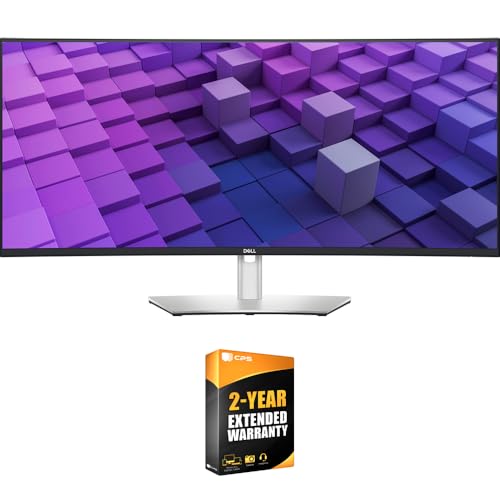
Dell 38-Inch IPS Black Curved Monitor
Best for: Color-accurate creative work and multi-PC setups
- Screen Size
- 37.5"
- Resolution
- 3840×1600
- Panel Type
- IPS Black
- Aspect Ratio
- 21:9
- Ports
- USB-C, USB-A, HDMI, DisplayPort, RJ45
- Features
- Curved Screen
The Dell U3824DW offers a 37.5-inch curved IPS Black panel with WQHD+ resolution. It covers 98% DCI-P3 and 100% sRGB for professional color work. A USB-C hub provides 90W power delivery and connects to two PCs via Auto KVM. The 2000:1 contrast ratio delivers deep blacks. This monitor suits users needing a large, color-accurate display with strong connectivity.
- IPS Black panel with 2000:1 contrast ratio
- 98% DCI-P3 and 100% sRGB color coverage
- USB-C port with 90W power delivery
- Auto KVM for switching between two PCs
- Built-in 2.5GbE Ethernet and dual 9W speakers
- Lower resolution than the 5K2K Dell U4025QW on this list
- Heavier build at 29.3 pounds compared to lighter alternatives
- Smaller 37.5-inch screen size versus the 40-inch Dell UltraSharp
- You need high color accuracy for creative work
- You want to connect two computers with one keyboard
- You prefer a curved display to reduce eye strain
- You require 5K2K resolution for maximum pixel density
- You are looking for a 40-inch screen size
- You need a lightweight monitor for easy transport
Verdict: Dell UltraSharp U3824DW 38-Inch Curved Monitor provides excellent color fidelity and connectivity for professionals. It fits users who prioritize contrast and multi-PC workflows over the highest possible resolution.

ViewSonic 38-Inch Curved IPS Monitor
Best for: Business users needing color accuracy
- Screen Size
- 38 Inches
- Resolution
- 3840x1600p
- Panel Type
- IPS
- Aspect Ratio
- 21:9
- Ports
- HDMI, DisplayPort, USB, USB-C
- Features
- HDR, Curved Screen
The ViewSonic VP3881A is a 38-inch curved ultrawide monitor with a 21:9 aspect ratio and WQHD+ resolution. It uses an IPS panel for accurate colors and supports HDR10. The design includes eye care features like flicker-free technology and a blue light filter. This monitor suits users who need a large, comfortable screen for office work or business tasks.
- 38-inch curved display with 21:9 aspect ratio
- WQHD+ resolution of 3840x1600p
- IPS panel with 100% sRGB coverage
- HDR10 support for better contrast
- Eye care features including flicker-free and blue light filter
- Resolution is lower than the 5K2K displays on this list
- Screen size is smaller than the 40-inch and 38-inch options
- Weight is 27.7 pounds, which is heavier than some competitors
- You want a large curved screen for multitasking
- You need accurate color reproduction for business work
- You prefer eye care features for long usage
- You require 5K2K resolution for professional design
- You prefer a smaller 34-inch ultrawide footprint
- You need a monitor lighter than 27.7 pounds
Verdict: ViewSonic VP3881A 38-Inch Curved Monitor fits office workers who value color accuracy and eye comfort over the highest resolution. It is a practical pick for those who want a curved ultrawide screen for business tasks.

Dell UltraSharp 38-inch WQHD+ Curved Monitor
Best for: Productivity and dual-PC workflows
- Screen Size
- 37.5"
- Resolution
- 3840 x 1600
- Refresh Rate
- 60Hz
- Panel Type
- IPS Black
- Response Time
- 5ms
- Aspect Ratio
- 21:9
The Dell U3824DW is a 38-inch curved monitor featuring a 21:9 WQHD+ resolution. It uses an IPS panel with a 60Hz refresh rate. The display includes built-in speakers and Auto KVM support for switching between two PCs. You get a comfortable viewing experience with height, tilt, and swivel adjustments. This model suits users who need a large workspace for productivity tasks.
- 38-inch curved WQHD+ screen
- 21:9 aspect ratio for multitasking
- IPS panel technology
- Built-in Auto KVM for dual PCs
- Adjustable stand with height control
- 60Hz refresh rate limits smooth motion
- 38-inch width is narrower than 40-inch alternatives
- 300-nit brightness is lower than typical high-end displays
- You need a large curved screen for productivity
- You want to control two computers with one keyboard
- You prefer IPS color accuracy over OLED contrast
- You require a high refresh rate for gaming
- You want a 40-inch display size
- You need OLED panel technology
Verdict: Dell U3824DW 38-Inch Curved Ultrawide offers a spacious 21:9 workspace with dual-PC management. It fits professionals who value screen real estate and connectivity over high-speed refresh rates.

SANSUI 34-Inch 240Hz Curved Ultrawide Monitor
Best for: High-speed ultrawide gaming
- Screen Size
- 34 Inch
- Resolution
- 3440×1440
- Refresh Rate
- 240Hz
- Panel Type
- Fast VA
- Response Time
- 1ms
- Aspect Ratio
- 21:9
This SANSUI monitor offers a 34-inch curved VA panel with a 240Hz refresh rate and 1ms response time. It delivers UWQHD resolution (3440×1440) for a 21:9 aspect ratio. The display includes HDR400 support and gaming features like AI crosshairs. It connects via HDMI 2.1 and DisplayPort 1.4. This ultrawide screen suits gamers seeking high speed and immersive visuals.
- 240Hz refresh rate for smooth motion
- 34-inch curved VA panel for immersion
- 1ms MRPT response time
- HDMI 2.1 and DP 1.4 ports
- Built-in AI gaming features
- 34-inch size is smaller than the 37.5-inch and 38-inch alternatives
- VA panel type may have slower pixel transitions than IPS panels
- UWQHD resolution is lower than the 5K2K displays in the guide
- You prioritize high refresh rates for competitive gaming
- You want an ultrawide screen for multitasking
- You prefer a curved display for immersion
- You need 5K2K resolution for detailed work
- You require an IPS panel for better color accuracy
- You want a larger 40-inch screen
Verdict: SANSUI 34-Inch 240Hz Curved Monitor fits gamers who need speed and an ultrawide field of view. It delivers high refresh rates but falls short on resolution compared to the larger ultrawide options.

Alienware 34-Inch Curved QD-OLED Monitor
Best for: high-refresh-rate OLED gaming
- Screen Size
- 34-inch
- Refresh Rate
- 165Hz
- Panel Type
- QD-OLED
- Response Time
- 0.1 ms
- Aspect Ratio
- 21:9
- Variable Refresh Rate
- AMD FreeSync Premium Pro
This 34-inch ultrawide QD-OLED monitor delivers 165Hz refresh rates and a 21:9 aspect ratio. It uses Quantum Dot technology to enhance color performance with 99.3% DCI-P3 coverage. The curved 1800R panel and AMD FreeSync Premium Pro support reduce stuttering. It includes a height-adjustable stand and a 3-year warranty covering OLED burn-in. This display suits gamers who prioritize speed and color accuracy over resolution.
- 165Hz refresh rate for smooth gameplay
- 99.3% DCI-P3 color gamut coverage
- 0.1ms response time for low latency
- 3-year warranty includes burn-in coverage
- Height-adjustable stand with tilt and swivel
- Ultrawide QHD resolution is lower than the 5K2K alternatives
- 34-inch size is smaller than the 37.5 and 38-inch options
- 20.5-pound weight is heavier than many flat panels
- You want a high-refresh-rate OLED panel for gaming
- You need precise color accuracy with 99.3% DCI-P3
- You prefer a curved 1800R immersive viewing angle
- You require 5K2K or 4K resolution clarity
- You prefer a flat screen over a curved design
- You need a monitor larger than 34 inches
Verdict: Alienware 34-inch QD-OLED Gaming Monitor offers superior color and speed for gamers who value OLED quality. It fits users who prioritize refresh rate and color gamut over higher resolution or larger screen real estate.
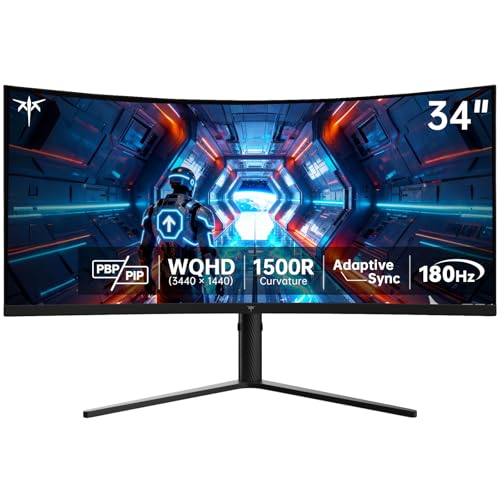
KTC 34-Inch Curved 180Hz Ultrawide
Best for: UWQHD gaming with high refresh rates
- Screen Size
- 34"
- Resolution
- 3440 x 1440
- Refresh Rate
- 180Hz
- Panel Type
- HVA
- Response Time
- 1ms MPRT
- Aspect Ratio
- 21:9
The KTC H34S5 is a 34-inch ultrawide monitor with a 21:9 aspect ratio and 1500R curvature. It delivers UWQHD resolution at 180Hz with adaptive sync for smooth gameplay. The HVA panel offers a 4000:1 contrast ratio and 125% sRGB coverage. Its ergonomic stand supports height, tilt, and swivel adjustments. This model suits gamers seeking high refresh rates and immersive visuals in a compact footprint.
- 180Hz refresh rate for smooth motion
- 1500R curved screen for immersion
- 4000:1 contrast ratio on HVA panel
- Height-adjustable ergonomic stand
- 125% sRGB color gamut coverage
- 34-inch size is smaller than the 37.5 and 40-inch alternatives
- 16.8 pounds weight is lighter but build feels less substantial than larger screens
- HDMI ports limited to 100Hz output
- You want a high-refresh-rate ultrawide for gaming
- You prefer a curved display for immersion
- You need an ergonomic stand with height adjustment
- You require 4K or higher resolution
- You need a larger 38-inch or 40-inch screen
- You want OLED panel technology
Verdict: KTC 34-Inch 180Hz Curved UWQHD Monitor fits gamers who prioritize smooth frame rates and a curved field of view over sheer screen real estate. It delivers solid color performance and ergonomic flexibility in a compact 34-inch package.
Specifications side by side

| Spec | Dell 40-Inch 5K2K Curved Ultrawide Monitor | Dell 38-Inch IPS Black Curved Monitor | ViewSonic 38-Inch Curved IPS Monitor | Dell UltraSharp 38-inch WQHD+ Curved Monitor | SANSUI 34-Inch 240Hz Curved Ultrawide Monitor | Alienware 34-Inch Curved QD-OLED Monitor | KTC 34-Inch Curved 180Hz Ultrawide |
|---|---|---|---|---|---|---|---|
| Screen Size | 39.7" | 37.5" | 38 Inches | 37.5" | 34 Inch | 34-inch | 34" |
| Resolution | 5K2K WUHD | 3840×1600 | 3840x1600p | 3840 x 1600 | 3440×1440 | – | 3440 x 1440 |
| Refresh Rate | – | – | – | 60Hz | 240Hz | 165Hz | 180Hz |
| Panel Type | LED | IPS Black | IPS | IPS Black | Fast VA | QD-OLED | HVA |
| Response Time | 5 ms | – | – | 5ms | 1ms | 0.1 ms | 1ms MPRT |
| Aspect Ratio | 21:9 | 21:9 | 21:9 | 21:9 | 21:9 | 21:9 | 21:9 |
| Variable Refresh Rate | – | – | – | – | Freesync | AMD FreeSync Premium Pro | Adaptive Sync |
| Ports | USB Type-C | USB-C, USB-A, HDMI, DisplayPort, RJ45 | HDMI, DisplayPort, USB, USB-C | DP 1.4, HDMI 2.1, USB-C, USB-A, RJ45 | 2x HDMI 2.1, 2x DP 1.4 | – | HDMI 2.0, DP 1.4 |
| Features | Curved Screen | Curved Screen | HDR, Curved Screen | Built-in Speakers, Curved Screen | HDR, Curved Screen | Curved Screen | Curved Screen, Height-Adjustable Stand |
| Use | – | – | Business & Office, Office | – | Gaming | Gaming | Gaming |
| Size | 16.5" x 37.3" x 4.3" | – | 38 Inches | – | 34 Inch | 34.0" OLED | 34 Inch |
| Dimensions | 4.3 × 37.3 × 16.5 inches | 42 × 21 × 9 inches | 14.8 × 41.2 × 24.8 inches | 35.2 × 17.4 × 22.2 inches | 7.48 × 31.8 × 17.9 inches | 32.1 × 12 × 20.7 inches | 6.22 × 27.9 × 20.4 inches |
| Weight | 41.9 pounds | 29.3 pounds | 27.7 pounds | – | – | 20.5 pounds | 16.8 pounds |
| Color | Information Not Available | Platinum Silver | Black | Silver | Black | Black | Black |
| Model | U4025QW | E99DELU3824DW | VP3881A | U3824DW | ES-G34C5 PRO | AW3423DWF | H34S5 |
Frequently asked questions
Which monitor offers the best color accuracy for creative work?
The Dell 38-Inch IPS Black Curved Monitor is the top choice for color fidelity. It uses an IPS Black panel to deliver deeper contrast and better color accuracy than standard IPS displays. This makes it ideal for professionals who need precise color representation for creative tasks.
What is the fastest refresh rate available in this list?
The SANSUI 34-Inch Curved Monitor provides the highest speed with a 240Hz refresh rate. This high frame rate ensures smooth motion for fast-paced gaming. It is designed for users who prioritize speed and responsiveness over the higher resolution found in larger productivity-focused screens.
Do any of these monitors feature OLED technology?
Yes, the Alienware 34-Inch Curved QD-OLED Monitor uses OLED panel technology. This display type offers superior color performance and contrast compared to LCD panels. It is built for gamers who value visual quality and high refresh rates in a compact ultrawide format.
Which option is best for business users needing eye comfort?
The ViewSonic 38-Inch Curved IPS Monitor is tailored for business environments. It emphasizes color accuracy and eye comfort features for office workers. This monitor provides a practical curved ultrawide screen that supports long work sessions without compromising visual clarity or professional needs.
How does the weight of the 40-inch Dell compare to smaller models?
The Dell 40-Inch model weighs 41.9 pounds, which is heavier than the smaller alternatives. For comparison, the KTC 34-Inch monitor weighs only 16.8 pounds. The larger screen requires a more substantial build to support its size and structural integrity on a desk.
Are there options with adjustable stands for ergonomic flexibility?
The KTC 34-Inch Curved Monitor includes a height-adjustable stand. This feature allows you to customize the viewing angle and position for better ergonomics. Most other models in this list do not specify adjustable stands in their published specifications, limiting their physical flexibility.
Which monitor is best for dual-PC workflows?
The Dell UltraSharp 38-inch WQHD+ Curved Monitor supports dual-PC management. It offers a spacious 21:9 workspace that helps separate tasks between two computers. This model fits professionals who value screen real estate and connectivity for managing multiple systems simultaneously.
What aspect ratio do all these monitors share?
All monitors listed share a 21:9 aspect ratio. This ultrawide format provides a wider field of view compared to standard 16:9 displays. It is consistent across productivity, gaming, and business models, allowing for extended horizontal space for multitasking or immersive gaming.
See also