Best Thunderbolt 5 Docking Stations in 2026: 13 Picks Ranked by Specs
As Amazon Associates, we earn from qualifying purchases. This means we may receive a small commission at no extra cost to you if you click through and make a purchase.
As an Amazon Associate we earn from qualifying purchases. Links on this page are affiliate links.
Choosing the best Thunderbolt 5 docking stations requires focusing on raw specifications rather than marketing claims. We compared 13 models ranked by their published data. The Anker Prime 14-in-1 Thunderbolt 5 Dock leads with 140W power delivery and cooling fans for sustained performance. Our picks rely strictly on specs like resolution, port count, and transfer speeds listed on the product pages. This guide helps you decide which dock matches your display and power needs.
Match your display resolution and port needs

Check the supported resolution and refresh rate first. Most docks handle dual 8K, but some support triple 8K or quad 4K. Verify the host interface is Thunderbolt 5. Ensure the power delivery wattage meets your laptop requirements. Ports like Ethernet and SD readers vary by model. Choose based on your specific screen and connectivity needs.
| # | Product | Best for | Price |
|---|---|---|---|
| 1 | Anker Prime 14-in-1 Thunderbolt 5 Dock Best overall | High-speed data transfer and dual 8K displays | |
| 2 | CalDigit TS5 15-Port Thunderbolt 5 Dock Also great | high-power laptops and dual 8K displays | |
| 3 | Lenovo ThinkPad Thunderbolt 5 Smart Dock Also great | commercial fleets needing 180W power and 8K support | |
| 4 | Tobenone Quad 4K 20-in-1 DisplayLink Dock Best budget | Quad monitor setups on Windows or Intel Macs | |
| 5 | Plugable Thunderbolt 5 Dual HDMI Dock Also great | Dual 8K display setups and heavy USB-C usage | |
| 6 | iVANKY FusionDock Max 2 Thunderbolt 5 Dock Best premium | Apple Silicon Macs needing silent, high-res connectivity | |
| 7 | Dell SD25TB5 Pro 300W Thunderbolt 5 Dock Also great | Dell users needing high power and multi-display support | |
| 8 | UGREEN Maxidok Thunderbolt 5 Dock with NVMe Slot Also great | Windows users needing 8K triple displays and M.2 storage | |
| 9 | WAVLINK Quad 4K@60Hz DisplayLink Dock Best displayport | Quad monitor setups with moderate power needs | |
| 10 | Razer Thunderbolt 5 Dock Chroma Also great | High refresh rate gaming and local storage | |
| 11 | UGREEN Maxidok Thunderbolt 5 Docking Station Also great | High-bandwidth workflows and SD card access | |
| 12 | StarTech Thunderbolt 5 Mac Dock 140W Best windows | Dual 8K setups with compact form factor | |
| 13 | WAVLINK Thunderbolt 5 Dock with M.2 Slot Also great | Video editors needing local SSD caching |
The best fit for you

- You need the fastest data speeds and cooling – Anker Prime 14-in-1 Thunderbolt 5 Dock – It supports 120Gbps transfers and includes a cooling fan for sustained performance.
- You require the highest power delivery for laptops – Dell SD25TB5 Pro 300W Thunderbolt 5 Dock – It delivers 180W of power to charge high-performance devices efficiently.
- You want to connect four monitors simultaneously – Tobenone Quad 4K 20-in-1 DisplayLink Dock – It uses DisplayLink technology to support quad 4K displays on compatible systems.
- You need silent operation with high resolution – iVANKY FusionDock Max 2 Thunderbolt 5 Dock – It features an aluminum build and supports 6K resolution without a fan.

Anker Prime 14-in-1 Thunderbolt 5 Dock
Best for: High-speed data transfer and dual 8K displays
- Host Interface
- Thunderbolt 5
- Display Support
- Dual
- Max Resolution
- 8K@60Hz
- Power Delivery
- 140W
- Data Transfer Speed
- 120Gbps
- Video Ports
- HDMI 2.1, DisplayPort 2.1, TB5
The Anker Prime TB5 Docking Station is a 14-in-1 hub built for high-speed data and video. It features a Thunderbolt 5 host interface for 120Gbps transfers and supports dual 8K@60Hz displays. You get 140W of power delivery for your laptop and active cooling to manage heat. This dock suits users who need fast file movement and robust video output from a compact, gray unit.
- Thunderbolt 5 interface with 120Gbps max data transfer
- Supports dual 8K@60Hz displays via HDMI 2.1 or DP 2.1
- 140W power delivery for connected laptops
- Active cooling system prevents overheating under full load
- Includes SD and TF card readers
- 140W power delivery is lower than some competitors offering 240W
- Only supports dual displays, whereas other options handle triple or quad monitors
- Heavier at 2.37 pounds compared to lighter dock alternatives
- You need to transfer large files quickly using Thunderbolt 5 speeds
- You want to connect two high-resolution 8K displays
- You prefer a dock with active cooling for sustained performance
- You require a single dock to drive three or four monitors
- You need more than 140W of power delivery for your laptop
- You want a dock that supports more than 14 ports
Verdict: Anker Prime TB5 Docking Station delivers fast 120Gbps transfers and dual 8K video support in a compact form. It fits professionals who prioritize speed and cooling over maximum port count or multi-monitor setups.

CalDigit TS5 15-Port Thunderbolt 5 Dock
Best for: high-power laptops and dual 8K displays
- Host Interface
- Thunderbolt 5
- Display Support
- Dual
- Max Resolution
- 8K 60Hz
- Power Delivery
- 140W
- Data Transfer Speed
- 120Gb/s
- Video Ports
- DisplayPort 2.1, Thunderbolt 5
The CalDigit TS5 is a Thunderbolt 5 docking station with a 240W power supply and 140W host charging. It supports up to dual 8K displays on compatible Macs and Windows systems. The dock includes a 2.5Gb Ethernet port and SD card readers. Its aluminum chassis acts as a heat sink. This unit suits users needing high power delivery and flexible display configurations for professional workflows.
- 240W power supply with 140W dedicated host charging
- Supports dual 8K 60Hz displays on Thunderbolt 5 hosts
- 2.5Gb Ethernet port for faster network transfers
- SD and microSD UHS-II card readers included
- Lower host charging power than the 160W offered by some competitors
- Heavier build at 8.9 ounces compared to lighter dock options
- You need 140W charging for large laptops
- You require dual 8K display support
- You use 2.5Gb Ethernet for file transfers
- You need more than 140W host charging
- You prefer a lighter dock under 8 ounces
- You only have Thunderbolt 3 or 4 hosts
Verdict: The CalDigit TS5 Thunderbolt 5 Dock delivers high power and dual 8K support for users with compatible hosts. It fits professionals who need robust charging and fast network speeds.

Lenovo ThinkPad Thunderbolt 5 Smart Dock
Best for: commercial fleets needing 180W power and 8K support
- Host Interface
- Thunderbolt 5
- Display Support
- Up to 4 displays
- Max Resolution
- 8K 60Hz
- Power Delivery
- 180W
- Data Transfer Speed
- 120Gbps
- Video Ports
- Thunderbolt 5, HDMI 2.1, DisplayPort 2.1
This Thunderbolt 5 dock delivers 180W power delivery and supports up to three 8K 60Hz displays. It features HDMI 2.1 and DisplayPort 2.1 outputs for high-resolution setups. The unit includes 2.5Gbps Ethernet and USB ports. It is designed for commercial users who need robust connectivity and remote fleet management capabilities for their workstations.
- 180W Power Delivery output
- Supports three 8K 60Hz displays
- 2.5Gbps Ethernet port
- Cloud-based fleet management
- 1.29 pounds weight is heavier than some competitors
- 180W power is lower than 240W or 300W options
- Fewer total ports than 15-port or 23-port docks
- You need 180W power delivery for fast charging
- You require support for three 8K displays
- You manage a fleet of commercial laptops
- You need more than 180W power delivery
- You want a dock with 240W or higher power
- You prefer a lighter dock under 1 pound
Verdict: Lenovo ThinkPad TB5 Smart Dock 7500 offers high power delivery and multi-8K support for commercial environments. It suits IT managers needing remote fleet tools and users requiring robust display connectivity.

Tobenone Quad 4K 20-in-1 DisplayLink Dock
Best for: Quad monitor setups on Windows or Intel Macs
- Host Interface
- Thunderbolt 5
- Display Support
- Quad
- Max Resolution
- 4K@60Hz
- Power Delivery
- 100W
- Video Ports
- HDMI, DisplayPort
- Total Ports
- 20
This TobenONE docking station expands your workspace to four 4K@60Hz monitors using DisplayLink technology. It connects via Thunderbolt 5 and includes a 150W power adapter that delivers up to 100W to your laptop. The unit offers 20 ports, including four HDMI and four DisplayPort outputs. It supports Windows, macOS, and Chrome OS. You get a compact build with a dedicated power button for all connected devices. This setup is ideal for users needing extensive screen real estate.
- Supports quad 4K@60Hz displays
- 150W power supply with 100W laptop charging
- 20 ports including 4 HDMI and 4 DP
- Compatible with Thunderbolt 5 and USB-C
- Lower laptop charging power at 100W compared to 140W or 144W on other docks
- Heavier build at 2.27 pounds
- Requires DisplayLink driver installation
- You need to drive four external monitors simultaneously
- You use a Windows or Intel-based Mac laptop
- You want a single dock for many peripherals
- You own an M1 or M2 Mac requiring native multi-display support
- You need higher than 100W laptop charging
- You prefer plug-and-play without driver installation
Verdict: TobenONE 20-in-1 DisplayLink Dock fits users who need four 4K screens and many ports but can accept a driver setup. It is a practical option for Windows users or Intel Macs needing high display count.

Plugable Thunderbolt 5 Dual HDMI Dock
Best for: Dual 8K display setups and heavy USB-C usage
- Host Interface
- Thunderbolt 5
- Display Support
- Dual
- Max Resolution
- 8K@60Hz
- Power Delivery
- 140W
- Video Ports
- HDMI 2.1
- Total Ports
- 16
The Plugable TBT-UDH2 is a 16-in-1 Thunderbolt 5 docking station offering 140W laptop charging and dual HDMI 2.1 outputs. It supports up to 8K 60Hz or 4K 144Hz video. The unit includes six USB-C ports, 2.5G Ethernet, and UHS-II readers. It weighs 8.92 ounces and measures 2.95 inches wide. This dock suits users needing high-resolution dual displays and robust connectivity for modern laptops.
- Dual HDMI 2.1 ports support 8K 60Hz or 4K 144Hz
- 140W Power Delivery for laptop charging
- Six USB-C ports including two front-facing 30W charging ports
- 2.5G Ethernet and UHS-II card readers
- Driverless operation with lifetime support
- Lower power delivery at 140W compared to 240W or 300W options on this list
- Only dual display support limits users needing three or more monitors
- Heavier build at 8.92 ounces compared to lighter alternatives
- You need dual 8K or high-refresh-rate 4K displays
- You require 140W charging for your laptop
- You want six USB-C ports for peripherals
- You need triple or quad monitor setups
- You require more than 140W of power delivery
- You are using Thunderbolt 3 or USB-C hosts without Thunderbolt 4
Verdict: Plugable TBT-UDH2 Thunderbolt 5 Dock delivers strong dual-display performance and ample USB-C connectivity for users who prioritize resolution and port count over maximum power delivery.
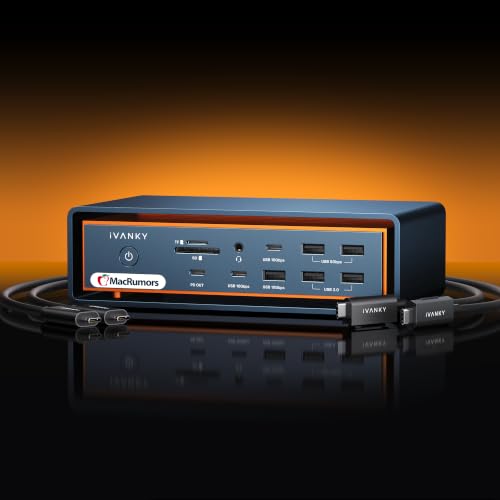
iVANKY FusionDock Max 2 Thunderbolt 5 Dock
Best for: Apple Silicon Macs needing silent, high-res connectivity
- Host Interface
- Thunderbolt 5
- Display Support
- Triple
- Max Resolution
- 6K@60Hz
- Power Delivery
- 140W
- Data Transfer Speed
- 120Gbps
- Video Ports
- Thunderbolt 5, HDMI
The iVANKY FusionDock Max 2 is a 23-in-1 Thunderbolt 5 dock designed exclusively for Apple Silicon Macs. It delivers 140W power delivery and supports up to triple 6K@60Hz displays depending on your Mac chip. The all-aluminum chassis uses passive cooling to eliminate fan noise while maintaining stable performance. You get ten USB ports, 2.5Gb Ethernet, and fast SD/TF 4.0 card slots for a complete workstation setup.
- Thunderbolt 5 host interface with 120Gbps data transfer speeds
- 140W power delivery for connected laptops
- Supports up to triple 6K@60Hz displays on compatible Macs
- Passive aluminum cooling design eliminates fan noise
- Includes 2.5Gb Ethernet and SD/TF 4.0 card slots
- Limited to 140W power delivery compared to 240W or 300W options on this list
- Exclusively compatible with Apple Silicon Macs, excluding Windows and Intel systems
- Single Mac support prevents switching between multiple computers
- You use an M1–M5 series Mac and need a single, tidy workstation
- You prioritize silent operation and prefer passive cooling over fans
- You require high-resolution displays up to 6K@60Hz for creative work
- You use a Windows PC or Intel-based Mac
- You need to switch between multiple computers with one dock
- You require more than 140W of power delivery for your laptop
Verdict: The iVANKY FusionDock Max 2 Thunderbolt 5 Dock fits Mac users who want a silent, aluminum-built hub with high-resolution display support. It is ideal for those who do not need to share the dock with other operating systems or require higher wattage charging.

Dell SD25TB5 Pro 300W Thunderbolt 5 Dock
Best for: Dell users needing high power and multi-display support
- Host Interface
- Thunderbolt 5
- Display Support
- Up to four displays
- Max Resolution
- 8K @ 60Hz
- Power Delivery
- Up to 300W
- Data Transfer Speed
- 1.25 GB/s
- Video Ports
- Thunderbolt 5, DP 2.1, HDMI 2.1
The Dell SD25TB5 Pro is a 12-port Thunderbolt 5 smart dock designed for high-performance workflows. It supports up to four displays, including single 8K @ 60Hz or quad 4K @ 120Hz setups. With 300W power delivery for Dell systems and 240W for others, it keeps your devices running. Data transfer speeds reach 1.25 GB/s. It works with Windows, macOS, and Linux, making it a versatile hub for complex multi-monitor environments.
- Delivers up to 300W power for Dell systems
- Supports quad 4K @ 120Hz or single 8K @ 60Hz displays
- Features 12 ports including 2x Thunderbolt 5
- Offers 1.25 GB/s data transfer speeds
- Compatible with Windows, macOS, and Linux
- Lower power delivery for non-Dell systems at 240W compared to 300W for Dell
- Fewer ports than the 14-23 port options on this list
- You use a Dell laptop and need maximum power delivery
- You require a single 8K display or four 4K screens
- You need a stable hub for Windows or Linux workstations
- You need more than 12 ports for your peripherals
- You want higher power delivery for non-Dell laptops
- You prefer a dock with more than 12 connection points
Verdict: Dell SD25TB5 Pro 300W Thunderbolt 5 Dock suits Dell users needing high power and multi-display support. It fits professionals who prioritize raw display resolution and brand-specific power optimization over port count.

UGREEN Maxidok Thunderbolt 5 Dock with NVMe Slot
Best for: Windows users needing 8K triple displays and M.2 storage
- Host Interface
- Thunderbolt 5
- Display Support
- Triple
- Max Resolution
- 8K@60Hz
- Power Delivery
- 140W
- Data Transfer Speed
- 120Gbps
- Video Ports
- Thunderbolt 5, DP 1.4, DP 2.1
The UGREEN Maxidok is a 17-in-1 Thunderbolt 5 docking station designed for high-bandwidth workstations. It features a built-in M.2 NVMe slot supporting up to 8TB of storage. The dock delivers 240W of total power and includes 3.5G Ethernet for stable networking. It supports triple independent displays on Windows, with options for dual or single 8K@60Hz output. This setup suits users who need extensive local storage and multi-monitor capabilities.
- 120Gbps Thunderbolt 5 bandwidth with Intel certification
- Built-in M.2 NVMe slot supports up to 8TB SSDs
- 240W total system power with 140W PD
- Triple display support including 8K@60Hz on Windows
- Mac support is limited to dual displays only
- DP port does not support DP++ for passive HDMI adapters
- Cooling fan produces audible noise under heavy load
- You need local storage expansion via an M.2 slot
- You require triple monitors with 8K resolution on Windows
- You want a high-power dock with 240W total output
- You use a Mac and need three independent displays
- You prefer a completely silent operation without fan noise
- You want to connect HDMI monitors without an active adapter
Verdict: UGREEN Maxidok Thunderbolt 5 Dock is a robust solution for Windows users who need 8K triple displays and built-in 8TB storage expansion. It fits professionals who prioritize high bandwidth and local SSD integration over silent operation or native Mac multi-monitor support.

WAVLINK Quad 4K@60Hz DisplayLink Dock
Best for: Quad monitor setups with moderate power needs
- Host Interface
- Thunderbolt 5
- Display Support
- Quad
- Max Resolution
- 5K@60Hz, 4K@60Hz
- Power Delivery
- 100W
- Video Ports
- 4x HDMI, 4x DisplayPort
- Ethernet Speed
- 2.5Gbps
This WAVLINK dock supports quad displays at 4K resolution and 60Hz refresh rates. It uses DisplayLink technology to drive four monitors from a single USB-C or Thunderbolt connection. The unit includes a 100W Power Delivery output to charge your laptop. You also get an SD 4.0 card reader and 2.5Gbps Ethernet. It works with macOS and Windows devices that have Thunderbolt 3, 4, or 5 ports.
- Supports quad monitor setups at 4K@60Hz
- 100W Power Delivery for laptop charging
- Includes SD 4.0 card reader
- 2.5Gbps Ethernet connectivity
- 100W Power Delivery is lower than the 140W or 240W options on this list
- Uses DisplayLink technology which requires driver installation
- Weighs 1.96 pounds, adding bulk to your setup
- You need four monitors for heavy multitasking
- You use a Mac with Thunderbolt 3 or 4
- You require an SD card reader for photo editing
- You need more than 100W of power for your laptop
- You want to avoid installing additional drivers
- You prefer a dock with higher wattage charging
Verdict: WAVLINK Quad 4K@60Hz USB-C Dock fits users who need four screens and have laptops that do not require high-wattage charging. It is a solid option for Mac users who value display count over raw power delivery.

Razer Thunderbolt 5 Dock Chroma
Best for: High refresh rate gaming and local storage
- Host Interface
- Thunderbolt 5
- Display Support
- Triple
- Max Resolution
- 8K 60 Hz
- Power Delivery
- 140W
- Data Transfer Speed
- 120Gbps
- Video Ports
- Thunderbolt 5
This dock offers 140W power delivery and supports triple 4K displays at 144 Hz. It includes an M.2 SSD slot for up to 8TB of storage. The unit measures 8.08 x 3.35 x 1.18 inches. You get 11 ports for peripherals. It connects via a single USB Type-C cable. This setup suits users needing high refresh rates and local storage expansion.
- 140W power delivery for compatible laptops
- Supports triple 4K displays at 144 Hz
- Built-in M.2 SSD slot for up to 8TB
- 11 total ports including Gigabit Ethernet
- Compact footprint at 1.18 inches high
- 140W power delivery is lower than the 240W option on the list
- 11 ports are fewer than the 14 or 15 ports on other docks
- Gigabit Ethernet is slower than the 2.5GbE found on some competitors
- You need high refresh rates for gaming
- You want to add fast local NVMe storage
- You prefer a compact dock design
- You require more than 140W of power
- You need 2.5GbE network speeds
- You want more than 11 connection ports
Verdict: Razer Thunderbolt 5 Dock Chroma fits users who prioritize high refresh rates and local storage over maximum port count or power. It delivers strong display performance in a compact form factor.

UGREEN Maxidok Thunderbolt 5 Docking Station
Best for: High-bandwidth workflows and SD card access
- Host Interface
- Thunderbolt 5
- Display Support
- Triple
- Max Resolution
- 8K
- Power Delivery
- 140W
- Data Transfer Speed
- 120Gbps
- Video Ports
- Thunderbolt 5
The UGREEN Maxidok is a Thunderbolt 5 docking station featuring four 120Gbps ports and 140W power delivery. It supports triple 4K@60Hz or dual 6K displays via the Thunderbolt connection. The unit includes a 2.5G Ethernet port, SD card reader, and multiple USB-A and USB-C ports. Its aluminum chassis helps manage heat during heavy workloads. This dock suits users needing high bandwidth and solid peripheral connectivity for professional tasks.
- Four Thunderbolt 5 ports for 120Gbps data transfer
- 140W dynamic power delivery for laptops
- Supports triple 4K@60Hz or dual 6K displays
- Includes 2.5G Ethernet and SD card reader
- 140W power delivery is lower than the 240W and 300W options on this list
- Requires external display cables as it has no built-in HDMI or DisplayPort outputs
- You need high-speed data transfer for large files
- You want a compact aluminum dock with SD card support
- You use Thunderbolt 5 compatible laptops
- You require built-in HDMI or DisplayPort video outputs
- You need more than 140W of power delivery
- You are using older Thunderbolt 3 or 4 computers
Verdict: UGREEN Maxidok Thunderbolt 5 Dock offers strong bandwidth and connectivity for professionals who prioritize data speed and peripheral variety over raw charging wattage.

StarTech Thunderbolt 5 Mac Dock 140W
Best for: Dual 8K setups with compact form factor
- Host Interface
- Thunderbolt 5
- Display Support
- Quad
- Max Resolution
- Dual 8K 60Hz
- Power Delivery
- 140W
- Data Transfer Speed
- 120Gbps
- Video Ports
- HDMI, DisplayPort, USB-C
This StarTech dock connects via Thunderbolt 5 and supports dual 8K 60Hz or triple 4K displays. It delivers 140W of power to your laptop and includes a 2.5GbE Ethernet port for fast wired networking. The unit is compact, measuring 3.5 by 0.9 by 1.2 inches and weighing 1.2 pounds. It offers plug-and-play compatibility with Windows 11 and macOS, making it a solid choice for multi-monitor setups.
- Dual 8K 60Hz display support
- 140W laptop power delivery
- 2.5GbE Ethernet connection
- Compact 3.5-inch footprint
- 140W power delivery is lower than the 240W option on the CalDigit TS5
- 1.2-pound weight is heavier than the 1-pound Plugable dock
- Single 2.5GbE port is slower than the 10GbE found on the Razer dock
- You need dual 8K displays
- You require 140W power delivery
- You want a compact dock
- You need more than 140W power
- You require 10GbE Ethernet
- You want more than three displays
Verdict: StarTech Thunderbolt 5 Dock fits users who prioritize high-resolution displays and a small footprint. It suits those who need 140W charging and 2.5GbE networking without bulk.

WAVLINK Thunderbolt 5 Dock with M.2 Slot
Best for: Video editors needing local SSD caching
- Host Interface
- Thunderbolt 5
- Display Support
- Triple
- Max Resolution
- 8K@144Hz
- Power Delivery
- 140W
- Data Transfer Speed
- 120Gbps
- Video Ports
- Thunderbolt 5
This WAVLINK 13-in-1 docking station connects via a single Thunderbolt 5 upstream port delivering 140W of power. It features three downstream Thunderbolt 5 ports and a PCIe Gen 4 x4 M.2 SSD slot for local caching. The dock supports up to 8K@144Hz on a single display. It includes an SD 4.0 reader and 2.5G Ethernet. This setup suits creators who need high-speed storage integration alongside robust video output.
- Thunderbolt 5 host interface with 120Gbps data transfer
- 140W Power Delivery for laptop charging
- Internal PCIe Gen 4 x4 M.2 SSD slot
- SD 4.0 card reader for direct media import
- Single display support up to 8K@144Hz
- Supports only dual external displays on macOS systems
- Includes a two-year warranty instead of a longer term
- Requires separate purchase of the NVMe M.2 SSD
- You need local high-speed caching for large RAW or 3D files
- You work with video editing and require direct SSD storage
- You use a Windows PC for triple 4K@144Hz multi-screen setups
- You rely on macOS for triple external monitor configurations
- You prefer a dock that includes the internal SSD
- You need a warranty longer than two years
Verdict: WAVLINK Thunderbolt 5 Dock with M.2 Slot is ideal for video editors and designers who want to store large projects directly on the dock. It offers fast local caching and strong display options for Windows users. macOS users should note the dual-display limit.
Specifications side by side

| Spec | Anker Prime 14-in-1 Thunderbolt 5 Dock | CalDigit TS5 15-Port Thunderbolt 5 Dock | Lenovo ThinkPad Thunderbolt 5 Smart Dock | Tobenone Quad 4K 20-in-1 DisplayLink Dock | Plugable Thunderbolt 5 Dual HDMI Dock | iVANKY FusionDock Max 2 Thunderbolt 5 Dock | Dell SD25TB5 Pro 300W Thunderbolt 5 Dock | UGREEN Maxidok Thunderbolt 5 Dock with NVMe Slot | WAVLINK Quad 4K@60Hz DisplayLink Dock | Razer Thunderbolt 5 Dock Chroma | UGREEN Maxidok Thunderbolt 5 Docking Station | StarTech Thunderbolt 5 Mac Dock 140W | WAVLINK Thunderbolt 5 Dock with M.2 Slot |
|---|---|---|---|---|---|---|---|---|---|---|---|---|---|
| Display Support | Dual | Dual | Up to 4 displays | Quad | Dual | Triple | Up to four displays | Triple | Quad | Triple | Triple | Quad | Triple |
| Max Resolution | 8K@60Hz | 8K 60Hz | 8K 60Hz | 4K@60Hz | 8K@60Hz | 6K@60Hz | 8K @ 60Hz | 8K@60Hz | 5K@60Hz, 4K@60Hz | 8K 60 Hz | 8K | Dual 8K 60Hz | 8K@144Hz |
| Host Interface | Thunderbolt 5 | Thunderbolt 5 | Thunderbolt 5 | – | Thunderbolt 5 | Thunderbolt 5 | Thunderbolt 5 | Thunderbolt 5 | USB-C | Thunderbolt 5 | Thunderbolt 5 | Thunderbolt 5, USB4 | Thunderbolt 5 |
| Power Delivery | 140W | 140W | 180W | 100W | 140W | 140W | Up to 300W | 140W | 100W | 140W | 140W | 140W | 140W |
| Data Transfer Speed | 120Gbps | 120Gb/s | 120Gbps | – | – | 120Gbps | 1.25 GB/s | 120Gbps | – | 120Gbps | 120Gbps | 120Gbps | 120Gbps |
| Video Ports | HDMI 2.1, DisplayPort 2.1, TB5 | DisplayPort 2.1, Thunderbolt 5 | Thunderbolt 5, HDMI 2.1, DisplayPort 2.1 | HDMI, DisplayPort | HDMI 2.1 | Thunderbolt 5, HDMI | Thunderbolt 5, DP 2.1, HDMI 2.1 | Thunderbolt 5, DP 1.4, DP 2.1 | 4x HDMI, 4x DisplayPort | Thunderbolt 5 | Thunderbolt 5 | HDMI, DisplayPort, USB-C | Thunderbolt 5 |
| Total Ports | 14 | 15 | – | 20 | 16 | 23 | 12 | 17 | – | 11 | – | – | 13 |
| Ethernet Speed | 2.5Gbps | 2.5GbE | 2.5Gbps | – | 2.5GbE | 2.5GbE | – | 2.5GbE | 2.5Gbps | Gigabit | 2.5GbE | 2.5GbE | 2.5GbE |
| Resolution | 8K UHD | – | – | 4K UHD | 8K UHD | 6K | – | 8K UHD | 4K UHD | 4K UHD | 6K | 8K UHD | – |
| Refresh Rate | – | – | – | 60Hz | 144Hz | 60Hz | – | 60Hz | 60Hz | 144Hz | 60Hz | 60Hz | – |
| Ports | Ethernet, Thunderbolt 4 | Ethernet, Thunderbolt 4 | Ethernet, Thunderbolt 4 | USB-C, Ethernet, Thunderbolt 4 | HDMI, Ethernet, Thunderbolt 4 | Ethernet, Thunderbolt 4 | USB-C, Thunderbolt 4 | USB-C, Ethernet, Thunderbolt 4 | HDMI, DisplayPort, USB-C, Ethernet, Thunderbolt 4 | Thunderbolt 4 | Ethernet, Thunderbolt 4, USB-A | Ethernet, Thunderbolt 4 | Ethernet, Thunderbolt 4, USB-A |
| Features | Power Delivery, SD Card Reader, Cooling Fan | Power Delivery, Audio Support, SD Card Reader | Power Delivery | DisplayLink | Power Delivery | Power Delivery | – | Power Delivery, Audio Support, M.2 SSD Slot, Cooling Fan | Power Delivery, DisplayLink, SD Card Reader | Power Delivery, M.2 SSD Slot, Cooling Fan | Power Delivery, Audio Support, SD Card Reader | SD Card Reader | Power Delivery, SD Card Reader, M.2 SSD Slot |
| Use | – | – | – | Mac | – | Mac | – | – | Mac | – | – | Mac | – |
| Operating System | – | – | – | macOS | macOS | macOS | – | – | macOS | – | – | Windows | – |
| Number of Computers | 4 Computers | – | – | – | – | – | – | – | – | 4 Computers | – | – | 4 Computers |
| Dimensions | 3 × 4.6 × 4.6 inches | 4.5 × 2.75 × 1.12 inches | 9.25 × 3.15 × 1.18 inches | 11.8 × 3.14 × 0.86 inches | 1.97 × 2.95 × 5.91 inches | – | 1.39 × 3.54 × 8.07 inches | 5.24 × 5.24 × 2.09 inches | – | 8.08 × 3.35 × 1.18 inches | 7.6 × 4.06 × 0.94 inches | 5.5 × 5.9 × 2 inches | – |
| Weight | 2.37 pounds | 8.9 ounces | 1.29 pounds | 2.27 pounds | 8.92 ounces | – | – | – | 1.96 pounds | – | – | 1.2 pounds | – |
| Size | 4.60" x 4.60" x 3" | 4.25 | 1 Count (Pack of 1) | small | – | – | – | – | – | 8.08 x 3.35 x 1.18 inches | – | 3.5×0.9×1.2 in | – |
| Color | Gray | Space Gray | Eclipse Black | Grey | Space Gray | Midnight Blue | Black | Bronze | Black | Black | – | Space Gray | Silver |
| Model | A83B5 | TBT5-TS5-US-AMZ | 40BA0265US | – | TBT-UDH2 | – | E99DELSD25TB5 | U716 | RC-UG39PD8-UK | RC21-02290100-R3U1 | U715 | 215N-TB5USB4DOCK | UTD58M |
You can compare plugable thunderbolt 5 docking station alternatives if you require different display bandwidth or port configurations.
Key specs to check for your setup

Check display resolution support
Verify the maximum resolution the dock supports before buying. Most Thunderbolt 5 docks handle dual 8K displays, which suits professionals needing high detail. If you require three screens, the UGREEN Maxidok with an NVMe slot supports triple 8K output. For users needing four monitors, the Tobenone Quad 20-in-1 dock offers quad 4K support via DisplayLink. Ensure the dock matches your monitor count and resolution needs to avoid compatibility issues.
Match refresh rates for gaming
Look at the refresh rate if you play games or watch fast motion content. Standard docks offer 60Hz, which is fine for office work. If you need smoother visuals, the Plugable Dual HDMI dock supports 144Hz on its displays. The Razer Thunderbolt 5 Dock Chroma also delivers 144Hz for gaming performance. Higher refresh rates require compatible monitors and cables. Check the specs to ensure the dock can sustain the frame rate you need for your workflow.
Verify power delivery wattage
Ensure the dock provides enough power for your laptop. High-performance machines often need 140W or more. The Lenovo ThinkPad Smart Dock offers 180W, which suits commercial fleets with power-hungry devices. The Dell SD25TB5 Pro provides 300W for maximum charging capability. Most other options, like the Anker Prime and UGREEN models, deliver 140W. Check your laptop requirements to avoid underpowered charging that slows down performance or drains the battery.
Consider local storage expansion
Some docks include slots for M.2 SSDs, allowing you to add local storage directly to the hub. The UGREEN Maxidok with NVMe slot supports up to 8TB of storage expansion. This is useful for video editors who need fast access to large files without using laptop ports. The Razer Thunderbolt 5 Dock Chroma also includes an M.2 slot. If you frequently move large datasets, a dock with built-in storage can streamline your workflow and reduce cable clutter.
Check cooling and form factor
Docks with high power delivery and multiple displays can generate heat. The Anker Prime 14-in-1 dock includes a cooling fan to maintain performance during sustained use. The UGREEN Maxidok with NVMe slot also features a fan. If you prefer silent operation, the iVANKY FusionDock Max 2 is built with aluminum and lacks active cooling. Check the dimensions if desk space is limited. Smaller docks like the CalDigit TS5 are compact but may run warmer under heavy loads.
Ensure OS compatibility
Verify that the dock works with your operating system. Some docks, like the Tobenone Quad, require driver setup for Windows or Intel Macs to support four displays. The iVANKY FusionDock Max 2 is optimized for Apple Silicon Macs and may not support other systems. The StarTech Thunderbolt 5 Mac Dock works with both Windows and macOS. Check the product specs for supported operating systems to ensure seamless connectivity and feature availability on your specific computer.
Frequently asked questions
Do Thunderbolt 5 docks support Apple Silicon Macs?
Yes, several models work with Apple Silicon Macs. The iVANKY FusionDock Max 2 is built for macOS and offers 140W power delivery. The StarTech Thunderbolt 5 Mac Dock also supports macOS while providing dual 8K display capability. You can use these docks for high-resolution video and fast charging on your Mac.
Which Thunderbolt 5 dock supports four monitors?
The Tobenone Quad 4K 20-in-1 DisplayLink Dock supports four 4K displays at 60Hz. The WAVLINK Quad 4K@60Hz DisplayLink Dock also handles four screens. Both use DisplayLink technology to expand your desktop. These options are practical for Windows users or Intel Macs needing multiple screens.
Can I use a Thunderbolt 5 dock with Windows 11?
Yes, most docks support Windows. The UGREEN Maxidok Thunderbolt 5 Dock with NVMe Slot is designed for Windows users needing 8K triple displays. The StarTech Thunderbolt 5 Mac Dock explicitly lists Windows compatibility. You can connect peripherals and displays efficiently on Windows systems with these models.
What is the highest power delivery on these docks?
The Lenovo ThinkPad Thunderbolt 5 Smart Dock offers 180W power delivery. This is the highest wattage among the listed options. Other models like the Anker Prime and Plugable Thunderbolt 5 Dual HDMI Dock provide 140W. Check your laptop requirements to ensure the dock meets your charging needs.
Do Thunderbolt 5 docks have cooling fans?
Some models include active cooling. The Anker Prime 14-in-1 Thunderbolt 5 Dock has a cooling fan to maintain performance. The UGREEN Maxidok Thunderbolt 5 Dock with NVMe Slot also features a fan. The Razer Thunderbolt 5 Dock Chroma includes a cooling fan as well. These help manage heat during heavy use.
Which dock supports triple 8K displays?
The UGREEN Maxidok Thunderbolt 5 Dock with NVMe Slot supports triple 8K displays at 60Hz. It also includes an M.2 SSD slot for local storage. This dock is ideal for Windows users who need high bandwidth and multiple high-resolution screens for professional workflows.
Are there Thunderbolt 5 docks with SD card readers?
Yes, many models include SD card readers. The Anker Prime, CalDigit TS5, Plugable Thunderbolt 5 Dual HDMI Dock, and iVANKY FusionDock Max 2 all feature SD card slots. The StarTech Thunderbolt 5 Mac Dock and WAVLINK Thunderbolt 5 Dock with M.2 Slot also support SD cards for easy media access.
See also