12 Best Docking Stations with macOS, Compared
As Amazon Associates, we earn from qualifying purchases. This means we may receive a small commission at no extra cost to you if you click through and make a purchase.
As an Amazon Associate we earn from qualifying purchases. Links on this page are affiliate links.
Choosing the best docking stations with macOS requires matching your display needs to the right host interface. We compared 12 options based strictly on published specifications. The Plugable 16-in-1 Thunderbolt 4 Dock leads because it delivers 100W Power Delivery for reliable charging alongside dual 4K support. This guide helps you decide which dock fits your workflow, whether you need simple dual monitors or complex multi-display setups.
Match the Host Interface to Your Mac

Your Mac model determines which dock works. Thunderbolt 4 docks like the Plugable 16-in-1 offer dual 4K displays and 100W charging for standard setups. If you need more screens, look for DisplayLink docks such as the Tobenone Quad 4K. These support up to five monitors but require specific drivers. Check your host interface before buying.
| # | Product | Best for | Price |
|---|---|---|---|
| 1 | Plugable 16-in-1 Thunderbolt 4 Dock Best overall | Mac users needing dual 4K monitors | |
| 2 | Tobenone Quad 4K 20-in-1 DisplayLink Dock Also great | Mac users needing four 4K monitors | |
| 3 | UGREEN 8-in-1 Thunderbolt 4 Dock Also great | MacBook Pro users needing dual 4K displays | |
| 4 | Plugable Thunderbolt 5 Dual HDMI Dock Best 8k uhd | Dual 8K displays and 140W charging | |
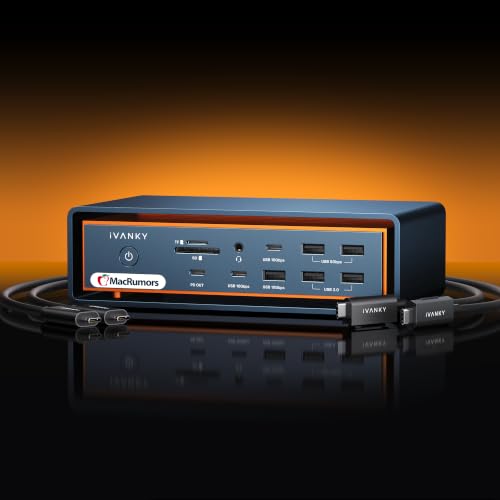
| 5 | iVANKY FusionDock Max 2 Thunderbolt 5 Dock Best premium | M-series Macs needing triple 6K displays and 140W charging | |
| 6 | Belkin 14-in-1 DisplayLink Dual Display Dock Best budget | Dual monitor setups with 100W charging | |
| 7 | WAVLINK Quad 4K@60Hz DisplayLink Dock Also great | Mac users needing four 4K monitors | |
| 8 | WAVLINK DL7400 5-Monitor Dock Also great | Mac users needing five 4K displays | |
| 9 | Belkin Thunderbolt 4 Triple Display Dock Best triple display | macOS users needing triple 4K displays | |
| 10 | RayCue 80Gbps Mac Studio Dock Best m.2 ssd slot | Mac Studio users needing large internal SSD storage | |
| 11 | Tobenone DL-7400 5-Display Dock Best cooling fan | five-monitor macOS workflows with cooling | |
| 12 | Treewaw 15-in-1 Quad 4K@60Hz Dock Also great | macOS users needing four 4K monitors |
The best fit for you

- You need dual 4K monitors with reliable charging – Plugable 16-in-1 Thunderbolt 4 Dock – It supports dual 4K displays and provides 100W Power Delivery for your Mac.
- You want to connect four 4K monitors to your Mac – Tobenone Quad 4K 20-in-1 DisplayLink Dock – This dock supports quad displays via DisplayLink and connects via Thunderbolt 5.
- You need dual 8K displays with fast charging – Plugable Thunderbolt 5 Dual HDMI Dock – It drives dual 8K screens at 144Hz and delivers 140W of power.
- You want to connect five 4K monitors to your Mac – WAVLINK DL7400 5-Monitor Dock – It supports five 4K displays using DisplayLink technology for extensive screen count.

Plugable 16-in-1 Thunderbolt 4 Dock
Best for: Mac users needing dual 4K monitors
- Operating System
- macOS
- Display Support
- Dual
- Max Resolution
- 4K@60Hz
- Host Interface
- Thunderbolt 4
- Power Delivery
- 100W
- Data Transfer Speed
- 40Gbps
The Plugable 16-in-1 Thunderbolt 4 dock delivers dual 4K 60Hz displays via HDMI or DisplayPort for M4 and M5 Macs. It includes 100W power delivery and seven USB ports. The silver unit measures 11.9 by 6 by 4.3 inches and weighs 1.42 pounds. It supports macOS 11 and later without driver installation.
- Dual 4K 60Hz display support
- 100W power delivery
- Seven USB ports
- Driver-free macOS setup
- UL tested safety
- Supports only dual displays
- 100W power delivery limit
- 1.42 pound weight
- You need dual 4K monitors for a Mac
- You want a driver-free setup
- You require 100W laptop charging
- You need triple or quad display support
- You require Thunderbolt 5 speeds
- You need more than two monitors
Verdict: Plugable 16-in-1 Thunderbolt 4 Dock fits Mac users who need a clean dual-monitor setup with reliable 100W charging. It is a solid choice for standard productivity workflows.

Tobenone Quad 4K 20-in-1 DisplayLink Dock
Best for: Mac users needing four 4K monitors
- Operating System
- macOS
- Display Support
- Quad
- Max Resolution
- 4K@60Hz
- Power Delivery
- 100W
- Video Ports
- HDMI, DisplayPort
- Total Ports
- 20
The TobenONE DisplayLink dock expands your Mac setup to four 4K@60Hz monitors. It includes 15 ports, a 150W power supply, and a host interface compatible with Thunderbolt 5. This grey unit weighs 2.27 pounds and measures 11.8 inches long. It suits professionals needing extensive screen real estate and high-speed connectivity for their workspace.
- Supports four 4K@60Hz displays simultaneously
- Includes 20 total ports for peripherals
- Provides 100W laptop charging via 150W adapter
- Compatible with macOS 11+ and Thunderbolt 5
- 100W charging is lower than the 150W adapter capacity
- 2.27-pound weight is heavier than typical docks
- Requires DisplayLink driver installation for operation
- You need to drive four external monitors
- You require a high port count for peripherals
- You use a Mac with Thunderbolt 5 connectivity
- You prefer a lighter, more portable dock
- You want plug-and-play without driver installation
- You need charging power above 100W
Verdict: TobenONE 20-in-1 Quad 4K Dock fits users who need to connect four high-resolution screens and maximize port availability on their Mac. It is a robust solution for fixed desk setups requiring extensive expansion.

UGREEN 8-in-1 Thunderbolt 4 Dock
Best for: MacBook Pro users needing dual 4K displays
- Operating System
- macOS
- Display Support
- Dual
- Max Resolution
- 8K@30Hz
- Host Interface
- Thunderbolt 4
- Power Delivery
- 85W
- Data Transfer Speed
- 40Gbps
This UGREEN dock expands your Mac with dual 4K@60Hz displays or a single 8K screen. It includes three Thunderbolt 4 ports for 40Gbps data transfer and gigabit Ethernet. The 85W power delivery keeps your laptop charged while you work. It fits users who need solid macOS compatibility and reliable connectivity without the bulk of multi-monitor heavy-duty stations.
- Supports dual 4K@60Hz displays for MacBooks with Pro/Max chips
- Three downstream Thunderbolt 4 ports for high-speed data transfer
- 85W power delivery included with 140W GaN charger
- Gigabit Ethernet port for stable wired internet
- Only supports one display for MacBooks with basic M-Chips
- Lower port count than 10-in-1 or higher alternatives on this list
- Heavier at 3.09 pounds compared to lighter slim docks
- You use a MacBook Pro or Max and need dual 4K monitors
- You require three Thunderbolt 4 devices for your workflow
- You want a compact dock with gigabit Ethernet
- You need to drive three or more displays simultaneously
- You use a MacBook Air or base M1/M2 and need dual screens
- You prefer a lighter dock under 2 pounds
Verdict: UGREEN 8-in-1 Thunderbolt 4 Dock offers essential dual-display support and robust Thunderbolt 4 connectivity for Mac users who do not need the extreme multi-monitor capacity of higher-end options.

Plugable Thunderbolt 5 Dual HDMI Dock
Best for: Dual 8K displays and 140W charging
- Operating System
- macOS
- Display Support
- Dual
- Max Resolution
- 8K@60Hz
- Host Interface
- Thunderbolt 5
- Power Delivery
- 140W
- Video Ports
- HDMI 2.1
The Plugable TBT-UDH2 is a 16-in-1 Thunderbolt 5 docking station designed for high-resolution displays. It supports dual 8K at 60Hz or 4K at 144Hz via native HDMI 2.1 ports. It provides 140W of power delivery for your laptop and includes six USB-C ports. This dock suits users with Thunderbolt 5 or 4 hosts who need maximum pixel performance and charging power for their Mac or Windows setup.
- Dual HDMI 2.1 ports support 8K 60Hz or 4K 144Hz
- 140W power delivery charges laptops quickly
- Six USB-C ports including two front-facing 30W charging ports
- Driverless setup compatible with macOS 13+
- Limited to dual displays on macOS, unlike some competitors offering quad or five-monitor support
- Requires Thunderbolt 5, Thunderbolt 4, or USB4 hosts; older Thunderbolt 3 or USB-C devices are not supported
- Heavier at 8.92 ounces compared to lighter 8-in-1 alternatives
- You use a Thunderbolt 5 or 4 laptop and need dual high-resolution monitors
- You require 140W charging for power-hungry devices
- You want native HDMI 2.1 connections without adapters
- You need to drive more than two external displays on macOS
- Your laptop only has Thunderbolt 3 or standard USB-C
- You prefer a lighter dock under 6 ounces
Verdict: The Plugable Thunderbolt 5 8K Dock delivers exceptional resolution support and fast charging for users with compatible hosts. It is the right choice for professionals who need dual 8K or 4K 144Hz displays and robust connectivity.
iVANKY FusionDock Max 2 Thunderbolt 5 Dock
Best for: M-series Macs needing triple 6K displays and 140W charging
- Operating System
- macOS
- Display Support
- Triple
- Max Resolution
- 6K@60Hz
- Host Interface
- Thunderbolt 5
- Power Delivery
- 140W
- Data Transfer Speed
- 120Gbps
This iVANKY dock targets Apple Silicon Macs with a 140W power delivery output and Thunderbolt 5 connectivity. It supports up to triple 6K displays at 60Hz on compatible M-series chips. The all-aluminum chassis uses passive cooling to eliminate fan noise. You get 10 USB ports, 2.5G Ethernet, and SD card slots. It is designed for users who need high-resolution multi-monitor setups and fast data transfer speeds on macOS.
- 140W Power Delivery for fast laptop charging
- Thunderbolt 5 host interface with 120Gbps data speeds
- Supports up to triple 6K@60Hz displays on M5 Pro
- Passive cooling design ensures silent operation
- 2.5G Ethernet port for stable network connections
- Limited to M-series Macs and excludes Intel Macs
- Passive cooling results in a warm aluminum chassis under load
- Supports only one Mac at a time without switching
- You use an M-series Mac and need triple high-resolution displays
- You require 140W charging for your laptop
- You want silent operation without internal fans
- You use an Intel-based Mac or Windows PC
- You need to switch between multiple computers
- You require active fan cooling to keep the surface cool
Verdict: iVANKY FusionDock Max 2 23-in-1 Thunderbolt 5 is a specialized dock for M-series Mac users who demand triple 6K displays and 140W charging. It fits professionals who prioritize silent operation and high-speed data transfer over multi-computer switching capabilities.

Belkin 14-in-1 DisplayLink Dual Display Dock
Best for: Dual monitor setups with 100W charging
- Operating System
- macOS
- Display Support
- Dual
- Max Resolution
- 4K@60Hz
- Host Interface
- USB-C
- Power Delivery
- 100W
- Data Transfer Speed
- 10Gbps
The Belkin 14-in-1 USB-C hub expands your MacBook Pro or Chromebook into a full workstation. It supports dual 4K@60Hz monitors via DisplayLink technology, allowing you to extend or mirror your screen for better multitasking. You get up to 100W of power delivery to charge your laptop while connected. Data transfer speeds reach 10Gbps for fast file moves. It also includes a 1Gb Ethernet port and legacy USB-A compatibility.
- Supports dual 4K@60Hz displays via DisplayLink
- Provides up to 100W PD laptop charging
- Features 10Gbps data transfer speeds
- Includes 1Gb Ethernet and USB-A adapter
- VESA mountable with Kensington Lock compatibility
- Supports only two displays, fewer than the triple or quad options on this list
- Uses DisplayLink technology rather than native Thunderbolt for video output
- 10Gbps data speed is lower than the 40Gbps or 80Gbps ports on other docks
- You need a stable dual-monitor setup for macOS
- You want 100W charging for your laptop
- You require wired Ethernet connectivity
- You need more than two external monitors
- You require Thunderbolt 4 or 5 native video output
- You need data speeds above 10Gbps
Verdict: The Belkin 14-in-1 Dual Display Dock fits users who need reliable dual 4K output and 100W charging without the complexity of multi-monitor setups. It is a practical solution for standard office workflows.

WAVLINK Quad 4K@60Hz DisplayLink Dock
Best for: Mac users needing four 4K monitors
- Operating System
- macOS
- Display Support
- Quad
- Max Resolution
- 5K@60Hz, 4K@60Hz
- Host Interface
- USB-C
- Power Delivery
- 100W
- Video Ports
- 4x HDMI, 4x DisplayPort
This WAVLINK dock supports four 4K displays at 60Hz via DisplayLink technology. It includes a 100W power delivery port for your laptop and a 2.5Gbps Ethernet connection. The unit weighs 1.96 pounds and works with macOS devices. You get a comprehensive set of ports for multitasking. It is a solid option for users needing multiple screens without native Thunderbolt display support.
- Supports four 4K displays at 60Hz
- 100W Power Delivery for laptop charging
- 2.5Gbps Ethernet port for fast networking
- Compatible with macOS and USB-C devices
- Includes SD 4.0 card reader
- 1.96 pounds is heavier than the average dock on this list
- 18-month warranty is shorter than the standard coverage offered by competitors
- Requires DisplayLink drivers, adding setup complexity compared to plug-and-play options
- You need four monitors for your Mac
- You want 100W charging for your laptop
- You need a 2.5Gbps Ethernet connection
- You prefer a lighter dock under 1.5 pounds
- You want a longer warranty than 18 months
- You need native Thunderbolt display output without drivers
Verdict: WAVLINK Quad 4K DisplayLink Dock delivers four 4K screens and 100W charging for Mac users who need extensive connectivity. It suits those prioritizing screen count and network speed over minimal weight or warranty length.

WAVLINK DL7400 5-Monitor Dock
Best for: Mac users needing five 4K displays
- Operating System
- macOS
- Display Support
- 5
- Max Resolution
- 8K@60Hz
- Host Interface
- USB-C
- Power Delivery
- 100W
- Data Transfer Speed
- 10Gbps
This WAVLINK docking station expands your Mac setup to five 4K displays using the DisplayLink DL7400 chipset. It includes two DisplayPort outputs for high refresh rates and three HDMI ports for standard 4K@60Hz connections. The dock provides 100W Power Delivery to charge your laptop while connecting peripherals through USB-A and USB-C ports. It also features a 2.5Gb Ethernet port for stable wired networking. This solution suits professionals needing extensive screen real estate for multitasking.
- Supports up to five external 4K displays
- Includes 100W Power Delivery for laptop charging
- Features 2.5Gb Ethernet for fast wired internet
- Two DisplayPort outputs support 4K@120Hz or 8K@60Hz
- Requires a separate USB-C port on the laptop for the fifth display
- Relies on DisplayLink drivers rather than native Thunderbolt video output
- Heavier build at 1.79 pounds compared to lighter Thunderbolt docks
- You need five monitors for trading or development workflows
- You use a Mac with limited native video outputs
- You require 100W charging for your laptop
- You need native Thunderbolt 4 or 5 video expansion
- You want to connect five displays without using a laptop USB-C port
- You are looking for a dock with lower weight
Verdict: WAVLINK DL7400 5-Monitor DisplayLink Dock is a specialized tool for users who must drive five screens from a single Mac. It fits office workstations where screen count matters more than native bandwidth.

Belkin Thunderbolt 4 Triple Display Dock
Best for: macOS users needing triple 4K displays
- Operating System
- macOS
- Display Support
- Triple
- Max Resolution
- 4K@60Hz
- Host Interface
- Thunderbolt 4
- Power Delivery
- 96W
- Data Transfer Speed
- 40Gbps
This Belkin Thunderbolt 4 dock supports three 4K monitors at 60Hz, making it a strong option for macOS users needing expanded screen real estate. It delivers 96W of power to your laptop and offers 2.5Gb Ethernet for fast wired networking. The unit weighs 2.55 pounds and features a 14-port layout. It suits professionals who require stable connectivity and high-speed data transfer for their daily workflow.
- Supports triple 4K displays at 60Hz
- Delivers 96W power delivery to laptops
- Includes 2.5Gb Ethernet for fast networking
- Provides 40Gbps data transfer speeds
- Features 14 total expansion ports
- Lower power delivery than the 100W or 150W options on this list
- Heavier build at 2.55 pounds compared to lighter hubs
- Slower 40Gbps speed versus the 80Gbps Thunderbolt 5 models
- You need three external monitors for productivity
- You require reliable 2.5Gb wired internet
- You want a single cable solution for your Mac
- You need more than 100W of charging power
- You want Thunderbolt 5 speeds for large files
- You prefer a lighter, more portable dock
Verdict: Belkin Thunderbolt 4 Triple Display Dock fits users who prioritize triple-screen setups and fast Ethernet over maximum charging speed or next-gen bandwidth.

RayCue 80Gbps Mac Studio Dock
Best for: Mac Studio users needing large internal SSD storage
- Operating System
- macOS
- Max Resolution
- 8K@30Hz
- Data Transfer Speed
- 80Gbps
- Video Ports
- HDMI 2.1, DisplayPort 2.1
- Total Ports
- 10
- Features
- Power Delivery, Audio Support, M.2 SSD Slot
This RayCue dock targets Mac Studio users with an 80Gbps connection. It includes dual NVMe SSD bays for up to 16TB of storage. You get two HDMI 2.1 ports and one DisplayPort 2.1 for multi-display setups. The aluminum build matches the Mac Studio. It supports CFexpress card readers and Hi-Fi audio output for creative workflows.
- 80Gbps data transfer speed
- Dual NVMe SSD bays up to 16TB
- HDMI 2.1 and DisplayPort 2.1 outputs
- CFexpress Type A/B card readers
- Limited to 8K at 30Hz resolution
- Supports only three displays simultaneously
- You use a Mac Studio M4 Max or M3 Ultra
- You need high-capacity internal SSD expansion
- You require CFexpress card reader access
- You need more than three connected displays
- You prefer a Thunderbolt 4 or 5 connection
- You want 8K resolution at 60Hz
Verdict: RayCue 80Gbps Mac Studio Dock fits Mac Studio owners who need massive storage and specific pro media inputs. It suits those prioritizing internal SSD expansion over higher display refresh rates.

Tobenone DL-7400 5-Display Dock
Best for: five-monitor macOS workflows with cooling
- Operating System
- macOS
- Display Support
- 5 Displays
- Max Resolution
- 8K
- Host Interface
- USB-C
- Power Delivery
- 45W
- Video Ports
- HDMI
This TobenONE docking station supports five simultaneous displays, including one 8K screen and four 4K screens at 120Hz. It uses a DisplayLink chip and includes an active cooling fan to manage heat during heavy loads. The unit provides 45W USB-C charging and a 2.5Gbps Ethernet port. It works with macOS 11+, Windows 10+, and ChromeOS. You need the DisplayLink driver for operation. This setup suits users requiring extensive multi-monitor workflows.
- Supports up to five displays simultaneously
- Includes an active cooling fan for heat dissipation
- Provides 45W USB-C charging
- Features a 2.5Gbps Ethernet port
- Compatible with macOS 11+
- Lower USB-C charging wattage compared to 100W options on this list
- Requires separate DisplayLink driver installation
- Heavier and bulkier build due to the 150W power supply and fan
- You need five monitors for trading or editing
- You want active cooling for sustained performance
- You require a 2.5Gbps wired connection
- You prefer plug-and-play without driver installation
- You need higher than 45W laptop charging
- You want Thunderbolt 5 native display output
Verdict: TobenONE 5-Display Dock with Cooling Fan fits professionals who need five screens and active cooling. It suits users who accept lower charging power and driver setup for maximum display count.

Treewaw 15-in-1 Quad 4K@60Hz Dock
Best for: macOS users needing four 4K monitors
- Operating System
- macOS
- Display Support
- Quad
- Max Resolution
- 4K@60Hz
- Host Interface
- Thunderbolt 3/4, USB-C
- Power Delivery
- 100W
- Data Transfer Speed
- 10Gbps
This Treewaw docking station expands your Mac display setup to four monitors via DisplayLink technology. It supports simultaneous 4K resolution at 60Hz across HDMI ports. The dock provides 100W USB-C Power Delivery for laptop charging. It includes five USB data ports, Gigabit Ethernet, and SD card slots. You need to install the DisplayLink driver and grant screen recording permissions on macOS to use it.
- Supports quad 4K@60Hz extended displays
- 100W USB-C Power Delivery input
- 15-in-1 connectivity with HDMI, Ethernet, and USB ports
- Compatible with macOS M1 through M5 models
- Requires DisplayLink driver installation and macOS kernel extension approval
- Heavier at 13.6 ounces compared to lighter Thunderbolt docks
- HDCP-protected streaming content may not play on connected screens
- You need to drive four monitors from a single USB-C port
- You require 100W charging alongside multiple display outputs
- You are comfortable installing drivers and granting system permissions
- You want plug-and-play Thunderbolt 4 or 5 connectivity without drivers
- You need to stream HDCP-protected video content
- You prefer a lighter, more compact dock design
Verdict: Treewaw 15-in-1 Quad 4K@60Hz DisplayLink Dock suits Mac users who need four screens and do not mind configuring DisplayLink software. It delivers high display capacity and fast charging for productivity-focused setups.
Specifications side by side

| Spec | Plugable 16-in-1 Thunderbolt 4 Dock | Tobenone Quad 4K 20-in-1 DisplayLink Dock | UGREEN 8-in-1 Thunderbolt 4 Dock | Plugable Thunderbolt 5 Dual HDMI Dock | iVANKY FusionDock Max 2 Thunderbolt 5 Dock | Belkin 14-in-1 DisplayLink Dual Display Dock | WAVLINK Quad 4K@60Hz DisplayLink Dock | WAVLINK DL7400 5-Monitor Dock | Belkin Thunderbolt 4 Triple Display Dock | RayCue 80Gbps Mac Studio Dock | Tobenone DL-7400 5-Display Dock | Treewaw 15-in-1 Quad 4K@60Hz Dock |
|---|---|---|---|---|---|---|---|---|---|---|---|---|
| Display Support | Dual | Quad | Dual | Dual | Triple | Dual | Quad | 5 | Triple | – | 5 Displays | Quad |
| Max Resolution | 4K@60Hz | 4K@60Hz | 8K@30Hz | 8K@60Hz | 6K@60Hz | 4K@60Hz | 5K@60Hz, 4K@60Hz | 8K@60Hz | 4K@60Hz | 8K@30Hz | 8K | 4K@60Hz |
| Host Interface | Thunderbolt 4 | – | Thunderbolt 4 | Thunderbolt 5 | Thunderbolt 5 | USB-C | USB-C | USB-C | Thunderbolt 4 | – | USB-C | Thunderbolt 3/4, USB-C |
| Power Delivery | 100W | 100W | 85W | 140W | 140W | 100W | 100W | 100W | 96W | – | 45W | 100W |
| Data Transfer Speed | 40Gbps | – | 40Gbps | – | 120Gbps | 10Gbps | – | 10Gbps | 40Gbps | 80Gbps | – | 10Gbps |
| Video Ports | 2x HDMI, 2x DisplayPort | HDMI, DisplayPort | Thunderbolt 4 | HDMI 2.1 | Thunderbolt 5, HDMI | HDMI, DisplayPort | 4x HDMI, 4x DisplayPort | DisplayPort 1.4, HDMI | HDMI | HDMI 2.1, DisplayPort 2.1 | HDMI | HDMI |
| Total Ports | 16 | 20 | 8 | 16 | 23 | 14 | – | – | 14 | 10 | – | 15 |
| Ethernet Speed | 2.5Gbps | – | Gigabit | 2.5GbE | 2.5GbE | 1GbE | 2.5Gbps | 2.5Gbps | 2.5GbE | – | 2.5GbE | Gigabit |
| Resolution | 4K UHD | 4K UHD | 4K UHD | 8K UHD | 6K | – | 4K UHD | 4K UHD | – | – | 4K UHD | 4K UHD |
| Refresh Rate | – | 60Hz | 60Hz | 144Hz | 60Hz | – | 60Hz | 120Hz | – | – | 120Hz | 60Hz |
| Ports | HDMI, DisplayPort, Ethernet, Thunderbolt 4 | USB-C, Ethernet, Thunderbolt 4 | Ethernet, Thunderbolt 4 | HDMI, Ethernet, Thunderbolt 4 | Ethernet, Thunderbolt 4 | – | HDMI, DisplayPort, USB-C, Ethernet, Thunderbolt 4 | HDMI, DisplayPort, Ethernet | USB-C, Ethernet, Thunderbolt 4 | HDMI, DisplayPort | Ethernet, Thunderbolt 4 | HDMI, Ethernet, Thunderbolt 4 |
| Features | Power Delivery, SD Card Reader | DisplayLink | Power Delivery | Power Delivery | Power Delivery | DisplayLink | Power Delivery, DisplayLink, SD Card Reader | DisplayLink | – | Power Delivery, Audio Support, M.2 SSD Slot | Power Delivery, DisplayLink, Cooling Fan | Power Delivery, Audio Support, DisplayLink, SD Card Reader |
| Use | Mac | Mac | Mac | – | Mac | Business & Office, Mac, Office, Home Office | Mac | Business & Office, Mac, Office, Home Office | Mac | Mac | Mac | – |
| Operating System | macOS | macOS | macOS | macOS | macOS | macOS | macOS | macOS | macOS | macOS | macOS | macOS |
| Dimensions | 11.9 × 6 × 4.3 inches | 11.8 × 3.14 × 0.86 inches | 9.5 × 9.5 × 2.5 inches | 1.97 × 2.95 × 5.91 inches | – | – | – | 9.65 × 3.7 × 1.48 inches | – | – | 3.5 × 1.18 × 7.87 inches | 7.09 × 3.71 × 1.14 inches |
| Weight | 1.42 pounds | 2.27 pounds | 3.09 pounds | 8.92 ounces | – | – | 1.96 pounds | 1.79 pounds | 2.55 pounds | – | – | 13.6 ounces |
| Size | 11.6" × 5.8" × 4.1" | small | 8-in-1 | – | – | – | – | – | – | 80Gbps | – | 180 * 95 * 29 mm |
| Color | Silver | Grey | Dark Gray | Space Gray | Midnight Blue | Black | Black | 75PD13 | Gray | Sliver | Grey | black |
| Model | TBT4-UDZ | – | 25053 | TBT-UDH2 | – | INC025ttBK | RC-UG39PD8-UK | WL-UG75PD5 | INC030ttSGY | – | DC1501A | HKKY-US-MS003-02 |
Key Specs for Choosing a Mac Dock

Check Display Resolution Limits
Your monitor resolution determines the necessary bandwidth. Most docks support 4K UHD, which is sufficient for standard productivity tasks on macOS. If you require higher clarity, look for models supporting 6K or 8K resolutions. For example, the iVANKY FusionDock Max 2 handles triple 6K displays, while the Plugable Thunderbolt 5 model supports dual 8K output. Ensure your Mac’s host port can drive the resolution you need without downscaling.
Verify Refresh Rate Needs
Refresh rate affects motion smoothness, especially for scrolling or gaming. Standard docks often cap at 60Hz, which is adequate for office work. If you need smoother visuals, check for higher rates like 120Hz or 144Hz. The Plugable Thunderbolt 5 8K Dock offers 144Hz support for compatible displays. The WAVLINK DL7400 supports 120Hz for five 4K screens. Match the refresh rate to your specific usage requirements to avoid unnecessary costs for features you will not use.
Determine Display Count
Decide how many screens you need to drive simultaneously. Dual display docks like the Plugable 16-in-1 or UGREEN 8-in-1 are ideal for most users. For expanded setups, consider quad display options such as the Tobenone Quad or WAVLINK Quad. If you require five screens, the WAVLINK DL7400 or Tobenone DL-7400 are specialized choices. Triple display needs are met by the Belkin Thunderbolt 4 Triple Display Dock. Select the count that matches your workflow complexity.
Match Power Delivery Output
Power Delivery (PD) charges your Mac through the dock. Higher wattage ensures faster charging for larger laptops. Standard docks often provide 100W PD, which works well for most MacBook Pro models. Premium options like the iVANKY FusionDock Max 2 or Plugable Thunderbolt 5 offer 140W PD for rapid charging. Check your Mac’s charging requirements and choose a dock that meets or exceeds them to maintain battery health during intensive tasks.
Confirm Host Interface Compatibility
The dock must connect via a port your Mac supports. Thunderbolt 4 is common and reliable for dual displays. Newer models use Thunderbolt 5 for higher bandwidth. Ensure your Mac has the corresponding port. For example, the Tobenone Quad 4K and iVANKY FusionDock Max 2 use Thunderbolt 5 hosts. Using an incompatible interface will prevent the dock from functioning. Verify your Mac’s specifications before purchasing to ensure seamless connectivity and data transfer speeds.
Frequently asked questions
Can I connect four monitors to a Mac with a docking station?
Yes, you can connect four monitors using specific docks. The Tobenone Quad 4K and WAVLINK Quad 4K docks support quad displays via DisplayLink technology. These units allow you to drive four 4K screens simultaneously. This setup is ideal for fixed desk workstations where maximum screen real estate is required.
Which docking station supports 8K resolution for macOS?
The Plugable Thunderbolt 5 Dual HDMI Dock supports 8K UHD resolution. It can drive dual 8K displays or 4K displays at 144Hz. This dock uses Thunderbolt 5 for the necessary bandwidth. It is designed for professionals who need exceptional clarity and high refresh rates on their monitors.
How much charging power do these Mac docking stations provide?
Most docks provide between 100W and 140W of Power Delivery. The Plugable 16-in-1 and Belkin 14-in-1 docks offer 100W charging. Higher-end models like the iVANKY FusionDock Max 2 and Plugable Thunderbolt 5 dock deliver 140W. This allows you to charge your Mac while using the dock.
Do I need DisplayLink drivers for multi-monitor setups on Mac?
Yes, docks using DisplayLink technology require driver installation. Models like the Tobenone Quad and Belkin 14-in-1 use DisplayLink to add extra video outputs. You must install the software to enable quad or triple displays. Native Thunderbolt docks do not require these additional drivers for their supported resolutions.
Can a dock support triple 4K displays on a Mac?
Yes, the Belkin Thunderbolt 4 Triple Display Dock supports three 4K monitors. It connects via Thunderbolt 4 for stable performance. This option is suitable for users who need three screens but do not require the extreme multi-monitor capacity of five-display solutions. It prioritizes triple-screen stability and fast Ethernet.
Are there docks with M.2 SSD slots for Mac Studio?
The RayCue 80Gbps Mac Studio Dock includes an M.2 SSD slot. This feature allows you to add internal storage directly to the dock. It is designed specifically for Mac Studio users who need massive storage expansion. This dock prioritizes internal storage and pro media inputs over high display refresh rates.
Which dock is best for silent operation with M-series Macs?
The iVANKY FusionDock Max 2 is designed for silent operation. It supports triple 6K displays and 140W charging for M-series Macs. This dock prioritizes quiet performance and high-speed data transfer. It is a specialized choice for professionals who value silence over multi-computer switching capabilities.
See also