8 Best Samsung 100Hz Monitors, Compared
As Amazon Associates, we earn from qualifying purchases. This means we may receive a small commission at no extra cost to you if you click through and make a purchase.
As an Amazon Associate we earn from qualifying purchases. Links on this page are affiliate links.
Finding the best samsung 100Hz monitors requires comparing key specifications across eight options. The top pick is the Samsung 34-Inch ViewFinity S50GC Flat Ultrawide. It leads because it offers an Ultrawide QHD resolution for wide multitasking and smooth 100Hz gaming. We compared 8 models based strictly on published specs. This guide helps you decide which monitor fits your desk size and connectivity needs. You can choose between flat or curved screens with varying port selections. Focus on resolution and refresh rate to match your workflow.
Choose size and ports first

Select your screen size and connection needs before comparing other details. Ultrawide models offer wider multitasking space, while 24-inch and 27-inch options fit compact desks. Check for Thunderbolt 4 or USB-C ports if you need efficient cable management and laptop charging. Most models include FreeSync for smoother motion.
| # | Product | Best for | Price |
|---|---|---|---|
| 1 | Samsung 34-Inch ViewFinity S50GC Flat Ultrawide Best overall | Wide multitasking and smooth 100Hz gaming | |
| 2 | Samsung ViewFinity S65TC Thunderbolt 4 Monitor Best premium | Ultrawide productivity and Thunderbolt 4 connectivity | |
| 3 | Samsung 24" ViewFinity S6 QHD Best ethernet | compact setups requiring wired Ethernet | |
| 4 | Samsung 27-Inch ViewFinity 100Hz Monitor Best budget | productivity tasks and vertical document viewing | |
| 5 | Samsung 34" ViewFinity S50GC Ultra-WQHD Also great | multitasking and media consumption | |
| 6 | Samsung 32" ViewFinity S6 QHD Monitor Best 32 inch | Productivity and detailed content viewing | |
| 7 | Samsung CH890 34-inch Curved Monitor Best business & office | business multitasking and USB-C connectivity | |
| 8 | Samsung 34" ViewFinity S65UA Also great | Ultrawide multitasking with USB-C convenience |
The best fit for you

- You want the best overall ultrawide display – Samsung 34-Inch ViewFinity S50GC Flat Ultrawide – It features a 34-inch flat panel with FreeSync and Ultra-WQHD resolution.
- You need Thunderbolt 4 connectivity for your setup – Samsung ViewFinity S65TC Thunderbolt 4 Monitor – This model includes Thunderbolt 4 ports and a height-adjustable curved stand.
- You require a compact monitor with Ethernet – Samsung 24" ViewFinity S6 QHD – It offers a 24-inch QHD screen with built-in Ethernet and USB-C.
- You prefer a standard 27-inch productivity screen – Samsung 27-Inch ViewFinity 100Hz Monitor – It provides a 27-inch QHD display with a height-adjustable stand.
- You want a 32-inch QHD monitor for detail – Samsung 32" ViewFinity S6 QHD Monitor – It delivers a 32-inch QHD panel with ergonomic stand adjustments.

Samsung 34-Inch ViewFinity S50GC Flat Ultrawide
Best for: Wide multitasking and smooth 100Hz gaming
- Refresh Rate
- 100Hz
- Screen Size
- 34"
- Response Time
- 5ms
- Aspect Ratio
- 21:9
- Variable Refresh Rate
- AMD FreeSync
- Ports
- 2 x HDMI 2.2, 1 x DisplayPort 1.2
This 34-inch flat monitor offers Ultra-WQHD resolution for expansive multitasking. It runs at 100Hz with AMD FreeSync to reduce motion blur. HDR10 support displays over a billion colors. An ambient light sensor adjusts brightness automatically. Eye Care features include Flicker Free technology. It connects via two HDMI 2.2 ports and one DisplayPort 1.2.
- 34-inch Ultra-WQHD resolution for wide viewing area
- 100Hz refresh rate with AMD FreeSync
- HDR10 support for deeper color depth
- Ambient light sensor for automatic brightness adjustment
- Dual HDMI 2.2 and DisplayPort 1.2 inputs
- Flat panel design instead of curved screen
- 300 cd/m² typical brightness is lower than HDR standards
- 10.8 pounds weight is bulkier than 24-inch models
- You need a wide screen for multitasking
- You want AMD FreeSync for smoother gaming
- You prefer flat monitors over curved ones
- You require a curved display for immersion
- You need higher than 100Hz refresh rates
- You prefer smaller 24-inch or 27-inch screens
Verdict: Samsung 34" ViewFinity S50GC provides a wide Ultra-WQHD canvas for multitasking and smooth 100Hz performance. It fits users who want a large flat screen with eye-care features and AMD FreeSync support.

Samsung ViewFinity S65TC Thunderbolt 4 Monitor
Best for: Ultrawide productivity and Thunderbolt 4 connectivity
- Refresh Rate
- 100Hz
- Screen Size
- 34"
- Aspect Ratio
- 21:9
- Variable Refresh Rate
- AMD FreeSync
- Ports
- Thunderbolt 4, HDMI, DisplayPort, LAN
- Resolution
- Ultrawide QHD
This 34-inch ultrawide monitor features a 1000R curve and 100Hz refresh rate for smooth visuals. It includes Thunderbolt 4 connectivity with 90W charging and HDR10 support. The height-adjustable stand and built-in speakers add convenience. You will benefit from the immersive field of view and efficient desk setup.
- 100Hz refresh rate with AMD FreeSync
- Thunderbolt 4 port with 90W charging
- Built-in speakers for desk space saving
- Height-adjustable stand with swivel and tilt
- 17.9 pounds weight is bulkier than compact 24-inch models
- 1000R curve limits flat screen preference options
- You need Thunderbolt 4 connectivity for device charging
- You want a curved ultrawide display for immersion
- You require built-in speakers to reduce clutter
- You prefer a flat screen over a curved one
- You need a smaller 24-inch or 27-inch footprint
- You require 4K resolution instead of Ultrawide QHD
Verdict: Samsung 34" ViewFinity S65TC Curved Monitor delivers a spacious ultrawide workspace with robust Thunderbolt 4 connectivity. It fits users who prioritize immersive curved displays and efficient cable management.
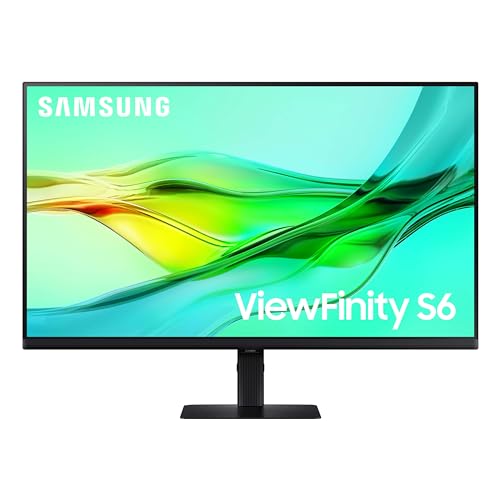
Samsung 24" ViewFinity S6 QHD
Best for: compact setups requiring wired Ethernet
- Refresh Rate
- 100Hz
- Screen Size
- 24"
- Resolution
- 2560×1440
- Ports
- USB-C, LAN
- Features
- HDR, Height-Adjustable Stand
- Size
- 24 Inch
The Samsung 24-inch ViewFinity S6 delivers QHD resolution and a 100Hz refresh rate for clear, smooth visuals. It stands out with built-in Ethernet connectivity and a USB-C port supporting 90W charging. The ergonomic stand adjusts height and pivots for document viewing. A KVM switch lets you control two sources with one keyboard and mouse. This model suits users who need reliable wired networking and efficient desk setups.
- Built-in LAN port for Ethernet connectivity
- USB-C port with 90W charging capability
- Built-in KVM switch for dual-source control
- Height-adjustable stand with pivot function
- QHD 2560×1440 resolution with 100Hz refresh rate
- 24-inch screen is smaller than the 32-inch and 34-inch options on this list
- QHD resolution is lower than the Ultra-WQHD panels found in other list items
- You need a built-in Ethernet port for stable wired internet
- You want to charge your laptop via the monitor's USB-C port
- You prefer a compact 24-inch display for tight desk spaces
- You require a screen larger than 24 inches
- You need Ultra-WQHD or 4K resolution for detailed work
- You prefer wireless connectivity over built-in Ethernet
Verdict: Samsung 24" ViewFinity S6 100Hz Monitor offers a compact QHD display with essential connectivity for professionals. It fits users who prioritize wired networking and laptop charging in a small footprint.

Samsung 27-Inch ViewFinity 100Hz Monitor
Best for: productivity tasks and vertical document viewing
- Refresh Rate
- 100Hz
- Screen Size
- 27"
- Resolution
- 2560×1440
- Ports
- HDMI, DP, USB-A, USB-B
- Features
- HDR, Height-Adjustable Stand
- Size
- 27 Inch
The Samsung ViewFinity S6 is a 27-inch monitor with QHD resolution and a 100Hz refresh rate. It includes HDR10 support for better color depth and contrast. The stand is height-adjustable and pivots 90 degrees for vertical use. It connects via HDMI, DisplayPort, and USB ports. This model suits users who need a flexible, high-resolution display for productivity and smooth visuals.
- QHD (2560×1440) resolution for sharp details
- 100Hz refresh rate reduces stuttering
- Height-adjustable stand with 90-degree pivot
- HDR10 support for enhanced color and contrast
- 27-inch size is smaller than the 34-inch options on this list
- 13.5-pound weight is heavier than many 24-inch competitors
- Only one HDMI port limits multi-device connections
- You need a high-resolution screen for detailed work
- You prefer a vertically oriented display for documents
- You want a tool-free stand setup
- You require a 34-inch ultrawide screen
- You need more than one HDMI input
- You prefer a lighter, more portable monitor
Verdict: Samsung 27" ViewFinity S6 QHD 100Hz offers a solid balance of resolution and ergonomic flexibility. It fits users who prioritize screen clarity and adjustable positioning over larger ultrawide formats.

Samsung 34" ViewFinity S50GC Ultra-WQHD
Best for: multitasking and media consumption
- Refresh Rate
- 100Hz
- Screen Size
- 34"
- Resolution
- Ultra-WQHD
- Response Time
- 5ms
- Aspect Ratio
- 21:9
- Variable Refresh Rate
- AMD FreeSync
This Samsung ViewFinity S50GC is a 34-inch ultrawide monitor with an Ultra-WQHD resolution and a 100Hz refresh rate. It features AMD FreeSync to reduce image tearing and an ambient light sensor for automatic brightness adjustment. The borderless design supports multi-monitor setups, while HDR10 enhances color depth. It suits users who need a wide workspace for productivity or media consumption.
- 100Hz refresh rate for smooth motion
- Ultra-WQHD resolution for detailed visuals
- AMD FreeSync reduces screen tearing
- Ambient light sensor adjusts brightness automatically
- Borderless design for seamless multi-monitor setups
- Resolution is lower than the 3440×1440 panels on other list items
- Only lists HDMI ports, offering fewer connection options than competitors
- You need a wide 21:9 aspect ratio for multitasking
- You want automatic brightness adjustment via an ambient light sensor
- You prefer a borderless design for multi-monitor arrangements
- You require more than one HDMI port for connectivity
- You need a higher resolution than Ultra-WQHD
- You want a standard 16:9 screen format
Verdict: Samsung 34" ViewFinity S50GC is a solid ultrawide option for users prioritizing a borderless design and automatic eye care features. It fits professionals who value screen real estate and smooth motion over maximum resolution.

Samsung 32" ViewFinity S6 QHD Monitor
Best for: Productivity and detailed content viewing
- Refresh Rate
- 100Hz
- Screen Size
- 32"
- Resolution
- 2560×1440
- Ports
- HDMI, DP, USB-A, USB-B
- Features
- HDR, Height-Adjustable Stand
- Size
- 32 Inch
This Samsung ViewFinity S6 is a 32-inch QHD monitor with a 100Hz refresh rate. It features HDR10 support and a height-adjustable stand that pivots 90 degrees. The panel offers 2560×1440 resolution for clear details. You will appreciate the ergonomic design and eye care features. It suits users who need a large, versatile screen for productivity and smooth visuals.
- 32-inch QHD (2560×1440) resolution
- 100Hz refresh rate reduces stuttering
- Height-adjustable and pivoting stand
- HDR10 for enhanced color and contrast
- Heavier build at 15.9 pounds
- Standard 100Hz refresh rate
- Smaller 32-inch screen size
- You need a large 32-inch display for detailed work
- You value ergonomic adjustments like height and pivot
- You want smooth 100Hz visuals for general use
- You require a higher 144Hz or 165Hz refresh rate
- You prefer a smaller 24-inch or 27-inch footprint
- You need an ultrawide 34-inch aspect ratio
Verdict: Samsung 32-inch ViewFinity S6 delivers solid QHD clarity and ergonomic flexibility for professionals who prioritize screen real estate and adjustability over high-speed gaming performance.

Samsung CH890 34-inch Curved Monitor
Best for: business multitasking and USB-C connectivity
- Refresh Rate
- 100Hz
- Screen Size
- 34-inch
- Resolution
- 3440 x 1440
- Response Time
- 4ms
- Aspect Ratio
- 21:9
- Variable Refresh Rate
- AMD Free Sync
The Samsung CH890 is a 34-inch ultrawide monitor with a 3440×1440 resolution and 100Hz refresh rate. Its 3000:1 contrast ratio and 4ms response time support multimedia work. The curved screen and USB-C connectivity streamline your office setup. This model includes a highly adjustable stand for ergonomic comfort. It is designed specifically for business environments and federal government customers.
- 34-inch 3440×1440 WQHD resolution
- 100Hz refresh rate with AMD Free Sync
- USB-C connectivity for power and data
- Highly adjustable stand with height, tilt, and swivel
- 3000:1 contrast ratio
- 4ms response time is slower than gaming-focused models
- 17.4-pound weight makes it bulkier than smaller 24-inch options
- 34-inch size requires more desk space than standard 27-inch monitors
- You need a large ultrawide screen for multitasking in an office
- You require USB-C connectivity to connect a laptop with a single cable
- You want an ergonomic stand with height and tilt adjustments
- You prefer a standard 16:9 aspect ratio for video editing
- You need a high refresh rate above 100Hz for competitive gaming
- You have limited desk space and need a compact 24-inch monitor
Verdict: Samsung CH890 34" WQHD Curved Business Monitor fits professionals who need a large ultrawide display with USB-C connectivity for a streamlined office setup.

Samsung 34" ViewFinity S65UA
Best for: Ultrawide multitasking with USB-C convenience
- Refresh Rate
- 100Hz
- Screen Size
- 34"
- Resolution
- Ultra WQHD
- Aspect Ratio
- 21:9
- Ports
- USB Type-C
- Features
- HDR, Curved Screen, Height-Adjustable Stand
The Samsung ViewFinity S65UA is a 34-inch ultrawide QHD monitor with a 100Hz refresh rate. Its 1000R curvature matches your field of sight to reduce eye strain during long work sessions. A USB-C port delivers 90W charging and data through a single cable, keeping your desk tidy. HDR10 support enhances color depth for media and design. This monitor suits users who need screen real estate and a clean setup.
- 34-inch ultrawide QHD resolution for seamless multitasking
- 1000R curved screen reduces eye strain
- USB-C port with 90W charging capability
- 100Hz refresh rate for smooth motion
- HDR10 support for enhanced color range
- 34-inch size is narrower than 34-inch ultra-wide options in this list
- 17.6-pound weight is heavier than smaller 24-inch or 27-inch models
- 350-nit brightness is lower than typical high-end displays
- You want a single-cable USB-C connection for your laptop
- You prefer a curved screen to reduce eye fatigue
- You need extra horizontal screen space for multitasking
- You require a flat display for precise image alignment
- You prefer a standard 16:9 aspect ratio
- You need a lighter monitor for frequent moving
Verdict: The Samsung 34" ViewFinity S65UA Curved Monitor fits professionals who value a clutter-free desk and immersive ultrawide viewing. It is ideal for users who spend long hours at their computer and benefit from the 1000R curve and USB-C convenience.
Specifications side by side

| Spec | Samsung 34-Inch ViewFinity S50GC Flat Ultrawide | Samsung ViewFinity S65TC Thunderbolt 4 Monitor | Samsung 24" ViewFinity S6 QHD | Samsung 27-Inch ViewFinity 100Hz Monitor | Samsung 34" ViewFinity S50GC Ultra-WQHD | Samsung 32" ViewFinity S6 QHD Monitor | Samsung CH890 34-inch Curved Monitor | Samsung 34" ViewFinity S65UA |
|---|---|---|---|---|---|---|---|---|
| Screen Size | 34" | 34" | 24" | 27" | 34" | 32" | 34-inch | 34" |
| Resolution | – | – | 2560×1440 | 2560×1440 | Ultra-WQHD | 2560×1440 | 3440 x 1440 | Ultra WQHD |
| Refresh Rate | 100Hz | 100Hz | 100Hz | 100Hz | 100Hz | 100Hz | 100 Hz | 100Hz |
| Response Time | 5ms | – | – | – | 5ms | – | 4ms | – |
| Aspect Ratio | 21:9 | 21:9 | – | – | 21:9 | – | 21:9 | 21:9 |
| Variable Refresh Rate | AMD FreeSync | AMD FreeSync | – | – | AMD FreeSync | – | AMD Free Sync | – |
| Ports | 2 x HDMI 2.2, 1 x DisplayPort 1.2 | Thunderbolt 4, HDMI, DisplayPort, LAN | USB-C, LAN | HDMI, DP, USB-A, USB-B | – | HDMI, DP, USB-A, USB-B | HDMI, DisplayPort, USB Type-C | USB Type-C |
| Features | HDR | HDR, Built-in Speakers, Curved Screen, Height-Adjustable Stand | HDR, Height-Adjustable Stand | HDR, Height-Adjustable Stand | – | HDR, Height-Adjustable Stand | Curved Screen | HDR, Curved Screen, Height-Adjustable Stand |
| Use | – | – | – | – | – | – | Business & Office, Business | – |
| Size | 34- in Flat | 34-in Curved | 24 Inch | 27 Inch | – | 32 Inch | 34 Inch | 34-in Curved |
| Dimensions | 8.7 × 32.1 × 18 inches | 9.5 × 31.8 × 22.1 inches | 8.66 × 21.3 × 21.1 inches | 8.66 × 24.1 × 21.9 inches | – | 8.66 × 28.1 × 23 inches | 11.8 × 31.9 × 21.2 inches | 9.25 × 31.8 × 22.1 inches |
| Weight | 10.8 pounds | 17.9 pounds | 11.9 pounds | 13.5 pounds | – | 15.9 pounds | 17.4 pounds | 17.6 pounds |
| Color | Black | White | Black | Black | black | Black | Black/ Titanium | Black |
| Model | FBASAMLS34C502GAN | FBASAMLS34C650TA | LS24D606UANXZA | LS27D606EANXGO | LS34C50GAUXEN | LS32D606EANXGO | LC34H890WGNXGO | LS34C650UANXGO |
How to choose the right samsung 100Hz monitor
Compare screen resolutions
You should check the resolution to ensure text and images remain sharp. Most models in this guide use QHD or Ultrawide QHD. This provides more pixel density than standard 1080p displays. Higher resolution helps with detailed work like photo editing or coding. If you need crisp text for long reading sessions, prioritize QHD. The Samsung 24-inch ViewFinity S6 offers QHD in a smaller form factor. This allows you to fit a high-resolution screen on a compact desk without sacrificing clarity or workspace area.
Check port availability
Verify the ports match your computer connections before buying. Some monitors include Thunderbolt 4, USB-C, or Ethernet. Thunderbolt 4, found on the ViewFinity S65TC, allows single-cable connectivity for data and power. USB-C is common for laptop users who want to charge their device while viewing. The ViewFinity S6 includes Ethernet, which is rare for compact monitors. This helps users who need stable wired networking without extra adapters. Match the ports to your setup to avoid needing dongles or hubs.
Decide on panel curvature
Choose between flat and curved panels based on your viewing habits. Curved screens, like the 1000R curve on the ViewFinity S65UA, can feel more immersive. They wrap around your field of vision, which some users prefer for media. Flat panels, such as the ViewFinity S50GC, offer a traditional rectangular view. This is often better for design work where straight lines matter. Consider your desk depth and viewing distance. Curved screens may require more space behind them due to their shape.
Look for ergonomic stands
Ensure the monitor has an adjustable stand for comfort. Height-adjustable stands allow you to position the screen at eye level. This reduces neck strain during long work sessions. The ViewFinity S65TC and ViewFinity S6 both include height-adjustable stands. This feature lets you raise or lower the display to suit your chair height. Fixed stands limit your positioning options. If you plan to use a monitor arm later, check the VESA mount compatibility, though this data is not provided for all models.
Verify variable refresh rate
Check if the monitor supports variable refresh rate technology. FreeSync helps reduce screen tearing during fast motion. This is useful for both gaming and smooth scrolling in documents. Most models in this list include FreeSync support. It ensures the refresh rate matches the frame rate of your graphics output. This creates a smoother visual experience. If you use a compatible AMD or NVIDIA graphics card, FreeSync will work seamlessly. It is a key spec for maintaining fluid motion without visual artifacts.
Frequently asked questions
Which Samsung 100Hz monitor has Thunderbolt 4?
The Samsung ViewFinity S65TC Thunderbolt 4 Monitor is the only model in this list with Thunderbolt 4 connectivity. This port allows for efficient cable management and high-speed data transfer. It also features a curved screen and height-adjustable stand for ergonomic flexibility.
Do these Samsung monitors support FreeSync?
Most models in this guide include AMD FreeSync support. The Samsung 34-Inch ViewFinity S50GC Flat Ultrawide, the S65TC, and the S50GC Ultra-WQHD all list FreeSync as a variable refresh rate feature. This technology helps reduce screen tearing during smooth 100Hz gaming sessions.
Is there a Samsung 100Hz monitor with Ethernet?
Yes, the Samsung 24" ViewFinity S6 QHD includes an Ethernet port. This feature is unique among the listed options and suits users who need wired networking in a compact setup. It also offers USB-C for laptop charging and a height-adjustable stand.
Which Samsung 100Hz monitor is best for vertical viewing?
The Samsung 27-Inch ViewFinity 100Hz Monitor is noted for vertical document viewing. It features a height-adjustable stand that allows you to pivot the screen for portrait orientation. This makes it ideal for productivity tasks that require reading long documents or code.
Which Samsung monitors have a curved screen?
Several models in this list feature curved screens for immersive viewing. The Samsung ViewFinity S65TC, S65UA, and CH890 are all curved. The S65UA specifically offers a 1000R curve. These designs help reduce eye strain during long hours of use.
Does the Samsung ViewFinity S65TC have built-in speakers?
Yes, the Samsung ViewFinity S65TC Thunderbolt 4 Monitor includes built-in speakers. This feature reduces desk clutter by eliminating the need for external audio devices. It also features HDR support and a height-adjustable stand for comfortable positioning.
Which Samsung 100Hz monitor is best for business use?
The Samsung CH890 34-inch Curved Monitor is designated for business and office use. It provides Ultrawide QHD resolution and USB-C connectivity for streamlined office setups. Its curved design supports multitasking across multiple windows efficiently.
See also