15 Best Docking Stations with Thunderbolt 4, Compared
As Amazon Associates, we earn from qualifying purchases. This means we may receive a small commission at no extra cost to you if you click through and make a purchase.
As an Amazon Associate we earn from qualifying purchases. Links on this page are affiliate links.
Choosing the best docking stations with Thunderbolt 4 requires careful attention to port counts, charging speeds, and display support. We compared 15 models based strictly on the specifications published on their listings. The Anker Prime 14-in-1 Thunderbolt 5 Dock leads this list because it offers 140W Power Delivery and supports dual 8K displays. This high wattage ensures your laptop stays powered during intensive tasks, while the resolution support handles demanding visual workflows. Each option here targets specific needs, from triple monitor setups to budget-friendly connectivity. Use this guide to decide which dock matches your hardware requirements and workspace layout.
Match the host interface to the dock

Your laptop must have a compatible host interface to use these docks. Most listed models connect via Thunderbolt 4, but several newer options require Thunderbolt 5. Verify your computer’s port type before buying. If your laptop only supports Thunderbolt 4, you cannot use the Thunderbolt 5 docks, even if they offer higher charging wattage or resolution.
| # | Product | Best for | Price |
|---|---|---|---|
| 1 | Anker Prime 14-in-1 Thunderbolt 5 Dock Best overall | high-speed data transfer and dual 8K displays | |
| 2 | CalDigit TS5 15-Port Thunderbolt 5 Dock Best premium | Thunderbolt 5 hosts needing 140W charging | |
| 3 | Microsoft Surface Thunderbolt 4 Dock Also great | Dual 4K monitor setups with tactile ports | |
| 4 | Plugable 13-in-1 Triple 4K USB-C Dock Best chromeos | ChromeOS triple monitor setups | |
| 5 | CalDigit TS4 Thunderbolt 4 Dock Also great | Users needing 18 ports and 2.5GbE connectivity | |
| 6 | Plugable 16-in-1 Thunderbolt 4 Dock Also great | Dual 4K monitor setups with 100W charging | |
| 7 | TechTray SD25TB4 Quad Display Dock Also great | Windows users needing quad 4K displays and included cables | |
| 8 | Koncept 13-Port Thunderbolt 4 Dock Best budget | Windows users needing 130W charging | |
| 9 | Tobenone Quad 4K 20-in-1 DisplayLink Dock Best displaylink | Quad monitor setups requiring many ports | |
| 10 | UGREEN 8-in-1 Thunderbolt 4 Dock Also great | Users needing three Thunderbolt 4 ports and 85W charging | |
| 11 | HP G6 Thunderbolt 4 Dock Also great | Quad display setups with 180W charging needs | |
| 12 | Plugable 12-in-1 Triple 4K USB-C Dock Also great | Multi-monitor Windows and ChromeOS setups | |
| 13 | Plugable Thunderbolt 5 Dual HDMI Dock Best 144hz | 4K 144Hz dual display setups | |
| 14 | iVANKY FusionDock Max 2 Thunderbolt 5 Dock Best 6k | Apple Silicon Macs needing triple 6K displays | |
| 15 | Dell SD25TB5 Pro 300W Thunderbolt 5 Dock Also great | multi-display Dell workstations |
The best fit for you

- You need high-speed data transfer with dual 8K displays – Anker Prime 14-in-1 Thunderbolt 5 Dock – It supports 8K UHD resolution and offers 140W Power Delivery for top-tier performance.
- You require triple 4K monitors for ChromeOS devices – Plugable 13-in-1 Triple 4K USB-C Dock – This dock provides triple 4K support and 100W charging specifically for ChromeOS users.
- You want 4K displays at 144Hz refresh rates – Plugable Thunderbolt 5 Dual HDMI Dock – It delivers 4K resolution at 144Hz with 140W Power Delivery for compatible hosts.

Anker Prime 14-in-1 Thunderbolt 5 Dock
Best for: high-speed data transfer and dual 8K displays
- Ports
- Ethernet, Thunderbolt 4
- Display Support
- Dual
- Max Resolution
- 8K@60Hz
- Host Interface
- Thunderbolt 5
- Power Delivery
- 140W
- Data Transfer Speed
- 120Gbps
This Anker Prime dock uses a Thunderbolt 5 host interface for 120Gbps data transfer speeds. It supports dual 8K displays and delivers 140W of power delivery to connected laptops. The unit includes an active cooling fan to manage heat during heavy workloads. You get two Thunderbolt 5 downstream ports and standard USB connections. This setup suits users who need high-speed file transfers and high-resolution video output.
- 120Gbps Thunderbolt 5 data transfer speed
- 140W power delivery for laptop charging
- Active cooling fan for thermal management
- Supports dual 8K@60Hz displays
- Supports only dual displays, while other docks support triple or quad monitors
- 140W charging power is lower than the 180W or 240W options available
- Heavier at 2.37 pounds compared to lighter USB-C docks
- You need 120Gbps data transfer speeds for large files
- You want to drive dual 8K monitors simultaneously
- You require 140W charging for a compatible laptop
- You need to connect three or four monitors at once
- You require more than 140W of charging power
- You prefer a dock without an active cooling fan
Verdict: Anker Prime 14-in-1 Thunderbolt 5 Dock delivers top-tier speed and 140W charging for users prioritizing data transfer and dual 8K displays over multi-monitor setups.

CalDigit TS5 15-Port Thunderbolt 5 Dock
Best for: Thunderbolt 5 hosts needing 140W charging
- Ports
- Ethernet, Thunderbolt 4
- Display Support
- Dual
- Max Resolution
- 8K 60Hz
- Host Interface
- Thunderbolt 5
- Power Delivery
- 140W
- Data Transfer Speed
- 120Gb/s
The CalDigit TS5 is a high-performance docking station built for Thunderbolt 5 hosts. It features a 240W power supply and 140W dedicated host charging, making it suitable for power-hungry laptops. The dock includes three downstream 80Gb/s ports and supports dual 8K displays on compatible systems. Its aluminum chassis acts as a heat sink. This unit is designed for users who need maximum bandwidth and sustained power delivery for professional workflows.
- 140W dedicated host charging for high-power laptops
- 240W total power supply for sustained performance
- Three downstream 80Gb/s Thunderbolt 5 ports
- 2.5GbE Ethernet port for faster network speeds
- Dual 8K 60Hz display support on Thunderbolt 5 hosts
- Requires Thunderbolt 5 or USB4 v2 host for full 80Gb/s performance
- Limited to dual displays on macOS, unlike some Windows options
- Heavier build at 8.9 ounces compared to lighter docks
- You use a Thunderbolt 5 or USB4 v2 host computer
- You need 140W charging for a high-performance laptop
- You require 2.5GbE Ethernet for fast file transfers
- You only have Thunderbolt 3 or 4 hosts
- You need triple display support on macOS
- You prefer a lighter, more portable dock
Verdict: The CalDigit TS5 Thunderbolt 5 Dock delivers exceptional power and bandwidth for users with compatible hosts. It is the best choice for professionals who need 140W charging and 2.5GbE networking on a robust aluminum chassis.

Microsoft Surface Thunderbolt 4 Dock
Best for: Dual 4K monitor setups with tactile ports
- Ports
- Thunderbolt 4
- Display Support
- Up to 2
- Max Resolution
- 4K
- Host Interface
- Thunderbolt 4
- Ethernet Speed
- 2.5G
- Dimensions
- 11 × 4.4 × 3.2 inches
This Microsoft docking station connects via Thunderbolt 4 to support dual 4K monitors. It provides three USB-C and three USB-A ports alongside 2.5G Ethernet. The unit charges your laptop in 2.5 hours and weighs 14.4 ounces. It measures 11 by 4.4 by 3.2 inches. This dock suits users who need reliable multi-monitor support and tactile port identification.
- Supports two 4K monitors
- Includes three USB-C and three USB-A ports
- Features raised tactile indicators on ports
- Charges laptop in 2.5 hours
- Contains 20% recycled ocean-bound plastic
- Supports only two monitors while other docks handle three or four
- Weighs 14.4 ounces which is lighter but offers less bulk than heavier alternatives
- Limited to 2.5G Ethernet instead of 10G or higher speeds
- You need dual 4K monitor support
- You want tactile port identification
- You prefer a compact 11-inch footprint
- You require triple or quad monitor setups
- You need 10G Ethernet connectivity
- You want a dock with more than six total USB ports
Verdict: Microsoft Surface Thunderbolt 4 Dock provides a compact, sustainable solution for dual 4K displays. It fits users who prioritize tactile port access and moderate port counts over high-end multi-monitor expansion.

Plugable 13-in-1 Triple 4K USB-C Dock
Best for: ChromeOS triple monitor setups
- Ports
- HDMI, DisplayPort, USB-C, Thunderbolt 4
- Display Support
- Triple
- Max Resolution
- 4K@60Hz
- Host Interface
- USB-C
- Power Delivery
- 100W
- Data Transfer Speed
- 10Gbps
This Plugable dock supports three 4K monitors via DisplayLink technology, making it a strong option for ChromeOS users who need extensive screen real estate. It delivers 100W of power delivery to charge your laptop while connecting peripherals. The unit includes HDMI and DisplayPort outputs for flexible display arrangements. It is designed for office productivity and hybrid work environments where multiple displays are essential for daily tasks.
- Supports triple 4K 60Hz displays
- Provides 100W laptop charging
- Compatible with ChromeOS 100.x+
- Includes wired Ethernet connectivity
- Offers SD card slot access
- Requires DisplayLink drivers on macOS
- Heavier at 1.07 pounds than lighter docks
- Does not support HDCP protected content
- You need three external monitors on a ChromeOS device
- You require 100W charging for your laptop
- You work in an office with wired Ethernet needs
- You use a Mac and cannot install DisplayLink drivers
- You need to play protected streaming content on external screens
- You prefer a lighter dock under 1 pound
Verdict: Plugable UD-ULTC4K ChromeOS Dock is a practical solution for ChromeOS users who need triple 4K displays and 100W charging. It suits professionals who prioritize screen count and wired connectivity over HDCP support or minimal weight.

CalDigit TS4 Thunderbolt 4 Dock
Best for: Users needing 18 ports and 2.5GbE connectivity
- Ports
- USB-C, Ethernet, Thunderbolt 4, USB-A
- Display Support
- Dual
- Max Resolution
- 8K@30Hz, 6K@60Hz
- Host Interface
- Thunderbolt 4
- Power Delivery
- 98W
- Data Transfer Speed
- 40Gb/s
The CalDigit TS4 is an 18-port Thunderbolt 4 dock designed for heavy workflows. It offers 98W charging and a 2.5GbE port for faster networking. Windows users can drive a single 8K display or dual 4K monitors. macOS users on Pro or Ultra chips support dual 6K displays, while standard Macs are limited to one screen. This compact unit suits users needing extensive connectivity and high-resolution video output.
- 18 total ports including 3 Thunderbolt 4 and 5 USB-A ports
- 98W power delivery for compatible laptops
- 2.5GbE Ethernet port for faster network speeds
- Supports single 8K or dual 4K@60Hz displays on Windows
- 98W charging is lower than the 140W or 240W options available on other list items
- Standard macOS models are limited to a single display due to host hardware constraints
- Requires a Thunderbolt 4 or fully optioned USB4 host for maximum performance
- You need an 18-port hub for complex setups
- You require 2.5GbE Ethernet for faster local network transfers
- You use a Windows PC or high-end Mac Pro/Ultra
- You need more than 98W of charging power for your laptop
- You use a standard M1-M3 Mac and want dual monitors
- You require Thunderbolt 5 speeds or 8K@60Hz dual display support
Verdict: The CalDigit TS4 18-Port Thunderbolt 4 Dock fits users who prioritize extensive port selection and fast Ethernet over maximum charging wattage. It is ideal for Windows power users or those with high-end Macs needing multiple high-resolution displays.

Plugable 16-in-1 Thunderbolt 4 Dock
Best for: Dual 4K monitor setups with 100W charging
- Ports
- HDMI, DisplayPort, Ethernet, Thunderbolt 4
- Display Support
- Dual
- Max Resolution
- 4K@60Hz
- Host Interface
- Thunderbolt 4
- Power Delivery
- 100W
- Data Transfer Speed
- 40Gbps
This Plugable dock supports dual 4K 60Hz displays via HDMI or DisplayPort. It delivers 100W power delivery for laptop charging and includes seven USB ports, 2.5Gbps Ethernet, and SD card slots. The unit weighs 1.42 pounds and measures 11.6 by 5.8 by 4.1 inches. It works with Thunderbolt 4, USB4, and Thunderbolt 5 laptops. This setup suits users who need a clean, driver-free dual monitor solution for Mac or Windows systems.
- Supports dual 4K 60Hz monitors
- Provides 100W power delivery
- Includes 2.5Gbps Ethernet port
- Has SD and microSD card slots
- Works with Thunderbolt 5 and USB4
- Supports only dual displays instead of triple or quad setups
- Offers 100W charging versus higher wattage options
- Weighs 1.42 pounds
- You need two 4K displays for multitasking
- You use a Mac or Windows laptop with Thunderbolt 4
- You want a simple plug-and-play setup without drivers
- You require more than two external monitors
- You need charging power above 100W
- You prefer a dock with triple or quad display support
Verdict: Plugable 16-in-1 Thunderbolt 4 Dock fits users who need a reliable dual monitor workstation with 100W charging and standard connectivity for Mac or Windows laptops.
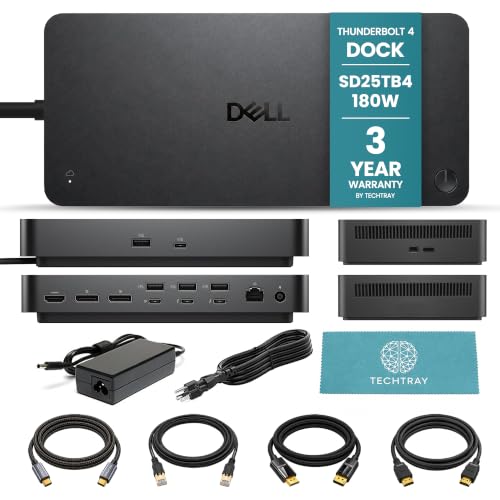
TechTray SD25TB4 Quad Display Dock
Best for: Windows users needing quad 4K displays and included cables
- Ports
- HDMI, DisplayPort, Ethernet, Thunderbolt 4
- Display Support
- Up to 4
- Max Resolution
- 8K@60Hz
- Host Interface
- Thunderbolt 4
- Power Delivery
- Up to 130W (Dell), 96W (non-Dell)
- Video Ports
- DisplayPort 1.4, HDMI 2.1
This bundle pairs the Dell SD25TB4 dock with a set of 2-meter cables. It delivers up to 130W of power to compatible Dell laptops and 96W to others. You get support for up to four 4K displays at 60Hz. The dock includes two Thunderbolt 4 ports, four USB-A ports, and video outputs like HDMI 2.1 and DisplayPort 1.4. It suits users who need a complete, ready-to-use workstation setup with high-resolution multi-display capabilities.
- Supports up to four 4K displays at 60Hz
- Provides up to 130W power to compatible Dell computers
- Includes two Thunderbolt 4 ports and four USB-A 3.2 Gen 2 ports
- Bundle includes 2-meter DisplayPort, HDMI, USB-C, and Cat8 Ethernet cables
- Delivers 96W to non-Dell computers, which is lower than the 140W or 180W offered by some competitors
- macOS users are limited to one or two external displays, whereas Windows systems can support up to four
- Includes only one HDMI 2.1 port and two DisplayPort 1.4 outputs, fewer video ports than some 15-port alternatives
- You want a complete bundle with 2-meter cables included
- You use a compatible Dell computer and need up to 130W charging
- You require a quad-display setup for Windows workstations
- You need more than 130W of power delivery
- You use a standard M1 or M2 Mac and need more than one external display
- You prefer a dock with more than four total video output ports
Verdict: TechTray Dell SD25TB4 Thunderbolt 4 Bundle provides a complete cable solution for users who need quad 4K support and high power delivery for Dell laptops. It is a practical choice for Windows users building a multi-monitor workstation.

Koncept 13-Port Thunderbolt 4 Dock
Best for: Windows users needing 130W charging
- Ports
- USB-C, Thunderbolt 4, USB-A
- Display Support
- Up to 4
- Max Resolution
- 4K@60Hz
- Host Interface
- Thunderbolt 4
- Data Transfer Speed
- 40Gbps
- Video Ports
- Thunderbolt 4, DisplayPort 1.4, HDMI 2.0
The Koncept WD22TB4 provides 13 ports for versatile connectivity. It features a Thunderbolt 4 host port delivering 130W of energy. This dock supports dual 4K displays at 60Hz. It includes Gigabit Ethernet for stable wired connections. The device works with Thunderbolt 4, Thunderbolt 3, USB4, and USB-C devices. It suits users needing reliable power delivery and multiple display options.
- 130W energy delivery for host devices
- Supports up to four 4K 60Hz monitors on Windows
- Includes Gigabit Ethernet port
- 13 total ports for connectivity
- Lower 130W power delivery compared to competitors offering 140W or more
- Heavier 0.63 ounces weight than typical lightweight docks
- Limited to dual 4K display support on macOS without DisplayLink
- You need 130W charging for your laptop
- You require a Gigabit Ethernet connection
- You use Windows and want multi-monitor support
- You need more than 130W power delivery
- You want native dual 4K support on M1/M2 Macs
- You prefer a lighter dock under 0.63 ounces
Verdict: Koncept WD22TB4 Thunderbolt 4 Dock fits users who prioritize 130W charging and wired networking. It serves Windows users needing multiple displays well.

Tobenone Quad 4K 20-in-1 DisplayLink Dock
Best for: Quad monitor setups requiring many ports
- Ports
- USB-C, Ethernet, Thunderbolt 4
- Display Support
- Quad
- Max Resolution
- 4K@60Hz
- Power Delivery
- 100W
- Video Ports
- HDMI, DisplayPort
- Total Ports
- 20
This TobenONE docking station connects four external monitors at 4K resolution and 60Hz refresh rate. It uses DisplayLink technology to drive the quad setup through a single Thunderbolt 4 host interface. The unit includes a 150W power supply that delivers 100W of charging power to your laptop. You get 20 total ports, including four HDMI and four DisplayPort outputs. It works with Windows and Mac systems, provided you install the required driver.
- Supports four 4K@60Hz displays simultaneously
- 20 total ports including 4 HDMI and 4 DP
- 100W laptop charging via 150W power adapter
- Universal compatibility with Thunderbolt 3, 4, and 5 hosts
- Requires separate DisplayLink driver installation
- Heavier build at 2.27 pounds compared to lighter docks
- Does not support HDCP for protected content
- You need to drive four monitors from one laptop
- You use a Windows laptop or non-M1 Mac
- You want a single dock for many peripherals
- You use an M1 MacBook that only supports three displays
- You need HDCP support for protected media
- You prefer a plug-and-play setup without drivers
Verdict: TobenONE 20-in-1 Quad 4K DisplayLink Dock is a high-port-count solution for users who need to connect four screens to a single computer. It fits professionals who multitask across multiple windows and have a host port that supports Thunderbolt 4 or 5.

UGREEN 8-in-1 Thunderbolt 4 Dock
Best for: Users needing three Thunderbolt 4 ports and 85W charging
- Ports
- Ethernet, Thunderbolt 4
- Display Support
- Dual
- Max Resolution
- 8K@30Hz
- Host Interface
- Thunderbolt 4
- Power Delivery
- 85W
- Data Transfer Speed
- 40Gbps
This UGREEN 8-in-1 Thunderbolt 4 dock offers three downstream Thunderbolt 4 ports for high-speed data transfer up to 40Gbps. It supports dual 4K displays at 60Hz or a single 8K display for Windows laptops. The included 140W GaN charger provides up to 85W of power delivery to your laptop. It also features a gigabit Ethernet port and three USB-A 3.2 ports. This setup suits users needing reliable expansion for compatible Mac and Windows devices.
- Three downstream Thunderbolt 4 ports for 40Gbps data speeds
- Supports dual 4K@60Hz or single 8K displays
- Includes 140W GaN charger for 85W laptop charging
- Features gigabit Ethernet and three USB-A 3.2 ports
- Lower 85W power delivery compared to competitors offering 100W or more
- Heavier build at 3.09 pounds compared to lighter alternatives
- Fewer total ports with only 8-in-1 expansion capability
- You need three Thunderbolt 4 ports for multiple high-speed devices
- You want to charge your laptop with up to 85W power delivery
- You require dual 4K displays at 60Hz for productivity
- You need more than 85W of charging power for your laptop
- You want to connect more than three Thunderbolt 4 devices simultaneously
- You prefer a lighter docking station under 3 pounds
Verdict: UGREEN 8-in-1 Thunderbolt 4 Dock provides solid expansion for users who prioritize three Thunderbolt 4 ports and reliable 85W charging. It fits those who need dual 4K displays without needing the highest power output available.

HP G6 Thunderbolt 4 Dock
Best for: Quad display setups with 180W charging needs
- Ports
- Thunderbolt 4, USB-A
- Display Support
- 4 Displays Supported
- Host Interface
- Thunderbolt 4
- Power Delivery
- 230 W
- Features
- Power Delivery
- Dimensions
- 4.76 × 4.76 × 1.95 inches
The HP G6 is a wired docking station designed for desktop PCs and notebooks. It supports quad displays and offers 180W charging capability via its Thunderbolt 4 connection. The unit measures 4.76 by 4.76 by 1.95 inches and weighs a modest amount for its build. It includes USB-A ports alongside the primary Thunderbolt 4 interface. This setup suits users who need multiple monitors and reliable power delivery for their devices.
- Supports quad display output
- Provides 180W charging capability
- Includes USB-A ports
- Compact 1.95-inch height
- Lower 180W charging capacity compared to 240W or 300W options
- Fewer total ports than 14-port or 18-port alternatives
- Supports only Thunderbolt 4, not the faster Thunderbolt 5 standard
- You need quad display support for productivity
- You require 180W charging for your notebook
- You prefer a compact dock with a low profile
- You need Thunderbolt 5 speeds
- You require more than 180W of charging power
- You want a dock with over 14 ports
Verdict: HP G6 Thunderbolt 4 Dock fits users who prioritize quad display support and solid 180W charging in a compact form factor. It is a practical choice for those who do not need the highest power output or the newest Thunderbolt 5 technology.

Plugable 12-in-1 Triple 4K USB-C Dock
Best for: Multi-monitor Windows and ChromeOS setups
- Ports
- HDMI, DisplayPort, USB-C, Ethernet, Thunderbolt 4
- Display Support
- Triple
- Max Resolution
- 4K@60Hz
- Host Interface
- USB-C
- Power Delivery
- 100W
- Video Ports
- 3x HDMI, 3x DisplayPort
This Plugable docking station supports three 4K displays at 60Hz via HDMI or DisplayPort. It delivers 100W of power delivery to charge compatible laptops, including MacBooks and Windows systems. The unit includes six USB 3.0 ports, Ethernet, and audio jacks. It works with USB-C, USB4, and Thunderbolt systems running Windows, macOS, or ChromeOS. The build measures 9.1 by 5.8 by 3.4 inches and weighs 2.4 pounds. It suits users needing multiple screens for productivity or trading dashboards.
- Supports three 4K 60Hz displays simultaneously
- Provides 100W power delivery for laptops
- Includes six USB 3.0 ports for peripherals
- Compatible with Windows, macOS, and ChromeOS
- Requires DisplayLink drivers for macOS operation
- 2-year warranty is shorter than typical enterprise standards
- 100W charging may be insufficient for high-power workstations
- You need three external monitors for a workflow
- You use a Windows or ChromeOS laptop
- You want a single cable for power and data
- You require Thunderbolt 5 speeds
- You want native macOS display support without drivers
- You need more than 100W of charging power
Verdict: Plugable 12-in-1 Triple 4K Dock is a solid choice for Windows and ChromeOS users who need three 4K screens and reliable 100W charging. It fits well in enterprise or home office setups where multiple displays boost productivity.

Plugable Thunderbolt 5 Dual HDMI Dock
Best for: 4K 144Hz dual display setups
- Ports
- HDMI, Ethernet, Thunderbolt 4
- Display Support
- Dual
- Max Resolution
- 8K@60Hz
- Host Interface
- Thunderbolt 5
- Power Delivery
- 140W
- Video Ports
- HDMI 2.1
This Plugable dock offers 16-in-1 connectivity with 140W laptop charging. It features dual HDMI 2.1 ports supporting up to 8K 60Hz or 4K 144Hz. The unit includes six USB-C ports and 2.5G Ethernet. It suits users needing high refresh rates and robust charging for modern laptops.
- 140W Power Delivery for laptop charging
- Dual HDMI 2.1 outputs up to 8K 60Hz
- Supports 4K 144Hz refresh rate
- Six USB-C ports including front-facing options
- 2.5G Ethernet connectivity
- 8.92 ounces weight is heavier than many compact docks
- Only two HDMI ports limit multi-monitor setups compared to 4K 120Hz triple displays
- Thunderbolt 5 host required for maximum 8K resolution
- You need 140W charging for power-hungry laptops
- You want 4K 144Hz display support
- You require dual HDMI 2.1 connections
- You only have Thunderbolt 3 or USB-C hosts
- You need support for more than two external displays
- You require a lighter or more portable dock
Verdict: Plugable TBT-UDH2 Thunderbolt 5 Dock delivers high-resolution video and fast charging for compatible hosts. It fits users who prioritize 4K 144Hz performance and ample USB-C connectivity.

iVANKY FusionDock Max 2 Thunderbolt 5 Dock
Best for: Apple Silicon Macs needing triple 6K displays
- Ports
- Ethernet, Thunderbolt 4
- Display Support
- Triple
- Max Resolution
- 6K@60Hz
- Host Interface
- Thunderbolt 5
- Power Delivery
- 140W
- Data Transfer Speed
- 120Gbps
The iVANKY FusionDock Max 2 is a 23-in-1 Thunderbolt 5 dock designed exclusively for Apple Silicon Macs. It supports up to three 6K displays at 60Hz on M5 Pro models and delivers 140W of power delivery. The aluminum chassis uses passive cooling to eliminate fan noise. You get three 120Gbps Thunderbolt 5 ports and ten USB ports for extensive connectivity.
- Three 120Gbps Thunderbolt 5 ports for high-speed data
- 140W power delivery for connected laptops
- Supports up to three 6K displays at 60Hz on compatible Macs
- Passive aluminum cooling eliminates fan noise
- Includes 2.5Gbps Ethernet and SD/TF 4.0 card slots
- Limited to Apple Silicon Macs and excludes Windows or Intel Macs
- Supports only one Mac at a time without switching capability
- 24-month warranty is shorter than the industry standard three-year term
- You use an M-series Mac and need triple 6K display support
- You require 140W power delivery for your laptop
- You prefer silent operation without internal fans
- You use a Windows PC or Intel-based Mac
- You need to switch between multiple computers
- You require a longer than 24-month warranty
Verdict: The iVANKY FusionDock Max 2 Thunderbolt 5 fits M-series Mac users who need triple 6K displays and silent operation. It offers high-speed Thunderbolt 5 connectivity but excludes non-Apple systems.

Dell SD25TB5 Pro 300W Thunderbolt 5 Dock
Best for: multi-display Dell workstations
- Ports
- USB-C, Thunderbolt 4
- Display Support
- Up to four displays
- Max Resolution
- 8K @ 60Hz
- Host Interface
- Thunderbolt 5
- Power Delivery
- Up to 300W
- Data Transfer Speed
- 1.25 GB/s
This Dell dock offers 12 ports with a Thunderbolt 5 host interface. It supports up to four displays, including 8K at 60Hz or 4K at 120Hz. You get fast data transfer rates of 1.25 GB/s. Power delivery reaches 300W for Dell systems and 240W for others. It works with Windows, macOS, and Linux. This setup suits users needing high-resolution multitasking and robust power.
- Thunderbolt 5 host interface for high bandwidth
- Supports up to four displays at 8K 60Hz
- Delivers up to 300W power to Dell systems
- 12 versatile ports including USB-C and DP2.1
- Supports only 12 ports compared to 14+ on other list items
- Max data transfer rate is 1.25 GB/s, lower than Thunderbolt 4's 40Gbps theoretical limit
- You need to drive four high-resolution displays simultaneously
- You use Dell systems requiring up to 300W power delivery
- You want broad compatibility with Windows, macOS, and Linux
- You require more than 12 total ports for your peripherals
- You need Thunderbolt 4 only and want a simpler setup
- You prefer a dock with higher raw data transfer speeds
Verdict: Dell SD25TB5 Pro 300W Thunderbolt 5 Dock fits professionals who need four high-resolution screens and high power output for Dell devices. It provides essential connectivity for complex workstations.
Specifications side by side

| Spec | Anker Prime 14-in-1 Thunderbolt 5 Dock | CalDigit TS5 15-Port Thunderbolt 5 Dock | Microsoft Surface Thunderbolt 4 Dock | Plugable 13-in-1 Triple 4K USB-C Dock | CalDigit TS4 Thunderbolt 4 Dock | Plugable 16-in-1 Thunderbolt 4 Dock | TechTray SD25TB4 Quad Display Dock | Koncept 13-Port Thunderbolt 4 Dock | Tobenone Quad 4K 20-in-1 DisplayLink Dock | UGREEN 8-in-1 Thunderbolt 4 Dock | HP G6 Thunderbolt 4 Dock | Plugable 12-in-1 Triple 4K USB-C Dock | Plugable Thunderbolt 5 Dual HDMI Dock | iVANKY FusionDock Max 2 Thunderbolt 5 Dock | Dell SD25TB5 Pro 300W Thunderbolt 5 Dock |
|---|---|---|---|---|---|---|---|---|---|---|---|---|---|---|---|
| Display Support | Dual | Dual | Up to 2 | Triple | Dual | Dual | Up to 4 | Up to 4 | Quad | Dual | 4 Displays Supported | Triple | Dual | Triple | Up to four displays |
| Max Resolution | 8K@60Hz | 8K 60Hz | 4K | 4K@60Hz | 8K@30Hz, 6K@60Hz | 4K@60Hz | 8K@60Hz | 4K@60Hz | 4K@60Hz | 8K@30Hz | – | 4K@60Hz | 8K@60Hz | 6K@60Hz | 8K @ 60Hz |
| Host Interface | Thunderbolt 5 | Thunderbolt 5 | Thunderbolt 4 | USB-C | Thunderbolt 4 | Thunderbolt 4 | Thunderbolt 4 | Thunderbolt 4 | – | Thunderbolt 4 | Thunderbolt 4 | USB-C | Thunderbolt 5 | Thunderbolt 5 | Thunderbolt 5 |
| Power Delivery | 140W | 140W | – | 100W | 98W | 100W | Up to 130W (Dell), 96W (non-Dell) | – | 100W | 85W | 230 W | 100W | 140W | 140W | Up to 300W |
| Data Transfer Speed | 120Gbps | 120Gb/s | – | 10Gbps | 40Gb/s | 40Gbps | – | 40Gbps | – | 40Gbps | – | – | – | 120Gbps | 1.25 GB/s |
| Video Ports | HDMI 2.1, DisplayPort 2.1, TB5 | DisplayPort 2.1, Thunderbolt 5 | – | 3x HDMI, 3x DisplayPort | DisplayPort 1.4, Thunderbolt 4 | 2x HDMI, 2x DisplayPort | DisplayPort 1.4, HDMI 2.1 | Thunderbolt 4, DisplayPort 1.4, HDMI 2.0 | HDMI, DisplayPort | Thunderbolt 4 | – | 3x HDMI, 3x DisplayPort | HDMI 2.1 | Thunderbolt 5, HDMI | Thunderbolt 5, DP 2.1, HDMI 2.1 |
| Total Ports | 14 | 15 | – | 13 | 18 | 16 | – | 13 | 20 | 8 | – | 12 | 16 | 23 | 12 |
| Ethernet Speed | 2.5Gbps | 2.5GbE | 2.5G | – | 2.5GbE | 2.5Gbps | – | Gigabit | – | Gigabit | – | – | 2.5GbE | 2.5GbE | – |
| Resolution | 8K UHD | – | – | 4K UHD | 8K UHD | 4K UHD | – | 4K UHD | 4K UHD | 4K UHD | – | 4K UHD | 8K UHD | 6K | – |
| Refresh Rate | – | – | – | – | 60Hz | – | – | – | 60Hz | 60Hz | – | – | 144Hz | 60Hz | – |
| Ports | Ethernet, Thunderbolt 4 | Ethernet, Thunderbolt 4 | Thunderbolt 4 | HDMI, DisplayPort, USB-C, Thunderbolt 4 | USB-C, Ethernet, Thunderbolt 4, USB-A | HDMI, DisplayPort, Ethernet, Thunderbolt 4 | HDMI, DisplayPort, Ethernet, Thunderbolt 4 | USB-C, Thunderbolt 4, USB-A | USB-C, Ethernet, Thunderbolt 4 | Ethernet, Thunderbolt 4 | Thunderbolt 4, USB-A | HDMI, DisplayPort, USB-C, Ethernet, Thunderbolt 4 | HDMI, Ethernet, Thunderbolt 4 | Ethernet, Thunderbolt 4 | USB-C, Thunderbolt 4 |
| Features | Power Delivery, SD Card Reader, Cooling Fan | Power Delivery, Audio Support, SD Card Reader | – | Power Delivery | Power Delivery | Power Delivery, SD Card Reader | – | – | DisplayLink | Power Delivery | Power Delivery | Power Delivery | Power Delivery | Power Delivery | – |
| Use | – | – | – | Mac | Mac | Mac | – | – | Mac | Mac | – | Mac | – | Mac | – |
| Operating System | – | – | – | ChromeOS | Windows | macOS | – | – | macOS | macOS | – | Windows | macOS | macOS | – |
| Number of Computers | 4 Computers | – | – | – | – | – | – | – | – | – | – | – | – | – | – |
| Dimensions | 3 × 4.6 × 4.6 inches | 4.5 × 2.75 × 1.12 inches | 11 × 4.4 × 3.2 inches | 4.72 × 2.64 × 6.89 inches | 4.46 × 1.65 × 5.55 inches | 11.9 × 6 × 4.3 inches | – | 10 × 6 × 4 inches | 11.8 × 3.14 × 0.86 inches | 9.5 × 9.5 × 2.5 inches | 4.76 × 4.76 × 1.95 inches | 7.87 × 3.39 × 1.26 inches | 1.97 × 2.95 × 5.91 inches | – | 1.39 × 3.54 × 8.07 inches |
| Weight | 2.37 pounds | 8.9 ounces | 14.4 ounces | 1.07 pounds | 1.41 pounds | 1.42 pounds | – | 0.63 ounces | 2.27 pounds | 3.09 pounds | – | 2.4 pounds | 8.92 ounces | – | – |
| Size | 4.60" x 4.60" x 3" | 4.25 | (Pack of 1) | – | compact | 11.6" × 5.8" × 4.1" | – | – | small | 8-in-1 | 1.95" x 4.76" x 4.76" | 9.1" × 5.8" × 3.4" | – | – | – |
| Color | Gray | Space Gray | Black | – | Space Gray | Silver | Black | Black | Grey | Dark Gray | Grey | Black | Space Gray | Midnight Blue | Black |
| Model | A83B5 | TBT5-TS5-US-AMZ | T8H-00001 | UD-ULTC4K | TS4-US 500971 | TBT4-UDZ | SD25TB4 | Docking-WD22TB4-Station New | – | 25053 | G6 | UD-6950PDZ | TBT-UDH2 | – | E99DELSD25TB5 |
Key Specs for Choosing a Dock

Check power delivery needs
Ensure the dock provides enough wattage for your laptop. The Anker Prime offers 140W, while the CalDigit TS5 also delivers 140W for high-power hosts. The Koncept model provides 130W, and the HP G6 reaches 180W. Lower wattage options like the UGREEN dock offer 85W. Match the PD rating to your laptop’s maximum input to ensure proper charging and performance.
Verify display resolution support
Confirm the dock supports your monitor’s resolution. The Anker Prime and CalDigit TS4 handle 8K UHD. Most others, like the Plugable 16-in-1 and Koncept, support 4K UHD. The iVANKY dock supports 6K. If you use high-resolution screens, check the attribute list for resolution specs. Selecting a dock with insufficient resolution support will limit your display quality or prevent connection entirely.
Match host interface compatibility
Your laptop must have the correct host interface. Several docks, including the Anker Prime and Plugable Thunderbolt 5 Dual HDMI, require Thunderbolt 5. The Microsoft Surface and CalDigit TS4 use Thunderbolt 4. Using a Thunderbolt 5 dock with a Thunderbolt 4 port will not work. Check your computer’s port specifications before purchasing to avoid compatibility issues and wasted investment.
Count required monitor outputs
Determine how many displays you need. The TechTray SD25TB4 and HP G6 support quad displays. The Plugable 12-in-1 and Tobenone dock also handle four screens. Dual display docks like the UGREEN and Koncept models support two monitors. Triple display options include the Plugable 13-in-1 and iVANKY dock. Choose a dock with enough video outputs for your workspace setup.
Review refresh rate options
Check the refresh rate if you need smooth motion. The Plugable Thunderbolt 5 Dual HDMI dock supports 144Hz for high-refresh gaming or editing. The iVANKY and Tobenone docks offer 60Hz. Most standard docks also default to 60Hz. If you use high-refresh-rate monitors, verify the dock’s maximum refresh rate. Selecting a 60Hz dock for a 144Hz screen will limit performance.
Consider operating system use
Verify compatibility with your operating system. The Plugable 13-in-1 is optimized for ChromeOS. The CalDigit TS4 and iVANKY dock support macOS and Windows. The Microsoft Surface dock is designed for Surface devices. Some docks, like the iVANKY, exclude non-Apple systems. Check the use or operating system attributes to ensure the dock works with your computer’s OS without driver issues.
Frequently asked questions
Can a Thunderbolt 4 dock support four monitors?
Yes, several models in this list support quad displays. The TechTray SD25TB4 and Tobenone 20-in-1 docks both offer quad 4K support. The HP G6 also handles four screens with 180W charging. These options are ideal for users who need extensive screen real estate for multitasking.
Do I need Thunderbolt 5 for these docks?
Not necessarily, but newer docks use Thunderbolt 5 for higher bandwidth. The Anker Prime and CalDigit TS5 use Thunderbolt 5 hosts. However, many listed docks, like the Microsoft Surface and Plugable 16-in-1, connect via Thunderbolt 4. Check your laptop’s port type to ensure compatibility before purchasing.
Which dock provides the highest charging wattage?
The HP G6 Thunderbolt 4 Dock offers the highest power delivery at 180W. The Dell SD25TB5 Pro also delivers 300W for compatible devices. The Anker Prime and CalDigit TS5 provide 140W. These high-wattage options are best for laptops that require significant power for heavy workloads.
Are there docks compatible with ChromeOS?
Yes, the Plugable 13-in-1 Triple 4K USB-C Dock is specifically designed for ChromeOS. It supports triple 4K displays and provides 100W charging. This model is practical for ChromeOS users who need multiple screens and wired connectivity without relying on HDCP support or minimal weight.
Can I connect two 8K displays to a Thunderbolt dock?
The Anker Prime 14-in-1 Thunderbolt 5 Dock supports dual 8K UHD displays. It also offers 140W Power Delivery and a cooling fan. This makes it suitable for users prioritizing high-resolution video and fast data transfer over multi-monitor setups with lower resolutions.
Which dock is best for Apple Mac users?
The iVANKY FusionDock Max 2 Thunderbolt 5 is tailored for Apple Silicon Macs. It supports triple 6K displays and silent operation. The Plugable 16-in-1 and UGREEN 8-in-1 docks also support macOS. These options provide reliable dual 4K support and standard connectivity for Mac laptops.
Do these docks include Ethernet ports?
Most docks in this list include Ethernet ports for wired networking. The CalDigit TS5 features a 2.5GbE port. The Plugable 16-in-1 and Tobenone docks also include Ethernet. Wired connectivity is essential for stable internet speeds in professional environments where wireless signals may be unreliable.
Is there a compact option for dual monitors?
The Microsoft Surface Thunderbolt 4 Dock is a compact solution for dual 4K displays. It measures 4.4 by 3.2 inches and weighs 14.4 ounces. It is ideal for users who prioritize tactile port access and moderate port counts over high-end multi-monitor expansion.
See also