Best Dell Monitors with USB-C: 12 Spec-Based Picks
As Amazon Associates, we earn from qualifying purchases. This means we may receive a small commission at no extra cost to you if you click through and make a purchase.
As an Amazon Associate we earn from qualifying purchases. Links on this page are affiliate links.
Finding the best dell monitors with USB-C requires matching your desk setup to specific hardware capabilities. We compared 12 models based strictly on the specifications published on their listings. The Dell 27-Inch 4K 120Hz USB-C Monitor leads because it combines 4K UHD resolution with a 120Hz refresh rate for smooth visuals. This single-cable solution simplifies your workspace without compromising clarity. You will find options for ultrawide multitasking, large 4K screens, and compact webcam-equipped displays. Use this guide to decide which port configuration and panel size fits your workflow.
Match Resolution to Your Desk Size

Most picks in this list offer 4K UHD or 1440p QHD resolutions on 27-inch panels. If you need more workspace, consider the 38-inch or 43-inch ultrawide and 4K models. Higher resolution provides sharper text and images, while larger screens accommodate multiple windows. Choose the resolution that fits your viewing distance and task complexity.
| # | Product | Best for | Price |
|---|---|---|---|
| 1 | Dell 27-Inch 4K 120Hz USB-C Monitor Best overall | Single-cable 4K productivity and casual gaming | |
| 2 | Dell 27-Inch 1440p USB-C Monitor Best budget | single-cable laptop setups with ergonomic needs | |
| 3 | Dell 27-Inch 4K 120Hz IPS Monitor Best usb-a | 4K color accuracy and Thunderbolt 4 connectivity | |
| 4 | Dell UltraSharp 27-Inch 120Hz 1440p Monitor Best thunderbolt 4 | Thunderbolt 4 connectivity and 98% DCI-P3 color accuracy | |
| 5 | Dell 32-Inch 4K 100Hz IPS Monitor Best 100hz | Large screen users needing 90W charging | |
| 6 | Dell U4323QE 43-inch 4K USB-C Hub Monitor Best premium | users needing large 4K screen real estate | |
| 7 | Dell 38-Inch IPS Black Curved Monitor Also great | Multitasking and color-critical work | |
| 8 | Dell P3426WEB 34" Curved UWQHD Webcam Monitor Also great | Remote workers needing a webcam and ultrawide screen | |
| 9 | Dell 34-Inch Curved Thunderbolt 120Hz IPS Monitor Also great | multitasking and immersive ultrawide viewing | |
| 10 | Dell 43-Inch 4K USB-C Hub Monitor Also great | multi-PC workflows and large display partitions | |
| 11 | Dell P2726DEV 27-inch USB-C Monitor Also great | Users needing a built-in webcam and Ethernet port | |
| 12 | Dell P2426HEV 24-inch 120Hz IPS Monitor Also great | Compact setups with video call needs |
The best fit for you

- You want a balanced 4K setup with smooth motion – Dell 27-Inch 4K 120Hz USB-C Monitor – It combines 4K UHD resolution with a 120Hz refresh rate for clear visuals and fluid movement.
- You need a large screen for complex multitasking – Dell U4323QE 43-inch 4K USB-C Hub Monitor – The 43-inch 4K display provides massive screen real estate for managing multiple windows and systems.
- You want a compact monitor with a built-in camera – Dell P2426HEV 24-inch 120Hz IPS Monitor – The 24-inch size fits small spaces while the integrated webcam supports frequent video calls.
- You need Thunderbolt 4 connectivity for high-speed data – Dell UltraSharp 27-Inch 120Hz 1440p Monitor – It features Thunderbolt 4 ports and 98% DCI-P3 color accuracy for professional workflows.
- You prefer an ultrawide curved display for immersion – Dell P3426WEB 34" Curved UWQHD Webcam Monitor – The 34-inch curved UWQHD screen offers a wide workspace with a convenient built-in webcam.

Dell 27-Inch 4K 120Hz USB-C Monitor
Best for: Single-cable 4K productivity and casual gaming
- Ports
- HDMI, DisplayPort, USB-C
- Screen Size
- 27"
- Resolution
- 3840×2160
- Refresh Rate
- 120Hz
- Panel Type
- IPS
- Response Time
- 4ms
The Dell S2725QC is a 27-inch IPS monitor featuring 4K UHD resolution and a 120Hz refresh rate. It includes USB-C connectivity with up to 65W power delivery, allowing you to connect a single cable for data, video, and charging. The display covers 99% sRGB and supports AMD FreeSync Premium. This setup suits users who want high clarity and smooth motion for both work and gaming.
- 4K UHD resolution for sharp visuals
- 120Hz refresh rate with AMD FreeSync Premium
- USB-C port with up to 65W power delivery
- 99% sRGB color coverage
- 27-inch size is smaller than the 31.5-inch and 34-inch options on this list
- 4ms response time is slower than the 1ms or 5ms specs found on other models
- 14.8-pound weight is heavier than the lighter 24-inch or 27-inch alternatives
- You need a single USB-C cable to charge your laptop while displaying 4K video
- You want a 120Hz refresh rate for smoother motion in games or scrolling
- You prefer a compact 27-inch footprint for your desk
- You require a larger 34-inch or 43-inch ultrawide or multi-monitor setup
- You need a faster response time for competitive esports gaming
- You prefer a lighter monitor that weighs less than 14 pounds
Verdict: Dell S2725QC 27-inch 4K 120Hz USB-C offers a balanced mix of high resolution and smooth refresh rates for users who value a clean, single-cable desk setup. It fits professionals and casual gamers who prioritize color accuracy and 4K clarity over ultrawide field of view.

Dell 27-Inch 1440p USB-C Monitor
Best for: single-cable laptop setups with ergonomic needs
- Ports
- USB-C
- Screen Size
- 27-inch
- Resolution
- 2560×1440
- Refresh Rate
- 75Hz
- Response Time
- 4Ms
- Variable Refresh Rate
- AMD FreeSync
The Dell S2722DC is a 27-inch WQHD (2560×1440) monitor with a 75Hz refresh rate and AMD FreeSync. It features a USB-C port with 65W power delivery for single-cable laptop connections. The stand offers height, tilt, swivel, and pivot adjustments. Built-in speakers add convenience. This model suits users seeking a balanced display with versatile connectivity and ergonomic flexibility for daily tasks and light gaming.
- USB-C connectivity with 65W power delivery
- 27-inch WQHD (2560×1440) resolution
- Height-adjustable stand with pivot capability
- Built-in speakers for audio output
- AMD FreeSync for tear-free visuals
- 75Hz refresh rate is lower than the 100Hz and 120Hz options available
- WQHD resolution is lower than the 4K UHD panels on the list
- 27-inch size is smaller than the 31.5-inch and 34.1-inch alternatives
- You want a single-cable USB-C solution with 65W charging
- You need a height-adjustable stand with pivot functionality
- You prefer a 27-inch WQHD display for general use
- You require 4K UHD resolution for detailed work
- You need a refresh rate of 100Hz or higher
- You prefer a screen larger than 27 inches
Verdict: Dell S2722DC 27-inch WQHD USB-C Monitor fits users who prioritize ergonomic adjustability and efficient single-cable laptop connectivity over higher resolution or refresh rates.

Dell 27-Inch 4K 120Hz IPS Monitor
Best for: 4K color accuracy and Thunderbolt 4 connectivity
- Ports
- HDMI, USB-C, Ethernet, USB-A
- Screen Size
- 27-Inch
- Resolution
- 3840 x 2160
- Refresh Rate
- 120Hz
- Panel Type
- IPS Black
- Response Time
- 5ms
The Dell U2725QE is a 27-inch 4K UHD monitor with a 120Hz refresh rate. It uses an IPS Black panel with 99% DCI-P3 color coverage. The monitor includes Thunderbolt 4 for up to 140W power delivery. You get HDMI 2.1, USB-A, and Ethernet ports. It supports height, tilt, swivel, and pivot adjustments. This model suits users needing high color accuracy and fast motion handling.
- 4K UHD resolution with 99% DCI-P3 color coverage
- 120Hz refresh rate for smooth motion
- Thunderbolt 4 with up to 140W power delivery
- IPS Black panel technology
- Full ergonomic stand adjustments
- 27-inch size is smaller than the 31.5-inch P3225QE and 43-inch U4323QE options
- 21.4-pound weight is heavier than the 27-inch S2722DC and P2426HEV models
- 5ms response time is slower than the 120Hz U2725QE QHD variant or faster 144Hz+ competitors
- You need 4K resolution with high color accuracy for creative work
- You require Thunderbolt 4 connectivity with high-power device charging
- You want a 27-inch screen with a 120Hz refresh rate
- You prefer a larger screen size like 32 or 43 inches
- You need a lighter monitor for easy portability
- You are looking for a budget-friendly option with lower specs
Verdict: Dell U2725QE 27-inch 4K 120Hz Monitor delivers professional color accuracy and high-speed performance in a compact 27-inch frame. It fits creators and professionals who value Thunderbolt 4 connectivity and precise ergonomic adjustments.

Dell UltraSharp 27-Inch 120Hz 1440p Monitor
Best for: Thunderbolt 4 connectivity and 98% DCI-P3 color accuracy
- Ports
- HDMI, DisplayPort, USB-C, Ethernet, Thunderbolt 4
- Screen Size
- 27"
- Resolution
- WQHD
- Refresh Rate
- 120 Hz
- Response Time
- 5ms
- Dimensions
- 7.57 × 24.1 × 15.2 inches
The Dell UltraSharp U2724DE is a 27-inch WQHD monitor featuring two Thunderbolt 4 ports and two USB-C connections. It offers a 120 Hz refresh rate and 98% DCI-P3 color coverage. An ambient light sensor adjusts brightness automatically. Enhanced ComfortView Plus reduces blue light while keeping colors accurate. This model suits users needing a reliable hub with high color fidelity for professional work.
- Two Thunderbolt 4 ports for high-speed data and display
- 120 Hz refresh rate for smoother motion
- 98% DCI-P3 color gamut coverage
- Built-in ambient light sensor for auto-brightness
- 5 ms response time is slower than the 4 ms found on the Dell S2725QC
- WQHD resolution is lower than the 4K UHD panels on the Dell U2725QE and P3225QE
- You need multiple Thunderbolt 4 connections for your devices
- You require 98% DCI-P3 color accuracy for creative work
- You want a 120 Hz refresh rate for smoother scrolling
- You need 4K UHD resolution for sharper text
- You require a 4 ms response time for fast-paced gaming
- You prefer a 32-inch or larger display size
Verdict: Dell UltraSharp 27-inch WQHD Monitor provides a robust Thunderbolt 4 hub with 98% DCI-P3 coverage. It fits professionals who prioritize color accuracy and connectivity over 4K resolution or faster response times.

Dell 32-Inch 4K 100Hz IPS Monitor
Best for: Large screen users needing 90W charging
- Ports
- USB-C
- Screen Size
- 31.5-Inch
- Resolution
- 3840 x 2160
- Refresh Rate
- 100Hz
- Panel Type
- IPS
- Response Time
- 5ms
The Dell P3225QE is a 31.5-inch 4K IPS monitor designed for sharp visuals and smooth motion. It features a 100Hz refresh rate and 5ms response time. The display covers 99% of the sRGB color gamut for accurate colors. You get USB-C connectivity with up to 90W power delivery. This model suits those who need a large screen with versatile connectivity options.
- 31.5-inch 4K Ultra HD resolution
- 100Hz refresh rate for smooth motion
- 99% sRGB color gamut coverage
- USB-C with 90W power delivery
- Fully adjustable stand with pivot
- 100Hz refresh rate is lower than the 120Hz found on other list models
- 5ms response time is slower than the 4ms spec on the S2725QC
- 21.1-pound weight is heavier than typical 27-inch counterparts
- You need a large 31.5-inch screen for detailed work
- You want 90W power delivery over a single USB-C cable
- You prioritize color accuracy with 99% sRGB coverage
- You require a higher 120Hz or 144Hz refresh rate
- You prefer a lighter, more portable display
- You are limited to a 27-inch desk footprint
Verdict: Dell P3225QE 31.5-inch 4K Monitor delivers a large, sharp canvas with strong color accuracy. It fits professionals who value screen real estate and single-cable charging over maximum speed.

Dell U4323QE 43-inch 4K USB-C Hub Monitor
Best for: users needing large 4K screen real estate
- Ports
- USB-C
- Screen Size
- 42.5''
- Resolution
- 4K
- Dimensions
- 10.1 × 38.1 × 23.4 inches
- Weight
- 38.8 pounds
The Dell U4323QE is a 43-inch 4K UHD monitor designed for high productivity. It features USB-C connectivity and supports up to four FHD partitions via iMST. You can manage multiple PCs with a single keyboard and mouse using KVM switching. The unit weighs 38.8 pounds and measures 38.1 inches wide. This large display suits users who need extensive screen real estate for multitasking.
- 43-inch 4K UHD IPS display
- USB-C connectivity with hub capabilities
- Supports four FHD partitions via iMST
- KVM switching for multiple PCs
- Heavier 38.8 pounds build compared to smaller models
- Larger 38.1-inch width requires more desk space
- You need a large screen for multitasking
- You work with multiple computers simultaneously
- You want a 4K display with USB-C
- You have limited desk space
- You prefer a lighter monitor
- You want a smaller screen size
Verdict: Dell U4323QE 43-inch 4K USB-C Monitor is ideal for users who need a massive display for complex multitasking. It fits professionals managing multiple systems who prioritize screen size over portability.
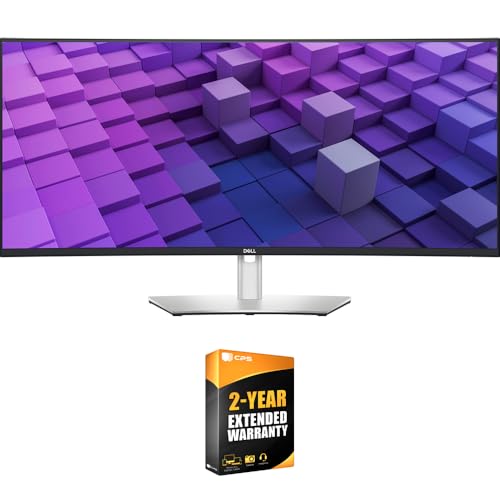
Dell 38-Inch IPS Black Curved Monitor
Best for: Multitasking and color-critical work
- Ports
- USB-C
- Screen Size
- 37.5"
- Resolution
- 3840×1600
- Panel Type
- IPS Black
- Aspect Ratio
- 21:9
- Features
- Curved Screen
The Dell U3824DW is a 37.5-inch ultrawide monitor with a 21:9 aspect ratio and WQHD+ resolution. It features an IPS Black panel for a 2000:1 contrast ratio and covers 98% DCI-P3. The USB-C port delivers 90W power delivery. You will appreciate the built-in 2.5GbE Ethernet and dual 9W speakers. This model suits users needing a large, immersive display for multitasking.
- 37.5-inch WQHD+ curved screen with 2000:1 contrast ratio
- USB-C port with 90W power delivery
- 98% DCI-P3 color coverage
- Integrated 2.5GbE Ethernet port
- Heavier build at 29.3 pounds
- Larger physical footprint than 27-inch or 34-inch models
- You need a large ultrawide screen for multitasking
- You want a single cable for video and 90W charging
- You require built-in Ethernet for stable networking
- You prefer a standard 16:9 aspect ratio
- You need a smaller desk footprint
- You want a higher refresh rate than standard
Verdict: Dell U3824DW 37.5-Inch Curved USB-C Monitor delivers a massive 21:9 canvas for complex workflows. It fits professionals who value color accuracy and integrated networking over compact size.

Dell P3426WEB 34" Curved UWQHD Webcam Monitor
Best for: Remote workers needing a webcam and ultrawide screen
- Ports
- HDMI, DisplayPort, USB-C
- Screen Size
- 34.1-inch
- Resolution
- 3440 x 1440
- Panel Type
- IPS
- Response Time
- 5ms
- Features
- Curved Screen, Webcam
The Dell Pro P3426WEB is a 34.1-inch curved ultrawide monitor with UWQHD resolution and an IPS panel. It includes a built-in webcam and USB-C connectivity for streamlined desk setups. The 5ms response time suits business tasks and media viewing. At 22 pounds, it is a substantial display. This model fits users who want an integrated camera and wide workspace without a hub.
- 34.1-inch curved UWQHD (3440 x 1440) IPS display
- Integrated webcam for video conferencing
- USB-C, HDMI, and DisplayPort connectivity
- 5ms response time for smooth visuals
- 22-pound weight is heavier than many 27-inch competitors
- 5ms response time is slower than the 120Hz models on this list
- UWQHD resolution is lower than the 4K panels in other picks
- You need a built-in webcam for remote work
- You want a single-cable USB-C connection for a laptop
- You prefer a curved ultrawide screen for multitasking
- You require 4K UHD resolution for detailed graphic work
- You need a high-refresh rate for gaming
- You prefer a lightweight monitor for frequent moving
Verdict: Dell Pro P3426WEB 34-inch Curved UWQHD offers a practical ultrawide workspace with a convenient webcam. It is best for remote workers who prioritize video calls and screen real estate over high refresh rates.

Dell 34-Inch Curved Thunderbolt 120Hz IPS Monitor
Best for: multitasking and immersive ultrawide viewing
- Ports
- USB-C
- Screen Size
- 34.1"
- Resolution
- 3440 x 1440
- Refresh Rate
- 120Hz
- Panel Type
- IPS
- Response Time
- up to 5ms
The Dell UltraSharp U3425WE is a 34-inch curved IPS monitor featuring a 21:9 aspect ratio. It delivers UWQHD resolution at 120Hz with a 5ms response time. The high 2000:1 contrast ratio enhances image depth. You will appreciate the Thunderbolt 4 connectivity for versatile device linking. This setup suits users seeking an immersive, high-refresh-rate ultrawide display for productivity or gaming.
- 120Hz refresh rate for smooth visuals
- 2000:1 contrast ratio for vivid images
- Thunderbolt 4 port for versatile connectivity
- 34-inch curved IPS panel
- Heavier build at 33.5 pounds
- Slower 5ms response time compared to faster gaming monitors
- Larger footprint at 37.5 inches wide
- You need a wide 21:9 screen for multitasking
- You want a high 120Hz refresh rate for smooth motion
- You prefer a curved display for immersion
- You require a standard 16:9 aspect ratio
- You need a lighter monitor under 25 pounds
- You prefer a flat screen over a curved one
Verdict: Dell UltraSharp U3425WE 34-inch Curved Monitor fits users who prioritize a large, immersive ultrawide display with high refresh rates and robust connectivity options.

Dell 43-Inch 4K USB-C Hub Monitor
Best for: multi-PC workflows and large display partitions
- Ports
- USB-C
- Resolution
- 4K
- Dimensions
- 2.5 × 38.1 × 22.1 inches
- Weight
- 54.5 pounds
This 43-inch 4K UHD monitor offers a massive canvas for productivity. It features a wide 38.1-inch width and supports iMST for up to four FHD partitions. You can switch between multiple PCs using the built-in KVM. The design includes pop-out USB-A and USB-C ports for easy access. At 54.5 pounds, it is a substantial piece of equipment that anchors your workspace.
- 43-inch 4K UHD display provides extensive screen real estate
- iMST technology allows up to four FHD partitions
- Built-in KVM enables switching between multiple PCs
- Pop-out front USB-A and USB-C ports
- 54.5-pound weight makes it significantly heavier than smaller models
- 38.1-inch width requires more desk space than 27-inch options
- You need a single large screen for multi-PC workflows
- You want to partition your display for multitasking
- You prefer integrated KVM switching without extra hardware
- You have limited desk depth or width
- You prefer a lightweight monitor for easy movement
- You need a standard 16:9 aspect ratio
Verdict: Dell UltraSharp 43-inch 4K USB-C Hub Monitor suits professionals who need a wide canvas for multi-PC setups. It fits users who value partitioned displays and integrated KVM over portability.

Dell P2726DEV 27-inch USB-C Monitor
Best for: Users needing a built-in webcam and Ethernet port
- Ports
- USB-C
- Screen Size
- 27"
- Resolution
- 2560 x 1440
- Refresh Rate
- 100 Hz
- Panel Type
- IPS
- Response Time
- 5 ms (GtG)
This 27-inch Dell monitor uses an IPS panel to deliver QHD resolution at 100Hz. It includes a built-in 5MP Sony Starvis webcam and a Gigabit Ethernet port. The display offers 350 nits of brightness and covers 16.7 million colors. You get a practical hub setup with USB-C connectivity. This model suits professionals who need video conferencing and stable wired networking alongside a clear, responsive screen.
- 2560 x 1440 resolution at 100Hz refresh rate
- Built-in 5MP Sony Starvis QHD webcam
- Integrated RJ45 Gigabit Ethernet port
- IPS panel with 350 nits brightness
- 100Hz refresh rate is lower than the 120Hz options on this list
- 5ms response time is slower than the 4ms panel on the top pick
- 350 nits brightness is lower than the 400+ nits common in premium models
- You need a built-in webcam for video calls
- You require a wired Gigabit Ethernet connection
- You prefer a 27-inch QHD display
- You need a 120Hz or higher refresh rate
- You require 4K UHD resolution
- You want a curved screen
Verdict: Dell P2726DEV 27-inch USB-C Monitor fits users who prioritize integrated video and networking hardware over maximum speed. It is a solid choice for office work where a webcam and Ethernet port save desk space.

Dell P2426HEV 24-inch 120Hz IPS Monitor
Best for: Compact setups with video call needs
- Ports
- USB-C
- Screen Size
- 24"
- Resolution
- 1920 x 1080
- Refresh Rate
- 120 Hz
- Panel Type
- IPS
- Features
- Webcam
The Dell P2426HEV is a 24-inch IPS monitor with a 120Hz refresh rate and 1080p resolution. It includes a built-in webcam and USB-C hub. This compact display suits users who need video calls and peripheral connectivity in a small footprint. The IPS panel provides reliable color accuracy for general tasks.
- 120Hz refresh rate for smoother motion
- Integrated webcam for video conferencing
- Built-in USB-C hub for device connectivity
- IPS panel for wide viewing angles
- 1080p resolution is lower than the 4K and WQHD options on this list
- 24-inch screen size is smaller than the 27-inch and larger displays available
- 1920 x 1080 resolution may lack sharpness for detailed work compared to higher pixel counts
- You need a compact monitor for a small desk
- You require a built-in webcam for meetings
- You want a USB-C hub for simplified cable management
- You need 4K or WQHD resolution for detailed work
- You prefer a screen larger than 24 inches
- You want a curved display for immersive viewing
Verdict: Dell P2426HEV 24-inch Webcam Monitor fits users who prioritize a compact size and integrated webcam over high resolution. It is a practical choice for small spaces where video calls are frequent.
Specifications side by side

| Spec | Dell 27-Inch 4K 120Hz USB-C Monitor | Dell 27-Inch 1440p USB-C Monitor | Dell 27-Inch 4K 120Hz IPS Monitor | Dell UltraSharp 27-Inch 120Hz 1440p Monitor | Dell 32-Inch 4K 100Hz IPS Monitor | Dell U4323QE 43-inch 4K USB-C Hub Monitor | Dell 38-Inch IPS Black Curved Monitor | Dell P3426WEB 34" Curved UWQHD Webcam Monitor | Dell 34-Inch Curved Thunderbolt 120Hz IPS Monitor | Dell 43-Inch 4K USB-C Hub Monitor | Dell P2726DEV 27-inch USB-C Monitor | Dell P2426HEV 24-inch 120Hz IPS Monitor |
|---|---|---|---|---|---|---|---|---|---|---|---|---|
| Screen Size | 27" | 27-inch | 27-Inch | 27" | 31.5-Inch | 42.5'' | 37.5" | 34.1-inch | 34.1" | – | 27" | 24" |
| Resolution | 3840×2160 | 2560×1440 | 3840 x 2160 | WQHD | 3840 x 2160 | 4K | 3840×1600 | 3440 x 1440 | 3440 x 1440 | 4K | 2560 x 1440 | 1920 x 1080 |
| Refresh Rate | 120Hz | 75Hz | 120Hz | 120 Hz | 100Hz | – | – | – | 120Hz | – | 100 Hz | 120 Hz |
| Panel Type | IPS | – | IPS Black | – | IPS | – | IPS Black | IPS | IPS | – | IPS | IPS |
| Response Time | 4ms | 4Ms | 5ms | 5ms | 5ms | – | – | 5ms | up to 5ms | – | 5 ms (GtG) | – |
| Aspect Ratio | – | – | – | – | 16:9 | – | 21:9 | – | 21:9 | – | 16:9 | – |
| Variable Refresh Rate | AMD FreeSync Premium | AMD FreeSync | – | – | – | – | – | – | – | – | – | – |
| Ports | USB-C, HDMI, DisplayPort | USB-C, USB 3.2 Gen 1 Type-A | HDMI 2.1, USB-C, USB-A, Ethernet | HDMI, DisplayPort, Thunderbolt, USB-C | HDMI 2.1, DisplayPort 1.4, USB-C | – | USB-C, USB-A, HDMI, DisplayPort, RJ45 | HDMI, DisplayPort, USB-C | HDMI, DisplayPort, Thunderbolt 4, USB-C | USB-A, USB-C | HDMI, DisplayPort, USB-C, 1 x RJ45 GbE | USB-C |
| Features | – | Built-in Speakers | – | – | – | – | Curved Screen | Curved Screen, Webcam | Curved Screen | – | Webcam | Webcam |
| Size | S2725QC | 27 Inch | 27.0 inches | – | – | – | – | – | – | 22.1" x 38.1" x 2.5" | – | 24 |
| Dimensions | 7.89 × 24.1 × 15.3 inches | 6.88 × 24.1 × 15.8 inches | 2.19 × 24.1 × 13.9 inches | 7.57 × 24.1 × 15.2 inches | 8.46 × 28.1 × 24.4 inches | 10.1 × 38.1 × 23.4 inches | 42 × 21 × 9 inches | 32.1 × 9.02 × 22.6 inches | 37.5 × 18 × 9 inches | 2.5 × 38.1 × 22.1 inches | 7.28 × 24.1 × 16.3 inches | – |
| Weight | 14.8 pounds | 11.9 pounds | 21.4 pounds | 11.5 pounds | 21.1 pounds | 38.8 pounds | 29.3 pounds | 22 pounds | 33.9 pounds | 54.5 pounds | 15.3 pounds | 8.58 pounds |
| Color | Ash White | Platinum Silver | UHD-120Hz | Silver | Black | – | Platinum Silver | black | Silver | Information Not Available | black | Preto |
| Model | S2725QC | S2722DC | U2725QE | U2724DE | DELL-P3225QE | DELL-U4323QE | E99DELU3824DW | DELL-P3426WEB | U3425WE UltraSharp | U4323QE | P2726DEV | P2426HEV |
If you require wider aspect ratios for multitasking, consider the best dell ultrawide monitors with USB-C.
How to choose the right USB-C monitor
Check USB-C power delivery
You need to verify if the port charges your laptop. Some models provide enough power for daily use, while others do not. The Dell P3225QE offers 90W charging, which handles most laptops efficiently. The Dell S2725QC also supports single-cable connectivity. You should check the wattage in the specifications to ensure your device stays powered without a separate adapter. This simplifies your desk by reducing cable clutter.
Match resolution to screen size
You should pair resolution with physical size for sharp text. A 27-inch panel with 4K UHD resolution, like the Dell S2725QC, offers high clarity. The Dell S2722DC uses 1440p QHD on the same size, which is suitable for budget setups. Larger screens, such as the 43-inch Dell U4323QE, also use 4K UHD. You need higher resolution on bigger panels to maintain detail. Choose based on your viewing distance and text clarity needs.
Evaluate refresh rate for motion
You should consider the refresh rate if you game or watch fast motion. The Dell S2725QC and Dell U2725QE both offer 120Hz, providing smooth visuals. The Dell S2722DC runs at 75Hz, which is standard for office work. The Dell P3225QE provides 100Hz. Higher numbers reduce blur during movement. You should select a higher rate if you play games or prefer smoother cursor movement. Standard office tasks do not require high refresh rates.
Look for Thunderbolt 4 ports
You should check for Thunderbolt 4 if you need high-speed data. The Dell U2725QE and Dell U2724DE feature this port. It offers faster connectivity than standard USB-C. You can connect multiple devices with higher bandwidth. The Dell U3425WE also includes Thunderbolt 4. You should prioritize this feature for professional workflows. It ensures reliable performance for data-heavy tasks. Standard USB-C ports are sufficient for basic video and charging needs.
Consider built-in features
You should look for integrated hardware to save desk space. The Dell P2726DEV and Dell P2426HEV include built-in webcams. The Dell S2722DC has built-in speakers. The Dell P3426WEB combines a webcam with an ultrawide screen. These features reduce the need for external peripherals. You should choose models with built-in tools if you work from home. This creates a cleaner workspace. Check the attributes list to confirm which features are included in each model.
Frequently asked questions
Which Dell USB-C monitor is best for 4K productivity?
The Dell S2725QC is the top choice for balanced 4K productivity. It features a 27-inch IPS panel with 4K UHD resolution and a 120Hz refresh rate. This combination supports smooth motion and clear text. It is ideal for users who want a clean single-cable setup without needing ultrawide field of view.
Do Dell USB-C monitors support laptop charging?
Yes, most models support charging, but wattage varies. The Dell P3225QE provides 90W charging, which handles most laptops efficiently. Other models like the S2722DC and U2725QE also use USB-C for connectivity. You should verify the specific power delivery specs for your laptop model before purchasing to ensure compatibility.
What is the difference between USB-C and Thunderbolt 4?
Thunderbolt 4 offers higher bandwidth and more robust connectivity than standard USB-C. The Dell U2725QE and U2724DE feature Thunderbolt 4 ports for high-speed data transfer and video output. Standard USB-C models like the S2725QC provide essential video and power delivery but with lower maximum speeds. Choose Thunderbolt 4 for professional hubs.
Are there ultrawide Dell monitors with USB-C?
Yes, several ultrawide options are available for multitasking. The Dell U3824DW is a 38-inch curved IPS Black monitor with a 21:9 aspect ratio. The Dell P3426WEB offers a 34-inch curved UWQHD display with a built-in webcam. These models provide expansive screen real estate for complex workflows and video calls.
Which Dell monitor is best for large screen real estate?
The Dell U4323QE is ideal for users needing massive 4K screen space. It is a 43-inch 4K USB-C hub monitor designed for complex multitasking. It fits professionals managing multiple systems who prioritize size over portability. The monitor weighs 38.8 pounds and offers a wide canvas for partitioned displays.
Do any Dell USB-C monitors have built-in webcams?
Several models include integrated webcams for remote work. The Dell P3426WEB features a webcam on its 34-inch curved ultrawide screen. The Dell P2726DEV includes a webcam on a 27-inch model. The Dell P2426HEV also has a built-in webcam on a compact 24-inch display. These save desk space for video calls.
What refresh rates do these Dell monitors offer?
Refresh rates vary by model. The S2725QC and U2725QE offer 120Hz for smooth motion. The U3425WE also provides a 120Hz refresh rate on its ultrawide panel. The P2426HEV features 120Hz on a 24-inch screen. Standard productivity models like the S2722DC offer 75Hz, while the P3225QE provides 100Hz.
Which monitor is best for ergonomic adjustments?
The Dell S2722DC is noted for ergonomic adjustability. It is a 27-inch 1440p QHD monitor with FreeSync support. It fits users who prioritize ergonomic needs and single-cable laptop connectivity. The U2725QE also offers precise ergonomic adjustments for professional use. Both models support clean desk setups with efficient cable management.
See also