BenQ 32-Inch 4K IPS Designer Monitor Review: Who It Fits and Who Should Skip It
As Amazon Associates, we earn from qualifying purchases. This means we may receive a small commission at no extra cost to you if you click through and make a purchase.
As an Amazon Associate we earn from qualifying purchases. Links on this page are affiliate links.
This benq 32 inch 4k ips designer monitor review covers the BenQ PD3205U. It is a 32-inch display built for creative work. The panel offers 4K UHD resolution for sharp detail. Color accuracy is a key feature, with 99% sRGB and Rec.709 coverage. You get Calman Verified and Pantone Validated results. The screen uses IPS technology for consistent viewing angles. Connectivity includes USB-C with 90W power delivery. This setup supports Mac users well. The monitor includes ergonomic adjustments and a Hotkey Puck for quick changes. It aims to streamline your creative workflow efficiently.
- 99% sRGB and Rec.709 color coverage
- Calman Verified and Pantone Validated certifications
- USB-C with 90W power delivery
- Hotkey Puck G2 for quick settings
- KVM Switch and DualView support
Good fit for
This monitor suits designers and video editors who need precise color representation. The 4K resolution and wide color gamut ensure your projects look accurate. Mac users will appreciate the Mac-Ready features and USB-C connectivity. If you work with multiple computers, the KVM Switch helps manage inputs easily. The ergonomic stand allows you to adjust height, tilt, and pivot. This flexibility supports long work sessions. Professionals who value industry-standard color accuracy will find this setup reliable for daily tasks.
Who can skip it
You should look at another option if you need high refresh rates for gaming. This monitor is designed for productivity, not fast motion. If you require more than one USB-C port, you may need a hub. The panel is IPS, which may not offer the deep blacks of OLED. Users who prefer a smaller screen might find the 32-inch size too large for their desk. If you do not need Mac-specific features, other models may be more cost-effective. Consider your specific workflow needs before buying.
Verdict
The BenQ PD3205U delivers solid color accuracy and useful productivity features for creative professionals. It is a strong choice for Mac users who prioritize precision over gaming performance.
Key specs explained for you

Resolution: 4K UHD
This display offers 3840×2160 pixels. You get four times the detail of standard 1080p screens. Text remains crisp and images stay sharp. Designers benefit from seeing fine lines and small UI elements clearly. This resolution is standard for high-end creative monitors. Compare this to lower resolutions if you need more screen real estate for multitasking.
Panel Type: IPS
In-Plane Switching technology provides wide viewing angles. Colors stay consistent even when you look at the screen from the side. This is ideal for collaborative work or when you move around your desk. IPS panels are the industry standard for photo and video editing. Other panel types may shift colors when viewed off-center, which is less reliable for precise work.
Color Coverage: 99% sRGB & Rec.709
This monitor reproduces nearly all colors used in web design and standard video. You can trust that what you see matches industry standards. This is essential for graphic designers and video editors. It ensures your work looks correct on most devices. Compare this to monitors with lower coverage, which may show washed-out or inaccurate colors that do not translate well to other screens.
Connectivity: USB-C with 90W Power Delivery
A single cable connects your computer and powers your laptop. You can plug in your Mac and charge it simultaneously. This reduces cable clutter on your desk. It supports video and data transfer through one connection. This feature is highly beneficial for Mac users who want a clean setup. Compare this to monitors that require separate power bricks and data cables.
Size: 32 Inch
This large screen size provides ample space for complex projects. You can view multiple windows or timelines side by side. It is suitable for desktop setups where desk space allows. The size enhances immersion for video editing and design work. Compare this to smaller 27-inch models if you have limited desk space. A 32-inch display requires a higher resolution to maintain sharp text clarity.
Design and build specs

According to the listing, the BenQ PD3205U measures 11.1 inches in width, 9.13 inches in height, and 3.98 inches in depth. It weighs 20.7 pounds. The finish is described as metallic grey. This substantial weight suggests a sturdy base. You may need a stable desk surface to support it. The dimensions indicate a footprint that fits standard workspaces. It is not a compact travel display.
The monitor includes tilt, swivel, pivot, and height adjustments. These features allow you to position the screen for ergonomic comfort. You can align the display with your eye level or switch to portrait mode. This flexibility supports long creative sessions. The anti-glare coating helps reduce distractions from ambient light. You get a clear view without excessive reflections.
Controls are managed via the Hotkey Puck G2. This device streamlines input selection and settings. You also have access to KVM Switch and DualView functions. These tools help manage multiple devices efficiently. The layout prioritizes workflow speed. You can switch between inputs quickly without digging through on-screen menus. The design focuses on utility for designers. It supports a organized and efficient desk setup.
Setup and everyday use guide

Connecting this monitor is straightforward thanks to its versatile port selection. You can link devices via USB-C, HDMI 2.0, or DisplayPort 1.4. The USB-C connection is particularly useful for modern laptops, as it supports up to 90W power delivery. This allows you to charge your computer while sending video and data signals through a single cable. DisplayPort Alt Mode ensures compatibility with devices that require direct digital video output. For older hardware, the HDMI and DisplayPort inputs provide reliable integration.
Daily operation is streamlined by the included Hotkey Puck G2. This external controller lets you adjust settings without navigating on-screen menus. You can switch between inputs or toggle features quickly. The monitor also includes a KVM switch, which lets you control two computers with one keyboard and mouse. DualView mode allows you to split the screen for multitasking. This setup reduces cable clutter and keeps your workflow efficient.
Ergonomics play a significant role in everyday comfort. The stand offers tilt, swivel, pivot, and height adjustments. You can position the screen at the ideal angle for your desk. The anti-glare coating helps minimize distractions during long work sessions. The monitor is optimized for macOS, ensuring seamless compatibility with Apple systems. ICC Sync helps maintain color consistency across your workflow. These features combine to create a stable, productive environment for creative tasks.
Before You Buy This Monitor
This BenQ PD3205U is designed for creative professionals who need precise color reproduction. It works well with macOS, but you should verify your specific device compatibility before purchasing. The USB-C port delivers up to 90W of power, which is sufficient for many laptops. However, if you use a desktop computer or a tablet with lower power requirements, you will need separate adapters or hubs. The monitor includes a Hotkey Puck G2 for quick adjustments. You should keep this accessory safe, as it is essential for efficient workflow management. Cleaning the anti-glare screen requires a soft, dry cloth. Avoid harsh chemicals that might damage the coating. When comparing this 1 options in our guide, note that this model emphasizes color accuracy over pure gaming speed. It fits best in a studio or home office environment where image fidelity matters more than high refresh rates. Ensure your desk has enough depth to support its 3.98-inch depth and 20.7-pound weight comfortably.
Check before you buy
- Verify USB-C power delivery matches your laptop needs
- Confirm macOS compatibility with your specific operating system version
- Check desk depth for the 3.98-inch monitor depth
- Ensure you have the Hotkey Puck G2 for settings
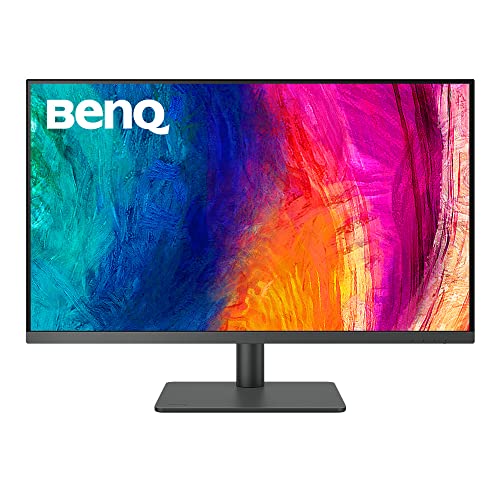
BenQ 32-Inch 4K IPS Designer Monitor
Best for: designers needing accurate color and USB-C
- Screen Size
- 31.5"
- Resolution
- 3840×2160
- Panel Type
- IPS
- Ports
- USB-C, HDMI 2.0, DisplayPort 1.4
- Features
- USB Hub, Hotkey Switching
- Use
- Mac
This 32-inch 4K UHD IPS monitor delivers precise color for creative work. It covers 99% sRGB and Rec.709 with Delta E ≤3 accuracy. USB-C connectivity provides 90W power delivery and data transfer. The stand allows tilt, swivel, pivot, and height adjustments. It includes a Hotkey Puck G2 for quick settings changes. This display suits designers needing reliable color fidelity and ergonomic flexibility.
- 32-inch 4K UHD (3840×2160) IPS panel
- 99% sRGB and Rec.709 color coverage
- USB-C with 90W power delivery
- Tilt, swivel, pivot, and height adjustments
- Weighs 20.7 pounds
- Only HDMI 2.0 and DisplayPort 1.4 ports
- 99% color coverage rather than 100%
- You need accurate color for design projects
- You want USB-C power delivery for your laptop
- You require ergonomic stand adjustments
- You need higher refresh rates for gaming
- You prefer a smaller 27-inch footprint
- You require DisplayPort 2.0 connectivity
Verdict: BenQ 32-Inch 4K IPS Designer Monitor fits designers who prioritize color accuracy and ergonomic flexibility. It supports workflows requiring USB-C power delivery and precise visual output.
Specifications side by side
| Spec | BenQ 32-Inch 4K IPS Designer Monitor |
|---|---|
| Screen Size | 31.5" |
| Resolution | 3840×2160 |
| Panel Type | IPS |
| Ports | USB-C, HDMI 2.0, DisplayPort 1.4 |
| Features | USB Hub, Hotkey Switching |
| Use | Mac |
| Size | 32 Inch |
| Operating System | macOS |
| Dimensions | 3.98 × 11.1 × 9.13 inches |
| Weight | 20.7 pounds |
| Color | Metallic Grey |
| Model | PD3205U |
Frequently asked questions
Is this monitor good for Mac users?
Yes, the BenQ PD3205U is optimized for macOS. The listing explicitly states it is designed for Mac use. This ensures better compatibility with Apple operating systems. You get a seamless experience when connecting to your computer. The display supports your workflow without extra configuration hurdles.
Does it support USB-C power delivery?
Yes, it features a USB-C port that supports power delivery. This allows you to connect your laptop and charge it simultaneously. The port also handles video and data signals. This reduces cable clutter on your desk. You can simplify your setup by using a single connection for multiple needs.
What is the panel type and color performance?
It uses an IPS panel for wide viewing angles. The display covers 99% of the sRGB and Rec.709 color spaces. This ensures accurate color reproduction for design work. You get consistent colors from different viewing positions. This makes it suitable for tasks requiring precise visual output.
How large is the screen?
The screen size is 32 inches. This provides a large canvas for creative projects. The 4K UHD resolution ensures sharp detail at this size. You get ample space for multiple windows or detailed designs. The physical dimensions are 11.1 inches wide and 9.13 inches high.
Does it have a built-in USB hub?
Yes, the monitor includes a USB Hub feature. This allows you to connect multiple peripherals easily. You can attach drives or other devices directly to the monitor. This adds convenience to your workspace. It helps keep your desk organized by centralizing connections.
What ports are available for connection?
It offers DisplayPort and USB-C ports. You can connect various devices using these options. The USB-C port supports power delivery and video. DisplayPort provides another reliable video connection. This versatility ensures compatibility with most modern computers and laptops.
Is it heavy and stable?
The monitor weighs 20.7 pounds. This substantial weight suggests a sturdy base. It should remain stable on your desk during use. The metallic grey finish adds to its solid appearance. You get a reliable display that does not wobble easily.
What is the model number?
The model number is BenQ PD3205U. This identifies the specific 32-inch 4K IPS design. It helps you find the correct accessories or drivers. You can use this number to verify compatibility with your setup. It distinguishes this model from other BenQ displays.
See also