Best ViewSonic 100Hz Monitors: 2 Spec-Based Picks
As Amazon Associates, we earn from qualifying purchases. This means we may receive a small commission at no extra cost to you if you click through and make a purchase.
As an Amazon Associate we earn from qualifying purchases. Links on this page are affiliate links.
Finding the best ViewSonic 100Hz monitors requires looking closely at published specifications. We compared 2 models to help you choose based on real data. The ViewSonic VG2758-2K 27-Inch 1440p Docking Monitor leads because it includes Ethernet and 100W USB-C charging. These specs support a streamlined office setup without extra cables. The second pick, the VG2751, offers a 27-inch 1080p screen with USB-C for workers who prioritize size over sharpness. This guide helps you decide which display matches your connectivity and resolution needs.
Choose resolution based on your needs

You must pick between 1440p and 1080p sharpness. The top pick offers 1440p QHD resolution for clearer text and images. It also includes an Ethernet port and 100W USB-C charging. The second option provides 1080p FHD resolution on a 27-inch screen. It lacks Ethernet but keeps USB-C connectivity. Choose 1440p if you need higher clarity and wired networking.
| # | Product | Best for | Price |
|---|---|---|---|
| 1 | ViewSonic VG2758-2K 27-Inch 1440p Docking Monitor Best overall | Office workers needing Ethernet and 100W charging | |
| 2 | ViewSonic VG2751 27-Inch 1080p Monitor Best 1080p fhd | Office workers needing USB-C and a 27-inch screen |
The best fit for you

- You need Ethernet and 100W charging for office work – ViewSonic VG2758-2K 27-Inch 1440p Docking Monitor – It offers Ethernet ports and 100W USB-C charging for a streamlined setup.
- You want a large 27-inch screen with USB-C – ViewSonic VG2751 27-Inch 1080p Monitor – It provides a 27-inch IPS panel with USB-C connectivity for convenience.
- You prefer 1440p resolution for sharper image quality – ViewSonic VG2758-2K 27-Inch 1440p Docking Monitor – It delivers 1440p QHD resolution for clearer text and graphics.

ViewSonic VG2758-2K 27-Inch 1440p Docking Monitor
Best for: Office workers needing Ethernet and 100W charging
- Refresh Rate
- 100Hz
- Screen Size
- 27"
- Resolution
- 2560 x 1440
- Panel Type
- IPS
- Ports
- USB-C, HDMI, DisplayPort, RJ45
- Features
- USB Hub
This ViewSonic monitor delivers a 27-inch 1440p IPS display with a 100Hz refresh rate. It connects via USB-C with 100W charging and includes an Ethernet port. The stand offers height, tilt, swivel, and rotation adjustments. Integrated flicker-free technology and a blue light filter help reduce eye strain during long work sessions. It suits professionals needing a versatile, single-cable docking solution.
- 27-inch 1440p IPS panel with 100Hz refresh rate
- USB-C port with 100W power delivery
- Built-in RJ45 Ethernet port
- Ergonomic stand with height, tilt, swivel, and rotation
- Flicker-free technology and blue light filter
- 16.4-pound weight is heavier than lighter alternatives
- 24.1-inch width requires more desk space than 24-inch models
- You need a single cable for video, data, and 100W charging
- You require an Ethernet port for wired network stability
- You want a 1440p resolution for detailed professional work
- You prefer a lighter monitor under 15 pounds
- You only need a 24-inch display size
- You do not require wired Ethernet connectivity
Verdict: ViewSonic VG2758-2K 27-Inch 1440p Monitor fits professionals who need a sturdy, feature-rich display with robust connectivity options like Ethernet and 100W USB-C charging for a streamlined office setup.
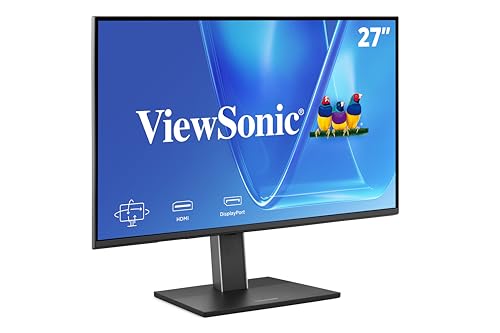
ViewSonic VG2751 27-Inch 1080p Monitor
Best for: Office workers needing USB-C and a 27-inch screen
- Refresh Rate
- 100Hz
- Screen Size
- 27-Inch
- Resolution
- 1920 x 1080
- Panel Type
- IPS
- Ports
- USB-C, HDMI, DisplayPort, VGA
- Features
- Height-Adjustable Stand, USB Hub
The ViewSonic VG2751 is a 27-inch 1080p monitor with a 100Hz refresh rate and IPS panel. It uses a single USB-C cable for video, data, and power. The stand adjusts for height, tilt, swivel, and rotation. It includes Flicker-Free technology and a Blue Light Filter for eye comfort. This model suits office users needing a clear, stable display.
- 27-inch 1080p IPS panel with 100Hz refresh rate
- USB-C port supports video, data, and power delivery
- Height-adjustable stand with tilt, swivel, and rotate options
- Integrated Flicker-Free and Blue Light Filter features
- 1080p resolution is lower than the 1440p option on this list
- 15-pound weight is heavier than lighter 24-inch variants
- 27-inch screen size is larger than the 24-inch option
- You want a large 27-inch screen for office work
- You need a single USB-C cable for your laptop
- You prefer adjustable ergonomics for a healthy workspace
- You require 1440p resolution for sharper text
- You need a smaller 24-inch footprint for your desk
- You prioritize higher refresh rates for gaming
Verdict: ViewSonic VG2751 27 Inch 1080p Monitor fits office workers who value screen real estate and USB-C convenience. It is a practical choice for those who do not need 1440p sharpness.
Specifications side by side

| Spec | ViewSonic VG2758-2K 27-Inch 1440p Docking Monitor | ViewSonic VG2751 27-Inch 1080p Monitor |
|---|---|---|
| Screen Size | 27" | 27-Inch |
| Resolution | 2560 x 1440 | 1920 x 1080 |
| Refresh Rate | 100Hz | 100Hz |
| Panel Type | IPS | IPS |
| Ports | USB-C, HDMI, DisplayPort, RJ45 | USB-C, HDMI, DisplayPort, VGA |
| Features | USB Hub | Height-Adjustable Stand, USB Hub |
| Use | Business & Office, Mac, Office, Home Office | Business & Office, Mac, Office, Home Office |
| Size | 14.2" x 24.1" x 1.8" | 27 Inch |
| Operating System | macOS | macOS |
| Dimensions | 8.6 × 24.1 × 20.7 inches | 8.6 × 24.1 × 15.8 inches |
| Weight | 16.4 pounds | 15 pounds |
| Color | Black | Black |
| Model | VG2758-2K | VG2751 |
Spec-Based Buying Guide for ViewSonic 100Hz Displays
Choose Your Resolution
You must decide between 1440p and 1080p clarity. The ViewSonic VG2758-2K offers 1440p QHD resolution, providing sharper text and images for detailed work. The ViewSonic VG2751 uses 1080p FHD, which is sufficient for standard tasks but less crisp. Select 1440p if you need high detail. Choose 1080p if you prioritize budget or do not require pixel-perfect sharpness for your daily applications.
Verify Connectivity Needs
Check the available ports for your devices. The ViewSonic VG2758-2K includes an Ethernet port, allowing a wired internet connection without a separate adapter. It also features USB-C with 100W charging. The ViewSonic VG2751 lacks Ethernet but still offers HDMI, DisplayPort, and USB-C. If you need stable wired networking, prioritize the model with the Ethernet jack. Otherwise, wireless or existing network setups suffice.
Assess Stand Adjustability
Ergonomics matter for long office sessions. The ViewSonic VG2751 comes with a height-adjustable stand, letting you raise or lower the screen for comfortable viewing. This feature helps reduce neck strain. The VG2758-2K data does not explicitly list height adjustment in its features list. If you require a customizable viewing angle without buying a separate arm, the VG2751 is the practical choice for your setup.
Check USB Hub Utility
Both models include a USB hub feature. This allows you to connect peripherals like keyboards or mice directly to the monitor. It reduces cable clutter on your desk. The ViewSonic VG2758-2K also provides 100W USB-C charging, which can power a laptop. The VG2751 offers USB-C connectivity for data and power, though specific wattage is not listed. Use the hub to streamline your workspace and keep your desk tidy.
Confirm macOS Compatibility
Ensure the monitor works with your operating system. Both the ViewSonic VG2758-2K and the VG2751 list macOS in their operating system compatibility. This ensures proper display scaling and functionality on Apple devices. If you use a Mac, either model will integrate well. Verify that your specific Mac port matches the monitor inputs, such as HDMI or USB-C, for a seamless connection.
Frequently asked questions
Which ViewSonic 100Hz monitor is best for office work?
The ViewSonic VG2758-2K is the top choice for office environments. It features a 1440p QHD resolution for sharp text and includes an Ethernet port. This model also provides 100W USB-C charging, allowing you to power your laptop while connected. Its sturdy build supports a streamlined home office setup.
Does the ViewSonic VG2751 support USB-C?
Yes, the ViewSonic VG2751 includes USB-C connectivity. This port allows for convenient data transfer and power delivery to compatible devices. The monitor also features an HDMI and DisplayPort input. It is designed for users who value screen real estate and simple connectivity options for their workspace.
What resolution does the ViewSonic VG2758-2K offer?
The ViewSonic VG2758-2K offers a 1440p QHD resolution. This provides higher clarity for text and images compared to standard 1080p displays. The 27-inch panel size ensures ample screen space for multitasking. This resolution is ideal for professionals who need detailed visuals for their daily tasks.
Is the ViewSonic VG2751 an IPS panel?
Yes, the ViewSonic VG2751 uses an IPS panel type. This technology typically offers wide viewing angles and consistent color reproduction. It is suitable for office work and general computing. The monitor combines this panel type with a 100Hz refresh rate for smooth performance in standard applications.
Can I connect an Ethernet cable to the VG2758-2K?
Yes, the ViewSonic VG2758-2K includes an Ethernet port. This allows you to connect directly to your network for a stable internet connection. You do not need a separate network adapter. This feature supports a cleaner desk setup by reducing the number of cables required for your workspace.
What is the screen size of the ViewSonic VG2751?
The ViewSonic VG2751 features a 27-inch screen. This size provides generous viewing area for office tasks and media consumption. It uses 1080p FHD resolution, which is sufficient for standard productivity work. The large display helps reduce eye strain by allowing you to view more content at once.
Does the top pick monitor have a USB hub?
Yes, the ViewSonic VG2758-2K includes a USB hub feature. This allows you to connect multiple peripherals to the monitor instead of your computer. It helps manage cable clutter and simplifies your setup. The hub works alongside the USB-C connection for enhanced connectivity options in your office environment.
See also