Acer Nitro 34in WQHD 3440×1440 Alternatives: 6 Similar Picks Compared
As Amazon Associates, we earn from qualifying purchases. This means we may receive a small commission at no extra cost to you if you click through and make a purchase.
As an Amazon Associate we earn from qualifying purchases. Links on this page are affiliate links.
The Acer Nitro 34in WQHD 3440×1440 alternatives list helps you find monitors with similar ultrawide specifications. You might look elsewhere if you need a higher refresh rate, a different panel type, or a specific brand reputation. The original monitor offers a 180Hz refresh rate and FreeSync support for smooth gaming. It also includes a height-adjustable stand and a curved screen for better immersion. These features make it a solid choice for many users.
We selected 6 alternatives that share key specs with the Acer Nitro. Each option on this list matches the ultrawide QHD resolution and curved design. Some picks offer faster refresh rates, while others provide different ergonomic adjustments or panel technologies. You can compare these options to find the right balance of speed, size, and comfort for your setup. The following section breaks down each monitor’s published specifications so you can make an informed decision.
How the alternatives compare
Amzfast 34-Inch 240Hz Curved Ultrawide Monitor
The Amzfast model pushes the refresh rate to 240Hz, which is faster than the 180Hz found on the Acer Nitro. This higher speed benefits competitive gamers who prioritize frame smoothness over other features. Both monitors share the same ultrawide QHD resolution and curved design. However, the Amzfast lacks the USB hub included with the Acer. You also get a height-adjustable stand on the Amzfast, matching the ergonomic flexibility of the original. If your main goal is maximum speed and you do not need extra USB connectivity, this option offers a clear performance upgrade in motion handling.
KTC 34-Inch Curved 180Hz Ultrawide Monitor
The KTC H34S5 shares the 180Hz refresh rate and ultrawide QHD resolution of the Acer Nitro. It focuses on color accuracy and immersive viewing. This monitor includes HDR support, which the Acer also lists as HDR Ready. The KTC model offers a height-adjustable stand, providing similar ergonomic adjustments to the original. It is slightly lighter at 21.9 pounds compared to the bulkier Acer dimensions. You should choose this if you value balanced color performance and comfort. It gives up the specific brand ecosystem of Acer but maintains the same core gaming speed and screen size for a comparable experience.
KTC 34-Inch Curved 180Hz Ultrawide
This KTC model also runs at 180Hz with ultrawide QHD resolution, matching the Acer Nitro’s speed and clarity. It uses Adaptive-Sync technology instead of FreeSync, which serves a similar purpose of preventing screen tearing. Like the original, it features a curved screen and a height-adjustable stand for better ergonomics. The aspect ratio is 21:9, identical to the Acer. You might pick this if you want a budget-friendly option with similar adjustability. It offers the same immersive curvature and refresh rate but relies on Adaptive-Sync for variable refresh rate compatibility with your graphics card.
ViewSonic 34-Inch 180Hz Curved Gaming Monitor
The ViewSonic monitor matches the Acer Nitro with an 180Hz refresh rate and 34-inch curved display. It utilizes a VA panel type, which often provides deeper blacks. Both monitors support HDR and include height-adjustable stands. The ViewSonic offers HDMI and DisplayPort connectivity, similar to the Acer’s ports. You should consider this if you prefer the ViewSonic brand or want a potentially different color profile from the VA panel. It gives up the specific USB hub feature of the Acer but maintains the same high refresh rate and ergonomic flexibility for a solid ultrawide gaming setup.
Alienware 34 Curved 180Hz Gaming Monitor
The Alienware monitor also features a 180Hz refresh rate and curved ultrawide QHD display. It supports both FreeSync and Adaptive-Sync, offering broader compatibility than the Acer’s single FreeSync support. The build is described as sturdy, which may appeal to users who prefer a heavier, more robust monitor. It weighs 21 pounds, similar to the KTC options. You might choose this if you value color accuracy and brand reputation. It lacks the height-adjustable stand mentioned for the Acer, so you may need a separate mount for ergonomic adjustments. It offers a solid alternative with comparable speed and screen real estate.
ASUS TUF 32-Inch Curved 180Hz Gaming Monitor
The ASUS TUF monitor differs by using a 32-inch display instead of the 34-inch ultrawide format. It still offers 180Hz refresh rate and QHD resolution. This model is significantly lighter at 7.1 pounds, making it easier to mount or move. It supports HDR and includes a curved screen. You should pick this if you prefer a standard 16:9 aspect ratio over the immersive 21:9 ultrawide view. It gives up the wider field of view but provides a more compact footprint. The curved design and high refresh rate remain consistent with the Acer Nitro’s gaming focus, just in a smaller package.
| # | Product | Best for | Price |
|---|---|---|---|
| 1 | Acer Nitro 34in Curved Gaming Monitor Best overall | Gamers wanting ultrawide immersion and ergonomic adjustability | |
| 2 | Amzfast 34-Inch 240Hz Curved Ultrawide Monitor Best premium | high refresh rate ultrawide gaming | |
| 3 | KTC 34-Inch Curved 180Hz Ultrawide Monitor Also great | Immersive curved gaming with color accuracy | |
| 4 | KTC 34-Inch Curved 180Hz Ultrawide Best budget | immersive gaming with ergonomic adjustments | |
| 5 | ViewSonic 34-Inch 180Hz Curved Gaming Monitor Best va | immersive ultrawide gaming at 180Hz | |
| 6 | Alienware 34 Curved 180Hz Gaming Monitor Also great | immersive ultrawide gaming with accurate colors | |
| 7 | ASUS TUF 32-Inch Curved 180Hz Gaming Monitor Also great | 32-inch curved QHD gaming |

Acer Nitro 34in Curved Gaming Monitor
Best for: Gamers wanting ultrawide immersion and ergonomic adjustability
- Screen Size
- 34 inches
- Resolution
- 3440 x 1440
- Refresh Rate
- 180Hz
- Response Time
- 1ms (MPRT)
- Aspect Ratio
- 21:9
- Variable Refresh Rate
- AMD FreeSync
The Acer Nitro XZ340CUR X1 is a 34-inch ultrawide curved monitor with a 3440×1440 resolution and 180Hz refresh rate. It features a 1500R curve and AMD FreeSync for smooth gameplay. The stand includes height adjustment and a USB hub. This monitor suits gamers who want a large, immersive screen with high refresh rates and ergonomic flexibility.
- 180Hz refresh rate for smooth motion
- 3440×1440 UWQHD resolution for detailed visuals
- Height-adjustable stand with USB hub
- 1500R curved screen for immersion
- AMD FreeSync reduces screen tearing
- 180Hz refresh rate is lower than the 240Hz option on the list
- 34-inch width is wider than the 32-inch ASUS option
- 1ms MPRT response time is a trade-off for motion clarity
- You want a large ultrawide screen for gaming
- You need height adjustment for ergonomic comfort
- You prefer a curved display for immersion
- You need a refresh rate higher than 180Hz
- You prefer a flat screen over a curved one
- You want a smaller 32-inch footprint
Verdict: Acer Nitro 34in WQHD 180Hz Curved Monitor delivers a solid ultrawide gaming experience with a 180Hz refresh rate and ergonomic stand. It fits users who prioritize screen size and comfort over the highest possible refresh rates found in other options.

Amzfast 34-Inch 240Hz Curved Ultrawide Monitor
Best for: high refresh rate ultrawide gaming
- Screen Size
- 34 inches
- Resolution
- 3440 x 1440
- Refresh Rate
- 240Hz
- Response Time
- 1ms
- Variable Refresh Rate
- Adaptive Sync, FreeSync
- Ports
- DisplayPort 1.4, HDMI 2.1
The Amzfast AMZG34C8 Pro is a 34-inch ultrawide monitor with a 1500R curve and 240Hz refresh rate. It offers UWQHD 3440×1440 resolution and 1ms response time. The stand adjusts in height, tilt, swivel, and pivot. It supports PIP/PBP and includes HDMI 2.1 and DisplayPort 1.4 ports. This panel suits gamers seeking high speed and immersive curvature.
- 240Hz refresh rate for fast visuals
- 1500R curved screen for immersion
- Height, tilt, swivel, and pivot stand
- Dual HDMI 2.1 and DP 1.4 ports
- PIP/PBP split-screen support
- 1500R curve is less aggressive than the 1800R or 1900R curves found on competing models
- 450 nits peak brightness is lower than the 1000 nits HDR rating on the Alienware alternative
- 34-inch size is larger and bulkier than the 32-inch ASUS option
- You want a 240Hz refresh rate for competitive gaming
- You prefer a deep 1500R curve for immersion
- You need a fully adjustable ergonomic stand
- You require native HDR1000 brightness levels
- You prefer a flatter screen without curvature
- You want a more compact 32-inch footprint
Verdict: The Amzfast 34 Inch 240Hz Curved Gaming Monitor delivers high-speed 240Hz performance and a fully adjustable stand. It fits gamers who prioritize refresh rate and ergonomic flexibility over extreme HDR brightness.

KTC 34-Inch Curved 180Hz Ultrawide Monitor
Best for: Immersive curved gaming with color accuracy
- Screen Size
- 34"
- Resolution
- 3440 x 1440
- Refresh Rate
- 180Hz
- Aspect Ratio
- 21:9
- Variable Refresh Rate
- FreeSync, Adaptive Sync
- Ports
- HDMI 2.0 x 2, DP 1.4 x 2
The KTC H34S5 is a 34-inch ultrawide monitor with a 1500R curve and WQHD 3440×1440 resolution. It runs at 180Hz with FreeSync support for smooth gameplay. The panel covers 125% sRGB and 96% DCI-P3 for accurate color. You get a fully adjustable stand with tilt, swivel, height, and pivot options. This display suits those who want immersion and color accuracy in a curved format.
- 180Hz refresh rate for responsive gaming
- 1500R curved screen for immersion
- 125% sRGB and 96% DCI-P3 color coverage
- Adjustable stand with height and pivot
- 180Hz refresh rate is lower than the 240Hz option on the list
- 21.9 pounds weight is heavier than some competitors
- 1500R curvature is less aggressive than typical 1000R gaming monitors
- You want a curved ultrawide display for immersive gaming
- You need an adjustable stand for ergonomic comfort
- You prioritize color accuracy with wide gamut coverage
- You require the highest possible refresh rate of 240Hz
- You prefer a flat screen over a curved one
- You need a lighter monitor for easy desk movement
Verdict: KTC H34S5 34-inch 180Hz Curved Monitor offers strong color performance and ergonomic flexibility for users who value immersion and adjustability over maximum speed. It is a solid choice for gamers who want a balanced ultrawide experience.
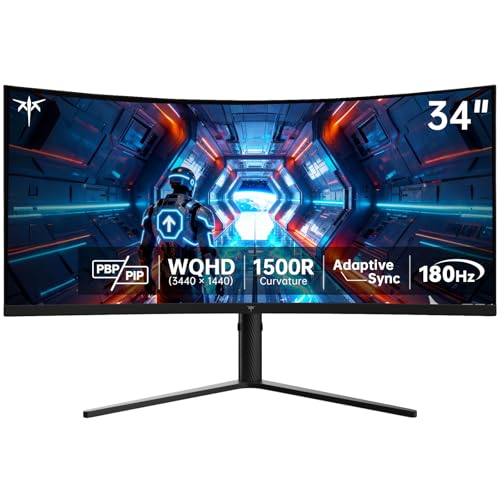
KTC 34-Inch Curved 180Hz Ultrawide
Best for: immersive gaming with ergonomic adjustments
- Screen Size
- 34"
- Resolution
- 3440 x 1440
- Refresh Rate
- 180Hz
- Panel Type
- HVA
- Response Time
- 1ms MPRT
- Aspect Ratio
- 21:9
The KTC H34S5 is a 34-inch ultrawide monitor with a 1500R curve and 180Hz refresh rate. It uses an HVA panel for a 4000:1 contrast ratio and covers 125% of the sRGB gamut. The stand offers height, tilt, swivel, and pivot adjustments. This monitor suits gamers who want immersive visuals and flexible positioning without a steep price.
- 180Hz refresh rate for smooth gaming
- 1500R curvature for immersion
- Height-adjustable ergonomic stand
- 125% sRGB color gamut coverage
- 180Hz refresh rate is lower than the 240Hz option on this list
- 100mm x 100mm VESA mount is smaller than the 200mm x 200mm mounts on some competitors
- 16.8 pounds weight is heavier than the 14.5-pound ViewSonic VX3418C-2K
- You want a 1500R curve for deeper immersion
- You need a height-adjustable stand for ergonomic comfort
- You prioritize color gamut coverage over maximum refresh rate
- You require a 240Hz refresh rate for competitive gaming
- You prefer a 200mm x 200mm VESA mounting pattern
- You want a lighter monitor under 15 pounds
Verdict: The KTC H34S5 34in UWQHD Curved Monitor delivers strong color and comfort for a budget price. It fits buyers who value ergonomic adjustments and immersive curvature over top-tier speed.

ViewSonic 34-Inch 180Hz Curved Gaming Monitor
Best for: immersive ultrawide gaming at 180Hz
- Screen Size
- 34 Inch
- Resolution
- 3440 x 1440
- Refresh Rate
- 180Hz
- Response Time
- 1ms
- Aspect Ratio
- 21:9
- Variable Refresh Rate
- FreeSync Premium
The ViewSonic VX3418C-2K is a 34-inch ultrawide monitor with a 1440p resolution and 180Hz refresh rate. It features a 1500R curved VA panel for immersion. This model includes FreeSync Premium and HDR10 support. You get a height-adjustable stand and standard HDMI and DisplayPort connections. It suits gamers who want smooth visuals and a flexible setup for PC or console play.
- 180Hz refresh rate for smooth gaming
- 1ms response time for fast action
- Height-adjustable stand for ergonomic positioning
- FreeSync Premium reduces screen tearing
- 1500R curved VA panel
- 1440p resolution is lower than the 3440×1440 UWQHD standard on other picks
- 12.5 pounds weight is heavier than many competitors
- Only HDMI and DisplayPort ports available
- You want a curved ultrawide screen for immersive gaming
- You need a height-adjustable stand for comfort
- You play fast-paced games at 180Hz
- You require 3440×1440 UWQHD resolution
- You need USB-C connectivity
- You prefer a lighter monitor under 10 pounds
Verdict: ViewSonic 34in 1440p Curved Gaming Monitor offers a solid 180Hz experience with a height-adjustable stand. It fits players who prioritize refresh rate and ergonomics over higher pixel density.

Alienware 34 Curved 180Hz Gaming Monitor
Best for: immersive ultrawide gaming with accurate colors
- Screen Size
- 34-inch
- Resolution
- WQHD
- Refresh Rate
- 180Hz
- Response Time
- 1ms
- Variable Refresh Rate
- AMD FreeSync Premium, VESA AdaptiveSync
- Features
- Curved Screen
The Alienware 34in WQHD Curved Gaming Monitor delivers a 3440×1440 resolution with a 1500R curve for immersive viewing. It features an 180Hz refresh rate and 1ms response time for smooth gameplay. The panel covers 95% of the DCI-P3 color gamut and holds VESA DisplayHDR 400 certification. This monitor includes hardware-based low blue light technology to reduce eye strain during long sessions.
- 180Hz refresh rate for fluid motion
- 95% DCI-P3 color coverage for vibrant visuals
- 1500R curved screen for immersion
- Hardware-based low blue light solution
- 1500R curve is less aggressive than the 180Hz competitors
- 21-pound weight is heavier than many alternatives
- VESA DisplayHDR 400 rating is modest for HDR content
- You want a 34-inch ultrawide display with a 1500R curve
- You prioritize color accuracy with 95% DCI-P3 coverage
- You need hardware-based low blue light protection
- You prefer a flatter screen without curvature
- You need a higher refresh rate than 180Hz
- You want a lighter monitor under 20 pounds
Verdict: Alienware 34in WQHD Curved Gaming Monitor suits gamers who value color accuracy and a moderate curve. It fits those who prefer a sturdy build over the lightest options available.

ASUS TUF 32-Inch Curved 180Hz Gaming Monitor
Best for: 32-inch curved QHD gaming
- Screen Size
- 31.5-inch
- Resolution
- 2560 x 1440
- Refresh Rate
- 180Hz
- Response Time
- 0.5ms (GTG)
- Variable Refresh Rate
- FreeSync
- Features
- HDR, Curved Screen
The ASUS TUF VG32WQ3B is a 32-inch QHD curved gaming monitor with an 180Hz refresh rate. It features a 0.5ms response time and FreeSync support for smooth visuals. The panel covers 90% of the DCI-P3 color space, offering vibrant imagery. Shadow Boost technology enhances dark areas without overexposing bright scenes. This monitor suits gamers seeking a balance of speed and color accuracy in a curved form factor.
- 180Hz refresh rate for smooth gameplay
- 0.5ms (GTG) response time reduces motion blur
- 90% DCI-P3 color gamut coverage
- FreeSync variable refresh rate support
- 3-year manufacturer warranty included
- 2560 x 1440 resolution is lower than the 3440×1440 UWQHD standard of most alternatives
- 32-inch screen size is smaller than the 34-inch ultrawide options listed
- 7.1-pound weight is lighter but offers less substantial build compared to larger displays
- You prefer a 32-inch curved screen over a 34-inch ultrawide
- You want a 1440p resolution with a 180Hz refresh rate
- You value wide color gamut coverage for gaming
- You require a 3440×1440 ultrawide resolution
- You need a 34-inch or larger screen size
- You are looking for a G-SYNC compatible monitor
Verdict: The ASUS TUF VG32WQ3B 32in Curved 180Hz monitor fits players who prefer a 32-inch curved QHD display over the 34-inch ultrawide format. It delivers solid 180Hz performance and wide color coverage for immersive gaming.
Specifications side by side

| Spec | Acer Nitro 34in Curved Gaming Monitor | Amzfast 34-Inch 240Hz Curved Ultrawide Monitor | KTC 34-Inch Curved 180Hz Ultrawide Monitor | KTC 34-Inch Curved 180Hz Ultrawide | ViewSonic 34-Inch 180Hz Curved Gaming Monitor | Alienware 34 Curved 180Hz Gaming Monitor | ASUS TUF 32-Inch Curved 180Hz Gaming Monitor |
|---|---|---|---|---|---|---|---|
| Screen Size | 34 inches | 34 inches | 34" | 34" | 34 Inch | 34-inch | 31.5-inch |
| Resolution | 3440 x 1440 | 3440 x 1440 | 3440 x 1440 | 3440 x 1440 | 3440 x 1440 | WQHD | 2560 x 1440 |
| Refresh Rate | 180Hz | 240Hz | 180Hz | 180Hz | 180Hz | 180Hz | 180Hz |
| Panel Type | – | – | – | HVA | – | – | – |
| Response Time | 1ms (MPRT) | 1ms | – | 1ms MPRT | 1ms | 1ms | 0.5ms (GTG) |
| Aspect Ratio | 21:9 | – | 21:9 | 21:9 | 21:9 | – | – |
| Variable Refresh Rate | AMD FreeSync | Adaptive Sync, FreeSync | FreeSync, Adaptive Sync | Adaptive Sync | FreeSync Premium | AMD FreeSync Premium, VESA AdaptiveSync | FreeSync |
| Ports | DisplayPort 1.4, HDMI 2.1 | DisplayPort 1.4, HDMI 2.1 | HDMI 2.0 x 2, DP 1.4 x 2 | HDMI 2.0, DP 1.4 | HDMI, DisplayPort | – | – |
| Features | Curved Screen, Height-Adjustable Stand, USB Hub | Curved Screen, Height-Adjustable Stand | HDR, Curved Screen | Curved Screen, Height-Adjustable Stand | HDR, Curved Screen, Height-Adjustable Stand | Curved Screen | HDR, Curved Screen |
| Use | Gaming | Gaming | Gaming | Gaming | Gaming | Gaming | Gaming |
| Size | – | 34 Inch | 34 Inch | 34 Inch | 34 Inch | – | – |
| Dimensions | 11.5 × 32 × 18 inches | 10.8 × 31.8 × 21.5 inches | 5.31 × 32.5 × 21.2 inches | 6.22 × 27.9 × 20.4 inches | 11.4 × 31.8 × 20.9 inches | 31.7 × 9.13 × 21.8 inches | 8.4 × 27.9 × 19.9 inches |
| Weight | – | – | 21.9 pounds | 16.8 pounds | 12.5 pounds | 21 pounds | 7.1 pounds |
| Color | Black | Black | Black | Black | Black | Black | BLACK |
| Model | XZ340CUR X1biipphx | AMZG34C8 Pro | H34S5 | H34S5 | VX3418C-2K | AW3425DWM | VG32WQ3B |
Frequently asked questions
Which monitor offers the highest refresh rate among these alternatives?
The Amzfast 34-Inch model provides the highest speed with a 240Hz refresh rate. This is faster than the 180Hz found on the Acer Nitro and most other picks. It suits competitive gamers who want smoother motion. Other options like the KTC and ViewSonic stick to 180Hz, which remains excellent for most gaming needs.
Do these monitors include height-adjustable stands for better ergonomics?
Several models feature fully adjustable stands to improve your viewing comfort. The Acer Nitro, Amzfast, KTC H34S5, and ViewSonic VX3418C-2K all include height-adjustable stands. This allows you to raise or lower the screen to match your desk setup. The Alienware and ASUS models do not list this specific ergonomic feature in their data.
Is there a budget-friendly option that still offers curved immersion?
The KTC H34S5 is labeled as the best budget choice. It delivers a 34-inch curved ultrawide display with 180Hz refresh rates. You get strong color performance and ergonomic adjustments without paying for premium speed. It fits users who value immersion and adjustability over the highest possible frame rates available in other models.
Which alternative uses a VA panel for deeper contrast?
The ViewSonic VX3418C-2K utilizes a VA panel type. This technology typically offers deeper black levels and higher contrast ratios compared to standard IPS panels. It pairs this with a 180Hz refresh rate and a curved screen. This makes it a solid choice for players who prioritize visual depth and immersive gaming experiences.
Are there any non-ultrawide options if you prefer a standard aspect ratio?
The ASUS TUF VG32WQ3B is a 32-inch monitor rather than an ultrawide. It offers a standard 16:9 aspect ratio with 1440p QHD resolution. This suits players who prefer a more compact curved display over the expansive 21:9 format. It still delivers 180Hz performance and wide color coverage for immersive gaming.
Do these monitors support variable refresh rate technologies like FreeSync?
Most listed monitors support FreeSync to reduce screen tearing. The Acer Nitro, Amzfast, KTC, ViewSonic, and Alienware models all include FreeSync support. The second KTC H34S5 model supports Adaptive-Sync. These technologies help synchronize the monitor's refresh rate with your graphics card for smoother gameplay without stuttering.
Which monitor is best for users prioritizing color accuracy?
The Alienware AW3425DWM is noted for accurate colors. It suits gamers who value precise color reproduction alongside immersive ultrawide gaming. The KTC models also offer strong color performance. These picks fit users who want a balanced experience that prioritizes visual fidelity and adjustability over maximum speed or extreme HDR brightness.
See also