ViewSonic 38-Inch Curved IPS Monitor Alternatives: 6 Similar Picks Compared
As Amazon Associates, we earn from qualifying purchases. This means we may receive a small commission at no extra cost to you if you click through and make a purchase.
As an Amazon Associate we earn from qualifying purchases. Links on this page are affiliate links.
The ViewSonic VP3881A delivers a spacious 38-inch curved canvas with a 21:9 aspect ratio and IPS panel. If you are searching for viewsonic 38 inch curved ips monitor alternatives, you likely need a different size, feature set, or brand. While this model excels at office multitasking with its wide field of view, its large footprint and weight may not suit every desk. Some users prefer a smaller screen, a different resolution like 4K, or integrated features such as webcams or speakers. Other buyers might want a standard 16:9 display or a non-curved panel. We selected these options because their specifications overlap with the original, offering comparable connectivity and panel technology. Each pick addresses specific needs, from compact 27-inch setups to ultrawide models with built-in conferencing tools. This guide helps you compare specs side by side to find the right fit for your workspace.
How alternatives compare to VP3881A
LG 34-Inch Curved WQHD IPS Monitor
The LG 34-Inch Curved WQHD IPS Monitor offers a more compact footprint than the ViewSonic VP3881A. At 34 inches, it saves desk space while maintaining a 21:9 aspect ratio. It features 100Hz refresh rate and 96W USB-C power delivery, which exceeds the ViewSonic’s charging capabilities. Built-in speakers add convenience. This model suits professionals who want a cleaner setup with strong connectivity. You give up some screen width for a lighter, more manageable size. It is ideal if you prioritize portability and audio integration over maximum display area.
ViewSonic 27-Inch 4K USB-C Monitor
The ViewSonic 27-Inch 4K USB-C Monitor shifts from ultrawide to standard 4K UHD resolution. It is significantly smaller and lighter, weighing just 8.6 pounds compared to the VP3881A’s 27.7 pounds. This model provides sharp pixel density in a compact form factor. It includes USB-C with power delivery and built-in speakers. You trade the wide horizontal field of view for higher vertical clarity and a smaller desk footprint. It is best for users who need a clean, space-saving setup for home offices or Mac systems rather than expansive multitasking screens.
ViewSonic 32-Inch 4K UHD IPS Monitor
The ViewSonic 32-Inch 4K UHD IPS Monitor replaces the ultrawide format with a traditional 16:9 4K display. It offers 32 inches of screen space with high resolution and USB-C connectivity. This model is lighter and narrower than the VP3881A. It suits users who prefer standard aspect ratios and single-cable laptop connections. You lose the expansive side-to-side workspace but gain vertical detail and a more conventional layout. It is a practical choice for office work and creative tasks where standard monitor proportions are preferred over ultrawide immersion.
ViewSonic 34in UWQHD Webcam Monitor
The ViewSonic 34-Inch Curved Webcam Monitor integrates a built-in webcam into the 21:9 ultrawide design. It matches the curved IPS panel style but adds conferencing tools. This model is slightly smaller at 34 inches and weighs 20.9 pounds. It features USB-C connectivity for streamlined desk setups. You gain integrated video capabilities without external peripherals. This is ideal for hybrid workers who attend frequent calls. You trade the larger 38-inch canvas for a more focused ultrawide size with essential communication hardware built directly into the monitor frame.
ViewSonic 27-Inch 4K UHD IPS Monitor
The ViewSonic 27-Inch 4K UHD IPS Monitor is a compact, non-USB-C option. It weighs only 12.1 pounds and fits small desks easily. It offers 4K clarity in a standard 16:9 format. This model lacks USB-C and built-in speakers, focusing on core display performance. You give up the ultrawide view and advanced connectivity for a lightweight, affordable 4K experience. It is best for users who prioritize sharpness and space efficiency over screen width or modern laptop charging features.
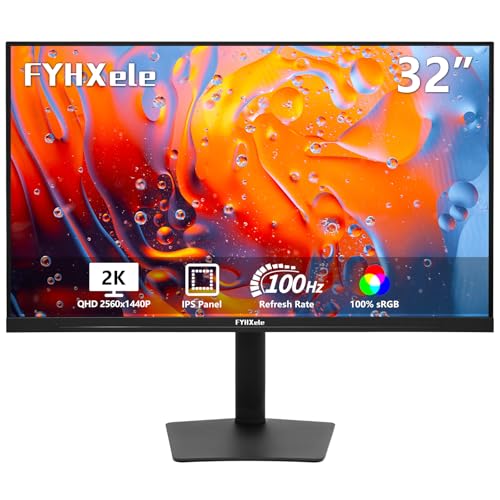
FYHXele 32 Inch Touchscreen Monitor
The FYHXele 32-Inch Touchscreen Monitor introduces interactive controls to the 1440p QHD resolution. It features an adjustable stand and touch functionality, which the VP3881A lacks. This model is lighter and narrower, weighing less than 17 pounds. It offers 100Hz refresh rate and USB-C connectivity. You trade the 38-inch curved canvas for a versatile, interactive display. It suits professionals who need to interact directly with the screen for design or office tasks. It is a practical alternative for those who value touch input and adjustability over maximum screen size.
| # | Product | Best for | Price |
|---|---|---|---|
| 1 | ViewSonic 38-Inch Curved IPS Monitor Best overall | office multitasking and wide workflows | |
| 2 | LG 34-Inch Curved WQHD IPS Monitor Best premium | multitasking and clean USB-C setups | |
| 3 | ViewSonic 27-Inch 4K USB-C Monitor Best budget | compact 4K home office setups | |
| 4 | ViewSonic 32-Inch 4K UHD IPS Monitor Best 32 inch | 4K clarity and USB-C convenience | |
| 5 | ViewSonic 34in UWQHD Webcam Monitor Best webcam | Hybrid work setups requiring integrated webcam | |
| 6 | ViewSonic 27-Inch 4K UHD IPS Monitor Also great | Compact 4K office and creative work | |
| 7 | FYHXele 32 Inch Touchscreen Monitor Best 1440p qhd | touch-enabled office and design workflows |

ViewSonic 38-Inch Curved IPS Monitor
Best for: office multitasking and wide workflows
- Screen Size
- 38 Inches
- Resolution
- 3840x1600p
- Panel Type
- IPS
- Aspect Ratio
- 21:9
- Ports
- HDMI, DisplayPort, USB, USB-C
- Features
- HDR, Curved Screen
This 38-inch ultrawide monitor features a 21:9 aspect ratio and WQHD+ resolution. It uses an IPS panel for accurate colors, covering 100% sRGB. The 2300R curve and HDR10 support enhance viewing. Eye care technologies like flicker-free and blue light filters reduce fatigue. It includes USB-C, HDMI, and DisplayPort connections. This screen suits office work and business use.
- 38-inch 21:9 WQHD+ (3840x1600p) resolution
- IPS panel with 100% sRGB color coverage
- 2300R curved screen design
- HDR10 support
- Eye care flicker-free and blue light filter
- Heavier at 27.7 pounds compared to lighter alternatives
- Larger 41.2-inch width requires more desk space
- Standard 100Hz refresh rate limits high-speed gaming
- You need a wide 21:9 workspace for multitasking
- You prioritize color accuracy for business tasks
- You want a curved screen for better immersion
- You require a 4K UHD resolution display
- You have limited desk space for a large monitor
- You need a portable or lightweight screen
Verdict: ViewSonic 38-Inch Curved IPS Monitor delivers a spacious ultrawide canvas for office productivity. Its large footprint and weight suit stationary desks rather than mobile setups.

LG 34-Inch Curved WQHD IPS Monitor
Best for: multitasking and clean USB-C setups
- Screen Size
- 34"
- Resolution
- 3440 x 1440
- Refresh Rate
- 100Hz
- Panel Type
- IPS
- Response Time
- 5ms
- Aspect Ratio
- 21:9
This LG curved monitor features a 34-inch 21:9 WQHD IPS panel with a 100Hz refresh rate. It includes HDR10 support and up to 99% sRGB color coverage for accurate visuals. A single USB-C cable delivers display signals and up to 96W of power delivery. Built-in speakers with DepthSound technology provide audio without extra hardware. The 3800R curve and Reader Mode enhance comfort during long work sessions.
- 34-inch 21:9 WQHD (3440×1440) curved IPS display
- 100Hz refresh rate with 5ms response time
- USB-C with 96W power delivery
- Built-in speakers with DepthSound
- 99% sRGB color coverage and HDR10
- Lower 100Hz refresh rate compared to 144Hz options
- Heavier 22.3-pound build compared to smaller monitors
- Smaller 34-inch screen size compared to 38-inch or 32-inch 4K models
- You need a wide 21:9 screen for multitasking
- You want a single cable for display and charging
- You prefer built-in audio for a clean desk
- You require 4K UHD resolution
- You need a high refresh rate above 100Hz
- You prefer a larger 38-inch or 32-inch 4K display
Verdict: LG 34-Inch Curved IPS WQHD Monitor offers a balanced ultrawide experience with 96W USB-C charging and built-in speakers. It suits professionals who value screen real estate and clean connectivity over maximum resolution or high refresh rates.

ViewSonic 27-Inch 4K USB-C Monitor
Best for: compact 4K home office setups
- Screen Size
- 27 Inch
- Resolution
- 3840 x 2160
- Panel Type
- IPS
- Ports
- USB-C, HDMI, DisplayPort
- Features
- HDR, Built-in Speakers, Power Delivery
- Use
- Business & Office, Mac, Office, Home Office
This 27-inch 4K UHD IPS monitor delivers sharp detail for home office use. It features a single-cable USB-C connection with 65W power delivery to reduce desk clutter. HDR10 support enhances media contrast, while Flicker-Free technology and a Blue Light Filter help reduce eye strain during long sessions. The slim profile fits neatly into modern workspaces.
- 4K UHD resolution for high detail
- 65W USB-C power delivery
- IPS panel with HDR10 support
- Flicker-Free and Blue Light Filter
- 27-inch screen is smaller than the 38-inch and 34-inch alternatives
- 8.6-pound weight is heavier than some competitors
- No built-in webcam for video calls
- You need a compact 4K display for a desk
- You want to power a laptop via USB-C
- You prefer IPS color accuracy for office work
- You require a curved ultrawide screen
- You need a built-in webcam
- You want a larger 34-inch or 38-inch view
Verdict: ViewSonic 27-Inch 4K USB-C Monitor is a compact 4K option for users who prioritize a clean desk setup with USB-C charging. It suits those who do not need the wide field of view of the larger ultrawide monitors listed here.

ViewSonic 32-Inch 4K UHD IPS Monitor
Best for: 4K clarity and USB-C convenience
- Screen Size
- 32 Inch
- Resolution
- 3840 x 2160
- Panel Type
- IPS
- Ports
- USB-C, HDMI, DisplayPort
- Features
- HDR
- Use
- Business & Office, Mac, Office, Home Office
This 32-inch 4K UHD IPS monitor delivers sharp detail and wide viewing angles. It features HDR10 support for richer contrast in media. The USB-C port provides 65W charging and single-cable connectivity for laptops. Flicker-free technology and a blue light filter help reduce eye strain. It includes HDMI and DisplayPort inputs for versatile setup options.
- 32-inch 4K UHD (3840 x 2160) IPS display
- 65W USB-C charging and data connectivity
- HDR10 support for enhanced contrast
- Flicker-Free and Blue Light Filter for eye comfort
- Heavier build at 17.2 pounds compared to lighter 27-inch options
- Standard 65W USB-C power delivery limits high-power laptop charging
- No built-in webcam unlike some ultrawide competitors
- You need a large 32-inch screen for detailed work
- You want 65W USB-C charging for a single-cable setup
- You prefer IPS panels for consistent color accuracy
- You require a 38-inch or 34-inch ultrawide aspect ratio
- You need more than 65W of power delivery from the monitor
- You prefer a lighter monitor under 15 pounds
Verdict: ViewSonic 32-Inch 4K USB-C Monitor suits users who prioritize screen real estate and 4K clarity over ultrawide formats. It is ideal for those who want a single-cable solution for laptops with moderate power needs.

ViewSonic 34in UWQHD Webcam Monitor
Best for: Hybrid work setups requiring integrated webcam
- Screen Size
- 34 Inch
- Resolution
- UWQHD
- Aspect Ratio
- 21:9
- Ports
- USB-C, RJ45 Ethernet, HDMI, DisplayPort
- Features
- Curved Screen, Webcam
- Use
- Business & Office, Office, Home Office
This 34-inch ultrawide monitor features a 21:9 UWQHD curved IPS panel. It includes an integrated IR webcam with Windows Hello support for secure login. A 100W USB-C port provides power delivery and data connectivity. Built-in RJ45 Ethernet adds wired networking options. It suits users who need a streamlined hybrid work setup with video conferencing tools built directly into the display.
- Integrated IR webcam with Windows Hello support
- 100W USB-C power delivery and docking
- Built-in RJ45 Ethernet port
- 21:9 UWQHD curved display
- 34-inch size is smaller than the 38-inch ViewSonic VP3881A
- UWQHD resolution is lower than the 4K UHD models on this list
- 20.9-pound weight is heavier than the 27-inch ViewSonic options
- You need a built-in webcam for video calls
- You want 100W USB-C charging for your laptop
- You prefer a wired Ethernet connection for stability
- You require 4K UHD resolution for detailed graphics
- You prefer a larger 38-inch ultrawide screen
- You want a standard 16:9 aspect ratio
Verdict: ViewSonic 34-Inch Curved Webcam Monitor is a practical pick for professionals who prioritize integrated conferencing tools and high-power USB-C connectivity over maximum screen real estate or resolution.

ViewSonic 27-Inch 4K UHD IPS Monitor
Best for: Compact 4K office and creative work
- Screen Size
- 27 Inch
- Resolution
- 3840 x 2160
- Panel Type
- IPS
- Ports
- Dual HDMI, DisplayPort
- Features
- HDR
- Use
- Business & Office, Mac, Office, Home Office
This 27-inch ViewSonic monitor delivers 4K UHD resolution on an IPS panel. It features HDR10 support and 400-nit brightness for clear images. Dual HDMI and DisplayPort inputs provide flexible connectivity. The design includes ultra-thin bezels and Eye Care technology. It suits office work, creative tasks, and everyday viewing on Mac or PC systems.
- 27-inch IPS panel with 4K UHD resolution
- HDR10 support for improved contrast
- Dual HDMI and DisplayPort connectivity
- Eye Care technology for comfortable viewing
- Ultra-thin bezel design
- 27-inch screen is smaller than the 34- to 38-inch ultrawide alternatives
- 12.1-pound weight is heavier than many 27-inch competitors
- 400-nit brightness is lower than HDR10 displays with higher peak brightness
- You need a compact 4K display for a standard desk
- You work with Mac or PC systems requiring dual HDMI inputs
- You prefer IPS color accuracy for creative or office tasks
- You require a 34-inch or larger ultrawide aspect ratio
- You need USB-C connectivity for single-cable docking
- You prioritize high refresh rates for gaming
Verdict: ViewSonic 27-Inch 4K IPS Monitor fits users who want a sharp, compact 4K display for office or creative work without the bulk of an ultrawide screen. It is ideal for standard desk setups where space is limited.
FYHXele 32 Inch Touchscreen Monitor
Best for: touch-enabled office and design workflows
- Screen Size
- 32"
- Refresh Rate
- 100Hz
- Panel Type
- IPS
- Ports
- USB-C, HDMI, DisplayPort
- Resolution
- 1440p QHD
- Features
- Height-Adjustable Stand, Touchscreen
The FYHXele 32-Inch 1440p Touchscreen Monitor offers a 32-inch IPS panel with 1440p QHD resolution and 100Hz refresh rate. It includes 10-point touch capability and 100% standard color space coverage. The stand adjusts for height, swivel, tilt, and rotation. This monitor suits users who need precise color accuracy and interactive control for office or design tasks.
- 32-inch IPS panel with 1440p QHD resolution
- 10-point touchscreen for intuitive interaction
- 100Hz refresh rate for fluid motion
- Height-adjustable, swivel, tilt, and rotate stand
- 100Hz refresh rate is lower than the 100Hz+ options in the list
- 32-inch size is larger than the 34-inch and 27-inch alternatives
- Touch function incompatible with consoles like PS5 or Switch
- You need a large 32-inch display for detailed work
- You want 10-point touch interaction for presentations
- You require 100% standard color space coverage for design
- You need console compatibility for gaming
- You prefer a smaller 27-inch or 34-inch footprint
- You want a higher refresh rate than 100Hz
Verdict: The FYHXele 32-Inch 1440p Touchscreen Monitor fits professionals who need a large, color-accurate screen with touch controls. It is a practical option for office environments where interactive displays are valued over high-speed gaming performance.
Specifications side by side

| Spec | ViewSonic 38-Inch Curved IPS Monitor | LG 34-Inch Curved WQHD IPS Monitor | ViewSonic 27-Inch 4K USB-C Monitor | ViewSonic 32-Inch 4K UHD IPS Monitor | ViewSonic 34in UWQHD Webcam Monitor | ViewSonic 27-Inch 4K UHD IPS Monitor | FYHXele 32 Inch Touchscreen Monitor |
|---|---|---|---|---|---|---|---|
| Screen Size | 38 Inches | 34" | 27 Inch | 32 Inch | 34 Inch | 27 Inch | 32" |
| Resolution | 3840x1600p | 3440 x 1440 | 3840 x 2160 | 3840 x 2160 | UWQHD | 3840 x 2160 | – |
| Refresh Rate | – | 100Hz | – | – | – | – | 100Hz |
| Panel Type | IPS | IPS | IPS | IPS | – | IPS | IPS |
| Response Time | – | 5ms | – | – | – | – | – |
| Aspect Ratio | 21:9 | 21:9 | – | – | 21:9 | – | – |
| Ports | HDMI, DisplayPort, USB, USB-C | HDMI, DisplayPort, USB Type-C | USB-C, HDMI, DisplayPort | USB-C, HDMI, DisplayPort | USB-C, RJ45 Ethernet, HDMI, DisplayPort | Dual HDMI, DisplayPort | USB-C, HDMI, DisplayPort |
| Features | HDR, Curved Screen | HDR, Built-in Speakers, Curved Screen, Power Delivery | HDR, Built-in Speakers, Power Delivery | HDR | Curved Screen, Webcam | HDR | Height-Adjustable Stand, Touchscreen |
| Use | Business & Office, Office | – | Business & Office, Mac, Office, Home Office | Business & Office, Mac, Office, Home Office | Business & Office, Office, Home Office | Business & Office, Mac, Office, Home Office | Gaming, Business & Office, Office |
| Size | 38 Inches | 34 | 27 Inch | 32 Inch | 34 Inch | 27 Inch | – |
| Operating System | – | – | macOS | macOS | Windows | macOS | – |
| Dimensions | 14.8 × 41.2 × 24.8 inches | 9.1 × 32.2 × 21.1 inches | 8.2 × 24.2 × 17.2 inches | 9.2 × 28.1 × 19.6 inches | 9.3 × 31.8 × 21 inches | 2.1 × 24.2 × 14.5 inches | 2.69 × 28.2 × 16.7 inches |
| Weight | 27.7 pounds | 22.3 pounds | 8.6 pounds | 17.2 pounds | 20.9 pounds | 12.1 pounds | – |
| Color | Black | Black | Black | Black | Black | Black | Black-32" |
| Model | VP3881A | 34U650A-B.AUS | VS19281 | VX3267U-4K | VG3457CV | VA2756-4K-MHD | FYHXTGM |
Frequently asked questions
Is there a 38-inch curved monitor alternative with better color accuracy?
The ViewSonic VP3881A uses an IPS panel, which typically offers wider viewing angles and consistent color reproduction. If you need a different size, the LG 34-inch curved IPS monitor also features an IPS panel. This ensures similar color performance in a more compact 21:9 format. Other options like the 27-inch 4K ViewSonic models also utilize IPS technology for sharp, accurate visuals suitable for office work.
Which alternative offers the highest resolution for detailed work?
Several listed monitors provide higher pixel density than the ultrawide 1440p options. The ViewSonic 27-inch 4K USB-C monitor and the 32-inch 4K UHD IPS model both deliver 4K resolution. This offers significantly more screen real estate for sharp text and detailed graphics. The LG 34-inch curved monitor offers WQHD resolution, which is lower than 4K but still provides clear imagery for multitasking.
Can I find a curved monitor with built-in speakers?
Yes, the LG 34-inch curved WQHD IPS monitor includes built-in speakers. This feature allows for a cleaner desk setup by eliminating the need for external audio devices. The ViewSonic 27-inch 4K USB-C monitor also comes with built-in speakers. Most other listed monitors, such as the 38-inch ViewSonic and the 32-inch 4K model, do not list integrated audio in their specifications.
Is there an ultrawide monitor with a webcam for video calls?
The ViewSonic 34-inch UWQHD Webcam Monitor is designed for hybrid work. It features an integrated webcam, which is rare for ultrawide displays. This model maintains the 21:9 aspect ratio and curved screen found in the VP3881A. It also provides USB-C connectivity. This makes it a practical alternative for professionals who need conferencing tools without adding extra hardware to their desk.
Which monitor is best for a small desk setup?
The ViewSonic 27-inch 4K USB-C Monitor is the most compact option. It weighs only 8.6 pounds and measures 24.2 inches in width. This size fits well in standard home office spaces. The LG 34-inch curved monitor is also relatively light at 22.3 pounds. In contrast, the 38-inch ViewSonic VP3881A is much larger and heavier, making it less suitable for limited desk areas.
Do any alternatives support USB-C charging for laptops?
Multiple monitors offer USB-C connectivity with power delivery. The LG 34-inch curved monitor provides 96W of charging power. The ViewSonic 27-inch 4K USB-C monitor and the 32-inch 4K model also support USB-C connections. These allow you to connect your laptop with a single cable for data and power. The 38-inch ViewSonic VP3881A includes USB-C but does not specify charging wattage in the data.
Is there a touchscreen option for interactive workflows?
The FYHXele 32-inch touchscreen monitor is the only listed model with touch capabilities. It features a 1440p QHD resolution and a 100Hz refresh rate. This monitor is ideal for users who prefer direct interaction with their display. It includes a height-adjustable stand. Other alternatives, such as the ViewSonic and LG models, rely on traditional input devices and do not offer touch functionality.
Which monitor has the highest refresh rate?
The LG 34-inch curved WQHD IPS monitor and the FYHXele 32-inch touchscreen monitor both feature a 100Hz refresh rate. This is higher than the standard 60Hz found in many office monitors. The ViewSonic 38-inch VP3881A does not list a specific refresh rate in the provided data. Higher refresh rates can provide smoother motion for video playback and general desktop navigation.
See also