Looking Beyond the ViewSonic 27-Inch 4K USB-C Monitor? 6 Alternatives Worth a Look
As Amazon Associates, we earn from qualifying purchases. This means we may receive a small commission at no extra cost to you if you click through and make a purchase.
As an Amazon Associate we earn from qualifying purchases. Links on this page are affiliate links.
The ViewSonic 27-Inch 4K USB-C Monitor delivers solid 4K clarity and convenient 65W charging for home offices. If you are searching for viewsonic 27 inch 4k USB c monitor alternatives, you may want different specs or features. Some users need larger screens for more workspace, while others prioritize higher refresh rates for gaming. Others might require built-in webcams or Ethernet ports for specific office setups. You might also prefer a different brand or a more budget-friendly option without USB-C connectivity. We selected these alternatives because their core specifications overlap with the original model. Each choice shares key traits like 4K resolution or IPS panels, ensuring comparable visual quality. This approach helps you find a display that matches your exact needs, whether that means more size, better ergonomics, or specialized ports. The list covers a range of options to suit various priorities. You can compare sizes, connectivity types, and special features to decide what matters most for your desk. This guide focuses on practical differences in hardware rather than subjective opinions. Your ideal monitor depends on how you plan to use it daily.
How Each Alternative Compares
ViewSonic 27-Inch 4K UHD IPS Monitor
The ViewSonic 27-Inch 4K UHD IPS Monitor keeps the same 27-inch IPS panel and 4K resolution as the original, but it removes USB-C connectivity. You lose single-cable charging and data transfer, relying instead on HDMI and DisplayPort for video. This model also lacks built-in speakers, which the original includes. It is a lighter option if you do not need docking capabilities. Choose this if you want 4K clarity for media or productivity without the need for USB-C power delivery. It suits setups where external speakers and separate chargers are already in place.
INNOCN 27-Inch 4K DisplayPort Monitor
The INNOCN 27-Inch 4K DisplayPort Monitor matches the original in resolution and USB-C support but adds a height-adjustable stand. The original uses a fixed stand, so this alternative offers better ergonomic flexibility for adjusting viewing angles. It retains HDR support and built-in speakers for comfort. This monitor is ideal for creative workers who need precise color and physical adjustability. If you find the original’s stand limiting, this option provides the same 4K clarity and USB-C charging with added vertical adjustability for a more comfortable long-term workspace.
Thinlerain 27-Inch 4K 160Hz Webcam Monitor
The Thinlerain 27-Inch 4K 160Hz Webcam Monitor significantly increases the refresh rate from the original’s standard speed to 160Hz. It also includes a built-in webcam, which the ViewSonic lacks. This combination suits users who game or need video conferencing without extra hardware. It keeps 4K resolution and USB-C connectivity for charging. You gain smoother motion and integrated video tools, but the design may be bulkier. Pick this if you need high-speed visuals and a camera in one device, rather than just a static display for office work.
ViewSonic 32-Inch 4K UHD IPS Monitor
The ViewSonic 32-Inch 4K UHD IPS Monitor increases the screen size from 27 to 32 inches while keeping 4K resolution and USB-C charging. This gives you more workspace and larger text visibility. It retains HDR support but may have a larger footprint on your desk. This alternative is best for those who find 27 inches too small for multitasking. You get the same brand reliability and single-cable convenience in a larger frame. Choose this if you prioritize screen real estate and detailed visuals over a compact desk setup.
ViewSonic VG2458 24-Inch 1080p Docking Monitor
The ViewSonic VG2458 24-Inch 1080p Docking Monitor drops the resolution to 1080p and shrinks the size to 24 inches. However, it adds an Ethernet port and a USB hub, which the original does not have. This makes it suitable for office environments needing wired networking and device connectivity. It keeps USB-C for charging and video. Choose this if you require built-in Ethernet and hub functionality over 4K clarity. It is a practical choice for business setups where network access and peripheral management are more important than high-resolution visuals.
ViewSonic VG2751 27-Inch 1080p Monitor
The ViewSonic VG2751 27-Inch 1080p Monitor maintains the 27-inch size but reduces resolution to 1080p. It adds a height-adjustable stand and a USB hub, offering better ergonomics and connectivity than the original. This model is ideal for users who value physical adjustability and peripheral management over pixel density. It keeps USB-C charging and HDMI inputs. Pick this if you need an ergonomic stand and hub features for office productivity, and do not require the sharpness of 4K for your daily tasks.
| # | Product | Best for | Price |
|---|---|---|---|
| 1 | ViewSonic 27-Inch 4K USB-C Monitor Best overall | home office setups needing 4K clarity and USB-C charging | |
| 2 | ViewSonic 27-Inch 4K UHD IPS Monitor Best budget | 4K productivity and media viewing | |
| 3 | INNOCN 27-Inch 4K DisplayPort Monitor Best premium | Color-accurate creative work and clean setups | |
| 4 | Thinlerain 27-Inch 4K 160Hz Webcam Monitor Best webcam | Gamers who also need a built-in webcam | |
| 5 | ViewSonic 32-Inch 4K UHD IPS Monitor Best 32 inch | large 4K home office and media viewing | |
| 6 | ViewSonic VG2458 24-Inch 1080p Docking Monitor Best ethernet | Office setups requiring wired Ethernet connectivity | |
| 7 | ViewSonic VG2751 27-Inch 1080p Monitor Also great | office productivity with ergonomic flexibility |

ViewSonic 27-Inch 4K USB-C Monitor
Best for: home office setups needing 4K clarity and USB-C charging
- Screen Size
- 27 Inch
- Resolution
- 3840 x 2160
- Panel Type
- IPS
- Ports
- USB-C, HDMI, DisplayPort
- Features
- HDR, Built-in Speakers, Power Delivery
- Use
- Business & Office, Mac, Office, Home Office
This ViewSonic 27-inch monitor delivers 4K UHD resolution on an IPS panel for sharp, color-accurate visuals. It features a single-cable USB-C connection that supports 65W power delivery, simplifying your desk setup. HDR10 support enhances contrast for media, while built-in eye care technologies like Flicker-Free and Blue Light Filter reduce fatigue during long work sessions. It includes HDMI and DisplayPort inputs for versatile connectivity.
- 4K UHD (3840×2160) IPS display for high detail
- USB-C port with 65W charging for single-cable setup
- HDR10 support for enhanced contrast and color
- Integrated Flicker-Free and Blue Light Filter for eye comfort
- Versatile inputs including HDMI, DisplayPort, and USB-C
- 65W USB-C power delivery is lower than the 100W offered by the ViewSonic VG2458
- 27-inch screen size is smaller than the 32-inch ViewSonic VX3267U-4K
- Weight of 8.6 pounds is heavier than the 7.7 pounds of the ViewSonic VA2756-4K-MHD
- You need a single-cable USB-C solution for your laptop
- You require 4K resolution for detailed work or media
- You prefer an IPS panel for wide viewing angles
- You need more than 65W of power delivery for your device
- You want a larger 32-inch display for immersive viewing
- You are looking for a higher refresh rate than standard
Verdict: ViewSonic 27-Inch 4K USB-C Monitor is a solid choice for users who want 4K clarity and convenient 65W USB-C charging in a compact 27-inch frame. It suits home office workers who value eye comfort and clean desk setups over maximum power delivery or larger screen real estate.

ViewSonic 27-Inch 4K UHD IPS Monitor
Best for: 4K productivity and media viewing
- Screen Size
- 27 Inch
- Resolution
- 3840 x 2160
- Panel Type
- IPS
- Ports
- Dual HDMI, DisplayPort
- Features
- HDR
- Use
- Business & Office, Mac, Office, Home Office
The ViewSonic VA2756-4K-MHD delivers 4K UHD resolution on a 27-inch IPS panel. It offers 400-nit brightness and HDR10 support for improved contrast. Connectivity relies on dual HDMI and DisplayPort inputs. Eye Care technology and an anti-glare screen support longer work sessions. This monitor suits home office and creative tasks where sharp detail is key.
- 4K UHD resolution on a 27-inch IPS panel
- HDR10 support for enhanced visual depth
- 400-nit brightness for clear everyday viewing
- Dual HDMI and DisplayPort inputs for flexible connection
- Lower 400-nit brightness compared to higher-end options
- Fixed stand without height adjustment mentioned in specs
- Heavier 12.1-pound build compared to lighter alternatives
- You need sharp 4K detail for productivity work
- You prefer a standard 27-inch display size
- You want HDR10 support for media consumption
- You require USB-C connectivity for laptop docking
- You need height-adjustable stand for ergonomic setup
- You prioritize high refresh rates for gaming
Verdict: ViewSonic 27-Inch 4K IPS Monitor is a solid choice for users who prioritize 4K clarity and HDR10 support over advanced connectivity or ergonomic adjustability. It fits well in home offices where visual fidelity matters more than docking capabilities.

INNOCN 27-Inch 4K DisplayPort Monitor
Best for: Color-accurate creative work and clean setups
- Screen Size
- 27"
- Resolution
- 3840 x 2160
- Refresh Rate
- 60hz
- Panel Type
- IPS
- Aspect Ratio
- 16:9
- Ports
- DisplayPort, HDMI, USB-C
This INNOCN 27-inch monitor delivers 4K UHD resolution on an IPS panel. It features HDR400 support and a Delta E score under 2 for accurate color reproduction. The USB-C port connects your laptop for display and power. You get a fully adjustable stand with pivot capability. This setup suits professionals who need precise color for design work and a clean desk with fewer cables.
- 4K UHD 3840 x 2160 resolution
- IPS panel with Delta E < 2 color accuracy
- HDR400 certification for better contrast
- USB-C, DisplayPort, and HDMI connectivity
- Pivot, height, and swivel adjustable stand
- 60Hz refresh rate limits smooth motion
- 400 nits max brightness is modest
- 1000:1 contrast ratio is standard for IPS
- You need accurate colors for photo or video editing
- You want a single cable for display and power
- You value a frameless design for multi-monitor setups
- You require high refresh rates for competitive gaming
- You need HDR600 or higher brightness levels
- You prefer a 32-inch display for more screen real estate
Verdict: INNOCN 27" 4K USB-C Monitor offers precise color and flexible mounting for creative work. It fits designers who prioritize color accuracy over high-speed motion.

Thinlerain 27-Inch 4K 160Hz Webcam Monitor
Best for: Gamers who also need a built-in webcam
- Screen Size
- 27"
- Resolution
- 3840 x 2160
- Refresh Rate
- 160Hz
- Panel Type
- IPS
- Response Time
- 1ms GTG
- Ports
- 2x HDMI, DisplayPort, USB-C, USB-A
This Thinlerain monitor combines a 27-inch IPS panel with 4K UHD resolution and a 160Hz refresh rate. It includes a pop-up 3MP webcam and microphone, eliminating the need for external peripherals. The stand offers height, tilt, swivel, and pivot adjustments. Dual built-in speakers provide basic audio. It suits users who want high frame rates for gaming and video calls in one device.
- 160Hz refresh rate and 1ms GTG response time for smooth motion
- Pop-up 3MP webcam with physical privacy shutter
- Ergonomic stand with 90-degree pivot for vertical use
- Dual built-in speakers for immediate audio output
- Webcam requires a separate USB-A to USB-B connection
- 350 nits brightness is lower than typical professional displays
- Only includes USB-C for video input, not power delivery
- You need a high refresh rate for fast-paced gaming
- You want a built-in camera without desk clutter
- You frequently switch between landscape and portrait orientations
- You require USB-C power delivery for your laptop
- You need a webcam that works without extra cables
- You prioritize high brightness for bright office environments
Verdict: Thinlerain 27" 4K 160Hz Monitor with Webcam offers a unique blend of gaming speed and video conferencing tools. It fits buyers who want a single display for both high-frame-rate play and remote work without adding external gear.

ViewSonic 32-Inch 4K UHD IPS Monitor
Best for: large 4K home office and media viewing
- Screen Size
- 32 Inch
- Resolution
- 3840 x 2160
- Panel Type
- IPS
- Ports
- USB-C, HDMI, DisplayPort
- Features
- HDR
- Use
- Business & Office, Mac, Office, Home Office
This ViewSonic monitor offers a 32-inch 4K UHD IPS panel for sharp, detailed visuals with wide viewing angles. It features HDR10 support for enhanced contrast and color in media. A single USB-C cable delivers video, data, and 65W of power to your laptop. The design includes eye-care technologies like Flicker-Free and a Blue Light Filter. It suits users who want a larger screen for home office or media tasks.
- 32-inch 4K UHD resolution for high detail
- 65W USB-C charging reduces cable clutter
- IPS panel ensures wide viewing angles
- HDR10 support for richer media contrast
- Integrated Flicker-Free and Blue Light Filter
- Heavier at 17.2 pounds compared to 27-inch models
- 65W power delivery is lower than 100W options
- No mention of adjustable height stand in specs
- You want a larger 32-inch screen for media or work
- You need a single USB-C cable for power and video
- You prioritize 4K resolution and wide viewing angles
- You need a compact 24-inch or 27-inch footprint
- You require more than 65W of USB-C power
- You are looking for a high-refresh-rate gaming monitor
Verdict: ViewSonic 32-Inch 4K USB-C Monitor fits users who want a large, detailed display with convenient single-cable charging. It is ideal for home office setups where screen real estate and reduced desk clutter matter more than high-speed gaming performance.

ViewSonic VG2458 24-Inch 1080p Docking Monitor
Best for: Office setups requiring wired Ethernet connectivity
- Screen Size
- 24"
- Resolution
- 1920 x 1080
- Refresh Rate
- 100Hz
- Panel Type
- IPS
- Ports
- USB-C, HDMI, DisplayPort, RJ45
- Features
- Height-Adjustable Stand, USB Hub
This 24-inch ViewSonic monitor offers Full HD resolution and a 100Hz refresh rate on an IPS panel. It distinguishes itself with an RJ45 Ethernet port and 100W USB-C charging. The display supports daisy chaining for multi-monitor setups. It suits professionals needing wired network connectivity and a compact footprint for office desks or home workspaces.
- 100W USB-C power delivery for single-cable laptop charging
- Built-in RJ45 Ethernet port for wired network connection
- 100Hz refresh rate for smooth motion on 1080p IPS panel
- DisplayPort-out for USB-C daisy chaining of multiple monitors
- 24-inch screen size is smaller than the 27-inch and 32-inch alternatives
- 1080p resolution is lower than the 4K UHD panels on other list items
- 13.6-pound weight is heavier than typical slim 24-inch displays
- You need a wired Ethernet connection directly on the monitor
- You want a compact 24-inch display for tight desk spaces
- You require 100W USB-C charging to power a laptop
- You need 4K resolution for detailed creative work
- You prefer a larger 27-inch or 32-inch screen
- You rely exclusively on wireless networking without Ethernet
Verdict: ViewSonic VG2458 24-Inch 1080p USB-C Monitor fits users who prioritize wired networking and compact sizing over high resolution. It is ideal for office environments where daisy chaining and Ethernet ports are essential.
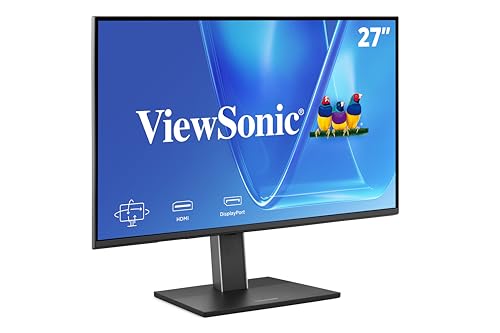
ViewSonic VG2751 27-Inch 1080p Monitor
Best for: office productivity with ergonomic flexibility
- Screen Size
- 27-Inch
- Resolution
- 1920 x 1080
- Refresh Rate
- 100Hz
- Panel Type
- IPS
- Ports
- USB-C, HDMI, DisplayPort, VGA
- Features
- Height-Adjustable Stand, USB Hub
The ViewSonic VG2751 is a 27-inch monitor with 1080p resolution and a 100Hz refresh rate. It uses an IPS panel for consistent colors and includes USB-C connectivity with power delivery. The stand offers full ergonomic adjustments, including height, tilt, swivel, and rotation. This setup suits professionals who prioritize screen real estate and cable management over high-resolution clarity.
- 27-inch IPS panel with 100Hz refresh rate
- USB-C port with power delivery and data transfer
- Height-adjustable stand with tilt, swivel, and rotation
- Flicker-Free technology and Blue Light Filter
- 1080p resolution is lower than the 4K options in this guide
- 100Hz refresh rate is slower than the 160Hz model listed
- 15-pound weight is heavier than the 24-inch dock monitor
- You need a large 27-inch screen for office tasks
- You want a single-cable USB-C connection for your laptop
- You require a fully adjustable stand for ergonomic comfort
- You require 4K resolution for detailed work
- You need a high refresh rate for gaming
- You prefer a lighter, more portable display
Verdict: ViewSonic VG2751 27-Inch 1080p USB-C fits office workers who value a large workspace and ergonomic flexibility over pixel density. It is ideal for general productivity rather than graphic design or gaming.
Specifications side by side

| Spec | ViewSonic 27-Inch 4K USB-C Monitor | ViewSonic 27-Inch 4K UHD IPS Monitor | INNOCN 27-Inch 4K DisplayPort Monitor | Thinlerain 27-Inch 4K 160Hz Webcam Monitor | ViewSonic 32-Inch 4K UHD IPS Monitor | ViewSonic VG2458 24-Inch 1080p Docking Monitor | ViewSonic VG2751 27-Inch 1080p Monitor |
|---|---|---|---|---|---|---|---|
| Screen Size | 27 Inch | 27 Inch | 27" | 27" | 32 Inch | 24" | 27-Inch |
| Resolution | 3840 x 2160 | 3840 x 2160 | 3840 x 2160 | 3840 x 2160 | 3840 x 2160 | 1920 x 1080 | 1920 x 1080 |
| Refresh Rate | – | – | 60hz | 160Hz | – | 100Hz | 100Hz |
| Panel Type | IPS | IPS | IPS | IPS | IPS | IPS | IPS |
| Response Time | – | – | – | 1ms GTG | – | – | – |
| Aspect Ratio | – | – | 16:9 | – | – | – | – |
| Ports | USB-C, HDMI, DisplayPort | Dual HDMI, DisplayPort | DisplayPort, HDMI, USB-C | 2x HDMI, DisplayPort, USB-C, USB-A | USB-C, HDMI, DisplayPort | USB-C, HDMI, DisplayPort, RJ45 | USB-C, HDMI, DisplayPort, VGA |
| Features | HDR, Built-in Speakers, Power Delivery | HDR | HDR, Built-in Speakers, Height-Adjustable Stand | Built-in Speakers, Webcam | HDR | Height-Adjustable Stand, USB Hub | Height-Adjustable Stand, USB Hub |
| Use | Business & Office, Mac, Office, Home Office | Business & Office, Mac, Office, Home Office | Mac | Gaming, Business & Office, Office, Home Office | Business & Office, Mac, Office, Home Office | Business & Office, Mac, Office, Home Office | Business & Office, Mac, Office, Home Office |
| Size | 27 Inch | 27 Inch | 27 Inch | 27 Inch | 32 Inch | 12.5" x 21.2" x 1.8" | 27 Inch |
| Operating System | macOS | macOS | macOS | – | macOS | macOS | macOS |
| Dimensions | 8.2 × 24.2 × 17.2 inches | 2.1 × 24.2 × 14.5 inches | 2.6 × 24 × 14 inches | 8.67 × 24 × 21.3 inches | 9.2 × 28.1 × 19.6 inches | 8.08 × 21.2 × 19.9 inches | 8.6 × 24.1 × 15.8 inches |
| Weight | 8.6 pounds | 12.1 pounds | – | – | 17.2 pounds | 13.6 pounds | 15 pounds |
| Color | Black | Black | Black | 3840 x 2160-160Hz | Black | Black | Black |
| Model | VS19281 | VA2756-4K-MHD | 27C1U | HD-270 | VX3267U-4K | VG2458 | VG2751 |
Frequently asked questions
Which ViewSonic monitor offers the best value for 4K home office use?
The ViewSonic 27-Inch 4K UHD IPS Monitor is the best budget option. It provides 4K clarity and HDR10 support without the cost of USB-C connectivity. You connect via HDMI and DisplayPort. This model suits users who prioritize visual fidelity over docking capabilities in a home office setting.
Is there a 4K monitor with a built-in webcam for video calls?
Yes, the Thinlerain 27-Inch 4K 160Hz Webcam Monitor includes a built-in camera. It combines gaming speed with video conferencing tools. You get a single display for high-frame-rate play and remote work. This setup eliminates the need for external webcam gear while maintaining 4K resolution.
What is the best large 4K monitor for expanded workspace?
The ViewSonic 32-Inch 4K UHD IPS Monitor is the best 32-inch choice. It offers a larger screen for more detailed visuals and reduced desk clutter. It supports single-cable charging via USB-C. This model is ideal for home offices where screen real estate matters more than high-speed gaming.
Which monitor is best for color-accurate creative work?
The INNOCN 27-Inch 4K DisplayPort Monitor is the best premium pick for designers. It offers precise color reproduction and a height-adjustable stand. You get flexible mounting options for a clean setup. This monitor fits creative work that prioritizes color accuracy over high-speed motion performance.
Do any of these monitors include Ethernet ports for wired networking?
The ViewSonic VG2458 24-Inch 1080p Docking Monitor includes an Ethernet port. It provides wired networking and USB hub features. You get daisy-chaining capabilities for office environments. This compact model prioritizes connectivity over high resolution, making it suitable for business and office setups.
Which monitor provides the most ergonomic flexibility for office productivity?
The ViewSonic VG2751 27-Inch 1080p Monitor features a height-adjustable stand. It offers ergonomic flexibility for general productivity tasks. You get a large workspace with USB-C connectivity. This model suits office workers who value adjustability over pixel density for graphic design or gaming.
See also