UGREEN Thunderbolt 5 & High-Performance Docking Stations Compared
As Amazon Associates, we earn from qualifying purchases. This means we may receive a small commission at no extra cost to you if you click through and make a purchase.
Choosing the correct high-bandwidth docking station comes down to your host port architecture, display configuration, and data throughput demands. As workstations transition toward next-generation display resolutions and massive local data transfers, finding the right ugreen tb5 dock or high-speed Thunderbolt 4 hub dictates whether your laptop performs at its ceiling or suffers peripheral bottlenecks. Selecting the ideal hub requires evaluating whether you need 120Gbps next-generation headroom for high-refresh video editing or proven 40Gbps connectivity for standard dual-monitor office workflows.
This ugreen docking station comparison examines six distinct models from the manufacturer, ranging from compact desktop hubs to heavy-duty enterprise workstations. Across these six options, you will find substantial differences in host architecture—including cutting-edge Thunderbolt 5 platforms, standard Thunderbolt 4 hubs, and driver-based DisplayLink interfaces—as well as distinct power delivery profiles, multi-monitor display outputs, and internal storage capabilities. Comparing these specifications directly clarifies which ugreen docking station to buy for your particular hardware setup and daily productivity targets.
Which UGREEN Docking Stations Should You Buy
- For minimalist creative desks prioritizing pure Thunderbolt daisy-chaining: UGREEN 8-in-1 Thunderbolt 4 Docking Station.
- For balanced dual-display professional workstations with legacy port expansion: UGREEN 13-in-1 Thunderbolt 4 Docking Station.
- For video editors needing ultra-fast internal storage and 140W charging: UGREEN Maxidok Thunderbolt 5 Docking Station (Model U716).
- For triple high-refresh monitor setups using pure Thunderbolt video routing: UGREEN Maxidok Thunderbolt 5 Docking Station (Model U715).
- For streamlined DisplayPort 2.1 desk setups wanting silent fanless operation: UGREEN Maxidok Thunderbolt 5 Docking Station (Model U712).
- For enterprise users running quadruple independent displays across Windows or basic Apple silicon: UGREEN USB-C DisplayLink Docking Station.
UGREEN 8-in-1 Thunderbolt 4 Docking Station

Ugreen
4.3 average from Amazon buyers
- Color
- Dark Gray
- Dimensions
- 9.5 x 9.5 x 2.5 Inches
Listed by the seller on the product page.
Best for: Minimalist multi-Thunderbolt hub setups
Pros
- Three downstream Thunderbolt 4 ports
- Compact 8-in-1 desktop footprint
- Included 140W GaN power adapter
Cons
- No dedicated HDMI or DisplayPort
- Limited to Gigabit network speeds
The UGREEN 8-in-1 Thunderbolt 4 Docking Station focuses on streamlined, high-bandwidth daisy-chaining rather than packing dozens of legacy ports. Built around Intel Thunderbolt 4 architecture, this compact dark gray unit provides three downstream Thunderbolt 4 ports capable of full 40Gbps data transmission alongside 15W peripheral power delivery. Rather than cluttering your workspace with rarely used legacy plugs, this hub operates as a central distribution node for external solid-state drives, external graphics enclosures, and native USB-C monitors. Similar to how you might streamline mobile gear alongside an anker laptop dock, this station prioritizes clean, minimalist desk setups.
Display capabilities on this ugreen thunderbolt 4 dock cater directly to dual-monitor users. Windows host machines can drive dual 4K monitors running at 60Hz or a single 8K display at 30Hz, while Apple silicon systems equipped with Pro or Max chips also support dual 4K at 60Hz outputs. Base Apple M-series chips remain restricted to a single external display due to host-side processor limitations. The dock includes a dedicated 140W DC power supply that supplies up to 85W of continuous charging directly to your connected laptop, eliminating the need to unpack your portable travel charger during working hours.
Wired peripheral connectivity is handled via three 10Gbps USB-A 3.2 ports alongside a reliable Gigabit Ethernet jack for stable network communication. Weighing 1.4 kilograms and measuring 9.5 inches square, this desktop dock stays firmly anchored when cables are connected or removed. While it provides an exceptional solution for users already invested in USB-C and Thunderbolt displays, creative professionals requiring integrated SD card readers or native DisplayPort outputs will find greater versatility in the brand’s larger 13-in-1 alternative.
- Three downstream Thunderbolt 4 ports delivering 40Gbps data and 15W peripheral charging
- Dual 4K display output at 60Hz or single 8K at 30Hz for compatible host hardware
- Included 140W GaN power adapter delivering up to 85W host laptop charging
- Three high-speed 10Gbps USB-A 3.2 data ports and Gigabit Ethernet networking
UGREEN 13-in-1 Thunderbolt 4 Docking Station
Ugreen
4.6 average from Amazon buyers
- Color
- Gray
- Size
- 13-in-1 (1*USBC 3.2)
Listed by the seller on the product page.
Best for: Versatile dual-display Thunderbolt 4 workstations
Pros
- Fast 2.5GbE wired networking
- UHS-II SD and microSD card slots
- Integrated DisplayPort 1.4 output
Cons
- DisplayPort lacks DP++ support
- Incompatible with 2018 Intel Mac mini
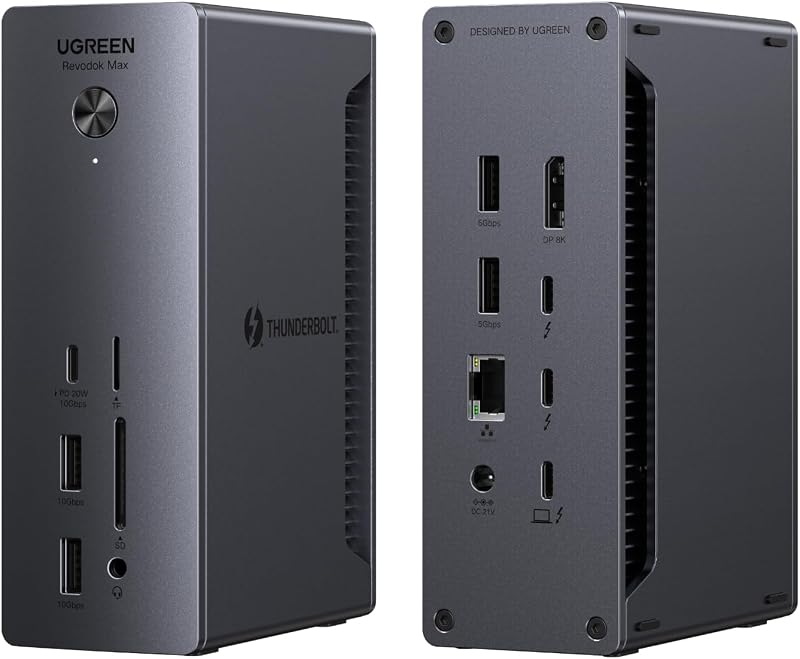
The UGREEN 13-in-1 Thunderbolt 4 Docking Station, also highlighted as the Revodok Max 213, expands connectivity for traditional desk setups that balance legacy USB gear with modern high-speed peripherals. It integrates two Thunderbolt 4 ports running at 40Gbps, five USB ports spanning 10Gbps and 5Gbps transfer rates, a 3.5mm audio jack, and dual UHS-II SD and microSD 4.0 card readers that sustain speeds up to 312MB/s. Professionals working with photography and field audio can quickly transfer camera cards while managing high-fidelity headphones.
For video expansion, this station incorporates an integrated DisplayPort 1.4 connection alongside its downstream Thunderbolt 4 port, outputting dual 4K video at 60Hz or a single 8K screen at 30Hz for Windows PCs. Apple MacBook systems running M1, M2, M3, or M4 Pro and Max processors drive dual 4K displays at 60Hz natively, whereas base M-series machines support a single display. When connecting external displays, users should note that the DisplayPort socket does not support DP++ passive adapters, meaning an active converter is mandatory when linking an HDMI monitor. If you are comparing multi-display solutions against an anker macbook docking station, this model stands out with its included 2.5GbE high-speed networking port.
Power distribution is managed by an included 180W GaN power adapter, allowing the dock to supply 90W of dedicated charging to host laptops while leaving ample reserve for connected devices. Front-facing connectivity features a 10Gbps USB-C port pushing up to 20W Power Delivery, making it simple to rapid-charge mobile accessories without draining host power. Measuring a compact 5.85 inches by 3.79 inches, this unit occupies minimal desk real estate while offering full legacy and high-bandwidth coverage, though users seeking higher 120Gbps throughput will want to step up to the Maxidok Thunderbolt 5 generation.
- Comprehensive 13-port expansion including two 40Gbps Thunderbolt 4 channels
- High-bandwidth 2.5GbE network port and dual UHS-II SD/TF 4.0 card readers running at 312MB/s
- Robust 90W laptop host charging powered by an included 180W GaN desktop brick
- Dual 4K at 60Hz display support across Windows and Pro-tier Apple silicon computers
UGREEN Maxidok Thunderbolt 5 Docking Station

Best for: Compact high-speed workstations with DisplayPort 2.1
Pros
- Dedicated DisplayPort 2.1 output
- Silent fanless aluminum alloy housing
- Up to 100W laptop power delivery
Cons
- Restricted to Gigabit Ethernet
- Only three USB-A accessory ports
Best for: High-refresh multi-display pure Thunderbolt setups
Pros
- Four high-speed Thunderbolt 5 ports
- Triple 4K at 144Hz support
- Silent fanless dual-layer aluminum design
Cons
- Lacks native HDMI or DisplayPort sockets
- Requires Thunderbolt-native monitor connections
Best for: Demanding editors needing integrated NVMe storage
Pros
- Internal 8TB M.2 NVMe slot
- Blazing 120Gbps Thunderbolt 5 bandwidth
- Robust 140W laptop charging delivery
Cons
- Integrated cooling fan generates operational hum
- Requires macOS 15 for Apple systems
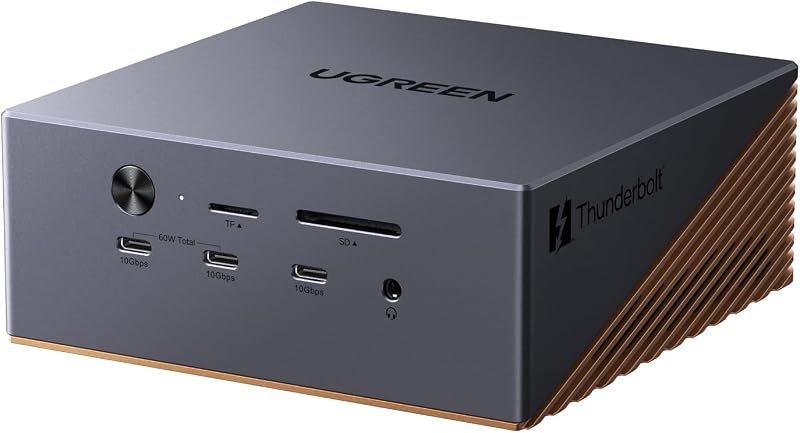
Representing the pinnacle of the ugreen maxidok thunderbolt 5 family, the UGREEN Maxidok Thunderbolt 5 Docking Station under model number U716 delivers extreme performance for data-intensive video production and 3D modeling workflows. This Intel-certified ugreen thunderbolt 5 dock harnesses next-generation Thunderbolt 5 architecture to provide up to 120Gbps of bandwidth, tripling the throughput of previous-generation docks. Its standout hardware capability is an internal NVMe PCIe Gen4x4 M.2 slot supporting form factors from 2230 to 2280 up to 8TB capacity, transforming your docking station into a high-speed external storage array without adding external drive enclosures to your desk.
Display flexibility on this ugreen maxidok u716 station easily accommodates complex multi-screen arrangements. Windows users can establish triple independent displays across two downstream Thunderbolt 5 ports and a dedicated DisplayPort 1.4 connection, achieving dual or single 8K output at 60Hz. On Apple macOS systems (requiring macOS 15 or later), the hardware drives dual high-resolution displays. A massive 240W total system power budget supplies up to 140W of dedicated charging to demanding host laptops, while dual USB-C ports share a dedicated 60W Power Delivery output for auxiliary devices.
Expansion across the bronze aluminum unibody chassis includes seventeen total connections, featuring three 10Gbps USB-A ports, three 10Gbps USB-C ports, three 3.5mm audio jacks, 2.5GbE networking, and high-speed SD/TF 4.0 slots. To maintain sustained data transfers without thermal throttling, the chassis houses an active AI smart cooling system utilizing a 60mm ultra-thin fan. While the cooling fan introduces faint operational noise under maximum compute and drive loads, the immense throughput and internal storage make this dock the ultimate high-performance hub for creative workstations.
- Next-generation 120Gbps Thunderbolt 5 throughput powered by Intel-certified architecture
- Integrated PCIe Gen4x4 M.2 NVMe slot supporting up to 8TB internal storage drives
- Dual or single 8K display output at 60Hz alongside triple display support on Windows
- Massive 240W system power delivering 140W host charging and 60W auxiliary device power
UGREEN Maxidok Thunderbolt 5 Docking Station

Ugreen
4.5 average from Amazon buyers
- Color
- Bronze
Listed by the seller on the product page.
The UGREEN Maxidok Thunderbolt 5 Docking Station, identified under model number U715, is engineered specifically for users who run modern monitors with native Type-C or Thunderbolt connections. Equipped with four high-speed Thunderbolt 5 ports operating at 120Gbps, this dock delivers pure bandwidth capable of moving massive media assets—such as a 21GB video file in approximately two seconds. Crucially, the ugreen maxidok u715 omits legacy HDMI and DisplayPort video sockets entirely, relying strictly on its Thunderbolt ports to route uncompressed video streams directly to compatible screens.
Video capabilities on this streamlined dock are remarkable, supporting triple 4K monitors running at a rapid 144Hz refresh rate, dual 6K displays at 60Hz, or a single pristine 8K display. The dock incorporates dynamic power allocation, delivering up to 140W of host charging to keep power-hungry laptops running at full clock speeds. It is bundled with a compact 180W GaN power brick that is 33 percent smaller than traditional adapters and includes interchangeable US, EU, and UK plugs, making it exceptionally versatile for traveling creators and international offices.
Peripheral connectivity spans thirteen ports, including 2.5Gbps Ethernet network sharing, a UHS-II SD/TF 4.0 card reader operating at 312MB/s, a 3.5mm headphone and microphone jack, and five USB ports (two USB-A 3.2, two USB-A 3.0, and one USB-C 3.2). Thermal dissipation is managed silently through a dual-layer aluminum chassis paired with internal thermal silicone, completely eliminating fan noise. Dual-sided rubber pads allow the unit to sit securely in either horizontal or vertical orientations, offering an ideal fit for clutter-free desks, though users needing built-in DisplayPort connectors should look to the U716 or U712 configurations.
- Four 120Gbps Thunderbolt 5 ports engineered for data-heavy professional creative pipelines
- Triple 4K display output at 144Hz, dual 6K at 60Hz, or single 8K video output
- Up to 140W dynamic host charging with a compact 180W GaN adapter and multi-region plugs
- Completely silent dual-layer aluminum chassis designed for horizontal or vertical placement
UGREEN Maxidok Thunderbolt 5 Docking Station
Ugreen
4.4 average from Amazon buyers
- Hardware Interface
- 3.5mm Audio, Ethernet, MicroSD, PCIE x 16, Secure Digital Card, Thunderbolt, USB 3.2 Gen 2
- Total Usb Ports
- 3
- Number of Ports
- 10
- Wattage
- 140 watts
- Item Weight
- 1.6 kg
Listed by the seller on the product page.
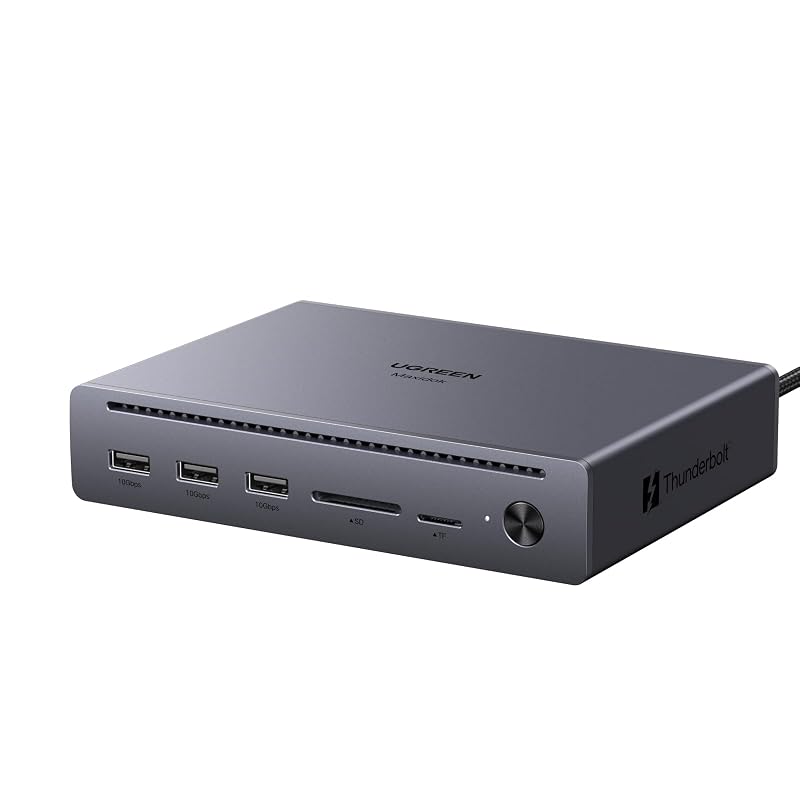
Designed for professionals seeking 120Gbps bandwidth without unneeded peripheral bulk, the UGREEN Maxidok Thunderbolt 5 Docking Station (Model U712) balances cutting-edge performance with an efficient 10-port layout. This ugreen maxidok u712 model supports 120Gbps uni-directional and 80Gbps bi-directional transfer rates, moving a 6GB 4K video clip in approximately one second while maintaining backward compatibility with Thunderbolt 4, Thunderbolt 3, and USB4 computers.
For visual creators, this unit incorporates an advanced DisplayPort 2.1 port alongside two downstream Thunderbolt 5 connections. This combination lets compatible host systems drive dual or single 8K displays at 60Hz or run triple 4K monitors at 144Hz for fluid animation, software debugging, and color grading. Like its siblings, the DisplayPort socket requires an active adapter if adapting to HDMI displays. Charging is backed by a 140W total power design that supplies up to 100W Power Delivery directly to host laptops, keeping even a fully loaded 16-inch MacBook Pro energized without battery drain.
The hardware configuration provides essential connectivity, featuring three 10Gbps USB-A data ports, a dual SD/TF 3.0 card reader operating at 170MB/s, a 3.5mm audio jack, and Gigabit Ethernet networking. The grey aluminum alloy housing relies on an internal passive thermal dissipation system, ensuring completely silent operation throughout intensive rendering tasks. While it sacrifices the 2.5GbE networking and internal SSD expansion found on the larger U716 model, its compact footprint and native DisplayPort 2.1 connection establish it as a strong contender for the best ugreen thunderbolt dock in focused creative setups.
- Intel-certified 120Gbps Thunderbolt 5 performance with backward compatibility for USB4 and TB4
- Dedicated DisplayPort 2.1 socket and two downstream Thunderbolt 5 ports supporting triple 4K at 144Hz
- Reliable 100W Power Delivery laptop charging from an efficient 140W power architecture
- Fanless, silent aluminum alloy unibody construction with integrated security lock slot
UGREEN USB-C DisplayLink Docking Station

Ugreen
4.8 average from Amazon buyers
- Color
- Dark Gray
Listed by the seller on the product page.
Best for: Multi-monitor business setups spanning quadruple displays
Pros
- Drives up to four 4K displays
- Dual HDMI and dual DisplayPort outputs
- Dedicated 27W front USB-C fast charging
Cons
- Requires background DisplayLink software drivers
- DisplayLink cannot route protected streaming video
The UGREEN USB-C DisplayLink Docking Station takes a completely different technical approach from native Thunderbolt hardware, using software-driven DisplayLink technology to bypass operating system display restrictions. Where standard Thunderbolt docks cannot drive more than one external monitor from a base M1, M2, M3, or M4 Apple laptop, this 15-in-1 desktop hub successfully drives up to four independent 4K monitors running at 60Hz simultaneously across two integrated HDMI ports and two DisplayPort outputs. The unit includes a dedicated USB flash drive preloaded with the required DisplayLink drivers for straightforward installation.
Beyond its quadruple display capabilities, this station offers flexible video modes, including single 8K output at 60Hz via DisplayPort or 8K at 30Hz via HDMI, as well as dual 8K configurations. For audio routing, connecting standard desktop speakers or studio monitoring headphones via a dedicated ugreen 3.5mm audio cable ensures low-latency playback without software driver interference. Peripheral expansion includes two 10Gbps USB-C data ports, three 5Gbps USB-A ports, 2.5GbE networking, and dual SD/TF 3.0 card slots delivering 170MB/s data transfers.
Power is supplied through a 150W desktop adapter that delivers up to 100W of dedicated laptop charging while supplying up to 27W through a separate front-panel Power Delivery port. This power distribution is dynamically allocated; when the 27W auxiliary port draws 15W or more to fast-charge a phone or tablet, host charging drops slightly to 85W. While DisplayLink drivers consume modest host CPU cycles and cannot display HDCP-protected streaming video from certain platforms, this dock remains the ultimate multi-display solution for enterprise users restricted by native silicon display ceilings.
- DisplayLink architecture driving up to four independent 4K displays at 60Hz across HDMI and DP
- Generous 15-in-1 port array including 2.5GbE networking and dual 10Gbps USB-C data connections
- Included 150W power adapter providing 100W laptop host charging and a dedicated 27W fast-charge port
- Cross-platform support for USB-C laptops running Windows or Apple macOS
What Sets These Models Apart
| Model | Host Interface & Bandwidth | Display Outputs | Host Power Delivery | Key Specialty |
|---|---|---|---|---|
| UGREEN 8-in-1 Thunderbolt 4 Docking Station | Thunderbolt 4 (40Gbps) | Dual 4K@60Hz or Single 8K@30Hz (via TB4) | 85W (140W adapter) | Pure Thunderbolt daisy-chaining hub |
| UGREEN 13-in-1 Thunderbolt 4 Docking Station | Thunderbolt 4 (40Gbps) | Dual 4K@60Hz or Single 8K@30Hz (DP 1.4 + TB4) | 90W (180W adapter) | 2.5GbE network and UHS-II 312MB/s card reader |
| UGREEN Maxidok Thunderbolt 5 Docking Station (U716) | Thunderbolt 5 (120Gbps) | Triple Displays, Dual/Single 8K@60Hz (DP 1.4 + 2x TB5) | 140W (240W adapter) | Internal 8TB M.2 NVMe SSD slot and AI cooling |
| UGREEN Maxidok Thunderbolt 5 Docking Station (U715) | Thunderbolt 5 (120Gbps) | Triple 4K@144Hz or Single 8K (4x TB5 ports) | 140W (180W adapter) | Pure Thunderbolt display routing and fanless design |
| UGREEN Maxidok Thunderbolt 5 Docking Station (U712) | Thunderbolt 5 (120Gbps) | Triple 4K@144Hz or Dual 8K@60Hz (DP 2.1 + 2x TB5) | 100W (140W adapter) | DisplayPort 2.1 output and fanless aluminum chassis |
| UGREEN USB-C DisplayLink Docking Station | USB 3.2 Gen 2 (10Gbps) | Quad 4K@60Hz (2x HDMI + 2x DP) | 100W (150W adapter) | Quad-monitor support via DisplayLink software drivers |
Buying Tips for UGREEN Docking Stations
Before investing in a high-performance dock, verify the exact specification of your host laptop port. While a ugreen tb5 dock offers full backward compatibility with Thunderbolt 4, Thunderbolt 3, and USB4 ports, the dock will automatically throttle its bandwidth to match your host port maximum. To achieve the full 120Gbps transfer rates and triple 4K at 144Hz display configurations offered by the Maxidok generation, your laptop must feature a certified Thunderbolt 5 controller. When packing portable gear for travel, carrying a compact ugreen battery bank ensures mobile power, but desktop docks strictly require their dedicated wall power adapters to function.
Understand the difference between native display tunneling and driver-based display output. Thunderbolt docks rely on your computer GPU and native DisplayPort Alternate Mode, delivering uncompressed visuals with zero input latency, ideal for gaming and professional color grading. However, basic Apple M1 through M4 chips restrict native output to a single external monitor across standard Thunderbolt docks. If you use a base Apple laptop and require two or more displays, the DisplayLink model is the only choice in this lineup that circumvents that restriction, albeit requiring installed software drivers.
Pay close attention to video port protocols and adapter requirements. None of the DisplayPort sockets on the UGREEN Thunderbolt docks support DP++ (DisplayPort Dual-Mode). This means you cannot use an inexpensive passive DisplayPort-to-HDMI cable to connect an HDMI monitor; you must use an active converter cable to translate the digital signal. Additionally, calculate your laptop charging requirements: mobile workstations running intensive rendering tasks benefit substantially from the 140W Power Delivery provided by the U716 and U715 docks, whereas standard ultrabooks operate smoothly on 85W to 100W profiles.
FAQ
Can a UGREEN Thunderbolt 5 dock work on a Thunderbolt 4 laptop?
Yes, all UGREEN Thunderbolt 5 docking stations are fully backward compatible with Thunderbolt 4, Thunderbolt 3, and USB4 computers. When connected to a Thunderbolt 4 host, the dock automatically negotiates data transfers and video bandwidth down to 40Gbps limits. All peripheral USB ports, card slots, audio jacks, and network ports will function normally, but maximum display refresh rates and transfer speeds will be capped by the host connection.
Why do the DisplayPort sockets require active adapters for HDMI monitors?
The DisplayPort connections on UGREEN Thunderbolt docking stations output standard DisplayPort signals without DP++ (DisplayPort Dual-Mode) capability. A DP++ port allows passive cables to renegotiate signals to HDMI, whereas standard DisplayPort outputs require an active converter containing an integrated chipset to actively translate the DisplayPort video stream into an HDMI-compatible signal.
How does the DisplayLink docking station bypass Apple M-series monitor limits?
Base Apple M1, M2, M3, and M4 processors only feature single external display pipelines over native Thunderbolt. The UGREEN USB-C DisplayLink dock uses software drivers that compress display data through host CPU processing and send it as standard USB data packets to the dock. Hardware chips inside the dock then decompress that data directly into native HDMI and DisplayPort video signals, enabling up to four displays without relying on the native GPU display engine.
Does the internal M.2 NVMe slot on the Maxidok U716 support any SSD?
The UGREEN Maxidok U716 supports standard M.2 NVMe PCIe Gen4x4 solid-state drives in 2230, 2242, 2260, and 2280 form factors with capacities up to 8TB. However, SATA M.2 drives are not supported. Furthermore, if your NVMe SSD includes a pre-installed heatsink, the heatsink dimensions must not exceed 12 millimeters in height and 24 millimeters in width to fit securely inside the internal drive bay.
Can these docking stations function using laptop battery power alone?
No, all six UGREEN docking stations covered in this guide require a continuous connection to their included external DC or GaN power adapters to operate. They cannot draw bus power from the laptop to power external drives, display outputs, or networking ports. Connecting the supplied power adapter is mandatory for the docking station and its connected peripherals to initialize and function properly.