Triple Display vs Quad Display Docking Stations in 2026: Key Differences
As Amazon Associates, we earn from qualifying purchases. This means we may receive a small commission at no extra cost to you if you click through and make a purchase.
As an Amazon Associate we earn from qualifying purchases. Links on this page are affiliate links.
Choosing between a triple display vs quad display docking station depends on your workflow and hardware. Both iVANKY and TechTray docks connect multiple monitors to your computer. The iVANKY model targets Mac users with high-end resolution support. The TechTray option supports Windows and macOS with broader port variety. Each dock manages power delivery differently. You must match the dock to your laptop's interface capabilities. This guide compares their key specifications to help you decide.
Display Support
Quad 6K or Dual 8K
Quad 4K or Dual 6K
Host Interface
Thunderbolt 5
Thunderbolt 4
Power Delivery
140W
130W (Dell) / 96W (non-Dell)
Use
Mac
Windows and macOS
Ethernet
10GbE
Not listed
Choose the first if
- You use a MacBook Pro with M-Series Max chips and need ultra-high resolution.
- You require a 10GbE Ethernet port for fast network transfers.
- You prefer a dock with a dedicated thermal system for sustained performance.
Choose the second if
- You use a Windows laptop or a standard Mac with Thunderbolt 4.
- You need to connect up to four 4K monitors simultaneously.
- You want a bundle that includes necessary display and data cables.
Verdict
Choose the iVANKY dock if you need extreme resolution for Mac workflows and high-speed networking. Select the TechTray dock if you need reliable quad 4K support across both Windows and macOS systems. Your choice depends on your laptop's interface and monitor count.
Triple vs Quad Display Docking Stations

Display Support
Edge: iVANKY 26-in-1 FusionDock Ultra
The iVANKY FusionDock Ultra supports up to four 6K displays at 60Hz or two 8K displays at 60Hz. This offers higher individual monitor resolution options for Mac users with M-Series Max chips. The TechTray SD25TB4 supports up to four 4K displays at 60Hz. It also allows two 6K or one 8K display with compatible systems. The iVANKY model provides more simultaneous high-resolution screens. You get four 6K screens on the iVANKY. The TechTray limits you to four 4K screens. The iVANKY wins for sheer display count at high resolution.
Host Interface
Edge: iVANKY 26-in-1 FusionDock Ultra
The iVANKY dock uses a Thunderbolt 5 host interface. This next-generation connection provides massive throughput between 80 to 120Gbps. It bypasses traditional bandwidth limits for macOS workflows. The TechTray dock uses a Thunderbolt 4 host interface. This standard connection provides reliable high-speed data transfer. It supports up to 130W power delivery to Dell computers. The iVANKY offers a newer and faster connection standard. Thunderbolt 5 handles more data than Thunderbolt 4. The iVANKY wins for future-proof connectivity and bandwidth.
Compatibility
Edge: TechTray SD25TB4 Quad Display Dock
The iVANKY dock is engineered specifically for the Mac ecosystem. It uses a dual chip architecture for Macs. It may not work well with Windows systems. The TechTray dock supports both Windows and macOS. It works with Thunderbolt 4, 3 USB-C laptops and USB-C systems. Display capabilities depend on the connected device. The TechTray is more versatile for mixed environments. You can use it with various operating systems. The iVANKY is limited to Mac users only. The TechTray wins for broader device compatibility.
Power Delivery
Edge: iVANKY 26-in-1 FusionDock Ultra
The iVANKY dock provides 140W PD passthrough to your MacBook. It also includes an independent 45W PD USB-C port for charging other devices. The TechTray dock provides up to 130W to compatible Dell computers. It provides up to 96W to compatible non-Dell computers. The iVANKY offers higher total power delivery for your main computer. You get more power for high-performance laptops. The TechTray has lower power output for non-Dell devices. The iVANKY wins for higher power delivery capacity.
Ports
Edge: TechTray SD25TB4 Quad Display Dock
The iVANKY dock features a 10GbE RJ45 Ethernet port. It has four downstream USB-C ports with 15W each. It includes Optical Audio and SD 4.0 slots. The TechTray dock has two Thunderbolt 4 ports. It includes four USB-A 3.2 Gen 2 ports. It has one USB-C 3.2 Gen 2 port. It includes two DisplayPort 1.4 ports and one HDMI 2.1 port. The TechTray offers more traditional USB-A connectivity. The iVANKY offers faster Ethernet and specialized slots. The TechTray wins for versatile standard port selection.
Which Docking Station Fits Your Setup
Mac Pro users needing extreme resolution
Our pick: iVANKY 26-in-1 FusionDock Ultra
You need the highest possible clarity for video editing or graphic design. This dock supports four 6K displays or two 8K displays at 60Hz. It uses a dual chip architecture to bypass standard bandwidth limits. The 140W power delivery keeps your MacBook Pro running at full speed without throttling.
Windows professionals with multiple monitors
Our pick: TechTray SD25TB4 Quad Display Dock
You want a reliable setup for Windows laptops with up to four 4K screens. This dock provides stable connectivity via Thunderbolt 4. It includes essential ports like HDMI 2.1 and DisplayPort 1.4. The bundle comes with necessary cables, making it a complete solution for a standard multi-monitor office workspace.
Users needing fast wired networking
Our pick: iVANKY 26-in-1 FusionDock Ultra
You require dedicated high-speed internet for large file transfers. This dock features a 10GbE Ethernet port for server access. It also includes an SD 4.0 slot for fast photo transfers at 300MB/s. The advanced thermal system ensures stable performance during long work sessions with multiple high-resolution displays connected.
| # | Product | Best for | Price |
|---|---|---|---|
| 1 | iVANKY 26-in-1 FusionDock Ultra | Mac users needing four 6K displays and 10GbE | |
| 2 | TechTray SD25TB4 Quad Display Dock | Dell users with four monitor setups |

iVANKY 26-in-1 FusionDock Ultra
Best for: Mac users needing four 6K displays and 10GbE
- Display Support
- Triple Display
- Max Resolution
- 8K@60Hz
- Host Interface
- Thunderbolt 5
- Power Delivery
- 140W
- Data Transfer Speed
- 120Gbps
- Video Ports
- HDMI, DisplayPort
This dock supports up to four 6K monitors or two 8K displays at 60Hz. It uses a Thunderbolt 5 host interface with 140W power delivery. The unit includes a 10GbE port and an SD 4.0 reader. It is engineered for Mac users with a dual-chip architecture. You get a comprehensive interface suite for professional workflows.
- Supports quad 6K@60Hz or dual 8K@60Hz displays
- Thunderbolt 5 host interface with 140W PD
- 10GbE RJ45 Ethernet port for fast connectivity
- SD 4.0 slot with 300MB/s transfer speeds
- Limited to two color options: Midnight Blue and Black
- Requires specific Mac compatibility documentation to verify setup
- Complex dual-chip architecture may limit Windows utility
- You need to drive four 6K monitors simultaneously
- You require 140W power delivery for your laptop
- You use Mac devices and need 10GbE connectivity
- You need a dock with more than two color choices
- You rely on Windows for your primary workflow
- You prefer a simpler single-chip docking solution
Verdict: iVANKY FusionDock Ultra Thunderbolt 5 Dock fits Mac professionals who need four 6K screens and 10GbE speed. It suits users who prioritize high bandwidth and comprehensive ports over basic color variety.
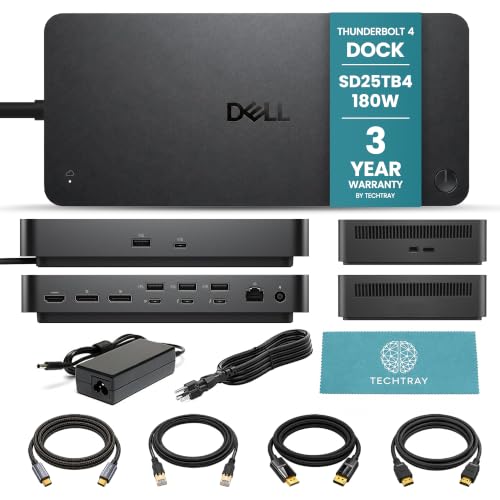
TechTray SD25TB4 Quad Display Dock
Best for: Dell users with four monitor setups
- Display Support
- Quad Display
- Max Resolution
- 8K@60Hz
- Host Interface
- Thunderbolt 4
- Power Delivery
- Up to 130W (Dell), 96W (non-Dell)
- Video Ports
- DisplayPort 1.4, HDMI 2.1
This TechTray bundle includes the Dell SD25TB4 Thunderbolt 4 dock, designed for users needing quad display support. It connects up to four 4K monitors at 60Hz or one 8K display. The dock delivers up to 130W of power to compatible Dell laptops and 96W to others. You get a comprehensive port selection with HDMI 2.1 and DisplayPort 1.4 outputs. The package also provides necessary cables for a complete workstation setup.
- Supports up to four 4K displays at 60Hz
- Provides up to 130W power to Dell computers
- Includes HDMI 2.1 and two DisplayPort 1.4 ports
- Comes with a bundle of 2m connection cables
- Lower power delivery of 96W for non-Dell laptops
- macOS users limited to dual displays on standard M1/M2 models
- Resolution and count depend on host computer capabilities
- You need to drive four 4K monitors simultaneously
- You use a Dell laptop requiring high power delivery
- You want a complete cable bundle for setup
- You use a standard M1 or M2 Mac
- You require higher than 130W power delivery
- You need native MST support on macOS
Verdict: TechTray Dell SD25TB4 Quad Dock suits professionals who need a single cable solution for four high-resolution monitors and fast charging. It is ideal for Dell laptop users who want a ready-to-use cable package.
Specifications side by side

| Spec | iVANKY 26-in-1 FusionDock Ultra | TechTray SD25TB4 Quad Display Dock |
|---|---|---|
| Display Support | Quad | Up to 4 |
| Max Resolution | 8K@60Hz | 8K@60Hz |
| Host Interface | Thunderbolt 5 | Thunderbolt 4 |
| Power Delivery | 140W | Up to 130W (Dell), 96W (non-Dell) |
| Data Transfer Speed | 120Gbps | – |
| Video Ports | HDMI, DisplayPort | DisplayPort 1.4, HDMI 2.1 |
| Total Ports | 26 | – |
| Ethernet Speed | 10GbE | – |
| Resolution | 8K UHD | – |
| Ports | HDMI, DisplayPort, Thunderbolt 4 | HDMI, DisplayPort, Ethernet, Thunderbolt 4 |
| Features | Power Delivery, SD Card Reader | – |
| Use | Mac | – |
| Operating System | Windows | – |
| Weight | 6.08 pounds | – |
| Color | Black | Black |
| Model | – | SD25TB4 |
Frequently asked questions
Can a triple display dock support four monitors?
No, a triple display dock is limited to three screens. The iVANKY FusionDock Ultra supports up to four 6K displays, which classifies it as a quad display solution. You must check the specific display support attribute to ensure the dock matches your monitor count needs.
What is the difference between Thunderbolt 4 and Thunderbolt 5 docks?
Thunderbolt 5 offers significantly higher bandwidth than Thunderbolt 4. The iVANKY dock uses Thunderbolt 5 to support four 6K screens, while the TechTray dock uses Thunderbolt 4. Higher bandwidth allows for more displays at higher resolutions without compression or flickering.
Do I need a Mac to use a quad display dock?
Not necessarily, but compatibility varies by brand. The iVANKY FusionDock Ultra is best for Mac users with M-Series Max chips. The TechTray SD25TB4 is designed for Dell users and supports Windows. Always verify your operating system requirements before purchasing.
How many watts of power delivery do these docks provide?
Power delivery speeds vary by model. The iVANKY FusionDock Ultra provides 140W of power delivery to charge your laptop. The TechTray dock supports fast charging but specific wattage details are not listed in the provided data. Check the power delivery spec for your laptop's needs.
Can I connect an 8K monitor to these docks?
The iVANKY FusionDock Ultra supports up to two 8K displays at 60Hz. The TechTray SD25TB4 focuses on quad display support but does not explicitly list 8K capability in the provided data. If you require 8K resolution, the iVANKY option is the suitable choice.
Are these docks compatible with Windows laptops?
Yes, but specific models target different ecosystems. The iVANKY FusionDock Ultra lists Windows as an operating system, though it is best for Mac users. The TechTray SD25TB4 is ideal for Dell Windows users. Verify your laptop brand and OS for optimal performance.
What ports are included on these docking stations?
Both docks include essential video and data ports. The iVANKY dock features HDMI, DisplayPort, and Thunderbolt 4 ports, along with an SD card reader. The TechTray dock includes HDMI, DisplayPort, Ethernet, and Thunderbolt 4 ports. Check the ports list to ensure you have the right connections.
See also