Thinlerain 27-Inch 4K 160Hz Webcam Monitor Alternatives: 6 Similar Picks Compared
As Amazon Associates, we earn from qualifying purchases. This means we may receive a small commission at no extra cost to you if you click through and make a purchase.
As an Amazon Associate we earn from qualifying purchases. Links on this page are affiliate links.
You are looking for thinlerain 27 inch 4k 160hz webcam monitor alternatives because the original model has specific requirements that may not fit your setup. The Thinlerain monitor offers 4K clarity and a 160Hz refresh rate on an IPS panel. It includes a pop-up 3MP webcam and built-in speakers. However, the webcam requires a USB-B connection, which limits compatibility with some computers. You might prefer a different size, a higher refresh rate, or a simpler port layout. You may also want a monitor without a built-in camera to reduce clutter on your desk.
We compared 6 similar picks to find options with overlapping specifications. These alternatives share key traits like 27-inch sizes, 4K resolution, and IPS panels. Some models offer USB-C connectivity for easier cable management. Others provide ergonomic stands or different refresh rates. We selected these products based on their published specs. This list helps you find a display that matches your workflow without the constraints of the original model. Each pick serves a distinct need, from gaming to office productivity.
How these picks differ

ViewSonic 27-Inch 4K USB-C Monitor
The ViewSonic VS19281 swaps the Thinlerain’s 160Hz refresh rate and integrated webcam for a cleaner, professional setup. It retains 4K resolution and an IPS panel but focuses on cable management with 65W USB-C power delivery. You lose the pop-up camera and high-speed gaming performance. This monitor suits office workers who prioritize image quality and a single-cable connection to their laptop. It does not include HDR or a webcam, making it a simpler, more reliable choice for static work rather than dynamic video calls or fast-paced gaming.
ViewSonic 27-Inch 1080p Conferencing Monitor
The ViewSonic VG2741V offers a 120Hz refresh rate and a built-in webcam, similar to the Thinlerain, but at a lower 1080p resolution. You gain integrated conferencing tools without needing a separate camera, but you sacrifice the sharp 4K clarity of the original. This model is ideal for remote workers who prioritize video call convenience and smooth motion over pixel density. It lacks HDR and USB-C video input, making it a budget-friendly option for those who value functional conferencing hardware over high-end visual fidelity.
ViewSonic 27-Inch 4K UHD IPS Monitor
The ViewSonic VA2756-4K-MHD provides 4K UHD resolution and HDR support but removes the 160Hz refresh rate and webcam entirely. It uses standard HDMI and DisplayPort connections, offering a reliable display for productivity and media consumption. You give up gaming speed and built-in video tools for a more traditional monitor experience. This pick fits users who want clear 4K visuals for office work and do not need high refresh rates or integrated cameras. It is a straightforward, no-frills option for static content creation and business tasks.
INNOCN 27-Inch 4K DisplayPort Monitor
The INNOCN 27C1U focuses on color accuracy and ergonomic flexibility with a height-adjustable stand, matching the Thinlerain’s 4K IPS panel. It includes USB-C connectivity and HDR support but lacks a webcam and high refresh rate. You gain superior stand adjustability and precise color performance for design work, but lose the integrated video tools and 160Hz speed. This monitor is best for designers and professionals who value physical adjustability and image quality over gaming performance or built-in conferencing features.
ViewSonic 32-Inch 4K UHD IPS Monitor
The ViewSonic VX3267U-4K increases the screen size to 32 inches while keeping 4K resolution and an IPS panel. It offers USB-C power delivery but removes the webcam and high refresh rate found in the Thinlerain. You gain a larger workspace for multitasking and media, but sacrifice the compact 27-inch form factor and integrated video tools. This monitor suits users who need more screen real estate for office tasks and media viewing. It is not designed for high-speed gaming or video conferencing, focusing instead on spacious, clear visuals.
Gawfolk 32 Inch 4K Curved Monitor
The Gawfolk GFTY982 offers a 32-inch curved 4K display with FreeSync support, but runs at only 60Hz and lacks a webcam. You gain an immersive screen for casual gaming and media, but lose the 160Hz smoothness and integrated video tools of the Thinlerain. This monitor is best for users who prioritize screen size and curvature over speed and conferencing features. It includes built-in speakers and standard HDMI and DisplayPort connections, making it a solid choice for entertainment and relaxed gaming rather than professional video calls or fast-paced action.
| # | Product | Best for | Price |
|---|---|---|---|
| 1 | Thinlerain 27-Inch 4K 160Hz Webcam Monitor Best overall | gamers and remote workers needing integrated video tools | |
| 2 | ViewSonic 27-Inch 4K USB-C Monitor Best premium | Office work and media viewing with USB-C | |
| 3 | ViewSonic 27-Inch 1080p Conferencing Monitor Best budget | integrated video conferencing setups | |
| 4 | ViewSonic 27-Inch 4K UHD IPS Monitor Also great | 4K productivity and media with standard ports | |
| 5 | INNOCN 27-Inch 4K DisplayPort Monitor Best height-adjustable stand | Color-accurate 4K work with adjustable stands | |
| 6 | ViewSonic 32-Inch 4K UHD IPS Monitor Also great | Users needing a large 32-inch 4K workspace | |
| 7 | Gawfolk 32 Inch 4K Curved Monitor Best 60hz | immersive 4K media and casual gaming |

Thinlerain 27-Inch 4K 160Hz Webcam Monitor
Best for: gamers and remote workers needing integrated video tools
- Screen Size
- 27"
- Resolution
- 3840 x 2160
- Refresh Rate
- 160Hz
- Panel Type
- IPS
- Response Time
- 1ms GTG
- Ports
- 2x HDMI, DisplayPort, USB-C, USB-A
This 27-inch IPS monitor delivers 4K UHD resolution at a 160Hz refresh rate. It includes a pop-up 3MP webcam with a microphone and dual built-in speakers. The stand supports height, tilt, swivel, and 90-degree pivot adjustments for portrait use. You get HDMI, DisplayPort, and USB-C connectivity. It suits users who need high clarity, smooth motion, and integrated video conferencing tools in one device.
- 4K UHD (3840×2160) resolution with 160Hz refresh rate
- Pop-up 3MP webcam with microphone and physical privacy shutter
- IPS panel with 100% sRGB color coverage
- Ergonomic stand with 90-degree pivot and height adjustment
- Webcam and microphone require a USB-A to USB-B connection
- Brightness is limited to 350 nits
- Webcam resolution is 3MP, lower than standard 1080p cameras
- You need a high-refresh-rate display for gaming or fast motion
- You want a built-in webcam and speakers to reduce desk clutter
- You frequently rotate your screen to portrait mode for coding
- Your computer lacks a USB-A port for the webcam connection
- You require 1080p or higher resolution for the built-in camera
- You need a monitor with HDR10 certification for creative work
Verdict: Thinlerain 27-Inch 4K 160Hz Webcam Monitor is a solid choice for gamers and remote workers who prioritize screen smoothness and integrated video tools. It fits users who value ergonomic flexibility and do not mind the specific USB-B requirement for the camera.

ViewSonic 27-Inch 4K USB-C Monitor
Best for: Office work and media viewing with USB-C
- Screen Size
- 27 Inch
- Resolution
- 3840 x 2160
- Panel Type
- IPS
- Ports
- USB-C, HDMI, DisplayPort
- Features
- HDR, Built-in Speakers, Power Delivery
- Use
- Business & Office, Mac, Office, Home Office
This ViewSonic monitor offers 4K UHD resolution on a 27-inch IPS panel. It features HDR10 support for better contrast and color. The USB-C port provides 65W power delivery and video. Flicker-free technology and a blue light filter help reduce eye strain. It suits home office users who want a clean setup with minimal cables.
- 4K UHD resolution for sharp detail
- 65W USB-C charging for laptops
- HDR10 support for richer visuals
- IPS panel for wide viewing angles
- Flicker-free and blue light filter
- 60Hz refresh rate is lower than 160Hz alternatives
- 8.6-pound weight is heavier than some 27-inch models
- No built-in webcam unlike the Thinlerain pick
- You need a single cable for video and power
- You prioritize color accuracy and resolution over speed
- You want HDR10 support for media consumption
- You require a built-in webcam for calls
- You need a high refresh rate for gaming
- You prefer a lighter, more portable display
Verdict: ViewSonic 27-Inch 4K USB-C Monitor delivers sharp 4K visuals and convenient 65W USB-C charging. It fits professionals who value image quality and cable management over high refresh rates or integrated webcams.
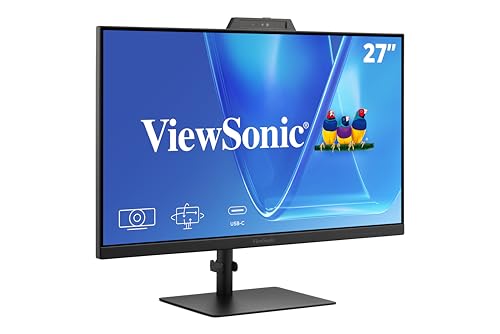
ViewSonic 27-Inch 1080p Conferencing Monitor
Best for: integrated video conferencing setups
- Screen Size
- 27-Inch
- Resolution
- 1080p
- Refresh Rate
- 120Hz
- Ports
- USB-C, HDMI, DisplayPort
- Features
- Built-in Speakers, Webcam
- Use
- Business & Office, Mac, Office, Home Office
This 27-inch monitor pairs a 1080p FHD IPS panel with a 120Hz refresh rate. It includes a 5MP IR webcam supporting Windows Hello, plus built-in speakers and a microphone. USB-C, HDMI, and DisplayPort provide connectivity. It suits business, hybrid, and home office users who need streamlined conferencing hardware without extra accessories.
- 120Hz refresh rate for smoother motion
- 5MP IR webcam with Windows Hello support
- Built-in speakers and microphone for calls
- USB-C, HDMI, and DisplayPort connectivity
- 1080p resolution is lower than the 4K UHD panels on this list
- 27-inch size is smaller than the 32-inch options available
- 11.7 pounds weight is lighter than many larger displays
- You need a built-in webcam for daily video calls
- You prefer a 120Hz refresh rate over 60Hz
- You want a streamlined setup without extra peripherals
- You require 4K UHD resolution for detailed work
- You prefer a 32-inch screen for more viewing area
- You do not need integrated audio or video hardware
Verdict: ViewSonic VG2741V 27-Inch 1080p Webcam Monitor fits remote workers who prioritize integrated conferencing tools and a 120Hz refresh rate over high resolution.

ViewSonic 27-Inch 4K UHD IPS Monitor
Best for: 4K productivity and media with standard ports
- Screen Size
- 27 Inch
- Resolution
- 3840 x 2160
- Panel Type
- IPS
- Ports
- Dual HDMI, DisplayPort
- Features
- HDR
- Use
- Business & Office, Mac, Office, Home Office
This 27-inch ViewSonic monitor delivers 4K UHD resolution on an IPS panel with 400-nit brightness. It supports HDR10 for better contrast and includes dual HDMI and DisplayPort inputs. The design features ultra-thin bezels and Eye Care technology for comfortable viewing. It suits home office and productivity tasks where sharp images and flexible connectivity matter more than high refresh rates.
- 4K UHD 3840×2160 resolution on an IPS panel
- HDR10 support for improved contrast and detail
- Dual HDMI and DisplayPort connectivity options
- Eye Care technology and anti-glare screen
- 60Hz refresh rate is lower than the 120Hz or 160Hz options on this list
- No USB-C connectivity compared to other picks with 65W power delivery
- Heavier at 12.1 pounds compared to lighter ultrathin alternatives
- You need a sharp 4K display for productivity and media consumption
- You prefer standard HDMI and DisplayPort connections over USB-C
- You want a monitor with HDR10 support for better visual depth
- You require a high refresh rate for fast-paced gaming
- You need USB-C connectivity for single-cable laptop charging and video
- You are looking for a webcam-enabled all-in-one solution
Verdict: ViewSonic 27-Inch 4K IPS Monitor is a solid pick for users prioritizing image clarity and HDR performance over speed. It fits those who want a reliable 4K display for office work and media without needing USB-C or high refresh rates.

INNOCN 27-Inch 4K DisplayPort Monitor
Best for: Color-accurate 4K work with adjustable stands
- Screen Size
- 27"
- Resolution
- 3840 x 2160
- Refresh Rate
- 60hz
- Panel Type
- IPS
- Aspect Ratio
- 16:9
- Ports
- DisplayPort, HDMI, USB-C
This 27-inch IPS monitor delivers 4K UHD resolution with HDR400 support and a Delta E under 2 for accurate color. It includes a height-adjustable stand with swivel and pivot options. The USB-C port handles display and power delivery. It suits users who need a clear, color-accurate display with ergonomic flexibility for desk setups.
- 4K UHD 3840×2160 resolution on an IPS panel
- Height, swivel, and pivot adjustable stand
- HDR400 certification with Delta E < 2 color accuracy
- USB-C port for display and power
- 60Hz refresh rate is lower than the 120Hz or 160Hz panels in this guide
- Max brightness of 400 nits is less than HDR10 displays reaching 450 nits
- Built-in speakers are present but lack audio power details
- You need a height-adjustable stand with pivot capability
- You prioritize color accuracy with Delta E under 2
- You want a 4K display for creative work
- You require a high refresh rate above 60Hz
- You need a built-in webcam for meetings
- You prefer a larger 32-inch screen size
Verdict: INNOCN 27-Inch 4K USB-C Monitor offers precise color and ergonomic flexibility for designers who value stand adjustability over speed. It fits users who need a clear 4K image with a sturdy, adjustable base.

ViewSonic 32-Inch 4K UHD IPS Monitor
Best for: Users needing a large 32-inch 4K workspace
- Screen Size
- 32 Inch
- Resolution
- 3840 x 2160
- Panel Type
- IPS
- Ports
- USB-C, HDMI, DisplayPort
- Features
- HDR
- Use
- Business & Office, Mac, Office, Home Office
This ViewSonic monitor offers a 32-inch 4K UHD IPS panel with HDR10 support. It features 65W USB-C connectivity for single-cable charging and data transfer. The display includes eye-care technologies like Flicker-Free and Blue Light Filter. It is suitable for home office and business use, providing a large workspace for detailed tasks and media consumption.
- 32-inch 4K UHD (3840×2160) IPS display
- 65W USB-C single-cable connectivity
- HDR10 support for enhanced contrast
- Flicker-Free and Blue Light Filter technology
- Multiple input options including HDMI and DisplayPort
- 32-inch size is larger than the 27-inch standard in this guide
- Weight of 17.2 pounds is heavier than smaller alternatives
- 60Hz refresh rate is lower than the 160Hz option at the top of the list
- You need a larger 32-inch screen for detailed work
- You want 65W USB-C charging for your laptop
- You prioritize color accuracy and viewing angles for media
- You prefer a compact 27-inch footprint for your desk
- You require a high refresh rate above 60Hz for gaming
- You need built-in webcam or speaker functionality
Verdict: ViewSonic 32-Inch 4K USB-C Monitor fits users who want a spacious 4K workspace with convenient laptop charging. It is ideal for office tasks and media viewing rather than high-speed gaming.

Gawfolk 32 Inch 4K Curved Monitor
Best for: immersive 4K media and casual gaming
- Screen Size
- 32"
- Resolution
- 3840 x 2160
- Refresh Rate
- 60Hz
- Variable Refresh Rate
- FreeSync
- Ports
- HDMI 2.0, DP 1.4, 3.5mm audio
- Features
- Built-in Speakers, Curved Screen
The Gawfolk 32-Inch 4K Curved Monitor offers a 3840×2160 resolution on a VA panel with a 1500R curve. It runs at 60Hz with FreeSync for stable visuals. This 32-inch screen includes built-in speakers and tilt adjustment. It suits users who want a large, immersive display for casual gaming or office work without needing high refresh rates or webcam integration.
- 3840×2160 4K UHD resolution on a 32-inch VA panel
- 1500R curved screen for immersive viewing angles
- Built-in speakers and 3.5mm headphone jack
- FreeSync support for tear-free 60Hz gameplay
- 100x100mm VESA wall mount compatibility
- 60Hz refresh rate is lower than the 120Hz or 160Hz options on this list
- 32-inch size is larger than the 27-inch standard found in most alternatives
- Tilt-only stand lacks height or swivel adjustment
- You want a large 32-inch screen for immersive media consumption
- You prefer a curved display for better peripheral visibility
- You need built-in audio to reduce desk clutter
- You require a 120Hz or higher refresh rate for competitive gaming
- You need a webcam for video conferencing
- You prefer a 27-inch footprint to save desk space
Verdict: Gawfolk 32-Inch 4K Curved Monitor fits users who prioritize screen size and immersion over speed. It is a solid choice for casual gaming and media, but not for high-refresh-rate needs.
Specifications side by side

| Spec | Thinlerain 27-Inch 4K 160Hz Webcam Monitor | ViewSonic 27-Inch 4K USB-C Monitor | ViewSonic 27-Inch 1080p Conferencing Monitor | ViewSonic 27-Inch 4K UHD IPS Monitor | INNOCN 27-Inch 4K DisplayPort Monitor | ViewSonic 32-Inch 4K UHD IPS Monitor | Gawfolk 32 Inch 4K Curved Monitor |
|---|---|---|---|---|---|---|---|
| Screen Size | 27" | 27 Inch | 27-Inch | 27 Inch | 27" | 32 Inch | 32" |
| Resolution | 3840 x 2160 | 3840 x 2160 | 1080p | 3840 x 2160 | 3840 x 2160 | 3840 x 2160 | 3840 x 2160 |
| Refresh Rate | 160Hz | – | 120Hz | – | 60hz | – | 60Hz |
| Panel Type | IPS | IPS | – | IPS | IPS | IPS | – |
| Response Time | 1ms GTG | – | – | – | – | – | – |
| Aspect Ratio | – | – | – | – | 16:9 | – | – |
| Variable Refresh Rate | – | – | – | – | – | – | FreeSync |
| Ports | 2x HDMI, DisplayPort, USB-C, USB-A | USB-C, HDMI, DisplayPort | USB-C, HDMI, DisplayPort | Dual HDMI, DisplayPort | DisplayPort, HDMI, USB-C | USB-C, HDMI, DisplayPort | HDMI 2.0, DP 1.4, 3.5mm audio |
| Features | Built-in Speakers, Webcam | HDR, Built-in Speakers, Power Delivery | Built-in Speakers, Webcam | HDR | HDR, Built-in Speakers, Height-Adjustable Stand | HDR | Built-in Speakers, Curved Screen |
| Use | Gaming, Business & Office, Office, Home Office | Business & Office, Mac, Office, Home Office | Business & Office, Mac, Office, Home Office | Business & Office, Mac, Office, Home Office | Mac | Business & Office, Mac, Office, Home Office | Gaming, Business & Office, Office, Home Office |
| Size | 27 Inch | 27 Inch | 27 Inch | 27 Inch | 27 Inch | 32 Inch | 32 Inch |
| Operating System | – | macOS | Windows | macOS | macOS | macOS | – |
| Dimensions | 8.67 × 24 × 21.3 inches | 8.2 × 24.2 × 17.2 inches | 8.11 × 24.1 × 21.7 inches | 2.1 × 24.2 × 14.5 inches | 2.6 × 24 × 14 inches | 9.2 × 28.1 × 19.6 inches | 3.89 × 27.6 × 16.3 inches |
| Weight | – | 8.6 pounds | 11.7 pounds | 12.1 pounds | – | 17.2 pounds | 11.5 pounds |
| Color | 3840 x 2160-160Hz | Black | Black | Black | Black | Black | Black |
| Model | HD-270 | VS19281 | VS20457 | VA2756-4K-MHD | 27C1U | VX3267U-4K | GFTY982 |
Frequently asked questions
Which monitor is best for gaming and remote work?
The Thinlerain 27-Inch 4K 160Hz Webcam Monitor is the top pick for this dual need. It combines a 160Hz refresh rate for smooth gaming with an integrated webcam for video calls. The 4K IPS panel ensures clear visuals for both tasks. This model suits users who want high performance and communication tools in one device without buying separate equipment.
Is there a premium option with USB-C charging?
Yes, the ViewSonic VS19281 serves as the best premium choice. It features a 4K IPS panel and provides 65W USB-C power delivery. This allows you to charge your laptop directly through the monitor. It is ideal for professionals who prioritize image quality and cable management over high refresh rates or built-in webcams.
What is the best budget-friendly conferencing monitor?
The ViewSonic VG2741V is the best budget option for video conferencing. It offers a 1080p resolution and a 120Hz refresh rate on a 27-inch screen. The monitor includes a built-in webcam and speakers, making it ready for remote work out of the box. It fits users who need integrated tools without the cost of 4K displays.
Can I get a 4K monitor with HDR support?
Several options here include HDR capabilities. The ViewSonic VS19281 and the INNOCN 27C1U both feature HDR support alongside 4K resolution. The INNOCN model also includes a height-adjustable stand for better ergonomics. These picks are suitable for media viewing and productivity tasks where color accuracy and dynamic range matter more than speed.
Are there larger 32-inch 4K alternatives available?
Yes, you can choose between two 32-inch models. The ViewSonic VX3267U-4K offers a spacious 4K workspace with USB-C charging. The Gawfolk GFTY982 provides a curved screen for immersive media and casual gaming. Both are larger than the standard 27-inch options, giving you more screen real estate for multitasking or entertainment.
Does the ViewSonic 32-inch monitor support macOS?
Yes, the ViewSonic VX3267U-4K is listed as compatible with macOS. It provides a 4K UHD IPS panel and HDMI or DisplayPort connections. The USB-C port allows for convenient laptop charging. This monitor is designed for office tasks and media viewing, making it a practical choice for Mac users who need a larger display.
Which monitor is best for color-accurate design work?
The INNOCN 27C1U is the best choice for designers. It features a 4K IPS panel with HDR support and a height-adjustable stand. This ergonomic flexibility helps reduce strain during long editing sessions. The monitor focuses on precise color and image clarity, making it ideal for creative professionals who value display quality over gaming speed.
Is there a curved 4K monitor for gaming?
The Gawfolk GFTY982 is a 32-inch curved 4K monitor. It supports FreeSync for smoother gameplay and includes built-in speakers. While it has a 60Hz refresh rate, it is suitable for casual gaming and media consumption. The curved screen enhances immersion, making it a solid option for users who prioritize screen size and visual engagement.
See also