TESmart USB-C + HDMI + Review (2026): A Spec-Based Look
As Amazon Associates, we earn from qualifying purchases. This means we may receive a small commission at no extra cost to you if you click through and make a purchase.
As an Amazon Associate we earn from qualifying purchases. Links on this page are affiliate links.
In this tesmart USB c hdmi review, we look at the TESmart 4-Port USB-C KVM Dock. This device lets you control four computers using a single keyboard, mouse, and dual monitors. It combines KVM switching with docking station functions. The two specs that define it are its support for 4K@60Hz resolution and its 60W charging module. You can connect via USB-C or HDMI. It handles dual displays for both Mac and Windows systems. This all-in-one hub aims to declutter your workspace by integrating video, data, and power into one compact unit.
- Supports 4K@60Hz (4:4:4) resolution for sharp visuals
- Includes a 60W built-in charging module for laptops
- Features a 1000 Mbps LAN port for wired internet
- Allows switching via hotkey, front button, or remote
Good fit for
This dock suits professionals who need high-resolution displays for video editing or design work. Gamers may appreciate the support for 1080p at 240Hz or 1440p at 120Hz. It is ideal for users managing four computers who want to reduce cable clutter. The integrated LAN port and 60W charging make it a practical choice for home offices that value a clean, organized desk setup without sacrificing connectivity.
Who can skip it
If you require more than four computer connections, this model will not meet your needs. Users needing higher refresh rates than 60Hz for 4K content should look elsewhere, as this unit caps at that limit. Those who do not need dual monitor support or wired Ethernet connectivity might find the feature set excessive. It is also less suitable if you prefer wireless audio solutions, as it relies on a 3.5mm jack.
Verdict
The TESmart 4-Port USB-C KVM Dock offers a robust, spec-driven solution for multi-computer setups. It delivers essential connectivity and power in a single, compact device.
Key specs explained for this KVM dock

Resolution: 4K UHD
This device supports a 4K UHD resolution output. For you, this means sharper text and finer image details compared to standard 1080p monitors. It is ideal if you use high-resolution displays for design work or want crisp visuals for general computing. Check your monitor’s native resolution to ensure compatibility, as not all displays benefit from this higher pixel count.
Refresh Rate: 60Hz
The listed refresh rate is 60Hz. This value determines how many times per second the screen updates. A 60Hz rate is standard for office work and general media consumption. It provides smooth motion for web browsing and video. If you are a competitive gamer seeking higher frame rates, you may need to verify if the dock supports higher rates for your specific monitor connection.
Ports: HDMI, DisplayPort, USB-C, USB 3.0
This listing includes HDMI, DisplayPort, USB-C, and USB 3.0 ports. These connections allow you to link multiple monitors and peripherals. HDMI and DisplayPort handle video signals, while USB ports connect keyboards, mice, and storage. Having multiple port types ensures compatibility with various monitors and computers. Check your existing cables to ensure you have the right adapters for your setup.
Features: EDID Emulation, Hotkey Switching
EDID emulation maintains consistent screen resolution across connected devices. Hotkey switching lets you toggle between computers using keyboard shortcuts. This feature helps prevent display flickering or resolution changes when you switch sources. It is useful for professionals who need stable display settings. When shopping, look for this feature if you want a seamless transition between different machines without manual monitor adjustments.
Number of Computers: 4 Computers
This KVM dock supports control over four separate computers. You can manage multiple systems using one set of input devices. This is beneficial for users with a desktop, laptop, and other workstations. It reduces desk clutter by sharing one monitor and keyboard. When comparing options, ensure the count matches your current or future setup needs to avoid buying a unit with insufficient ports.
Design and build overview

According to the listing, the TESmart 4-Port USB-C KVM Dock measures 13.8 inches in length, 5.9 inches in width, and 1.77 inches in height. The unit is finished in black. These dimensions suggest a chassis that sits flat on a desk. It is not a compact puck-style dock. You will need adequate surface space to accommodate its footprint. The low profile allows it to sit below or behind monitors without blocking the view.
The listing does not specify the materials used for the casing. It also does not provide a weight figure. You should assume it is a solid, desktop-oriented unit rather than a portable travel accessory. The layout includes multiple connection points for cables. This design prioritizes connectivity over minimalism. You will manage several cables for video, data, and power.
Controls are integrated into the unit itself. You can switch between connected computers using hotkeys, a front button, or a remote control. This flexibility lets you choose the method that fits your workflow. The physical button offers a tactile option if you prefer direct interaction. The inclusion of a remote allows operation from a distance. The design focuses on functionality and stability for a fixed workstation setup.
Setup and everyday use

Setting up the TESmart 4-Port USB-C KVM Dock involves connecting your peripherals and computers to the unit. The listing includes specific cables to help with this process. You receive two USB-C cables for connecting laptops and two sets of cables for desktops, which include KVM cables and DisplayPort cables. This means you do not need to source separate connections for the core video and data links. The device supports dual monitor setups via HDMI and DisplayPort outputs. This flexibility allows you to match most modern graphics cards without needing extra adapters. It works with both MacBooks and Windows laptops, accommodating different display technology needs. For daily use, the dock simplifies managing four computers. You can switch between devices using a front button, a remote, or hotkeys. This keeps your workflow efficient if you toggle between a work laptop and a gaming PC. The unit also handles power and internet connectivity. A built-in 60W charging module powers your laptop, while a 1000 Mbps LAN port provides wired internet. This reduces cable clutter on your desk. Additional ports include two USB 3.0, two USB 2.0, and a 3.5mm audio jack. The EDID emulation feature helps maintain stable screen resolution and icon placement when switching computers. This prevents display flickering or resolution changes that can disrupt your work. The device supports 4K at 60Hz for professional tasks and higher refresh rates for gaming. It accommodates various keyboard types, including mechanical and wireless models. Overall, the setup is straightforward, and the switching mechanism is designed for smooth daily transitions between multiple systems.
Before You Buy This KVM Dock
Before you add the TESmart 4-Port USB-C KVM Dock to your desk, check your cable inventory. The listing includes two USB-C cables for laptops and two DisplayPort sets for desktops. Verify that your monitors have HDMI or DisplayPort inputs. If they only have VGA, you will need separate adapters. This device supports 4K@60Hz and 1080p@240Hz. Ensure your GPU and cables support these rates for smooth visuals. The unit handles both Mac and Windows systems. MacBooks without MST may require specific settings for dual displays. Upkeep is minimal. Dust the exterior with a dry cloth. Keep the area around the vents clear for airflow. This dock sits alongside other Computer Monitors as a central hub. It simplifies switching between four computers. You save desk space by using one keyboard and mouse. Confirm your power needs match the 60W charging module. This ensures your laptop stays powered during heavy workloads.
Check before you buy
- Verify monitor inputs match HDMI or DisplayPort ports.
- Check if your laptop supports dual display via USB-C.
- Ensure your GPU supports 4K@60Hz or higher refresh rates.
- Confirm you have enough USB-C and DisplayPort cables.
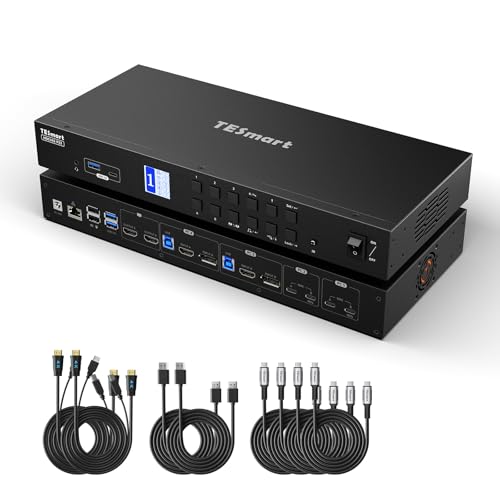
TESmart 4-Port USB-C KVM Dock
Best for: multi-computer setups with dual monitors
- Computers Supported
- 4
- Monitors Supported
- 2
- Maximum Resolution
- 4K@60Hz
- Video Interface
- USB-C, HDMI, DisplayPort
- Power Delivery
- 60W
- USB Hub Standard
- USB 3.0, USB 2.0
This TESmart KVM docking station manages four computers and two monitors. It supports 4K@60Hz video output and includes a 60W charging module. You get a 1000 Mbps LAN port and multiple USB connections. The unit handles dual displays for both Mac and Windows systems. It is built for users who want to control multiple machines with one keyboard and mouse setup.
- Supports 4K@60Hz resolution with 4:4:4 color sampling
- Includes a 60W built-in charging module for laptops
- Features a 1000 Mbps LAN port for wired internet
- Manages up to 4 computers with 2 monitor outputs
- Offers hotkey switching and EDID emulation for stable resolution
- Maximum refresh rate is limited to 60Hz at 4K resolution
- Physical dimensions measure 13.8 inches in length
- Supports only one DisplayPort output per computer connection
- You need to switch between four different computers
- You require a 60W charging solution for your laptop
- You want stable 4K@60Hz visuals for professional work
- You need higher than 60Hz refresh rates at 4K
- You prefer wireless connectivity over wired LAN ports
- You only operate a single computer setup
Verdict: TESmart 4-PC KVM Dock 4K@60Hz suits professionals managing multiple systems who need stable 4K visuals and integrated power delivery for their laptops.
Specifications side by side
| Spec | TESmart 4-Port USB-C KVM Dock |
|---|---|
| Computers Supported | 4 |
| Monitors Supported | 2 |
| Maximum Resolution | 4K@60Hz |
| Video Interface | USB-C, HDMI, DisplayPort |
| Power Delivery | 60W |
| USB Hub Standard | USB 3.0, USB 2.0 |
| Ethernet Speed | 1000 Mbps |
| Resolution | 4K UHD |
| Refresh Rate | 60Hz |
| Ports | HDMI, DisplayPort, USB-C, USB 3.0 |
| Features | EDID Emulation, Hotkey Switching |
| Number of Computers | 4 Computers |
| Dimensions | 13.8 × 5.9 × 1.77 inches |
| Color | Black |
| Model | HDC402-P23-USBK |
Frequently asked questions
Does this KVM dock support dual monitors?
Yes, the TESmart 4-Port USB-C KVM Dock is designed for dual monitor setups. It allows you to connect two displays to each of the four supported computers. This configuration is ideal for professionals who need expanded screen real estate to manage multiple systems efficiently without cluttering their desk with extra peripherals.
What is the maximum resolution supported by this device?
The device supports 4K UHD resolution. It maintains this output at a 60Hz refresh rate. This specification ensures that you get sharp visuals and smooth motion, which is beneficial for tasks requiring high detail, such as graphic design or data analysis, when switching between your connected computers.
How do I switch between the four connected computers?
You can switch between the four computers using hotkey switching. This feature allows you to toggle control without physically unplugging cables. The unit includes EDID emulation to help maintain consistent display settings across different machines, ensuring a seamless transition when you change which system is active.
What types of video ports does this KVM use?
The dock utilizes HDMI and DisplayPort connections for video output. It also features USB-C and USB 3.0 ports for data and peripheral connectivity. This variety allows you to connect both modern laptops via USB-C and traditional desktops using DisplayPort, providing flexibility for mixed computer environments.
Is this device suitable for a home office setup?
Yes, it is suitable for multi-computer setups, including home offices. The unit measures 13.8 inches in length and 5.9 inches in width, allowing it to sit flat on a desk. Its black finish helps it blend into most workspaces while managing up to four systems with a single keyboard and mouse.
What cables are included for connecting laptops?
The listing includes two USB-C cables specifically for connecting laptops. These cables facilitate both data transfer and video output from your computers to the dock. This inclusion simplifies the initial setup process, allowing you to quickly establish connections without needing to purchase additional cabling for your primary devices.
See also