6 Best Alternatives to the TESmart 8K@60Hz DP KVM Switch 2 Monitors (2026)
As Amazon Associates, we earn from qualifying purchases. This means we may receive a small commission at no extra cost to you if you click through and make a purchase.
As an Amazon Associate we earn from qualifying purchases. Links on this page are affiliate links.
If you are looking for tesmart 8k 60hz dp kvm switch 2 monitors alternatives, this guide compares seven options that share similar high-resolution capabilities. The original TESmart unit supports 8K@60Hz and 4K@144Hz with DisplayPort 1.4 inputs. It includes EDID emulators for stable settings and handles audio switching via hotkeys or remote. This makes it a strong choice for dual-monitor desktops requiring 8K clarity.
You might seek other models if your setup uses HDMI instead of DisplayPort. Some users prefer USB-C connectivity for laptops or need to manage more than two computers. Others may want quad-monitor support or a different form factor. We selected these alternatives because their specifications overlap with the original product. Each option offers distinct port combinations, computer capacities, or resolution limits to fit varied workflows.
How these alternatives compare
TESmart 8K HDMI DP KVM
This model adds HDMI inputs alongside the DisplayPort connections found on the original. You get both HDMI and DisplayPort support for greater source flexibility, while maintaining 8K UHD resolution and 144Hz refresh rates. It retains EDID emulation and hotkey switching for stable operation. The unit supports two computers and includes Ethernet and USB 3.0 ports. If you need to connect older HDMI devices alongside DisplayPort monitors, this hybrid approach offers more versatility than the DP-only original. The dimensions are nearly identical, making it a drop-in replacement for mixed-port setups.
TESmart 8K HDMI KVM Switch
This option focuses exclusively on HDMI inputs, removing DisplayPort support entirely. It still delivers 8K UHD resolution at 144Hz for two computers, with EDID emulation and hotkey switching features. Audio support and USB 3.0 connectivity remain standard. You should choose this if your monitors and computers use HDMI outputs rather than DisplayPort. The lack of DisplayPort inputs makes it incompatible with the original’s specific DP workflow, but it provides a dedicated HDMI path for gaming or video production. It includes an Ethernet port for network sharing, matching the connectivity options of the original unit.
TESmart 8K HDMI KVM Switch
This switch also relies on HDMI inputs, excluding DisplayPort connections. It supports 8K UHD resolution and 144Hz refresh rates for two computers. Key features include EDID emulation, hotkey switching, and audio support. It lacks an Ethernet port, which distinguishes it from the original model that includes one. The USB 3.0 ports are present for peripheral sharing. This unit is suitable if you prioritize HDMI connectivity and do not require network access through the KVM. It offers stable dual-monitor performance for HDMI-based desktops, providing a simpler alternative for users who do not need the original’s network capabilities.
TESmert USB-C KVM Switch for 2 Laptops
This model targets USB-C laptops, offering DisplayPort, USB-C, Ethernet, and USB 3.0 ports. It supports 4K UHD resolution at 144Hz, which is lower than the original’s 8K capability. It includes power delivery, audio support, EDID emulation, and hotkey switching. MST support allows for multi-stream transport. You should pick this if you use USB-C laptops and need charging, as it lacks the 8K resolution of the original. It is ideal for users who prioritize laptop connectivity and power delivery over maximum display resolution. The inclusion of Ethernet and USB-C makes it versatile for modern mobile workstations.
TESmart 4K KVM Switch 4 Monitors
This unit supports four monitors across two computers, doubling the display count of the original. It uses HDMI and DisplayPort inputs and supports 4K UHD resolution at 60Hz. It retains EDID emulation, hotkey switching, and audio support. An Ethernet port is included for network sharing. You should choose this if you need to manage more than two displays. It sacrifices the 144Hz refresh rate of the original for expanded monitor capacity. It is best for productivity workflows requiring multiple screens, rather than high-refresh gaming. The larger size accommodates the additional monitor connections.
TESmart 4-PC 3-Monitor KVM
This switch handles four computers with three monitors each, significantly expanding capacity beyond the original’s two-computer limit. It supports 8K UHD resolution and 144Hz refresh rates. It uses DisplayPort inputs and includes EDID emulation. It lacks explicit mention of audio support or hotkey switching in the provided data, focusing on core switching capabilities. The unit is much larger, measuring 15.6 inches in length. You should choose this for complex multi-PC setups requiring high-resolution triple-monitor displays. It offers higher resolution and refresh rates than the original but requires more desk space and supports more connected machines.
| # | Product | Best for | Price |
|---|---|---|---|
| 1 | TESmart 8K DP KVM Switch 2×2 Best overall | two DisplayPort desktops needing 8K support | |
| 2 | TESmart 8K HDMI DP KVM Best premium | dual 8K monitor setups for two PCs | |
| 3 | TESmart 8K HDMI KVM Switch Best budget | Dual HDMI 8K gaming setups | |
| 4 | TESmart 8K HDMI KVM Switch Also great | Dual HDMI desktop setups requiring 8K gaming | |
| 5 | TESmert USB-C KVM Switch for 2 Laptops Best usb-c | USB-C laptops needing charging and Ethernet | |
| 6 | TESmart 4K KVM Switch 4 Monitors Best 60hz | Quad monitor setups with two PCs | |
| 7 | TESmart 4-PC 3-Monitor KVM Best 4 computers | 4 computers with 3 monitors each |

TESmart 8K DP KVM Switch 2×2
Best for: two DisplayPort desktops needing 8K support
- Computers Supported
- 2
- Monitors Supported
- 2
- Maximum Resolution
- 8K@60Hz
- Video Interface
- DisplayPort 1.4
- USB Hub Standard
- USB 3.0
- Ethernet Speed
- 1 Gbps
This DisplayPort 1.4 KVM switch manages two desktops and two monitors. It supports 8K@60Hz resolution with DSC and backward compatibility for 4K@144Hz. EDID emulators stabilize display settings across inputs. You get four switching methods, including hotkeys and an IR remote. Integrated audio allows you to listen to one computer while working on another. This model is designed for desktop setups using DP connections.
- Supports 8K@60Hz resolution with DSC technology
- Includes EDID emulators for stable display settings
- Offers four switching options including hotkeys and IR remote
- Integrated microphone and audio output for dual-computer use
- Backward compatible with 4K@144Hz
- Supports only two computers and two monitors
- Dimensions are 7.5 x 4.9 x 2.08 inches
- IR remote requires AAA batteries
- You use two DisplayPort 1.4 desktops and monitors
- You need 8K@60Hz resolution support
- You want audio switching between computers
- You need HDMI or USB-C inputs
- You require more than two monitor outputs
- You prefer a model with included batteries
Verdict: TESmart 8K@60Hz DP KVM Switch fits users with two DisplayPort desktops needing 8K support. It provides stable dual-monitor performance and audio switching for specialized workflows.
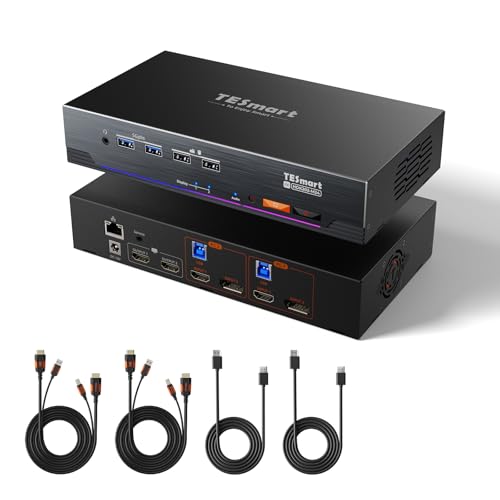
TESmart 8K HDMI DP KVM
Best for: dual 8K monitor setups for two PCs
- Computers Supported
- 2
- Monitors Supported
- 2
- Maximum Resolution
- 8K@60Hz
- Video Interface
- HDMI 2.1, DisplayPort 1.4
- USB Hub Standard
- USB 3.0
- Ethernet Speed
- 1 Gbps
This TESmart KVM switch supports dual monitors across two computers with 8K@60Hz and 4K@144Hz output. It uses HDMI 2.1 and DisplayPort 1.4 connections. The unit includes EDID emulation to maintain stable display settings. You get gigabit Ethernet sharing and multiple switching methods. It fits users who need high-resolution gaming or editing workflows with reliable signal handling.
- Supports 8K@60Hz and 4K@144Hz resolutions
- Includes EDID emulators for each input
- Shares a single gigabit Ethernet connection
- Offers four switching options including hotkeys
- Compatible with Nvidia and AMD cards
- Only supports two computers, unlike competitors with three or four
- Requires AAA batteries for the IR remote
- Maxes out at two monitor outputs per PC
- You need 8K@60Hz or 4K@144Hz display support
- You want to share one Ethernet cable between two PCs
- You prefer using keyboard hotkeys to switch sources
- You need to connect three or more computers
- You require DisplayPort output on both monitors simultaneously
- You want a remote control with built-in rechargeable battery
Verdict: TESmart 8K HDMI+DP KVM Switch is a solid choice for users who need high-resolution dual-monitor support for two computers. It suits those who value EDID stability and shared network access over expanding to more connected machines.

TESmart 8K HDMI KVM Switch
Best for: Dual HDMI 8K gaming setups
- Computers Supported
- 2
- Monitors Supported
- 2
- Maximum Resolution
- 8K@60Hz, 4K@144Hz
- Video Interface
- HDMI 2.1
- USB Hub Standard
- USB 3.0
- Ethernet Speed
- 1 Gbps
This TESmart unit handles two computers and two monitors via HDMI 2.1 ports. It supports 8K@60Hz resolution with 48Gbps bandwidth and includes EDID emulation for stable signals. You get 1G Ethernet sharing and audio switching. It suits gamers needing VRR and HDR. Note that each PC must provide two HDMI outputs for dual-monitor setups.
- Supports 8K@60Hz and 4K@144Hz via HDMI 2.1
- Includes EDID emulators for signal stability
- Shares 1G Ethernet between two PCs
- Switches audio with active headphones
- Requires two HDMI outputs per computer
- HDMI only, no DisplayPort or USB-C video
- Includes IR remote but not batteries
- You use two HDMI computers with dual monitors
- You need 8K@60Hz gaming performance
- You want to share a wired network
- Your computers use DisplayPort for video
- Your laptops only have USB-C video
- You need more than two monitors
Verdict: TESmart 8K HDMI KVM Switch fits users with dual HDMI outputs who need 8K@60Hz performance and network sharing. It is not suitable for DisplayPort setups.

TESmart 8K HDMI KVM Switch
Best for: Dual HDMI desktop setups requiring 8K gaming
- Computers Supported
- 2
- Monitors Supported
- 2
- Maximum Resolution
- 8K@60Hz
- Video Interface
- HDMI 2.1
- USB Hub Standard
- USB 3.0
- Ethernet Speed
- 1G Ethernet
This KVM switch connects two HDMI computers to two monitors with 8K@60Hz resolution. It supports 4K@144Hz for gaming and includes EDID emulation for stable signals. You get USB 3.0 connectivity and a 1G Ethernet port for network sharing. The unit measures 8 by 5 by 2 inches and offers multiple switching methods including an IR remote.
- Supports 8K@60Hz and 4K@144Hz refresh rates via HDMI 2.1
- Includes EDID emulators for stable display signal compatibility
- Features 1G Ethernet port for shared network access
- Supports VRR, ALLM, and Dynamic HDR for gaming
- Requires computers with two HDMI outputs for dual monitor use
- Limited to HDMI connections without native DisplayPort or USB-C video ports
- Physical dimensions of 8 by 5 by 2 inches require desk space
- You use two desktop PCs with dual HDMI outputs
- You need 8K resolution or 4K@144Hz gaming performance
- You want to share a single Ethernet connection between two computers
- You rely on DisplayPort monitors for your workstation setup
- You use laptops with only USB-C video outputs
- You need to connect more than two computers
Verdict: TESmart 8K HDMI KVM Switch 2 Monitors fits users with dual HDMI desktops who need high-resolution gaming support. It provides stable 8K@60Hz performance and network sharing for specific HDMI-based setups.

TESmert USB-C KVM Switch for 2 Laptops
Best for: USB-C laptops needing charging and Ethernet
- Computers Supported
- 2
- Monitors Supported
- 2
- Maximum Resolution
- 4K@60Hz
- Video Interface
- HDMI, USB-C
- Power Delivery
- 65W
- USB Hub Standard
- USB 3.0 (5 Gbps)
This USB-C KVM switch connects two laptops to two monitors via a single cable per computer. It supports 4K@60Hz resolution and includes 65W Power Delivery charging. You get 1G Ethernet, USB 3.0, and EDID emulation to keep windows stable during switching. It fits users who want a clean desk setup with fast data transfer and network connectivity for dual systems.
- Supports dual 4K@60Hz displays via USB-C MST
- Provides 65W Power Delivery charging for laptops
- Includes 1000 Mbps Ethernet port
- Features GHOST EDID emulator to prevent window rearrangement
- Offers three switching methods: hotkeys, buttons, and mouse wheel
- Max resolution is 4K@60Hz, lower than the 8K@60Hz capability of other options on this list
- Supports only two computers, whereas some alternatives handle three or four systems
- Physical dimensions are 4.53 by 7.28 by 1.89 inches, which is bulkier than compact docks
- You need 65W charging and 1G Ethernet for your laptops
- You want to switch between two computers and two monitors with one cable
- You require EDID emulation to keep your desktop layout consistent
- You need to connect more than two computers
- You require 8K resolution support at 60Hz
- You prefer a DisplayPort-only connection without USB-C
Verdict: TESmert USB-C KVM Switch 2×2 is a solid choice for users who prioritize USB-C connectivity, charging, and Ethernet in a dual-computer setup. It suits those who need stable window management via EDID emulation and do not require 8K resolution.

TESmart 4K KVM Switch 4 Monitors
Best for: Quad monitor setups with two PCs
- Computers Supported
- 2
- Monitors Supported
- 4
- Maximum Resolution
- 4K@60Hz
- Video Interface
- HDMI 2.0, DisplayPort 1.2
- USB Hub Standard
- USB 3.0 (5Gbps), USB 1.1
- Ethernet Speed
- 1 Gbps
This KVM switch lets you control two computers across four monitors. It supports 4K resolution at 60Hz with HDR10 and Dolby Vision. You get a built-in 1G Ethernet port and USB 3.0 hubs for peripherals. EDID emulation keeps display settings stable. It is a practical solution for users who need to manage multiple screens and devices from a single keyboard and mouse setup.
- Supports quad monitor setups with 4K@60Hz resolution
- Includes integrated 1G Ethernet port for network sharing
- Features EDID emulation to prevent display setting issues
- Offers multiple switching methods including hotkeys and IR remote
- Lower 4K@60Hz resolution compared to 8K options on the list
- Supports only two computers instead of three or more
- Uses older DisplayPort 1.2 standard
- You need to drive four displays from two PCs
- You require a shared wired Ethernet connection for your devices
- You want stable EDID emulation to avoid display glitches
- You need 8K resolution for your workflow
- You plan to connect more than two computers
- You require DisplayPort 1.4 or higher bandwidth
Verdict: TESmart 4K HDMI+DP KVM 4 Monitors is ideal for users who need to manage four displays across two computers. It fits those who value a built-in Ethernet port and stable EDID emulation over higher resolution specs.

TESmart 4-PC 3-Monitor KVM
Best for: 4 computers with 3 monitors each
- Computers Supported
- 4
- Monitors Supported
- 3
- Maximum Resolution
- 8K@60Hz
- Video Interface
- DisplayPort 1.4
- USB Hub Standard
- USB 3.2 Gen 1 (5Gbps), USB 1.1
- Ethernet Speed
- 1G Ethernet
This KVM switch supports up to four computers and three monitors via DisplayPort 1.4. It handles resolutions up to 8K@60Hz and refresh rates up to 144Hz. You get EDID emulation to keep settings stable during switching. The unit includes one-gigabit Ethernet and USB 3.0 ports for peripheral sharing. It suits users who need high refresh rates across multiple screens.
- Supports up to 8K@60Hz resolution with 144Hz refresh rates
- Connects four computers to three monitors simultaneously
- Includes EDID emulation for stable display settings
- Features one-gigabit Ethernet and USB 3.0 ports
- Offers multiple switching options including hotkeys and remote
- Limited to three monitor outputs per computer
- Requires three DisplayPort connections per computer
- Physical dimensions are 15.6 inches wide
- You need to control four desktops from one setup
- You require high refresh rates for gaming
- You want stable EDID settings across switches
- You only need to connect two monitors
- You prefer HDMI connections over DisplayPort
- You only have two computers to manage
Verdict: TESmart 4K@144Hz 3-Monitor 4-PC KVM is a high-spec switch for users managing four PCs with triple displays. It fits those who need 144Hz performance and stable EDID emulation. You should choose this if your workflow demands multiple high-refresh monitors.
Specifications side by side

| Spec | TESmart 8K DP KVM Switch 2×2 | TESmart 8K HDMI DP KVM | TESmart 8K HDMI KVM Switch | TESmart 8K HDMI KVM Switch | TESmert USB-C KVM Switch for 2 Laptops | TESmart 4K KVM Switch 4 Monitors | TESmart 4-PC 3-Monitor KVM |
|---|---|---|---|---|---|---|---|
| Computers Supported | 2 | 2 | 2 | 2 | 2 | 2 | 4 |
| Monitors Supported | 2 | 2 | 2 | 2 | 2 | 4 | 3 |
| Maximum Resolution | 8K@60Hz | 8K@60Hz | 8K@60Hz, 4K@144Hz | 8K@60Hz | 4K@60Hz | 4K@60Hz | 8K@60Hz |
| Video Interface | DisplayPort 1.4 | HDMI 2.1, DisplayPort 1.4 | HDMI 2.1 | HDMI 2.1 | HDMI, USB-C | HDMI 2.0, DisplayPort 1.2 | DisplayPort 1.4 |
| Power Delivery | – | – | – | – | 65W | – | – |
| USB Hub Standard | USB 3.0 | USB 3.0 | USB 3.0 | USB 3.0 | USB 3.0 (5 Gbps) | USB 3.0 (5Gbps), USB 1.1 | USB 3.2 Gen 1 (5Gbps), USB 1.1 |
| Ethernet Speed | 1 Gbps | 1 Gbps | 1 Gbps | 1G Ethernet | 1000 Mbps | 1 Gbps | 1G Ethernet |
| EDID Emulation | Supported | – | – | – | – | – | – |
| Resolution | 8K UHD | 8K UHD | 8K UHD | 8K UHD | 4K UHD | 4K UHD | 8K UHD |
| Refresh Rate | 144Hz | 144Hz | 144Hz | 144Hz | 144Hz | 60Hz | 144Hz |
| Ports | DisplayPort, Ethernet, USB 3.0 | HDMI, DisplayPort, Ethernet, USB 3.0 | HDMI, Ethernet, USB 3.0 | HDMI, USB 3.0 | DisplayPort, USB-C, Ethernet, USB 3.0 | HDMI, DisplayPort, Ethernet, USB 3.0 | DisplayPort, Ethernet, USB 3.0 |
| Features | Audio Support, EDID Emulation, Hotkey Switching | EDID Emulation, Hotkey Switching | Audio Support, EDID Emulation, Hotkey Switching | Audio Support, EDID Emulation, Hotkey Switching | Power Delivery, Audio Support, EDID Emulation, Hotkey Switching, MST | Audio Support, EDID Emulation, Hotkey Switching | EDID Emulation |
| Use | Gaming | Gaming | Gaming | Gaming | – | – | Gaming |
| Display Support | – | – | – | – | – | Quad Display | – |
| Number of Computers | 2 Computers | 2 Computers | 2 Computers | 2 Computers | 2 Computers | 2 Computers | 4 Computers |
| Dimensions | 7.5 × 4.9 × 2.08 inches | 7.48 × 4.92 × 2.09 inches | 8 × 5 × 2 inches | 8 × 5 × 2 inches | 7.28 × 4.53 × 1.89 inches | 9 × 5 × 2 inches | 15.6 × 7.8 × 4.2 inches |
| Size | For 2 Monitor & 2 Desktop (DP) | – | For 2 Monitor & 2 PC (HDMI) | 8K60Hz for 2 Monitor & 2 Desktop (HDMI) | – | – | For 3 Monitor & 4 Desktop (DP) |
| Color | Black | Black | Black | – | – | Black | Black |
| Model | DKS202-M24-USBK-V2 | HDK202-M24-USBK | HKS202-M24-USBK-V2 | – | T422-CACB | HDK204-P24-USBK1 | DKS403-M24-USBK |
Frequently asked questions
Which KVM switch is best for two DisplayPort desktops needing 8K support?
The TESmart 8K DP KVM Switch 2×2 is the top choice for users with two DisplayPort desktops requiring 8K resolution. It supports 8K UHD at 144Hz refresh rates. The unit includes DisplayPort, Ethernet, and USB 3.0 ports. It also features audio support, EDID emulation, and hotkey switching for stable performance.
Is there a premium option with both HDMI and DisplayPort inputs?
Yes, the TESmart 8K HDMI DP KVM is the best premium option for dual 8K monitor setups. It connects two computers and supports 8K UHD at 144Hz. You get HDMI, DisplayPort, Ethernet, and USB 3.0 ports. It includes EDID emulation and hotkey switching for reliable operation.
Can I use a KVM switch if my computers only have HDMI outputs?
Yes, you can use the TESmart 8K HDMI KVM Switch for dual HDMI 8K gaming setups. It supports 8K UHD at 144Hz refresh rates. The device features HDMI, Ethernet, and USB 3.0 ports. It includes audio support, EDID emulation, and hotkey switching. Note that it is not suitable for DisplayPort setups.
Which KVM is best for USB-C laptops that need charging?
The TESmert USB-C KVM Switch for 2 Laptops is the best USB-C option. It supports 4K UHD at 144Hz refresh rates. It features USB-C, DisplayPort, Ethernet, and USB 3.0 ports. The device provides power delivery, audio support, EDID emulation, hotkey switching, and MST for stable window management.
What is the best KVM for quad monitor setups with two PCs?
The TESmart 4K KVM Switch 4 Monitors is ideal for managing four displays across two computers. It supports 4K UHD at 60Hz refresh rates. The unit includes HDMI, DisplayPort, Ethernet, and USB 3.0 ports. It features audio support, EDID emulation, and hotkey switching for stable performance.
Is there a KVM switch that supports four computers with three monitors each?
Yes, the TESmart 4-PC 3-Monitor KVM supports four computers with triple displays. It handles 8K UHD resolution at 144Hz refresh rates. The device features DisplayPort, Ethernet, and USB 3.0 ports. It includes EDID emulation for stable settings. This model fits workflows demanding multiple high-refresh monitors.
Do these KVM switches support audio switching?
Most listed models support audio switching. The TESmart 8K DP KVM Switch, the 8K HDMI KVM Switch, and the 4K KVM Switch 4 Monitors all include audio support. The TESmert USB-C model also provides audio support. This allows you to route sound from the selected computer to your speakers.
How do I switch between computers on these KVM switches?
You can switch between computers using hotkey switching on most models. The TESmart 8K DP KVM Switch, the 8K HDMI DP KVM, and the 8K HDMI KVM Switch all feature hotkey switching. The 4K KVM Switch 4 Monitors and the TESmert USB-C model also include this feature for easy control.
See also