TechTray SD25TB4 Dell Pro Thunderbolt Review: Who It Fits and Who Should Skip It
As Amazon Associates, we earn from qualifying purchases. This means we may receive a small commission at no extra cost to you if you click through and make a purchase.
As an Amazon Associate we earn from qualifying purchases. Links on this page are affiliate links.
This techtray sd25tb4 dell pro thunderbolt review focuses on the TechTray SD25TB4 Quad Display Dock. It is a docking station designed to expand your workstation capabilities through a single Thunderbolt 4 connection. The two defining specs are its ability to support up to four 4K displays at 60Hz and its power delivery of up to 130W to compatible Dell computers. This bundle includes essential cables, making it a comprehensive solution for users needing multiple high-resolution screens and reliable connectivity from a single port.
- Supports up to four 4K displays at 60Hz or one 8K display at 60Hz with compatible systems.
- Provides up to 130W power delivery to compatible Dell computers and up to 96W to non-Dell computers.
- Includes two Thunderbolt 4 ports, four USB-A 3.2 Gen 2 ports, and one USB-C 3.2 Gen 2 port.
- Comes with a bundle of 2m/6.5ft cables including DisplayPort 1.4, HDMI 2.0b, and Cat8 Ethernet.
Good fit for
This dock suits professionals who need to connect multiple high-resolution monitors to a single laptop. It is ideal for Windows users and M1 Pro/Max Mac users requiring dual extended 4K displays. If you rely on Thunderbolt 4/3 USB-C laptops and need robust port expansion with USB-A and Ethernet, this setup fits your workflow. The included cables make it ready for immediate use in flexible workstation environments.
Who can skip it
You should look elsewhere if you use a standard M1 or M2 Mac, as these models are limited to one external display. This dock is also not suitable for users without Thunderbolt 4/3 or USB-C systems supporting DisplayPort Alt Mode. Additionally, if you require more than four displays or need specific non-USB-C connectivity options not listed, this product may not meet your needs. macOS users should note the lack of MST extended display support.
Verdict
The TechTray SD25TB4 is a strong choice for users needing multi-monitor setups and high power delivery through a single cable. It delivers on its spec sheet promises for compatible systems.
Key specs for your setup

Support 4 Monitors
This dock can drive up to four 4K displays at 60Hz, or two 6K screens, depending on your host computer. This allows you to create a large, multi-screen workspace for coding, data analysis, or design work. You should verify that your laptop supports this level of display output. If you only need two screens, this capability offers room to grow without buying new hardware.
Thunderbolt 4
Thunderbolt 4 provides a single high-speed cable connection for video, data, and power. This simplifies your desk by reducing cable clutter. It ensures consistent performance and compatibility with a wide range of peripherals. When shopping for monitors, look for docks with this standard to ensure you get the best bandwidth for high-resolution displays and fast data transfer speeds.
180W Power Adapter
The bundle includes a powerful power adapter. The dock itself delivers up to 130W to compatible Dell computers and 96W to non-Dell systems. This allows you to charge your laptop while using the dock. You do not need a separate charger for your computer. This is useful for professionals who keep their laptops docked for long periods at a desk.
USB-C Thunderbolt 4, HDMI 2.0b, DisplayPort 1.4
The included cables cover the main video standards. You get a Thunderbolt 4 cable, an HDMI 2.0b cable, and a DisplayPort 1.4 cable. These options let you connect to various monitor types. HDMI is common for standard office monitors, while DisplayPort often supports higher refresh rates. Having these cables in the bundle ensures you can connect your existing displays immediately without extra purchases.
Design and Build Overview

According to the listing, the TechTray SD25TB4 features a black finish. The model number is SD25TB4. This color choice helps the dock blend into most professional office environments without drawing attention. The unit is compact, designed to sit neatly beside your keyboard or monitor stand. Its small footprint saves valuable desk space, which is critical if you are working in a shared or limited workspace.
The layout prioritizes connectivity over flashy aesthetics. You get two Thunderbolt 4 ports, four USB-A 3.2 Gen 2 ports, and one USB-C 3.2 Gen 2 port. There is also a multifunction USB-C port and video outputs including two DisplayPort 1.4 and one HDMI 2.1. This arrangement allows you to connect multiple peripherals without needing additional hubs. The inclusion of a multifunction port adds flexibility for charging or data transfer.
Build quality appears sturdy, with a focus on function. The dock includes a 180W power adapter, ensuring your laptop stays charged while driving multiple displays. The bundle comes with specific cables, including DisplayPort 1.4, HDMI 2.0b, USB-C Thunderbolt 4, and Cat8 Ethernet. These 2m cables provide enough length for flexible workstation setup. You can position the dock slightly away from your laptop while keeping all connections secure and organized.
Setup and Daily Workflow

Setup begins with connecting the included cables. The bundle provides DisplayPort 1.4, HDMI 2.0b, USB-C Thunderbolt 4, and Cat8 Ethernet cables, each measuring two meters. You connect your computer to the dock using the single Thunderbolt 4 cable. This single link manages video, data, and power delivery. The dock supplies up to 130W to compatible Dell systems and 96W to other brands. This reduces cable clutter on your desk significantly.
Compatibility depends on your host machine. The dock works with Thunderbolt 4 or 3 USB-C laptops, as well as USB-C systems with DisplayPort Alt Mode. It supports both Windows and macOS. However, macOS has specific limitations. Standard M1 and M2 Macs are restricted to one external display. M1 Pro and M1 Max models support dual displays. Dual extended 4K 60Hz setups on Mac require specific Thunderbolt or DisplayPort connections because macOS does not support MST for extended displays.
Daily use involves plugging peripherals into the four USB-A 3.2 Gen 2 ports and the one USB-C 3.2 Gen 2 port. You also have two Thunderbolt 4 ports for additional high-speed devices. Video output comes from two DisplayPort 1.4 ports and one HDMI 2.1 port. The dock can drive up to four 4K screens at 60Hz, provided your computer supports Display Stream Compression. If your system lacks this support, the number of active displays may decrease. The included cables allow flexible placement of your monitors around the workstation.
Before You Buy This Dock
Before you commit to this dock, verify your laptop’s specific capabilities. macOS users face strict limits. Standard M1 and M2 models only support one external display. You need an M1 Pro or M1 Max for dual 4K setups. Windows systems generally offer more flexibility with multi-monitor configurations. Check if your host supports DisplayPort Alt Mode or Thunderbolt 3 and 4 standards. The dock provides 130W for Dell computers and 96W for others, which may not charge all laptops sufficiently. You will need compatible monitors with the correct inputs. The included cables help, but ensure your screens match the port types. This bundle suits users needing extensive connectivity and high resolution. It fits well alongside other high-end options in Computer Monitors for those prioritizing screen real estate. Keep the unit clean and avoid dust accumulation in the ports. Regularly inspect cable connections for wear. This approach ensures stable performance over time without unexpected interruptions in your workflow.
Check before you buy
- Verify your Mac model supports multiple external displays.
- Confirm your laptop has Thunderbolt 3 or 4.
- Check if your monitors match the included ports.
- Ensure your laptop charges adequately via the dock.
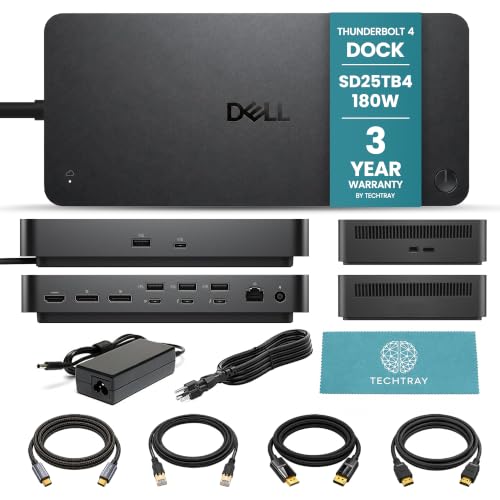
TechTray SD25TB4 Quad Display Dock
Best for: multi-display Dell laptop setups
- Display Support
- Up to 4
- Max Resolution
- 8K@60Hz
- Host Interface
- Thunderbolt 4
- Power Delivery
- Up to 130W (Dell), 96W (non-Dell)
- Video Ports
- DisplayPort 1.4, HDMI 2.1
The TechTray bundle includes the Dell SD25TB4 Thunderbolt 4 dock. It supports up to four 4K displays at 60Hz or one 8K display. You get up to 130W of power for Dell laptops and 96W for others. The package provides DisplayPort, HDMI, USB-C, and Cat8 Ethernet cables. This setup suits users needing high-resolution multi-display support and fast charging through a single cable.
- Supports up to four 4K displays at 60Hz
- Provides up to 130W power delivery for compatible Dell computers
- Includes Cat8 Ethernet and multiple video cables in the bundle
- Features two Thunderbolt 4 ports and four USB-A ports
- Power delivery drops to 96W for non-Dell computers
- macOS users are limited to one external display on standard M1 and M2 models
- You need to drive multiple high-resolution monitors from a single connection
- You use a compatible Dell laptop requiring up to 130W power delivery
- You want a bundle that includes necessary DisplayPort and Ethernet cables
- You use a standard M1 or M2 Mac expecting multiple extended displays
- You require more than 130W of power delivery for your workstation
- You prefer a standalone dock without bundled cables
Verdict: TechTray Dell SD25TB4 Thunderbolt Dock fits users who need robust multi-display support and high-speed charging for compatible Dell systems. It is a solid choice for Windows workstations requiring extensive connectivity.
Specifications side by side
| Spec | TechTray SD25TB4 Quad Display Dock |
|---|---|
| Display Support | Up to 4 |
| Max Resolution | 8K@60Hz |
| Host Interface | Thunderbolt 4 |
| Power Delivery | Up to 130W (Dell), 96W (non-Dell) |
| Video Ports | DisplayPort 1.4, HDMI 2.1 |
| Ports | HDMI, DisplayPort, Ethernet, Thunderbolt 4 |
| Color | Black |
| Model | SD25TB4 |
Frequently asked questions
Does the TechTray SD25TB4 work with non-Dell laptops?
Yes, the dock uses a standard Thunderbolt 4 connection, so it works with any compatible laptop, not just Dell models. However, the listing notes it is specifically designed for robust multi-display support on Dell systems. You should verify your computer’s Thunderbolt capabilities to ensure full functionality.
How many displays can this dock actually run?
The TechTray SD25TB4 supports quad displays, allowing you to connect up to four monitors. It can drive four 4K screens at 60Hz or two 6K displays, depending on your host computer’s limits. This makes it ideal for users needing extensive screen real estate for complex workflows.
What ports are available on the TechTray SD25TB4?
The dock includes HDMI, DisplayPort, Ethernet, and Thunderbolt 4 ports. These connections allow you to link multiple monitors and network devices. The Thunderbolt 4 port serves as the primary link to your computer, managing video, data, and power delivery through a single cable.
Is this dock suitable for macOS users?
You should check your Mac’s specific model before buying. Standard M1 and M2 Macs only support one external display. You need an M1 Pro or M1 Max chip to support dual 4K setups. While the dock works, macOS limits the number of screens you can drive compared to Windows.
What cables come with the TechTray SD25TB4?
The bundle includes DisplayPort 1.4, HDMI 2.0b, USB-C Thunderbolt 4, and Cat8 Ethernet cables. Each cable measures two meters in length. These included cables simplify setup by providing the necessary connections for video, data, and networking without requiring you to purchase additional accessories separately.
Does the dock support high-speed charging?
Yes, the TechTray SD25TB4 provides high-speed charging for compatible devices. It is designed to deliver power efficiently to your laptop while managing multiple displays. This feature ensures your workstation stays powered during intensive tasks, reducing the need for separate power adapters for your computer.
Can I use this dock for professional design work?
Yes, the quad display support makes it excellent for design work. You can connect multiple 4K monitors to create a large workspace for coding or data analysis. The high bandwidth of Thunderbolt 4 ensures stable video output, which is crucial for precise visual tasks and detailed graphic design.
See also