TechTray SD25TB4 Dell Pro Thunderbolt Alternatives: 6 Similar Picks Compared
As Amazon Associates, we earn from qualifying purchases. This means we may receive a small commission at no extra cost to you if you click through and make a purchase.
As an Amazon Associate we earn from qualifying purchases. Links on this page are affiliate links.
The TechTray SD25TB4 bundle delivers robust multi-display support and high power delivery for Dell users. If you are searching for techtray sd25tb4 dell pro thunderbolt alternatives, you may need a different form factor or specific port configuration. This dock excels at connecting up to four 4K monitors at 60Hz while providing up to 130W of power to compatible devices. It offers extensive connectivity with Thunderbolt 4, HDMI, and DisplayPort options.
However, you might prefer a dock with a smaller footprint, different operating system compatibility, or unique features like an SD card reader. The alternatives listed here were chosen because their specifications overlap with the original product. Each option provides similar multi-monitor capabilities or high-speed data transfer speeds. You can compare these picks to find the best fit for your workstation setup. This guide compares 6 similar picks to help you decide which dock meets your specific display and connectivity needs.
How each alternative compares
WAVLINK Quad 4K@60Hz DisplayLink Dock
The WAVLINK Quad 4K DisplayLink Dock supports four 4K displays at 60Hz, matching the TechTray SD25TB4’s multi-monitor capacity. It features a Thunderbolt 5 host interface, offering newer connectivity standards compared to the SD25TB4’s Thunderbolt 4. This dock provides 100W power delivery, which is slightly less than the TechTray’s 130W output to compatible Dell systems. It includes a DisplayLink adapter and an SD card reader, adding storage versatility the TechTray bundle lacks. The WAVLINK unit weighs 1.96 pounds, making it heavier than some competitors. It is ideal for users who need extensive port variety and modern interface speeds without sacrificing screen count.
Plugable 16-in-1 Thunderbolt 4 Dock
The Plugable 16-in-1 Thunderbolt 4 Dock focuses on dual 4K display support rather than the TechTray SD25TB4’s quad display capability. It delivers 100W power delivery, which is lower than the TechTray’s 130W maximum. This dock is designed for professionals who prioritize a stable dual-monitor setup with robust networking and SD card reading features. It weighs 1.42 pounds and measures 11.6 inches in length, offering a different form factor than the compact TechTray bundle. The Plugable model is suited for users who do not need four screens but want high-quality dual 4K performance and reliable Thunderbolt 4 connectivity for their workflow.
WAVLINK Thunderbolt 4 Quad 4K Dock
The WAVLINK Thunderbolt 4 Quad 4K Dock also supports four 4K displays at 60Hz, matching the TechTray SD25TB4’s display potential. It uses DisplayLink technology to achieve multi-monitor support, which may require additional drivers compared to the native Thunderbolt approach of the TechTray. This dock prioritizes multi-screen workflows and high-speed data transfer over maximum charging power. It does not specify a power delivery wattage in its attributes, so you should verify charging needs for your devices. It is a solid choice for users who need extensive screen real estate and fast data speeds, even if they must manage software dependencies for the DisplayLink functionality.
Plugable 13-in-1 Triple 4K USB-C Dock
The Plugable 13-in-1 Triple 4K USB-C Dock supports three 4K displays, offering a middle ground between the TechTray SD25TB4’s four screens and dual-display alternatives. It provides 100W power delivery, which is less than the TechTray’s 130W. This dock is optimized for ChromeOS and Windows users, making it a strong option for those operating in those ecosystems. It weighs only 1.07 pounds, making it significantly lighter and more portable than the TechTray bundle. The Plugable model is ideal for users who need three high-resolution monitors and reliable charging without the bulk or complexity of a four-display Thunderbolt 4 dock.
Koncept Thunderbolt 4 Modular Dock 130W
The Koncept Thunderbolt 4 Modular Dock supports dual 4K displays, which is fewer screens than the TechTray SD25TB4’s quad display support. It delivers 130W power delivery, matching the TechTray’s charging capability for compatible systems. This dock is designed for users who prioritize Thunderbolt 4 connectivity and a compact form factor over maximum screen count. It weighs 1.28 pounds and measures 8.07 inches in length, offering a smaller footprint than the TechTray bundle. The Koncept model is suitable for professionals who need robust charging and dual 4K performance without the need for four simultaneous monitors.
Tobenone Quad 4K 20-in-1 DisplayLink Dock
The Tobenone Quad 4K 20-in-1 DisplayLink Dock supports four 4K displays at 60Hz, matching the TechTray SD25TB4’s multi-monitor capacity. It features a Thunderbolt 5 host interface, providing newer connectivity compared to the TechTray’s Thunderbolt 4. This dock offers extensive port variety with 20 connections, far exceeding the TechTray’s port selection. It weighs 2.27 pounds, making it the heaviest option in this comparison. The Tobenone model is ideal for users who need maximum port availability and four high-resolution screens, even if they must accommodate DisplayLink drivers and a larger physical footprint for their workstation setup.
| # | Product | Best for | Price |
|---|---|---|---|
| 1 | TechTray SD25TB4 Quad Display Dock Best overall | Dell users needing quad 4K display support | |
| 2 | WAVLINK Quad 4K@60Hz DisplayLink Dock Also great | users needing four 4K displays | |
| 3 | Plugable 16-in-1 Thunderbolt 4 Dock Best premium | Dual 4K 60Hz setups with 100W charging | |
| 4 | WAVLINK Thunderbolt 4 Quad 4K Dock Best budget | multi-monitor workflows and high-speed data transfer | |
| 5 | Plugable 13-in-1 Triple 4K USB-C Dock Best chromeos | ChromeOS users needing three 4K displays | |
| 6 | Koncept Thunderbolt 4 Modular Dock 130W Also great | Dual 4K monitor setups with Thunderbolt 4 laptops | |
| 7 | Tobenone Quad 4K 20-in-1 DisplayLink Dock Also great | users needing four 4K monitors and many ports |
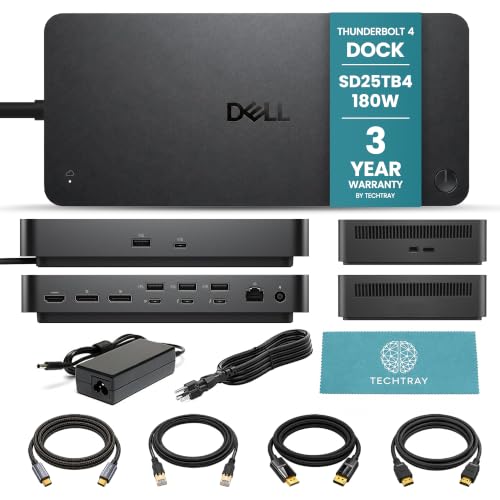
TechTray SD25TB4 Quad Display Dock
Best for: Dell users needing quad 4K display support
- Display Support
- Up to 4
- Max Resolution
- 8K@60Hz
- Host Interface
- Thunderbolt 4
- Power Delivery
- Up to 130W (Dell), 96W (non-Dell)
- Video Ports
- DisplayPort 1.4, HDMI 2.1
This bundle includes the Dell SD25TB4 Thunderbolt 4 dock and essential cables. It supports up to four 4K displays at 60Hz or one 8K display. The dock delivers 130W of power to Dell computers and 96W to others. You get DisplayPort 1.4, HDMI 2.1, and Thunderbolt 4 connectivity. This setup suits users needing high-resolution multi-monitor workstations with reliable power delivery.
- Supports up to four 4K displays at 60Hz
- Delivers 130W power to compatible Dell computers
- Includes DisplayPort 1.4 and HDMI 2.1 ports
- Bundle provides necessary 2m cables for setup
- Lower power delivery of 96W for non-Dell computers compared to 130W for Dell
- Mac users are limited to one external display on standard M1 and M2 models
- Requires specific Thunderbolt connections for dual 4K 60Hz on macOS
- You need a single cable solution for displays, data, and power
- You require support for up to four 4K monitors at 60Hz
- You use a Dell computer and want maximum 130W charging
- You use a standard M1 or M2 Mac and need more than one external display
- You require higher than 96W power delivery for a non-Dell laptop
- You prefer a dock without bundled cables
Verdict: TechTray SD25TB4 Dell Thunderbolt Dock Bundle offers robust multi-display support and high power delivery for Dell users. It is ideal for professionals managing complex workstation setups with multiple high-resolution screens.

WAVLINK Quad 4K@60Hz DisplayLink Dock
Best for: users needing four 4K displays
- Display Support
- Quad
- Max Resolution
- 5K@60Hz, 4K@60Hz
- Host Interface
- USB-C
- Power Delivery
- 100W
- Video Ports
- 4x HDMI, 4x DisplayPort
- Ethernet Speed
- 2.5Gbps
This WAVLINK dock supports four monitors at 4K resolution and 60Hz refresh rates. It connects via Thunderbolt 5 and delivers 100W of power delivery to your laptop. You get an SD card reader and 2.5Gbps Ethernet for fast data transfers. It works with Mac and Windows devices. This setup suits users who need extensive screen real estate and high-speed connectivity for professional workflows.
- Supports quad displays at 4K@60Hz
- 100W power delivery for laptops
- Built-in SD 4.0 card reader
- 2.5Gbps Ethernet port included
- Compatible with Thunderbolt 5 hosts
- Heavier build at 1.96 pounds
- Requires external 180W power adapter
- Uses DisplayLink technology for extra screens
- You need four screens for multitasking
- You use a Thunderbolt 5 laptop
- You require an SD card reader
- You prefer a lighter, portable dock
- You want native Thunderbolt video output
- You only need two or three monitors
Verdict: WAVLINK Quad 4K Thunderbolt 5 Dock delivers a robust multi-monitor experience for users who prioritize screen count and connectivity over portability. It fits professionals who need to connect many peripherals to a single host.

Plugable 16-in-1 Thunderbolt 4 Dock
Best for: Dual 4K 60Hz setups with 100W charging
- Display Support
- Dual
- Max Resolution
- 4K@60Hz
- Host Interface
- Thunderbolt 4
- Power Delivery
- 100W
- Data Transfer Speed
- 40Gbps
- Video Ports
- 2x HDMI, 2x DisplayPort
The Plugable TBT4-UDZ is a premium 16-in-1 Thunderbolt 4 docking station designed for dual 4K 60Hz monitors. It delivers 100W of power delivery to keep your laptop charged while you work. This dock supports macOS 11+ and Windows 10 or later via USB4 or Thunderbolt 4 connections. It includes seven USB ports, 2.5Gbps Ethernet, and SD card slots. You get a simple, driver-free setup for Mac users needing a clean dual-monitor solution.
- Supports dual 4K 60Hz displays via HDMI or DisplayPort
- Provides 100W Power Delivery for laptop charging
- Includes 2.5Gbps Ethernet and SD/microSD slots
- Compatible with Thunderbolt 5, 4, USB4, and USB-C laptops
- Award-winning design with seven USB ports
- Supports only dual monitors, while competitors offer quad monitor setups
- Heavier build at 1.42 pounds compared to lighter alternatives
- Larger footprint with dimensions of 11.6 by 5.8 by 4.1 inches
- You need a reliable dual 4K 60Hz monitor setup for Mac or Windows
- You require 100W charging and 2.5Gbps Ethernet connectivity
- You want a Thunderbolt 4 dock with SD card reading capabilities
- You need to connect more than two 4K monitors simultaneously
- You prefer a lighter or more compact docking station
- You do not have a Thunderbolt 4 or USB4 compatible laptop
Verdict: Plugable TBT4-UDZ 16-in-1 Thunderbolt 4 Dock suits professionals who need a stable dual 4K 60Hz setup with robust charging and networking features. It is ideal for users prioritizing display quality and port selection over multi-monitor expansion.

WAVLINK Thunderbolt 4 Quad 4K Dock
Best for: multi-monitor workflows and high-speed data transfer
- Display Support
- Quad
- Max Resolution
- 8K@60Hz
- Host Interface
- Thunderbolt 4
- Power Delivery
- 98W
- Data Transfer Speed
- 40Gbps
- Video Ports
- HDMI, DisplayPort, Thunderbolt 4
This WAVLINK dock merges Thunderbolt 4 and DisplayLink tech to drive four 4K monitors at 60Hz. It offers three 40Gbps downstream ports and one upstream port with 98W power delivery. You get 2.5G Ethernet, SD card reading, and multiple USB-A connections. It suits creators needing high-speed data transfer and extensive screen real estate for complex workflows.
- Supports quad 4K displays at 60Hz via DisplayLink
- Three 40Gbps Thunderbolt 4 downstream ports
- 98W power delivery for connected laptops
- Built-in 2.5G Ethernet and SD V4.0 reader
- 98W power delivery is lower than the 130W option on this list
- Requires downloading DisplayLink drivers for HDMI and DP ports
- M1/M2 Macs are limited to one video output from Thunderbolt ports
- You need four screens for detailed editing work
- You require fast 40Gbps transfer speeds for large files
- You use a Windows PC or newer Mac with Thunderbolt
- You want plug-and-play video without installing drivers
- You need 130W or higher power delivery
- You rely on M1/M2 Macs for multi-monitor setups
Verdict: WAVLINK TB4 Quad 4K Dock delivers robust multi-screen capability and fast data speeds for professionals who need extensive connectivity. It is best for users who prioritize screen count and transfer rates over maximum charging power.

Plugable 13-in-1 Triple 4K USB-C Dock
Best for: ChromeOS users needing three 4K displays
- Display Support
- Triple
- Max Resolution
- 4K@60Hz
- Host Interface
- USB-C
- Power Delivery
- 100W
- Data Transfer Speed
- 10Gbps
- Video Ports
- 3x HDMI, 3x DisplayPort
This Plugable docking station connects up to three 4K 60Hz displays through a single USB-C link. It delivers 100W Power Delivery to charge your laptop while providing 20W for accessories. The unit supports Windows, macOS, and ChromeOS, making it a versatile hub for multi-monitor setups. Its compact design fits well on desks where you need significant screen real estate without excessive bulk.
- Supports three 4K 60Hz monitors simultaneously
- Provides 100W Power Delivery for laptops
- Includes HDMI and DisplayPort outputs
- Compatible with ChromeOS 100.x or later
- Supports only three displays compared to four on other list options
- Requires DisplayLink drivers on macOS systems
- Does not support HDCP for protected streaming content
- You need three monitors for coding or data analysis
- You use ChromeOS or Windows for daily tasks
- You want 100W charging for your laptop
- You require four simultaneous displays
- You need HDCP support for protected media
- You want a Thunderbolt 4 dock with native macOS support
Verdict: Plugable UD-ULTC4K Triple 4K Dock offers a solid triple-monitor solution for ChromeOS and Windows users who prioritize screen count and charging power over four-display capacity or native Thunderbolt integration.

Koncept Thunderbolt 4 Modular Dock 130W
Best for: Dual 4K monitor setups with Thunderbolt 4 laptops
- Display Support
- Dual
- Max Resolution
- 4K
- Host Interface
- Thunderbolt 4
- Power Delivery
- 130W
- Data Transfer Speed
- 40Gbps
- Video Ports
- Thunderbolt 4, DP 1.4, HDMI 2.0
This Koncept dock replicates the Dell SD25TB4 design using Thunderbolt 4 technology. It supports dual 4K displays and delivers up to 130W of power to your laptop. The unit includes a 180W power supply and measures 3.54 by 8.07 inches. You get a compact footprint with robust connectivity options. It fits well if you need a reliable, single-cable solution for a clean workspace setup.
- Thunderbolt 4 connectivity for 40Gbps data transfer
- Supports dual 4K displays simultaneously
- Provides up to 130W charging power
- Includes HDMI, DisplayPort, and USB-C ports
- Compact dimensions at 3.54 by 8.07 inches
- Supports only dual displays instead of triple or quad setups
- Lower charging wattage compared to 100W-plus competitors
- Heavier at 1.28 pounds than some lighter alternatives
- You need a Thunderbolt 4 dock for dual 4K monitors
- You want a compact dock with a 130W power delivery
- You prefer a modular design style similar to Dell docks
- You require support for three or four monitors
- You need a dock with higher than 130W charging
- You prefer a lighter dock under 1.28 pounds
Verdict: Koncept SD25TB4 Thunderbolt 4 Dock offers solid dual 4K support and 130W charging for users who prioritize Thunderbolt 4 connectivity and a compact form factor.

Tobenone Quad 4K 20-in-1 DisplayLink Dock
Best for: users needing four 4K monitors and many ports
- Display Support
- Quad
- Max Resolution
- 4K@60Hz
- Power Delivery
- 100W
- Video Ports
- HDMI, DisplayPort
- Total Ports
- 20
- Features
- DisplayLink
The TobenONE is a grey docking station designed for quad 4K@60Hz displays. It features a 20-port layout with four HDMI and four DisplayPort outputs. The unit includes a 150W power supply that delivers 100W to your laptop. It supports Thunderbolt 5 and USB4 connections. This dock suits users who need extensive port expansion and multi-monitor setups for professional multitasking.
- Supports four external monitors at 4K@60Hz resolution
- Includes 20 ports with four HDMI and four DP outputs
- Provides 100W laptop charging via the 150W adapter
- Compatible with Thunderbolt 5, USB4, and macOS
- Requires installation of the DisplayLink driver before use
- Heavier at 2.27 pounds compared to lighter alternatives
- Does not support HDCP for protected content playback
- You need to connect four monitors to a single laptop
- You require a wide variety of ports for peripherals
- You use a Windows or macOS system with Thunderbolt
- You want a plug-and-play experience without driver installation
- You need to play HDCP-protected media on all screens
- You prefer a lighter, more portable docking station
Verdict: TobenONE 20-in-1 DisplayLink Dock offers extensive connectivity for users managing four displays. It fits professionals who prioritize port variety and high-resolution multitasking over minimal setup complexity.
Specifications side by side

| Spec | TechTray SD25TB4 Quad Display Dock | WAVLINK Quad 4K@60Hz DisplayLink Dock | Plugable 16-in-1 Thunderbolt 4 Dock | WAVLINK Thunderbolt 4 Quad 4K Dock | Plugable 13-in-1 Triple 4K USB-C Dock | Koncept Thunderbolt 4 Modular Dock 130W | Tobenone Quad 4K 20-in-1 DisplayLink Dock |
|---|---|---|---|---|---|---|---|
| Display Support | Up to 4 | Quad | Dual | Quad | Triple | Dual | Quad |
| Max Resolution | 8K@60Hz | 5K@60Hz, 4K@60Hz | 4K@60Hz | 8K@60Hz | 4K@60Hz | 4K | 4K@60Hz |
| Host Interface | Thunderbolt 4 | USB-C | Thunderbolt 4 | Thunderbolt 4 | USB-C | Thunderbolt 4 | – |
| Power Delivery | Up to 130W (Dell), 96W (non-Dell) | 100W | 100W | 98W | 100W | 130W | 100W |
| Data Transfer Speed | – | – | 40Gbps | 40Gbps | 10Gbps | 40Gbps | – |
| Video Ports | DisplayPort 1.4, HDMI 2.1 | 4x HDMI, 4x DisplayPort | 2x HDMI, 2x DisplayPort | HDMI, DisplayPort, Thunderbolt 4 | 3x HDMI, 3x DisplayPort | Thunderbolt 4, DP 1.4, HDMI 2.0 | HDMI, DisplayPort |
| Total Ports | – | – | 16 | 15 | 13 | – | 20 |
| Ethernet Speed | – | 2.5Gbps | 2.5Gbps | 2.5GbE | – | Gigabit | – |
| Resolution | – | 4K UHD | 4K UHD | 4K UHD | 4K UHD | 4K UHD | 4K UHD |
| Refresh Rate | – | 60Hz | – | 60Hz | – | – | 60Hz |
| Ports | HDMI, DisplayPort, Ethernet, Thunderbolt 4 | HDMI, DisplayPort, USB-C, Ethernet, Thunderbolt 4 | HDMI, DisplayPort, Ethernet, Thunderbolt 4 | HDMI, DisplayPort, Ethernet, Thunderbolt 4, USB-A | HDMI, DisplayPort, USB-C, Thunderbolt 4 | HDMI, DisplayPort, USB-C, Thunderbolt 4 | USB-C, Ethernet, Thunderbolt 4 |
| Features | – | Power Delivery, DisplayLink, SD Card Reader | Power Delivery, SD Card Reader | Power Delivery, DisplayLink | Power Delivery | – | DisplayLink |
| Use | – | Mac | Mac | – | Mac | – | Mac |
| Operating System | – | macOS | macOS | – | ChromeOS | – | macOS |
| Weight | – | 1.96 pounds | 1.42 pounds | – | 1.07 pounds | 1.28 pounds | 2.27 pounds |
| Dimensions | – | – | 11.9 × 6 × 4.3 inches | – | 4.72 × 2.64 × 6.89 inches | 8.07 × 3.54 × 1.39 inches | 11.8 × 3.14 × 0.86 inches |
| Color | Black | Black | Silver | silver | – | Black | Grey |
| Model | SD25TB4 | RC-UG39PD8-UK | TBT4-UDZ | WL-UTD41Pro | UD-ULTC4K | SD25TB4 | – |
| Size | – | – | 11.6" × 5.8" × 4.1" | – | – | – | small |
Frequently asked questions
Does the TechTray SD25TB4 support four monitors?
Yes, the TechTray SD25TB4 supports quad display output. It connects to multiple screens for complex workstation setups. This makes it suitable for professionals who need extensive screen real estate. The dock uses Thunderbolt 4 connectivity to manage these displays efficiently.
What is the best alternative for Dell users needing quad displays?
The TechTray SD25TB4 Quad Display Dock is the top pick for Dell users. It offers robust multi-display support and high power delivery. This dock is ideal for professionals managing complex workstation setups with multiple high-resolution screens. It remains the best overall choice for this specific need.
Which dock supports four 4K displays at 60Hz?
The WAVLINK Quad 4K DisplayLink Dock supports four 4K displays at 60Hz. It features a Thunderbolt 5 host interface for newer connectivity. This dock delivers a robust multi-monitor experience for users who prioritize screen count. It fits professionals needing to connect many peripherals to a single host.
Is there a dock with 130W power delivery?
The Koncept Thunderbolt 4 Modular Dock offers 130W power delivery. It provides solid dual 4K support for Thunderbolt 4 laptops. This dock prioritizes Thunderbolt 4 connectivity and a compact form factor. It is a strong option for users needing higher charging speeds with dual displays.
Which dock is best for ChromeOS users?
The Plugable 13-in-1 Triple 4K USB-C Dock is the best choice for ChromeOS users. It offers a solid triple-monitor solution for ChromeOS and Windows systems. This dock prioritizes screen count and charging power. It is ideal for users who need three 4K displays without native Thunderbolt integration.
What is the best budget option for multi-monitor workflows?
The WAVLINK Thunderbolt 4 Quad 4K Dock is the best budget option. It delivers robust multi-screen capability and fast data speeds. This dock is best for users who prioritize screen count and transfer rates. It supports 4K UHD resolution at 60Hz for extensive connectivity.
Which dock offers the most ports for four displays?
The Tobenone Quad 4K 20-in-1 DisplayLink Dock offers extensive connectivity for four displays. It features a Thunderbolt 5 host interface and USB-C ports. This dock fits professionals who prioritize port variety. It supports 4K UHD resolution at 60Hz for high-resolution multitasking.
Can I use a dock with macOS and dual 4K displays?
The Plugable 16-in-1 Thunderbolt 4 Dock suits professionals needing a stable dual 4K 60Hz setup. It is ideal for macOS users prioritizing display quality. This dock offers robust charging and networking features. It provides 100W power delivery for connected devices.
See also