6 Best Alternatives to the StarTech.com StarTech Thunderbolt 5 USB4 (2026)
As Amazon Associates, we earn from qualifying purchases. This means we may receive a small commission at no extra cost to you if you click through and make a purchase.
As an Amazon Associate we earn from qualifying purchases. Links on this page are affiliate links.
The StarTech Thunderbolt 5 USB4 Dock supports dual 8K displays and offers 140W power delivery. If you are searching for startech com startech thunderbolt 5 usb4 alternatives, you may want different specs. This dock is large and focuses on high-resolution outputs. Some users prefer smaller docks or higher charging wattage.
We selected these alternatives because their specifications overlap with the original. You can choose a budget option with four 4K screens or a premium dock with more ports. Each product here shares key features like Thunderbolt connectivity or SD card readers. You can compare sizes, refresh rates, and power delivery to find the best fit. This list covers seven models that meet professional needs. You can review the data to decide which specs matter most for your setup.
How alternatives differ from StarTech
WAVLINK Quad 4K@60Hz DisplayLink Dock
The WAVLINK dock supports four 4K displays at 60Hz, whereas the StarTech unit handles dual 8K or triple 4K. This dock uses DisplayLink technology, which requires drivers on macOS, while the StarTech dock offers driverless plug-and-play compatibility with Windows and macOS. The WAVLINK provides 100W power delivery, which is lower than the StarTech’s 140W output. It includes an SD card reader and Ethernet port similar to the StarTech model. You should choose this option if you need more screens than the StarTech can drive natively and do not mind installing software. It is a budget-friendly choice for multi-monitor users who prioritize screen count over maximum charging speed or native Thunderbolt performance.
CalDigit TS4 Thunderbolt 4 Dock
The CalDigit TS4 is a Thunderbolt 4 dock, not Thunderbolt 5, so it lacks the highest bandwidth available in newer systems. It supports a single 8K display at 60Hz, whereas the StarTech dock supports dual 8K outputs. The CalDigit provides 98W power delivery, which is significantly less than the StarTech’s 140W charging capability. It features 18 ports, offering more connectivity options than the StarTech model, but focuses on a single high-resolution screen rather than multiple displays. The CalDigit is heavier and slightly larger in footprint. You should pick this dock if you need extensive port variety and robust build quality. It suits users who prioritize a single 8K monitor and strong peripheral connectivity over higher power delivery or multiple high-resolution screens.
Tobenone Quad 4K 20-in-1 DisplayLink Dock
The Tobenone dock supports four 4K displays using DisplayLink technology, which requires driver installation on macOS. The StarTech dock supports dual 8K or triple 4K natively without additional software. The Tobenone model is larger and heavier than the StarTech dock, measuring 11.8 inches in length. It does not specify power delivery wattage in the provided data, while the StarTech offers 140W charging. The Tobenone includes Ethernet and Thunderbolt 4 ports. You should choose this option if you need four simultaneous 4K screens and are comfortable managing drivers. It fits office workers who prioritize screen real estate over native Thunderbolt speed or high-wattage laptop charging. The StarTech is better for users wanting simpler setup and faster charging.
iVANKY 26-in-1 FusionDock Ultra
The iVANKY FusionDock Ultra supports triple 8K displays, exceeding the StarTech dock’s dual 8K capability. Both docks use Thunderbolt 5 and offer 140W power delivery. The iVANKY model is designed specifically for Mac professionals with M-Series Max chips, similar to the StarTech dock. It includes HDMI and DisplayPort outputs. The StarTech dock includes an SD card reader and 2.5GbE Ethernet, details not listed for the iVANKY model. The iVANKY is a black dock, while the StarTech is space gray. You should pick the iVANKY if you need three 8K screens for extreme productivity. It suits users with high-end MacBooks who want maximum display resolution. The StarTech is preferable if you need built-in SD card access and faster Ethernet connectivity.
UGREEN 13-in-1 Thunderbolt 4 Dock
The UGREEN 13-in-1 dock supports dual 8K displays at 60Hz, matching the StarTech dock’s resolution capability. However, it uses Thunderbolt 4, not Thunderbolt 5, which limits bandwidth. The UGREEN dock emphasizes silent operation and multiple Thunderbolt 4 ports, whereas the StarTech dock focuses on high-wattage charging and networking. The UGREEN model includes an SD card reader and audio support. The StarTech dock provides 140W power delivery, while the UGREEN model’s charging capacity is not specified in the data. The UGREEN dock is smaller in width. You should choose this option if you prioritize quiet performance and multiple Thunderbolt 4 connections. It fits users who need dual 8K screens but do not require Thunderbolt 5 speeds or maximum laptop charging power.
UGREEN Maxidok Thunderbolt 5 Docking Station
The UGREEN Maxidok supports 6K displays at 60Hz, which is lower resolution than the StarTech dock’s dual 8K capability. It uses Thunderbolt 5 and offers 140W power delivery, matching the StarTech dock’s charging speed. The UGREEN model includes Ethernet, Thunderbolt 4, and USB-A ports, along with an SD card reader. The StarTech dock includes HDMI and DisplayPort outputs, which are not listed for the UGREEN model. The UGREEN dock is designed for vertical placement and has a robust thermal design. You should pick this option if you need 140W charging and Thunderbolt 5 connectivity. It suits users who prioritize thermal management and vertical desk space over higher resolution outputs or HDMI display support.
| # | Product | Best for | Price |
|---|---|---|---|
| 1 | StarTech Thunderbolt 5 Mac Dock 140W Best overall | users needing dual 8K displays and 2.5GbE Ethernet | |
| 2 | WAVLINK Quad 4K@60Hz DisplayLink Dock Best budget | multi-monitor setups with 100W charging needs | |
| 3 | CalDigit TS4 Thunderbolt 4 Dock Best premium | Users needing high power and 8K display support | |
| 4 | Tobenone Quad 4K 20-in-1 DisplayLink Dock Also great | Quad monitor setups on Windows or Intel Macs | |
| 5 | iVANKY 26-in-1 FusionDock Ultra Best triple display | Mac users needing triple 8K displays | |
| 6 | UGREEN 13-in-1 Thunderbolt 4 Dock Best dual display | silent operation and multiple Thunderbolt 4 ports | |
| 7 | UGREEN Maxidok Thunderbolt 5 Docking Station Best 6k | Thunderbolt 5 hosts needing 140W charging |

StarTech Thunderbolt 5 Mac Dock 140W
Best for: users needing dual 8K displays and 2.5GbE Ethernet
- Display Support
- Quad
- Max Resolution
- Dual 8K 60Hz
- Host Interface
- Thunderbolt 5, USB4
- Power Delivery
- 140W
- Data Transfer Speed
- 120Gbps
- Video Ports
- HDMI, DisplayPort, USB-C
This dock supports dual 8K displays at 60Hz or triple 4K monitors at 144Hz. It delivers 140W of power to your laptop and includes a 2.5GbE Ethernet port for fast wired networking. The device works with Thunderbolt 5, Thunderbolt 4, and USB4 hosts. It also features SD 4.0 card slots for quick media transfers. This setup suits users who need high-resolution multi-monitor setups and fast data access.
- Supports dual 8K 60Hz or triple 4K 144Hz displays
- Provides 140W laptop power delivery
- Includes 2.5GbE Ethernet port
- Features SD 4.0 and microSD 4.0 slots
- Supports only two 8K displays compared to competitors offering triple or quad 4K
- Weighs 1.2 pounds, which is heavier than some alternatives
- Offers only 140W charging versus 180W or higher on other docks
- You need dual 8K displays for high-resolution work
- You require a 2.5GbE Ethernet connection for fast networking
- You use Thunderbolt 5 or USB4 host devices
- You need to connect more than two 8K displays
- You require more than 140W of laptop charging power
- You prefer a lighter docking station under 1 pound
Verdict: StarTech Thunderbolt 5 USB4 Dock delivers high-resolution display support and fast networking for users who need dual 8K or triple 4K setups. It is ideal for professionals who prioritize display count and network speed over maximum charging power.

WAVLINK Quad 4K@60Hz DisplayLink Dock
Best for: multi-monitor setups with 100W charging needs
- Display Support
- Quad
- Max Resolution
- 5K@60Hz, 4K@60Hz
- Host Interface
- USB-C
- Power Delivery
- 100W
- Video Ports
- 4x HDMI, 4x DisplayPort
- Ethernet Speed
- 2.5Gbps
This WAVLINK dock supports four displays at 4K@60Hz via DisplayLink technology. It connects through a Thunderbolt 5 host interface and delivers 100W of power delivery for your laptop. The unit includes a 2.5Gbps Ethernet port and an SD 4.0 card reader. It weighs 1.96 pounds and is available in black. This setup suits users who need multiple screens and fast data transfer without relying on native Thunderbolt video output.
- Supports quad monitors at 4K@60Hz resolution
- Provides 100W Power Delivery for laptops
- Includes 2.5Gbps Ethernet and SD 4.0 reader
- Compatible with Thunderbolt 5 and USB-C devices
- 100W charging is lower than the 140W offered by the StarTech dock
- Weighs 1.96 pounds, making it bulkier than some alternatives
- Relies on DisplayLink rather than native Thunderbolt video
- You need four monitors at 4K@60Hz
- You require 100W charging for your laptop
- You use Thunderbolt 5 or USB-C devices
- You need more than 100W of charging power
- You prefer native Thunderbolt video output
- You want a lighter, more portable dock
Verdict: WAVLINK Quad 4K@60Hz USB-C Dock fits users who prioritize four high-resolution screens and 100W charging over native Thunderbolt video performance.
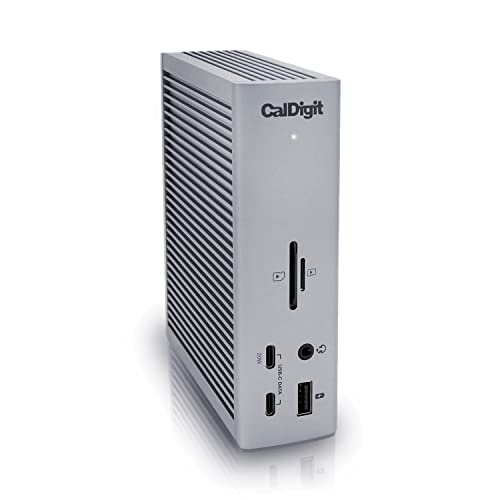
CalDigit TS4 Thunderbolt 4 Dock
Best for: Users needing high power and 8K display support
- Display Support
- Dual
- Max Resolution
- 8K@30Hz, 6K@60Hz
- Host Interface
- Thunderbolt 4
- Power Delivery
- 98W
- Data Transfer Speed
- 40Gb/s
- Video Ports
- DisplayPort 1.4, Thunderbolt 4
The CalDigit TS4 is a compact Thunderbolt 4 dock with 18 ports. It delivers 98W charging and supports a single 8K display or dual 4K monitors. The 2.5GbE port offers faster wired networking. It works with Mac and Windows computers. This dock suits users who need extensive connectivity and high power delivery for their devices in a small footprint.
- 18 total ports for extensive connectivity
- 98W power delivery for laptops
- Supports single 8K or dual 4K displays
- 2.5GbE Ethernet port for faster networking
- 98W power delivery is lower than the 140W option on the list
- Supports only dual 4K displays, fewer than the triple 4K capability of competitors
- Heavier at 1.41 pounds compared to lighter dock alternatives
- You need high power delivery for larger laptops
- You require a single 8K display connection
- You want a compact dock with many ports
- You need more than 98W of charging power
- You require support for three or more monitors
- You prefer a lighter, more portable dock
Verdict: CalDigit TS4 Thunderbolt 4 Dock provides robust 18-port connectivity and strong 98W charging. It is best for users who prioritize high power delivery and single 8K display support over multi-monitor setups.

Tobenone Quad 4K 20-in-1 DisplayLink Dock
Best for: Quad monitor setups on Windows or Intel Macs
- Display Support
- Quad
- Max Resolution
- 4K@60Hz
- Power Delivery
- 100W
- Video Ports
- HDMI, DisplayPort
- Total Ports
- 20
- Features
- DisplayLink
This TobenONE docking station expands your workspace to four 4K@60Hz monitors via DisplayLink technology. It connects through Thunderbolt 5, USB4, or USB-C hosts. The unit includes a 150W power adapter, delivering 100W to your laptop and 18W to a phone. It offers 20 ports, including four HDMI and four DisplayPort outputs. This setup suits professionals needing extensive multitasking capabilities on Windows or Mac systems.
- Supports four 4K@60Hz displays simultaneously
- 100W laptop charging via 150W adapter
- 20 ports including 4 HDMI and 4 DP
- Compatible with Thunderbolt 5 and USB4 hosts
- Lower 100W laptop charging compared to 140W competitors
- Heavier 2.27-pound build than many alternatives
- Requires DisplayLink driver installation
- You need to drive four external monitors
- You use a Windows laptop or non-M1 Mac
- You want a single dock for many peripherals
- You own an M1 MacBook needing four displays
- You require plug-and-play without driver installation
- You need Thunderbolt 5 native daisy-chaining
Verdict: TobenONE 20-in-1 DisplayLink Quad 4K Dock delivers extensive display options for users who prioritize screen real estate over native Thunderbolt bandwidth. It fits office workers managing multiple windows who do not mind installing software drivers.

iVANKY 26-in-1 FusionDock Ultra
Best for: Mac users needing triple 8K displays
- Display Support
- Quad
- Max Resolution
- 8K@60Hz
- Host Interface
- Thunderbolt 5
- Power Delivery
- 140W
- Data Transfer Speed
- 120Gbps
- Video Ports
- HDMI, DisplayPort
The iVANKY FusionDock Ultra is a 26-in-1 docking station built for Mac users. It connects via Thunderbolt 5 and supports up to three 8K displays or four 6K monitors. You get 140W power delivery and a 10GbE port. The dual-chip architecture handles high bandwidth for professional workflows. It includes an SD card reader and optical audio output.
- Supports dual 8K@60Hz or quad 6K@60Hz displays
- 140W Power Delivery passthrough for MacBook
- 10GbE Ethernet port for fast network access
- Dual-chip architecture for high throughput
- Includes SD 4.0 card reader and Toslink audio
- Limited to Mac ecosystem compatibility
- Requires specific Thunderbolt 5 connection
- Complex dual-chip setup may need compatibility checks
- You use a MacBook Pro with M-Series Max chips
- You need dual 8K or quad 6K display support
- You require 10GbE Ethernet connectivity
- You use a Windows PC
- You need standard Thunderbolt 4 compatibility
- You prefer plug-and-play simplicity without compatibility checks
Verdict: The iVANKY FusionDock Ultra Thunderbolt 5 Mac Dock fits Mac professionals who need extreme display resolution and high-speed networking. It is best for users with M-Series Max MacBooks requiring triple 8K or quad 6K setups.

UGREEN 13-in-1 Thunderbolt 4 Dock
Best for: silent operation and multiple Thunderbolt 4 ports
- Display Support
- Dual
- Max Resolution
- 8K@30Hz
- Host Interface
- Thunderbolt 4
- Power Delivery
- 96W
- Data Transfer Speed
- 40Gbps
- Video Ports
- Thunderbolt 4, DP 1.4
The UGREEN 13-in-1 Thunderbolt 4 Dock supports dual 4K@60Hz displays or a single 8K@30Hz screen. It features three Thunderbolt 4 ports with 40Gbps bandwidth. The unit includes 180W total power, delivering up to 96W to laptops. It also offers SD/TF card readers and Gigabit Ethernet. This dock suits users needing silent, fanless operation and robust connectivity for office or design work.
- Supports dual 4K@60Hz or single 8K@30Hz output
- Three Thunderbolt 4 ports with 40Gbps speed
- 180W total power with 96W PD charging
- Fanless silent cooling design
- Supports only dual displays, while competitors offer triple or quad setups
- Gigabit Ethernet speed is lower than the 2.5Gb or 10GbE options on other docks
- DP port does not support DP++, requiring active adapters for HDMI
- You need silent, fanless operation for a quiet workspace
- You require three Thunderbolt 4 ports for daisy-chaining devices
- You want a compact vertical dock with SD card readers
- You need more than two simultaneous monitor outputs
- You require faster than Gigabit Ethernet speeds
- You want direct HDMI connectivity without an active adapter
Verdict: UGREEN 13-in-1 Thunderbolt 4 Dock is a solid choice for users prioritizing silent operation and multiple Thunderbolt 4 ports over higher display counts or faster networking.

UGREEN Maxidok Thunderbolt 5 Docking Station
Best for: Thunderbolt 5 hosts needing 140W charging
- Display Support
- Triple
- Max Resolution
- 8K
- Host Interface
- Thunderbolt 5
- Power Delivery
- 140W
- Data Transfer Speed
- 120Gbps
- Video Ports
- Thunderbolt 5
This UGREEN dock supports triple 4K or dual 6K displays via its four Thunderbolt 5 ports. It delivers 140W of power delivery and includes a 2.5G Ethernet port. The aluminum chassis helps manage heat during heavy workloads. You should choose this if you need high bandwidth for video editing or 3D rendering. It fits users who want a compact, vertically oriented dock with robust connectivity options.
- 120Gbps Thunderbolt 5 bandwidth for fast data transfers
- 140W power delivery for compatible laptops
- Supports triple 4K or dual 6K display configurations
- 2.5G Ethernet port for stable wired networking
- Dual-layer aluminum chassis for heat management
- Only supports up to 6K resolution, while the top alternative offers 8K
- Requires a Thunderbolt 5 host, excluding older Thunderbolt 3 computers
- No built-in HDMI or DisplayPort video outputs
- You need high bandwidth for large video files
- You want a vertically oriented dock to save desk space
- You require 140W charging for your laptop
- You only have Thunderbolt 3 or USB-C computers
- You need built-in HDMI or DisplayPort outputs
- You want to connect more than three monitors
Verdict: UGREEN Maxidok Thunderbolt 5 Dock is a high-bandwidth solution for professionals who need 140W charging and robust thermal design. It suits users with Thunderbolt 5 hosts who prioritize vertical placement and fast data speeds over native HDMI ports.
Specifications side by side

| Spec | StarTech Thunderbolt 5 Mac Dock 140W | WAVLINK Quad 4K@60Hz DisplayLink Dock | CalDigit TS4 Thunderbolt 4 Dock | Tobenone Quad 4K 20-in-1 DisplayLink Dock | iVANKY 26-in-1 FusionDock Ultra | UGREEN 13-in-1 Thunderbolt 4 Dock | UGREEN Maxidok Thunderbolt 5 Docking Station |
|---|---|---|---|---|---|---|---|
| Display Support | Quad | Quad | Dual | Quad | Quad | Dual | Triple |
| Max Resolution | Dual 8K 60Hz | 5K@60Hz, 4K@60Hz | 8K@30Hz, 6K@60Hz | 4K@60Hz | 8K@60Hz | 8K@30Hz | 8K |
| Host Interface | Thunderbolt 5, USB4 | USB-C | Thunderbolt 4 | – | Thunderbolt 5 | Thunderbolt 4 | Thunderbolt 5 |
| Power Delivery | 140W | 100W | 98W | 100W | 140W | 96W | 140W |
| Data Transfer Speed | 120Gbps | – | 40Gb/s | – | 120Gbps | 40Gbps | 120Gbps |
| Video Ports | HDMI, DisplayPort, USB-C | 4x HDMI, 4x DisplayPort | DisplayPort 1.4, Thunderbolt 4 | HDMI, DisplayPort | HDMI, DisplayPort | Thunderbolt 4, DP 1.4 | Thunderbolt 5 |
| Total Ports | – | – | 18 | 20 | 26 | 13 | – |
| Ethernet Speed | 2.5GbE | 2.5Gbps | 2.5GbE | – | 10GbE | Gigabit | 2.5GbE |
| Resolution | 8K UHD | 4K UHD | 8K UHD | 4K UHD | 8K UHD | 8K UHD | 6K |
| Refresh Rate | 60Hz | 60Hz | 60Hz | 60Hz | – | 60Hz | 60Hz |
| Ports | Ethernet, Thunderbolt 4 | HDMI, DisplayPort, USB-C, Ethernet, Thunderbolt 4 | USB-C, Ethernet, Thunderbolt 4, USB-A | USB-C, Ethernet, Thunderbolt 4 | HDMI, DisplayPort, Thunderbolt 4 | Ethernet, Thunderbolt 4 | Ethernet, Thunderbolt 4, USB-A |
| Features | SD Card Reader | Power Delivery, DisplayLink, SD Card Reader | Power Delivery | DisplayLink | Power Delivery, SD Card Reader | Power Delivery, Audio Support, SD Card Reader | Power Delivery, Audio Support, SD Card Reader |
| Use | Mac | Mac | Mac | Mac | Mac | – | – |
| Operating System | Windows | macOS | Windows | macOS | Windows | – | – |
| Dimensions | 5.5 × 5.9 × 2 inches | – | 4.46 × 1.65 × 5.55 inches | 11.8 × 3.14 × 0.86 inches | – | 3.7 × 1.96 × 5.78 inches | 7.6 × 4.06 × 0.94 inches |
| Weight | 1.2 pounds | 1.96 pounds | 1.41 pounds | 2.27 pounds | 6.08 pounds | – | – |
| Size | 3.5×0.9×1.2 in | – | compact | small | – | 13-in-1 | – |
| Color | Space Gray | Black | Space Gray | Grey | Black | – | – |
| Model | 215N-TB5USB4DOCK | RC-UG39PD8-UK | TS4-US 500971 | – | – | U707 | U715 |
Frequently asked questions
Which alternative supports the highest power delivery for MacBooks?
The iVANKY FusionDock Ultra and UGREEN Maxidok both offer 140W Power Delivery. These docks suit users with high-power M-Series Max MacBooks. The iVANKY unit supports triple 8K displays, while the UGREEN model focuses on Thunderbolt 5 hosts. Both provide robust charging for demanding laptops.
Can I use a dock to drive four monitors simultaneously?
Yes, the WAVLINK Quad dock and TobenONE 20-in-1 dock support four displays. The WAVLINK unit handles four 4K screens at 60Hz. The TobenONE model also supports quad 4K outputs. Both use DisplayLink technology, which may require installing specific drivers on your operating system.
Which dock is best for silent operation?
The UGREEN 13-in-1 Thunderbolt 4 Dock is designed for silent operation. It prioritizes quiet performance over higher display counts or faster networking speeds. This dock supports dual displays and includes multiple Thunderbolt 4 ports for connectivity without fan noise during use.
Do any alternatives support native Thunderbolt 5 connections?
Yes, the StarTech Thunderbolt 5 Mac Dock, WAVLINK Quad dock, TobenONE dock, iVANKY FusionDock Ultra, and UGREEN Maxidok all feature Thunderbolt 5 host interfaces. These models leverage the higher bandwidth of Thunderbolt 5 for faster data transfer and video output compared to older Thunderbolt 4 standards.
Which dock is most compact for small desks?
The CalDigit TS4 Thunderbolt 4 Dock is described as compact. It measures 1.65 inches in width and 5.55 inches in height. This dock provides 18 ports and 98W charging. It is a space-efficient choice for users who need extensive connectivity without a large footprint.
Is there a dock that supports both Windows and Mac?
Several options support both operating systems. The StarTech Thunderbolt 5 Mac Dock lists Windows compatibility alongside its Mac focus. The CalDigit TS4 also supports both Windows and macOS. The iVANKY FusionDock Ultra and TobenONE dock similarly list support for both major platforms in their specifications.
Which dock provides the most USB ports for peripherals?
The CalDigit TS4 offers the most extensive connectivity with 18 ports. It includes USB-C, USB-A, and Ethernet options. This high port count suits users who need to connect many peripherals directly. It also delivers 98W of power to your host device.
See also