6 Best Alternatives to the Samsung 34” ViewFinity (2026)
As Amazon Associates, we earn from qualifying purchases. This means we may receive a small commission at no extra cost to you if you click through and make a purchase.
As an Amazon Associate we earn from qualifying purchases. Links on this page are affiliate links.
The Samsung 34” ViewFinity S65TC offers a 1000R curved display with Thunderbolt 4 connectivity and a KVM switch for multi-source control. If you are searching for samsung 34 viewfinity alternatives, you may want a different refresh rate, panel type, or connection standard. This monitor excels at productivity with its 90W charging and built-in speakers, but it lacks high-speed gaming features or an IPS panel for wider viewing angles.
We selected 6 alternatives that share core specifications like ultrawide QHD resolution and curved screens. These options cover a range of needs, from budget-friendly smart monitors to high-refresh-rate OLED displays. Each choice overlaps with the original in size and aspect ratio while offering distinct advantages in connectivity or visual performance. You can compare their ports, stand adjustability, and panel technologies to find the best fit for your desk setup.
How these options differ

LG 34-Inch Curved Smart Ultrawide Monitor
The LG 34SR60QC-W replaces the Samsung’s Thunderbolt 4 port with HDMI and DisplayPort, simplifying connectivity for non-Apple users. It keeps the 100Hz refresh rate and curved screen but drops the height-adjustable stand, making it less flexible for ergonomic setups. This model adds smart features for streaming without a PC, which the Samsung lacks. You give up KVM switching and USB-C power delivery here. It is a lighter, more affordable choice for multitasking and media consumption. If you prioritize built-in apps over desktop productivity tools, this is a practical alternative.
LG 34-Inch Curved Ultrawide USB-C Monitor
The LG 34WR55QK-B offers a similar 100Hz curved display but switches from Thunderbolt 4 to standard USB-C, HDMI, and DisplayPort. It retains the height-adjustable stand found on the Samsung, ensuring ergonomic flexibility. However, it lacks the Samsung’s KVM switch and built-in speakers, requiring external audio solutions. This monitor is designed for office environments where multiple windows are managed efficiently. You get solid color reproduction and reliable connectivity without the premium Thunderbolt price tag. It is a strong option for users who need ergonomic adjustability but do not require the specific high-speed data transfer of Thunderbolt 4.
LG 34-Inch Curved WQHD IPS Monitor
The LG 34U650A-B features an IPS panel, which typically offers better color accuracy and viewing angles than the Samsung’s unspecified panel type. It includes USB-C with power delivery, similar to the Samsung’s charging capabilities, but uses standard HDMI and DisplayPort connections. This model includes built-in speakers and a height-adjustable stand, matching the Samsung’s comfort features. It is ideal for professionals who prioritize color fidelity for creative work. You gain better image consistency across different viewing angles. It is a premium choice for multitasking and media, offering a cleaner desk setup with fewer cables.
AOC 34-Inch Curved QD-OLED Gaming Monitor
The AOC AGON Pro 346UCD is a QD-OLED gaming monitor with a 175Hz refresh rate, significantly faster than the Samsung’s 100Hz. It supports G-SYNC for smoother gameplay, whereas the Samsung uses FreeSync. This model offers superior contrast and color depth due to its OLED technology. It includes built-in speakers and a height-adjustable stand, matching the Samsung’s ergonomic features. You give up the Thunderbolt 4 connectivity and KVM switch for raw gaming performance. It is best for competitive gamers who value visual fidelity and speed over productivity features like multi-source switching.
LG 34-Inch Curved Ultrawide 144Hz Monitor
The LG 34U640B provides a 144Hz refresh rate, offering smoother motion than the Samsung’s 100Hz panel. It includes USB-C with power delivery and a KVM switch, matching the Samsung’s productivity features. However, it lacks built-in speakers, requiring external audio. The stand is height-adjustable, ensuring ergonomic comfort. This monitor is a balanced choice for users who want moderate gaming performance alongside office productivity. You get FreeSync support for reduced screen tearing. It is ideal for those who need a faster refresh rate for gaming but still require USB-C connectivity and multi-source control.
LG 34-Inch UltraGear Curved 160Hz Monitor
The LG 34G600A is a 160Hz gaming monitor with FreeSync support, offering faster refresh rates than the Samsung’s 100Hz. It lacks USB-C and Thunderbolt 4 connectivity, relying on HDMI and DisplayPort. It includes built-in speakers and a curved screen, matching some of the Samsung’s entertainment features. However, it does not have a height-adjustable stand, limiting ergonomic flexibility. This model is designed for gamers who prioritize speed and immersion. You gain smoother motion and better color accuracy for gaming. It is a solid choice for players who do not need the productivity features of the Samsung.
| # | Product | Best for | Price |
|---|---|---|---|
| 1 | Samsung ViewFinity S65TC Thunderbolt 4 Monitor Best overall | Productivity and casual gaming with Thunderbolt 4 | |
| 2 | LG 34-Inch Curved Smart Ultrawide Monitor Best budget | multitasking and streaming without a PC | |
| 3 | LG 34-Inch Curved Ultrawide USB-C Monitor Also great | Productivity and multi-window workflows | |
| 4 | LG 34-Inch Curved WQHD IPS Monitor Best premium | Office multitasking and media consumption | |
| 5 | AOC 34-Inch Curved QD-OLED Gaming Monitor Best oled | OLED gaming and high-contrast visuals | |
| 6 | LG 34-Inch Curved Ultrawide 144Hz Monitor Best 144hz | multitasking and moderate gaming | |
| 7 | LG 34-Inch UltraGear Curved 160Hz Monitor Also great | 160Hz ultrawide gaming with solid color accuracy |

Samsung ViewFinity S65TC Thunderbolt 4 Monitor
Best for: Productivity and casual gaming with Thunderbolt 4
- Screen Size
- 34"
- Refresh Rate
- 100Hz
- Aspect Ratio
- 21:9
- Variable Refresh Rate
- AMD FreeSync
- Ports
- Thunderbolt 4, HDMI, DisplayPort, LAN
- Resolution
- Ultrawide QHD
The Samsung 34" ViewFinity S65TC is an ultra-wide monitor with a 3440×1440 resolution and a 1000R curve. It features a 100Hz refresh rate and AMD FreeSync for smooth visuals. Thunderbolt 4 connectivity allows for 90W charging and data transfer. The height-adjustable stand and built-in speakers add convenience. This monitor suits users needing a spacious, connected display for work and casual gaming.
- Thunderbolt 4 port with 90W charging
- 1000R curved screen for immersion
- Height-adjustable stand with tilt and swivel
- Built-in speakers save desk space
- KVM switch for dual source control
- 100Hz refresh rate is lower than the 144Hz or 175Hz options on this list
- 17.9-pound weight is heavier than standard flat monitors
- 1000R curve is steeper than the gentler curves on other 34-inch models
- You need Thunderbolt 4 for fast data and charging
- You want a steep 1000R curve for immersion
- You value built-in speakers to reduce clutter
- You require a refresh rate above 100Hz for competitive gaming
- You prefer a flat screen over a curved one
- You want a lighter monitor for easy mounting
Verdict: Samsung 34" ViewFinity S65TC is a well-connected ultra-wide monitor ideal for users who prioritize Thunderbolt 4 convenience and immersive curvature. It fits those who want a complete package with speakers and KVM switching without needing high-end gaming speeds.

LG 34-Inch Curved Smart Ultrawide Monitor
Best for: multitasking and streaming without a PC
- Screen Size
- 34"
- Resolution
- 3440×1440
- Refresh Rate
- 100Hz
- Aspect Ratio
- 21:9
- Ports
- HDMI, USB
- Features
- HDR, Built-in Speakers, Curved Screen
This LG smart monitor offers a 34-inch ultrawide QHD display with a 100Hz refresh rate and 1800R curvature. It integrates webOS23 for direct streaming access to Netflix and Prime Video, eliminating the need for a connected PC for media consumption. The 99% sRGB coverage ensures accurate colors for general work and casual gaming. It includes built-in speakers and multiple connectivity ports for versatile setup options.
- Built-in webOS23 for standalone streaming apps like Netflix and Prime Video
- 34-inch QHD (3440×1440) resolution with 1800R curved screen
- 99% sRGB color gamut for vibrant visuals
- 100Hz refresh rate for smoother motion
- Apple AirPlay 2 and HomeKit compatibility
- 100Hz refresh rate is lower than the 144Hz or 175Hz options in this guide
- 1800R curvature is less aggressive than the 1000R curve on the Samsung ViewFinity
- QHD resolution is lower than the Ultra-WQHD or 4K panels available on other list items
- You want a single screen for both work and streaming without a PC
- You prefer a curved ultrawide display for immersive multitasking
- You use Apple devices and want seamless AirPlay 2 casting
- You need high refresh rates above 120Hz for competitive gaming
- You require a flat screen instead of a curved one
- You are looking for the highest possible resolution like 4K
Verdict: LG 34SR60QC-W Smart Monitor is a practical pick for users who value built-in streaming capabilities and a curved ultrawide view over raw gaming performance or maximum resolution.

LG 34-Inch Curved Ultrawide USB-C Monitor
Best for: Productivity and multi-window workflows
- Screen Size
- 34-inch
- Resolution
- 3440 x 1440
- Refresh Rate
- 100Hz
- Response Time
- 5ms
- Aspect Ratio
- 21:9
- Ports
- HDMI, DisplayPort, USB-C
This LG 34-inch monitor offers a 21:9 WQHD (3440 x 1440) curved display with a 100Hz refresh rate. It covers up to 99% of the sRGB color gamut and supports HDR10 for enhanced visuals. The included height-adjustable stand allows for ergonomic positioning. You will appreciate the USB-C port with 65W power delivery for connecting laptops. It also features Reader Mode to reduce blue light during long work sessions.
- 21:9 UltraWide WQHD resolution for multitasking
- USB-C with 65W power delivery
- Height-adjustable ergonomic stand
- 99% sRGB color gamut
- 100Hz refresh rate is lower than the 144Hz and 175Hz options on this list
- 5ms response time is slower than the gaming-focused alternatives here
- 15.2 pounds weight is heavier than some competitors
- You need a USB-C port for laptop charging
- You prefer a curved screen for immersive viewing
- You want height adjustment for ergonomics
- You require high refresh rates for competitive gaming
- You need a flat display panel
- You prioritize lightweight portability
Verdict: LG 34WR55QK-B 34" Curved WQHD Monitor is a solid choice for office workers who value connectivity and ergonomics over high-speed gaming performance.

LG 34-Inch Curved WQHD IPS Monitor
Best for: Office multitasking and media consumption
- Screen Size
- 34"
- Resolution
- 3440 x 1440
- Refresh Rate
- 100Hz
- Panel Type
- IPS
- Response Time
- 5ms
- Aspect Ratio
- 21:9
The LG 34U650A-B is a 34-inch curved IPS monitor with a 21:9 aspect ratio and WQHD resolution. It offers a 100Hz refresh rate and 99% sRGB color coverage for accurate visuals. USB-C connectivity provides up to 96W power delivery, simplifying desk setups. Built-in speakers and Reader Mode add practical value for office work and media consumption.
- 34-inch curved IPS panel with WQHD (3440×1440) resolution
- USB-C port with 96W power delivery
- 99% sRGB color coverage for accurate color reproduction
- Built-in speakers with DepthSound technology
- 100Hz refresh rate for smooth motion
- 100Hz refresh rate is lower than the 144Hz or 175Hz options on this list
- 3800R curve is less aggressive than the 1000R curve of the Samsung ViewFinity
- 22.3 pounds weight makes it heavier than some competitors
- You need USB-C connectivity with high-wattage power delivery for a laptop setup
- You want accurate color reproduction for creative work or media consumption
- You prefer a subtle curve for comfortable long-term viewing
- You require a high refresh rate for competitive gaming
- You want the most aggressive curvature for immersive viewing
- You prefer a lighter monitor for easier desk placement
Verdict: The LG 34U650A-B 34-inch Curved WQHD Monitor suits professionals who prioritize color accuracy and clean desk setups with USB-C. It is a solid choice for multitasking and media, though not ideal for high-speed gaming.

AOC 34-Inch Curved QD-OLED Gaming Monitor
Best for: OLED gaming and high-contrast visuals
- Screen Size
- 34"
- Resolution
- 3440×1440
- Refresh Rate
- 175Hz
- Panel Type
- QD OLED
- Response Time
- 0.03ms
- Aspect Ratio
- 21:9
The AOC AGON Pro 34" uses QD-OLED panel technology to deliver high contrast and vivid colors. It features a 3440×1440 resolution and a 175Hz refresh rate for smooth motion. NVIDIA G-SYNC compatibility reduces screen tearing. The stand offers height, tilt, and swivel adjustments. This monitor suits gamers who prioritize image quality and fast response times over basic office tasks.
- QD-OLED panel for deep blacks and high contrast
- 175Hz refresh rate with 0.03ms GtG response time
- NVIDIA G-SYNC compatibility for tear-free gameplay
- Height-adjustable stand with tilt and swivel options
- 175Hz refresh rate is lower than the 360Hz options available in other sizes
- 32.1-pound weight is heavier than standard IPS ultrawide monitors
- You want OLED contrast for gaming and media
- You need NVIDIA G-SYNC for smooth performance
- You prefer height-adjustable ergonomics
- You need a 240Hz or 360Hz refresh rate
- You prioritize a lightweight display for easy transport
- You prefer IPS panels for wider viewing angles
Verdict: AOC AGON Pro 34" QD-OLED Gaming Monitor delivers top-tier OLED visuals for competitive gamers. It fits players who value color accuracy and G-SYNC support over maximum refresh rates.

LG 34-Inch Curved Ultrawide 144Hz Monitor
Best for: multitasking and moderate gaming
- Screen Size
- 34"
- Resolution
- 3440 x 1440
- Refresh Rate
- 144Hz
- Response Time
- 5ms
- Aspect Ratio
- 21:9
- Variable Refresh Rate
- AMD FreeSync Premium
This LG monitor features a 34-inch 21:9 WQHD (3440 x 1440) curved display with an 1800R radius. It offers a 144Hz refresh rate and AMD FreeSync Premium for smooth motion. The panel covers 99% of the sRGB color gamut and supports HDR10. You get USB-C connectivity with 65W power delivery and a KVM switch to control two computers. The stand allows height adjustment for better ergonomics.
- 144Hz refresh rate for smooth visuals
- USB-C with 65W power delivery
- Built-in KVM switch for dual PCs
- 99% sRGB color coverage
- Height-adjustable stand
- 1800R curve is less aggressive than the 1000R curve on the Samsung S65TC
- 17-pound weight is heavier than the LG 34SR60QC-W and LG 34WR55QK-B
- 5ms response time is slower than the 1ms typical of gaming-focused competitors
- You need a single cable for display and laptop charging
- You want to control two computers with one keyboard and mouse
- You prefer a moderate curve for comfortable long sessions
- You require a flat screen for precise alignment
- You need a faster response time for competitive gaming
- You prefer a sharper 1000R curvature
Verdict: LG 34U640B 34-inch 144Hz Curved Monitor provides a balanced mix of productivity tools and smooth motion. It fits users who want USB-C convenience and KVM switching without the steep curve of ultra-gaming displays.
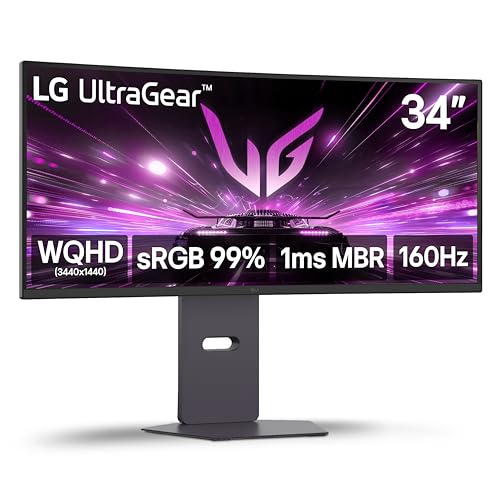
LG 34-Inch UltraGear Curved 160Hz Monitor
Best for: 160Hz ultrawide gaming with solid color accuracy
- Screen Size
- 34"
- Resolution
- 3440 x 1440
- Refresh Rate
- 160Hz
- Response Time
- 1ms MBR
- Variable Refresh Rate
- AMD FreeSync Premium
- Ports
- HDMI 2.1, DisplayPort
The LG 34G600A-B is a 34-inch ultrawide gaming monitor with a 1800R curved WQHD display. It features a 160Hz refresh rate and 1ms Motion Blur Reduction for smooth, responsive visuals. HDR10 support and 99% sRGB coverage enhance color accuracy. This monitor suits gamers who want immersive ultrawide performance without the premium price of OLED panels.
- 160Hz refresh rate for smooth frame transitions
- 1ms Motion Blur Reduction for crisp fast-paced action
- 1800R curved WQHD (3440×1440) display for immersion
- HDR10 and 99% sRGB color coverage
- AMD FreeSync Premium reduces screen tearing
- 1800R curvature is less aggressive than the 1000R curve on the Samsung S65TC
- Standard IPS panel rather than the QD OLED found on the AOC AGON Pro
- 22-pound weight is heavier than typical flat 34-inch monitors
- You want a 160Hz ultrawide gaming monitor with solid color accuracy
- You prefer a curved display that expands your field of view
- You need AMD FreeSync Premium for tear-free gameplay
- You require the deepest possible immersion with a 1000R curve
- You want the highest possible contrast with a QD OLED panel
- You need a flat screen for precise geometric alignment
Verdict: LG 34G600A 34-inch Curved Gaming Monitor delivers fast 160Hz performance and solid color for ultrawide gaming. It fits players who value smooth motion and immersion over the extreme contrast of OLED or the tight curve of the Samsung S65TC.
Specifications side by side

| Spec | Samsung ViewFinity S65TC Thunderbolt 4 Monitor | LG 34-Inch Curved Smart Ultrawide Monitor | LG 34-Inch Curved Ultrawide USB-C Monitor | LG 34-Inch Curved WQHD IPS Monitor | AOC 34-Inch Curved QD-OLED Gaming Monitor | LG 34-Inch Curved Ultrawide 144Hz Monitor | LG 34-Inch UltraGear Curved 160Hz Monitor |
|---|---|---|---|---|---|---|---|
| Screen Size | 34" | 34" | 34-inch | 34" | 34" | 34" | 34" |
| Resolution | – | 3440×1440 | 3440 x 1440 | 3440 x 1440 | 3440×1440 | 3440 x 1440 | 3440 x 1440 |
| Refresh Rate | 100Hz | 100Hz | 100Hz | 100Hz | 175Hz | 144Hz | 160Hz |
| Panel Type | – | – | – | IPS | QD OLED | – | – |
| Response Time | – | – | 5ms | 5ms | 0.03ms | 5ms | 1ms MBR |
| Aspect Ratio | 21:9 | 21:9 | 21:9 | 21:9 | 21:9 | 21:9 | – |
| Variable Refresh Rate | AMD FreeSync | – | – | – | NVIDIA G-SYNC Compatible | AMD FreeSync Premium | AMD FreeSync Premium |
| Ports | Thunderbolt 4, HDMI, DisplayPort, LAN | HDMI, USB | – | HDMI, DisplayPort, USB Type-C | – | HDMI, DisplayPort, USB-C, USB | HDMI 2.1, DisplayPort |
| Features | HDR, Built-in Speakers, Curved Screen, Height-Adjustable Stand | HDR, Built-in Speakers, Curved Screen | HDR, Curved Screen, Height-Adjustable Stand | HDR, Built-in Speakers, Curved Screen, Power Delivery | HDR, Built-in Speakers, Curved Screen, Height-Adjustable Stand | HDR, Curved Screen, Height-Adjustable Stand, Power Delivery | HDR, Built-in Speakers, Curved Screen |
| Use | – | – | – | – | Gaming | – | Gaming |
| Dimensions | 9.5 × 31.8 × 22.1 inches | 8.79 × 31.9 × 19 inches | 10.2 × 31.9 × 22.4 inches | 9.1 × 32.2 × 21.1 inches | 11.6 × 32 × 21.7 inches | 8.7 × 31.9 × 18.3 inches | 9.8 × 31.9 × 18.5 inches |
| Weight | 17.9 pounds | 13.5 pounds | 15.2 pounds | 22.3 pounds | 32.1 pounds | 17 pounds | 22 pounds |
| Size | 34-in Curved | – | – | 34 | 34" 175Hz QD-OLED | – | – |
| Color | White | White | Black | Black | Black | Black | Black |
| Model | FBASAMLS34C650TA | 34SR60QC-W.AUS | 34WR55QK-B.AUS | 34U650A-B.AUS | AG346UCD | 34U640B-B.AUS | 34G600A-B.AUS |
Frequently asked questions
Which alternative offers the best Thunderbolt 4 connectivity?
The Samsung ViewFinity S65TC remains the top choice for Thunderbolt 4 users. It provides a 100Hz refresh rate and includes a KVM switch for managing multiple devices. The curved screen and built-in speakers create a complete package for productivity and casual gaming without needing extra hardware.
Is there a budget-friendly curved ultrawide option with smart features?
The LG 34SR60QC-W serves as a practical budget pick. It features a curved ultrawide display with 100Hz refresh rate and built-in smart streaming capabilities. This monitor allows you to watch content without a PC, though it lacks a height-adjustable stand found on more expensive models.
Which monitor is best for office multitasking and ergonomics?
The LG 34WR55QK-B is ideal for office workers who need flexibility. It offers a height-adjustable stand and USB-C connectivity for easy setup. The curved screen and 100Hz refresh rate support smooth multi-window workflows, making it a solid choice for daily productivity tasks.
What is the best premium ultrawide for color accuracy?
The LG 34U650A-B is a premium option for professionals prioritizing color accuracy. It uses an IPS panel with USB-C power delivery and built-in speakers. The 100Hz refresh rate and curved design suit media consumption and office multitasking, though it is not built for high-speed gaming.
Which alternative provides the best OLED gaming experience?
The AOC AGON Pro 34" QD-OLED delivers top-tier visuals for competitive gamers. It features a 175Hz refresh rate and G-SYNC support for smooth motion. The curved screen and height-adjustable stand enhance immersion, making it the best choice for players valuing contrast and color accuracy.
Can I find a curved ultrawide with 144Hz refresh rate?
Yes, the LG 34U640B offers a 144Hz curved ultrawide display. It includes USB-C connectivity, power delivery, and a height-adjustable stand for ergonomic comfort. FreeSync technology ensures smooth motion, making it suitable for both moderate gaming and productive multitasking environments.
Which monitor offers the highest refresh rate for gaming?
The LG 34G600A provides a 160Hz curved gaming monitor experience. It features FreeSync technology and built-in speakers for immersive gameplay. While it lacks USB-C, the high refresh rate and solid color accuracy make it a strong option for players seeking smooth motion on an ultrawide screen.
See also