Looking Beyond the Plugable Thunderbolt 5 Dual HDMI? 6 Alternatives Worth a Look
As Amazon Associates, we earn from qualifying purchases. This means we may receive a small commission at no extra cost to you if you click through and make a purchase.
As an Amazon Associate we earn from qualifying purchases. Links on this page are affiliate links.
The Plugable Thunderbolt 5 Dual HDMI Dock delivers high-resolution video and robust charging for modern workstations. If you are evaluating plugable thunderbolt 5 dual hdmi alternatives, you may need different specifications for your specific setup. This dock supports dual 8K displays and provides 140W of power delivery through its Thunderbolt 5 interface. Its compact design and extensive port selection make it a strong baseline for comparison.
However, you might prefer a different form factor, additional storage options, or unique connectivity features. Some users require triple display support, while others prioritize silent operation or specific networking speeds. The alternatives listed here were chosen because their specs overlap with the original, ensuring they meet similar professional demands. Whether you need active cooling, internal NVMe storage, or DisplayLink technology for more screens, these options provide viable paths. Each product offers distinct advantages based on the published data, allowing you to select the hardware that best fits your workflow and hardware constraints without compromising on essential performance metrics.
How each alternative compares
Anker Prime 14-in-1 Thunderbolt 5 Dock
The Anker Prime dock also offers 140W charging and 8K resolution support, matching the Plugable in power delivery. However, it differs by including an active cooling fan, which helps maintain thermal stability during heavy use. It supports dual displays rather than the Plugable’s dual HDMI 2.1 native output. The Anker unit is larger and heavier, measuring 4.6 inches square with a 3-inch height. It lists support for four computers, a feature not mentioned for the Plugable. If you prioritize temperature control and multi-system connectivity over compact size, this model is a strong option. You give up the Plugable’s specific dual HDMI 2.1 port layout for this thermal management approach.
iVANKY FusionDock Max 2 Thunderbolt 5 Dock
The iVANKY FusionDock Max 2 targets a different visual need by supporting triple 6K displays. This is a significant shift from the Plugable’s dual 8K or 4K 144Hz capability. It is optimized for M-series Macs, offering silent performance without active cooling fans. Like the Plugable, it provides 140W power delivery and uses Thunderbolt 5. The resolution drops to 6K per display, but the count increases to three. This makes it ideal for creative professionals using Apple Silicon who need more screen real estate at 6K rather than fewer screens at 8K. You trade the Plugable’s high-refresh-rate 4K and dual 8K flexibility for triple 6K support on compatible Macs.
UGREEN Maxidok Thunderbolt 5 Dock with NVMe Slot
The UGREEN Maxidok distinguishes itself with an internal M.2 SSD slot, allowing for direct storage expansion up to 8TB. This removes the need for external drives, a feature the Plugable lacks. It supports triple 8K displays, offering more screen capacity than the Plugable’s dual setup. It also includes a cooling fan and audio support. The refresh rate is listed at 60Hz, which is lower than the Plugable’s 144Hz capability on 4K displays. It provides the same 140W charging via Thunderbolt 5. If you need internal storage expansion and triple high-resolution screens, this dock offers those advantages. You sacrifice the Plugable’s higher refresh rates and simpler plug-and-play HDMI design for this integrated storage solution.
WAVLINK Quad 4K@60Hz DisplayLink Dock
The WAVLINK dock takes a different approach by using DisplayLink technology to support four 4K displays at 60Hz. This exceeds the Plugable’s dual-display limit, making it suitable for users needing extensive screen real estate. It provides 100W power delivery, which is lower than the Plugable’s 140W. The unit includes an SD card reader and supports macOS. It is heavier, weighing 1.96 pounds compared to the Plugable’s 8.92 ounces. The resolution is capped at 4K, so you lose the 8K and high-refresh-rate options of the Plugable. If you need four screens and do not require 140W charging or 8K resolution, this DisplayLink-based solution is a practical alternative.
CalDigit TS5 Plus Thunderbolt 5 Dock
The CalDigit TS5 Plus focuses on networking speed, offering 10GbE LAN connectivity, which is faster than the Plugable’s 2.5G Ethernet. It matches the Plugable with 140W power delivery and Thunderbolt 5 support. It supports dual 8K displays at 60Hz, similar to the Plugable’s lower refresh rate mode. The unit is slightly taller and narrower, with a space black finish. It is less suitable if you need more than two monitors, just like the Plugable. The CalDigit model is ideal for Mac users who require high-speed network connections for professional workflows. You trade the Plugable’s 2.5G port and potentially higher refresh rates for superior 10GbE networking capabilities.
Plugable 16-in-1 Thunderbolt 4 Dock
The Plugable 16-in-1 Thunderbolt 4 Dock uses the previous generation Thunderbolt 4 standard instead of Thunderbolt 5. It supports dual 4K displays at 60Hz, which is lower than the Plugable Thunderbolt 5’s 144Hz or 8K capabilities. It provides 100W power delivery, less than the 140W offered by the newer model. The dock includes an SD card reader and supports both Mac and Windows systems. It is larger, measuring 11.6 inches in length, compared to the compact Thunderbolt 5 version. This model is a solid choice if you do not need Thunderbolt 5 speeds or high-refresh-rate 8K output. You give up the latest connectivity standard and higher power delivery for a reliable, proven Thunderbolt 4 solution.
| # | Product | Best for | Price |
|---|---|---|---|
| 1 | Plugable Thunderbolt 5 Dual HDMI Dock Best overall | Dual 8K display setups and high-power charging | |
| 2 | Anker Prime 14-in-1 Thunderbolt 5 Dock Best budget | High-power laptop users needing active cooling | |
| 3 | iVANKY FusionDock Max 2 Thunderbolt 5 Dock Best 6k | Triple 6K display setups on M-series Macs | |
| 4 | UGREEN Maxidok Thunderbolt 5 Dock with NVMe Slot Best premium | Users needing internal 8TB storage and triple 8K displays | |
| 5 | WAVLINK Quad 4K@60Hz DisplayLink Dock Best displaylink | macOS users needing four 4K displays | |
| 6 | CalDigit TS5 Plus Thunderbolt 5 Dock Also great | Mac users needing 10GbE LAN and 140W charging | |
| 7 | Plugable 16-in-1 Thunderbolt 4 Dock Also great | Dual 4K 60Hz setups with 100W charging |

Plugable Thunderbolt 5 Dual HDMI Dock
Best for: Dual 8K display setups and high-power charging
- Display Support
- Dual
- Max Resolution
- 8K@60Hz
- Host Interface
- Thunderbolt 5
- Power Delivery
- 140W
- Video Ports
- HDMI 2.1
- Total Ports
- 16
The Plugable TBT-UDH2 is a 16-in-1 Thunderbolt 5 docking station designed for high-resolution dual displays. It features dual HDMI 2.1 ports supporting 8K at 60Hz or 4K at 144Hz. The dock provides 140W of laptop charging and includes six USB-C ports. It connects via Thunderbolt 5, 4, or USB4. This setup suits users needing pixel-perfect clarity and robust connectivity for modern laptops.
- Dual HDMI 2.1 ports support 8K 60Hz or 4K 144Hz output
- 140W Power Delivery for fast laptop charging
- Six USB-C ports including two front-facing 30W charging ports
- Built-in 2.5Gbps Ethernet for stable network connections
- Driverless operation with lifetime support from a North American team
- Limited to two external displays on compatible hosts
- Heavier build at 8.92 ounces compared to lighter alternatives
- Requires Thunderbolt 5, 4, or USB4 host connections
- You need dual 8K or high-refresh-rate 4K monitors
- You require 140W of power delivery for your laptop
- You use a Windows 11 or macOS 13+ system
- You need more than two external displays
- Your laptop uses Thunderbolt 3 or USB-C without Thunderbolt support
- You prefer a lighter, more portable docking solution
Verdict: Plugable TBT-UDH2 Thunderbolt 5 Dock delivers exceptional visual clarity for dual monitors. It fits professionals who demand high-resolution outputs and robust charging capabilities for their workstations.

Anker Prime 14-in-1 Thunderbolt 5 Dock
Best for: High-power laptop users needing active cooling
- Display Support
- Dual
- Max Resolution
- 8K@60Hz
- Host Interface
- Thunderbolt 5
- Power Delivery
- 140W
- Data Transfer Speed
- 120Gbps
- Video Ports
- HDMI 2.1, DisplayPort 2.1, TB5
This Anker Prime Thunderbolt 5 dock offers 140W power delivery and supports up to 8K resolution. It features an active cooling system to manage heat during heavy workloads. The dock includes dual Thunderbolt 5 downstream ports and an HDMI 2.1 or DisplayPort 2.1 output. It is a solid option for users needing fast data transfer speeds and reliable multi-monitor support for compatible laptops.
- 140W Power Delivery via Thunderbolt 5 upstream port
- Active cooling system for thermal management
- Supports up to 8K@60Hz single display output
- Dual Thunderbolt 5 downstream video outputs
- Only one HDMI or DisplayPort 2.1 port compared to dual HDMI options elsewhere
- Heavier at 2.37 pounds than lighter alternatives
- Fewer total ports than 23-in-1 or 20-port competitors
- You need 140W charging for high-power laptops
- You want active cooling to prevent overheating
- You require fast 120Gbps data transfer speeds
- You need dual HDMI outputs for Windows laptops
- You require more than 14 total ports
- You prefer a lighter, more compact dock
Verdict: Anker Prime TB5 14-in-1 Dock suits professionals who prioritize thermal stability and high wattage charging over maximum port count. It is ideal for users with compatible Thunderbolt 5 laptops who need robust video output options.
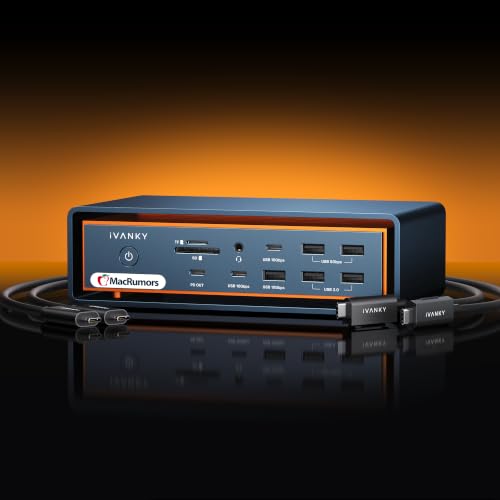
iVANKY FusionDock Max 2 Thunderbolt 5 Dock
Best for: Triple 6K display setups on M-series Macs
- Display Support
- Triple
- Max Resolution
- 6K@60Hz
- Host Interface
- Thunderbolt 5
- Power Delivery
- 140W
- Data Transfer Speed
- 120Gbps
- Video Ports
- Thunderbolt 5, HDMI
This iVANKY dock targets Apple Silicon Macs with Thunderbolt 5 connectivity. It supports up to three 6K displays at 60Hz on M5 Pro chips. The unit includes 140W power delivery and a 2.5Gbps Ethernet port. Its all-aluminum chassis uses passive cooling to eliminate fan noise. You get 23 ports total, including USB and card readers. It works only with M-series Macs, not Windows or Intel systems.
- Supports up to three 6K@60Hz displays on compatible Macs
- 140W power delivery for fast laptop charging
- 2.5Gbps Ethernet for high-speed wired internet
- Passive aluminum cooling eliminates fan noise
- 23 ports including 10 USB connections
- Limited to M-series Macs, excluding Windows and Intel PCs
- Single 2.5Gbps Ethernet port, slower than 10GbE options
- 140W power delivery lower than some competitors
- You use an M-series Mac with Thunderbolt 5
- You need triple 6K display support for creative work
- You prefer silent operation without internal fans
- You use a Windows PC or Intel Mac
- You require 10GbE Ethernet connectivity
- You need to switch between multiple computers
Verdict: iVANKY FusionDock Max 2 Thunderbolt 5 Dock delivers triple 6K display support for M-series Mac users. It suits creative professionals who need high resolution and silent performance on Apple Silicon systems.

UGREEN Maxidok Thunderbolt 5 Dock with NVMe Slot
Best for: Users needing internal 8TB storage and triple 8K displays
- Display Support
- Triple
- Max Resolution
- 8K@60Hz
- Host Interface
- Thunderbolt 5
- Power Delivery
- 140W
- Data Transfer Speed
- 120Gbps
- Video Ports
- Thunderbolt 5, DP 1.4, DP 2.1
This UGREEN dock offers 17 ports and 120Gbps Thunderbolt 5 bandwidth. It features an internal M.2 NVMe slot for up to 8TB of storage. The unit supports triple 8K displays on Windows and includes a 2.5GbE port. It delivers 140W power delivery to your laptop. The aluminum chassis houses an AI cooling fan. This setup suits users needing high-speed data and extensive connectivity in a single device.
- Intel-certified Thunderbolt 5 with 120Gbps bandwidth
- Built-in M.2 NVMe slot supports up to 8TB SSDs
- 17 ports including 3x USB-A and 2.5GbE Ethernet
- Triple display support for dual or single 8K@60Hz
- 240W total power is lower than the CalDigit TS5 Plus
- DP port does not support DP++ requiring active adapters for HDMI
- Fan noise is audible during heavy loads despite being under 30 dB
- You need internal storage expansion up to 8TB
- You require triple monitor setups with 8K resolution
- You want a single dock with 17 connectivity options
- You need passive HDMI adapters for your monitors
- You prefer silent operation without any fan noise
- You require more than 240W of total power delivery
Verdict: UGREEN Maxidok Thunderbolt 5 Dock provides robust storage and display options for power users. It fits professionals who need high bandwidth and internal SSD expansion without buying separate drives.

WAVLINK Quad 4K@60Hz DisplayLink Dock
Best for: macOS users needing four 4K displays
- Display Support
- Quad
- Max Resolution
- 5K@60Hz, 4K@60Hz
- Host Interface
- USB-C
- Power Delivery
- 100W
- Video Ports
- 4x HDMI, 4x DisplayPort
- Ethernet Speed
- 2.5Gbps
This WAVLINK dock supports four displays at 4K resolution and 60Hz refresh rate. It uses DisplayLink technology to drive multiple monitors from a single USB-C connection. The unit provides 100W power delivery for your laptop and includes a 2.5Gbps Ethernet port. It works with Thunderbolt 3, 4, and 5 hosts, as well as macOS and Windows devices. The build weighs 1.96 pounds.
- Supports quad monitor setups at 4K UHD resolution
- 100W Power Delivery for laptop charging
- 2.5Gbps Ethernet for fast wired networking
- Compatible with Thunderbolt 3, 4, and 5 hosts
- Includes SD 4.0 card reader
- Weighs 1.96 pounds, which is heavier than some lighter alternatives
- Relies on DisplayLink drivers rather than native video output
- Supports only 60Hz refresh rate per display
- You need to drive four monitors from one laptop
- You use a macOS or Windows device with a USB-C port
- You require 100W charging for your host device
- You need native Thunderbolt video output without drivers
- You require refresh rates higher than 60Hz
- You prefer a lighter docking station under 1.5 pounds
Verdict: WAVLINK Quad Monitor USB-C Dock delivers a practical multi-display solution for users who need four screens. It fits professionals who prioritize screen real estate and 100W charging over native bandwidth efficiency.

CalDigit TS5 Plus Thunderbolt 5 Dock
Best for: Mac users needing 10GbE LAN and 140W charging
- Display Support
- Quad
- Max Resolution
- 8K @ 60Hz
- Host Interface
- Thunderbolt 5
- Power Delivery
- 140W
- Data Transfer Speed
- 120 Gbps
- Video Ports
- DisplayPort 2.1, Thunderbolt 5
The CalDigit TS5 Plus is a Thunderbolt 5 docking station offering 20 ports and 140W host charging. It supports dual 8K displays at 60Hz on compatible Macs and includes a PCIe-based 10GbE LAN port. This dock features dual USB controllers to prevent bottlenecks when connecting multiple high-speed devices. It suits users needing extensive connectivity and high-speed network transfer capabilities for their workstation setup.
- 140W host charging for high-power laptops
- Dual 8K 60Hz display support on Mac
- PCIe-based 10GbE LAN for fast transfers
- Dual USB controllers reduce data bottlenecks
- Lower display count than the iVANKY FusionDock Max 2
- Fewer total ports than the iVANKY FusionDock Max 2
- Shorter warranty than the iVANKY FusionDock Max 2
- You need 140W charging for a MacBook Pro
- You require 10GbE LAN speeds for NAS
- You want dual 8K display support on Mac
- You need more than two external displays
- You require 23 or more total ports
- You want a 3-year warranty
Verdict: The CalDigit TS5 Plus Thunderbolt 5 Dock fits users who need high-speed 10GbE networking and 140W charging for professional Mac workstations. It is less suitable if you need to drive more than two monitors simultaneously.

Plugable 16-in-1 Thunderbolt 4 Dock
Best for: Dual 4K 60Hz setups with 100W charging
- Display Support
- Dual
- Max Resolution
- 4K@60Hz
- Host Interface
- Thunderbolt 4
- Power Delivery
- 100W
- Data Transfer Speed
- 40Gbps
- Video Ports
- 2x HDMI, 2x DisplayPort
This Plugable dock supports dual 4K 60Hz displays via HDMI or DisplayPort. It delivers 100W power delivery for laptop charging and includes seven USB ports, a 2.5Gbps Ethernet connection, and SD card slots. The device works with Thunderbolt 5, Thunderbolt 4, USB4, and USB-C laptops. It measures 11.6 by 5.8 by 4.1 inches and weighs 1.42 pounds. You get a reliable setup for macOS and Windows systems.
- Supports dual 4K 60Hz monitors
- 100W power delivery for laptops
- Includes 2.5Gbps Ethernet port
- Features SD and microSD card readers
- Compatible with Thunderbolt 5 and USB4
- Supports only 4K resolution, unlike competitors offering 8K
- Uses Thunderbolt 4 instead of Thunderbolt 5
- Weighs 1.42 pounds, heavier than some alternatives
- You need dual 4K 60Hz monitors for your workflow
- You require 100W power delivery for your laptop
- You use macOS or Windows with Thunderbolt or USB4
- You need 8K display support for high-resolution work
- You require the latest Thunderbolt 5 connectivity
- You want a dock with more than 16 ports
Verdict: Plugable 16-in-1 Thunderbolt 4 Dock fits users who need reliable dual 4K 60Hz output and 100W charging without needing the newest Thunderbolt 5 standard.
Specifications side by side

| Spec | Plugable Thunderbolt 5 Dual HDMI Dock | Anker Prime 14-in-1 Thunderbolt 5 Dock | iVANKY FusionDock Max 2 Thunderbolt 5 Dock | UGREEN Maxidok Thunderbolt 5 Dock with NVMe Slot | WAVLINK Quad 4K@60Hz DisplayLink Dock | CalDigit TS5 Plus Thunderbolt 5 Dock | Plugable 16-in-1 Thunderbolt 4 Dock |
|---|---|---|---|---|---|---|---|
| Display Support | Dual | Dual | Triple | Triple | Quad | Quad | Dual |
| Max Resolution | 8K@60Hz | 8K@60Hz | 6K@60Hz | 8K@60Hz | 5K@60Hz, 4K@60Hz | 8K @ 60Hz | 4K@60Hz |
| Host Interface | Thunderbolt 5 | Thunderbolt 5 | Thunderbolt 5 | Thunderbolt 5 | USB-C | Thunderbolt 5 | Thunderbolt 4 |
| Power Delivery | 140W | 140W | 140W | 140W | 100W | 140W | 100W |
| Data Transfer Speed | – | 120Gbps | 120Gbps | 120Gbps | – | 120 Gbps | 40Gbps |
| Video Ports | HDMI 2.1 | HDMI 2.1, DisplayPort 2.1, TB5 | Thunderbolt 5, HDMI | Thunderbolt 5, DP 1.4, DP 2.1 | 4x HDMI, 4x DisplayPort | DisplayPort 2.1, Thunderbolt 5 | 2x HDMI, 2x DisplayPort |
| Total Ports | 16 | 14 | 23 | 17 | – | 20 | 16 |
| Ethernet Speed | 2.5GbE | 2.5Gbps | 2.5GbE | 2.5GbE | 2.5Gbps | 10GbE | 2.5Gbps |
| Resolution | 8K UHD | 8K UHD | 6K | 8K UHD | 4K UHD | 8K UHD | 4K UHD |
| Refresh Rate | 144Hz | – | 60Hz | 60Hz | 60Hz | 60Hz | – |
| Ports | HDMI, Ethernet, Thunderbolt 4 | Ethernet, Thunderbolt 4 | Ethernet, Thunderbolt 4 | USB-C, Ethernet, Thunderbolt 4 | HDMI, DisplayPort, USB-C, Ethernet, Thunderbolt 4 | Ethernet, Thunderbolt 4 | HDMI, DisplayPort, Ethernet, Thunderbolt 4 |
| Features | Power Delivery | Power Delivery, SD Card Reader, Cooling Fan | Power Delivery | Power Delivery, Audio Support, M.2 SSD Slot, Cooling Fan | Power Delivery, DisplayLink, SD Card Reader | Power Delivery | Power Delivery, SD Card Reader |
| Use | – | – | Mac | – | Mac | – | Mac |
| Operating System | macOS | – | macOS | – | macOS | – | macOS |
| Number of Computers | – | 4 Computers | – | – | – | – | – |
| Dimensions | 1.97 × 2.95 × 5.91 inches | 3 × 4.6 × 4.6 inches | – | 5.24 × 5.24 × 2.09 inches | – | 5.03 × 1.85 × 6.1 inches | 11.9 × 6 × 4.3 inches |
| Weight | 8.92 ounces | 2.37 pounds | 6.08 pounds | – | 1.96 pounds | 8.9 ounces | 1.42 pounds |
| Color | Space Gray | Gray | Midnight Blue | Bronze | Black | Space Black | Silver |
| Model | TBT-UDH2 | A83B5 | – | U716 | RC-UG39PD8-UK | TBT5-TS5Plus-US-AMZ | TBT4-UDZ |
| Size | – | 4.60" x 4.60" x 3" | – | – | – | – | 11.6" × 5.8" × 4.1" |
Frequently asked questions
Which Thunderbolt 5 dock supports three displays for Mac users?
The iVANKY FusionDock Max 2 is the best option for triple display setups. It supports three 6K monitors at 60Hz, making it ideal for M-series Macs. The dock provides 140W of Power Delivery to keep your laptop charged while driving high-resolution outputs.
Does the Anker Prime dock include active cooling?
Yes, the Anker Prime 14-in-1 Thunderbolt 5 Dock includes an active cooling fan. This feature helps maintain thermal stability during heavy workloads. It also offers 140W Power Delivery and supports dual 8K displays for compatible Thunderbolt 5 laptops.
Which dock allows for internal SSD expansion?
The UGREEN Maxidok Thunderbolt 5 Dock features an M.2 SSD slot for internal storage expansion. It supports triple 8K displays at 60Hz and provides 140W Power Delivery. This dock is designed for users who need high bandwidth and internal drive options.
Can I connect four 4K monitors with a Thunderbolt dock?
The WAVLINK Quad 4K@60Hz DisplayLink Dock supports four 4K displays at 60Hz. It uses DisplayLink technology to achieve this multi-screen setup. The dock provides 100W Power Delivery and is compatible with macOS for professionals needing extensive screen real estate.
Which dock offers 10GbE networking for Mac workstations?
The CalDigit TS5 Plus Thunderbolt 5 Dock includes a 10GbE Ethernet port. It supports dual 8K displays at 60Hz and delivers 140W Power Delivery. This dock is suitable for Mac users who require high-speed networking and robust charging capabilities.
Is there a Thunderbolt 4 alternative for dual 4K setups?
The Plugable 16-in-1 Thunderbolt 4 Dock supports dual 4K displays at 60Hz. It provides 100W Power Delivery and includes an SD card reader. This dock is a reliable choice for users who do not need the latest Thunderbolt 5 standard.
See also