ORICO NAS Storage Lineup Compared: Choose the Right Backup Rig
As Amazon Associates, we earn from qualifying purchases. This means we may receive a small commission at no extra cost to you if you click through and make a purchase.
Choosing the right orico nas storage hardware requires identifying whether your backup pipeline demands a network-attached server or high-capacity direct-attached storage. ORICO develops both x86-based local private cloud servers running containerized operating systems and hardware-managed RAID enclosures designed for direct desktop connectivity. Deploying the wrong architecture leads to operational bottlenecks, either through unneeded network configuration overhead or a lack of remote multi-user file synchronization. Professional buyers comparing distributed networked appliances like hdd nas ugreen rigs against direct expansion banks can use this evaluation to match drive density and bandwidth to their storage goals.
This guide analyzes six storage solutions from ORICO, covering two distinct equipment categories across home office and workstation environments. The lineup ranges from multi-bay network-attached appliances equipped with dual 2.5GbE ports, M.2 NVMe caching slots, and virtualization platforms down to 4-bay and 5-bay direct-attached enclosures built with integrated 150W power supplies, hardware RAID switches, and aluminum cooling profiles. Reviewing their drive bay quantities, controller types, operating system capabilities, and transfer interfaces highlights where each unit fits within a modern backup workflow.
Which ORICO NAS Storage Systems Should You Buy
- ORICO HS500 NAS Storage: Best for creative teams needing 5 bays, dual NVMe caching, 2.5GbE connectivity, and virtual machine deployment.
- ORICO Network Attached Storage: Best for compact home offices wanting a 2-bay private cloud with NVMe slots and direct 4K HDMI media output.
- ORICO 5 Bay RAID External Hard: Best for video editors requiring 110TB desktop storage backed by an internal hardware RAID controller and alloy steel shell.
- ORICO RAID 5 Bay RAID HDD: Best for single-workstation setups demanding aluminum construction, bracket-free drive locking, and 8 physical RAID modes.
- ORICO 4-Bay Aluminum USB 3.0 External: Best for studio archives prioritizing independent JBOD drive recognition and up to 88TB of raw SATA storage.
- ORICO 5 Bay Hard Drive Enclosure: Best for multi-device environments requiring tool-free magnetic drive access and USB-C connectivity across PCs, routers, and consoles.
ORICO HS500 NAS Storage

Best for: Teams needing 5-bay private cloud virtualization
Pros
- 136TB capacity with dual NVMe
- Dual 2.5GbE and 4K HDMI
- One-click VM and Docker deployment
Cons
- Higher setup complexity than USB DAS
The ORICO HS500 NAS Storage is a full-featured network appliance built on a Linux/x86 Mini-ITX hardware platform. It houses five 3.5-inch SATA hard drive bays and two M.2 NVMe SSD slots, yielding a maximum local digital storage capacity of 136TB. Data throughput is driven by dual 2.5GbE Ethernet ports delivering local area transfer speeds up to 500MB/s, supported by two USB-A ports, a 5Gbps USB-C connection, and a 4K HDMI output. When building out the primary storage pool, enterprise-tier drives such as high-density western digital hdd units provide sustained mechanical reliability across long operational windows.
The system excels in software flexibility and remote data management. Users can deploy operating environments like TrueNAS, Windows 11, Ubuntu 24, and Debian 12 directly through a one-click virtualization manager. Integrated Docker support facilitates rapid container setup, including pre-installed Plex media server software for 4K video transcoding. Hardware highlights include an accessible magnetic suction faceplate for fast drive mounting, automatic or manual fan speed adjustment, and an AI Album engine capable of semantic image searches and facial recognition. If your team does not need five mechanical bays, the smaller 2-bay HS200 delivers identical OS and networking features in a smaller desktop footprint.
- Maximum 136TB capacity across five 3.5-inch SATA bays and dual M.2 NVMe SSD slots
- Dual 2.5GbE Ethernet interfaces delivering up to 500MB/s local transfer rates
- Preloaded virtualization tool supporting TrueNAS, Windows 11, Ubuntu 24, and Debian 12
- Flexible RAID architecture supporting modes 0, 1, 5, 6, 10, and Basic
ORICO Network Attached Storage

Orico
8.4/10 Our score
- Color
- gray or black
Listed by the seller on the product page.
Best for: Small offices wanting compact 4K media streaming
Pros
- 64TB capacity with NVMe caching
- Direct 4K 60Hz HDMI video output
- Preloaded OS virtualization options
Cons
- Limited to two mechanical drive bays
The ORICO Network Attached Storage, model HS200B, is an x86 network server designed for smaller office groups and personal private cloud management. It pairs two 3.5-inch SATA mechanical drive slots with two internal M.2 NVMe SSD positions to support up to 64TB of combined storage. The rear interface includes dual 2.5GbE networking ports, two USB-A ports, a 5Gbps USB-C port, and a dedicated HDMI port capable of streaming 4K video at 60Hz straight to displays. An 18-month manufacturer warranty covers the chassis, which is finished in surface-mount gray or black styling.
This orico network attached storage unit offers the same software stack found in larger ORICO servers. An integrated media center automatically scrapes posters, ratings, and production metadata, converting folders of film files into a structured visual library. For productivity, the system handles TimeMachine backups for Apple clients, two-way sync with Google Cloud storage, and containerized workflows like IDEA paired with MySQL via Docker. Hardware monitoring tools track internal memory consumption and component temperatures in real time. It yields to the 5-bay HS500 when your team requires three or more mechanical drives for parity-heavy RAID levels.
- Supports up to 64TB across two mechanical drive slots and two M.2 NVMe SSD slots
- Dual 2.5GbE ports and direct 4K at 60Hz HDMI video output
- Docker engine pre-configured for Plex and development environments
- Integrated AI Album software with semantic search and facial recognition
ORICO 5 Bay RAID External Hard
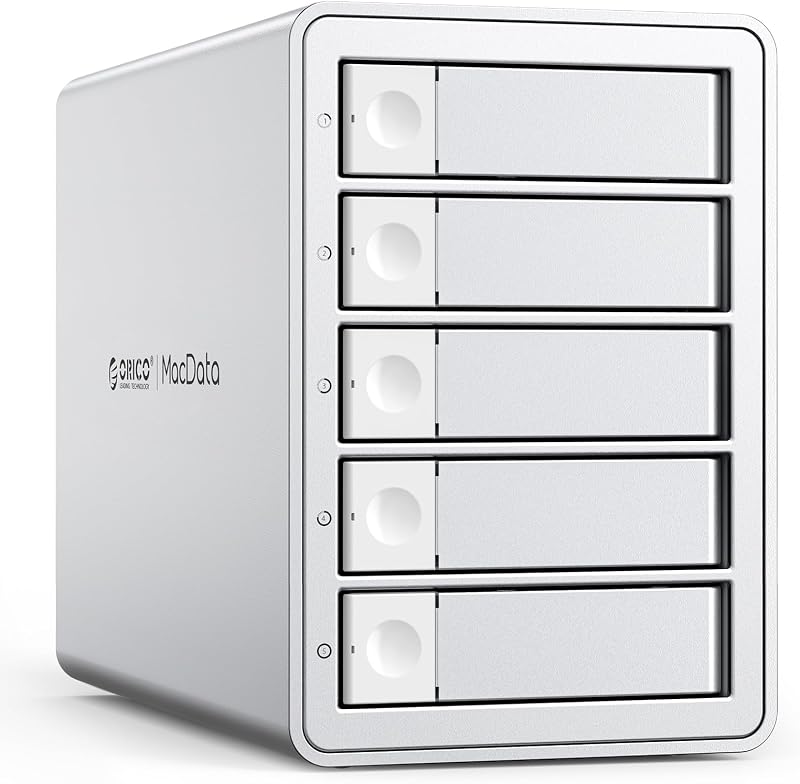
Best for: Fast drive swapping across multiple devices
Pros
- Magnetic tool-free front cover
- USB-C 5Gbps interface
- Fast 3-second drive recognition
Cons
- Plastic chassis construction
- Lacks hardware RAID logic
Best for: Desktop workstations requiring hardware RAID redundancy
Pros
- Eight hardware-switched RAID modes
- Internal 150W power supply
- Supports 2.5-inch and 3.5-inch drives
Cons
- USB 3.0 Type-A host connection
Departing from network servers to direct-attached desktop storage, the ORICO 5 Bay RAID External Hard drive enclosure provides local storage scaling up to 110TB. Constructed from an alloy steel shell with front and rear honeycomb ventilation grilles, the workstation accepts both 2.5-inch and 3.5-inch SATA hard drives and solid-state drives up to 22TB per slot. Connecting through a USB 3.0 Type-A interface, the device delivers read and write transfer rates up to 230MB/s across Windows, Mac, and Linux environments without external software drivers.
The standout feature of this orico 5 bay raid enclosure is its hardware RAID controller. Users adjust physical dip switches on the rear panel to configure RAID 0, 1, 3, 5, 10, JBOD, Clone, or Clear modes without taxing the host computer’s processor. Power delivery is managed by an integrated 150W internal power supply, which ensures voltage stability across five high-draw mechanical disks under simultaneous write cycles while eliminating bulky floor adapters. Editors organizing peripheral connections alongside hardware hubs like an orico mac mini m4 dock will appreciate having local RAID protection without configuring local subnets or switch ports.
- Hardware RAID controller supporting eight manual switch modes including RAID 5 and RAID 10
- Massive 110TB capacity supporting five 2.5-inch or 3.5-inch SATA drives
- Integrated 150W internal power supply preventing voltage drop under full disk load
- Alloy steel casing with front and rear honeycomb vents and an 80mm cooling fan
ORICO RAID 5 Bay RAID HDD

Best for: Workstations demanding locked aluminum drive bays
Pros
- All-aluminum shell with physical key locks
- Eight hardware RAID configurations
- Built-in 150W power supply
Cons
- Restricted to 3.5-inch SATA disks
The ORICO RAID 5 Bay RAID HDD enclosure is a specialized desktop array built from aluminum to house up to five 3.5-inch SATA hard drives. Providing a total storage ceiling of 110TB based on 22TB individual disks, it interfaces over a USB 3.0 connection supporting transfer speeds up to 235MB/s. Instead of traditional pull-out drive sleds, this enclosure utilizes a bracket-free installation architecture protected by independent physical key locks on each drive door to prevent accidental removal or tampering.
This orico raid storage bank provides flexible data parity management via eight hardware modes: 0, 1, 3, 5, 10, JBOD, CLONE, and CLEAR. An 80mm silent cooling fan pulls air through front-facing intake louvers and exhausts it through the rear plate, keeping high-capacity mechanical drives within safe thermal limits. The internal 150W power supply handles the electrical load of five multi-terabyte drives continuously. For studios that need simple individual disk access without configuring hardware RAID parameters, ORICO’s non-RAID multi-bay enclosures offer an alternative path.
- Aluminum construction featuring bracket-free drive loading and individual key locks
- 110TB maximum volume accommodating five 22TB 3.5-inch SATA disks
- Onboard hardware RAID management with eight physical array configurations
- Built-in 150W power supply designed for sustained peak-load stability
ORICO 4-Bay Aluminum USB 3.0 External

Orico
9.8/10 Our score
- Color
- Space Grey
Listed by the seller on the product page.
Best for: Archival users prioritizing straightforward JBOD disk capacity
Pros
- 88TB four-bay raw SATA capacity
- Integrated 150W internal power supply
- Aluminum alloy heat dissipation
Cons
- No integrated hardware RAID
The ORICO 4-Bay Aluminum USB 3.0 External hard drive enclosure is a non-RAID desktop chassis built for massive local data pooling. Finished in space grey aluminum alloy, it accommodates four 3.5-inch SATA mechanical drives up to 22TB each, establishing an overall storage ceiling of 88TB. The unit connects via a USB 3.1 Type-A interface operating at 5Gbps, achieving real-world data transfer rates up to 235MB/s when moving large media files and project archives.
Because it lacks an internal hardware RAID controller, this orico multi-bay storage tower presents each installed disk as an independent volume to Windows, Mac, or Linux operating systems. This simplifies workflows involving software-managed pools, manual backup duplication, or independent cold-storage archives. A built-in 150W power supply sits inside the aluminum housing to power all four drive bays cleanly without an external transformer brick. The tool-free door system features independent mechanical safety locks to keep drives seated securely during operation. If your data pipeline requires hardware-level mirroring or parity striping, step up to ORICO’s 5-bay hardware RAID enclosures.
- 88TB capacity supporting up to four 22TB 3.5-inch SATA hard drives
- Space grey aluminum body with an 80mm silent fan and dual airflow vents
- Direct USB 3.1 Type-A host connection delivering up to 235MB/s transfer rates
- Internal 150W power architecture and individual key-locked drive slots
ORICO 5 Bay Hard Drive Enclosure

Orico
9.2/10 Our score
- Color
- Black
- Dimensions
- 8.66 x 7.48 x 5.51 inches
Listed by the seller on the product page.
The ORICO 5 Bay Hard Drive Enclosure is engineered for users who need fast, tool-free access to large volumes of external data. Constructed from rugged black plastic with a magnetic front cover, the enclosure accepts both 2.5-inch and 3.5-inch SATA hard drives and SSDs, scaling up to 110TB across five bays. Its magnetic cover design eliminates mounting screws and drive brackets entirely, allowing the enclosure to recognize newly installed disks in approximately three seconds.
Host connectivity is handled via a USB 3.1 Gen 1 Type-C port supporting 5Gbps transfer bandwidth. The enclosure operates as an unmanaged multi-disk hub, making it compatible with personal computers, routers, game consoles, and smart televisions. An internal 60mm double-ball bearing cooling fan exhausts heat through rear honeycomb openings, while built-in protective circuitry guards against over-voltage, over-current, and short-circuit events across all connected bays. While ideal for rapid drive swapping and external device expansion, users needing internal RAID parity logic or autonomous network backups should select ORICO’s metallic RAID enclosures or HS-series NAS systems.
- Magnetic tool-free front panel enabling drive insertion and recognition in 3 seconds
- USB 3.1 Gen 1 Type-C interface supporting 5Gbps throughput
- Universal compatibility with 2.5-inch and 3.5-inch SATA HDDs and SSDs up to 110TB
- 60mm double-ball bearing fan and multi-point electrical fault protection
What Sets These Models Apart
Executing an accurate orico nas comparison requires distinguishing between true networked appliances and direct-attached storage enclosures. The HS500 and HS200 are autonomous network computers featuring dual 2.5GbE interfaces, integrated virtualization operating systems, and M.2 NVMe SSD cache slots. In contrast, ORICO’s multi-bay enclosures connect directly via USB to provide raw drive capacity, either managed by an onboard hardware RAID chip or mapped as independent desktop disks. Evaluating connectivity, parity handling, and drive counts clarifies which platform fits your operational requirements.
| Model | Primary Interface | Maximum Capacity | Drive Configuration |
|---|---|---|---|
| ORICO HS500 NAS Storage | Dual 2.5GbE LAN, USB-C, HDMI | 136TB | 5x 3.5-inch SATA + 2x M.2 NVMe |
| ORICO Network Attached Storage | Dual 2.5GbE LAN, USB-C, HDMI | 64TB | 2x 3.5-inch SATA + 2x M.2 NVMe |
| ORICO 5 Bay RAID External Hard | USB 3.0 Type-A | 110TB | 5x 2.5-inch / 3.5-inch SATA (Hardware RAID) |
| ORICO RAID 5 Bay RAID HDD | USB 3.0 Type-A | 110TB | 5x 3.5-inch SATA (Hardware RAID) |
| ORICO 4-Bay Aluminum USB 3.0 External | USB 3.1 Type-A | 88TB | 4x 3.5-inch SATA (Non-RAID JBOD) |
| ORICO 5 Bay Hard Drive Enclosure | USB 3.1 Gen 1 Type-C | 110TB | 5x 2.5-inch / 3.5-inch SATA (Magnetic Tool-Free) |
Buying Tips for ORICO NAS Storage Systems
Deciding which orico nas to buy comes down to network independence versus desktop attachment. If you manage remote team members, require off-site data synchronization with cloud services, or want to host virtualization containers like Plex and TrueNAS, a dedicated network appliance such as the HS500 or HS200 is essential. These true NAS devices function 24/7 without needing a host PC running, utilizing dual 2.5GbE networking to deliver fast multi-user throughput across your local network.
If your workload centers on high-volume video editing, local scratch storage, or single-system time machine backups, direct-attached storage is more practical. The best orico storage for backups on a single computer uses an integrated 150W power supply to guarantee electrical stability across multiple mechanical drives. For automated hardware redundancy without software overhead, choose a hardware RAID model like the ORICO 5 Bay RAID External Hard. If your workflow utilizes software pools or simple archiving, an unmanaged JBOD enclosure with tool-free magnetic bays provides the fastest path to expanding storage.
FAQ
What is the difference between an ORICO NAS and an ORICO RAID enclosure?
An ORICO NAS is an independent server featuring an x86 processor, network operating system, dual 2.5GbE Ethernet ports, and software tools like Docker and virtual machines. An ORICO RAID enclosure is a direct-attached storage unit that connects directly to a computer via USB, using physical hardware switches to configure data mirroring and striping without running its own operating system.
Can I run virtual machines on the ORICO HS500 and HS200?
Yes. Both the HS500 and HS200 feature integrated virtualization software that allows users to deploy operating systems such as TrueNAS, Windows 11, Ubuntu 24, and Debian 12 with a single click, providing full server flexibility on a local network.
Do ORICO hardware RAID enclosures require software to manage drive arrays?
No. ORICO hardware RAID models include dedicated onboard RAID controllers configured via physical switches on the chassis. They support RAID modes 0, 1, 3, 5, 10, JBOD, Clone, and Clear without requiring utility software or host CPU resources.
Does the ORICO 4-Bay Aluminum enclosure support RAID?
The ORICO 4-Bay Aluminum USB 3.0 External enclosure is a non-RAID device. It exposes each installed 3.5-inch hard drive as an independent disk volume to your operating system, though drives can still be combined using software-level storage pools on Windows, Mac, or Linux.
Why is an integrated 150W power supply important for multi-bay enclosures?
Mechanical hard drives demand significant peak current when spinning up and under heavy write loads. An internal 150W power supply ensures voltage remains stable across all bays simultaneously, preventing drive drops, write failures, and desktop clutter from external power adapters.