MT-VIKI MT-VIKI® KVM Rack Mount Review: Specs, Pros and Cons
As Amazon Associates, we earn from qualifying purchases. This means we may receive a small commission at no extra cost to you if you click through and make a purchase.
As an Amazon Associate we earn from qualifying purchases. Links on this page are affiliate links.
This mt viki mt viki kvm rack mount review focuses on the MT-VIKI 8-Port 17.3" LCD KVM Console. It is an all-in-one unit combining a KVM switch, keyboard, touchpad, and monitor. The two defining specs are its 17.3-inch display and its support for 1080p resolution at 60Hz. It fits into a standard 1U 19-inch rack. The design aims to simplify server management by integrating all necessary input and output components into a single chassis. You get direct access to up to eight connected computers or servers without needing separate peripherals. This consolidation helps save rack space while maintaining clear visual feedback for system administration tasks.
- Integrated 17.3-inch LCD monitor with 1080p FHD resolution at 60Hz refresh rate
- Supports connection to up to 8 computers via included 8-port KVM switch
- Adjustable monitor angle up to 110 degrees for ergonomic viewing in a rack
- Three switching methods: OSD menu, keyboard hotkeys, and front panel buttons
- HDMI console output allows connection to an external monitor for remote access
Good fit for
This unit suits IT administrators and data center managers who need to control multiple servers from a single physical location. It is ideal for setups where rack space is limited, as it combines the switch, input devices, and display into one 1U device. The HDMI output is useful for teams that prefer viewing the console on a larger external screen. If you manage Windows, Linux, or Unix systems and need secure, local access with password protection, this console provides a straightforward, integrated solution.
Who can skip it
You should look at another option if you require VGA connectivity, as this specific model uses HDMI ports only. It is also not suitable if you need to manage more than eight computers, as the base unit supports an 8-port limit. Users needing a larger 15.6-inch screen might prefer the alternative variation. Additionally, if you require wireless control or Bluetooth features, this wired, rack-mounted console does not include those capabilities. It is strictly designed for fixed rack installation rather than portable desktop use.
Verdict
The MT-VIKI 8-Port KVM Console offers a compact, integrated solution for managing up to eight servers in a standard rack. Its 17.3-inch 1080p display and multiple switching methods provide practical control for enterprise environments.
Key specs explained

17.3'' LCD Monitor
This is the built-in display size. You get a dedicated screen for server management without needing an external monitor. The 17.3-inch width provides enough space to read command lines and menus clearly. This is useful for rack environments where space is tight. It eliminates the need for additional display hardware in your 1U rack slot.
1080P@60Hz
This refers to the resolution and refresh rate. 1080p offers Full HD clarity, making text sharp and easy to read on the small screen. The 60Hz refresh rate ensures smooth scrolling and cursor movement. This combination is standard for professional KVM consoles. It ensures you can manage multiple servers without visual lag or pixelation during routine tasks.
8 Port
This indicates how many computers or servers you can connect and control. You can switch between eight different systems using a single keyboard, mouse, and monitor. This is ideal for small data centers or IT closets. It reduces cable clutter by centralizing access. You can manage multiple machines from one physical location without switching peripherals.
1U 19'' Rack
This specifies the physical form factor. The unit fits into a standard 19-inch server rack and occupies only 1U of vertical space. This saves valuable rack real estate for other equipment. The compact design allows you to stack other devices above or below. It ensures compatibility with most standard enterprise rack mounting systems found in data centers.
Design and Build Quality

According to the listing, the chassis combines aluminum for the main body and steel for the draw shell. This material choice aims to reduce overall weight while maintaining a sturdy structure for rack environments. The unit measures 18.9 by 23.6 by 1.77 inches and fits into a standard 1U 19-inch rack. You can adjust the mount depth between 23.6 and 31.8 inches to accommodate different server depths. The monitor angle adjusts up to 110 degrees, allowing you to tilt the screen for better visibility in tight spaces.
The design integrates the KVM switch, keyboard, touchpad, and 17.3-inch LCD into a single compact unit. A handle and lock mechanism are included to secure the device during transport or operation. This all-in-one layout saves rack space compared to using separate peripherals. You can switch between connected computers using the OSD menu, keyboard hotkeys, or front buttons. An external USB port is available for additional mice or keyboards if needed.
The black finish is standard for data center equipment. The listing notes compatibility with various operating systems, including Windows, Linux, and macOS. The secure password protection ensures only authorized users can access the connected servers. This build approach supports efficient management in enterprise, government, or educational IT settings where space and security are priorities.
Setup And Everyday Use Guide

Setting up this unit involves placing the KVM directly into a standard 19-inch rack. The listing confirms it fits a 1U space. You secure the device by tightening the included screws. The package includes a rail set to assist with this process. The unit is designed for data centers, enterprise IT, government, and educational institutions. This means the setup is intended for professional server management environments rather than home offices.
The device integrates an 8-port KVM switch, a touchpad, a keyboard, and the 17.3-inch LCD monitor. It comes with eight USB HDMI KVM cables to connect your servers. You can also use an external USB mouse via the dedicated port. The monitor angle is adjustable up to 110 degrees. This allows you to position the screen for comfortable viewing within the rack.
For daily operation, you have three ways to switch between connected computers. You can use the on-screen display menu, keyboard hotkeys, or physical buttons. The system supports two levels of OSD menus: Screen OSD and KVM OSD. This helps you navigate settings without opening the rack door. You can also connect an external monitor via the HDMI console output. This feature lets you access servers remotely without physical rack access.
The unit supports DOS, Windows, Linux, Unix, Mac OS 8.6/9/10, and Sun Solaris 8/9. Two-level password security ensures only authorized users can view and control the computers. The aluminum and steel construction aims for durability and reduced weight. You do not need to worry about heavy lifting during routine maintenance.
Before You Buy This KVM
Before you buy, verify your server inputs match the HDMI ports. The listing confirms support for Windows, Linux, and Mac OS, but you should double-check compatibility with older DOS or Unix systems if applicable. You will need to ensure your rack has adequate depth, as the unit extends up to 31.8 inches. Consider purchasing longer USB HDMI cables if your servers are positioned farther back in the rack. The included 8 cables may not reach distant machines. Regularly clean the 17.3-inch LCD screen with a dry cloth to maintain clarity. This console serves as a dedicated management tool rather than a general-purpose computer monitor. It fits best in data centers or enterprise IT environments where space is tight. You should keep the user manual handy for OSD navigation. Check the power adapter placement to avoid cable clutter. This unit is designed for secure, single-operator access. It does not replace a primary workstation display. Instead, it complements your existing setup by consolidating control. Ensure you have the necessary keys for hotkey switching. The aluminum and steel build requires minimal upkeep. Focus on cable management to keep the rack organized.
Check before you buy
- Verify server ports match the HDMI inputs.
- Check rack depth allows full extension.
- Confirm OS compatibility for your systems.
- Plan for longer cables if needed.
- Keep the user manual for OSD access.
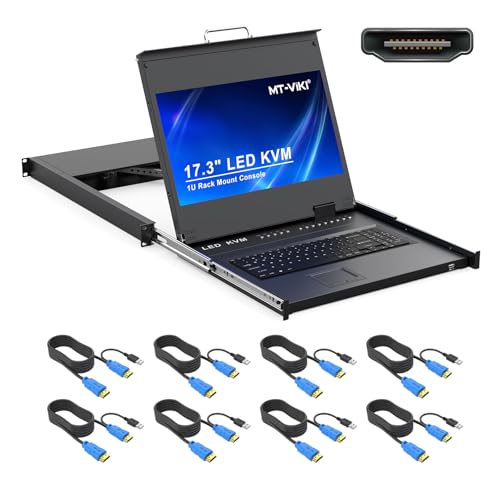
MT-VIKI 8-Port 17.3" LCD KVM Console
Best for: managing eight servers in a 1U rack
- Computers Supported
- 8
- Maximum Resolution
- 1080P@60Hz
- Video Interface
- HDMI
- USB Hub Standard
- USB 2.0
- Features
- Hotkey Switching
- Dimensions
- 9.06 × 3.7 × 8.66 inches
This rack-mount KVM console combines an 8-port switch with a 17.3-inch LCD display for managing multiple servers. It supports 1080p resolution at 60Hz and fits into a standard 1U 19-inch rack. You can control connected computers using the built-in touchpad, keyboard, or hotkeys. The unit includes eight USB HDMI cables and offers password security for authorized access.
- Integrates 8-port KVM switch with 17.3-inch LCD monitor
- Supports 1080p FHD resolution at 60Hz refresh rate
- Adjustable monitor angle up to 110 degrees for ergonomic viewing
- Includes HDMI console output for external monitor connection
- Features two-level password security for access control
- Uses USB 2.0 ports which limit data transfer speeds compared to USB 3.0
- Fixed 17.3-inch screen size offers less viewing area than larger 24-inch options
- Aluminum construction adds weight compared to lighter plastic alternatives
- You need to manage up to eight servers in a 1U rack space
- You prefer using a touchpad and integrated keyboard for direct control
- You require password protection to restrict access to server management
- You need to connect more than eight computers simultaneously
- You require USB 3.0 connectivity for faster peripheral data transfer
- You prefer a larger display screen for detailed text editing
Verdict: MT-VIKI 8-Port KVM with 17.3-Inch LCD suits IT administrators who need a compact, secure solution for managing eight servers in a standard rack without external peripherals.
Specifications side by side
| Spec | MT-VIKI 8-Port 17.3" LCD KVM Console |
|---|---|
| Computers Supported | 8 |
| Maximum Resolution | 1080P@60Hz |
| Video Interface | HDMI |
| USB Hub Standard | USB 2.0 |
| Resolution | 1080p FHD |
| Refresh Rate | 60Hz |
| Ports | HDMI |
| Features | Hotkey Switching |
| Dimensions | 9.06 × 3.7 × 8.66 inches |
| Size | 8 port KVM HDMI+ 17.3'' LCD |
| Color | Black |
| Model | MT-17308HL |
Frequently asked questions
Does the MT-VIKI KVM support hotkey switching?
Yes, the device supports hotkey switching. This feature allows you to toggle between connected servers without physically moving cables or using software. It simplifies management by letting you use keyboard shortcuts to access different systems. This is particularly useful in a 1U rack environment where space is tight.
What resolution does the built-in display offer?
The built-in display offers 1080p Full HD resolution. This provides clear text and sharp graphics for server management tasks. You do not need an external monitor to see detailed command lines or menus. The 17.3-inch screen size combined with this resolution ensures readability in standard rack setups.
How many servers can this KVM console manage?
This KVM console can manage up to eight servers. It is designed for IT administrators who need to control multiple systems from a single point. The unit integrates the keyboard, touchpad, and monitor into one compact chassis. This reduces clutter in your rack while maintaining full control over all connected machines.
What type of video ports does the MT-VIKI use?
The device uses HDMI ports for video input. You must ensure your servers have HDMI outputs to connect them to this unit. This specification is listed clearly in the product data. If your servers use older VGA or DisplayPort connections, you may need appropriate adapters to establish a video link.
Is the MT-VIKI compatible with Mac OS?
Yes, the listing confirms support for Mac OS. It also supports Windows and Linux operating systems. This versatility allows you to manage different types of servers from one console. You can switch between these operating systems using the hotkey feature without needing separate hardware for each platform.
What are the physical dimensions of the rack mount?
The unit measures 3.7 inches in width, 8.66 inches in height, and 9.06 inches in length. It fits into a standard 1U rack space. These compact dimensions help you save valuable rack real estate. The design allows you to mount it securely using the included rail set and screws.
Can I use the KVM without external peripherals?
Yes, the device is an all-in-one unit. It combines the KVM switch, keyboard, touchpad, and monitor into a single chassis. You do not need to attach a separate keyboard or mouse to the rack. This integrated design provides a complete management solution for your servers in a compact form factor.
See also