Logitech Flight Simulator Joysticks and Controls: Quick Buyer’s Guide
As Amazon Associates, we earn from qualifying purchases. This means we may receive a small commission at no extra cost to you if you click through and make a purchase.
Selecting the ideal logitech joystick flight simulator setup comes down to the specific category of virtual aviation you prioritize. A modern flight enthusiast navigating complex general aviation procedures requires completely different physical controls than a space combat pilot managing six degrees of freedom in an orbital dogfight. Logitech provides dedicated hardware configurations designed to mimic real-world aircraft and spacecraft interfaces, ensuring that every control input translates directly into precise virtual aerodynamic behavior. Choosing the correct control layout fundamentally changes the immersion and mechanical precision of your simulation sessions, whether you run modern civilian flight software or deep space combat environments.
This comprehensive logitech flight stick comparison examines exactly three hardware systems from Logitech: the space-optimized Logitech G X56 H.O.T.A.S Throttle, the combat-focused Logitech G Saitek X52 Pro Flight system, and the civilian-oriented Logitech G PRO Flight Yoke System. While each setup delivers authentic input hardware for desktop aviators, they diverge significantly in mechanical architecture, physical axis counts, ergonomic hand positioning, and throttling mechanisms. By evaluating these differences across real desktop cockpits, this guide clarifies which logitech flight stick to buy based on your preferred cockpit layout, simulation software, and hardware desk space.
Which Logitech Flight Sticks Should You Buy
- Logitech G X56 H.O.T.A.S Throttle: Best for modern space combat pilots, twin-engine military aviators, and virtual reality enthusiasts needing full six-degree-of-freedom control with extensive assignable toggle switches.
- Logitech G Saitek X52 Pro Flight: Best for jet combat pilots and military flight sim enthusiasts who demand precise single-engine throttle travel with tactile afterburner detents, ergonomic hand adjustment, and integrated multifunction telemetry.
- Logitech G PRO Flight Yoke System: Best for civilian flight sim enthusiasts and student pilots practicing general aviation or commercial airliner procedures that rely on a realistic two-handed control wheel and a dedicated multi-lever quadrant.
Logitech G X56 H.O.T.A.S Throttle
Logitech
4.1 average from Amazon buyers
- Color
- Black
- Weight
- 6.922 pounds
Listed by the seller on the product page.
Best for: Space combat and twin-engine throttle simmers
Pros
- Hall-effect 16-bit sensors
- Twin throttles with lock
- Mini analog thumbsticks
- Customizable RGB lighting
Cons
- Requires two USB ports
- Large desktop footprint
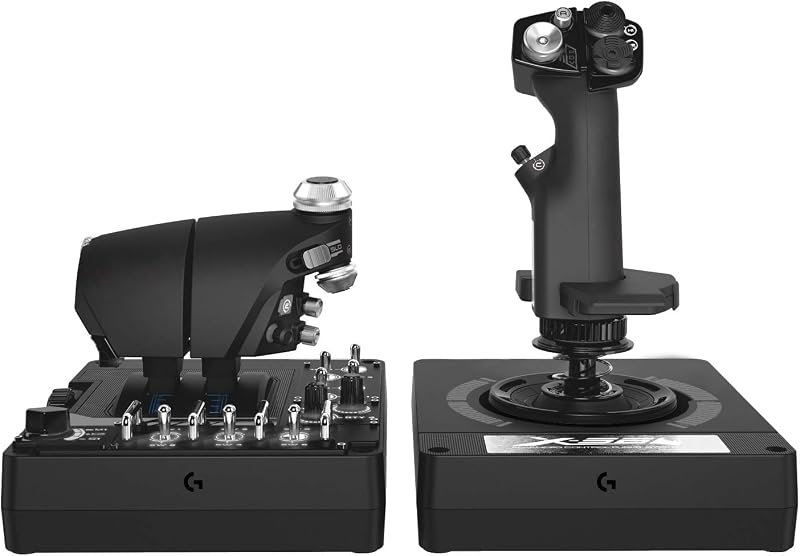
The Logitech G X56 H.O.T.A.S Throttle serves as the flagship logitech hotas flight stick designed specifically to cater to demanding modern military flight simulations and six-degrees-of-freedom space combat titles. Finished in a subtle black and gray aesthetic, this desktop peripheral pair splits control duties between a robust primary flight stick and a separate, independent dual-throttle unit. At its mechanical core, the primary stick utilizes non-contact 16-bit hall-effect sensors along both the aileron and elevator axes, providing digital tracking precision without the physical degradation or deadzone creep that can develop in mechanical potentiometers. For pilots transitioning between different aircraft handling profiles, Logitech includes an advanced four-spring system that allows operators to swap internal springs to tailor the centering resistance from feather-light agility to heavy, deliberate centering forces.
Space combat navigators and complex twin-engine simmers benefit directly from the unique auxiliary controls built into both halves of the unit. The X56 introduces dedicated mini analog stick control surfaces on both the stick and the throttle grips, granting full directional translation across pitch, roll, yaw, vertical strafe, and lateral thrusters without requiring operators to lift their hands from the primary inputs. These mini sticks can also direct gimballed weapon mounts independently from the ship’s heading, giving combat pilots an undeniable targeting advantage. The split throttle block features an integrated mechanical throttle lock and friction adjuster wheel, enabling simmers to operate twin engines independently or lock the levers together as a synchronized single assembly.
Ergonomically, this logitech flight simulator controller excels during virtual reality flights where visual sightlines to physical keyboards are entirely obstructed. The hardware presents over 189 programmable controls accessible across 24 physical buttons, multi-position rotary switches, and metallic toggle switches with varied mechanical tactile feedback, allowing users to identify specific commands entirely by finger feel. Software-driven RGB backlighting allows pilots to customize the illumination scheme to match peripheral cockpits or ambient room aesthetics. The unit connects via two independent USB cables measuring two meters in length, demanding two free USB 2.0 ports on Windows platforms. Simmers who want to complement this hands-on setup with foot-based yaw control might explore dedicated hardware options such as moza rudder pedals to offload rudder axis duties entirely from the stick twist mechanism.
- Non-contact 16-bit hall-effect sensors on aileron and elevator axes with an interchangeable four-spring resistance system.
- Twin throttle levers equipped with an integrated friction adjuster, mechanical throttle lock, and secondary mini analog stick.
- Extensive layout featuring over 189 programmable controls, 24 physical buttons, and customizable multi-zone RGB lighting.
- Designed for deep VR compatibility with tactile switch differentiation and dual independent USB 2.0 interface cables.
Logitech G Saitek X52 Pro Flight
Logitech G
4.0 average from Amazon buyers
- Color
- Black
- Size
- Stick: 6.7 x 6.7 x 10.9" (17 x 17 x 27.8cm)Th…
- Dimensions
- 14.57 x 9.84 x 9.06 inches
- Weight
- 5.1 pounds
Listed by the seller on the product page.
Best for: General combat flight sim pilots
Pros
- Integrated LCD multi-function display
- Adjustable five-position handle grip
- Physical idle and afterburner detents
Cons
- Single physical throttle lever
- No twin-engine splitting
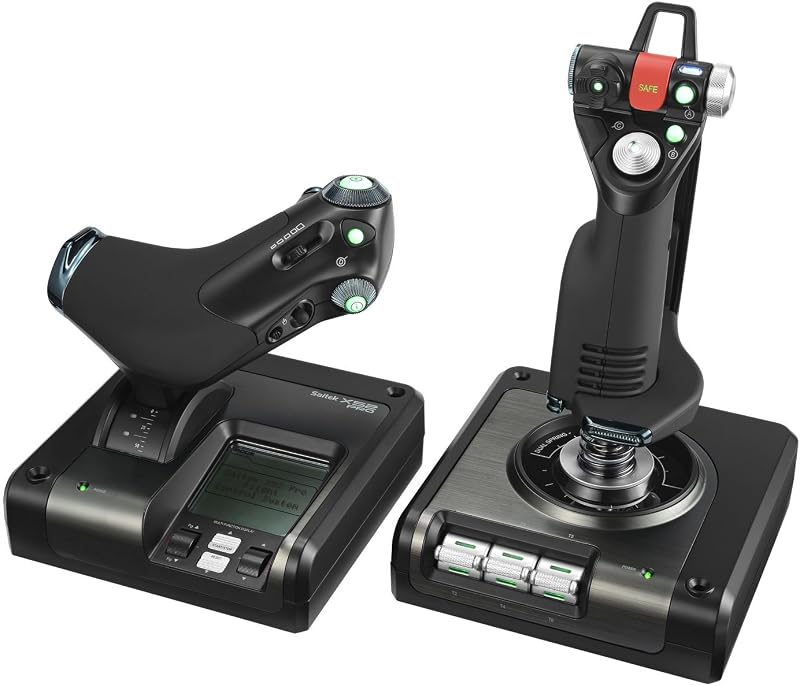
The Logitech G Saitek X52 Pro Flight system represents a mature, field-tested military control setup optimized for modern jet combat, rotary-wing craft, and atmospheric flight simulation. Sharing design heritage with legendary aerospace interfaces, this black and silver HOTAS configuration pairs a progressive single-engine throttle assembly with an ergonomically contoured flight stick. The central flight stick relies on non-contact magnetic technology across the X and Y axes, ensuring frictionless, highly linear motion that remains consistent over years of flight hours. Centering duties are handled by a dedicated constant-spring mechanism that produces smooth, predictable resistance across the full perimeter of stick deflection without sudden notches or transition resistance around the center point.
What distinguishes the X52 Pro in the broader category of best logitech flight sim controls is its pilot-centric ergonomic adjustability and interactive telemetry display. The primary flight stick features an adjustable five-position handle system, allowing pilots of any hand size to raise or lower the palm rest and finger shelf for fatigue-free reach across the dual-stage metal trigger, primary POV hat, and upper secondary buttons. On the throttle base, an illuminated interactive LCD multi-function display provides real-time feedback, enabling flight sim enthusiasts to view radio stack data, monitor elapsed mission time, and check active control profiles directly from the physical hardware without cluttering the on-screen sim environment.
Throttle management on the X52 Pro incorporates physical detent stops engineered for military fighter ops. As you push the progressive throttle forward, a tactile detent delineates normal dry thrust from afterburner engagement, while an idle detent at the bottom of the stroke prevents unintended flameouts or engine shutdown sequences during high-stress approaches. Variable throttle resistance can be dialed in on the fly using a dedicated tension adjustment wheel on the side of the throttle chassis. While the X52 Pro relies on a single throttle lever rather than the twin-engine split found on larger units, its streamlined desk footprint makes it an exceptional choice for space-constrained desks. Simmers wanting to compare this console-compatible military stick design against other desktop gear often evaluate thrustmaster hotas xbox hardware to compare ergonomics and multi-platform utility.
- Precision non-contact magnetic technology on primary X and Y axes with a uniform constant-tension centering spring.
- Integrated interactive LCD multi-function display on throttle unit for real-time radio and profile tracking.
- Five-position adjustable stick handle shelf accommodating varying hand sizes with soft-touch ergonomic grips.
- Progressive single-engine throttle lever with adjustable friction resistance and physical detents for idle and afterburner.
Logitech G PRO Flight Yoke System

Logitech G
4.9 average from Amazon buyers
- Color
- Black,Blue,Red
- Dimensions
- 18.9 x 15.8 x 9.1 inches
- Weight
- 6.17 Pounds
Listed by the seller on the product page.
Best for: Civilian and commercial flight sim aviators
Pros
- Stainless steel yoke shaft
- Dedicated three-lever throttle quadrant
- Sturdy two-position desk clamps
Cons
- Not suited for fighter jets
- Proprietary PS2 quadrant cable
For virtual aviators focused entirely on civil aviation, twin-engine regional commuters, and commercial jetliners, the Logitech G PRO Flight Yoke System departs completely from stick-based HOTAS layouts in favor of an authentic control wheel. Traditional center sticks and sidesticks fail to replicate the dual-handed muscle memory required to trim, level, and flare a Cessna 172 or Boeing transport category aircraft. This system solves that cockpit mismatch by providing a substantial desktop yoke mounted on a high-grade stainless steel shaft. The steel shaft rides inside precision mechanical bushings, delivering smooth, linear pitch translation along the longitudinal axis and crisp roll input across the rotational axis to give civilian aviators authentic tactile command over virtual control surfaces.
Bundled directly with the flight yoke is Logitech’s modular three-lever Flight Throttle Quadrant, creating an integrated five-axis control cockpit straight out of the package. The quadrant features three separate, smooth-sliding levers capped with interchangeable colored control knobs designed for standard throttle, propeller pitch, and fuel mixture configurations. Below each physical lever travel track sits an integrated detent switch that triggers reverse thrusters, feathering, or fuel cutoff valves when pulled fully aft past the mechanical stop. The quadrant connects to the yoke housing via a 4.92-foot PS/2 interface cable, while the main yoke assembly connects directly to your Windows desktop using an integrated 5.9-foot USB cable that acts as an expandable USB hub for supplementary flight modules.
Desk stability is paramount when executing steep banking maneuvers or firm crosswind flare corrections. Logitech equips the Pro Flight Yoke with two heavy-duty, two-position desk clamps that firmly lock both the wide yoke housing and the independent throttle quadrant to surfaces of varying thicknesses. The yoke handles feature a three-position mode selector switch, a POV hat switch, and 14 physical push buttons, translating into at least 54 programmable logical commands via software programming. Pilots looking to build out complete commercial or general aviation flight decks often compare modular desktop yoke systems with alternative hardware ecosystems such as the moza flight yoke to see how traditional mechanical shafts stack up against advanced direct-drive alternatives.
- Heavy-duty stainless steel yoke shaft riding on precision mechanical bushings for smooth pitch and roll control.
- Separate modular three-lever throttle quadrant equipped with interchangeable knobs and integrated detent switches.
- Includes two robust two-position mounting desk clamps to anchor the yoke and quadrant securely to desktop edges.
- Integrated mode switch and 14 push buttons offering at least 54 programmable controls across custom flight profiles.
What Sets These Models Apart
Understanding the mechanical distinctions between these three peripherals ensures you match your cockpit purchase to your primary flight preferences. The table below outlines how these controllers compare across axis sensors, throttle assemblies, mechanical mounting methods, and target aircraft designs.
| Feature | Logitech G X56 H.O.T.A.S | Logitech G Saitek X52 Pro | Logitech G PRO Flight Yoke |
|---|---|---|---|
| Primary Flight Control | Center stick with 16-bit hall-effect sensors | Center stick with magnetic non-contact sensors | Two-handed control yoke with stainless steel shaft |
| Throttle Architecture | Independent twin throttles with physical lock | Single progressive throttle with afterburner detents | Separate 3-lever quadrant for throttle, prop, and mixture |
| Centering System | 4 swappable springs for adjustable stick force | Constant-force internal compression spring | Internal spring centering on stainless steel shaft |
| Primary Target Simulation | Space combat, modern fighter jets, VR cockpits | Atmospheric combat flight, military jet sims | General aviation, commercial airliners, turboprops |
Buying Tips for Logitech Flight Sticks
Selecting the best logitech flight sim controls requires evaluating the physical space available on your desk and your willingness to commit to permanent or semi-permanent clamping hardware. Both the Logitech G X56 and the X52 Pro are designed with wide, weighted rubberized bases intended to sit directly on the desktop surface without mandatory clamping, though their large footprints require substantial horizontal clearance beside your keyboard. In contrast, the Logitech G PRO Flight Yoke System requires direct edge-of-desk mounting via its heavy-duty mechanical clamps; without a desk edge clear of obstructions or keyboard trays, mounting the yoke and its accompanying quadrant securely can become a logistical challenge in compact computer workstations.
Another critical factor is USB interface availability and power delivery. The Logitech G X56 requires two independent USB 2.0 ports—one dedicated to the throttle unit and one dedicated to the stick assembly. Because the X56 features programmable RGB illumination alongside high-frequency sensor reporting, connecting both cables into an unpowered external hub can cause intermittent axis dropout or signal noise. Running direct connections into your PC motherboard or utilizing a dedicated externally powered USB hub prevents axis jitter during demanding flight maneuvers. The X52 Pro and Pro Flight Yoke each route primary connectivity through single host connections, though the Yoke features an internal pass-through hub to accommodate modular instruments.
Finally, match the physical controls to your primary aerodynamic discipline rather than purchasing based on button count alone. Flying a multi-engine civilian airliner or a light single-engine prop aircraft using a combat HOTAS stick feels disjointed, as pulling back on a fighter stick does not replicate the tactile stability of a control wheel during instrument approaches. Conversely, piloting a supersonic fighter jet or maneuvering an orbital dogfighter with a civil aviation yoke is unwieldy due to the yoke’s wider rotational travel and slower lock-to-lock transitions. Pilots who enjoy a wide variety of simulation genres often maintain separate specialized controllers on quick-release mounts, pairing their flight gear alongside driving peripherals like a logitec steering wheel to keep their sim cockpits fully adaptable.
FAQ
Can the Logitech G X56 H.O.T.A.S Throttle be used without mounting clamps?
Yes. The Logitech G X56 throttle and joystick are built with wide, weighted bases and rubberized footpads designed to rest directly on flat desktop surfaces. While aggressive dogfighting maneuvers may cause minor base sliding on slick desk pads, standard flight operations remain stable without mandatory desk clamping.
Does the Logitech G Saitek X52 Pro Flight require separate rudder pedals?
No. The primary flight stick on the Logitech G Saitek X52 Pro features an integrated 3D twist rudder axis built directly into the grip handle. Pilots can control aircraft yaw simply by rotating the stick grip left or right, eliminating the mandatory requirement for dedicated foot pedal hardware in compact setups.
Are Logitech flight simulator controllers compatible with modern flight titles like Microsoft Flight Simulator?
Yes. All three controllers support modern PC flight simulations including Microsoft Flight Simulator, X-Plane, and Prepar3D on Windows 11, 10, 8.1, and 7 systems. Most major flight simulator platforms include default pre-configured control profiles for Logitech flight stick and yoke hardware straight out of the box.
Can you add a second throttle quadrant to the Logitech G PRO Flight Yoke System?
Yes. The modular design of Logitech’s civilian flight simulation ecosystem allows aviators to connect an additional standalone USB Flight Throttle Quadrant alongside the included PS/2 quadrant. This secondary quadrant expansion provides six distinct levers, perfectly accommodating multi-engine commercial airliners requiring independent throttle, prop, and mixture controls for multiple engines.
How do the centering springs work on the Logitech G X56?
The Logitech G X56 includes four distinct spring options that slip directly over the joystick shaft beneath the locking ring collar. Pilots can choose between light, medium, strong, or no spring tension, allowing complete mechanical customization over the stick’s return-to-center resistance and overall operational stiffness.