LG WQHD Monitor Guide: The Top 34-Inch Ultrawides Compared
As Amazon Associates, we earn from qualifying purchases. This means we may receive a small commission at no extra cost to you if you click through and make a purchase.
Selecting an lg wqhd monitor provides an immediate upgrade to desktop productivity by replacing disjointed dual-screen setups with a unified 21:9 panoramic workspace. Operating at a native resolution of 3440 x 1440, an lg 34 inch ultrawide wqhd panel delivers roughly 34 percent more horizontal canvas than a standard 16:9 widescreen, giving you ample room to arrange spreadsheets, code editors, creative timelines, and video conferences side by side without overlapping windows. Finding the best lg wqhd monitor requires matching your daily workflow to key engineering distinctions such as panel architecture, refresh speed, and single-cable docking functionality.
This comparative guide evaluates exactly six 34-inch displays manufactured by LG, examining how their technical specifications translate into everyday office, creative, and gaming environments. Across this lg wqhd monitor comparison, the models diverge significantly in purpose: some emphasize high-wattage laptop charging and wide-angle IPS color accuracy, another functions as an independent entertainment hub running webOS, while others offer fluid 120Hz or 240Hz refresh rates for fast-motion clarity. The following breakdown will help you determine which lg wqhd monitor to buy based strictly on manufacturer specifications and your specific workspace requirements.
Which LG WQHD Monitors Should You Buy
- For traditional office workstations requiring dual-device connectivity and 65W laptop charging: LG 34WR55QK-B 34-inch UltraWide WQHD
- For MacBook and power-intensive laptop users seeking 96W docking and uniform IPS angles: LG 34U650A-B 34-inch UltraWide IPS WQHD
- For hybrid desk setups needing standalone media streaming without a host computer: LG 34″ Curved UltraWide WQHD(3440×1440) Smart
- For budget-conscious multi-window productivity with smooth 120Hz motion and full stand adjustability: LG UltraWide 34 Inch WQHD HDR
- For competitive gaming, simulation rigs, and esports requiring maximum frame rates: LG 34G630A-B 34-Inch Ultragear WQHD
- For brightly lit office environments requiring elevated 400-nit luminance and USB-C connectivity: LG 34WR55QC-B 34″ Curved UltraWide WQHD
LG 34WR55QK-B 34-inch UltraWide WQHD

LG
8.0/10 Our score
- Color
- Black
- Dimensions
- 10.2 x 31.9 x 22.4 inches
- Weight
- 15.2 Pounds
Listed by the seller on the product page.
Best for: Office multitasking and dual PC setups
Pros
- 65W USB-C laptop power delivery
- Deep 3000:1 VA contrast ratio
- Hardware Picture-by-Picture support
- Height and tilt adjustable stand
Cons
- Standard 100Hz refresh ceiling
- Narrower viewing angles than IPS
The LG 34WR55QK-B 34-inch UltraWide WQHD is engineered as a comprehensive hub for office multitasking and data analysis. Built around a 34-inch curved VA LED panel with an expansive 3440 x 1440 resolution, it provides a high 3000:1 static contrast ratio that renders deep black levels and crisp text separation across documents. A 100Hz refresh rate and 5ms response time deliver noticeable fluidness over legacy 60Hz displays during rapid document scrolling and window management, while HDR10 decoding and 99% sRGB color gamut coverage ensure vibrant visual fidelity.
Connectivity is a defining strength of this model. It integrates a versatile lg usb c ultrawide monitor interface capable of transmitting display data while supplying up to 65W of power delivery to charge compatible laptops over a single cable. To support varied desktop configurations, the chassis also houses two HDMI inputs, a DisplayPort input, two standard USB ports, and an analog headphone jack. With integrated Picture-by-Picture support managed through LG OnScreen Control software, professionals can view content from two separate computers simultaneously on one continuous display.
Ergonomics and eye comfort are addressed through a flexible stand offering height and tilt adjustment, paired with a matte anti-glare screen finish and a dedicated Reader Mode that curtails blue light during extended work sessions. The LG 34WR55QK-B suits professionals who operate a work laptop alongside a desktop PC and need reliable power delivery with high text contrast. However, users managing power-heavy mobile workstations that require more than 65W of charging will find a more capable fit in the 96W-capable LG 34U650A-B.
- Integrated USB Type-C connection delivering up to 65W power delivery alongside data and display signals
- Deep 3000:1 contrast ratio on a curved VA panel for legible text and defined shadow details
- Picture-by-Picture capability for displaying two separate hardware input sources side by side
- Ergonomic stand supporting precision height and tilt adjustments
LG 34U650A-B 34-inch UltraWide IPS WQHD

LG
9.2/10 Our score
- Color
- Black
- Size
- 34
- Dimensions
- 9.1 x 32.2 x 21.1 inches
- Weight
- 22.3 pounds
Listed by the seller on the product page.
Best for: MacBook pros and power workstation users
Pros
- High-output 96W USB-C charging
- Consistent IPS viewing angles
- Built-in DepthSound audio speakers
- 6-section LG Switch layout control
Cons
- Lower 1000:1 static contrast ratio
- Limited to 100Hz refresh rate
Designed for creative specialists and modern laptop users, the LG 34U650A-B 34-inch UltraWide IPS WQHD utilizes an In-Plane Switching (IPS) panel to ensure color consistency across wide 178-degree viewing angles. While VA panels can experience subtle gamma shifts near the peripheral edges of an ultrawide display, this IPS panel maintains strict tonal stability and 99% sRGB gamut coverage across its entire horizontal plane. A subtle 3800R curvature conforms gently to natural eye movements without introducing extreme geometric distortion into design layouts or architectural plans.
The primary advantage of the LG 34U650A-B lies in its power architecture. Its USB-C interface provides an impressive 96W of power delivery, supplying sufficient wattage to keep larger performance laptops, such as 16-inch mobile workstations, charged under sustained workloads without requiring an external power brick. Desk organization is further enhanced by integrated stereo speakers featuring DepthSound technology, eliminating the necessity for desktop speaker enclosures during conference calls, training seminars, and media playback.
Screen organization is handled by the LG Switch application, which permits users to split the 3440 x 1440 canvas into up to six customized zones or launch video calls with a designated hotkey. Fluidity remains crisp thanks to a 100Hz refresh rate and a 5ms response time, while a 1000:1 contrast ratio and 300 cd/m2 luminance provide balanced clarity. The LG 34U650A-B is ideal for demanding workstation users needing robust single-cable docking and uniform color reproduction. Gamers seeking fast competitive response times, however, should pivot toward the higher refresh rates found on the UltraGear lineup.
- High-output USB-C connectivity with 96W laptop charging, data transmission, and video routing
- Expansive IPS panel maintaining color uniformity and wide 178-degree viewing angles
- Integrated DepthSound audio system providing built-in sound for conferencing and media
- LG Switch software support for rapid layout partitioning into up to six discrete desktop sections
LG 34" Curved UltraWide WQHD(3440×1440) Smart
LG
9.0/10 Our score
- Color
- Black
- Size
- 34 inch-100
- Dimensions
- 14.5 x 31.9 x 22.4 Inches
- Weight
- 15.4 pounds
Listed by the seller on the product page.
Best for: Hybrid office desks and cord-free streaming
Pros
- Standalone webOS23 streaming platform
- LG Magic Remote with voice control
- Enveloping 1800R screen curve
- Apple AirPlay 2 wireless support
Cons
- Listing omits USB-C charging wattage
- Lacks variable refresh sync tuning
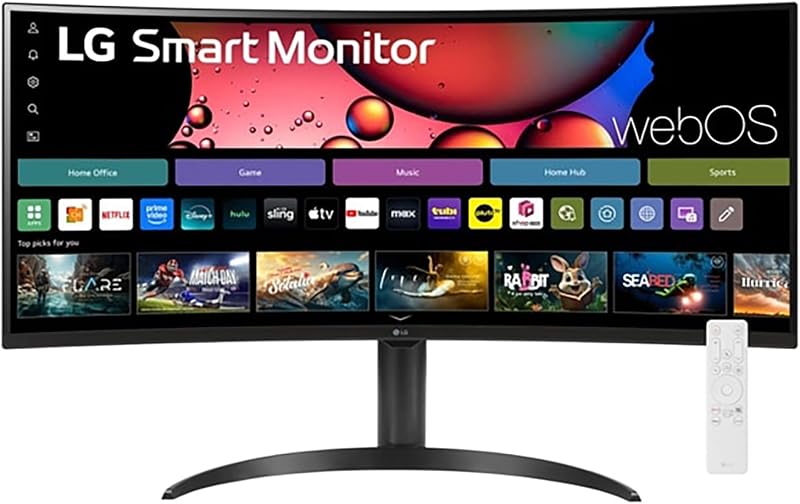
The LG 34″ Curved UltraWide WQHD(3440×1440) Smart diverges from conventional computer displays by incorporating LG webOS23 directly into the hardware. This smart operating platform permits users to stream media natively from services such as Netflix, Prime Video, Disney+, HBO Max, and over 300 free LG Channels without waking or connecting a PC. Navigation is managed via an included LG Magic Remote, which supports point-and-click control alongside voice commands for searching programs and changing settings.
Visual presentation is framed by an aggressive 1800R curvature that wraps the 34-inch ultrawide canvas tightly around the user’s field of view, generating a cinematic panoramic environment. The display features an anti-glare screen treatment, 99% sRGB color gamut coverage, HDR10 support, and a responsive 100Hz refresh rate. In addition to conventional PC connections, wireless screen casting is supported via Apple AirPlay 2, making it simple to push mobile documents, presentations, or video streams directly to the monitor.
This smart monitor suits hybrid work-from-home setups, dorm rooms, or studio spaces where a single screen must double as a primary productivity display by day and a standalone smart television by night. The ergonomic package includes an adjustable stand for tailored height and tilt positioning. It gives way to dedicated office models like the LG 34WR55QK-B for users who rely on high-wattage USB-C power delivery or advanced multi-source hardware docking, as this listing focuses on media functionality and does not specify USB power output.
- Built-in webOS23 platform enabling standalone app streaming and over 300 free LG Channels
- Included LG Magic Remote featuring convenient pointer navigation and integrated voice commands
- Deep 1800R screen curvature delivering an enveloping visual field for cinema and gaming
- Apple AirPlay 2 compatibility for effortless wireless casting from compatible portable devices
LG UltraWide 34 Inch WQHD HDR

LG
8.6/10 Our score
- Color
- Black
- Dimensions
- 9.1 x 31.9 x 21 inches
Listed by the seller on the product page.
Best for: Fluid 120Hz productivity and light gaming
Pros
- Smooth 120Hz refresh rate
- Versatile tilt height and swivel stand
- Responsive 5ms panel timing
- Matte anti-glare screen finish
Cons
- Amazon Renewed hardware unit
- Lacks integrated USB-C connectivity
The LG UltraWide 34 Inch WQHD HDR (model 34U62TB-B, Renewed) offers a performance-oriented 120Hz refresh rate on a 3440 x 1440 curved LED panel. By bumping the refresh ceiling from 100Hz to 120Hz, this display reduces motion blur during high-speed desktop navigation, video editing scrub operations, and fast-paced gaming sessions. A swift 5ms response time pairs with the 120Hz scan rate to ensure moving graphics and transitions remain sharp and legible.
Physical adjustability is a standout feature of this hardware package. While many ultrawide stands restrict movement to basic forward and backward tilt, the included stand on this model supports extensive height, tilt, and swivel adjustments. This mechanical versatility allows you to fine-tune the display’s orientation to match varied desk elevations or share on-screen information with colleagues seated nearby. The panel utilizes a matte anti-glare surface treatment to scatter ambient reflections, supported by a 170-degree viewing angle and HDR 10 contrast optimization.
Readers exploring broad 21:9 options can review our sceptre 34 inch curved ultrawide monitor guide to see how alternative curved form factors compare in basic productivity tasks. The LG 34U62TB-B is an effective solution for users who prioritize 120Hz motion smoothness and physical swivel positioning over modern docking amenities. Because it relies on standard DisplayPort and HDMI connectivity without built-in USB-C docking, professionals requiring single-cable laptop charging should consider the USB-equipped LG 34WR55QK-B instead.
- Enhanced 120Hz refresh rate delivering superior motion fluidness over conventional 100Hz panels
- Multi-directional ergonomic stand featuring comprehensive height, tilt, and swivel adjustments
- Integrated Reader Mode designed to minimize eye strain during long-form document review
- Matte screen finish paired with HDR 10 decoding for clear visibility under office lighting
LG 34G630A-B 34-Inch Ultragear WQHD
LG
8.8/10 Our score
- Aspect Ratio
- 21:9
- Screen Finish
- Matte
- Contrast Ratio
- 41.67
- Refresh Rate
- 240 hertz
- Display Type
- LCD
Listed by the seller on the product page.
Best for: High-speed esports and competitive gaming
Pros
- Blistering 240Hz refresh rate
- Fast 1ms GtG response time
- AMD FreeSync Premium support
- VESA DisplayHDR 400 certified
Cons
- USB-C power delivery capped at 15W
- Aggressive gaming aesthetic
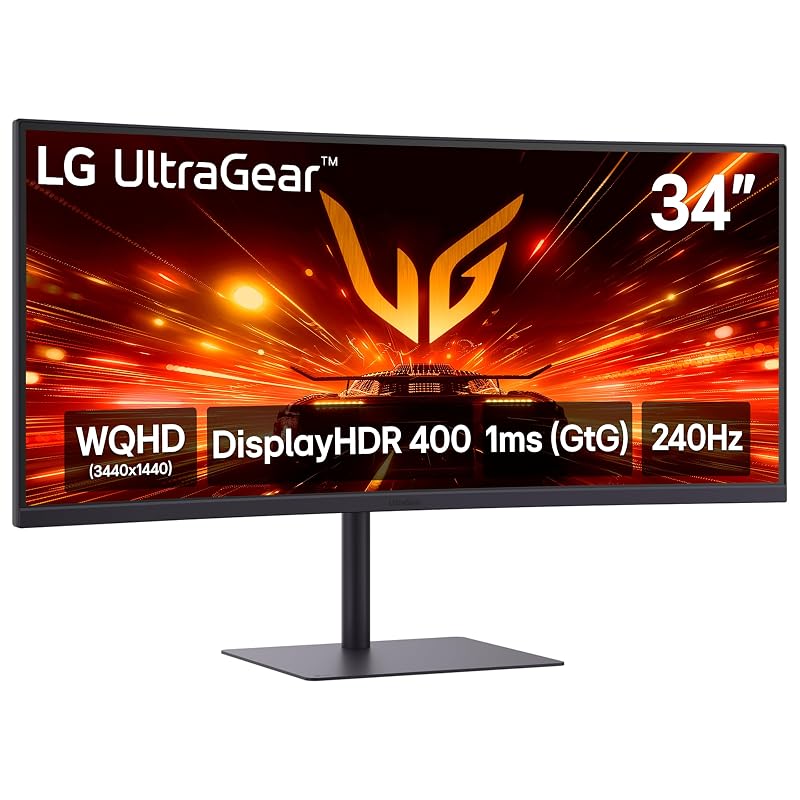
The LG 34G630A-B 34-Inch Ultragear WQHD represents LG’s performance tier for high-frame-rate ultrawide gaming. Front and center is a blazing 240Hz refresh rate combined with a native 1ms Gray-to-Gray (GtG) response time, virtually eliminating motion smearing, ghosting, and input delay. The 3440 x 1440 VA LCD panel is backed by AMD FreeSync Premium, which dynamically synchronizes the panel’s refresh cycle with your graphics card to prevent screen tearing and stutter across varying frame rates.
Visual fidelity is elevated beyond basic office standards through VESA DisplayHDR 400 certification, HDR10 compliance, and up to 95% coverage of the wide DCI-P3 color spectrum. This expanded color volume produces richer reds and greens alongside bright 300 cd/m2 specular highlights. On-screen tactical utilities include Dynamic Action Sync to minimize processing latency, Black Stabilizer to reveal shadow details in dark environments, a real-time hardware FPS Counter, and an optional center Crosshair overlay for shooting accuracy.
Gamers evaluating different display form factors can inspect our sansui 27 inch monitor 240hz breakdown to examine whether a compact 16:9 esports format or a sweeping 34-inch 21:9 ultrawide canvas matches their competitive focus. The 34G630A-B features versatile video inputs including DisplayPort, HDMI, and a USB Type-C port, supported by built-in speakers and a full tilt, height, and swivel stand. However, because its USB-C port provides only 15W of power delivery, it cannot recharge high-draw laptops during use, meaning pure workstation professionals will be better served by the 96W-equipped LG 34U650A-B.
- Esports-grade 240Hz refresh rate combined with a rapid 1ms GtG response time
- AMD FreeSync Premium variable refresh synchronization for tear-free gaming visuals
- VESA DisplayHDR 400 certification paired with up to 95% DCI-P3 wide color coverage
- Built-in gaming HUD enhancements including Black Stabilizer, Dynamic Action Sync, and crosshair overlays
LG 34WR55QC-B 34" Curved UltraWide WQHD

LG
8.0/10 Our score
- Color
- black
- Size
- 34-curved
- Dimensions
- 10.2 x 31.9 x 22.4 inches
- Weight
- 12.1 Pounds
Listed by the seller on the product page.
Best for: Brightly lit rooms and commercial offices
Pros
- Elevated 400 cd/m2 panel brightness
- VESA DisplayHDR 400 certified
- Integrated USB Type-C connectivity
- Three-side virtually borderless frame
Cons
- Listing omits charging wattage
- Stand lacks swivel articulation
The LG 34WR55QC-B 34″ Curved UltraWide WQHD focuses on bright, high-clarity desktop output. It stands apart from standard office displays by offering a robust peak brightness of 400 cd/m2, backed by VESA DisplayHDR 400 and HDR10 compliance. This higher luminance level makes the 34WR55QC-B an excellent choice for sunlit home offices or commercial spaces with strong overhead fluorescent lighting, where lower-powered 300 cd/m2 displays can look washed out or struggle against glare.
The monitor delivers a native 3440 x 1440 resolution at a smooth 100Hz refresh rate with AMD FreeSync support, preventing image tearing during video editing playback or casual gaming sessions. The physical design embraces a three-side virtually borderless aesthetic on a matte curved display, creating an uncluttered presentation on the desk while keeping multi-window arrangements seamless. Physical connectivity includes an integrated USB Type-C port alongside traditional DisplayPort and HDMI interfaces.
This display suits users who need dependable brightness, solid HDR handling, and clean modern styling for everyday commercial tasks. Note that while the listing confirms USB Type-C data and display integration, it does not specify high-wattage laptop charging capabilities. Consequently, workstation users who require dedicated single-cable laptop power delivery of 65W or 96W will find a more specialized match in the LG 34WR55QK-B or LG 34U650A-B.
- High luminance output of 400 cd/m2 paired with VESA DisplayHDR 400 certification
- Smooth 100Hz refresh rate complemented by AMD FreeSync technology
- Three-side virtually borderless curved screen design with a non-reflective matte finish
- Integrated USB Type-C, DisplayPort, and HDMI input options for flexible device connectivity
What Sets These Models Apart
While all six monitors share a 34-inch curved form factor and 3440 x 1440 WQHD resolution, their internal electronics cater to distinct workstation and entertainment demands. The matrix below highlights key functional variations across panel architecture, refresh speed, power delivery, and media features.
| Model | Panel Tech & Curvature | Refresh Rate & Sync | USB-C Power Delivery | Notable Stand & Media Features |
|---|---|---|---|---|
| LG 34WR55QK-B | VA LED (3000:1 Contrast) | 100Hz, 5ms | Up to 65W PD | Height/Tilt Stand, Picture-by-Picture, OnScreen Control |
| LG 34U650A-B | IPS LED (3800R Curve) | 100Hz, 5ms | Up to 96W PD | Built-in DepthSound Speakers, LG Switch App (6 splits) |
| LG 34″ Curved Smart | Anti-Glare (1800R Curve) | 100Hz, HDR10 | Not Specified | webOS23, Magic Remote, AirPlay 2, Free LG Channels |
| LG UltraWide 34 Inch HDR | Curved LED (170° View) | 120Hz, 5ms | No USB-C Port | Tilt, Height, and Swivel Stand, Renewed Model 34U62TB-B |
| LG 34G630A-B | VA LCD (DisplayHDR 400) | 240Hz, 1ms GtG, FreeSync Premium | 15W PD (Data/Display) | Tilt/Height/Swivel Stand, Integrated Speaker, Gaming HUD |
| LG 34WR55QC-B | Matte Curved (400 cd/m2) | 100Hz, FreeSync | USB-C (Wattage Unspecified) | DisplayHDR 400, Borderless Bezel, HDMI, DisplayPort |
Buying Tips for LG WQHD Monitors
When selecting an ultrawide monitor, the choice between IPS and VA panel technology fundamentally shapes your viewing experience. IPS panels, as seen on the LG 34U650A-B, excel in color accuracy and maintain consistent image reproduction from wide angles, making them the preferred standard for graphic design, photo work, and color-critical workflows. Conversely, VA panels, featured on models like the LG 34WR55QK-B and LG 34G630A-B, deliver substantially higher static contrast ratios (often reaching 3000:1), resulting in deeper blacks and superior readability in dimly lit office settings.
Power delivery specifications deserve close inspection if you intend to run a minimalist, single-cable laptop workstation. A display with USB Type-C does not automatically guarantee full laptop charging. For example, while the LG 34U650A-B pumps out 96W to easily power larger mobile workstations, the LG 34WR55QK-B supplies 65W for standard ultrabooks, and the gaming-oriented LG 34G630A-B limits USB-C power delivery to 15W, which is suitable only for mobile devices or light trickle charging. Always verify that the display’s wattage matches or exceeds your laptop manufacturer’s charging requirements.
Finally, consider how curve radius and refresh frequency influence your physical comfort and tasks. A subtle 3800R curve provides gentle alignment without altering horizontal straight lines, making it comfortable for engineering drawings and spreadsheets. In contrast, an aggressive 1800R curve offers deeper visual immersion for cinema and simulation gaming. If your priorities include comparative gaming hardware analysis, our hp omen monitor breakdown offers additional context on balancing high frame rates against panel size. Matching a 100Hz, 120Hz, or 240Hz refresh rate to your specific computing hardware ensures you extract maximum performance from your desktop investment.
FAQ
What native resolution does an LG 34-inch ultrawide WQHD monitor provide?
LG 34-inch ultrawide WQHD monitors operate at a native resolution of 3440 x 1440 pixels using an ultrawide 21:9 aspect ratio. This configuration provides approximately 34 percent more horizontal screen real estate than a standard 16:9 QHD (2560 x 1440) monitor, allowing users to keep multiple full-sized documents or browser windows open simultaneously without requiring a multi-monitor arrangement.
Can I charge my laptop through an LG USB-C ultrawide monitor?
Laptop charging depends strictly on the specific monitor model’s power delivery specifications. The LG 34U650A-B provides up to 96W of USB-C power delivery, making it capable of charging demanding mobile workstations. The LG 34WR55QK-B supplies up to 65W, which easily powers mainstream ultrabooks. However, gaming models like the LG 34G630A-B cap USB-C power delivery at 15W, which supports display output and data transfer but cannot adequately charge a working laptop.
What is the practical difference between an 1800R and 3800R screen curve?
The ‘R’ rating measures curvature radius in millimeters. An 1800R curve has a tighter radius of 1800mm, creating a pronounced wrap-around effect that brings peripheral content closer to your natural line of sight for immersive gaming and movie viewing. A 3800R curve has a much gentler arc, making it less visually intrusive for users working on linear CAD drafting, spreadsheets, and precision graphic design.
What is the benefit of a 100Hz refresh rate over a standard 60Hz display for office work?
A 100Hz refresh rate updates the on-screen image 100 times per second compared to 60 times on standard monitors. This increase creates substantially smoother cursor tracking, reduces eye strain during rapid text scrolling, and eliminates jitter when dragging windows across a wide 34-inch desktop, resulting in a cleaner and more responsive daily user experience.
Does the LG webOS smart monitor require a connected PC to stream content?
No. The LG 34″ Curved UltraWide WQHD Smart Monitor runs LG webOS23 independently using internal processing hardware and wireless networking. It allows users to launch streaming services like Netflix, Disney+, and free LG Channels, or cast via Apple AirPlay 2, directly through the monitor using the included Magic Remote without connecting or powering on a computer.