LG UltraGear 32-Inch Curved 180Hz Monitor or LG 34-Inch UltraWide 1080p IPS Monitor? Which LG Model to Buy
As Amazon Associates, we earn from qualifying purchases. This means we may receive a small commission at no extra cost to you if you click through and make a purchase.
As an Amazon Associate we earn from qualifying purchases. Links on this page are affiliate links.
When comparing the lg ultragear 32 inch curved 180hz monitor vs 34 inch ultrawide 1080p, you face a choice between dedicated gaming performance and expansive multitasking. Both models offer high refresh rates and HDR support for vibrant visuals. The primary difference lies in their shape and resolution. One provides a curved, square-ish screen with sharper detail, while the other offers a wide, flat display for side-by-side work. You need to decide which format fits your desk and habits.
Resolution
1440p QHD (2560×1440)
1080p WFHD (2560×1080)
Refresh Rate
180Hz
100Hz
Panel Shape
1000R Curved
Flat
Aspect Ratio
16:9
21:9 UltraWide
Ports
HDMI, DisplayPort
HDMI, DisplayPort, USB-C
Speakers
Not listed
Built-in stereo speakers
Choose the first if
- You play fast-paced games and want the smoothest motion with 180Hz refresh.
- You prefer a sharper image with QHD resolution on a 32-inch screen.
- You want an immersive, curved display that wraps around your view.
Choose the second if
- You multitask heavily and need the extra horizontal space of a 21:9 screen.
- You connect laptops and want the convenience of a single USB-C cable.
- You want built-in speakers for immediate audio without extra gear.
Verdict
The LG UltraGear 32-Inch Curved 180Hz Monitor suits gamers who prioritize speed and sharpness. The LG 34-Inch UltraWide 1080p IPS Monitor is better for users who need wide workspace and easy laptop connectivity. Your choice depends on whether you value gaming performance or productivity width.
Gaming Speed vs Multitasking Width

Resolution and clarity
Edge: LG UltraGear 32-Inch Curved 180Hz Monitor
The LG UltraGear 32-Inch Curved 180Hz Monitor delivers a QHD resolution of 2560×1440 on its 32-inch screen. This provides sharp detail for gaming. The LG 34-Inch UltraWide 1080p IPS Monitor uses a WFHD resolution of 2560×1080. While it has more horizontal pixels, the total pixel count is lower. The 1080p resolution on a 34-inch display results in lower pixel density. You will see less image sharpness on the UltraWide model compared to the higher resolution of the UltraGear. The QHD panel offers a clearer picture for fast-paced games.
Refresh rate
Edge: LG UltraGear 32-Inch Curved 180Hz Monitor
Smoothness matters for responsive gameplay. The LG UltraGear 32-Inch Curved 180Hz Monitor supports a 180Hz refresh rate. This allows for faster frame updates and smoother motion. The LG 34-Inch UltraWide 1080p IPS Monitor runs at 100Hz. This is sufficient for general use and video, but it is significantly slower than the 180Hz option. If you play competitive shooters or fast action games, the higher refresh rate on the UltraGear model provides a tangible advantage. The 100Hz rate on the UltraWide is adequate but not optimal for high-speed gaming.
Aspect ratio and workspace
Edge: LG 34-Inch UltraWide 1080p IPS Monitor
Screen shape changes how you work. The LG 34-Inch UltraWide 1080p IPS Monitor features a 21:9 aspect ratio. This wide format lets you view multiple windows side-by-side without stacking them. It is ideal for spreadsheets, coding, or editing timelines. The LG UltraGear 32-Inch Curved 180Hz Monitor uses a standard 16:9 ratio. It offers a taller screen but less horizontal space. For multitasking, the UltraWide model provides more real estate. You can keep more applications visible at once on the 34-inch display.
Panel and viewing angles
Edge: LG 34-Inch UltraWide 1080p IPS Monitor
Image quality depends on the panel technology. The LG 34-Inch UltraWide 1080p IPS Monitor uses an IPS panel. This ensures consistent colors and sharp images from wide viewing angles. The specifications for the LG UltraGear 32-Inch Curved 180Hz Monitor do not explicitly list the panel type. However, it highlights a 1000R curve for immersion. Without confirmed IPS data for the UltraGear, the UltraWide offers a known advantage in color consistency and viewing angles. This makes the UltraWide better for mixed usage where you move around.
Connectivity options
Edge: LG 34-Inch UltraWide 1080p IPS Monitor
How you connect devices is key. The LG 34-Inch UltraWide 1080p IPS Monitor includes USB Type-C, DisplayPort, and HDMI. The USB-C port supports both display output and data transfer, simplifying connections for laptops. The LG UltraGear 32-Inch Curved 180Hz Monitor lists DisplayPort and HDMI in its features. The data does not mention USB-C connectivity for the UltraGear model. If you use a modern laptop, the USB-C option on the UltraWide is more convenient. It reduces cable clutter and allows single-cable charging and video.
Which LG Monitor Fits Your Needs
Competitive FPS gamers seeking speed
Our pick: LG UltraGear 32-Inch Curved 180Hz Monitor
The LG UltraGear 32-Inch Curved 180Hz Monitor offers a 180Hz refresh rate and 1ms GtG response time. This combination reduces input lag and keeps motion smooth during fast-paced action. The 1000R curve also wraps around your field of view, helping you stay immersed in the game while reacting quickly to on-screen threats.
Office workers needing wide multitasking
Our pick: LG 34-Inch UltraWide 1080p IPS Monitor
The LG 34-Inch UltraWide 1080p IPS Monitor provides a 21:9 aspect ratio with 2560×1080 resolution. This extra horizontal space lets you keep multiple windows open side by side without switching tabs. The 100Hz refresh rate ensures smooth scrolling, while the IPS panel maintains consistent color and viewing angles for comfortable, extended work sessions.
Users wanting simple laptop connectivity
Our pick: LG 34-Inch UltraWide 1080p IPS Monitor
The LG 34-Inch UltraWide 1080p IPS Monitor includes USB Type-C connectivity. This port supports both display output and data transfer, allowing you to connect your laptop with a single cable. This setup reduces desktop clutter and simplifies your workflow, making it an ideal choice for users who value clean, efficient connections over high-end gaming features.

LG UltraGear 32-Inch Curved 180Hz Monitor
Best for: Fast-paced QHD gaming with immersion
- Screen Size
- 32"
- Resolution
- 2560×1440
- Refresh Rate
- 180Hz
- Response Time
- 1ms GtG
- Variable Refresh Rate
- AMD FreeSync
- Ports
- 2x HDMI, DisplayPort
This LG UltraGear monitor pairs a 32-inch QHD display with a 180Hz refresh rate and 1ms response time. The 1000R curved screen wraps around your view for better immersion. It covers 99% of the sRGB color gamut and supports HDR10. AMD FreeSync reduces screen tearing during fast gameplay. This setup suits gamers who want smooth motion and high resolution on a curved panel.
- 180Hz refresh rate for smooth gameplay
- QHD (2560×1440) resolution for sharp detail
- 1000R curved screen for immersion
- 99% sRGB color gamut coverage
- AMD FreeSync for tear-free visuals
- 13-pound weight requires sturdy support
- 1000R curve may feel steep for some users
- Limited to two HDMI ports
- You play fast-paced games and need high refresh rates
- You want a curved screen for better immersion
- You prioritize QHD resolution over ultra-wide width
- You need a flat screen for precise alignment
- You prefer a wider 34-inch ultrawide aspect ratio
- You require more than two HDMI connections
Verdict: LG 32GS60QC-B 32-Inch Curved QHD Gaming Monitor delivers high-speed QHD performance for competitive gamers. It fits players who want immersion and sharp visuals without the width of an ultrawide display.
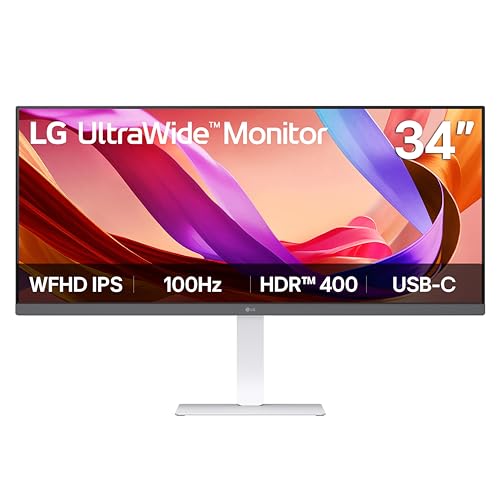
LG 34-Inch UltraWide 1080p IPS Monitor
Best for: multitasking and single-cable laptop setups
- Screen Size
- 34"
- Resolution
- 2560 x 1080
- Refresh Rate
- 100Hz
- Panel Type
- IPS
- Aspect Ratio
- 21:9
- Ports
- USB Type-C, DisplayPort, HDMI
This LG monitor offers a 34-inch 21:9 UltraWide display with 2560×1080 resolution. It uses an IPS panel with 100Hz refresh rate and VESA DisplayHDR 400 support. USB Type-C connectivity simplifies setup by handling display and data through one cable. The 19.4-pound build includes built-in MaxxAudio speakers. It suits users who need wide horizontal space for multitasking and document reading.
- 21:9 aspect ratio provides extra horizontal workspace for multitasking
- USB Type-C port supports single-cable display and data transfer
- VESA DisplayHDR 400 enhances brightness and contrast
- Built-in stereo speakers with Waves MaxxAudio technology
- 100Hz refresh rate is lower than the 180Hz option on this list
- 19.4-pound weight is heavier than the 32-inch alternative
- 1080p resolution offers less sharpness than the 1440p competitor
- You need wide horizontal space for multiple windows
- You prefer a single-cable USB-C connection for your laptop
- You want built-in speakers to reduce desktop clutter
- You require high refresh rates for competitive gaming
- You need high-resolution sharpness for detailed graphic work
- You prefer a lighter and more compact monitor setup
Verdict: LG 34U530A-W 34-inch UltraWide Monitor delivers wide multitasking space and convenient USB-C connectivity for office and creative workflows. It fits users who prioritize screen real estate and clean setups over high refresh rates or high resolution.
Specifications side by side

| Spec | LG UltraGear 32-Inch Curved 180Hz Monitor | LG 34-Inch UltraWide 1080p IPS Monitor |
|---|---|---|
| Screen Size | 32" | 34" |
| Resolution | 2560×1440 | 2560 x 1080 |
| Refresh Rate | 180Hz | 100Hz |
| Panel Type | – | IPS |
| Response Time | 1ms GtG | – |
| Aspect Ratio | – | 21:9 |
| Variable Refresh Rate | AMD FreeSync | – |
| Ports | 2x HDMI, DisplayPort | USB Type-C, DisplayPort, HDMI |
| Features | HDR, Curved Screen | HDR |
| Use | Gaming | – |
| Size | 32 Inch | – |
| Dimensions | 8.9 × 27.6 × 20 inches | 9.1 × 32.1 × 21 inches |
| Weight | 13 pounds | 19.4 pounds |
| Color | Black | White |
| Model | 32GS60QC-B.AUSQ | 34U530A-W.AUS |
Frequently asked questions
Is the LG 32GS60QC-B suitable for competitive gaming?
Yes, this monitor is built for speed. It features a 180Hz refresh rate and FreeSync variable refresh rate support. These specs help reduce screen tearing and keep motion smooth during fast-paced action. The 1440p QHD resolution also ensures sharp visuals without the width of an ultrawide display, making it ideal for immersive gaming.
Does the LG 34U530A-W support USB-C connectivity?
Yes, it includes a USB-C port alongside HDMI and DisplayPort connections. This allows you to connect a laptop with a single cable for both video and power delivery. The 100Hz refresh rate and IPS panel provide good color accuracy for office work and creative tasks, prioritizing screen real estate over high-speed gaming performance.
Which monitor has a curved screen?
The LG UltraGear 32-Inch Curved 180Hz Monitor features a curved screen. This design enhances immersion by wrapping the display around your field of view. The 34-Inch UltraWide model has a flat IPS panel. If you prefer a traditional flat display for multitasking, the UltraWide is the better choice.
What is the resolution difference between the two models?
The 32-inch model offers a 1440p QHD resolution, providing higher pixel density and sharper detail. The 34-inch UltraWide uses a 1080p WFHD resolution. While the UltraWide is wider, the 32-inch model delivers more clarity per inch, which is beneficial for gaming and media consumption.
Can the LG 34U530A-W handle HDR content?
Yes, both monitors support HDR. The 34-inch UltraWide includes HDR technology to enhance contrast and color range. This feature helps make images look more vibrant and realistic. It is useful for watching movies or working with creative media, even though the resolution is lower than the gaming-focused competitor.
Which monitor is lighter to move?
The LG UltraGear 32-Inch Curved 180Hz Monitor weighs 13 pounds. The LG 34-Inch UltraWide 1080p IPS Monitor is heavier at 19.4 pounds. If you need to move the display frequently or have a lighter desk stand, the 32-inch gaming monitor is the more portable option.
See also