6 Best Alternatives to the Lenovo ThinkVision T27hv-30 27″ Class (2026)
As Amazon Associates, we earn from qualifying purchases. This means we may receive a small commission at no extra cost to you if you click through and make a purchase.
As an Amazon Associate we earn from qualifying purchases. Links on this page are affiliate links.
The Lenovo ThinkVision T27hv-30 27" Class is a 27-inch monitor that offers WQHD resolution and a built-in webcam. If you are searching for lenovo thinkvision t27hv 30 27 class alternatives, you might want a different size or feature set. This model provides a 16:9 aspect ratio and a 75 Hz refresh rate. It is designed for productivity with a focus on clarity and integrated video conferencing tools. The 300 Nit brightness and 4 ms response time support standard office tasks and casual media consumption.
You may prefer a larger screen, a higher resolution, or a different connectivity option. Some users need an ultrawide display for multitasking, while others require 4K clarity for detailed work. The alternatives listed here were chosen because their specifications overlap with the original monitor. They all share key traits like webcam integration or similar screen sizes. This list covers options ranging from budget-friendly compact models to premium high-resolution displays. You can compare the specs to find the best fit for your workspace.
How these alternatives compare
Dell U3224KB 31.5-inch 6K Monitor
The Dell UltraSharp 32-inch 6K monitor offers significantly higher resolution than the 1440p ThinkVision. You get much sharper text and more screen real estate for multitasking. It keeps the integrated webcam feature you likely need for video calls. The trade-off is the larger 31.5-inch size, which requires more desk space. You also pay for premium build quality and color accuracy. This model suits professionals who prioritize visual clarity and workspace efficiency over compactness. It is a solid upgrade if you need finer detail in your daily work tasks.
Lenovo ThinkCentre TIO24 Gen5 24" FHD Monitor
The Lenovo TIO24 Gen5 is a compact 24-inch alternative with Full HD resolution. It is smaller and lighter than the 27-inch ThinkVision, making it ideal for tight desks. You keep the built-in webcam for video conferencing. However, you lose the sharpness of WQHD resolution. The 1080p panel is less detailed for text and images. This monitor is a budget-friendly option for standard office work. It suits users who need a smaller footprint and do not require high pixel density. It is a practical choice for basic computing tasks.
ASUS 27-Inch QHD Conferencing Monitor
The ASUS 27-inch QHD monitor matches the ThinkVision resolution but adds a USB-C port for single-cable connectivity. You can connect your laptop and power it through one cable. It also includes built-in speakers and a height-adjustable stand for better ergonomics. The design is sleek with a black finish. You get similar image quality but with more versatile connectivity options. This model is best for users who want to reduce cable clutter. It is a strong alternative if you need a modern docking solution without sacrificing screen sharpness.
Philips 34" Curved USB-C Monitor
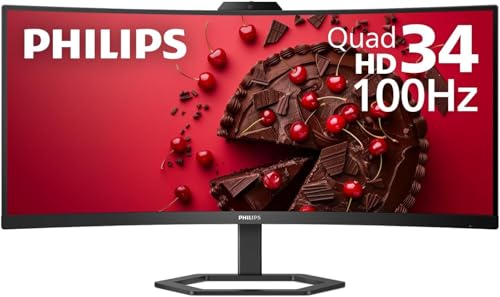
The Philips 34-inch ultrawide monitor provides a much wider 21:9 aspect ratio compared to the standard 16:9 ThinkVision. You get extra horizontal screen space for multitasking and spreadsheets. It features a curved screen for better immersion and a 100Hz refresh rate for smoother motion. It includes a webcam and built-in speakers. The trade-off is the non-standard shape, which may not fit all desk setups. This model suits professionals who need extensive horizontal workspace. It is ideal for users who want a immersive experience and wide productivity areas.
ASUS 27-Inch 1080p Video Conferencing Monitor
The ASUS 27-inch FHD monitor offers VGA connectivity, which the ThinkVision lacks. This makes it suitable for older computers with legacy ports. It has a 1080p resolution, which is lower than the WQHD ThinkVision. You still get a built-in webcam and height-adjustable stand. The image quality is adequate for basic tasks but less sharp. This model is best for users with older hardware who need video conferencing capabilities. It is a practical choice for business environments where legacy support is essential. You trade resolution for broader compatibility.
BenQ RD320UA 32" 4K Programming Monitor
The BenQ 32-inch 4K monitor offers four times the pixel count of the ThinkVision. You get exceptional clarity for coding and detailed visual work. The larger 32-inch size provides more screen area. It features an IPS panel for accurate colors. However, it lacks a built-in webcam, so you need a separate camera for video calls. It is heavier and requires a sturdy desk. This model suits professionals who prioritize image quality and screen space. It is ideal for dedicated workspaces where you do not need an integrated camera.
| # | Product | Best for | Price |
|---|---|---|---|
| 1 | Lenovo T27hv-30 27-inch WQHD Webcam Monitor Best overall | remote workers needing a webcam and WQHD clarity | |
| 2 | Dell U3224KB 31.5-inch 6K Monitor Best premium | High-resolution productivity and video calls | |
| 3 | Lenovo ThinkCentre TIO24 Gen5 24" FHD Monitor Best budget | compact desktop setups with webcam needs | |
| 4 | ASUS 27-Inch QHD Conferencing Monitor Best 1440p qhd | Single-cable video conferencing setups | |
| 5 | Philips 34" Curved USB-C Monitor Best ultrawide qhd | multitasking and single-cable laptop setups | |
| 6 | ASUS 27-Inch 1080p Video Conferencing Monitor Best vga | legacy VGA connectivity and video conferencing | |
| 7 | BenQ RD320UA 32" 4K Programming Monitor Best 4k uhd | coding and detailed visual tasks |

Lenovo T27hv-30 27-inch WQHD Webcam Monitor
Best for: remote workers needing a webcam and WQHD clarity
- Screen Size
- 27"
- Resolution
- 2560 x 1440
- Refresh Rate
- 75 Hz
- Response Time
- 4 ms
- Aspect Ratio
- 16:9
- Ports
- HDMI
This 27-inch monitor delivers WQHD resolution for sharp, clear visuals. It features a 75 Hz refresh rate and a 4 ms response time to reduce blur in fast-moving content. The built-in webcam adds convenience for video calls. With 300 nits of brightness and a 16:9 aspect ratio, it suits users who need a reliable display for productivity and casual media consumption.
- WQHD 2560 x 1440 resolution for sharp detail
- 75 Hz refresh rate reduces motion blur
- 4 ms response time minimizes ghosting
- Built-in webcam for video conferencing
- 300 nits brightness is lower than the 6K Dell UltraSharp
- 1440p resolution is less detailed than the 4K BenQ RD320UA
- 12.6 pounds weight is heavier than the 24-inch Lenovo ThinkCentre
- You need a webcam for remote work
- You prefer a 27-inch screen with WQHD clarity
- You want a 75 Hz refresh rate for smooth video
- You require 4K resolution for professional design work
- You need high brightness for very bright rooms
- You want a larger 31.5-inch or 34-inch display
Verdict: Lenovo ThinkVision T27hv-30 27-inch WQHD fits users who prioritize a built-in webcam and sharp WQHD resolution for daily tasks. It is a solid choice for those who do not need 4K clarity or ultra-high brightness.

Dell U3224KB 31.5-inch 6K Monitor
Best for: High-resolution productivity and video calls
- Screen Size
- 31.5"
- Resolution
- 6144 x 3456
- Refresh Rate
- 60 Hz
- Response Time
- 5 ms GTG (Fast)
- Aspect Ratio
- 16:9
- Ports
- USB Type-C
This Dell monitor features a 31.5-inch screen with 6K resolution. It includes a built-in webcam for video calls. The display offers 450 nits of brightness. You get a 5 ms response time for clear motion. The USB Type-C port supports fast data transfer. This setup suits users needing high detail and connectivity in a single device.
- 6K resolution for extreme clarity
- 31.5-inch viewable screen size
- Built-in webcam for meetings
- USB Type-C connectivity
- 450 Nit brightness level
- 5.5 pounds weight is heavier than compact 24-inch alternatives
- 5 ms response time is slower than gaming-focused 1ms panels
- 16:9 aspect ratio limits horizontal space compared to ultrawide options
- You need high pixel density for detailed work
- You want a built-in webcam for video calls
- You prefer a standard 16:9 screen shape
- You require an ultrawide 21:9 display
- You need a sub-1ms response time for competitive gaming
- You prefer a lighter, portable monitor under 5 pounds
Verdict: Dell UltraSharp 31.5" 6K Webcam Monitor delivers sharp visuals for professionals who value screen real estate and integrated video conferencing over speed or portability.

Lenovo ThinkCentre TIO24 Gen5 24" FHD Monitor
Best for: compact desktop setups with webcam needs
- Screen Size
- 23.8 inch
- Resolution
- 1920 x 1080
- Response Time
- 4 ms
- Aspect Ratio
- 16:9
- Features
- Webcam
- Dimensions
- 2.9 × 21.3 × 14.5 inches
The Lenovo ThinkCentre TIO24 Gen5 is a 24-inch Full HD monitor with a built-in webcam. It features a 1920 x 1080 resolution and a 4 ms response time. The display uses WLED backlighting and offers 250 nits of brightness. Eye Comfort Certification helps reduce visual fatigue. This model suits users who need a compact screen with integrated video capabilities for general office or media tasks.
- 1920 x 1080 FHD resolution for clear visuals
- Built-in webcam for video calls
- 4 ms response time reduces motion blur
- Eye Comfort Certification for reduced fatigue
- 250 nits brightness for clear display
- 24-inch screen is smaller than the 27-inch and 32-inch alternatives on this list
- 1080p resolution is lower than the QHD or 4K options available elsewhere in the guide
- 17.6 pounds weight is heavier than typical slim monitors in this category
- You need a compact 24-inch display for a small desk
- You require a built-in webcam for remote work
- You prioritize eye comfort features during long usage sessions
- You need a 27-inch or larger screen for better immersion
- You require QHD or 4K resolution for detailed work
- You prefer a lighter monitor under 15 pounds
Verdict: The Lenovo TIO24 Gen5 24" FHD Monitor fits users who need a compact, webcam-equipped display for standard office tasks. It is a practical choice for those who value eye comfort and do not require high-resolution screens.

ASUS 27-Inch QHD Conferencing Monitor
Best for: Single-cable video conferencing setups
- Screen Size
- 27-inch
- Resolution
- 2560×1440
- Panel Type
- IPS
- Ports
- HDMI, DisplayPort, USB-C
- Features
- Built-in Speakers, Height-Adjustable Stand, USB Hub, Webcam
- Dimensions
- 28.1 × 8.98 × 19.8 inches
This 27-inch monitor features a WQHD (2560×1440) IPS panel for sharp visuals and wide viewing angles. It includes a built-in Full HD webcam with AI noise-canceling technology and stereo speakers, making it suitable for video calls. The USB-C port supports video, data, and power delivery through a single cable. The frameless design helps maximize screen space for multitasking tasks.
- 27-inch WQHD (2560×1440) IPS display
- Built-in Full HD webcam with AI noise cancellation
- USB-C port for single-cable connectivity
- Integrated stereo speakers and microphone array
- 1440p resolution is lower than the 6K and 4K options on this list
- 23.6-pound weight is heavier than many standard 27-inch monitors
- You need a single-cable USB-C connection for your laptop
- You want a built-in webcam for video conferencing
- You prefer a frameless design for multi-monitor setups
- You require 4K or higher resolution for detailed work
- You prefer a lighter monitor for easy desk movement
- You do not need integrated audio or video features
Verdict: ASUS BE27ACSBK 27-inch QHD Monitor is a solid choice for users who prioritize clean aesthetics and integrated communication tools. It suits professionals who want a single-cable setup without buying separate peripherals.
Philips 34" Curved USB-C Monitor
Best for: multitasking and single-cable laptop setups
- Screen Size
- 34"
- Resolution
- 3440 x 1440
- Refresh Rate
- 100Hz
- Aspect Ratio
- 21:9
- Ports
- USB-C
- Features
- Built-in Speakers, Curved Screen, Webcam
This 34-inch monitor offers an ultrawide QHD resolution with a 21:9 aspect ratio, providing more horizontal screen space than standard 16:9 displays. It features a curved VA panel with a 1500R radius to reduce eye strain during long work sessions. The built-in 5MP webcam supports Windows Hello facial recognition, and a single USB-C cable delivers up to 65W of power delivery to your laptop.
- 3440 x 1440 Ultrawide QHD resolution
- 1500R curved VA panel for immersion
- Built-in 5MP webcam with Windows Hello
- USB-C with 65W power delivery
- Noise-canceling microphone and speakers
- 100Hz refresh rate is lower than typical 144Hz gaming monitors
- 26.2-pound weight is heavier than standard 27-inch models
- 123.24% sRGB coverage is less than some professional displays
- You need extra horizontal workspace for multitasking
- You want a single-cable USB-C connection for your laptop
- You prefer a curved screen for reduced eye strain
- You require a standard 16:9 aspect ratio
- You need a 4K resolution for detailed text
- You prefer a flat panel design
Verdict: Philips 34" Ultrawide QHD Monitor is a practical choice for professionals who value screen real estate and convenient connectivity. It suits users who want to reduce cable clutter with USB-C docking while enjoying a wider field of view.

ASUS 27-Inch 1080p Video Conferencing Monitor
Best for: legacy VGA connectivity and video conferencing
- Screen Size
- 27-inch
- Resolution
- 1920 x 1080
- Panel Type
- IPS
- Ports
- DisplayPort, HDMI, D-sub, USB, VGA
- Features
- Built-in Speakers, Height-Adjustable Stand, Webcam
- Dimensions
- 15.7 × 24.1 × 10.5 inches
This 27-inch IPS monitor offers Full HD resolution and includes a built-in 2MP webcam with a mic array and stereo speakers. It features extensive connectivity with HDMI, DisplayPort, and VGA ports. The stand provides ergonomic adjustments, including height, tilt, swivel, and pivot options. It is designed for business use and includes eye care technology. You get a 3-year warranty with advanced replacement service.
- Built-in 2MP adjustable webcam with mic array
- VGA port for legacy device compatibility
- Height-adjustable stand with pivot capability
- TÜV Rheinland-certified Flicker-free and Low Blue Light
- 1080p resolution is lower than the 1440p and 4K options on this list
- 27-inch screen size is smaller than the 31.5-inch and 34-inch alternatives
- 15-pound weight is heavier than typical 27-inch monitors
- You need a VGA connection for older computers
- You want an all-in-one solution with webcam and speakers
- You require ergonomic adjustments like height and pivot
- You need higher resolution than 1080p
- You prefer a larger screen size
- You do not need built-in audio or video conferencing tools
Verdict: ASUS BE279QSK 27" FHD Monitor suits users who need VGA connectivity and an integrated webcam for video calls. It is a practical choice for business environments where legacy ports and ergonomic flexibility are priorities.

BenQ RD320UA 32" 4K Programming Monitor
Best for: coding and detailed visual tasks
- Screen Size
- 32”
- Resolution
- 3840×2160
- Ports
- USB-C
- Panel Type
- IPS
- Aspect Ratio
- 16:9
- Dimensions
- 28 × 23 × 18 inches
This BenQ monitor offers a 32-inch 4K UHD IPS display with a 16:9 aspect ratio. It features a Nano Matte panel to reduce reflections and includes a 90W USB-C port for power delivery. The ergonomic stand allows for flexible positioning. It is designed for users who need clear visuals and reduced eye strain during long coding sessions or dark room usage.
- 32-inch 4K UHD resolution
- Nano Matte panel minimizes glare
- 90W USB-C power delivery
- Ergonomic stand for flexible positioning
- MoonHalo backlight for focus
- Heavier at 34.2 pounds
- Larger 32-inch size may not fit small desks
- You need a large 4K display for detailed work
- You want a monitor with a sturdy ergonomic stand
- You prefer a matte panel to reduce screen reflections
- You require a smaller 27-inch or 24-inch footprint
- You need a monitor under 30 pounds for easy mounting
- You prefer a high refresh rate for gaming
Verdict: BenQ RD320UA 32-inch 4K Monitor suits professionals who prioritize screen real estate and eye comfort. Its heavy build and large dimensions make it ideal for dedicated workspaces rather than compact setups.
Specifications side by side

| Spec | Lenovo T27hv-30 27-inch WQHD Webcam Monitor | Dell U3224KB 31.5-inch 6K Monitor | Lenovo ThinkCentre TIO24 Gen5 24" FHD Monitor | ASUS 27-Inch QHD Conferencing Monitor | Philips 34" Curved USB-C Monitor | ASUS 27-Inch 1080p Video Conferencing Monitor | BenQ RD320UA 32" 4K Programming Monitor |
|---|---|---|---|---|---|---|---|
| Screen Size | 27" | 31.5" | 23.8 inch | 27-inch | 34" | 27-inch | 32” |
| Resolution | 2560 x 1440 | 6144 x 3456 | 1920 x 1080 | 2560×1440 | 3440 x 1440 | 1920 x 1080 | 3840×2160 |
| Refresh Rate | 75 Hz | 60 Hz | – | – | 100Hz | – | – |
| Panel Type | – | – | – | IPS | – | IPS | – |
| Response Time | 4 ms | 5 ms GTG (Fast) | 4 ms | – | – | – | – |
| Aspect Ratio | 16:9 | 16:9 | 16:9 | – | 21:9 | – | – |
| Ports | HDMI | USB Type-C | – | HDMI, DisplayPort, USB-C | USB-C | DisplayPort, HDMI, D-sub, USB, VGA | USB-C |
| Features | Webcam | Webcam | Webcam | Built-in Speakers, Height-Adjustable Stand, USB Hub, Webcam | Built-in Speakers, Curved Screen, Webcam | Built-in Speakers, Height-Adjustable Stand, Webcam | – |
| Size | 15.9" x 24.2" x 2.1" | 19.2" x 28.2" x 2.6" | 14.5" x 21.3" x 2.9" | 27 Inch | 34" | 27 Inch | 32.0 |
| Operating System | – | – | – | – | Windows | – | – |
| Dimensions | 2.1 × 24.2 × 15.9 inches | 2.6 × 28.2 × 19.2 inches | 2.9 × 21.3 × 14.5 inches | 28.1 × 8.98 × 19.8 inches | 4.4 × 31.8 × 15 inches | 15.7 × 24.1 × 10.5 inches | 28 × 23 × 18 inches |
| Weight | 12.6 pounds | 5.5 pounds | 17.6 pounds | 23.6 pounds | 26.2 pounds | 15 pounds | 34.2 pounds |
| Color | Raven Black, Black | Information Not Available | Black | BLACK | Black | BLACK | Metal Grey |
| Model | T27hv-30 | U3224KB | TIO24 Gen5 | BE27ACSBK | 34E1C5600HE | BE279QSK | RD320UA |
Frequently asked questions
Which monitor offers the highest resolution for professional work?
The Dell U3224KB provides 6K resolution, which is significantly sharper than the 1440p ThinkVision. This extra pixel density benefits professionals who need crisp text and detailed visuals. It also includes a built-in webcam for video calls, maintaining the all-in-one convenience you may already value.
Is there a more compact alternative with a webcam?
The Lenovo TIO24 Gen5 is a 24-inch FHD monitor designed for smaller desktops. It fits users who need a compact setup without sacrificing video conferencing capabilities. This model prioritizes eye comfort and standard office tasks over high-resolution clarity, making it a practical budget-friendly choice.
Can I find an ultrawide option for better multitasking?
The Philips 34E1C5600HE features a 34-inch ultrawide QHD screen with a 21:9 aspect ratio. This wider field of view allows you to view more content side-by-side. It supports single-cable connectivity via USB-C and includes a webcam, reducing cable clutter while enhancing productivity.
Which monitor supports legacy VGA connections?
The ASUS BE279QSK includes a VGA port alongside HDMI and DisplayPort. This makes it suitable for business environments that still use older computers. It offers 1080p FHD resolution and a height-adjustable stand, providing ergonomic flexibility and integrated webcam functionality for video calls.
Is there a large 4K monitor for coding?
The BenQ RD320UA is a 32-inch 4K UHD monitor tailored for programming and detailed visual tasks. Its IPS panel ensures accurate colors and wide viewing angles. The large dimensions and heavy build make it ideal for dedicated workspaces where screen real estate and eye comfort are priorities.
What is a good QHD option for clean setups?
The ASUS BE27ACSBK delivers 1440p QHD resolution with a sleek black design. It integrates a webcam, built-in speakers, and a USB hub for a clean desk. This monitor supports single-cable connectivity, allowing you to connect your laptop with one cable for power, data, and video.
See also