Lenovo Koncept Hybrid USB-C USB-A Review: Specs, Pros and Cons
As Amazon Associates, we earn from qualifying purchases. This means we may receive a small commission at no extra cost to you if you click through and make a purchase.
As an Amazon Associate we earn from qualifying purchases. Links on this page are affiliate links.
This lenovo koncept hybrid USB c USB a review covers the ThinkPad Docking Station (model 40AF0135US). It is a black docking station designed to expand your laptop's connectivity. The device defines itself through its dual monitor support and versatile USB layout. You get two DisplayPort 1.2 ports and two HDMI ports for extended screens. The USB section includes one USB 3.1 Gen 2 Type-C port and three USB 3.1 Gen 2 Type-A ports. It also features two USB 2.0 ports and a gigabit Ethernet connection. This setup helps you connect multiple peripherals and displays from a single point.
- Dual DisplayPort 1.2 and dual HDMI ports for multi-monitor setups
- One USB 3.1 Gen 2 Type-C port with data and 5V 3A charging
- Three USB 3.1 Gen 2 Type-A ports for high-speed data transfer
- Gigabit Ethernet port for stable wired network connectivity
- Compact dimensions of 8.3 x 3.15 x 1.18 inches
Good fit for
This dock suits professionals who need to connect two external monitors to their laptops. The dual HDMI and DisplayPort outputs make it ideal for users who require extended desktop space. It is also a good fit for those who rely on wired Ethernet for stable internet connections. The multiple USB 3.1 ports allow you to connect high-speed peripherals like external drives or mice without switching hubs. If your laptop has a compatible USB-C port, this station provides a simple way to manage your workspace.
Who can skip it
You should look at another option if you need Thunderbolt 3 or Thunderbolt 4 connectivity for maximum bandwidth. This dock uses standard USB 3.1 Gen 2, which offers 10Gbps speeds, not the higher speeds of Thunderbolt. It also lacks built-in Wi-Fi, so you must rely on the Ethernet port or your laptop's wireless adapter. If your laptop does not support USB-C video output, the dual monitor feature may not work as expected. Additionally, users needing more than two external displays will find the port count limiting.
Verdict
This docking station provides solid multi-monitor support and versatile USB connectivity for compatible laptops. It is a practical choice for users who need to expand their display and peripheral options.
Key specs explained for this dock

2 x DisplayPort 1.2 Ports
These ports allow you to connect two separate monitors using DisplayPort cables. DisplayPort 1.2 supports high refresh rates and resolutions, which is essential for productivity workflows. You should verify that your laptop supports DisplayPort output over USB-C. This setup is ideal if you need extended desktop space for spreadsheets or coding without relying on HDMI.
2 x HDMI Ports
HDMI is the standard connection for most modern monitors and TVs. Having two ports lets you attach displays without needing adapters. This is useful if your monitors only accept HDMI input. You can mix and match DisplayPort and HDMI connections depending on the cables you already have. It simplifies your desk setup by reducing dongle clutter.
1 x USB 3.1 Gen 2 Type-C Port
This specific port provides high-speed data transfer at 10Gbps. It also delivers 5V at 3A of power, allowing you to charge devices quickly. Use this port for fast file transfers or connecting a high-bandwidth external drive. It is more capable than standard USB-C ports found on older docks. Check your device requirements to ensure compatibility with this power output.
3 x USB 3.1 Gen 2 Type-A Ports
These ports offer 10Gbps transfer speeds for standard USB-A devices like mice, keyboards, or flash drives. The high speed ensures data moves quickly, reducing wait times for large files. You can connect multiple peripherals simultaneously without bottlenecking your workflow. This is preferable to USB 2.0 ports for data-heavy tasks. It keeps your workspace organized with fewer cables.
1 x 10/100/1000 Mb/s Ethernet Port
This gigabit Ethernet port provides a stable wired internet connection. Wired connections are generally more reliable and faster than Wi-Fi for large uploads or video calls. You get consistent latency, which is critical for remote work or gaming. It supports speeds up to 1000 megabits per second. Use this port when your Wi-Fi signal is weak or unstable.
Design and build overview

According to the listing, the Lenovo ThinkPad Docking Station measures 8.3 inches in length, 3.15 inches in width, and 1.18 inches in height. Its compact form factor allows it to fit neatly beside most laptops without consuming excessive desk space. The unit is finished in black, a common choice for professional environments that prioritize a clean, uniform look. This color helps the dock blend in with standard office equipment rather than drawing attention to itself.
The device is built as a stationary hub, meaning you will likely place it on a desk or under a monitor arm. Its dimensions suggest it is designed to sit flat and stable. The listing does not mention a carrying case or ruggedized exterior, so you should treat it as a fixed accessory rather than a portable gadget. You will connect it to your laptop using the included USB-C cable, keeping the dock in one location while you move your computer if needed.
The layout is straightforward, with ports arranged for easy access. You will find USB-A and USB-C ports on the front or side for quick device connections. The inclusion of an Ethernet port and audio jacks means you can connect wired networks and headsets directly. This setup reduces cable clutter on your desk. The black finish and rectangular shape make it a practical addition to any workspace, focusing on function over flashy design elements.
Setup and everyday use guide

Setting up this Lenovo ThinkPad Dock begins with connecting the included power adapter. The package lists the 135W adapter alongside the dock unit itself. You then connect your laptop via the USB-C to A or USB-C to C cables provided. This single connection delivers both data and power to the dock. The listing notes it supports a wide range of laptops, which simplifies compatibility checks for enterprise environments. You do not need to install separate drivers for basic functionality. The universal docking design handles the handshake between your computer and the peripherals automatically. For daily use, the versatile USB layout offers plenty of options. You have three USB 3.1 Gen 2 Type-A ports for high-speed data transfer at 10Gbps. These are ideal for external drives or peripherals that require bandwidth. The always-on USB port allows you to charge devices even when the laptop is asleep. Two USB 2.0 Type-A ports provide convenient connections for low-bandwidth items like mice or keyboards. The gigabit Ethernet port ensures stable wired internet connectivity, which is crucial for remote work or large file transfers. Audio is handled by the stereo and mic combo port, allowing you to plug in standard headsets. The dual monitor support via DisplayPort and HDMI ports lets you extend your workspace efficiently. The compact black design keeps your desk tidy. You simply plug in your cables and work. The included microfiber cloth helps keep the surface clean during regular use. This setup prioritizes ease of connection and reliable performance for productivity tasks.
Key Considerations Before Buying
Before you commit to this Lenovo ThinkPad Dock, verify your laptop’s port compatibility. This device requires a USB-C or USB-A connection to function. Ensure your computer supports the necessary video output standards for dual monitors. You will need two DisplayPort or HDMI cables to activate the second screen. The listing includes one of each, but having spares is practical for frequent moves. Check your laptop’s power delivery specs if you plan to charge it through the dock. This dock fits well into a multi-monitor setup. It sits alongside other Computer Monitors as the central hub. Keep the unit clean with the included microfiber cloth. Dust can accumulate in the ports over time. Regularly inspect the included cables for wear. This ensures stable data transfer and video signals. The compact size helps manage desk clutter. It does not replace your monitors but enhances their utility. Consider your workspace layout carefully. The 135W power adapter requires a nearby outlet. Plan your cable routing to avoid tangling. This approach keeps your setup tidy and functional for daily tasks.
Check before you buy
- Verify laptop USB-C or USB-A port availability
- Check laptop support for dual monitor output
- Ensure nearby power outlet for 135W adapter
- Confirm included cables match your monitor inputs
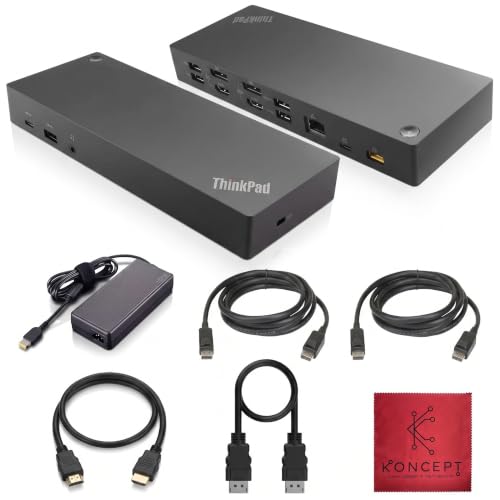
Koncept Hybrid USB-C and USB-A Dock
Best for: dual monitor setups with wired networking
- Display Support
- Dual
- Host Interface
- USB-C, USB-A
- Data Transfer Speed
- 10Gbps
- Video Ports
- DisplayPort 1.2, HDMI
- Ethernet Speed
- Gigabit
- Dimensions
- 8.3 × 3.15 × 1.18 inches
This Lenovo docking station supports dual monitor setups via two DisplayPort 1.2 and two HDMI ports. It features a USB-C port and three USB-A ports for high-speed data transfer at 10Gbps. The unit includes a gigabit Ethernet port and a stereo/mic combo audio jack. Measuring 8.3 by 3.15 by 1.18 inches, it provides a compact hub for connecting peripherals to compatible laptops.
- Dual DisplayPort 1.2 and dual HDMI ports for multi-monitor support
- USB 3.1 Gen 2 Type-C port with 10Gbps data speed
- Gigabit Ethernet port for stable wired network connection
- Includes HDMI and DisplayPort cables in the package
- Ethernet port limited to 10/100/1000 Mb/s speeds
- USB-C port provides only 5V 3A power output
- Compact footprint may limit cable management space
- You need to connect two external displays to your laptop
- You require a reliable gigabit Ethernet connection for work
- You want a single dock to manage multiple USB peripherals
- You need Thunderbolt 4 speeds for maximum data transfer
- You require more than two external display outputs
- You need high-power charging for your laptop through the dock
Verdict: Lenovo ThinkPad Dual Monitor Docking Station offers a practical solution for users needing dual displays and versatile USB connectivity. It fits professionals who prioritize wired networking and multi-monitor productivity over high-speed charging capabilities.
Specifications side by side
| Spec | Koncept Hybrid USB-C and USB-A Dock |
|---|---|
| Display Support | Dual |
| Host Interface | USB-C, USB-A |
| Data Transfer Speed | 10Gbps |
| Video Ports | DisplayPort 1.2, HDMI |
| Ethernet Speed | Gigabit |
| Ports | USB-C, USB-A |
| Dimensions | 8.3 × 3.15 × 1.18 inches |
| Color | Black |
| Model | 40AF0135US |
Frequently asked questions
Does the Lenovo Koncept Hybrid dock support dual monitors?
Yes, this docking station is designed for dual monitor setups. It provides two DisplayPort 1.2 outputs to connect separate screens. This configuration allows you to expand your workspace effectively for productivity tasks. You will need to ensure your laptop supports the necessary video output standards to activate both displays simultaneously.
What is the physical size of this Lenovo docking station?
The unit measures 8.3 inches in length, 3.15 inches in width, and 1.18 inches in height. Its compact form factor allows it to fit neatly beside most laptops without consuming excessive desk space. The black finish helps it blend into typical office environments while keeping your workspace organized and tidy.
Can I connect both USB-C and USB-A devices to this dock?
Yes, the Lenovo ThinkPad Dock offers versatile connectivity options. It features both USB-C and USB-A ports to accommodate various peripherals. You can connect modern devices using USB-C cables or older accessories using USB-A connections. This hybrid layout ensures compatibility with a wide range of keyboards, mice, and storage drives.
What model number is the Lenovo Koncept Hybrid dock?
The specific model number for this device is 40AF0135US. Identifying this number helps you verify compatibility with your laptop and locate the correct drivers. It is the official identifier for the ThinkPad Dual Monitor Docking Station. You can use this code when checking system requirements or seeking technical support for setup issues.
Is this dock suitable for professionals needing wired networking?
This dock is a practical solution for users who prioritize wired networking. It supports multi-monitor productivity alongside stable internet connections. Professionals who require reliable data transfer and consistent connectivity will find this setup beneficial. The design focuses on expanding your laptop's capabilities rather than providing high-speed wireless charging alternatives.
What ports are available on the Lenovo Koncept Hybrid dock?
The device includes USB-C and USB-A ports for data and peripheral connections. Additionally, it provides two DisplayPort 1.2 outputs for video signals. These ports allow you to connect two separate monitors using DisplayPort cables. The layout is designed to handle both video output and standard USB device connections efficiently.
See also