Kvm Switches Buying Guide (2026): What Matters and 8 Picks
As Amazon Associates, we earn from qualifying purchases. This means we may receive a small commission at no extra cost to you if you click through and make a purchase.
As an Amazon Associate we earn from qualifying purchases. Links on this page are affiliate links.
This kvm switch buying guide helps you select the right hardware for managing multiple computers. You will learn how to match port types, resolution limits, and refresh rates to your specific setup. Whether you need to control two systems or eight, the right switch simplifies your workflow. You will be able to decide between compact desktop units and rack-mounted consoles based on your space and device count.
We selected these 8 products by comparing their published specifications. The list includes options for high-bandwidth Thunderbolt connections, long-distance HDMI extenders, and dual-monitor configurations. Each entry highlights key attributes like audio support, power delivery, and switching methods. You can review the technical details to find a device that fits your operating system and display requirements without guessing.
Key Specs for KVM Switches

Resolution and port types
Resolution determines the clarity of your shared displays. Higher resolutions like 4K or 8K require specific port standards to transmit data efficiently. DisplayPort often supports higher bandwidths than HDMI in similar versions, while USB-C and Thunderbolt offer versatile connectivity for modern laptops. You must match the switch’s output resolution to your monitor’s native resolution. For example, the StarTech 4-Port DisplayPort KVM Switch supports 4K UHD, making it suitable for users managing four systems who prioritize peripheral sharing. Choosing the wrong port or resolution limit can result in blurry images or reduced functionality. Always check if the switch supports your monitor’s maximum resolution across all connected ports.
Look for
- Maximum supported resolution per port
- Port type compatibility with your monitors
- Bandwidth limits for high-res signals
Refresh rate capabilities
Refresh rate affects how smoothly motion appears on screen. A 60Hz refresh rate is standard for office work and general computing, providing smooth text and video playback. Higher rates like 144Hz or 240Hz are essential for gaming or fast-paced video editing. Most KVM switches cap at 60Hz, which may disappoint gamers. The Sabrent Thunderbolt 4 KVM Switch supports up to 144Hz, catering to users needing high-bandwidth connections for smoother visuals. The AV Access iDock C10 goes further with 240Hz support for dual monitor setups. If you do not need high frame rates, a 60Hz switch is usually sufficient and more affordable. Match the refresh rate to your primary activity to avoid unnecessary costs.
Look for
- Maximum refresh rate at target resolution
- Support for gaming or professional video
- Drop in refresh rate with multiple monitors
Number of connected computers
The port count defines how many systems you can control. Two-port switches are ideal for dual-computer setups, offering a simple configuration for most users. Four-port models, like the StarTech 4-Port DisplayPort KVM Switch, allow you to manage four systems, which is useful for multi-PC environments. Eight-port consoles, such as the MT-VIKI 8-Port LCD KVM Console, are designed for server racks and IT professionals. More ports increase complexity and cost. Ensure the switch has enough ports for your current setup and potential future additions. Consider the physical size of the unit, as higher port counts often require larger enclosures or rack mounting.
Look for
- Total input ports for your computers
- Scalability for future system additions
- Physical size and mounting options
Audio and peripheral support
KVM switches manage not just video but also audio and USB devices. Audio support allows you to switch headphones or speakers between computers seamlessly. USB 3.0 ports ensure fast data transfer for peripherals like keyboards, mice, and external drives. The StarTech 2-Port DP KVM 4K 60Hz includes a USB hub and audio support, enhancing its utility for dual-monitor setups. The TESmart 2-Port HDMI KVM Switch also offers audio switching and USB 3.0 connectivity. Verify that the switch supports the specific USB devices you use, such as high-speed storage or specialized input devices. Lack of audio support may require manual switching of speakers, which is inconvenient.
Look for
- Included audio output ports
- USB version and hub availability
- Support for specialized USB devices
Switching methods and features
Switching methods determine how you change control between computers. Hotkey switching allows you to use keyboard shortcuts to toggle connections quickly. The MT-VIKI 8-Port LCD KVM Console uses hotkey switching for efficient rack management. Some switches offer button presses on the device itself. Features like EDID emulation help maintain consistent display settings across different computers, preventing resolution or refresh rate mismatches. The AV Access 4KEX100-KVM Cat6 Extender includes EDID emulation for stable signal transmission in server rooms. Consider how you prefer to switch systems and whether features like EDID emulation are necessary for your multi-OS environment.
Look for
- Available switching methods (hotkey, button)
- EDID emulation for display stability
- Ease of use for frequent switching
Connection distance and extenders
Standard KVM switches have limited cable lengths, typically up to a few meters. If your computers and monitors are far apart, you may need an extender. The AV Access 4KEX100-KVM Cat6 Extender supports long-distance control up to 100 meters, ideal for server rooms or control racks. This allows you to keep the PC in a distant location while controlling it from your desk. Extenders often use Cat6 Ethernet cables, which are easier to route than long HDMI or DP cables. Ensure your network cabling infrastructure supports the extender’s requirements. For standard desk setups, a regular switch with adequate cable length is sufficient.
Look for
- Maximum cable length support
- Extender compatibility for long distances
- Cable type requirements (Cat6, etc.)
Power delivery and docking
Some KVM solutions double as docking stations, providing power delivery and additional connectivity. The AV Access iDock C10 Dual Monitor KVM offers Power Delivery, allowing you to charge your laptop while connected. This reduces the number of cables and adapters needed on your desk. It also includes Ethernet ports for network connectivity. This all-in-one approach is beneficial for users with limited desk space. Ensure the power delivery wattage is sufficient for your laptop’s charging needs. Docking KVMs are best for users who frequently connect and disconnect a single laptop or desktop from a multi-monitor setup.
Look for
- Power delivery wattage for laptops
- Integrated Ethernet and USB ports
- Desk space and cable management benefits
Common KVM Switch Categories

Desktop Switches
These compact units sit on your desk to manage two or four computers. They use DisplayPort or HDMI to connect your displays and USB for peripherals. The StarTech 4-Port DisplayPort model supports 4K at 30Hz, making it suitable for office work where high refresh rates are not critical. You get dedicated audio routing and USB 3.0 connectivity. The trade-off is limited port count and lower refresh rates compared to gaming-focused models. These switches are ideal for users who prioritize stable peripheral sharing over visual fluidity.
Extenders
Extenders allow you to place a computer in a server room or closet while controlling it from a distance. The AV Access 4KEX100-KVM Cat6 Extender supports 4K resolution at 60Hz over long distances using Cat6 cables. This setup ensures signal stability and simplifies cable management in data centers. You benefit from EDID emulation, which helps displays recognize the source correctly. This category suits professionals who need reliable remote access without sacrificing 4K clarity. The main limitation is the requirement for specific cabling infrastructure to maintain signal integrity over extended runs.
Rack-Mounted Consoles
These all-in-one units integrate a display, keyboard, and mouse into a single rack-mountable chassis. The MT-VIKI 8-Port KVM Console includes a 17.3-inch LCD screen and supports 1080p resolution at 60Hz. It manages up to eight computers via HDMI, making it essential for IT professionals managing server racks. Hotkey switching allows quick transitions between systems without external software. This solution saves desk space and consolidates control hardware. The trade-off is that the integrated display is typically limited to Full HD resolution, which may not suffice for detailed graphic design work on connected machines.
Docking Stations
Docking station KVMs combine switching with connectivity hubs for laptops. The AV Access iDock C10 supports dual monitors and offers 240Hz refresh rates for smooth visuals. It includes Ethernet ports and Power Delivery, allowing you to charge devices while switching between two computers. EDID emulation ensures consistent display behavior. This type suits business users who need integrated networking and charging without extra hubs. The compact design fits well in office environments. The primary consideration is that these docks often support fewer connected computers than traditional rack switches, focusing on efficiency for two-system setups.
High-Bandwidth Switches
These switches utilize Thunderbolt or USB-C to support extremely high resolutions and refresh rates. The Sabrent Thunderbolt 4 KVM Switch handles 8K resolution at 144Hz, catering to users with high-end displays. It supports both macOS and Windows systems with fast data transfer capabilities. Power Delivery allows single-cable connectivity for power and video. This category is best for professionals requiring maximum visual fidelity and speed. The trade-off is higher cost and the need for compatible Thunderbolt-enabled devices. It is less suitable for standard office tasks where 4K at 60Hz is sufficient.
Common KVM Switch Mistakes
Ignoring refresh rate limits
Check the maximum refresh rate for your resolution. A switch supporting 4K at 30Hz will feel laggy for gaming. If you need 60Hz or higher at 4K, ensure the spec sheet explicitly lists that combination. Mismatched rates cause stuttering or reduced clarity.
Overlooking port version differences
HDMI 2.0 and 2.1 offer different bandwidths. DisplayPort 1.4 and 2.0 vary significantly in data capacity. Always match the port version on the switch to your monitor’s input. Using an older port version may prevent you from achieving your monitor’s native resolution.
Forgetting USB peripheral needs
KVM switches share keyboards and mice, not just video. Check the USB port count and type. Some units lack enough ports for all your devices. Ensure the switch supports the specific USB protocols your peripherals require for full functionality across connected computers.
Assuming all ports are equal
Not all HDMI or DisplayPort inputs are identical. Some ports may support lower resolutions than others. Verify which ports handle your primary display’s resolution. Connecting to the wrong port might limit your picture quality or prevent the monitor from displaying the correct signal.
| # | Product | Best for | Price |
|---|---|---|---|
| 1 | StarTech 4-Port DisplayPort KVM Switch | managing four computers with 4K@30Hz | |
| 2 | AV Access 4KEX100-KVM Cat6 Extender | long-distance remote PC control in server rooms | |
| 3 | StarTech 2-Port DP KVM 4K 60Hz | Two-computer dual-monitor setups | |
| 4 | MT-VIKI 8-Port 17.3" LCD KVM Console | rack-mounted server management with integrated display | |
| 5 | AV Access iDock C10 Dual Monitor KVM | Dual monitor setups requiring integrated networking and charging | |
| 6 | TESmart 2-Port HDMI KVM Switch | dual computer setups with dual monitors | |
| 7 | StarTech 2-Port Dual-Monitor DP KVM | Two-computer dual monitor setups | |
| 8 | Sabrent Thunderbolt 4 KVM Switch | Dual computer setups with high-res displays |
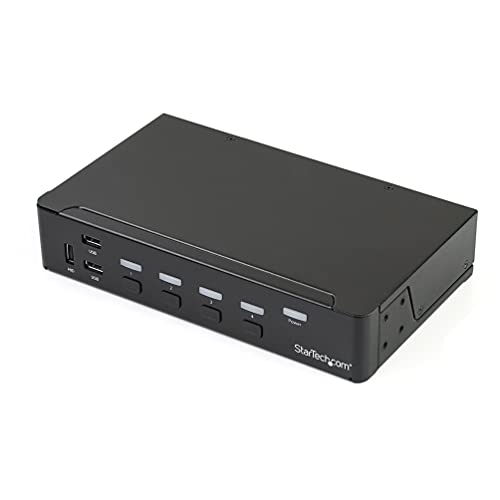
StarTech 4-Port DisplayPort KVM Switch
Best for: managing four computers with 4K@30Hz
- Computers Supported
- 4
- Monitors Supported
- 1
- Maximum Resolution
- 4K 30Hz
- Video Interface
- DisplayPort
- USB Hub Standard
- USB 3.0
- Ports
- DisplayPort, USB 3.0
This StarTech unit lets you control four DisplayPort computers using one monitor, keyboard, and mouse. It supports 4K UHD resolution at 30Hz. A built-in USB 3.0 hub shares peripherals separately from your input devices. It also includes 3.5 mm audio ports for independent analog audio sharing. The compact black chassis measures 1.7 x 5.1 x 8.7 inches. It suits users needing to manage multiple systems without extra desk space.
- Controls four computers with a single console
- Supports 4K UHD resolution at 30Hz
- Built-in 3-port USB 3.0 peripheral hub
- Includes 3.5 mm audio ports for analog audio
- 4K resolution is limited to 30Hz refresh rate
- Heavier at 2.34 pounds compared to lighter alternatives
- Larger dimensions at 8.7 inches in length
- You need to switch between four computers
- You require 4K video support for graphics work
- You want to share USB peripherals across systems
- You need dual monitor support per computer
- You require 60Hz refresh rate at 4K
- You prefer a Thunderbolt or HDMI connection
Verdict: StarTech 4-Port DisplayPort KVM Switch is a solid choice for users managing four systems who prioritize peripheral sharing over high refresh rates. It fits those who need 4K support at 30Hz and dedicated audio routing.

AV Access 4KEX100-KVM Cat6 Extender
Best for: long-distance remote PC control in server rooms
- Maximum Resolution
- 4K@60Hz
- Video Interface
- HDMI
- USB Hub Standard
- USB 2.0
- Ports
- HDMI, Ethernet
- Features
- Audio Support, EDID Emulation
- Dimensions
- 9.84 × 5.12 × 0.79 inches
This AV Access extender transmits 4K video at 60Hz over a single Cat6 cable up to 100 meters. You get four USB ports for peripherals and support for analog audio. It uses HDBaseT technology for stable, zero-latency signal delivery in server rooms or control racks. The unit includes independent EDID control to fix resolution issues. It is designed for users who need to operate a remote PC without moving their desk or dealing with cable clutter.
- Transmits 4K@60Hz video up to 100 meters over Cat6
- Includes four USB ports for keyboard, mouse, and drives
- Supports bi-directional RS232 and analog stereo audio
- Uses single power supply with PoH to reduce cabling
- USB transmission is limited to 2.0 speeds of 480Mbps
- Extender range is capped at 100 meters compared to longer options
- Requires a dedicated Cat6 cable infrastructure for installation
- You need to control a PC from a distance over 100 feet
- You require stable 4K video without signal drop in a rack setup
- You want to manage EDID settings to ensure display compatibility
- You need USB 3.0 speeds for high-bandwidth data transfer
- You want to connect directly without running network cables
- You need a wireless solution for flexible workspace layouts
Verdict: AV Access 4K KVM Extender 100m suits professionals who need reliable, long-distance control of a remote workstation. It is ideal for server rooms or control racks where cable management and signal stability are critical.
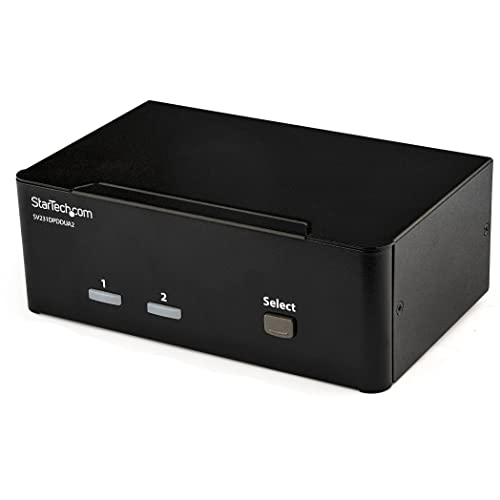
StarTech 2-Port DP KVM 4K 60Hz
Best for: Two-computer dual-monitor setups
- Computers Supported
- 2
- Monitors Supported
- 2
- Maximum Resolution
- 4K 60Hz
- Video Interface
- DisplayPort 1.2
- Features
- USB Hub, Audio Support
- Dimensions
- 3.9 × 6.3 × 2.3 inches
This StarTech KVM switch connects two computers to dual DisplayPort monitors. It supports 4K resolution at 60Hz on each screen. You can share USB peripherals and audio through the built-in hub and auxiliary ports. The compact chassis measures 6.3 by 3.9 by 2.3 inches. It suits creative professionals who need high-resolution displays and reliable peripheral sharing.
- Supports 4K UHD resolution at 60Hz
- Dual DisplayPort 1.2 outputs
- Built-in 2-port USB hub
- 3.5 mm auxiliary audio ports
- Limited to 2-port configuration
- DisplayPort 1.2 standard limits bandwidth
- Heavier at 1.62 pounds
- You need dual monitors for each computer
- You require 4K resolution at 60Hz
- You want shared USB and audio access
- You need more than two computers
- You require HDMI connectivity
- You need higher refresh rates than 60Hz
Verdict: StarTech 2-Port DP KVM Switch delivers solid dual-monitor performance for two systems. It fits users who prioritize 4K clarity and dedicated audio ports over higher port counts.
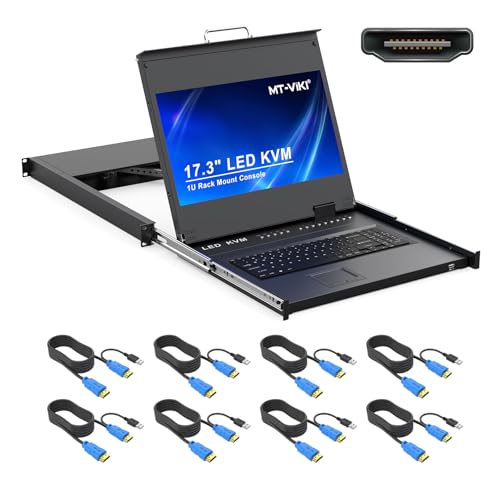
MT-VIKI 8-Port 17.3" LCD KVM Console
Best for: rack-mounted server management with integrated display
- Computers Supported
- 8
- Maximum Resolution
- 1080P@60Hz
- Video Interface
- HDMI
- USB Hub Standard
- USB 2.0
- Features
- Hotkey Switching
- Dimensions
- 9.06 × 3.7 × 8.66 inches
This unit combines an 8-port KVM switch with a built-in 17.3-inch LCD monitor and keyboard. It supports 1080p resolution at 60Hz. The device mounts into a standard 19-inch rack and includes eight HDMI cables. You can control connected computers using hotkeys or an on-screen display menu. The aluminum chassis keeps the weight manageable for server room environments.
- Includes a 17.3-inch LCD monitor for direct viewing
- Supports 1080p resolution at a 60Hz refresh rate
- Mounts into a standard 19-inch rack
- Comes with eight HDMI KVM cables included
- Resolution is limited to 1080p, lower than 4K options
- Port count is 8, fewer than the 16-port variant
- Refresh rate is 60Hz, slower than high-refresh displays
- You need a single unit for rack-mounted server management
- You prefer an integrated keyboard and monitor solution
- You manage up to eight computers in a data center
- You require 4K resolution for high-detail work
- You need to control more than eight computers
- You prefer a compact desktop switch without a screen
Verdict: MT-VIKI 8-Port HDMI KVM with 17.3" LCD provides an all-in-one rack solution for IT professionals. It fits buyers who want integrated display and control hardware for server rooms.

AV Access iDock C10 Dual Monitor KVM
Best for: Dual monitor setups requiring integrated networking and charging
- Computers Supported
- 2
- Monitors Supported
- 2
- Maximum Resolution
- 4K@60Hz
- Video Interface
- HDMI, DisplayPort, USB-C
- Power Delivery
- 60W
- USB Hub Standard
- USB 3.0
The AV Access iDock C10 combines a dual-monitor KVM switch with a 12-in-1 docking station. It supports dual 4K@60Hz or 1080p@240Hz outputs. A single USB-C connection delivers 60W charging, video, and data. It includes a Gigabit Ethernet port for stable wired networking. Switching between two computers takes about 2–3 seconds. This setup suits professionals who want to reduce cable clutter while managing multiple systems.
- Supports dual 4K@60Hz and high refresh rates up to 1080p@240Hz
- Integrates 60W USB-C power delivery with video and data
- Includes Gigabit Ethernet for reliable wired network connectivity
- Features 12-in-1 docking station with USB 3.0 and SD reader
- Supports only 2 computers, whereas other picks handle 4 ports
- macOS is limited to mirrored displays only due to MST constraints
- Weighs 2.2 pounds, which is bulkier than slim cable-based switches
- You need a single dock to manage two computers and two monitors
- You require 60W charging and Gigabit Ethernet in one device
- You use Windows or Linux for extended dual-monitor workflows
- You need to switch more than two computers
- You require native dual extended displays on macOS
- You prefer a lightweight cable-only KVM solution
Verdict: AV Access iDock C10 2-Port KVM Dock is a robust station for users who need to manage two systems with dual monitors. It fits professionals who want integrated networking and charging without extra hubs.

TESmart 2-Port HDMI KVM Switch
Best for: dual computer setups with dual monitors
- Computers Supported
- 2
- Monitors Supported
- 2
- Maximum Resolution
- 4K@60Hz
- Video Interface
- HDMI
- USB Hub Standard
- USB 3.0 (5Gbps)
- Ports
- HDMI, USB 3.0
This TESmart unit lets you control two computers with one set of peripherals while driving two monitors per system. It supports 4K resolution at 60Hz and includes USB 3.0 ports for faster data transfer. The device features EDID emulation to maintain display settings during switching. It also integrates audio output and microphone support. You get flexibility through IR remote, hotkeys, or physical buttons for source selection.
- Supports 4K UHD resolution at 60Hz refresh rate
- Includes USB 3.0 ports for high-speed data transfer
- Features EDID emulators to prevent display setting changes
- Integrated audio and microphone for seamless switching
- Offers three switching methods: remote, hotkeys, or buttons
- Supports only two computers, limiting scalability for larger setups
- Maximum resolution is 4K at 60Hz, lower than some competitors offering 144Hz
- Physical dimensions of 11.8 inches in length require more desk space
- You need to manage two computers with dual monitors each
- You require USB 3.0 speeds for peripheral data transfer
- You want to switch audio sources without disconnecting headphones
- You need to connect more than two computers
- You require high refresh rates above 60Hz for gaming
- You prefer a compact device under 10 inches in length
Verdict: TESmart 2-Port Dual Monitor HDMI KVM is a solid choice for users managing two systems with dual displays who need reliable USB 3.0 connectivity and audio switching capabilities.

StarTech 2-Port Dual-Monitor DP KVM
Best for: Two-computer dual monitor setups
- Computers Supported
- 2
- Monitors Supported
- 2
- Maximum Resolution
- 4K@60Hz
- Video Interface
- DisplayPort
- Ports
- DisplayPort, USB-A
- Features
- Hotkey Switching
This StarTech KVM switch lets you control two computers using one set of USB-A peripherals and dual DisplayPort monitors. It supports 4K resolution at 60Hz and draws power directly from the connected USB ports, so you do not need an external power adapter. The unit includes integrated 5-foot host cables and a 1.5-meter remote push button for switching. It works with Windows, macOS, Linux, and ChromeOS, making it a compact solution for dual-monitor setups.
- Supports dual 4K 60Hz DisplayPort monitors
- Bus-powered design with no external adapter needed
- Includes integrated 5ft host cables and 1.5m remote switch
- Compatible with Windows, macOS, Linux, and ChromeOS
- Supports only two computers, whereas other picks handle four
- Uses USB-A connectivity instead of Thunderbolt or USB-C
- Limited to 60Hz refresh rate compared to 144Hz options
- You need to switch between two desktops with dual monitors
- You want a compact unit that draws power from USB
- You use a mix of Windows and macOS computers
- You require support for more than two computers
- You need Thunderbolt 4 connectivity for higher bandwidth
- You require a refresh rate above 60Hz for gaming
Verdict: StarTech 2-Port Dual-Monitor DisplayPort KVM is a space-saving choice for users managing two machines with dual displays. It fits professionals who value bus-powered simplicity and broad operating system compatibility over high refresh rates or multi-computer expansion.
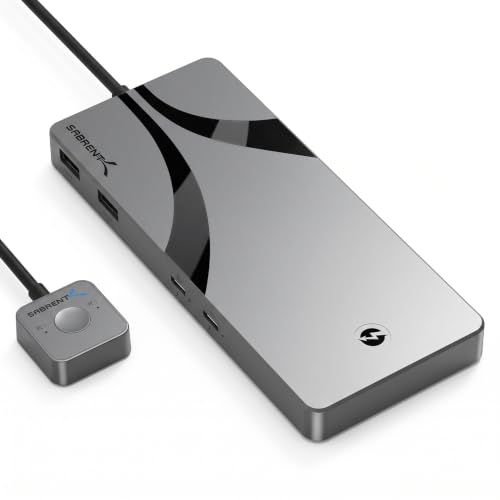
Sabrent Thunderbolt 4 KVM Switch
Best for: Dual computer setups with high-res displays
- Computers Supported
- 2
- Monitors Supported
- 2
- Maximum Resolution
- 8K@60Hz, 4K@144Hz
- Video Interface
- Thunderbolt 4, USB-C, DisplayPort
- Power Delivery
- 60W
- USB Hub Standard
- USB 3.2 Gen 2×1 (10Gbps)
This SABRENT Thunderbolt 4 KVM Switch lets you share two host computers with multiple peripherals. It supports 8K resolution at 60Hz or 4K at 144Hz on a single display. The device includes three Thunderbolt 4 ports and two USB-C ports with 60W power delivery. It features four USB-A ports for standard accessories. The aluminum build helps dissipate heat during operation.
- Supports 8K@60Hz or 4K@144Hz video output
- Three Thunderbolt 4 ports with 40Gbps transfer speeds
- Two USB-C ports provide up to 60W power delivery
- Four USB-A ports for keyboards and mice
- Aluminum chassis aids heat dissipation
- Limited to two host computers
- Includes only one integrated 70cm cable
- Requires a separate 24V/5A power adapter
- You need high-resolution displays up to 8K
- You require fast data transfer via Thunderbolt 4
- You want to charge laptops while switching
- You need to connect more than two computers
- You prefer a completely cable-free setup
- You only need 1080p resolution
Verdict: SABRENT Thunderbolt 4 KVM Switch fits users who need high-bandwidth connections for 8K displays and fast data transfer between two Mac or Windows computers.
Specifications side by side

| Spec | StarTech 4-Port DisplayPort KVM Switch | AV Access 4KEX100-KVM Cat6 Extender | StarTech 2-Port DP KVM 4K 60Hz | MT-VIKI 8-Port 17.3" LCD KVM Console | AV Access iDock C10 Dual Monitor KVM | TESmart 2-Port HDMI KVM Switch | StarTech 2-Port Dual-Monitor DP KVM | Sabrent Thunderbolt 4 KVM Switch |
|---|---|---|---|---|---|---|---|---|
| Computers Supported | 4 | – | 2 | 8 | 2 | 2 | 2 | 2 |
| Monitors Supported | 1 | – | 2 | – | 2 | 2 | 2 | 2 |
| Maximum Resolution | 4K 30Hz | 4K@60Hz | 4K 60Hz | 1080P@60Hz | 4K@60Hz | 4K@60Hz | 4K@60Hz | 8K@60Hz, 4K@144Hz |
| Video Interface | DisplayPort | HDMI | DisplayPort 1.2 | HDMI | HDMI, DisplayPort, USB-C | HDMI | DisplayPort | Thunderbolt 4, USB-C, DisplayPort |
| Power Delivery | – | – | – | – | 60W | – | – | 60W |
| USB Hub Standard | USB 3.0 | USB 2.0 | – | USB 2.0 | USB 3.0 | USB 3.0 (5Gbps) | – | USB 3.2 Gen 2×1 (10Gbps) |
| Ethernet Speed | – | – | – | – | 1 Gbps | – | – | – |
| Resolution | 4K UHD | 4K UHD | 4K UHD | 1080p FHD | 1080p FHD | 4K UHD | 4K UHD | 8K UHD |
| Refresh Rate | – | 60Hz | 60Hz | 60Hz | 240Hz | 60Hz | 60Hz | 144Hz |
| Ports | DisplayPort, USB 3.0 | HDMI, Ethernet | DisplayPort | HDMI | Ethernet, USB 3.0 | HDMI, USB 3.0 | DisplayPort, USB-A | USB-C, Thunderbolt 4, USB-A |
| Features | Audio Support | Audio Support, EDID Emulation | USB Hub, Audio Support | Hotkey Switching | Power Delivery, EDID Emulation | Audio Support, EDID Emulation, Hotkey Switching | Hotkey Switching | Power Delivery |
| Use | – | – | – | – | Business & Office, Office, Home Office | – | – | Mac |
| Operating System | – | – | – | – | – | – | Windows | macOS |
| Number of Computers | – | – | – | – | 2 Computers | 2 Computers | – | – |
| Dimensions | 8.7 × 5.1 × 1.7 inches | 9.84 × 5.12 × 0.79 inches | 3.9 × 6.3 × 2.3 inches | 9.06 × 3.7 × 8.66 inches | 5.5 × 3.7 × 1.9 inches | 11.8 × 4.33 × 1.18 inches | 4.9 × 3.5 × 1 inches | 6.3 × 2.76 × 0.71 inches |
| Weight | 2.34 pounds | 1.01 pounds | 1.62 pounds | – | 2.2 pounds | 1.1 pounds | 1.32 pounds | 1 pounds |
| Size | 1.7"x5.1"x8.7" | 100 | 2.3" x 6.3" x 3.9" | 8 port KVM HDMI+ 17.3'' LCD | 10 | USB3.0 for 2 PCs Dual Monitor | [Output] 2 x DP | Thunderbolt 4 KVM |
| Color | Black | Black | Black | Black | Grey | Black | black | Black |
| Model | SV431DPU3A2 | 4KEX100-KVM | SV231DPDDUA2 | MT-17308HL | iDock C10 | HKS202-P23 | C2-DD46-UA2-CBL-KVM | SB-TB4K |
Frequently asked questions
Can a KVM switch support dual monitors for two computers?
Yes, several models handle dual displays across multiple systems. The TESmart 2-Port HDMI KVM Switch manages two computers with dual monitors. It supports 4K resolution at 60Hz. The AV Access iDock C10 also fits dual monitor setups. It provides 1080p FHD output at 240Hz for smooth visuals.
What is the maximum resolution supported by these switches?
Most units support 4K UHD, but some go higher. The SABRENT Thunderbolt 4 KVM Switch reaches 8K UHD resolution. It maintains 144Hz refresh rates for high-end displays. The StarTech 4-Port DisplayPort model handles 4K UHD at 30Hz. Always check the spec sheet for your specific resolution needs.
Do I need audio support for my KVM setup?
Audio support depends on your peripheral requirements. The StarTech 4-Port DisplayPort model includes dedicated audio routing. The AV Access 4KEX100-KVM Cat6 Extender also supports audio transmission. The StarTech 2-Port DP KVM 4K 60Hz offers audio ports. Verify if your monitors or speakers require direct audio signal passing through the switch.
Which KVM switch is best for server rooms?
Rack-mounted consoles are ideal for server environments. The MT-VIKI 8-Port LCD KVM Console integrates a 17.3-inch display. It supports 1080p FHD at 60Hz. The AV Access 4KEX100-KVM Cat6 Extender suits long-distance control in server rooms. It provides reliable signal stability over Cat6 cabling for remote workstation management.
Can I use a KVM switch with Mac computers?
Some models explicitly support macOS environments. The SABRENT Thunderbolt 4 KVM Switch is designed for Mac and Windows systems. It uses Thunderbolt 4 and USB-C ports. The StarTech 2-Port Dual-Monitor DP KVM lists Windows compatibility. Check the operating system specifications to ensure your Mac functions correctly with the selected hardware.
How do I switch between computers without a keyboard?
Many switches allow switching via hotkeys or buttons. The MT-VIKI 8-Port model features hotkey switching capabilities. The TESmart 2-Port HDMI KVM Switch also includes hotkey functionality. The StarTech 2-Port Dual-Monitor DP KVM supports hotkey switching. This lets you toggle between connected systems using keyboard shortcuts or physical buttons on the device.
Does the KVM switch provide power to connected devices?
Certain docks include power delivery features for convenience. The AV Access iDock C10 offers Power Delivery capabilities. It integrates networking and charging for your devices. The StarTech 2-Port Dual-Monitor DP KVM is bus-powered. This means it draws power from the connected computers rather than using an external adapter.
What is the difference between HDMI and DisplayPort KVMs?
Port type affects bandwidth and compatibility. DisplayPort often supports higher bandwidths for resolutions like 4K at 60Hz. The StarTech 4-Port DisplayPort model uses this standard. HDMI is common in consumer electronics. The TESmart 2-Port HDMI KVM Switch uses HDMI for dual monitor setups. Choose based on your computer and monitor ports.
See also