6 Best Alternatives to the Kado 27″ Curved Triple Monitor (2026)
As Amazon Associates, we earn from qualifying purchases. This means we may receive a small commission at no extra cost to you if you click through and make a purchase.
As an Amazon Associate we earn from qualifying purchases. Links on this page are affiliate links.
The Kado 27" Curved Triple Monitor offers a wide, immersive workspace with 1080p resolution and a 75Hz refresh rate. If you need kado 27 curved triple monitor alternatives, you might want a different size, resolution, or brand. Some users prefer higher pixel density for sharp text, while others need faster refresh rates for gaming. You may also want a flat screen instead of a curved one, or a more compact footprint for smaller desks. These alternatives were chosen because their specs overlap with the original, ensuring they meet similar core needs.
Each option on this list shares key attributes like HDMI ports, built-in speakers, or specific panel types. You can compare resolution, refresh rate, and physical dimensions to find the best fit for your setup. Whether you need a dual-screen gaming rig or a compact triple-office setup, the data helps you decide. Focus on the numbers that matter to your workflow. This guide breaks down the specifications so you can make an informed choice without guessing.
How alternatives compare to Kado
Kado 27" Triple FHD 75Hz Monitor
This flat-screen trio keeps the same 1080p resolution and 75Hz refresh rate as the original. You trade the immersive 1500R curve for a standard flat panel, which some users find easier to align for precise text work. The build is slightly lighter at 10.6 pounds per unit. It retains built-in speakers and HDMI connectivity. This option suits office workers who prefer a neutral, flat display over curved immersion. It offers the same multi-monitor productivity benefits without the visual distortion of curvature. If you want a wider desk setup without the curve, this is a direct, practical alternative.
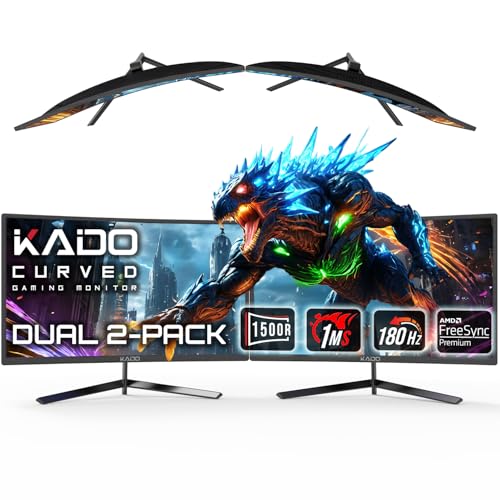
Kado Dual 24" 180Hz Curved Monitor
This dual-screen setup jumps to a 180Hz refresh rate, offering significantly smoother motion for fast-paced gaming. You sacrifice one monitor and drop to 24-inch panels, but gain FreeSync support and DisplayPort connectivity alongside HDMI. The curved design remains, but the focus shifts to speed rather than sheer screen real estate. This choice is best for gamers who prioritize fluidity and responsiveness over having three separate windows. The higher refresh rate reduces motion blur effectively. It is a premium pick for those who value visual smoothness and modern connectivity options over the original's triple-screen layout.
Kado 34" Ultrawide + 15.6" Portable Bundle
This bundle combines a 34-inch ultrawide monitor with a 15.6-inch portable screen, replacing the triple setup with a single large desktop display and a travel companion. You get a 165Hz refresh rate and FreeSync for smooth gaming, plus a 21:9 aspect ratio for immersive media. The portable unit adds flexibility for remote work. This option is ideal for users who want a primary ultrawide screen for gaming and a secondary screen for on-the-go tasks. It offers more versatility than a static triple monitor. The 1080p resolution on the ultrawide panel maintains pixel density similar to the original 27-inch screens.
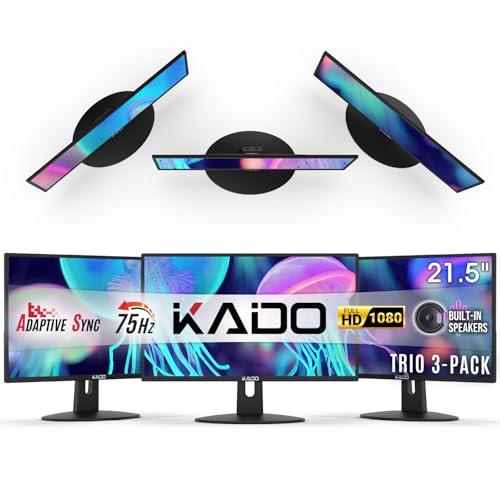
Kado 22" 3-Pack Monitor 75Hz
This compact triple-monitor pack uses 22-inch panels instead of 27-inch ones, reducing the overall desk footprint significantly. It keeps the 1080p resolution and 75Hz refresh rate, along with built-in speakers and HDMI ports. The smaller size makes it ideal for tight workspaces where space is limited. You get the same multi-window productivity benefits in a more condensed form. This is a practical choice for users who need three screens but have limited desk area. The trade-off is less screen real estate per panel, but the efficiency gains for small offices are notable.
Thinlerain 27-Inch 4K 160Hz Webcam Monitor
This single 27-inch monitor offers 4K UHD resolution and a 160Hz refresh rate, vastly outperforming the original in both sharpness and speed. It features an IPS panel for accurate colors and includes a built-in webcam and USB-C connectivity. You lose the triple-screen layout but gain exceptional detail and modern port options. This pick suits creators and gamers who value high pixel density and fast response times. The vertical orientation support adds flexibility for productivity tasks. It is a premium single-screen solution for those who do not need multiple monitors but want top-tier visual quality and connectivity.
Gawfolk 32 Inch 4K Curved Monitor
This 32-inch curved monitor delivers 4K UHD resolution at 60Hz, providing sharp visuals for media consumption and office work. It features FreeSync support and a comfortable curve for immersion. You gain significantly higher pixel density compared to the original's 1080p resolution, though the refresh rate is lower. This option is best for users who prioritize image clarity and screen size over fast motion handling. The built-in speakers and HDMI/DisplayPort connectivity match the original's utility. It is a solid choice for those who want a large, sharp, single display for gaming and work without the complexity of a multi-monitor setup.
| # | Product | Best for | Price |
|---|---|---|---|
| 1 | Kado 27" Curved Triple Monitor Best overall | immersive triple screen productivity setups | |
| 2 | Kado 27" Triple FHD 75Hz Monitor Also great | multi-screen office setups with accurate colors | |
| 3 | Kado Dual 24" 180Hz Curved Monitor Best premium | fast refresh rate dual-screen gaming setups | |
| 4 | Kado 34" Ultrawide + 15.6" Portable Bundle Best budget | Ultrawide gaming and portable multitasking | |
| 5 | Kado 22" 3-Pack Monitor 75Hz Also great | Compact triple-screen office setups | |
| 6 | Thinlerain 27-Inch 4K 160Hz Webcam Monitor Best ips | 4K gaming and vertical productivity tasks | |
| 7 | Gawfolk 32 Inch 4K Curved Monitor Best 60hz | Sharp 4K media viewing and office tasks |

Kado 27" Curved Triple Monitor
Best for: immersive triple screen productivity setups
- Screen Size
- 27"
- Resolution
- 1920×1080
- Refresh Rate
- 75Hz
- Ports
- HDMI
- Features
- Built-in Speakers, Curved Screen
- Use
- Gaming, Business & Office, Office
This Kado 27-inch monitor set includes three 1920×1080 panels with a 1500R curve and 75Hz refresh rate. The 100% sRGB color gamut ensures accurate visuals for work or gaming. Built-in speakers save desk space. The curved design reduces eye strain during long sessions. It is a practical choice for users needing a wide, immersive display setup without complex cabling.
- Three 27-inch 1920×1080 curved screens
- 1500R curvature for reduced eye strain
- 100% sRGB color gamut
- Built-in speakers
- 75Hz refresh rate
- 1920×1080 resolution is lower than the 3840×2160 UHD options available
- 75Hz refresh rate is slower than the 160Hz and 180Hz alternatives
- 12.2 pounds weight per monitor adds bulk to the setup
- You want a seamless triple monitor setup for productivity
- You prefer curved screens to reduce peripheral distortion
- You need built-in speakers to save desk space
- You require 4K UHD resolution for detailed work
- You need high refresh rates for competitive gaming
- You prefer flat screens over curved designs
Verdict: Kado 27" Curved Triple Monitor suits users who prioritize a wide, immersive viewing area with accurate colors over high resolution or speed. It is ideal for office work and casual gaming.

Kado 27" Triple FHD 75Hz Monitor
Best for: multi-screen office setups with accurate colors
- Screen Size
- 27"
- Resolution
- 1920×1080
- Refresh Rate
- 75Hz
- Ports
- HDMI
- Features
- Built-in Speakers
- Use
- Gaming, Business & Office, Office
This Kado triple monitor pack gives you three 27-inch flat screens for a wide desk setup. You get 1080p FHD resolution and a 75Hz refresh rate for smooth visuals. The 100% sRGB color gamut ensures accurate colors for work or gaming. Built-in speakers save desk space. Each panel weighs 10.6 pounds, so you need a sturdy stand to support the trio.
- 100% sRGB color gamut for accurate visuals
- 75Hz refresh rate for smooth motion
- Built-in speakers for audio convenience
- Three 27-inch panels for expanded workspace
- 1080p resolution is lower than the 4K options on this list
- 75Hz refresh rate is slower than the 180Hz and 160Hz alternatives
- 10.6-pound weight per monitor requires a heavy-duty stand
- You need a wide, multi-screen office setup
- You prioritize color accuracy with 100% sRGB coverage
- You want built-in speakers to save desk space
- You require 4K UHD resolution for detailed work
- You need high-refresh-rate gaming at 160Hz or 180Hz
- You prefer curved screens for immersive viewing
Verdict: Kado 27" Triple FHD 75Hz Monitor is a solid choice for users who need a wide, flat-screen office setup with accurate colors. It fits buyers who value the expanded workspace of three monitors over high-resolution or high-refresh-rate gaming performance.
Kado Dual 24" 180Hz Curved Monitor
Best for: fast refresh rate dual-screen gaming setups
- Screen Size
- 24"
- Resolution
- 1920×1080
- Refresh Rate
- 180Hz
- Response Time
- 1ms
- Variable Refresh Rate
- AMD FreeSync Premium
- Ports
- HDMI, DisplayPort
This Kado dual monitor setup features two 24-inch curved screens with a 1500R radius. It delivers Full HD 1920×1080 resolution and a high 180Hz refresh rate. The 1ms response time and AMD FreeSync Premium support smooth gameplay. You get HDMI and DisplayPort connectivity for flexible integration. This bundle suits users seeking a wide, immersive workspace or gaming rig with high-speed visuals.
- Dual 24-inch curved screens for panoramic viewing
- 180Hz refresh rate for ultra-smooth motion
- 1ms response time reduces motion blur
- AMD FreeSync Premium eliminates screen tearing
- Full HD 1920×1080 resolution is lower than the 4K UHD options on this list
- 24-inch panel size is smaller than the 27-inch and 32-inch alternatives available
- You want a wide, immersive curved display for gaming or multitasking
- You prioritize high refresh rates and fast response times over resolution
- You need a dual-screen bundle with VESA mount compatibility
- You require 4K UHD resolution for sharp text or detailed work
- You prefer larger 27-inch or 32-inch screens for a more spacious view
- You are looking for a triple-monitor setup with three displays
Verdict: Kado Dual 24" Curved 180Hz Monitor is a high-speed dual-screen solution for gamers who value smoothness over pixel density. It fits buyers who need a wide, immersive curved display with fast refresh rates.

Kado 34" Ultrawide + 15.6" Portable Bundle
Best for: Ultrawide gaming and portable multitasking
- Screen Size
- 34", 15.6"
- Resolution
- 3440 x 1440, 1920 x 1080
- Refresh Rate
- 165Hz
- Panel Type
- IPS
- Response Time
- 1ms
- Aspect Ratio
- 21:9
This bundle pairs a 34-inch curved ultrawide desktop display with a 15.6-inch portable screen. The main monitor offers 3440×1440 resolution, 165Hz refresh rate, and 1ms response time. The secondary screen provides 1920×1080 resolution for extra workspace. Both units include built-in speakers. This setup suits users who want a high-refresh ultrawide desktop view alongside a lightweight travel display for multitasking on the go.
- 34-inch 165Hz 21:9 WQHD curved desktop panel
- 15.6-inch 1920×1080 portable IPS secondary screen
- 1ms response time with AMD FreeSync Premium
- Built-in speakers on both displays
- 34-inch panel is curved rather than flat
- Portable screen is limited to 1920×1080 resolution
- Bundle includes only one portable size option
- You want a high-refresh ultrawide desktop experience
- You need a lightweight second screen for travel
- You prefer a cohesive dual-display setup
- You require a flat 34-inch desktop monitor
- You need 4K resolution on the portable screen
- You want a standalone ultrawide without a portable unit
Verdict: Kado 34" Curved + 15.6" Portable Monitor fits gamers and remote workers who want a fast ultrawide desktop paired with a travel-ready screen. It delivers smooth visuals and extra workspace without requiring a second desk.
Kado 22" 3-Pack Monitor 75Hz
Best for: Compact triple-screen office setups
- Screen Size
- 22"
- Resolution
- 1920×1080
- Refresh Rate
- 75Hz
- Ports
- HDMI
- Features
- Built-in Speakers
- Use
- Gaming, Business & Office, Office
This Kado trio offers three 22-inch flat screens for a wide workspace. It delivers 1920×1080 resolution at 75Hz with 99% sRGB coverage. Built-in speakers save desk space. The compact 8.25-pound design fits tight setups. You get fast response times for clear visuals. This setup suits users who need multiple displays without the bulk of larger panels.
- Triple monitor configuration for expanded workspace
- 99% sRGB color gamut for accurate visuals
- Built-in speakers reduce cable clutter
- 75Hz refresh rate for smooth motion
- 22-inch screens are smaller than the 24-inch and 27-inch alternatives on this list
- 1080p resolution is lower than the 4K options available in other picks
- Flat panel design lacks the immersion of the curved 1500R models in the guide
- You need a wide desk setup but have limited vertical space
- You prefer flat screens to avoid peripheral distortion
- You want built-in audio to keep your desk tidy
- You require 4K resolution for detailed creative work
- You want a curved display for immersive gaming
- You need larger 27-inch panels for better visibility
Verdict: Kado 22" Triple 1080p 75Hz Monitor provides a compact triple-screen solution for users who prioritize desk space efficiency over large panel size or high resolution. It is ideal for office tasks where multiple windows are essential but physical footprint is constrained.

Thinlerain 27-Inch 4K 160Hz Webcam Monitor
Best for: 4K gaming and vertical productivity tasks
- Screen Size
- 27"
- Resolution
- 3840 x 2160
- Refresh Rate
- 160Hz
- Panel Type
- IPS
- Response Time
- 1ms GTG
- Ports
- 2x HDMI, DisplayPort, USB-C, USB-A
The Thinlerain 27-inch monitor offers 4K UHD resolution and a 160Hz refresh rate on an IPS panel. It includes a pop-up 3MP webcam and built-in speakers. The stand supports vertical rotation and height adjustments. This setup suits users needing high clarity and smooth motion for gaming or creative work.
- 4K UHD 3840×2160 resolution for sharp detail
- 160Hz refresh rate with 1ms GTG response
- IPS panel with 100% sRGB color coverage
- Pop-up 3MP webcam with physical privacy shutter
- 90-degree pivot for vertical portrait orientation
- 27-inch screen is smaller than the 32-inch competitor
- 160Hz refresh rate is lower than the 180Hz option
- Webcam requires a separate USB-A to USB-B connection
- You want 4K clarity on a 27-inch screen
- You need a vertical mode for coding or reading
- You prefer a built-in webcam for video calls
- You require a larger 32-inch display
- You need a higher 180Hz refresh rate
- You want a curved 1500R panel design
Verdict: Thinlerain 27" 4K 160Hz IPS Monitor delivers high-resolution visuals and flexible mounting for creators. It fits users who value sharp 4K detail and portrait mode over larger screen sizes or higher refresh rates.

Gawfolk 32 Inch 4K Curved Monitor
Best for: Sharp 4K media viewing and office tasks
- Screen Size
- 32"
- Resolution
- 3840 x 2160
- Refresh Rate
- 60Hz
- Variable Refresh Rate
- FreeSync
- Ports
- HDMI 2.0, DP 1.4, 3.5mm audio
- Features
- Built-in Speakers, Curved Screen
The Gawfolk 32-inch monitor offers 4K UHD resolution on a 1500R curved VA panel. It runs at 60Hz with FreeSync for tear-free visuals. The 3000:1 contrast ratio and 85% NTSC coverage provide deep blacks and vivid colors. Built-in speakers and multiple ports simplify your setup. This screen suits users who prioritize sharp imagery and a curved field of view over high refresh rates.
- 3840×2160 4K UHD resolution
- 1500R curved VA panel
- 3000:1 contrast ratio
- Built-in speakers
- FreeSync support
- 60Hz refresh rate is lower than the 150Hz or 180Hz options on this list
- 32-inch size is larger than the 22-inch and 24-inch alternatives here
- Tilt-only stand lacks height or swivel adjustment
- You want a large 4K display for media consumption
- You prefer a curved screen for immersive viewing
- You need built-in speakers to save desk space
- You require a high refresh rate for competitive gaming
- You need a smaller footprint for tight desk setups
- You want full ergonomic stand adjustments like height or swivel
Verdict: Gawfolk 32-Inch 4K Curved Monitor delivers sharp 4K visuals and a comfortable curve for media and office work. It fits buyers who value image clarity and immersion over fast motion handling.
Specifications side by side

| Spec | Kado 27" Curved Triple Monitor | Kado 27" Triple FHD 75Hz Monitor | Kado Dual 24" 180Hz Curved Monitor | Kado 34" Ultrawide + 15.6" Portable Bundle | Kado 22" 3-Pack Monitor 75Hz | Thinlerain 27-Inch 4K 160Hz Webcam Monitor | Gawfolk 32 Inch 4K Curved Monitor |
|---|---|---|---|---|---|---|---|
| Screen Size | 27" | 27" | 24" | 34", 15.6" | 22" | 27" | 32" |
| Resolution | 1920×1080 | 1920×1080 | 1920×1080 | 3440 x 1440, 1920 x 1080 | 1920×1080 | 3840 x 2160 | 3840 x 2160 |
| Refresh Rate | 75Hz | 75Hz | 180Hz | 165Hz | 75Hz | 160Hz | 60Hz |
| Panel Type | – | – | – | IPS | – | IPS | – |
| Response Time | – | – | 1ms | 1ms | – | 1ms GTG | – |
| Aspect Ratio | – | – | – | 21:9 | – | – | – |
| Variable Refresh Rate | – | – | AMD FreeSync Premium | AMD FreeSync Premium | – | – | FreeSync |
| Ports | HDMI | HDMI | HDMI, DisplayPort | DisplayPort, HDMI | HDMI | 2x HDMI, DisplayPort, USB-C, USB-A | HDMI 2.0, DP 1.4, 3.5mm audio |
| Features | Built-in Speakers, Curved Screen | Built-in Speakers | Built-in Speakers, Curved Screen | Built-in Speakers, Curved Screen | Built-in Speakers | Built-in Speakers, Webcam | Built-in Speakers, Curved Screen |
| Use | Gaming, Business & Office, Office | Gaming, Business & Office, Office | Gaming, Business & Office, Office | Gaming, Business & Office, Office | Gaming, Business & Office, Office | Gaming, Business & Office, Office, Home Office | Gaming, Business & Office, Office, Home Office |
| Size | 27 | 27" 3-Pack | 24" Curved 180Hz | 34" Curved + 15.6" | 22 | 27 Inch | 32 Inch |
| Dimensions | 2.83 × 24.5 × 14.6 inches | 1.75 × 24.1 × 14.2 inches | 2.75 × 21.6 × 12.9 inches | 7.3 × 32.3 × 19 inches | 1.46 × 19.9 × 11.9 inches | 8.67 × 24 × 21.3 inches | 3.89 × 27.6 × 16.3 inches |
| Weight | 12.2 pounds | 10.6 pounds | – | 8.8 pounds | 8.25 pounds | – | 11.5 pounds |
| Color | Black | Black | – | Black | Black | 3840 x 2160-160Hz | Black |
| Model | KADO-C27-TRIPLE | KADO-E27-TRIPLE | KADO-C24X-168-DUAL | KADO-C34X-168-K16 | KADO-E22X-TRIPLE | HD-270 | GFTY982 |
Frequently asked questions
Can I get a triple monitor setup with 4K resolution?
The Kado options listed here max out at 1080p. If you need 4K clarity, consider the Thinlerain 27-Inch 4K 160Hz Webcam Monitor. It provides sharp UHD visuals on a single panel. You will not find a triple 4K bundle in this specific guide, but single high-res units are available for detailed work.
Which alternative offers the fastest refresh rate for gaming?
The Kado Dual 24" 180Hz Curved Monitor leads with a 180Hz refresh rate. This is faster than the 75Hz found in the triple 1080p models. It also includes FreeSync support for smoother visuals. This dual-screen curved setup suits gamers who prioritize speed over having three separate displays.
Is there a curved option that is not a triple screen?
Yes, the Gawfolk 32 Inch 4K Curved Monitor offers a single large curved display. It features 4K UHD resolution and a 60Hz refresh rate. This model provides immersion and sharpness for media viewing. It is a good alternative if you want curve benefits without the complexity of a triple monitor array.
What is the best choice for a compact office desk?
The Kado 22" 3-Pack Monitor 75Hz is designed for space efficiency. Each unit is smaller than the 27-inch models, fitting tighter desk arrangements. It maintains 1080p resolution and includes built-in speakers. This setup allows for triple-screen productivity while minimizing the physical footprint on your workspace.
Can I use a portable monitor with a desktop setup?
The Kado 34" Ultrawide + 15.6" Portable Bundle combines a desktop ultrawide with a travel screen. The 34-inch panel offers 165Hz refresh rates and 21:9 aspect ratio. The included 15.6-inch screen adds extra workspace for mobile use. This bundle suits users who need versatility between desk and travel.
Which monitor supports vertical orientation for productivity?
The Thinlerain 27-Inch 4K 160Hz Webcam Monitor supports portrait mode. Its IPS panel ensures accurate colors when rotated vertically. It includes USB-C and DisplayPort connectivity. This flexibility makes it ideal for coding or document editing where vertical space is more valuable than horizontal width.
Do these alternatives include built-in speakers?
Most models in this list feature integrated audio. The Kado triple screens, the 34-inch ultrawide bundle, and the Thinlerain webcam monitor all include built-in speakers. The Gawfolk 32-inch model also has speakers. This allows you to connect via HDMI or DisplayPort without needing external audio devices.
See also